Video Ads
Generate a finished, platform-ready video ad from one of your products, with a scripted format and native audio.
Video Ads turns a product into a short, scroll-stopping video ad. Pick a product, choose a format like UGC, Commercial, or Unboxing, set the size and length, and generate. You get a finished MP4 with native audio, sized for Reels, TikTok, Shorts, and feeds. Use it when you want motion creative instead of a static image.
At a glance
- You provide
- A product (required), plus an optional Brand Kit
- You get
- One finished MP4 video ad with native audio
- Best for
- Reels, TikTok, Shorts, and social feed ads
- Formats
- 13 styles, from UGC to Commercial to Unboxing
- Length
- 4 to 15 seconds
- Resolution
- 480p, 720p, or 1080p
Every format card auto-plays a preview so you can see the look. Tap the speaker icon to unmute and hear the audio style before you generate.
How it works
- 1
Open Video Ads and pick a product
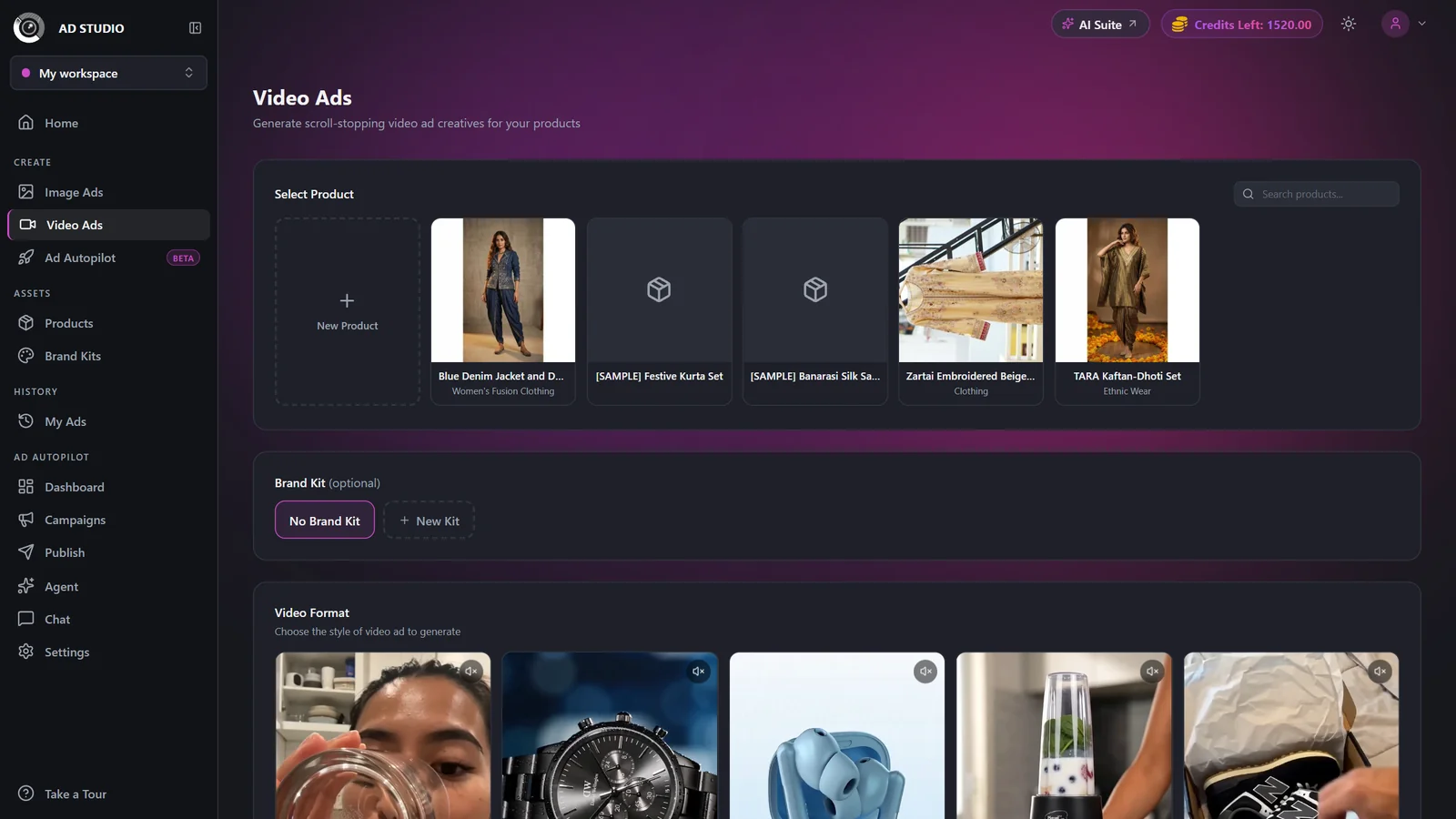
Open Video Ads in the Create section of the Ad Studio sidebar, then select a product. A product is required because its photos drive the video.
- 2
Add a Brand Kit (optional)
Pick a saved Brand Kit to supply your colors and an optional logo. This step is optional.
- 3
Choose a Video Format
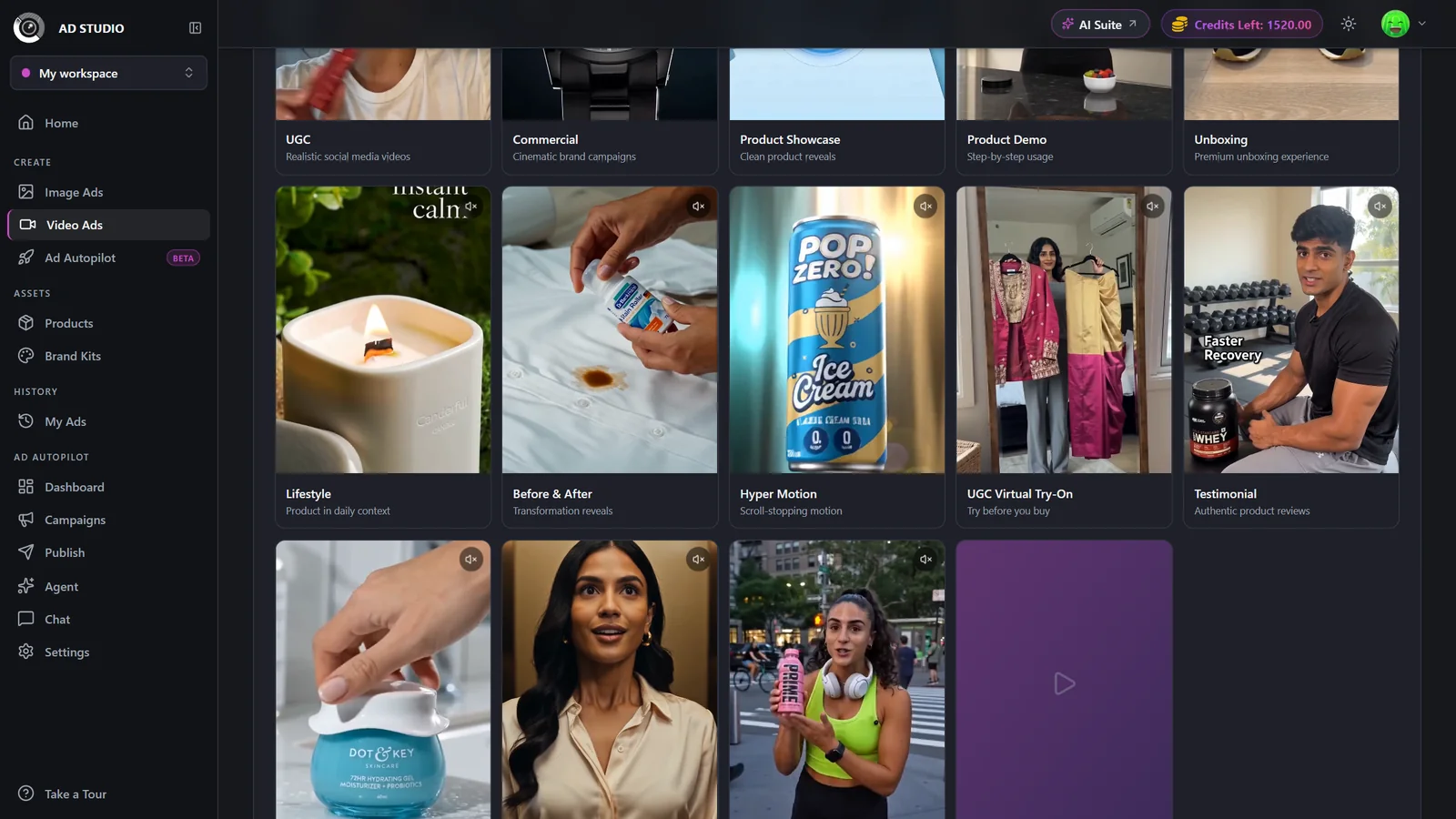
Pick a format from the gallery. Each card auto-plays a preview; tap the speaker to unmute. The format drives the script, camera, and audio style. Talking formats like UGC, Product Demo, Unboxing, Testimonial, Street Interview, and Yapper include natural speech; Yapper is one person talking to camera for the whole video.
- 4
Set the size and length
Choose an Aspect Ratio (9:16 Vertical, 16:9 Landscape, 1:1 Square, 4:3, 3:4, or 21:9), set Duration with the slider (4 to 15 seconds), and choose a Resolution (480p, 720p, or 1080p).
- 5
Add finishing touches (optional)
Toggle Text on Video for on-screen text overlays, pick an optional Campaign Goal to steer the script, and add Creative Direction as free text for extra scene guidance.
- 6
Generate
The Generate button shows the exact credit cost, with the pre-discount price struck through. Click it and you are taken to the generation detail page to watch progress and download the finished MP4.
Choosing a format
There are 15 formats in the gallery. Match the format to your product and your goal.
Authentic phone-camera social videos with voiceover
Cinematic brand campaigns
Clean studio reveals and rotations
Step-by-step usage walkthroughs with voiceover
Premium unboxing reveals with voiceover
Product woven into aspirational daily life
Transformation reveals
Dynamic, scroll-stopping motion
A hold-up-then-wear reveal for fashion and beauty
Review-style voiceover narrative
Sound-first sensory content for detail-driven items
A cinematic mini-story with an arc
One real person reacting on the street
A "POV:" caption scenario with the viewer as the character
One continuous take of a person telling you a story from their day while wearing or using the product, fast and unfiltered
Settings & options
| Setting | Options | What it does |
|---|---|---|
| Product | Any registered product | Required. The product's photos drive the video. |
| Brand Kit | None, or any saved kit | Optional. Supplies your colors and an optional logo. |
| Video Format | 15 formats (see the format list above) | Required. Each format has a distinct look and drives the script, camera, and audio. |
| Aspect Ratio | 9:16 Vertical, 16:9 Landscape, 1:1 Square, 4:3 Standard, 3:4 Portrait, 21:9 Cinematic | Required. Each option shows its ideal platforms, such as Reels, TikTok, Shorts, YouTube, LinkedIn, and feeds. |
| Duration | 4 to 15 seconds (1 second steps) | Longer clips cost more credits. |
| Resolution | 480p (Draft), 720p (Standard), 1080p (HD) | Higher resolution costs more. 720p and 1080p are paid-only; free accounts are limited to 480p. |
| Text on Video | On / Off | Adds on-screen text overlays to the video. |
| Campaign Goal | Sales/Conversions, Traffic, Lead Generation, Retargeting, Catalog Sales | Optional. Steers the direction of the script. |
| Creative Direction | Free text | Optional. Extra script and scene guidance. |
Cost depends on duration and resolution, and audio is always included. The Generate button always shows the exact live cost first, with the pre-discount price struck through. Costs range from 3 credits (480p, 4s) up to 40 credits (1080p, 15s). Representative examples at 8 seconds:
- 480p: 5.5 credits
- 720p: 11 credits
- 1080p: 21 credits
Any optional AI-generated reference images cost 1 extra credit each. Credits are deducted upfront. The easiest way to spend fewer credits while testing is a shorter length and lower resolution.
Free vs paid
Free accounts render at 480p only. 720p and 1080p are locked with an upgrade tooltip.
Paid plans unlock 720p and 1080p.
Free-only credits produce watermarked output. Watermark-free exports are a paid-plan benefit.
Best practices
Match the format to your product: UGC or UGC Virtual Try-On for fashion and beauty, Product Showcase or ASMR for detail-driven items, Commercial for a premium brand feel.
Use 9:16 Vertical for Reels, TikTok, and Shorts, the highest-reach placements.
Match the format to your funnel goal: UGC or Testimonial builds trust, Commercial or TV Spot builds brand.
Start at 480p to preview a concept cheaply, then re-run at 720p or 1080p once you like the direction.
Keep durations short (around 8 seconds) for feed ads; save the 15 second TV Spot for storytelling.
Only request extra AI reference images when they clearly improve the concept, since they cost 1 credit each.
Troubleshooting
Free accounts render at 480p only. Upgrade to unlock HD. See Plans & pricing.
Wait for your in-progress video generations to finish, then generate again.
Open the generation and use Try Again, or adjust the format or duration and regenerate.
Every format enforces a deliberate ending. Regenerate if a clip feels unfinished.
Enable the Text on Video toggle. Otherwise your copy is placed only in the platform text fields.
What to do next
Once your video ad looks right: