Image Ads
Turn a product photo into scroll-stopping static ad creatives, as single images or multi-slide carousels, matched to your goal and aspect ratio.
Image Ads turns a product you have registered into finished static ad creatives. Pick a goal and an aspect ratio, choose a single image or a carousel set, and generate. Each ad also gets platform copy (caption, headline, CTA) written for you, so what comes out is ready to run, not just a raw picture.
At a glance
- You provide
- A registered product (+ optional Brand Kit)
- You get
- Ad image variations or carousel slides, plus auto-written platform copy
- Best for
- Static ads for Instagram, Facebook, Pinterest, LinkedIn, Google Display, and more
- Product formats
- The product's uploaded photos: JPG, PNG, WebP
- Output
- PNG downloads, 640px to 1792px on the long edge
- Cost
- 1 credit per image (deducted upfront)
You pay 1 credit per image, and the total equals the number of images you request. A 4-variation single set costs 4 credits, and a 5-slide carousel costs 5 credits. Credits are deducted upfront when you click Generate, and if your balance is too low you get a clear error before anything runs.
How it works
- 1
Open Image Ads
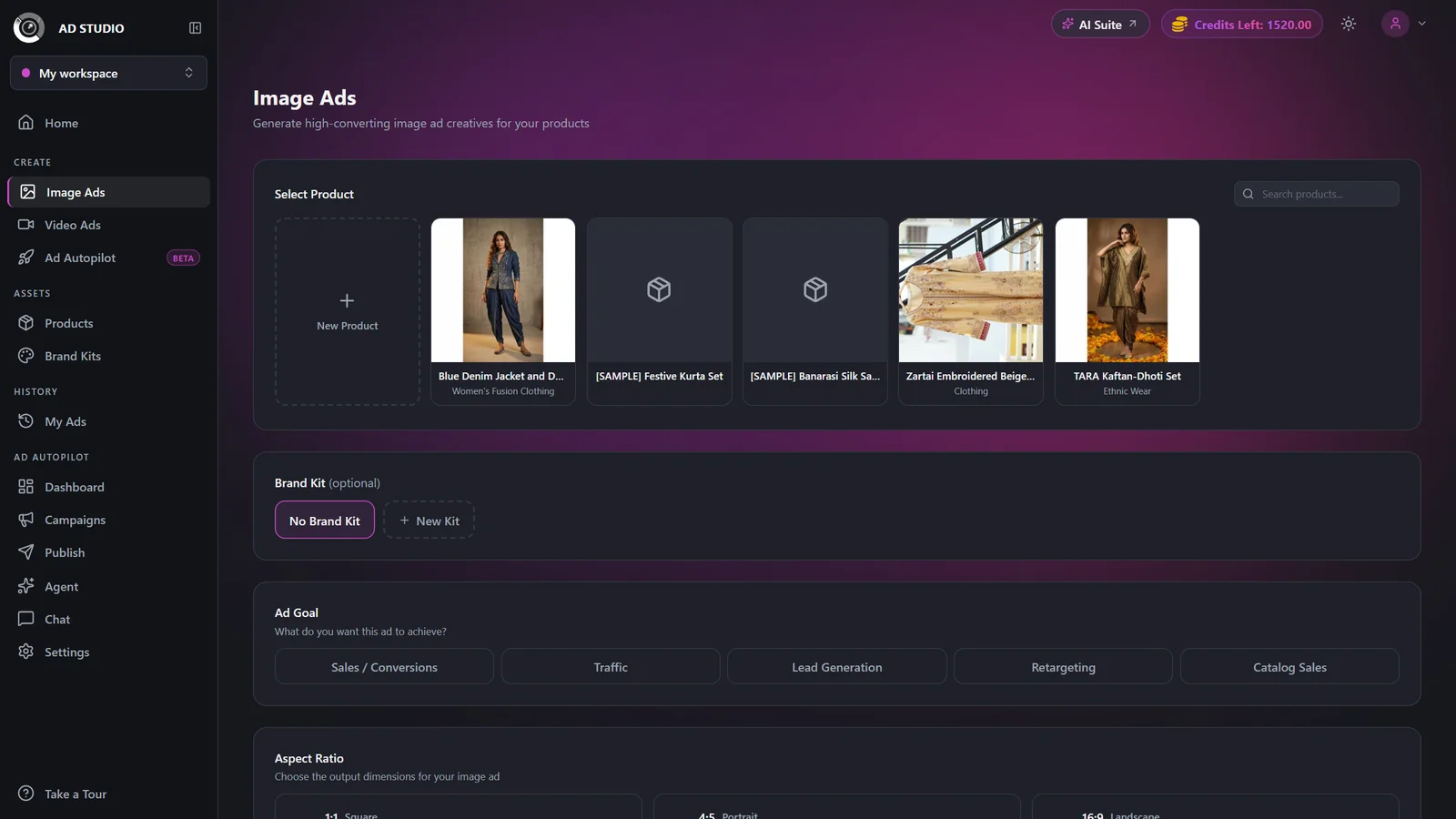
In Ad Studio, click Image Ads in the Create section of the sidebar.
- 2
Select a product
Pick the product you want to advertise. This is required. If you have none yet, click the New Product card to register one first. Its photos, name, description, category, and selling points all feed the ad.
- 3
Pick a Brand Kit (optional)
Your default kit is auto-selected. Choose None to skip brand styling. A kit supplies accent colors (used sparingly) and, if it has one, a logo.
- 4
Choose a goal and aspect ratio
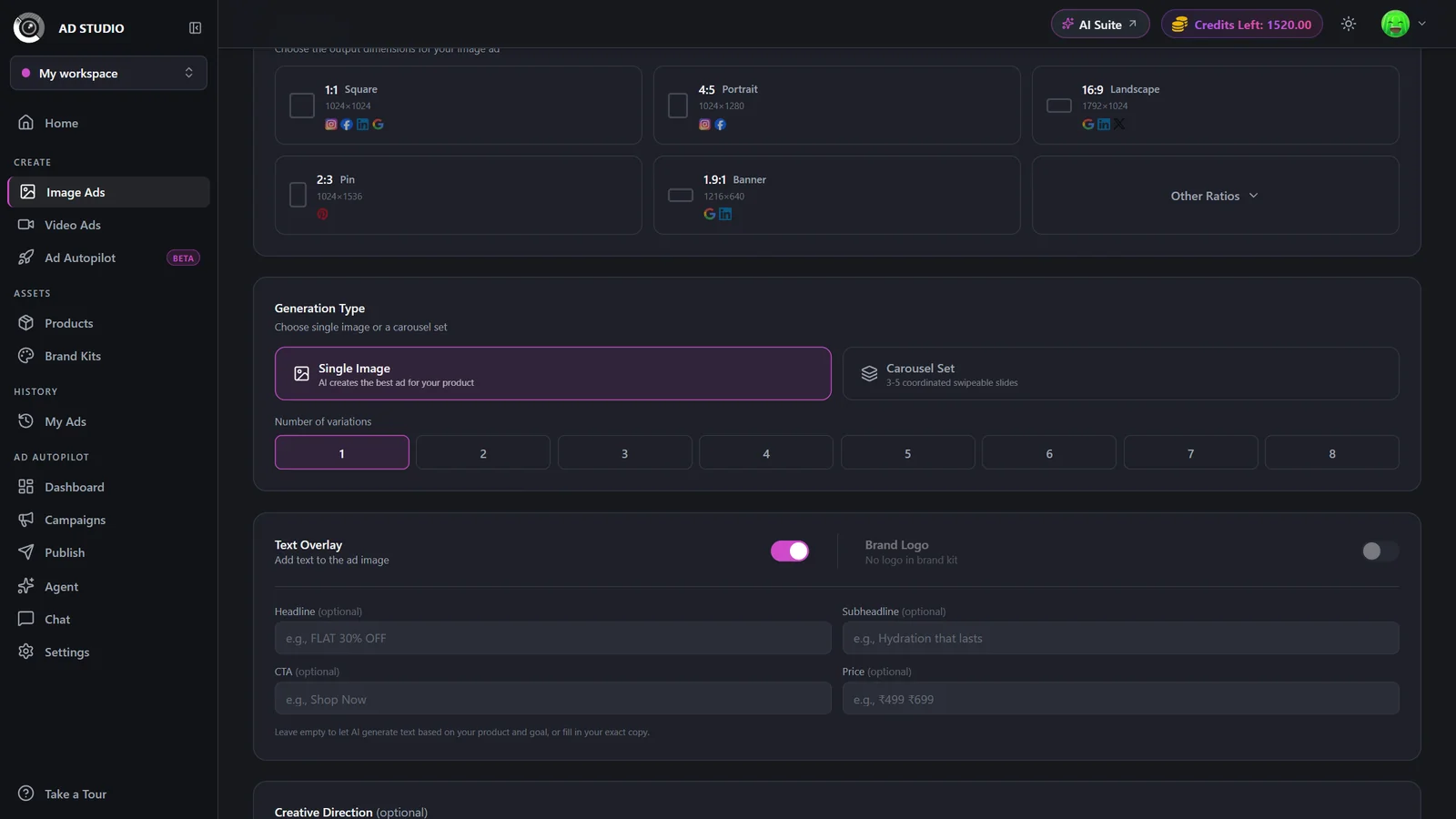
Select an Ad Goal and a Platform / Aspect Ratio. Both are required. The goal shapes the visual style and copy strategy, and each ratio shows which platforms it suits.
- 5
Set the type and count
Pick Single Image or Carousel Set, then set the number of variations (single) or slides (carousel).
- 6
Add text and creative direction (optional)
Turn on Text on Image to fill Headline, Subheadline, CTA, and Price. Turn on Brand Logo if your kit has one. Add free-text Creative Direction notes to steer the look.
- 7
Generate
Click Generate. You are taken to the generation detail page to watch results appear, then download each ad or add more variations.
Settings & options
| Setting | Options | What it does |
|---|---|---|
| Product | Any product you have registered (required) | The product's photos, name, description, category, and selling points are fed into the ad. Search and load-more are supported. |
| Brand Kit | None, or any saved kit (default kit auto-selected) | Optional. Supplies accent colors, used sparingly, and an optional logo. |
| Ad Goal | Sales / Conversions, Traffic, Lead Generation, Retargeting, Catalog Sales | Required. Shapes the visual style and, when text is on, the copy strategy. Click a selected goal again to deselect it. |
| Platform / Aspect Ratio | Main: 1:1 Square (1024x1024), 4:5 Portrait (1024x1280), 16:9 Landscape (1792x1024), 2:3 Pin (1024x1536), 1.9:1 Banner (1216x640). Other: 3:4 Tall, 3:2 Wide, 5:4 Classic, 4:3 Standard | Required. Each ratio shows which platforms it fits, such as Instagram, Facebook, LinkedIn, Google, Pinterest, and X. |
| Generation Type | Single Image or Carousel Set | Carousel produces a coordinated hook, value, and close story across slides. |
| Number of variations / slides | Single: 1 to 8. Carousel: 3, 4, or 5 slides | Free plan is capped at 3 for both single variations and carousel slides. Higher counts are locked with an upgrade tooltip. |
| Text on Image | On / Off, with optional Headline, Subheadline, CTA, and Price fields | When off, images are generated with zero on-image text. Platform caption and headline copy are still authored automatically. |
| Brand Logo | On / Off (disabled unless the selected Brand Kit has a logo) | Places your logo into the composition. |
| Creative Direction | Free text (optional) | Strict art-direction notes the generator follows. |
On the free plan you can create up to 3 variations or 3 carousel slides, you are limited to 5 registered products, and when a generation is paid entirely with free credits the output images carry a watermark. Paid plans unlock up to 8 single variations or 5 carousel slides with no watermark.
Best practices
Register the product with several clean photos and real selling points first. Richer product data yields better ads.
Match the aspect ratio to where the ad will actually run, for example 4:5 Portrait for Instagram and Facebook feed, or a tall Pin ratio for stories.
Leave Text on Image off for feed ads where the platform caption does the talking, and turn it on for sale or promo creatives.
Use a Carousel for storytelling or multiple selling points, and use Single with 3 to 4 variations to A/B test looks.
Add specific Creative Direction like "warm golden-hour kitchen scene" rather than generic notes.
Troubleshooting
You must select a product, a goal, and an aspect ratio. All three are required.
You already have image-ad generations in progress. Wait for them to finish, then start a new one.
Those counts are a paid feature. Upgrade your plan to unlock up to 8 variations. See Plans & pricing.
Watermarks apply when a generation is paid entirely with free credits, and to everything made during the free trial. A paid plan exports clean outputs.
What to do next
Once your static ads look right: