Retargeting expansion
Approve a linked retargeting campaign the agent proposes to re-engage the warm audience your prospecting built.
Retargeting expansion is a separate, linked campaign the agent proposes once a prospecting campaign has warmed up an audience worth re-engaging. It reuses your winning creative to bring warm viewers back, and it is framed honestly: retargeting almost always looks amazing on last-click reporting, so the card tells you how to read the numbers. You stay in control, tuning the budget, the lookback window, and the offer before you approve.
At a glance
- What it is
- A linked campaign that re-engages a warm audience
- Where
- The Approval inbox under Ad Autopilot, then the campaign detail page
- Who starts it
- The agent proposes it; you approve and tune it
- Creative
- Reuses your proven winning creative from the parent campaign
- Budget
- Additive, never cut from the parent campaign
- Cost
- 80 credits per 30 days (recurring management), plus ad spend
Use it when a campaign has warmed up an audience worth bringing back, for example page viewers or people who engaged but did not buy. The agent surfaces the proposal in your Approval inbox when it sees a warm pool; you decide whether to launch.
How it works
- 1
Open the proposal
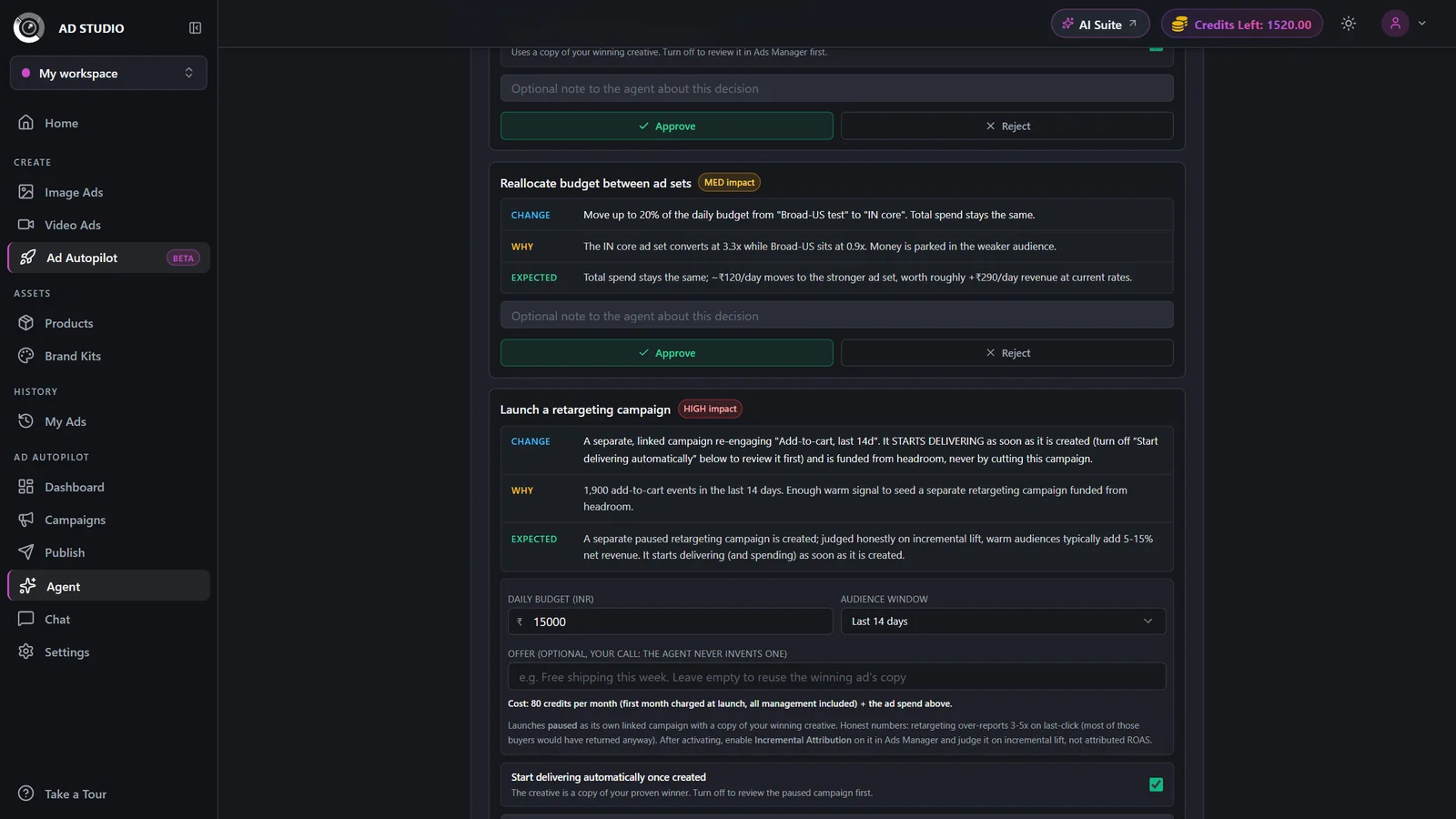
In the Approval inbox, open the Launch a retargeting campaign card. It explains which warm audience it targets and why the agent proposed it now.
- 2
Tune the knobs
Adjust the daily budget (added on top of the parent, never taken from it), the lookback window (7, 14, 30, or 90 days), and the offer text. The offer is pre-filled by the agent and fully editable.
- 3
Choose how it starts
Leave Auto-activate on to start delivering immediately, or turn it off to launch the campaign paused for review. It defaults to on because the creative is a duplicate of your proven winner, so there is nothing new to check.
- 4
Approve or reject
The Approve button shows the exact credit cost before you commit. Approving launches a separate, linked retargeting campaign; rejecting dismisses the proposal.

- 5
Track it
The new campaign appears badged Retargeting in your campaign list. Open its detail page to watch delivery and read its ROAS honesty banner.
Settings & options
| Setting | Options | What it does |
|---|---|---|
| Daily budget | Additive to the parent | The retargeting budget is added on top of the parent campaign. It is never cut from the source campaign that built the audience. |
| Lookback window | 7 (high intent), 14, 30, or 90 (widest) daysDefault: 7 days | How recently someone engaged to still be targeted. A shorter window is higher intent; a longer window is a wider pool. |
| Offer text | Free text | Pre-filled by the agent and editable. The agent never invents a discount on its own, so any promotional offer is yours to supply. |
| Auto-activate | On (starts spending) or Off (launches paused)Default: On | Whether the campaign begins delivering the moment it is created, or waits paused for your review. |
A retargeting campaign is billed as a full, separately managed campaign: a flat 80 credits every 30 days, covering planning, launch, and ongoing agent management. The first 30 days are charged when you approve, and the exact cost is always shown on the Approve button before you commit. Ad spend on the campaign is billed by the ad platform, separately from credits.
Reading the ROAS honestly
Last-click reporting over-credits retargeting by roughly 3 to 5 times, because most retargeted buyers would have come back on their own. Judge the campaign on incremental lift, not on the headline attributed ROAS.
Turn on Incremental Attribution for the campaign in Ads Manager to measure the lift it actually adds.
As a rough honest estimate, treat about 25 to 40 percent of the attributed revenue as genuinely incremental.
Read the honesty banner on the campaign card, which restates this so the numbers are never misleading.
Best practices
Judge the campaign on incremental lift, not attributed ROAS, so you do not double-count buyers who would have returned anyway.
Start with the 7 day window for the highest-intent audience, then widen to 14, 30, or 90 days only if the pool is too small to deliver.
Add a genuine offer in the offer text when you have one, since a fresh incentive is what turns a warm viewer into a buyer.
Keep the retargeting budget modest: warm pools are small and saturate quickly, so extra spend gives diminishing returns.
Leave Auto-activate on when you approve, since the creative is your proven winner and needs no extra review.
Troubleshooting
That is expected. Read the on-card honesty banner: most retargeted buyers would have returned anyway, so last-click over-credits retargeting by roughly 3 to 5 times. Judge it on incremental lift instead.
Warm audiences are small and saturate fast. Widen the lookback window (for example from 7 to 30 days) so the pool is large enough to deliver the budget.
The offer text is fully editable before you approve. Clear or rewrite it. The agent only pre-fills a suggestion and never commits a discount on its own.