Plans & pricing
Compare CamClo AI plans, understand monthly vs yearly billing, and pick the credit allowance that fits you.
A CamClo AI plan gives you a monthly allowance of credits to spend across the AI Suite and Ad Studio, plus plan benefits like watermark-free exports. There are three plans (Creator, Studio, and Enterprise), billed monthly or yearly in USD. Current prices are always shown live on the pricing page.
At a glance
- Plans
- Creator · Studio · Enterprise
- Billing
- Monthly or yearly (yearly saves ~17%)
- Currency
- USD, plus applicable taxes
- What a plan gives
- A monthly credit allowance + plan benefits
- Free trial
- 7 days of Creator or Studio 330 with 20 credits, card required
- Enterprise
- Custom-quoted, contact sales
- Run low mid-cycle?
- Buy top-up credits any time
The plans
- Creator: the entry plan for individuals getting started with the AI Suite and Ad Studio.
- Studio: for regular and professional use. Studio lets you choose your monthly credit tier from a dropdown, so you can size the allowance to your volume; the price updates with the tier you pick.
- Enterprise: for teams and high-volume needs, custom-quoted. Select Let's talk to contact sales.
All plans include full AI Suite and Ad Studio access and watermark-free exports. The exact benefit list for each plan is shown on the plan cards and the pricing page.
New accounts start with no credits. The way to try CamClo AI is the 7-day free trial of Creator or Studio below. Accounts without an active subscription are treated as free: any older free credits still work, but produce watermarked output with lower limits.
7-day free trial
Creator and Studio 330 (monthly) both come with a 7-day free trial. Pick the one you want to try, add a card on the secure payment page and pay nothing today. Your account gets 20 credits straight away and every AI Suite and Ad Studio tool, model and quality setting. The trial is for testing, so its output carries a watermark, and the tools that have a free-plan price (Smart Edit, Catalogue Studio, Change Background, Generative Fill and Magic Eraser) charge that price during the trial. Your paid plan removes the watermark and lowers those prices.
- When the trial ends, the plan you picked starts automatically at its normal monthly price and your account moves to its full monthly credit allowance. A Studio trial always continues as Studio 330; you can move to a bigger Studio tier at any time.
- We email you two days before the first charge.
- Cancel any time during the trial from Manage subscription and you are not charged. Unused trial credits stay usable until the trial's end date.
- Want the full allowance sooner? Choose Start plan now on Manage subscription: the trial ends, the plan starts today and you are charged then.
- Moving up to a bigger plan during the trial also ends the trial and starts that plan straight away. Moving down to Creator during a Studio trial is not available; cancel and subscribe to Creator instead.
- Ad Autopilot during the trial: launching a campaign costs nothing up front, and each review the agent completes costs 6 credits. Once your plan starts, the agent costs 3 credits per day it works, however many reviews it runs.
Each person and each card can use the free trial once, including across different accounts. If a trial was already used, the plans page offers to subscribe instead, and a trial checkout that repeats one is cancelled straight away with nothing charged.
How to subscribe
- 1
- 2
Choose monthly or yearly
Toggle the billing period. Yearly shows a Save 17% badge and the amount you save per year.
- 3
Size your credits (Studio)
On the Studio card, use the credits dropdown to pick how many credits per month you want. The price updates to match.
- 4
Start the plan
Click the plan button (Subscribe Now, or Upgrade / Downgrade / Switch if you already have a plan), confirm in the dialog, and complete payment on the secure payment page you are redirected to.
- 5
You're in
After payment you return to the app. Manage everything later from Manage subscription.
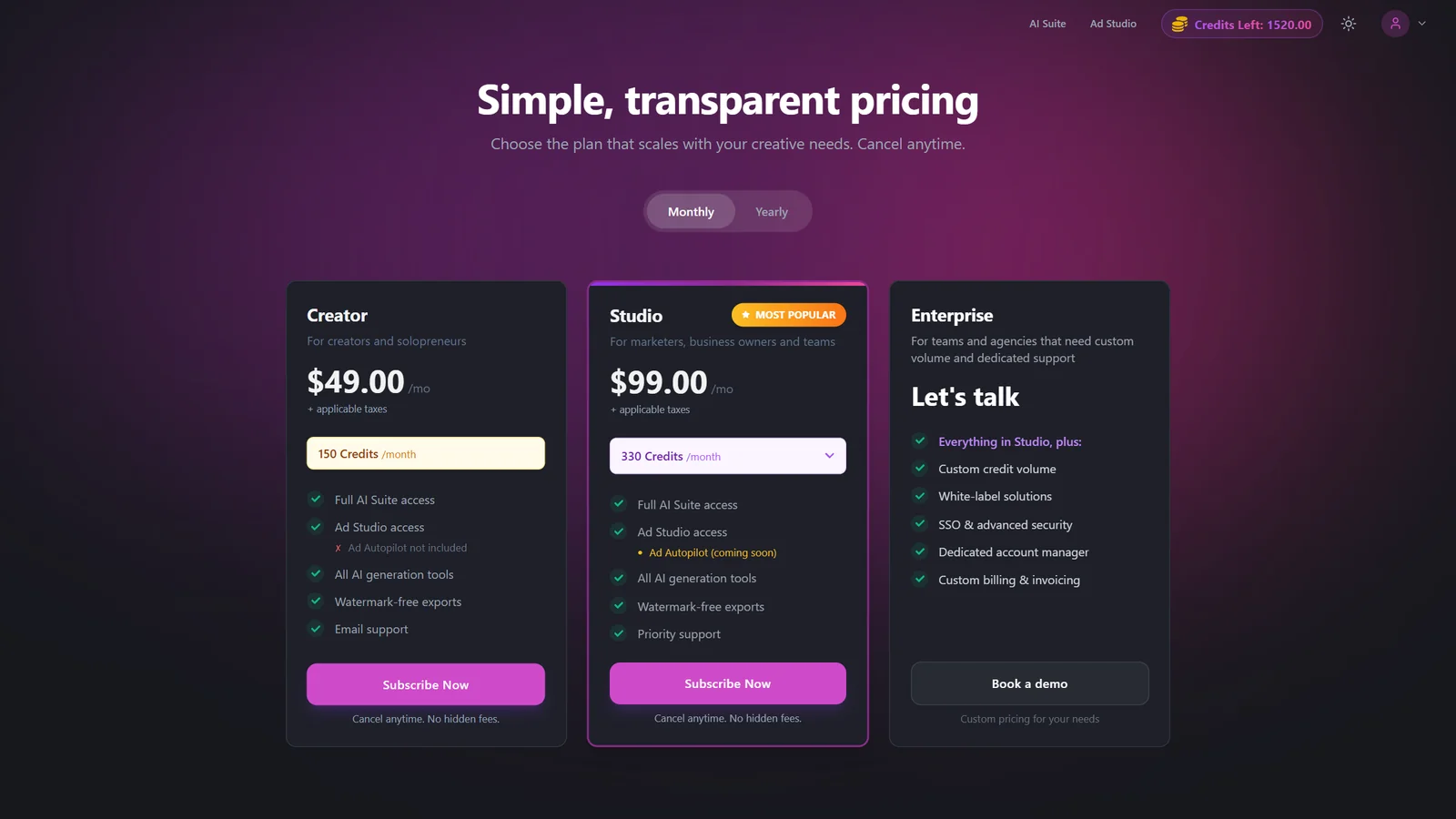
Monthly vs yearly
Yearly billing is discounted by roughly 17% versus paying monthly. All prices are shown before applicable taxes, which are calculated at checkout. On yearly plans your credits are still allocated every month, and the page shows your next monthly credit allocation date as well as your renewal date.
Upgrading, downgrading & switching
Upgrades take effect immediately: you pay only the prorated difference and get the higher allowance right away.
Downgrades and switches to a lower tier or period take effect at your next billing cycle, so you keep your current benefits until then.
A pending change shows as Scheduled on the Subscription page and can be cancelled before it takes effect.
If your plan button says Cancel subscription first, your current payment method can't change plans directly. Cancel the current plan, let the billing period end, then subscribe fresh with a card.
Payments, invoices & taxes
Payments are handled on a secure payment page. You can update your payment method, add a tax ID or billing address, and download invoices from the billing portal. Open it from Manage subscription. Add your business tax ID before your next charge so it appears on the invoice.
Troubleshooting
You have a pending downgrade or switch. Cancel the scheduled change on the Subscription page, then try again.
Your current payment method can't switch plans directly. Cancel, wait for the period to end, then subscribe with a card.
The trial is one per person and card, is for new customers only, and needs a permanent email address. If you already used it or had a plan before, subscribe from the plans page instead.
Live prices for every plan and Studio credit tier are on the pricing page. They update automatically.