Incubator (testing lab)
A small linked lab campaign your agent proposes to test untried angles safely, then graduates winners into the parent.
The Incubator is a small, linked testing campaign your Ad Autopilot agent can propose. It runs at roughly a tenth of the parent budget so it can try new creative concepts and angles without risking the main spend. When a concept proves itself, the agent proposes graduating it into the parent campaign. When it does not, the lab retires cleanly and its learnings stay with the agent.
At a glance
- What it is
- A small linked lab campaign that tests untried angles
- Budget
- About 10% of the parent campaign's budget
- Where it appears
- The Approval inbox, then a badged 'Lab' campaign in your list
- Graduates when
- A concept reaches about 10 purchases
- Retires by
- Day 14 if a concept has not proven itself
- Best for
- Safely testing new creative concepts away from the main budget
You do not create a lab manually. The agent surfaces a Create testing campaign (lab) card in the Approval inbox when it wants to explore a new angle. Nothing spends until you approve.
How it works
- 1
Open the lab proposal
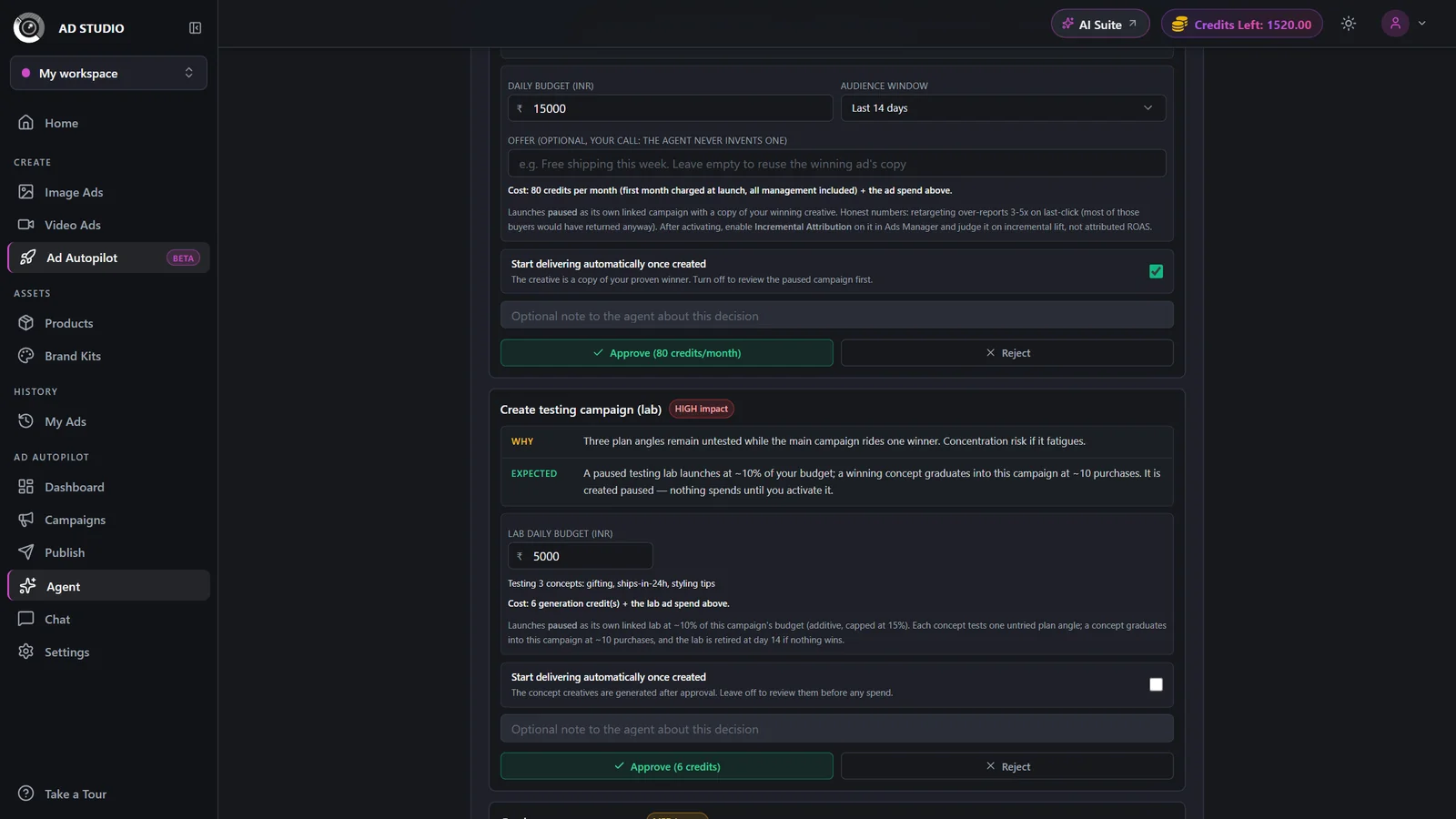
In the Approval inbox, open the Create testing campaign (lab) card. It shows the concept the agent wants to test and a small daily budget you can edit.
- 2
Set the small daily budget
The budget defaults to roughly 10% of the parent campaign. Adjust it on the card if you want to spend more or less on the test.
- 3
Approve
Approving generates the concept creatives. Leave auto-activate off so you can review those creatives before any spend starts.
- 4
Let it run and track it
The lab appears in your campaign list with a Lab badge. Its console explains what it is testing and how it will graduate or retire.

- 5
Graduate or retire from follow-up cards
When a concept reaches about 10 purchases, the agent proposes Graduate proven concept, moving it into the parent campaign. If a concept has not proven itself by day 14, the agent proposes Retire the testing campaign. Approve whichever fits.
Settings & options
| Setting | Options | What it does |
|---|---|---|
| Daily budget | Small (about 10% of the parent campaign) | Editable on the proposal card before you approve. |
| Auto-activate | On / OffDefault: Off | Leave it off to review the concept creatives before any spend starts. Turn it on only when you are comfortable letting the lab go live on approval. |
Launching a lab spends the standard launch credit rate, the same as launching any campaign. Graduating a proven concept and retiring the lab are agent actions you approve from follow-up cards. The lab itself is a paid, small linked campaign that runs on the daily budget you set.
Best practices
Use the lab to explore beyond your proven winners without endangering the main budget.
Keep auto-activate off so you always see the concept creatives before spend begins.
Approve graduation as soon as a concept proves itself, so the winner starts earning in the parent campaign.
Let a lab retire cleanly at day 14 if it does not prove out. The learnings stay with the agent regardless.
Troubleshooting
It is a linked test your agent created to try a new angle. Its Lab badge and its console explain what it is testing, how it graduates (about 10 purchases), and when it retires (day 14).
Auto-activate was left off, so it is waiting for you to review the concept creatives first. Activate it when you are ready for spend to begin.
The agent proposes Retire the testing campaign from a follow-up card in the Approval inbox. Approve it to close the lab cleanly.