Agent chat
Ask a per-campaign assistant how things are going, set standing rules, and produce client-ready reports, all in plain English.
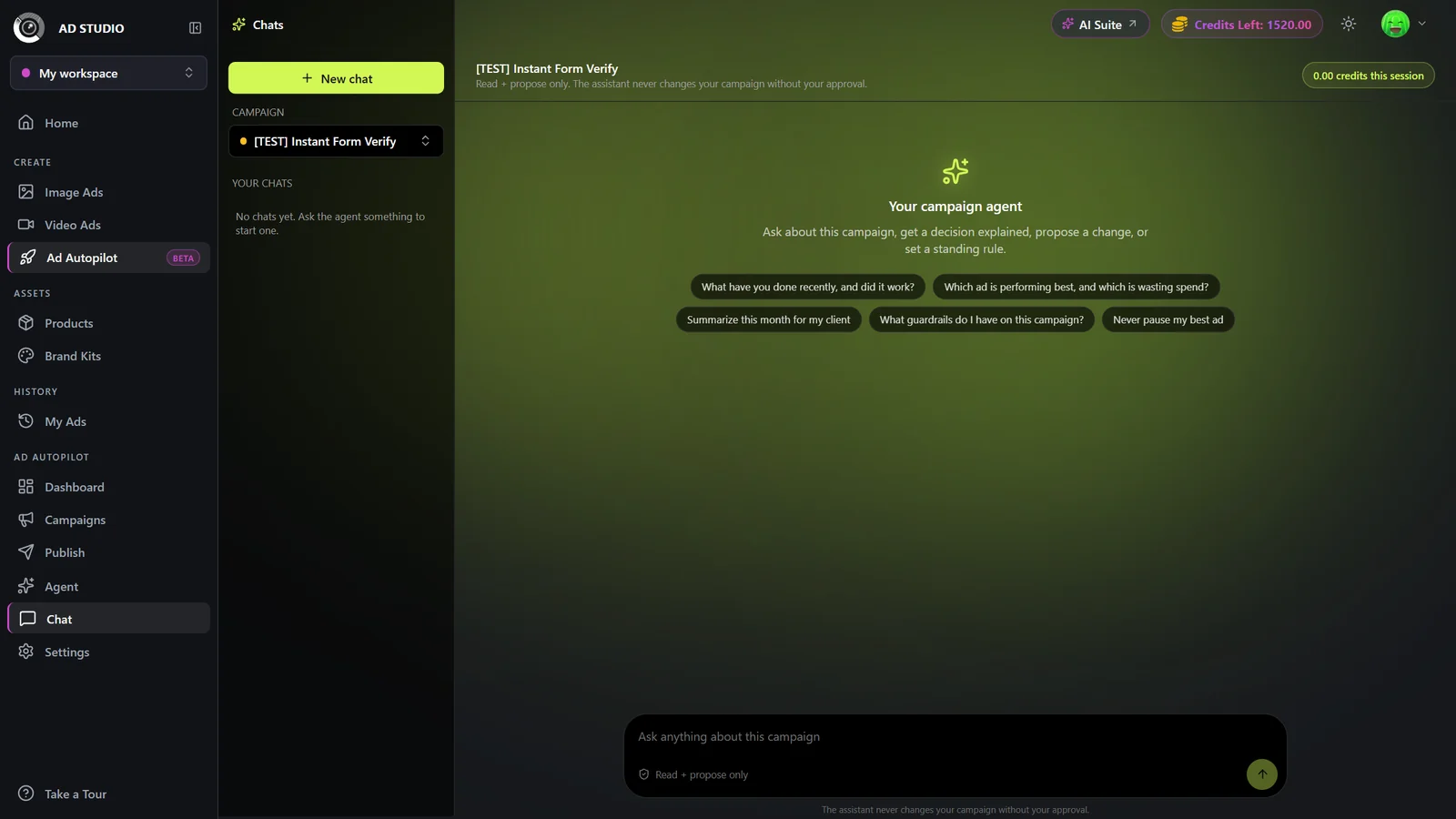
Agent chat is a per-campaign assistant that reads your live campaign data and answers in plain English, with inline charts and tables. It can explain what the agent did, propose changes for you to approve, save standing guardrails, and generate client-ready reports. It is read and propose only: nothing changes on your campaign without your approval.
At a glance
- You provide
- A published campaign and a question in plain English
- You get
- Grounded answers with charts and tables, approval cards, saved rules, and reports
- Best for
- Understanding a campaign, setting rules, and reporting to clients
- Scope
- One campaign at a time, each with its own chat threads
- Safety
- Read and propose only, nothing changes without your approval
- Cost
- Small credit usage per session, shown live in the header
Chat lives under Ad Autopilot at /ad-studio/autopilot/chat. The Ad Autopilot section appears in the left nav once a Meta account is connected.
How it works
- 1
Pick a campaign
Open Chat and choose a campaign in the left rail. Chat is scoped to one campaign at a time, and each campaign keeps its own threads.
- 2
Ask a question
Click a suggestion chip or type into Ask anything about this campaign. Chips are drawn from the campaign's real state and cover explaining, acting, setting a rule, and reporting.
- 3
Read the streamed answer
The reply streams in with inline charts and tables built from your live campaign data.
- 4
Approve any proposed change or rule
If the assistant proposes a change or a guardrail, it appears as a card in the chat. Approve it there to apply it. Nothing changes on your campaign until you approve.
- 5
Manage threads
Use New chat for a fresh thread. Rename or delete threads from the left rail.
Settings & options
| Setting | Options | What it does |
|---|---|---|
| Campaign selector | Any of your campaigns | Chat is scoped to one campaign at a time. Switch campaigns from the left rail. |
| Suggestion chips | Context-aware, for example: What have you done recently, and did it work? · Summarize this month for my client · Keep my CPA under a limit going forward · Never pause my best ad | Derived from the campaign's real state. They teach the four things chat can do: explain, act, set a rule, and report. |
| New chat | Start a fresh thread | Begin a new thread on the selected campaign. Rename or delete threads from the rail. |
Chatting uses a small amount of credits per session, shown live in the header as "X credits this session". Generating a client report is a flat charge shown on the report card. Approving a proposed change carries the same cost it would in the approval inbox. If a report fails to build, its credits are refunded.
Best practices
Treat it as read and propose only. It never changes your campaign without your approval, so use it freely to explore.
Use it to set guardrails, for example "keep my CPA under a limit" or "never pause my best ad". Saved rules then appear in the Agent Console under Active guardrails, removable anytime.
Ask it to summarize this month for my client to jump straight to a report.
Start a new thread for a new line of questions so each thread stays focused.
Troubleshooting
Chat needs at least one campaign. Launch one from Ad Autopilot first, then return to Chat.
Report generation runs in the background and resumes even after you reload the page. If it fails, the credits are refunded.