Buy more credits
Top up extra AI-generation credits at your plan's per-credit rate without changing your plan.
Buy more credits lets an active subscriber top up their balance when the monthly allowance runs low, without upgrading. You pick an amount, confirm your plan's per-credit rate, and pay at checkout. Purchased credits are added to your balance and carry forward across billing cycles, so they only expire if you fully cancel your subscription.
At a glance
- What it does
- Adds extra credits to your balance on demand
- Who can use it
- Anyone with an active subscription
- Quick amounts
- 50, 100, 250, 500, or 1000 credits
- Custom amount
- Minimum 50, up to 10,000, in steps of 50
- Price
- Credits x your plan's per-credit rate, plus tax at checkout
- Balance behaviour
- Purchased credits carry forward across cycles
Top-ups are only available to active subscribers. Without an active plan you are sent to Plans & pricing with a note that a plan is required first.
How it works
- 1
Open Buy Credits
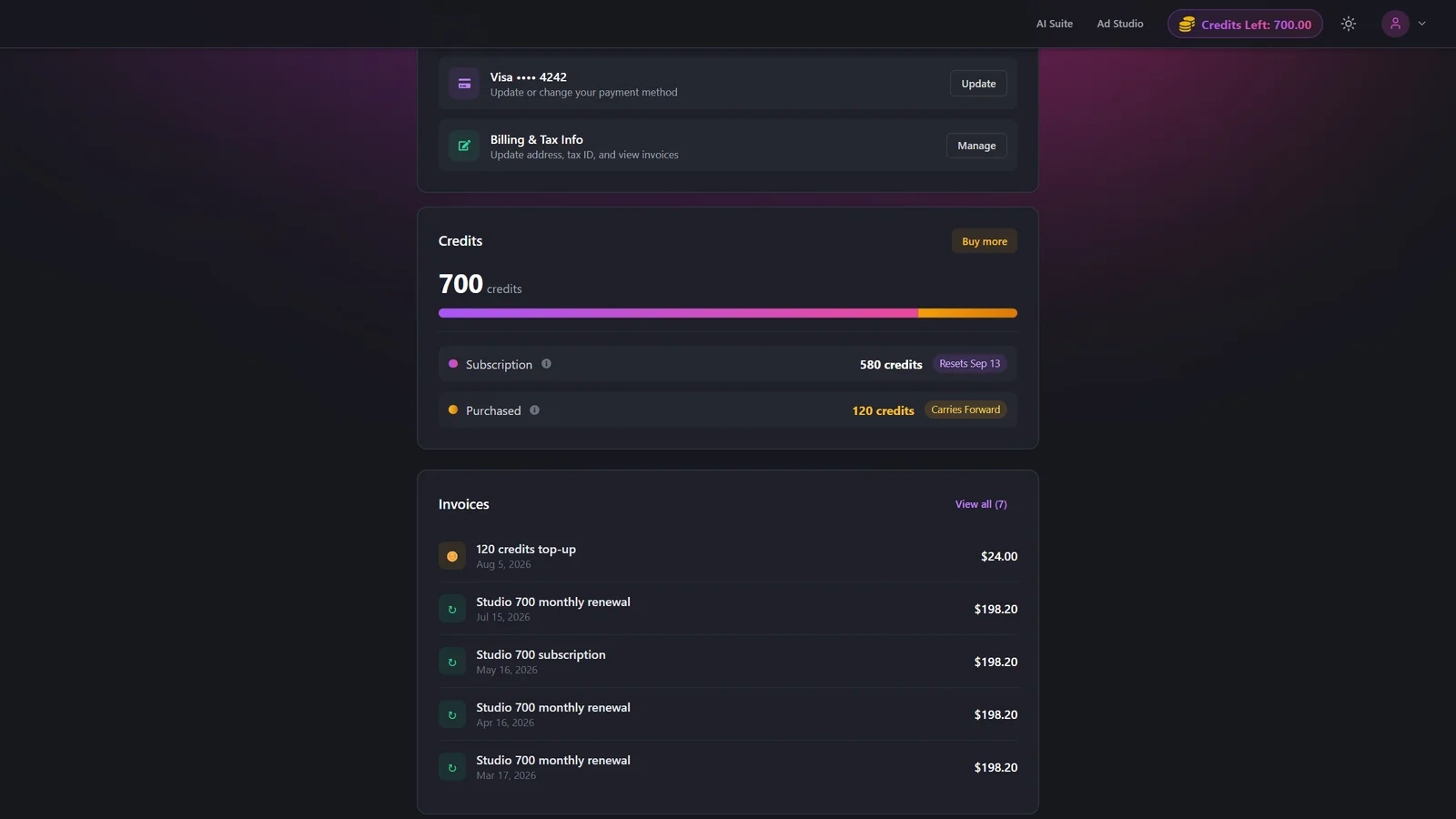
From the Subscription page, find the Credits card and click Buy more, or open Buy Credits directly.
- 2
Confirm your plan and rate
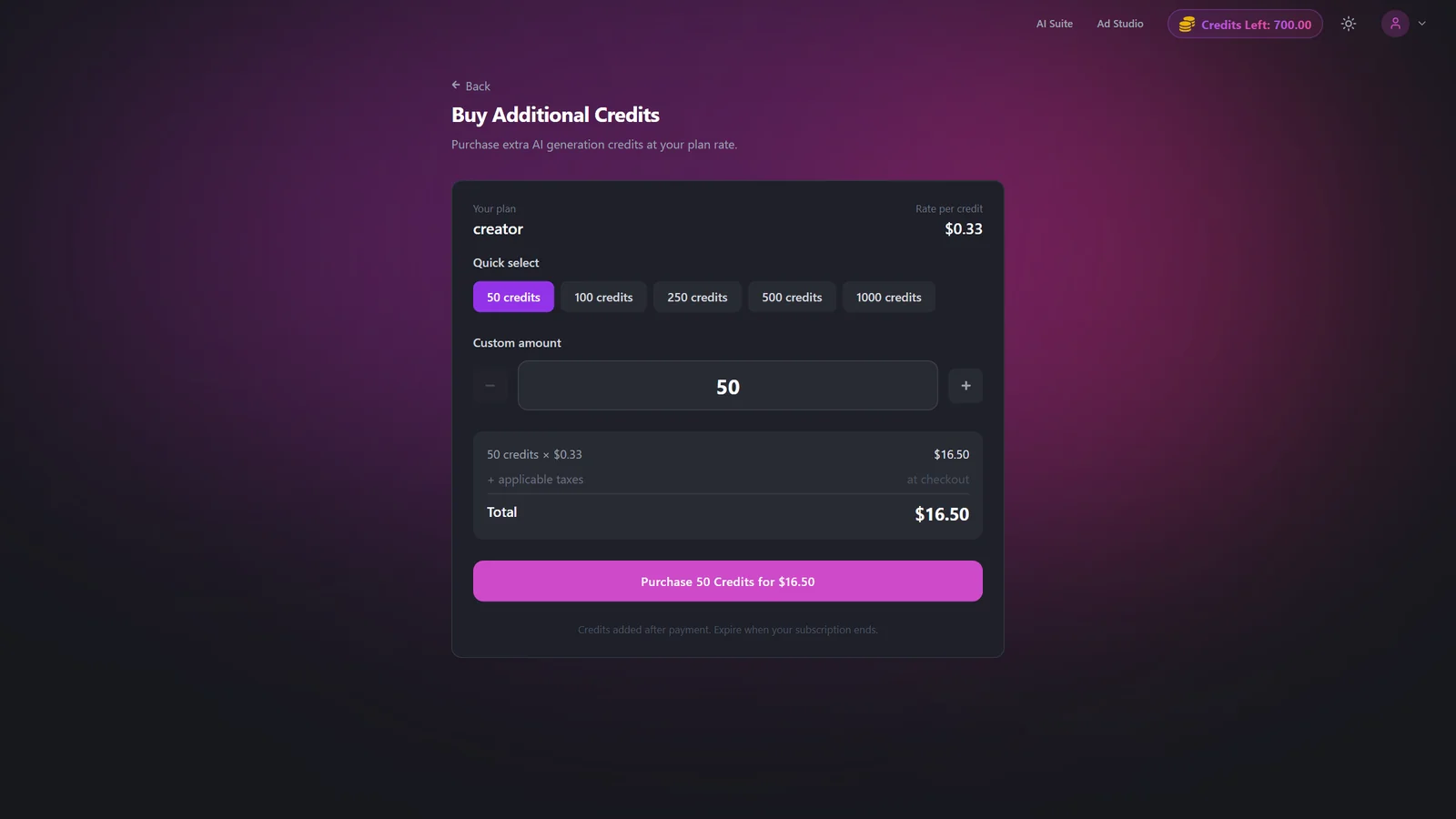
Check the plan name and per-credit rate shown at the top. The rate is set by your plan and determines the total price.
- 3
Choose an amount
Pick a quick amount (50, 100, 250, 500, or 1000) or set a custom amount with the +/- stepper. The custom amount moves in steps of 50, with a minimum of 50 and a maximum of 10,000.
- 4
Review the total
The page shows a live total: your credit amount multiplied by the per-credit rate. Applicable taxes are added at checkout.
- 5
Go to checkout
Click Purchase N Credits to open secure checkout and complete payment.
- 6
Credits are added
After payment succeeds, the credits are added to your balance and appear in the Credits card on the Subscription page. See How credits work for how the balance is used.
Settings & options
| Setting | Options | What it does |
|---|---|---|
| Credit amount | Quick: 50 / 100 / 250 / 500 / 1000. Custom: minimum 50, up to 10,000 | The number of credits to add. The custom stepper adjusts by 50. An amount below the minimum shows a warning and disables the purchase button. |
| Rate per credit | Set by your plan | Shown as a per-credit price. Your total is the credit amount multiplied by this rate, with tax added at checkout. |
Buying credits adds to your balance rather than consuming it. You pay in money: credit amount x per-credit rate, plus applicable taxes. The minimum purchase is set by your plan (fallback 50 credits) and the maximum is 10,000 per purchase. Pricing is in USD.
Best practices
Because purchased credits carry forward, top up in larger batches to save yourself repeated checkout trips.
If you find yourself buying credits often, compare the top-up cost against upgrading your plan tier, which may include a lower per-credit rate.
Confirm the per-credit rate at the top of the page before purchasing so the total matches what you expect.
Troubleshooting
Top-ups need an active subscription. Subscribe first, then return to buy credits. See Plans & pricing.
Your amount is below the minimum (for example 50 credits). Increase the amount until the button re-enables.
Retry. If it keeps happening, check your payment method under Subscription or contact support.