How credits work
Credits are the currency you spend on AI generations, split between a monthly plan allowance and any top-ups you buy.
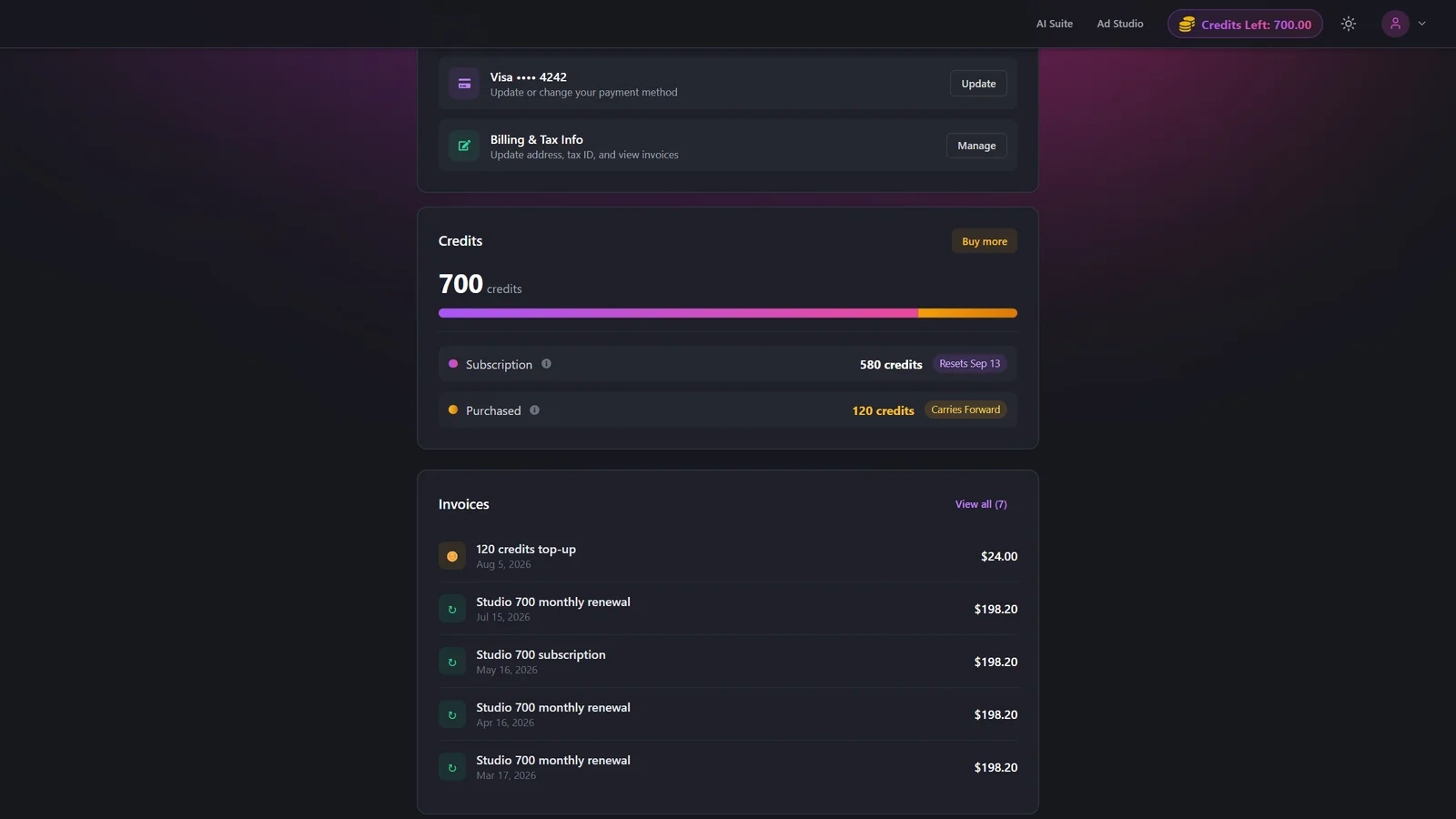
Credits are what every AI generation costs, across the AI Suite and Ad Studio. Your balance has two parts: subscription credits that come with your plan and reset each billing cycle, and purchased credits that you buy as top-ups and that carry forward. You can see the full picture on the Credits card in Subscription.
At a glance
- What credits are
- The currency spent on every AI generation
- Two types
- Subscription credits and purchased credits
- Total balance
- Subscription credits plus purchased credits
- Subscription credits
- Reset every billing cycle, do not carry forward
- Purchased credits
- Carry forward across cycles
- Where to check
- The Credits card in Subscription
This page explains balances and how they refresh. The exact credit cost of a generation depends on the feature and its settings, and each tool page lists its own cost. For example, see Virtual Try-On or Image to Video.
How it works
- 1
Open the Credits card
Go to Subscription and find the Credits card, which shows your total balance at the top.
- 2
Read the split bar
The bar splits your balance into subscription credits and purchased credits so you can see how much of each you have left.
- 3
Check the two rows
Below the bar, the Subscription row shows credits that reset each cycle, and the Purchased row shows top-up credits that carry forward.
- 4
Note your reset date
Watch the Resets badge for when your subscription credits refresh. Monthly plans show a Next Credit Reset date; yearly plans allocate credits monthly and show a Next Credit Allocation date.
The two credit types
| Setting | Options | What it does |
|---|---|---|
| Subscription credits | Reset every billing cycle | Allocated by your plan each cycle. They do not carry forward, and they are spent first before your purchased credits. |
| Purchased credits | Carry forward | Top-ups you buy on top of your plan. They carry across billing cycles and only expire when your subscription is fully cancelled. |
Your total balance = subscription credits + purchased credits. Generations draw down your subscription credits first, then your purchased credits, so the top-ups you paid for are the last to be used. Credits require an active paid plan.
Best practices
Spend early in the cycle. Subscription credits do not roll over, so use them before they reset.
Buy top-ups if you run out often. Purchased credits persist across cycles, so they are there when you need them.
Upgrade instead of repeat top-ups. If you regularly need more each month, a higher plan or Studio tier is better value than buying credits again and again.
Cancel with care. Cancelling forfeits both subscription and purchased credits once the current period ends.
Troubleshooting
Subscription credits reset each cycle and unused ones do not carry over. Only your purchased credits persist from cycle to cycle.
The next allocation or reset date is still being computed. Check back after the current cycle, or refresh the page.
Buy a top-up to keep working now, or upgrade your plan for a larger monthly allowance. See Buy additional credits and Plans and tiers.