Leads inbox
The permanent record of every lead your campaign's Instant Form collects, with contacted status and CSV export.
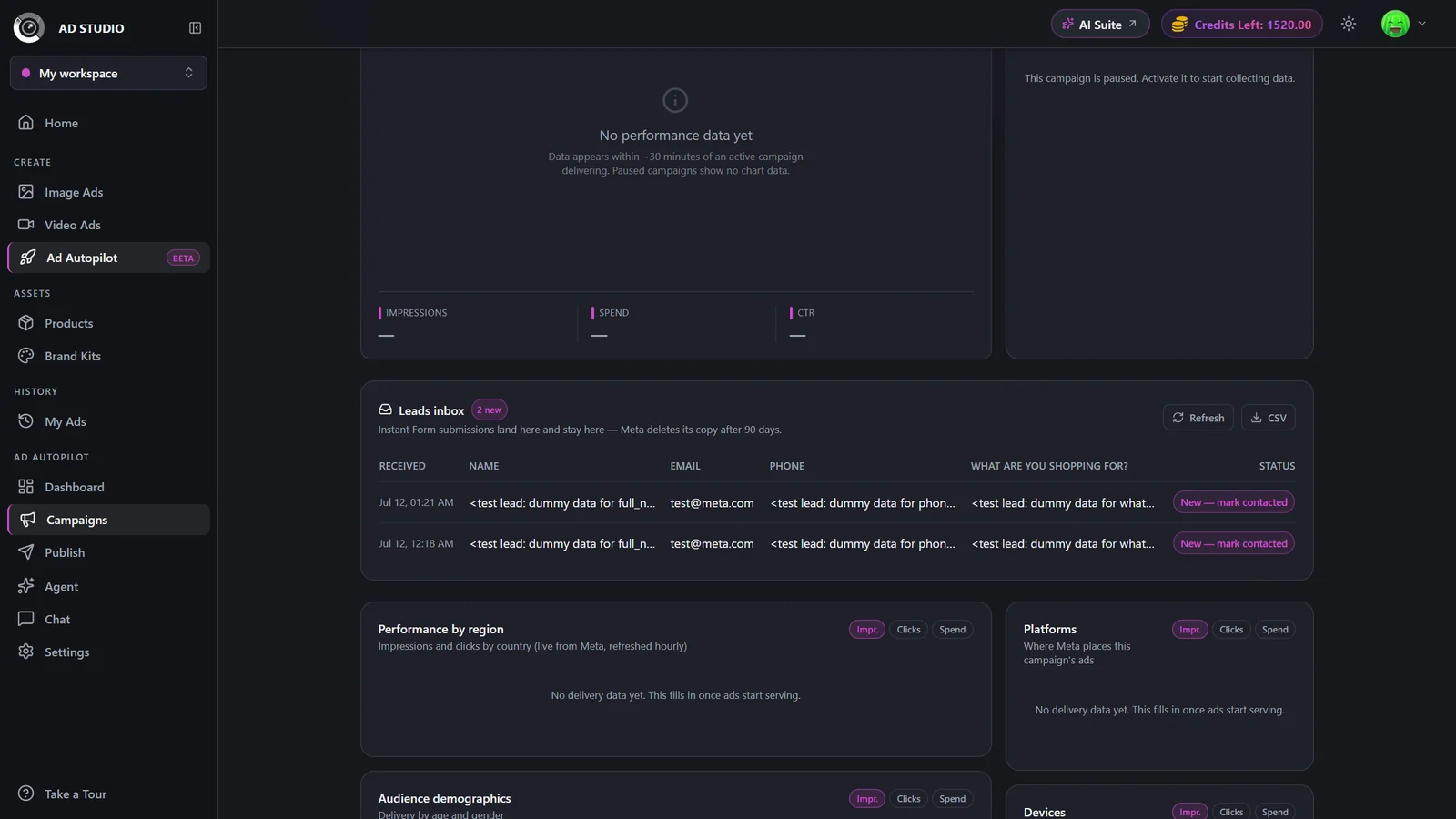
The Leads inbox is where names, emails, and phone numbers from a campaign's Instant Form land and stay. It lives on the campaign detail page for any Leads-goal campaign that uses an Instant Form. Because the ad platform deletes its own copy of a lead after 90 days, this inbox is your durable record of truth. Every lead is captured here, you can mark who you have contacted, and you can export the whole list to CSV for your CRM.
At a glance
- Where it lives
- The Leads inbox panel on a campaign's detail page
- Applies to
- Leads-goal campaigns that use an Instant Form
- You get
- A durable, paginated table of lead submissions
- Data captured
- Submitted names, emails, and phone numbers
- Export
- CSV download for your CRM
- Cost
- Free, part of running a lead campaign
The ad platform purges its own copy of each lead after 90 days. The leads kept here do not expire, so export regularly and treat this as the authoritative list.
How it works
- 1
Open the campaign
Go to the Campaigns list and open the detail page for an Instant Form lead campaign. The Leads inbox panel is on that page.
- 2
Read new leads as they arrive
New submissions are badged N new and usually appear within about a minute of being submitted. The table is paginated so a long history stays easy to scan.
- 3
Mark leads contacted
Toggle each lead to Contacted once you have reached out. This status is yours to manage and is the source of truth for follow-up.
- 4
Export to CSV
Use Export to download all leads as a CSV for your CRM. Leads whose details have not yet unlocked are excluded from the export until they unlock.
- 5
Refresh to force a sync
Use Refresh to pull the latest leads on demand, for example right after lead access is approved for your account.
Settings & options
| Setting | Options | What it does |
|---|---|---|
| Lead status | New / Contacted | Toggle per lead. This is your source of truth for who has been followed up with. |
| Export | CSV download | Downloads all leads for your CRM. Pending leads whose details have not yet unlocked are excluded until they unlock. |
Best practices
Treat this inbox as your record of truth, since the ad platform purges its own copy after 90 days.
Export to CSV regularly and load leads into your CRM so nothing is lost.
Mark leads Contacted as you work them so your follow-up list stays accurate.
Include lead volume and quality in a client summary using Reports & digests.
Troubleshooting
Lead-read permission is still pending approval for your account. Every lead is still counted, and the full details backfill automatically once access is granted.
Reconnect the account and grant Page access in Settings. Leads backfill after you reconnect.
Use Refresh to force a sync. New leads usually appear within about a minute on their own.
What to do next
Keep the leads flowing and your campaigns healthy: