
For owners who want the final say
CamClo AI for automating Facebook ads with your approval
With CamClo AI's Ad Autopilot you can automate Facebook and Instagram ads for your online store and still approve every change before it goes live. In Co-pilot mode, the default, the agent reviews your campaigns each day and turns what it wants to do into a card: the change, the reason, the expected result. Nothing runs until you approve it, in the app or from your email. When you trust it with routine moves, switch to Autopilot and keep a list of changes that must always ask first, such as budgets, targeting or new creatives.
7-day trial for $1 with 20 credits.
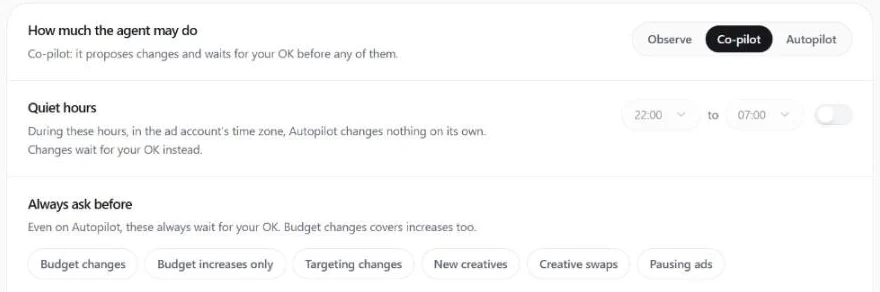
Co-pilot
the default mode: every change waits for your OK
6 kinds
of change you can make always ask first, even on Autopilot
1 switch
pauses the agent on every campaign while your ads keep running
Is it a fit?
Who it's for, and who it isn't for
Built for
- Store owners who run their own Facebook and Instagram ads and want help, not a black box
- Teams that had a rule-based tool change a budget they did not expect
- Brands that want a written reason for every budget, targeting and creative change
- Owners who would rather approve from their email than open an ads dashboard every day
Not the right fit if you need
- A fully hands-off account from day one: the default asks first, and trust is handed over one kind of change at a time
- Channels beyond Meta and Google Ads
- Guaranteed results: it reports measured numbers and never promises a ROAS or a cost per purchase
- Ad accounts with no purchase or lead tracking: proposals are built on results, so fix tracking first
How it works
The workflow, step by step
1
Choose how much the agent may do
Ad Autopilot has three modes. Observe only watches and reports. Co-pilot proposes changes and waits for your OK before any of them. Autopilot acts on its own inside your rules. New campaigns start in the mode you set in Settings, and you can change it for each campaign.
2
Read the card
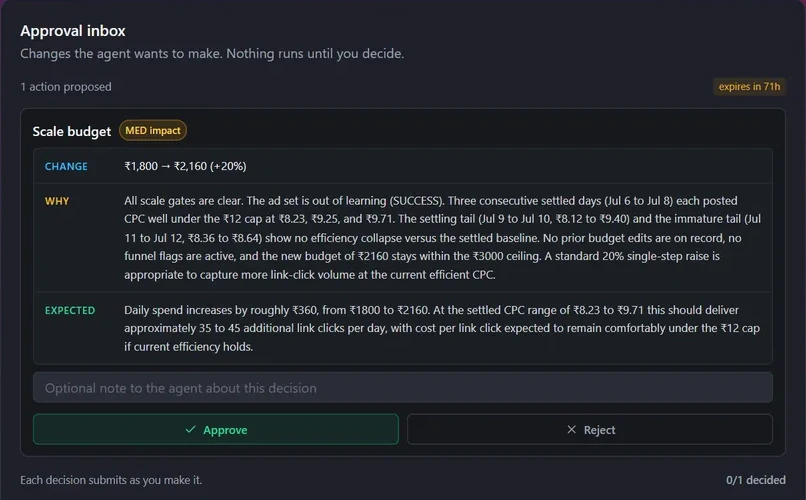
Every proposal is a card that shows the change with its before and after, why the agent wants it, the result it expects and any cost. The card shows the real ad or ad set it is about. It covers budgets, pausing or resuming an ad, targeting, a creative refresh, a new ad set, retargeting, a test of new creative angles and a new country.
3
Approve or reject, in the app or by email
Approve applies the change. Reject dismisses it, and the same idea is not proposed again for a week. Each proposal also arrives by email with Approve and Reject links that work without signing in. On some cards you can adjust the details first, such as a retargeting budget, and you can add a note for your team. If you want it done differently, tell the assistant in chat and it proposes your version as a card.
4
Decide what must always ask
On Autopilot, small routine changes apply on their own. You pick the kinds that still wait for you: budget changes, budget increases only, targeting changes, new creatives, creative swaps or pausing ads. Quiet hours add a window, in your ad account's time zone, when Autopilot changes nothing on its own. Limits written in code also cap the size of each budget raise, make the agent wait between raises and hold spend inside the daily and monthly caps you set.
5
Undo or stop at any time
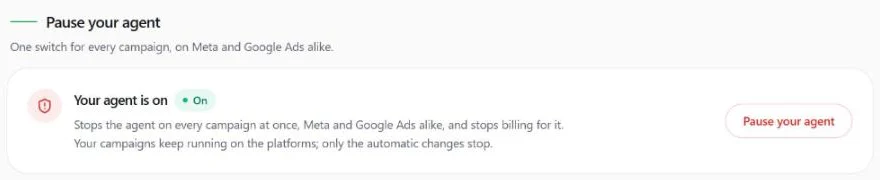
Every action the agent takes is listed in the activity feed, and an executed action can be undone from there. One switch pauses the agent on every campaign at once and stops its billing, while your campaigns keep running on Meta. You can also pause the agent on a single campaign.
What you get
Everything in one account
Ad Autopilot
The agent that plans, launches and manages your Meta campaigns.
Approvals
How decision cards work and what each one shows.
Guardrails
Modes, quiet hours, the Always ask before list and the pause switch.
Agent chat
Ask why a change was proposed, or ask for it done your way.
Reports
A weekly digest of what the agent did and what it measured.
Without a media buyer
The full picture of what the agent does on an account each day.
Pricing
What it costs
Ad Autopilot comes with the Studio plan, from $99 a month with 330 credits. Your first campaign is free for 30 days from when it starts delivering. Your ad spend goes to Meta as usual, and CamClo AI never takes a percentage of it.
- Studio: from $99 a month for 330 credits, with larger Studio plans up to $999 a month
- After the first 30 days, a managed campaign costs 80 credits per 30 days
- Or pay as you go: 3 credits for each day the agent works, with quiet days free
- Pausing the agent stops its billing, and your ads keep running
- Plans start with a 7-day trial for $1 with 20 credits
FAQ
Questions about approvals
How do I automate Facebook ads for my online store but still approve changes before they go live?
Use an agent that proposes instead of acting. In CamClo AI's Ad Autopilot, Co-pilot mode is the default: the agent reviews your campaigns every day and sends each change as a card with its reason and expected result. Nothing changes on Meta until you approve it, in the app or from the email.
What kinds of changes will it ask me about?
Budget changes and moving budget between ad sets, pausing or resuming an ad or ad set, targeting changes, a creative refresh, a new ad set, a retargeting campaign, a test of new creative angles, and expanding to a new country with localized creatives.
Can it ever change something without asking?
In Co-pilot mode, no: every change waits for you. In Autopilot mode it applies routine changes inside your rules, except the kinds you put on the Always ask before list. Raising spend past the daily or monthly cap you set is never possible in any mode.
Can I approve from my phone?
Yes. Each proposal arrives by email with Approve and Reject links that work without signing in, so one tap from your inbox is enough.
What if I approve something and regret it?
Open the activity feed and use Undo on the action. To stop everything, pause the agent with one switch. Your ads keep running as they are and only the automatic changes stop.
How is this different from automated rules in Ads Manager?
A rule fires when a number crosses a line you set in advance. The agent reads the whole campaign each day, explains what it sees and proposes a change with its reason, which can also be a new creative, a retargeting campaign or a new market. You stay the one who says yes.
Products
Guides
- How to Run Meta and Google Ads With Claude or ChatGPT (MCP Connectors Explained)
- Facebook Ads Automation in 2026: What Meta Does and the Best Tools
- AI Media Buyer: Can AI Run Your Paid Ads? (2026 Guide)
- AI Marketing Agents: What They Can Do and the Best Ones for Paid Ads (2026)
- Best Revealbot (Birch) Alternatives in 2026: 7 Tools Compared
Help center
More use cases
- CamClo AI for ecommerce ad agencies
- CamClo AI for bulk ad creatives across your catalog
- CamClo AI for Shopify stores
- CamClo AI for ecommerce brands without a media buyer
- Localized ads for ecommerce brands selling in several countries
- CamClo AI for ad fatigue: fresh creatives when your ads wear out
- CamClo AI for fixing Meta pixel and Conversions API tracking
- CamClo AI for turning product photos into video ads
- CamClo AI for UGC-style video ads
Automate your ads and keep the final say
Start with a 7-day trial for $1 and 20 credits.