
For brands without a media buyer
CamClo AI for ecommerce brands without a media buyer
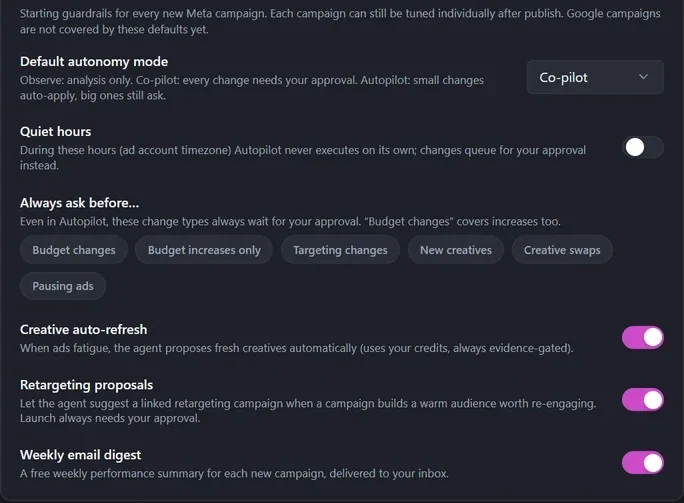
CamClo AI's Ad Autopilot is an AI media buyer for ecommerce brands that run Meta and Google Ads without one on staff. It plans a campaign from your products, goal and past ad results, launches it paused, then reviews it every day: it scales what works, pauses what doesn't and proposes fresh creatives when ads fatigue. In Co-pilot mode, the default, every change waits for your approval with the reason and the expected result. Code-enforced limits cap every budget step and your total spend, and you pay a flat credit price per campaign, never a percentage of ad spend.
7-day free trial with 20 credits.
Every day
one review of each campaign, on yesterday's settled results
+20%
the most a budget can rise in one step, 24 hours apart
0%
of your ad spend: a flat credit price per campaign instead
Is it a fit?
Who it's for, and who it isn't for
Built for
- Ecommerce brands spending anywhere from a few hundred to tens of thousands of dollars a month on Meta or Google Ads
- Founders and small teams who run ads themselves between everything else
- Brands that want every budget, targeting and creative change explained before it happens
- Stores that track purchases with a Meta pixel or a Google Ads conversion tag
Not the right fit if you need
- Channels beyond Meta and Google, such as TikTok, Amazon or LinkedIn Ads
- Guaranteed results: it reports measured numbers and never promises a ROAS or a cost per purchase
- A fully hands-off account: even in Autopilot mode, big changes still ask for your approval
- Ad accounts with no purchase tracking: without a working pixel, results fall back to link clicks, so fix tracking first
How it works
The workflow, step by step
1
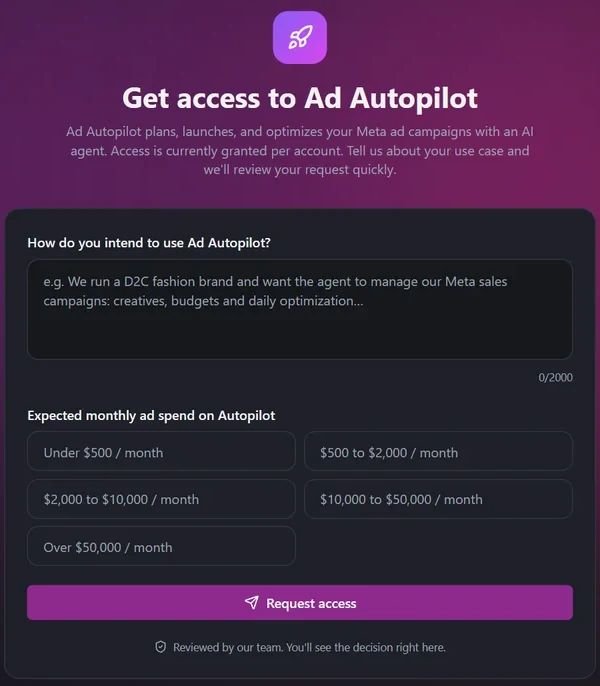
Request access and connect your ad account
Tell us how you plan to use Ad Autopilot and roughly what you spend each month; our team reviews every request. Then connect your Meta or Google Ads account. The Tracking Doctor checks that your pixel or conversion tag actually reports purchases, because the agent can only optimize for the sales it can see.
2
Get a plan, then launch it paused
Pick your products, goal, markets and budget. If your ad account has run ads before, the plan is built from its past ads and real results, such as click-through rate, ROAS and what converted, instead of generic benchmarks. You review everything before launch, and the campaign is created paused, so nothing spends until you switch it on.
3
Approve the changes that matter
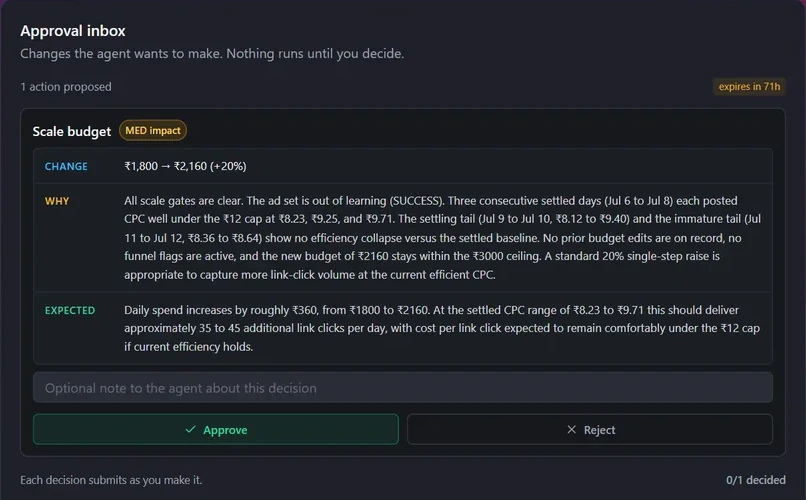
Each morning, in your account's time zone, the agent reviews the previous day and proposes what to do: raise or cut a budget, move money between ad sets, pause an ad that spends without converting, refresh a tired creative. In Co-pilot mode, the default, every change waits in your approval inbox and your email with its reason and expected result, and one click approves or rejects it. A rejected idea isn't proposed again for a week. In Autopilot mode small changes apply on their own, and you choose which kinds always ask first.
4
Find growth before spending more
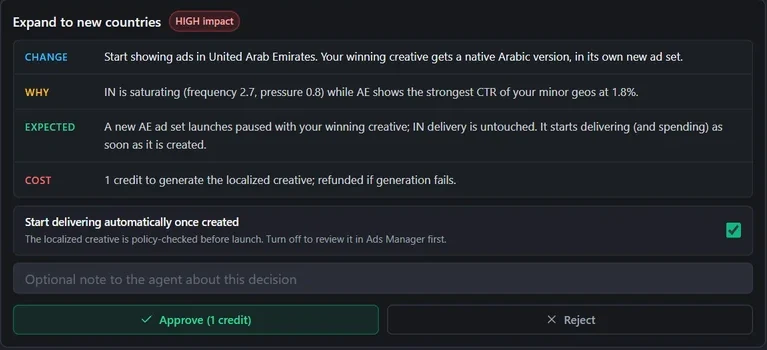
Before it asks for a bigger budget, the agent works with what you already spend: it shifts budget toward the ad sets that convert, pauses ads that burn money without results, replaces fatigued creatives with new ones, and flags a slow landing page on mobile. When there is room to grow, it proposes a testing lab for new creative angles at about 10% of your budget, a retargeting campaign for shoppers who already engaged, or a new country with your winning ad adapted to its language.
5
Stay inside limits the AI can't argue with
Guardrails run in code, not in the AI's judgment. A budget can rise at most 20% per step, 24 hours apart and 30% in a day, inside the range and the daily and monthly caps you set, and cuts are always allowed. The agent makes at most 10 changes per ad account per day and never deletes anything. On Meta, stop-loss rules are written into your ad account at launch, pausing a campaign that spends twice its daily budget in a day or four times your target cost per purchase over 3 days with no sales. Quiet hours and one kill switch stop automation whenever you want, while your ads keep running.
What you get
Everything in one account
Ad Autopilot
An AI media buyer for Meta and Google Ads that plans, launches and optimizes.
Approvals
Approve or reject each change in the app or straight from your email.
Guardrails
Autonomy mode, spend caps, quiet hours and the kill switch.
Testing lab
Try new creative angles on a small, capped share of your budget.
Retargeting
A linked campaign for shoppers who already showed interest.
Sales tracking
Make sure your purchases reach Meta and Google, so optimization works.
Pricing
What it costs
Ad Autopilot is included on Studio plans. Each managed campaign costs 80 credits a month, or pay as you go at 3 credits for each day the agent works on it, with quiet days free. Your ad spend goes to Meta or Google as usual, and CamClo AI never takes a percentage of it. If your credits run out, the agent stops working and your ads keep running as they are.
- Studio: $99 a month for 330 credits, enough for one campaign on the monthly rate plus 250 credits of new creatives
- Larger Studio plans from $199 to $999 a month
- On the 7-day free trial with 20 credits, each agent review costs 6 credits
- New creatives and creative refreshes use the same credit balance
FAQ
Questions brands ask
Is there an AI that manages Meta and Google ads for an ecommerce brand without a media buyer?
Yes. CamClo AI's Ad Autopilot is an AI media buyer for Meta (Facebook and Instagram) and Google Ads. It plans and launches campaigns, reviews them every day, and proposes or makes changes within the rules you set. In Co-pilot mode, the default, nothing changes until you approve it.
Is it a good alternative to hiring a media buyer for a small brand spending about $5,000 a month?
It covers the daily work a media buyer does on your account: budget changes, pausing ads that don't convert, creative refreshes, retargeting and testing, each with a written reason. It costs a flat 80 credits a month per campaign, not a salary or a percentage of spend. What it doesn't replace is what you know best, such as your offers, margins and product calendar, which you give it as goals and limits.
How can I lower my cost per purchase without spending more on ads?
Start with the budget you already have. Ad Autopilot moves money from weak ad sets to the ones that convert, pauses ads that spend without results, refreshes fatigued creatives, flags slow landing pages on mobile, and checks that your pixel reports purchases correctly, because broken tracking makes every sale look more expensive than it is.
Can I automate my Facebook ads but still approve changes before they go live?
Yes. In Co-pilot mode, the default, every change waits in your approval inbox and arrives by email with Approve and Reject buttons. In Autopilot mode, small changes apply automatically, and you choose which kinds always need approval: budgets, targeting, new creatives, creative swaps or pausing ads.
Does it refresh my ads when they start to fatigue?
Yes. With creative auto-refresh on, the agent spots fatigue in your results and proposes a new, different creative, which goes live as a new ad in the same ad set. If that ad set is still in Meta's learning phase, the new ad waits, paused, until learning ends. Refreshes use your credits.
What happens if I run out of credits?
The agent stops working on the campaign until you top up, and your ads keep running on Meta or Google exactly as they are. Nothing is paused or deleted because of billing.
Products
Guides
Help center
Let Ad Autopilot run your next campaign
Start with a 7-day free trial and 20 credits.