


Table of Contents
Facebook ads automation means letting software make the routine decisions in your Meta campaigns: who sees each ad, where it runs, how the budget moves, which creative runs and when to pause. Meta automates much of this for free with Advantage+ campaigns and automated rules, and since April 2026 you can connect ChatGPT, Claude or Perplexity to your ad account through Meta's own ads MCP server. Paid tools add the rest: stricter rules, bulk launching, fresh creative and AI agents that manage the account every day.
We checked every Meta feature in Meta's own help center and developer docs, and every price on the vendor's own site. Here is how we checked.
What you can automate in Meta ads in 2026
Most of the work in a Meta campaign can now be handed to software. The question is which part Meta does for free and which part needs another tool.
| Job | Built into Meta (free) | What paid tools add |
|---|---|---|
| Who sees the ad | Advantage+ audience starts from your suggestions and adjusts in real time | Retargeting and lookalike setups built for you, audience checks before launch |
| Where it runs | Advantage+ placements across Facebook, Instagram, Messenger and more | A creative sized for each placement |
| Budget | Advantage+ campaign budget moves spend to the best ad sets | Spending caps, budget steps and scheduled changes |
| Creative | Advantage+ creative varies your assets: music, animation, text, backgrounds, translations | New ads made from your product, bulk launching of hundreds of ads |
| If-then changes | Automated rules, up to 250 per ad account | More actions, more conditions and more frequent checks |
| Running it from AI chat | Meta ads AI connectors (ads MCP server and CLI), in open beta | Agents with a plan, spending limits and approvals built in |
Meta features from Meta's help center and developer docs.
Meta's built-in automation
Meta's own automation page describes three levels: automate parts of your ad with the Advantage suite, automate the whole ad with Advantage+ campaigns, or speed up setup with tailored campaigns that preload settings for your goal. Here is what each piece does, from Meta's documentation.
Advantage+ campaigns
Advantage+ sales, app and leads campaigns apply Meta's AI to audience, placement and budget at once. Advantage+ sales campaigns are the new name for Advantage+ shopping campaigns. Meta's developer docs say a campaign reaches the Advantage+ state only when all three settings qualify:
- Budget is set at campaign level, with a supported bid strategy.
- Audience uses Advantage+ audience, or no targeting beyond locations.
- Placements have no targeting or exclusions, so every placement is eligible.
You can also switch on each of the three alone in a manual campaign. For tool buyers, one technical change matters: from Marketing API v25.0 the old shopping and app campaign APIs can no longer create campaigns, so a tool built on the old setup must have moved to the new one.
Meta's own figures, from its own studies rather than independent tests: 20% better CPA for Advantage+ sales campaigns, 10% lower cost per qualified lead for leads campaigns and 7% better CPA for app campaigns on its Advantage+ page, while its help center gives 9% better cost per conversion for sales campaigns. It also says Advantage+ audience gave a 28% lower median cost per click, lead or landing page view than other audience options.
Advantage+ creative
Advantage+ creative changes your ad for each viewer. Meta's help article lists more than 30 enhancements; the generative AI ones include image, text and background generation, music, animation, translations, subtitles and touch-ups. Some are on by default and each can be turned off. You preview some versions before publishing, not all of them, and generative features may not be available for housing, employment, credit, social issue or political ads, or in some regulated industries and countries.
Automated rules
Automated rules are the classic form of Facebook ads automation. A rule checks your campaigns, ad sets or ads on a schedule and acts when a condition is met. According to Meta's help center, a rule can:
- Turn campaigns, ad sets or ads off or on.
- Send a notification only.
- Adjust the daily or lifetime budget of an ad set.
- Adjust a manual bid, or scale a budget or bid toward a target such as a cost per app install.
The limits matter once you rely on them: up to 250 rules per ad account, active and inactive; only one of each condition per rule; every condition in a rule must be met; one rule can cover campaigns or ad sets but not both; no rules on ads about social issues, elections or politics; and rules cannot pause reservation campaigns. Rules apply at ad account level, so they also act on ads your teammates create.
Meta ads AI connectors
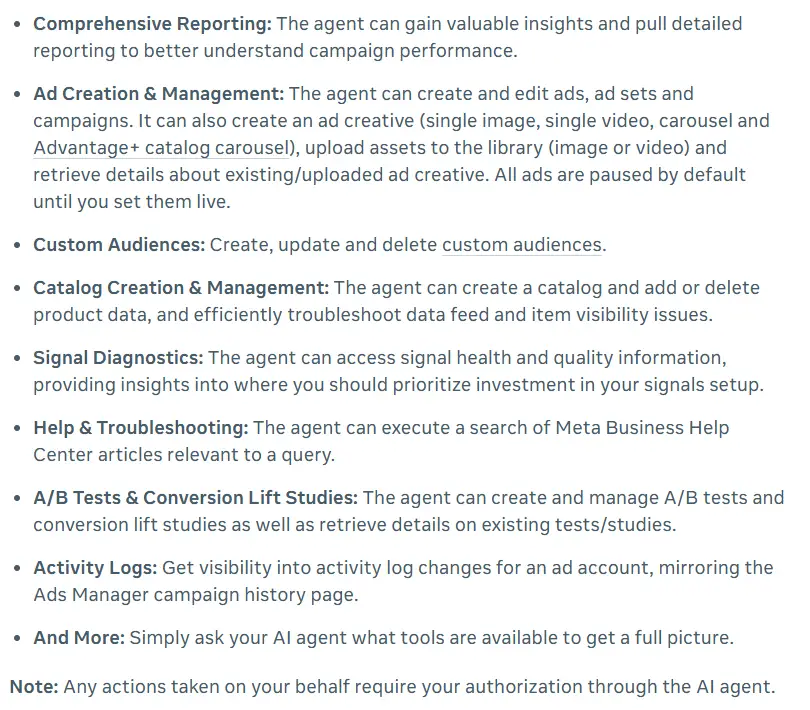
On April 29, 2026, Meta launched Meta ads AI connectors in open beta: an ads MCP server and an ads command line interface that connect an AI agent to your ad account. Meta's help center lists ChatGPT, Claude, Claude Code and Perplexity as the currently supported agents, and says an agent connected this way can:
- Pull reports on campaign performance.
- Create and edit campaigns, ad sets and ads, including single image, single video, carousel and Advantage+ catalog carousel creatives.
- Create, update and delete custom audiences, and manage product catalogs.
- Check signal health, and run A/B tests and conversion lift studies.
Ads created this way stay paused until you set them live, and any action needs your authorization through the agent. A July 16, 2026 update added two things: connections through your own developer app, and ads MCP server rules. Anyone with full control of a business portfolio can now block actions per ad account, such as creating campaigns, or block budgets above a set amount; Meta's example is $1,000. Meta also says that using the MCP server on its own does not put an account at risk of a ban.
The connector gives an assistant access, not a strategy: you still decide what to ask, check its numbers and approve each change.
Automated Ads, which Meta is retiring
Automated Ads was Meta's simple option for creating ads from a Facebook Page: up to 6 versions of an ad, a suggested audience and budget, and tips over time. Meta's help center now says it will be going away in 2026. Automated ads that are already running keep delivering, but you may not be able to create new ones.
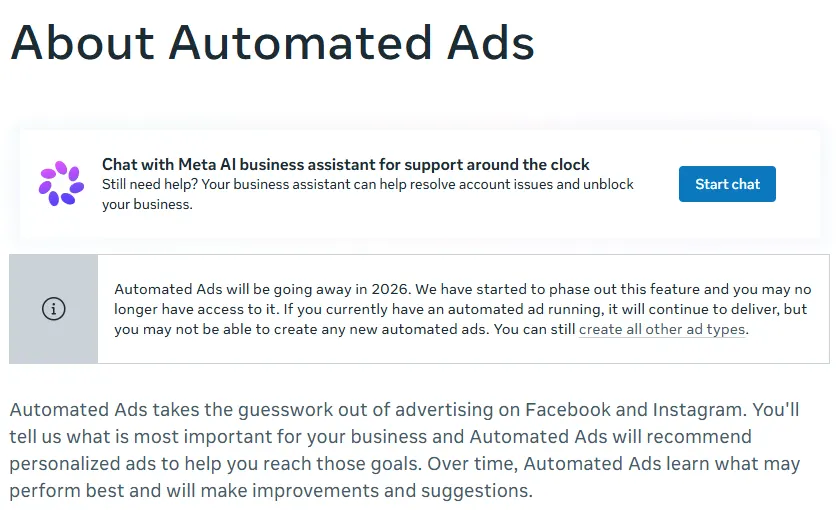
To pause one: open your Facebook Page, choose Ad Center, find the ad and select View results, then switch it off under the Details tab.
Where Meta's automation stops
- It optimizes the campaign you built. Advantage+ picks people, placements and budget split, but you still choose the offer, the landing page, the total budget and when to test something new.
- It needs creative from you. Advantage+ creative varies the images, video and text you upload. When those tire, the next concept has to come from somewhere. Our piece on curing Meta ad fatigue covers the signs.
- Rules only do what you write. They act on thresholds you set, up to 250 per ad account, and they do not explain results or plan the next test.
- It depends on good signal. Meta's own best practices for Advantage+ sales campaigns start with connecting your first-party data, through the Meta Pixel and Conversions API.
Third-party tools fill these gaps. They fall into four groups: rules engines, bulk launchers, workflow builders and AI agents.
Quick picks by use case
Plans, launches and manages Meta campaigns, and makes the image and video ads.
Facebook ads automation tools compared
| Tool | Best for | Type | Paid plans from | Free option | Makes new ads |
|---|---|---|---|---|---|
| CamClo AI | An AI agent that runs Meta campaigns and makes the ads | AI agent and ad studio | $49/mo (150 credits) | 7-day free trial with 20 credits | Yes, image and video |
| Madgicx | AI recommendations for ecommerce | AI platform | $45/mo (under $1K ad spend) | 7-day free trial | Yes |
| Bïrch | Custom rules | Rules engine | $49/mo; rules on Pro at $99/mo (up to $10K ad spend) | 14-day free trial, no card | Bulk variations of your assets |
| AdAmigo.ai | Daily AI actions you approve | AI agent | $99/mo per ad account (under $2K ad spend) | 7-day free trial | Yes |
| Smartly | Enterprise creative and media | Enterprise platform | Not published | None listed | Yes |
| WASK | Small budgets | Rules, reporting and AI creative | $15/mo (up to $1K ad spend) | 7-day free trial | Yes, with AI credits |
| Kitchn | Launching hundreds of ads | Bulk launcher | $529/mo | 14-day guided trial | No, it launches your assets |
| Make | Custom workflows | Workflow automation | $10.59/mo ($9/mo billed yearly) | Free plan, 1,000 credits a month | No |
Entry paid plan on each vendor's official pricing page, in US dollars, billed monthly unless marked. Madgicx, Bïrch and WASK price by monthly ad spend, so the price rises as you spend more. Your ad spend itself is billed by Meta in every case. Confirm before you buy.
The tools, one by one
1. CamClo AI
Best for: an AI agent that runs Meta campaigns and makes the adsCamClo AI is an AI studio for ecommerce teams. Its Ad Autopilot is an AI media buyer for Meta and Google Ads, built into the same studio that makes your image and video ads. It covers the whole loop: plan, make the ads, launch, watch, adjust and refresh.
- Launch: it turns your website and goal into a campaign plan you review, then publishes to Meta as an Advantage+ campaign by default (manual targeting is an option). The campaign stays paused until you switch it on, unless you choose to start delivery right away.
- Three modes: Observe only recommends. Co-pilot, the default, proposes each change and waits for your approval, in the app or straight from the email. Autopilot runs routine actions within your limits, and bigger changes still come back to you.
- Guardrails in code: daily and monthly spending caps, budget raises of 20% or less at a time, an optional maximum test loss, protected ads it never touches, and a kill switch per campaign and for the whole account. It also installs stop-loss rules as Meta automated rules on your ad account, for example one that checks every 30 minutes and pauses the campaign if today's spend runs far past its daily budget, so they keep working even if CamClo is offline.
- Creative: when an ad tires, it can make a fresh one in the studio and add it to the same ad set. When a winning campaign expands to a new country, it localizes image ads, both the copy and the text on the image. Video ads come in 15 formats, sized for 10 placements including Reels, Stories and Facebook and Instagram feeds, from 4 to 30 seconds at 480p, 720p or 1080p.
- Tracking and chat: a Tracking Doctor checks your Meta Pixel's event volume and match quality, a hosted Conversions API relay sends store orders to Meta, and campaign chat answers questions and proposes changes.
- Access: Ad Autopilot is switched on for your account after a short access request in the app.
- Pricing: plans from $49 per month with 150 credits. A managed campaign costs 80 credits per 30 days, or on pay as you go, 3 credits for each day the agent does work, with quiet days free. An 8-second 720p video ad costs 11 credits on the default model. There is a 7-day free trial with 20 credits.
Strengths
- Media buying and creative in one place, so the next ad is ready when the last one tires
- Big moves wait for your approval; routine ones stay inside your limits
- Stop-loss rules live on Meta's side as automated rules
- Also runs Google Ads (Search, Performance Max and Demand Gen) from the same workspace
Limits
- Can seem a little expensive next to a single rules tool, but the credits cover the campaign plan, the ads themselves and the daily management, not just a rule engine
To make the ads on their own, see the AI image ad generator for feed and Stories ads, and the UGC and product video ad maker for Reels. If you are weighing an agent against a person, our guide to the AI media buyer goes deeper. For Google campaigns, see our roundup of AI agents for Google Ads, and for the wider category, our guide to AI marketing agents.
2. Madgicx
Best for: AI recommendations and creative for ecommerce brandsMadgicx calls itself an "Ecom Ad Cloud", with a focus on Meta ads. Its AI Marketer audits your account, finds opportunities and tells you what to do next. Around it sit an AI ad generator, an automated ad launch tool, a creative tracker and analytics.
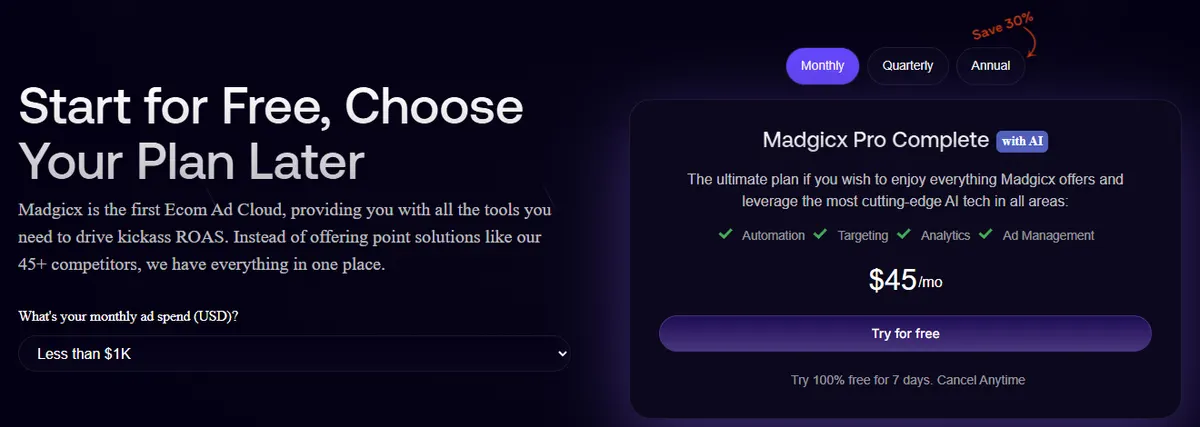
- Pricing: Madgicx Pro Complete is $45/month on monthly billing for under $1,000 of monthly ad spend. The price rises with ad spend, and quarterly or annual billing costs less. Tracking Pro, for server-side tracking, is a $49/month add-on.
- Free: a 7-day free trial.
Strengths
- Recommendations, creative and analytics in one subscription
- A low entry price at small ad spend
- Server-side tracking available as an add-on
Limits
- The price climbs as your ad spend grows
- Tracking Pro costs extra
Pick this instead of CamClo AI if you want AI recommendations and analytics for Meta and prefer to make each change yourself.
3. Bïrch (formerly Revealbot)
Best for: custom rules more flexible than Ads Manager'sBïrch is a rules engine for Meta, Google, Snapchat and TikTok ads. Its visual editor offers more than 20 actions, metric-to-metric comparisons, custom metrics and checks as often as every 15 minutes, plus ready-made strategies, bulk ad creation and automatic post boosting.
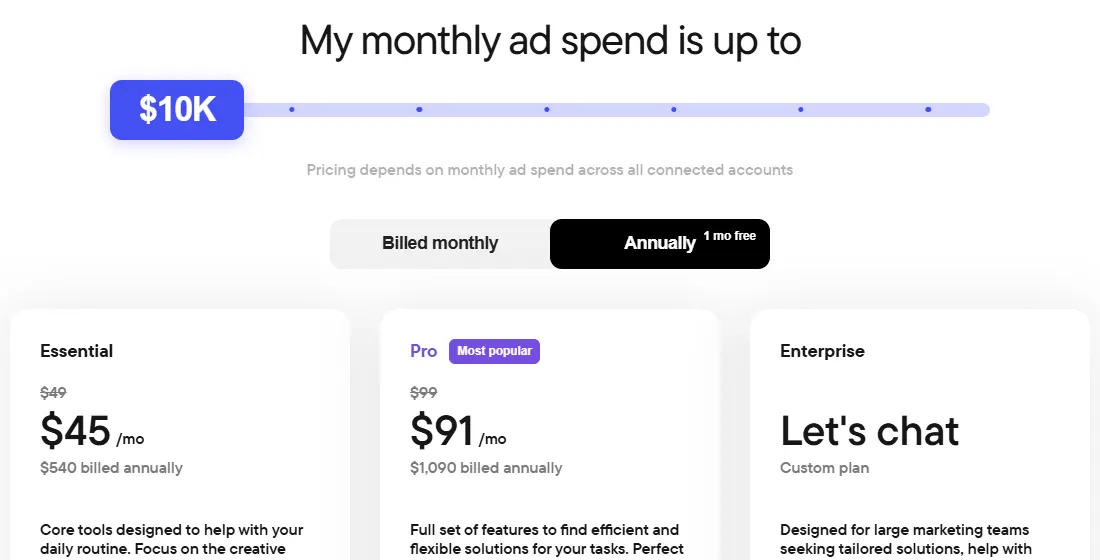
- Pricing: priced by monthly ad spend across connected accounts. Up to $10,000 a month, Essential is $49/month ($45/month billed yearly) and Pro is $99/month ($91/month billed yearly). Automated rules and strategies are on Pro.
- Free: a 14-day free trial with no credit card required.
Strengths
- Far more rule logic than Meta's own automated rules
- Logs that show why a rule did or did not fire
- Works across four ad platforms
Limits
- You design the strategy; rules only do what you write
- Automated rules need the Pro plan, and the price rises with ad spend
Pick this instead of CamClo AI if you know the exact rules you want and need more power than Ads Manager gives you.
4. AdAmigo.ai
Best for: an AI agent that suggests daily actions you approveAdAmigo.ai is an AI agent for Meta ads. You set goals, and it designs ads, builds the strategy and takes daily action on your account. Its pricing page adds: "You approve everything", and its FAQ says the autopilot can either wait for your approval each morning or apply changes overnight, logging every action. It also sells a bulk ad launcher and an anomaly detection service on their own.
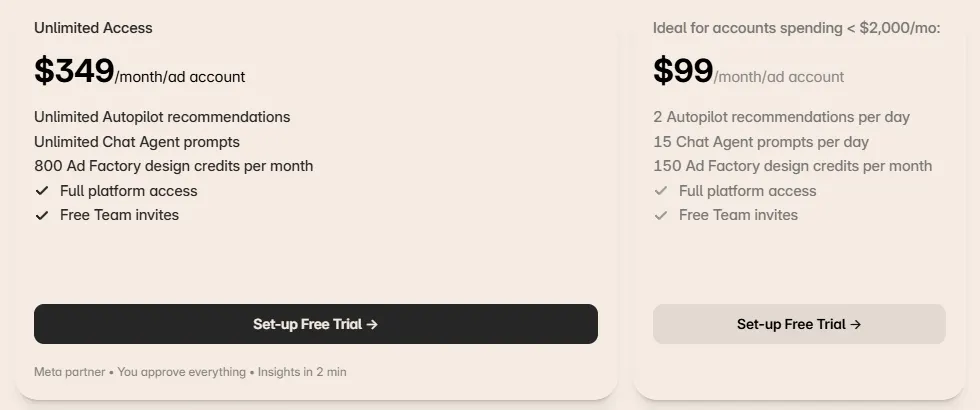
- Pricing: $99/month per ad account for accounts spending under $2,000 a month, with 2 Autopilot recommendations a day, 15 Chat Agent prompts a day and 150 Ad Factory design credits a month. Unlimited Access is $349/month per ad account, with 800 design credits. The Bulk Ad Launch standalone is $99/month per ad account.
- Free: a 7-day free trial; billing starts when it ends.
Strengths
- Agent, chat and ad design in one plan
- You choose whether to approve each action or let it apply changes on its own
Limits
- Priced per ad account, which adds up for agencies
- The entry plan allows 2 recommendations a day
Pick this instead of CamClo AI if you want a Meta-focused agent with a flat per-account price and your spend is under $2,000 a month.
5. Smartly
Best for: enterprise teams running creative and media at scaleSmartly calls itself an AI advertising platform. It has three parts: Creative, for building and personalizing ads across platforms; Media, for launching, managing and updating campaigns automatically across channels; and Intelligence, for reporting across your whole ad setup.
- Pricing: not published; Smartly sells through demos, so see vendor site.
- Free: none listed.
Strengths
- Creative production and media buying in one platform
- Built for many markets and channels at once
Limits
- No public pricing
- Sized for large teams and budgets
Pick this instead of CamClo AI if you run large budgets across many markets and channels and want creative and media on one enterprise contract.
6. WASK
Best for: rules and AI creative on a small budgetWASK covers Google and Meta ads for small teams. Its Smart Rules Engine runs if-this-then-that logic on metrics such as CTR or cost, with more than 1,000 templates, and actions can run automatically or wait for you. It adds reporting, an AI assistant and AI creative generation from your website URL or a prompt.
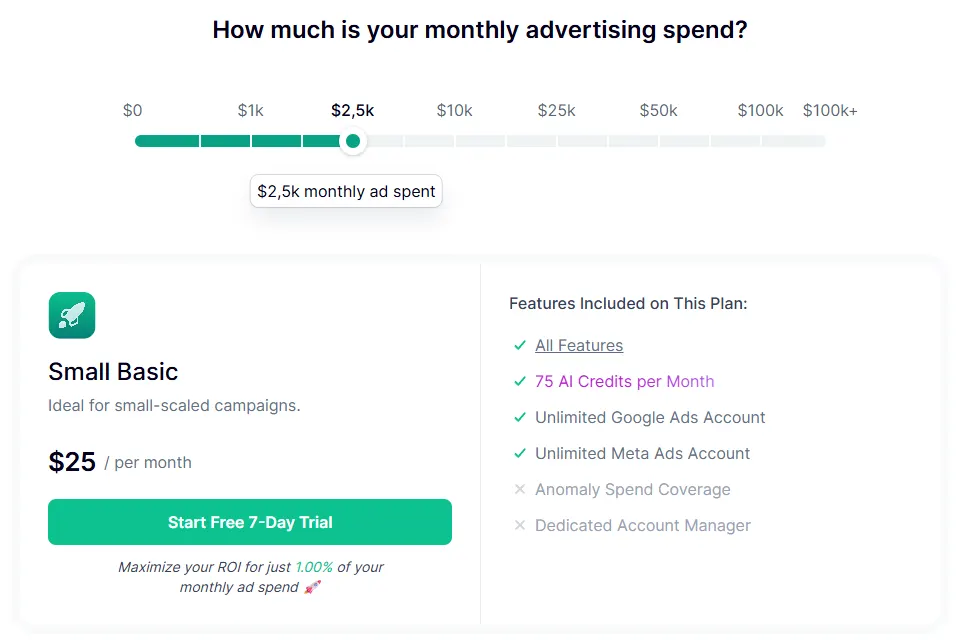
- Pricing: priced by monthly ad spend. Up to $1,000 a month, Micro is $15/month with 50 AI credits a month; from $1,000 to $2,500, Small Basic is $25/month with 75 AI credits a month. You can connect as many Google and Meta ad accounts as you need on any plan.
- Free: a 7-day free trial with all features.
Strengths
- A low price for small ad budgets
- Rules, reporting and creative in one tool
- Covers Google Ads too
Limits
- The price rises with your ad spend
- AI credits cap how much creative you can generate
Pick this instead of CamClo AI if your budget is small and you want rule templates and simple AI creative at a low monthly cost.
7. Kitchn
Best for: launching hundreds of ads fastKitchn.io is built for media buyers and agencies whose bottleneck is getting ads live. It uploads assets from Google Drive, Dropbox and Frame.io and applies reusable ad templates. Launch Elite adds custom ad naming, automatic folder scanning and fully automated ad launches. Rule-based campaign changes and CSV or Google Sheet uploads are on Enterprise.
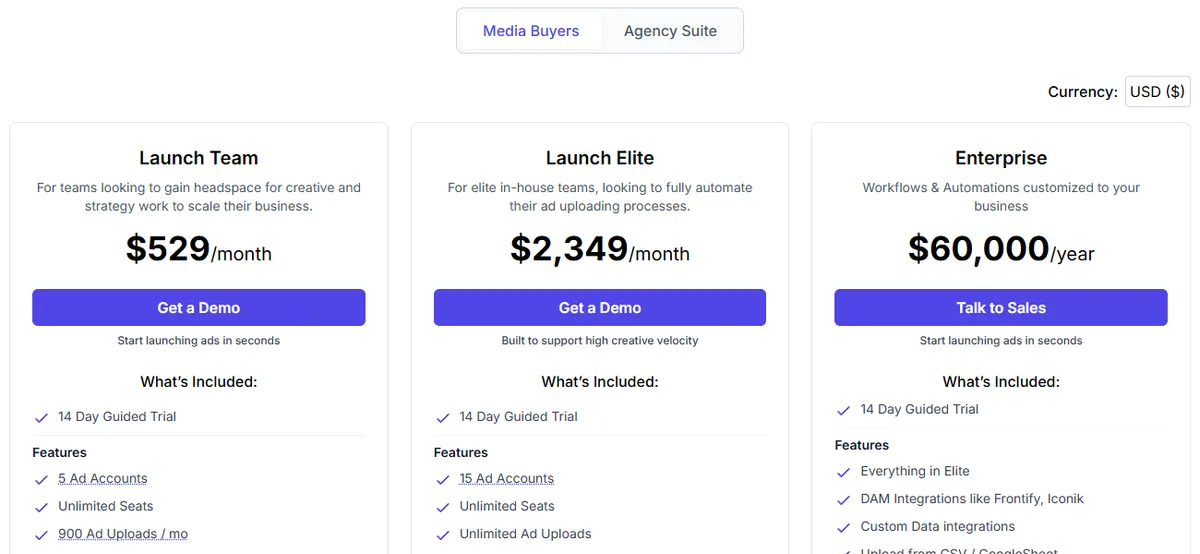
- Pricing (USD): Launch Team is $529/month with 5 ad accounts, unlimited seats and 900 ad uploads a month. Launch Elite is $2,349/month with 15 ad accounts and unlimited uploads. Enterprise is $60,000/year.
- Free: a 14-day guided trial on every plan.
Strengths
- Speed at volume, from cloud folders to live ads
- Templates and naming keep large accounts tidy
Limits
- Priced for teams, not solo sellers
- It launches ads; it does not make them or manage budgets on the entry plan
Pick this instead of CamClo AI if your creative team already produces hundreds of assets a month and you need them in Ads Manager fast.
8. Make
Best for: custom workflows between Meta and your other appsMake is a no-code automation platform. Its Facebook Ads Campaign Management app, maintained by Make, has 12 modules, including Update a Campaign, Update an Ad Set and Update an Ad, which you connect to Google Sheets, Slack, your store or an AI model. One of Make's templates sends Facebook Ads data to Google Sheets every morning.
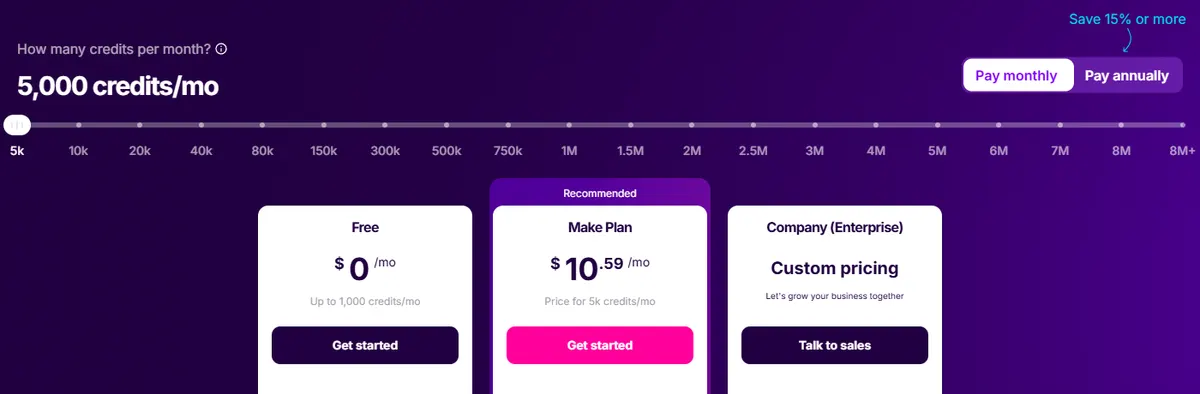
- Pricing: the Make plan is $10.59/month for 5,000 credits on monthly billing, or $9/month billed yearly. Each module action uses one credit.
- Free: a Free plan with 1,000 credits a month and a 15-minute minimum between runs.
Strengths
- Connects Meta ads to thousands of other apps
- The lowest entry price here, and a free plan
Limits
- You build and maintain every workflow yourself
- No ad strategy or creative built in
Pick this instead of CamClo AI if you need one specific workflow, such as a daily report in a spreadsheet, and are happy to build it yourself.
How to automate Facebook ads, step by step
- Fix tracking first. Automation learns from your conversion data, so check that the Meta Pixel and the Conversions API both send purchases or leads.
- Let Meta automate delivery. Start with an Advantage+ sales or leads campaign unless you have a clear reason to go manual.
- Add guardrail rules. Turn off an ad set that spends a set amount without a purchase, and get a notification when frequency climbs too high.
- Feed it creative. Meta's best practices ask for a wide variety of creative. Plan new ads before the old ones tire, sized for each placement; our Meta ads specs guide lists the sizes.
- Decide what an agent may do. Set spending caps and choose which changes need your approval. On Meta's ads MCP server you can block actions per ad account.
- Review weekly. Read what changed and why. Automation handles routine moves, not your offer, pricing or total budget.
How we checked
We read Meta's Business Help Center, Marketing API docs and Meta for Business pages for every Meta feature, limit and date here. For the tools, we started from those that appear in Google's results and ranking roundups for "facebook ads automation" and "meta ads automation", then read each vendor's official pricing and product pages and saved screenshots. Kitchn defaults to euros, so we switched it to US dollars; Smartly publishes no prices. CamClo AI's features come from the product itself.
We did not run a scored performance test, so the only result figures here are Meta's own, labelled as such. Trial any tool on one campaign before you move the whole account.
Frequently asked questions
What is Facebook ads automation?
It is software making the routine campaign decisions for you: who sees an ad, where it runs, how the budget moves, which creative runs and when to pause. Meta does much of this for free with Advantage+ campaigns, Advantage+ creative and automated rules. Third-party tools add custom rules, bulk launching, new creative and AI agents that manage the account day to day.
How do I automate Facebook ads?
Start with tracking, so Meta gets reliable conversion data. Then run an Advantage+ campaign, which automates audience, placements and budget together, and add automated rules as guardrails, for example to turn off an ad set that spends past a set amount without a purchase. Give Meta several creatives to work with, and add a tool only for the jobs Meta does not do for you, such as bulk launching or making new ads.
Are Facebook Automated Ads going away?
Yes. Meta's help center says Automated Ads, the product for creating ads from a Facebook Page, will be going away in 2026. Automated ads that are already running keep delivering, but you may not be able to create new ones. To pause one, open your Page, go to Ad Center, select View results on the ad and switch it off under the Details tab. You can still create all other ad types, including Advantage+ campaigns in Ads Manager.
Can I connect ChatGPT or Claude to my Meta ads?
Yes. Meta launched Meta ads AI connectors in open beta on April 29, 2026, and its help center lists ChatGPT, Claude, Claude Code and Perplexity as supported agents for its ads MCP server. The agent can pull reports and create or edit campaigns, ad sets and ads, which stay paused until you set them live. Since July 16, 2026, anyone with full control of a business portfolio can block specific agent actions, such as budgets above a set amount.
Is it safe to let AI run my Facebook ads?
It can be, if the limits are set outside the AI. Look for hard spending caps, budget changes in small steps, approval for big moves and a way to pause everything at once. Meta's ads MCP server rules can block actions for any connected agent, and Meta says using the MCP server on its own does not put your account at risk of a ban. Check the results yourself every week.
What is the best Facebook ads automation tool?
It depends on the job. CamClo AI runs Meta campaigns with an AI agent and makes the image and video ads in the same place. Bïrch is strongest for custom rules, Kitchn for launching hundreds of ads, Madgicx and AdAmigo.ai for AI recommendations, WASK for small budgets, Smartly for enterprise teams and Make for custom workflows. Meta's own Advantage+ campaigns and automated rules are free and cover a lot.
Want the ads and the automation in one place?
Try CamClo AI free for 7 days with 20 credits.
See plans and the free trial

