
For agencies
CamClo AI for ecommerce ad agencies
CamClo AI gives an ecommerce ad agency one place to make creatives and run ads for every client. Each client gets its own workspace for its ad accounts, products, brand kits and campaigns. The AI assistant turns a client's product photos into image and video ads in bulk, up to 500 products per request. Ad Autopilot then runs each client's Meta and Google Ads campaigns within the budgets and approvals you set, and writes a client-ready PDF report when you ask. Management is a flat credit price per campaign, never a percentage of ad spend.
7-day free trial with 20 credits.
Up to 20
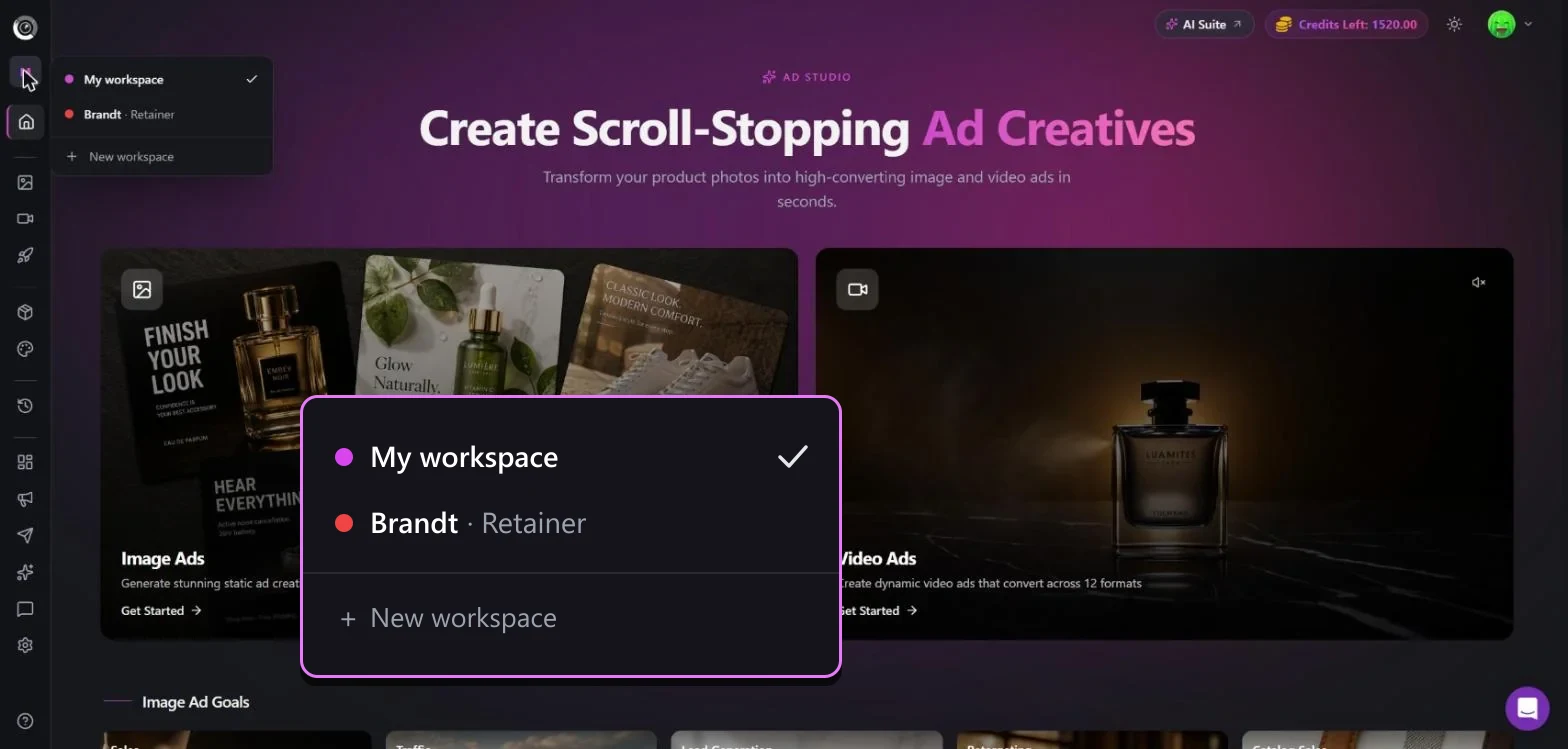
client workspaces on one account
500
products in a single assistant request
Co-pilot
by default: no change goes live without your approval
Is it a fit?
Who it's for, and who it isn't for
Built for
- Agencies running Meta or Google Ads for several ecommerce brands
- Teams that need fresh image and video ads for every client each month without adding designers
- Agencies that want every budget, targeting and creative change explained, and approved before it goes live
- Retainers where you report results to the client every month
Not the right fit if you need
- Agencies that need client logins or team roles today: a workspace organizes one account, and it can't be shared yet
- White-label reporting: reports and emails don't carry your agency's own branding yet
- Channels beyond Meta and Google, such as TikTok, Amazon or LinkedIn Ads
- Clients without product photos: the creative tools start from an image of the product
How it works
The workflow, step by step
1
Give every client its own workspace
Create a workspace per client, with a label such as Retainer and a color, and switch between them from the sidebar. Connect each client's Meta ad account and pixel to its workspace, so new campaigns land in the right place. The client's products, brand kits, ads and campaigns stay separate from everyone else's. Client workspaces are on paid plans: request them from inside the app, up to 20 per account.
2
Make a month of creatives in one request
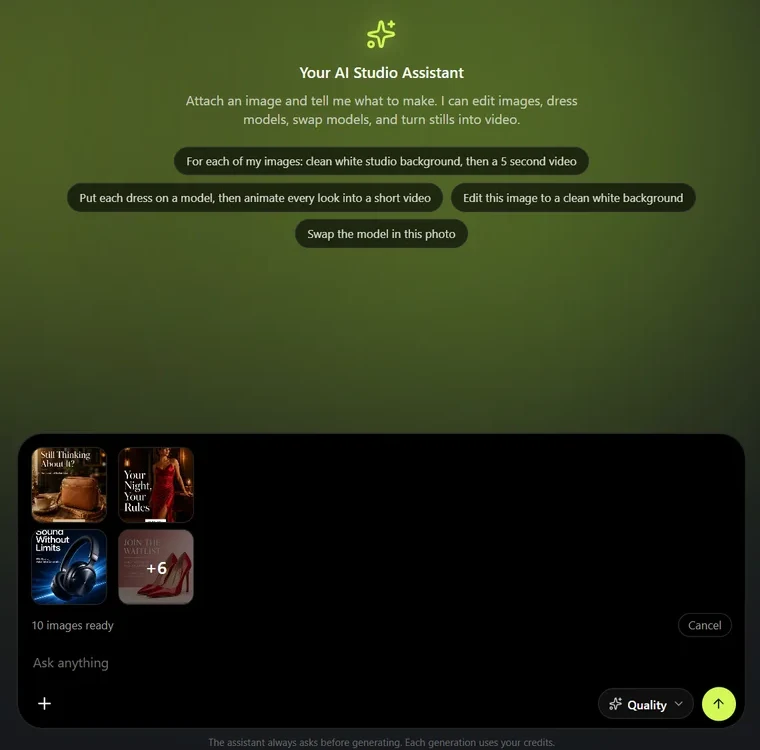
Attach up to 500 of a client's product photos in the AI assistant and describe what you need, for example an on-model shot, a 4:5 feed ad and a short video for every product. The assistant plans the whole workflow, shows the credit cost, and starts only when you approve it. Video scripts are written for each product, not copied across the catalog, and the results download as one ZIP.
3
Let Ad Autopilot run each client's campaigns
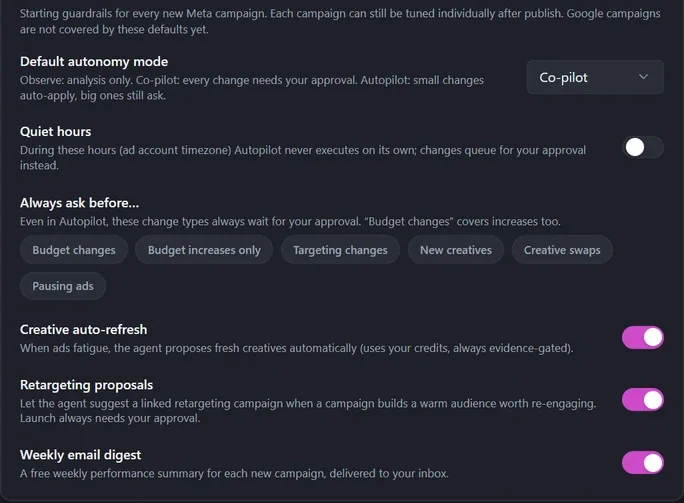
Ad Autopilot builds a campaign plan from the client's products and goal, launches it on Meta or Google Ads, then reviews results every day: it scales what works, pauses what doesn't and proposes fresh creatives when ads fatigue. In Co-pilot mode, the default, every change waits in your approval inbox with the reason and the expected result. In Autopilot mode small changes apply on their own, and you pick which changes always ask first: budgets, targeting, new creatives, creative swaps or pausing ads. Quiet hours and one kill switch cover the rest.
4
Send the client a report built from real numbers
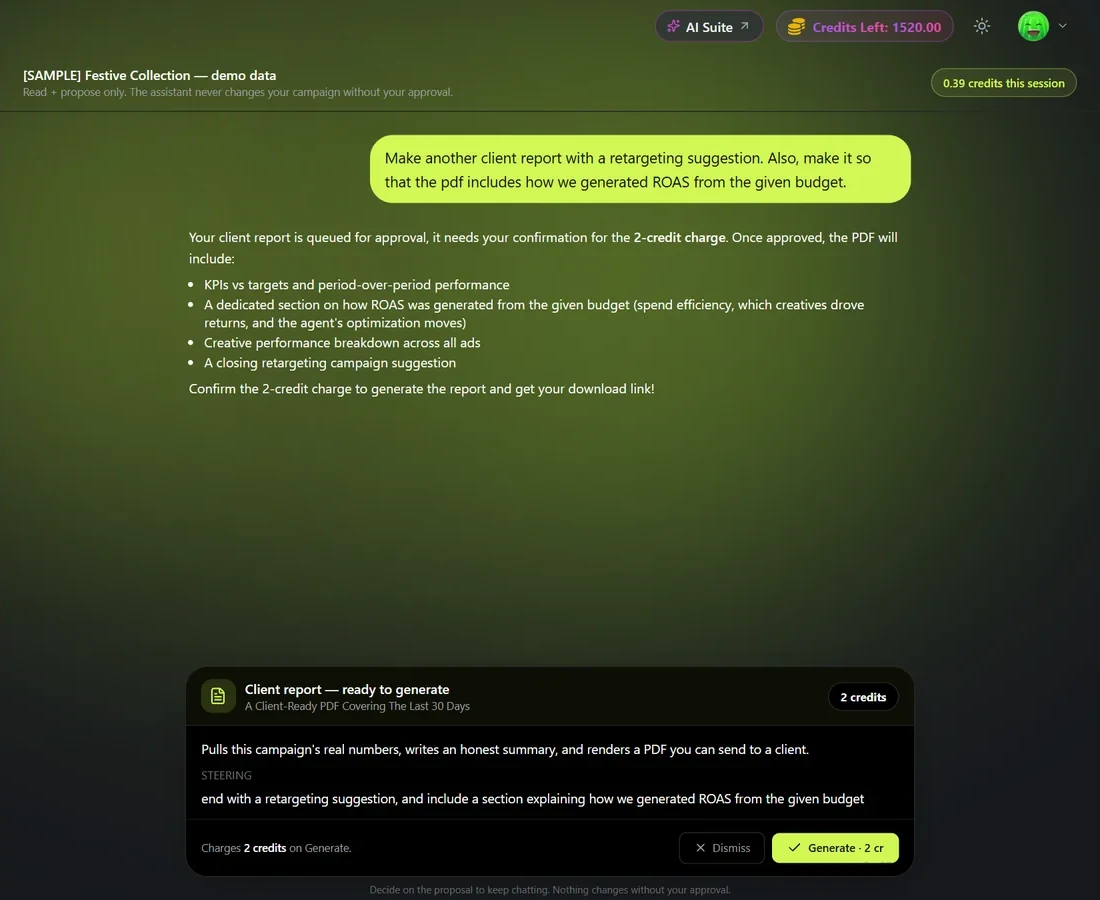
Ask the campaign chat for a client report and it builds a PDF of the last 30 days from the campaign's measured results: performance against targets, what the agent changed and why, and which creatives drove the results. You can steer it, for example to end with a retargeting suggestion, and it costs 2 credits. A free weekly email digest also summarizes every campaign for you.
What you get
Everything in one account
Workspaces
One workspace per client for ad accounts, products, brand kits and campaigns.
AI assistant
Bulk product shots, image ads and videos from one chat request.
Image Ads
Static ads for every placement, from feed to Stories.
Video Ads
UGC-style, product demo and commercial formats from a product photo.
Ad Autopilot
An AI media buyer for Meta and Google Ads, with approvals and spend limits.
Localized ads
Adapt a winning ad for new countries and languages.
Pricing
What it costs
Plans are credit-based, and one balance covers every client workspace. Ad Autopilot is included from the Studio plan up. Each managed campaign costs 80 credits a month, or 3 credits for each day the agent works on it, with quiet days free. It's never a percentage of ad spend.
- Studio: $99 a month for 330 credits
- Studio Pro, built for agencies: $299 a month for 1,100 credits
- Larger plans up to 5,000 credits a month
- New customers get a 7-day free trial with 20 credits
FAQ
Questions agencies ask
Can I manage several ecommerce clients from one CamClo AI account?
Yes. Each client gets its own workspace for its ad accounts, products, brand kits, ads and campaigns, and you switch between clients from the sidebar. Client workspaces are available on paid plans: request them from inside the app, up to 20 per account.
Can my clients or teammates log in to their workspace?
Not yet. A workspace organizes one CamClo AI account; there are no client logins or team roles today. To share results with a client, send the PDF client report.
Will Ad Autopilot change a client's ads without asking me?
Not unless you allow it. Co-pilot is the default mode: every change waits for your approval, with the reason and the expected result. In Autopilot mode, small changes apply automatically and big ones still ask, and you choose which change types always need approval. Observe mode only analyzes.
How is CamClo AI priced for an agency?
One credit balance covers all your clients. Ad Autopilot is included on Studio plans, which start at $99 a month for 330 credits; Studio Pro is $299 a month for 1,100 credits. Each managed campaign costs 80 credits a month, or 3 credits per day the agent works on it. It is never a percentage of ad spend.
Which ad platforms does it run?
Meta (Facebook and Instagram) and Google Ads.
How many creatives can I make for each client?
As many as your credits cover. The AI assistant takes up to 500 product photos in one request and makes product shots, image ads and videos for each, showing the credit cost before anything runs.
Guides
Help center
Try CamClo AI on your next client
Start with a 7-day free trial and 20 credits.