
CamClo AI vs AdStellar
Choose CamClo AI if you want on-brand ads made from your product photos and an AI media buyer for Meta and Google Ads that asks before big moves; choose AdStellar if you only advertise on Meta and mainly want to bulk-launch variations of past winners.

CamClo AI
An AI ad studio and media buyer that turns your product photos into on-brand image and video ads, then runs Meta and Google Ads campaigns with approvals, spending caps and a receipt for every action.
AdStellar
An AI Meta ads platform whose agent makes image, video and avatar UGC ads, builds campaigns from your past Meta results and launches them to Facebook and Instagram.
The short answer
CamClo AI is the better pick for most ecommerce and fashion brands: it makes on-brand image and video ads from your own product photos, runs them on Meta and Google Ads, and holds bigger budget and targeting moves for your approval inside limits enforced in code. AdStellar is a capable Meta-only platform whose strengths are bulk launching, leaderboards of your past Meta ads and talking-avatar UGC videos, but in our September 2026 test its AI agent needed several rounds of corrections from us because its campaign build did not match its own plan.
Choose CamClo AI if
- You advertise on Meta and Google Ads, or plan to, and want one AI media buyer with one approval flow and one set of guardrails for both.
- You want new ads made from your real product photos: image ads, 15 video formats and Remix Ads that rebuild a proven ad's structure for your product, up to 90 seconds.
- You want hard limits on the AI: daily and monthly spending caps, budget steps of 20% or less, Co-pilot approvals by default and a stop-loss rule that lives on Meta's own servers.
- You sell fashion or other physical products and want try-on style video formats, product photos, virtual try-on and model swap in the same account.
- You want campaign management at a flat rate per managed campaign or per day the agent works, never as a share of your ad spend.
Choose AdStellar if
- You only advertise on Meta and want to launch large test matrices: its Bulk Launcher turns every combination of audiences, images, headlines and texts into ads and shows the result on a campaign map.
- You have a long Meta history and want leaderboards of your past creatives, headlines, audiences and landing pages from imported campaigns.
- You want talking-avatar UGC ads from a library of stock AI presenters or a custom AI actor, with lip-sync on talking clips.
- Your team works in Slack and wants unlimited seats and ad accounts on one plan, with the agent posting proposals and taking approvals in Slack.
CamClo AI vs AdStellar at a glance
| CamClo AI | AdStellar | |
|---|---|---|
| Best for | Ecommerce and fashion brands that want the ads and the media buying in one loop | Meta advertisers and agencies with account history who test many variations |
| What it makes | Image ads, carousels, video ads in 15 formats and Remix Ads, plus product photos, virtual try-on and model swap | Image ads, video ads, talking-avatar UGC ads, Ad Clone videos and ad copy |
| Ad channels it runs | Meta (Facebook, Instagram) and Google Ads (Search, Performance Max, Demand Gen) | Meta (Facebook, Instagram) only. Its AI Info page says Google Ads, TikTok Ads and LinkedIn Ads are not yet supported |
| Starting price | $49 a month (Creator, 150 credits) | $100 a month (50,000 credits), one plan with every feature |
| Free trial | 7-day free trial with 20 credits | 7-day free trial with $100 in credits (50,000), $0 due today |
| Ads from your product photos | Paste a product link or upload photos; image and video ads are built from your real product, including a UGC Virtual Try-On video format | Product URL, Shopify catalogue or reference ads; creative generation needs product images or reference assets as input |
| Recreating proven ads | Remix Ads: find a reference in the Meta, TikTok, Google or LinkedIn ad libraries or upload one; new image or video ad for your product, up to 90 seconds | Ad Clone: paste a video ad or open a Facebook Page's ads; rebuilt around your product with the original branding replaced |
| Building a campaign | Plan from your site, goal, market research, account history and long-running ads from established brands in your category; you approve it before anything publishes | AI Campaign Builder from your past Meta winners, a free manual launcher and a Bulk Launcher that builds every combination |
| Approvals and guardrails | Observe, Co-pilot (default) or Autopilot; approvals in the app or by email; daily and monthly caps; budget steps of 20% or less; Meta-native stop-loss; one-click kill switch | Suggest-only or autonomous within safety caps; approvals in Slack; free deterministic Auto rules; manual launches publish inactive |
| Tracking and sales data | Tracking check before launch, URL tags on every ad, and server-side sales from Shopify, WooCommerce, BigCommerce, Webflow, Stripe or Razorpay, each sale counted once | Meta pixel and events from your ad account, UTM templates in its launcher, and an optional Cometly attribution sync |
| Analytics on past ads | Campaign dashboards and a timestamped receipt with the reason for every agent action | AI Insights across 14+ dimensions, Top Ads, AI Combos and hourly Meta sync for imported campaigns |
| Team and integrations | Workspaces for separate brands or clients, email approvals, Meta and Google Ads connections | Unlimited seats, ad accounts and workspaces, a Slack agent, Shopify and Cometly, and 1,300+ integrations for its Agent |
Shaded cells mark the stronger option for an ecommerce brand.
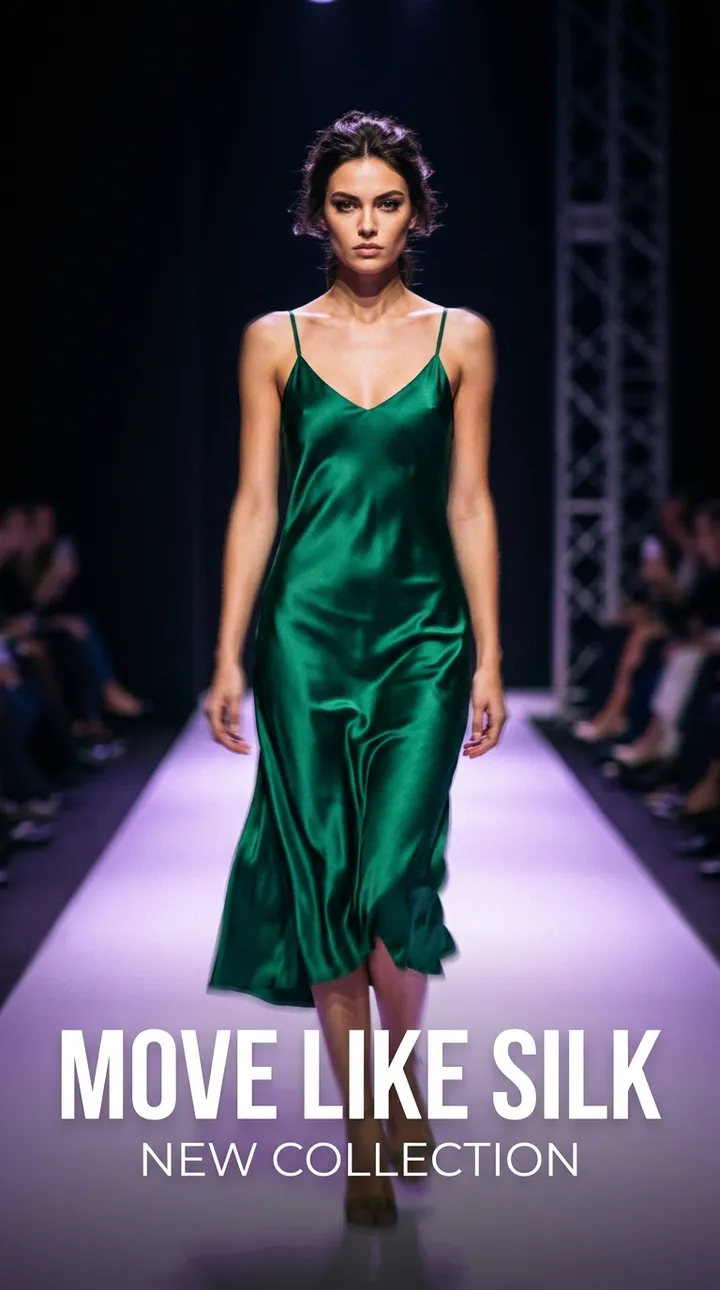
What CamClo AI makes


Channels and how each tool builds a campaign
AdStellar is built for Meta. Its own AI Info page, last updated 23 June 2026, says it supports Facebook and Instagram advertising only, and that Google Ads, TikTok Ads and LinkedIn Ads are not yet supported. Inside Meta it gives you three ways to build: a manual launcher that uses no AI credits, a Bulk Launcher that turns every combination of audiences, images, headlines and texts into ad sets and ads, and an AI Campaign Builder in which seven role-labelled agents (Page Analyzer, Structure, Targeting, Creative, Copy, Budget and Director) assemble a campaign from your past Meta results, with a written rationale for each choice.
CamClo AI's Ad Autopilot runs Meta campaigns on Facebook and Instagram and Google Ads campaigns across Search, Performance Max and Demand Gen from the same workspace, with the same approval flow, guardrails and reporting. It starts from your website and the result you want, researches your market and account history, and reads the long-running ads (still live after 30 days) of up to five established brands in your category before it writes the plan. You review the plan, it prepares the creative and copy, and every campaign publishes paused, so nothing spends until you choose to start delivery.
Which approach suits you
- Large Meta testing matrices: AdStellar. Its Bulk Launcher multiplies every variant you add, and its help center warns that Creative Testing Mode, which puts each ad in its own ad set, multiplies the total daily budget too.
- A focused campaign with fresh creative, on Meta and Google: CamClo AI. The plan splits one budget across a small number of ad sets and markets so each can learn, and the same agent keeps watching after launch.
- Launching from a conversation: both. AdStellar's Agent builds and launches from chat, and CamClo AI can take a campaign from chat to a paused launch on Meta or Google.
For a wider look at the category, see our guide to Facebook ads automation.
Making the ads: product photos, remixes and clones
Both tools make ads, but they start from different places. CamClo AI starts from your product. AdStellar can start from a product URL too, but much of its workflow builds on your account history and on ad formats you point it at.
CamClo AI Image Ads take a product link or your product photos and write the concept, the copy and the on-image text, at 1 credit per image, with up to eight variations or a five-slide carousel per run. Video Ads offer 15 formats, including UGC, UGC Virtual Try-On, Testimonial, POV, TV Spot and Yapper, rendered on Seedance 2.0 (4 to 15 seconds) or Seedance 2.5 (4 to 30 seconds) at 480p, 720p or 1080p. When a campaign expands into a new country, localized versions rewrite both the ad copy and the text on the image.
Remix Ads is CamClo AI's answer to ad cloning. You find a reference ad through the Meta, TikTok, Google or LinkedIn ad libraries, or upload one, and CamClo AI reads its structure and builds a new image or video ad for your product. Finished videos run up to 90 seconds, and the speech and on-screen text follow the reference's language unless you ask for another one.
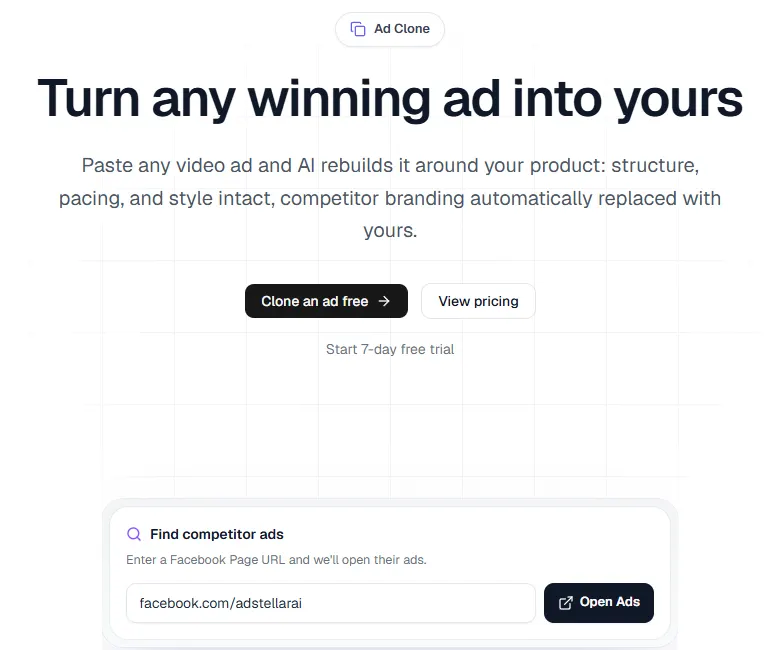
AdStellar makes image ads (about 100 credits each), video ads (at its baseline rate, from 2,800 credits for up to 10 seconds to 16,800 for 60 seconds; premium models cost more) and talking-avatar UGC ads from a library of AI presenters or a custom AI actor, with a lip-sync final render and an editor for trims, captions and voiceovers. Its Ad Clone reads a video ad's scene structure, script and visual style and rebuilds it around your product, and AdStellar says it detects and replaces the original brand's logos and messaging. Its AI Info page notes that creative generation needs product images or reference assets as input.
In our test, described below, AdStellar's generated square image added a logo we had asked it to leave out, and its agent-built campaign used five existing graphics from the account's library rather than new creative.
Approvals, guardrails and tracking
Both tools let an AI act on your ad account, so the controls matter as much as the features.
CamClo AI
- Three modes: Observe (recommendations only), Co-pilot (every change waits for your approval, in the app or straight from the email) and Autopilot (routine actions inside your limits). New campaigns start in Co-pilot.
- Limits enforced in code: daily and monthly spending caps the agent cannot exceed, budget increases of 20% or less per step, and bigger moves such as new spend, targeting changes or new markets always come back to you. The agent pauses rather than deletes.
- A backstop on Meta: a stop-loss rule installed on Meta's own servers keeps working even if CamClo's systems are down, and one kill switch pauses the agent across the account.
- Tracking before spend: a tracking check runs before launch, every ad carries URL tags for source, campaign, ad and placement, and server-side sales from Shopify, WooCommerce, BigCommerce, Webflow, Stripe or Razorpay are sent to Meta and Google with each sale counted once.
- Receipts: every agent action is logged with a timestamp and the reason for it.
AdStellar
- AI Media Buyer: runs suggest-only, so you approve each move, or acts on its own within safety caps and daily limits, and AdStellar describes its actions as reversible.
- Tasks and rules: scheduled Agent tasks propose actions as Confirm or Cancel cards by default and are metered in credits like a chat turn; deterministic Auto rules can act automatically and run for free.
- Slack: the agent posts proposals to a Slack channel and takes approvals there.
- Publishing: campaigns from the launcher publish inactive, so you can review them in Meta Ads Manager before turning them on.
If you are weighing how much to hand over to an AI, our guide to AI media buyers covers what to check first.
How the pricing works
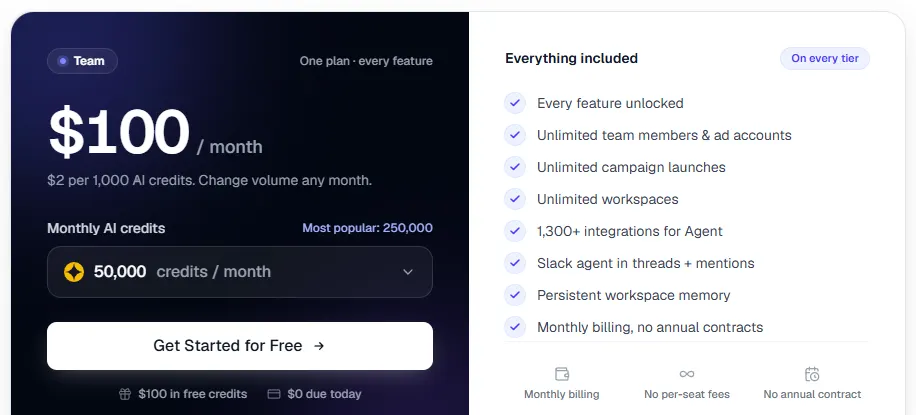
AdStellar sells one plan with every feature. You choose a monthly credit volume, from $100 for 50,000 credits up to $10,000 for 5,000,000, at $2 per 1,000 credits. Credits pay for AI work: about 100 per image, 2,800 to 16,800 per video by length at the baseline rate (premium video models cost more), about 100 per AI campaign launch and up to 200, 700 or 1,700 per agent message depending on the mode. Manual campaign builds use no credits, and monthly credits expire 60 days after they are granted.
CamClo AI plans start at $49 a month for 150 credits (Creator), with Studio plans from $99 (330 credits) to $999 (5,000 credits) a month. An image ad costs 1 credit and a 15-second video ad on Seedance 2.0 costs 10, 20 or 40 credits at 480p, 720p or 1080p. Ad Autopilot is priced per managed campaign: 80 credits for each 30 days, covering the plan, pre-flight checks, publishing and daily management, or pay as you go at 3 credits for each day the agent works, with quiet days free. It is never a percentage of your ad spend. Full details are on the CamClo AI pricing page.
CamClo AI can seem a little expensive next to a single tool, but the credits cover more than a raw output: the plan, the creative and the daily management with approvals.
What we found when we tested it
Hands-on test, 11-12 September 2026
The CamClo team signed up for AdStellar's trial and tested it on a connected Meta ad account on 11 and 12 September 2026. Every campaign we published was created paused and never delivered, so these findings cover setup, building and publishing, not ad results.
- Sign-up. When we started the trial on 11 September 2026, checkout asked for card details, then granted 50,000 credits with $0 due and $100 a month quoted after seven days.
- An AI-built campaign needed repairs. On 12 September 2026 we gave its agent a vague brief: launch a sales campaign for a new collection and keep it paused. It asked which creative to use rather than guessing. Its first build preview then had 10 ad sets and 50 ads, although it had recommended one broad ad set, and some interest groups had nothing to do with the store, such as music genres. The agent said it could not read the preview it had built, and it rebuilt the campaign as one ad set with five ads only after we described the problems. The published campaign used the same headline and text on all five ads, sent every ad to the homepage, carried no URL tags, and its ad set was named "All genders" while the saved targeting was a single gender.
- Two AI builds failed. On 11 September 2026, two AI Launch builds from a detailed brief both stopped with an error code and produced no draft. No credits were deducted for either attempt.
- Manual publishing worked, with some differences. On 11 September 2026 a manual launch created a campaign, ad set and ad in a paused state, as documented. Reading them back from Meta showed the start and end times had landed 9.5 hours later than the midnight times we entered (the form labelled times in Eastern Time, not the ad account's time zone), and a description we left blank had been filled with "Learn more about our products".
- Useful safety touches. On 11 September 2026 the video tool showed its rewritten prompt for approval before rendering, which let us reject a change we had not asked for, and when that video later timed out, its 3,360 credits were refunded automatically.
- What things cost. Analysis replies in Standard mode cost 571 and 700 credits; one generated image cost 67 credits and a text edit to it 100. The vague-brief campaign above used 3,240 credits in total, about $6.48 at the published $0.002 per credit, including 100 for the AI launch.
For reference, the campaign CamClo AI had built earlier for the same store, with the owner's input rather than a vague brief, used a distinct message for each ad, product and collection pages as destinations, and dynamic URL tags that include the campaign and placement.
Pricing: CamClo AI vs AdStellar
| CamClo AI | AdStellar | |
|---|---|---|
| Entry plan | Creator: $49 a month with 150 credits (yearly billing also offered) | Team: $100 a month with 50,000 credits, billed monthly with no annual contract |
| What the entry plan includes | 150 credits a month across the AI Suite and the Ad Studio (Image Ads, Video Ads, Remix Ads) | Every feature, unlimited team members, ad accounts, workspaces and campaign launches, a Slack agent and 1,300+ Agent integrations |
| Higher plans | Studio from $99 a month (330 credits) up to $999 a month (5,000 credits) | Same plan with more credits, from $150 (75,000) up to $10,000 a month (5,000,000); $500 for 250,000 is marked most popular |
| Free trial | 7-day free trial with 20 credits | 7-day free trial with $100 in credits (50,000), $0 due today; starting paid straight away adds $200 (100,000) in bonus credits that never expire |
| Running campaigns with AI | 80 credits per managed campaign for each 30 days, or pay as you go at 3 credits per day the agent works; campaign chat replies are metered separately by usage | About 100 credits per AI launch, manual launches free; agent messages up to 200, 700 or 1,700 credits by mode; Auto rules free |
| One image ad | 1 credit per image | About 100 credits per image on the default model (about $0.20); edits and resizes 100 credits each |
| A 15-second video ad | 10, 20 or 40 credits at 480p, 720p or 1080p (Seedance 2.0); Seedance 2.5 runs up to 30 seconds | 4,200 credits for up to 15 seconds at the baseline rate (about $8.40), up to 60 seconds for 16,800; premium models cost more |
AdStellar prices are from adstellar.ai/pricing, its AI Info page and its Plans, Billing, and AI Credits help page, read in US dollars. CamClo AI prices are from camclo3d.com/pricing on the same date. On both tools, ad spend is billed separately by Meta or Google to your own ad account.
Switching from AdStellar to CamClo AI
- 1
Before you leave AdStellar, note your best creatives, headlines and audiences from AI Insights and save copies of the images and videos you want to keep.
- 2
Start the CamClo AI 7-day free trial with 20 credits.
- 3
Add your products by pasting a product page link, then make fresh image and video ads in the Ad Studio, or use Remix Ads on an ad format that worked for you.
- 4
Open Ad Autopilot, connect your Meta ad account and, if you run search, your Google Ads account, then review and approve the campaign plan. Campaigns publish paused until you start delivery.
- 5
Campaigns AdStellar launched stay in your Meta account. Pause them in Meta Ads Manager once the new campaigns are running, then cancel AdStellar before its next billing date.
Try CamClo AI on your own products
Start with a 7-day free trial and 20 credits.
Start your free trialFrequently asked questions
Is CamClo AI a good AdStellar alternative?+
Yes, for most ecommerce and fashion brands. CamClo AI covers the same core job as AdStellar, making ads and launching and managing campaigns with AI, and adds Google Ads (Search, Performance Max and Demand Gen), fashion tools such as a UGC Virtual Try-On video format, virtual try-on and model swap, Remix Ads up to 90 seconds, and guardrails enforced in code such as budget steps of 20% or less and a stop-loss rule on Meta's servers. AdStellar remains the stronger pick if you only run Meta and mainly want to bulk-launch large variation matrices or use its avatar UGC library.
How much does AdStellar cost compared with CamClo AI?+
AdStellar has one plan, from $100 a month for 50,000 credits up to $10,000 a month for 5,000,000, at $2 per 1,000 credits. An image costs about 100 credits, a video from 2,800 credits, an AI campaign launch about 100 and an agent message up to 200, 700 or 1,700 depending on the mode; manual launches are free. CamClo AI starts at $49 a month for 150 credits (Creator), with Studio plans from $99 (330 credits) to $999 (5,000 credits). An image ad is 1 credit, and Ad Autopilot costs 80 credits per managed campaign for each 30 days, or 3 credits per day the agent works.
Does AdStellar support Google Ads?+
No. AdStellar's AI Info page, last updated 23 June 2026, says it supports Meta (Facebook and Instagram) advertising only and that Google Ads, TikTok Ads and LinkedIn Ads are not yet supported. CamClo AI's Ad Autopilot runs both Meta and Google Ads campaigns from the same workspace, with the same approvals and guardrails.
Can CamClo AI recreate a competitor's ad like AdStellar's Ad Clone?+
Yes, with Remix Ads. You find a reference ad through the Meta, TikTok, Google or LinkedIn ad libraries, or upload one, and CamClo AI reads its structure and builds a new image or video ad for your product. Remixed videos can run up to 90 seconds and keep the reference's spoken language unless you ask for another. AdStellar's Ad Clone works from a pasted video ad or a Facebook Page's ads, and AdStellar says it replaces the original brand's logos and messaging with yours.
Does AdStellar have a free trial?+
Yes. AdStellar offers a 7-day free trial with $100 in credits (50,000) and $0 due today; when we signed up on 11 September 2026, its checkout asked for card details. CamClo AI offers a 7-day free trial with 20 credits.
Will either tool change my ad budget without asking?+
CamClo AI campaigns start in Co-pilot mode, where each change waits for your approval in the app or by email. In Autopilot mode it runs routine actions inside your daily and monthly caps, raises a budget by no more than 20% at a time, and still sends bigger moves such as new spend, targeting changes or new markets back to you. AdStellar's scheduled tasks propose actions for approval by default, its AI Media Buyer can run suggest-only or act on its own within safety caps, and its deterministic Auto rules can act automatically.
Which is better for fashion and apparel brands?+
CamClo AI. Its video formats include UGC Virtual Try-On, where the product is held up and then worn, and the same account includes product photography, virtual try-on and model swap for catalogue images. Ads are built from your real product photos, and Ad Autopilot runs them on Meta and Google Ads. AdStellar is a general Meta ads platform, and its feature pages list no fashion-specific tools.