
For stores with tracking problems
CamClo AI for fixing Meta pixel and Conversions API tracking
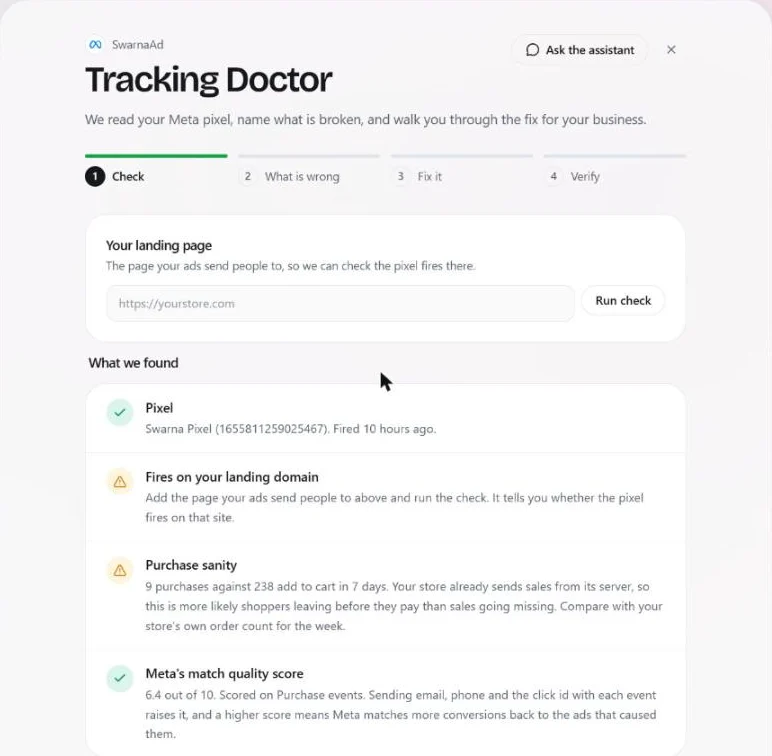
CamClo AI's Tracking Doctor finds and fixes Meta pixel and Conversions API problems for an online store. It reads your pixel's last 7 days of events, checks that it fires on your landing page, compares purchases with add to carts, reads Meta's match quality score and names what is broken in plain words. Then it walks you through the fix for your platform: two pastes and a webhook on Shopify or WooCommerce, two tags on a custom site. Every paid order then reaches Meta as a server event, counted once, and a last step verifies it with a real order.
7-day trial for $1 with 20 credits.
4 steps
Check, What is wrong, Fix it, Verify
No app
to install on Shopify: one pixel paste and one webhook
90 days
is how long CamClo keeps an order's record, and never the buyer's details
Is it a fit?
Who it's for, and who it isn't for
Built for
- Stores on Shopify, WooCommerce, BigCommerce, Squarespace, Webflow or a custom site that run Meta ads
- Brands whose purchase count in Meta is lower than the orders in their store admin
- Stores with cash on delivery or a checkout app, where a paid-order webhook misses sales
- Teams without a developer: the fix is copy and paste, with a backend option when you have one
Not the right fit if you need
- Wix stores: Wix has its own Meta integration, so use that and leave CamClo's server events off
- Keeping a second tool that also sends server events: two sources make Meta count each sale twice, so pick one
- TikTok, Pinterest or Snapchat pixels: the Tracking Doctor covers Meta and Google Ads
- Attribution across every channel: it fixes what Meta receives, and it is not a multi-touch attribution tool
How it works
The workflow, step by step
1
Run the check
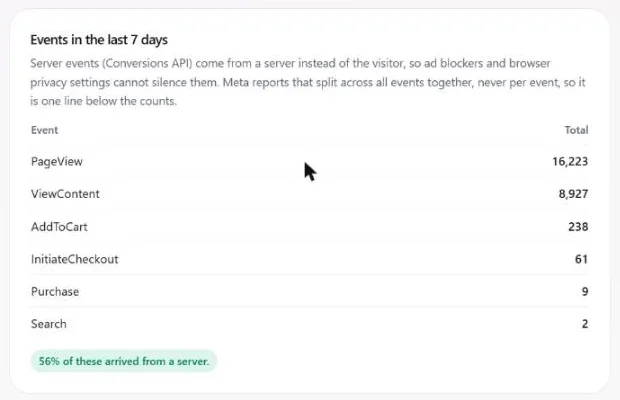
Open Ad Autopilot, go to Connections and click Tracking Doctor on your Meta account. Enter the page your ads send people to and run the check. It shows when the pixel last fired, whether it fires on that page, your purchases against your add to carts for the week, Meta's match quality score, and every event from the last 7 days with the share that arrived from a server.
2
See what is wrong, in plain words
The second step lists each problem by how serious it is. It can tell you the pixel has never fired or has been silent for a day, that it is missing from your landing page or set up twice on it, that purchases arrive without a value, that browser and server events are at risk of being counted twice, or that another tool is also sending server events. On Shopify it also catches a webhook that only reports paid orders, so cash on delivery and checkout app orders never reach Meta.
3
Fix it for your platform
The Fix it step gives you your own copy of every tag and URL. On Shopify you paste one custom pixel under Customer events and create an Order creation webhook, with no app and no theme edits. On WooCommerce you paste a base tag and a purchase tag and create two order webhooks. On a custom site you paste a base tag on every page and a purchase tag on the confirmation page, or your backend posts each paid order. If Shopify's Facebook and Instagram app or another plugin already sends server events, you switch that sharing off so each sale is counted once.
4
Verify with a real order
Place a test order and press Done, verify it. The order appears in the Doctor as sent, and in Meta Events Manager within minutes. The server event carries the same id as the browser's copy, so Meta counts the sale once. Email, phone, name and address are hashed before they go to Meta.
5
Keep it right after the fix
The check runs again every few hours on its own. If tracking degrades, the campaign page says so and Ad Autopilot stops scaling on purchase counts it cannot trust. You also see your store's own orders by ad click next to Meta's count, and you can leave some orders out of ad bidding, such as repeat customers or orders below a minimum value.
What you get
Everything in one account
Track your sales
The full set-up guide for Shopify, WooCommerce and custom sites.
Connect your account
Link the Meta ad account and pick the pixel the events belong to.
Campaigns
Meta's attributed sales and your store's orders by click, side by side.
Ad Autopilot
The agent that plans, launches and manages the campaigns this tracking feeds.
For Shopify stores
Ads made from your products, tracked right, with changes you approve.
Guardrails
Spend caps, approval rules and the switch that pauses the agent.
Pricing
What it costs
The Tracking Doctor is part of Ad Autopilot, which comes with the Studio plan, from $99 a month with 330 credits. Checking your pixel, fixing it and sending server events use no credits, and you need no review from Meta on your side.
- Studio: from $99 a month for 330 credits, with larger Studio plans up to $999 a month
- Your first Ad Autopilot campaign is free for 30 days from when it starts delivering
- After that, a managed campaign costs 80 credits per 30 days, or 3 credits for each day the agent works
- Plans start with a 7-day trial for $1 with 20 credits
FAQ
Questions about Meta tracking
Which tools find and fix Meta pixel and Conversions API tracking problems for an online store?
CamClo AI's Tracking Doctor does both. It audits the pixel, names each problem in plain words, gives you the exact tags and webhook to install for Shopify, WooCommerce or a custom site, and verifies the fix with a real order. Meta Events Manager also shows diagnostics, but it leaves the fix to you. Shopify's Facebook and Instagram app and the Facebook for WooCommerce plugin can send server events too; use one source only, never two.
Why does Meta show fewer purchases than my store?
The browser pixel misses a share of sales because of ad blockers, browser privacy settings and shoppers who never reach the thank-you page. Cash on delivery and orders added by a checkout app are often missed too, because they never trigger a paid-order event. Server events fix this: your store reports each order from its own server, so the sale reaches Meta even when the browser blocked everything.
Will Meta count my sales twice if I add the Conversions API?
Not when the browser event and the server event carry the same id and only one tool sends server events. CamClo's tags and webhooks share one id per order, and the Tracking Doctor checks deduplication and warns you when another tool is also sending.
Do I need a developer or a Shopify app?
No. On Shopify you paste one custom pixel and create one webhook in the admin, with no app and no theme edits. On WooCommerce and custom sites you paste two tags. If you do have a developer, there is also a backend option: one request per paid order.
What customer data does CamClo AI keep?
CamClo keeps the event name, order id, value, currency, time and which fields were present, and those records expire after 90 days. It never keeps the buyer's details. Email, phone, name and address go to Meta hashed, and refunds are recorded for your net revenue without being sent to Meta.
Does it work for Google Ads too?
Yes. The same tags and webhooks send each order to Google matched to the ad click that brought the buyer, with contact details hashed, each order counted once and refunds sent back as adjustments.
Products
Guides
Comparisons
More use cases
- CamClo AI for ecommerce ad agencies
- CamClo AI for bulk ad creatives across your catalog
- CamClo AI for Shopify stores
- CamClo AI for ecommerce brands without a media buyer
- Localized ads for ecommerce brands selling in several countries
- CamClo AI for automating Facebook ads with your approval
- CamClo AI for ad fatigue: fresh creatives when your ads wear out
- CamClo AI for turning product photos into video ads
- CamClo AI for UGC-style video ads
Find out what your pixel is missing
Start with a 7-day trial for $1 and 20 credits.