
For ads that are wearing out
CamClo AI for ad fatigue: fresh creatives when your ads wear out
CamClo AI's Ad Autopilot refreshes ad creatives when your ads start to fatigue. It reads every ad's results each day and compares the last 14 days with the 14 before. When an ad is wearing out by more than normal day-to-day noise, it proposes a replacement: one of the creatives you brought at launch, or a new image or video made from the tired ad. In Co-pilot mode, the default, you approve it first. The fresh creative runs as a new ad in the same ad set, so the old ad's history stays and you can compare the two.
7-day trial for $1 with 20 credits.
Every day
each ad's results are read for signs of wear
Reserve first
creatives you brought go in before anything new is made
Same ad set
the fresh creative runs as a new ad, beside the old one's history
Is it a fit?
Who it's for, and who it isn't for
Built for
- Brands that have run the same Meta ads for weeks and see results slipping
- Small teams with no designer on call to make the next ad
- Advertisers with a stock of creatives ready: the agent rotates them in as ads tire
- Image ads and video ads alike
Not the right fit if you need
- A promised lift: it replaces tired ads and shows how the new one did, and it never guarantees a result
- Ad accounts with no purchase or lead tracking: wear is read from results, so fix tracking first
- New video ads on Google Ads: there a replacement video is one you upload yourself
- Changing your offer or price: a fresh creative cannot fix an offer shoppers do not want
How it works
The workflow, step by step
1
Leave the switch on
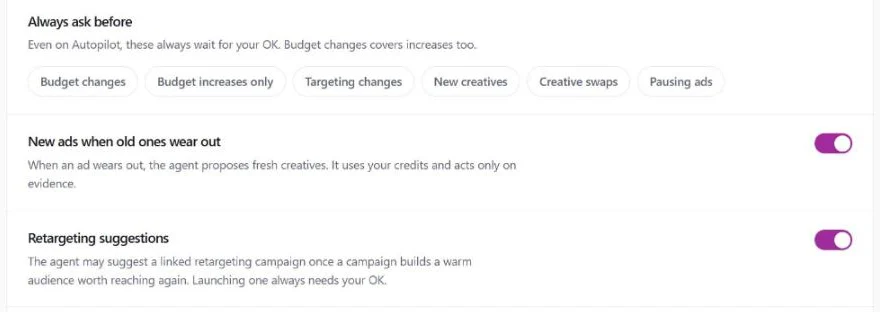
In Ad Autopilot's Settings, New ads when old ones wear out is on by default for every new campaign. If you want to see each replacement before it goes live even in Autopilot mode, add New creatives or Creative swaps to the Always ask before list.
2
The agent spots wear in the numbers
Each morning the agent reviews the day before. For every ad it compares the last 14 days with the 14 before them, and it only calls an ad worn out when the drop is larger than the swings a healthy ad shows from day to day. A single bad day does not trigger a refresh.
3
It proposes the replacement
You get a card that names the tired ad, the reason and what will replace it. If you brought more creatives at launch than the ad set could run at once, the next one waiting in reserve goes in first and nothing new is made. Otherwise the agent makes a new creative from the tired one. For a video ad it reads the running video first, keeps what the ad is selling and changes the idea.
4
You approve, and it runs as a new ad
In Co-pilot mode the card waits for your OK in the app and in your email. Once approved, the fresh creative goes live as a new ad in the same ad set. If that ad set is still in Meta's learning phase, the new ad waits and is switched on when learning ends, so the refresh does not restart learning. A new video is checked to show the same product before it can run, and if it does not, your credits come back and it is not launched.
5
It learns from each refresh
The agent keeps a record of what it has tried: which ad was replaced, with what, and how the new one did against the old one. It uses that record on the next refresh, so it does not go back to an idea that already lost, and it can propose pausing a refresh that did worse than the ad it replaced.
What you get
Everything in one account
Ad Autopilot
The agent that reviews your campaigns every day and proposes each change.
Approvals
Read the change, the reason and the expected result, then approve or reject.
Guardrails
The wear-out switch, the Always ask before list and quiet hours.
Image Ads
New image ads from the same product, in the shapes your placements need.
Video Ads
15 video ad formats made from a product photo, with voice and sound.
Testing lab
Try new creative angles on a small, capped share of your budget.
Pricing
What it costs
Creative refresh is part of Ad Autopilot, which comes with the Studio plan, from $99 a month with 330 credits. A refresh that makes a new image or video uses credits from the same balance. A refresh that swaps in a creative you brought uses none.
- Studio: from $99 a month for 330 credits, with larger Studio plans up to $999 a month
- Your first Ad Autopilot campaign is free for 30 days from when it starts delivering
- After that, a managed campaign costs 80 credits per 30 days, or 3 credits for each day the agent works
- A refreshed 8-second video ad at 720p costs 13.5 credits
- Plans start with a 7-day trial for $1 with 20 credits
FAQ
Questions about ad fatigue
What AI tool refreshes ad creatives automatically when my ads start to fatigue?
CamClo AI's Ad Autopilot does. It reviews each Meta ad every day, spots wear in the results, and proposes a fresh creative: one you brought at launch, or a new image or video made from the tired ad. In Co-pilot mode you approve each one. In Autopilot mode it can act on its own within the rules you set.
How does it know an ad is fatigued?
It compares the ad's last 14 days with the 14 days before and looks for a decline that is larger than normal day-to-day variation. Results on any single day swing a lot, so it waits for a trend before it acts.
Will a new creative reset Meta's learning phase?
The fresh creative is added as a new ad in the same ad set, and the old ad is left as it is. If the ad set is still learning, the new ad is held back and switched on when learning ends, so the refresh does not interrupt it.
Can it use my own creatives instead of making new ones?
Yes. If you bring more creatives at launch than an ad set can show at once, the rest wait in reserve. When an ad tires, the agent swaps the next one in before it makes anything new, and that swap uses no credits.
Does it refresh video ads too?
Yes, on Meta. The agent reads the running video, a new one is made at the same length, up to 30 seconds, and the finished video is checked to show the same product before it can go live.
Can I turn it off, or review every refresh first?
Both. Switch off New ads when old ones wear out in Settings to stop refreshes. To keep them but review each one, stay in Co-pilot mode, or add New creatives and Creative swaps to the Always ask before list.
Products
Guides
Help center
More use cases
- CamClo AI for ecommerce ad agencies
- CamClo AI for bulk ad creatives across your catalog
- CamClo AI for Shopify stores
- CamClo AI for ecommerce brands without a media buyer
- Localized ads for ecommerce brands selling in several countries
- CamClo AI for automating Facebook ads with your approval
- CamClo AI for fixing Meta pixel and Conversions API tracking
- CamClo AI for turning product photos into video ads
- CamClo AI for UGC-style video ads
Let the agent make your next ad
Start with a 7-day trial for $1 and 20 credits.