


Table of Contents
Ad fatigue is what happens when the same people have seen your ad so many times that they stop responding to it: clicks dry up and every sale or lead gets more expensive. To tell it from a bad week, put the ad's most recent 14 days against the previous 14, and call it worn out only when the decline is larger than the ups and downs the ad shows when nothing is wrong.
We learned that the slow way. We build Ad Autopilot, the agent in CamClo AI that manages ad campaigns, and spotting a tired Meta ad is one of its daily jobs. Our first fatigue rule looked like the ones most advertisers use. Once we ran it against the normal ups and downs of real ad history, it called a healthy ad tired about one week in three.
What Meta says here comes from Meta's Business Help Center. The test results come from our own ad history and our own rules, so treat them as one advertiser's findings. Here is how we checked.
What ad fatigue is, in Meta's words
Meta calls it creative fatigue. Its Business Help Center says it "occurs when an audience has seen the same creative too many times", and that people may then be less likely to engage, which can lead to a higher cost per result. Meta's glossary of reservation terms calls the same effect ad fatigue.
Once a campaign is running, the Delivery column in Ads Manager can flag an ad set or ad as Creative limited (cost per result higher than the ads you ran in the past, but less than twice as high) or Creative fatigue (twice as high or more). Meta weighs every recent showing of the ad's image or video, including showings in other campaigns from your Page, and can warn you before launch if fatigue may set in within the first 7 days. The catch: Meta's page says the feature is only available for ad sets with one creative, and not for some ad types such as dynamic creative. If your ad set runs several ads, you may never see the label, so you need a check of your own.
The usual signs, and why one alone misleads
Most advice names three signs: frequency going up, click rate going down and cost per result going up. All three are worth watching, and each also moves for reasons that have nothing to do with a tired ad. Frequency, the average number of times each person saw your ad, depends on your budget, audience size and schedule, Meta's glossary says, so a budget raise on a small audience lifts it on its own. Click rate swings from day to day; the next section has the size of those swings in our data. Cost per result can rise as a campaign runs because, in Meta's words, the delivery system "seeks the highest volume opportunities first" and may move on to more expensive ones when those run out, depending on your bid strategy.
Meta's own advice points the same way. Its glossary says to watch frequency together with results: if performance drops as frequency rises, the audience may be experiencing ad fatigue. Its page on performance swings says to judge a campaign over at least a full week, because some variation is normal.
Our test: how often a fatigue rule cries wolf
Before we let our agent replace anyone's ads, we measured how much results move when nothing is wrong. The data: 14 months of Meta results from two small ecommerce accounts of our own. For each number we measured the typical change from one day to the following day, beyond what chance in small counts would produce on its own.
| Number | Day-to-day movement with nothing wrong |
|---|---|
| Purchases | 33% to 46% |
| Add to carts | 39% to 51% |
| Click-through rate | 23% to 28% |
Our own ad history: two small ecommerce accounts, 14 months. Larger accounts are likely steadier, and your numbers will not match ours.
Then we built simulated ads with a constant true performance, layered that measured noise on top, and ran fatigue rules over them.
The old rule compared one week with the week before and called an ad fatigued when its click rate fell by 10% or more, or its cost per result rose by 15% or more. On perfectly steady ads, noise alone crossed those bars about one week in three. A rule like that replaces a good ad every few weeks.
The new rule compares the last 14 days whose results have settled with the 14 days before them. A fall in click rate or a rise in cost per result counts only when it goes past the band that normal noise reaches and is still at least as large as the old bars. We set that band so a steady ad crosses it by chance about one time in ten. On the same simulated steady ads, false alarms came down from about one week in three to about one in ten.
Two weeks hold twice the clicks and sales of one, so luck evens out more, and the band widens for an ad with few sales, because small counts swing more. With only 14 to 27 days of history, the agent compares 7 days with 7; with fewer than 14, it does not judge wear at all. These simulations rest on noise from two small accounts, so what we would trust is the direction: a single day or a single week is noisier than most fatigue rules assume.
Sign, what else it can mean, what to check
| Sign | What it can mean besides fatigue | What to check |
|---|---|---|
| Frequency rising | A budget raise or a small audience: Meta says frequency depends on budget, audience size and schedule. | Whether results fell over the same days. If they held, the audience is not tired yet. |
| Click rate falling | Noise: it moved 23% to 28% a day in our data with nothing wrong. A fall shared by every ad in the ad set points to the season or the offer. | The last 14 days against the 14 before, and the other ads in the ad set. |
| Cost per result rising | Meta says costs can rise as the delivery system uses up cheaper opportunities. An ad set in learning is also less stable. | The Delivery column (does it say Learning?) and the Last significant edit column. |
| Results drop off a cliff in one day | Tracking or delivery. Wear builds over days. | Missing purchases in Events Manager, and errors in the Delivery column. |
| Creative limited or Creative fatigue status | Meta's own check: cost per result above your past ads, weighing recent showings of the ad. | Confirm the two-week trend, then add a new ad without editing the old one. |
| One bad day or a bad weekend | Noise: purchases moved 33% to 46% a day in our data. | Nothing yet. Meta suggests judging over at least a full week. |
The day-to-day figures are from our own ad history. The rest is from Meta's Business Help Center, in our words.
How to replace a tired ad without making things worse
In our experience, most of the damage in a refresh comes from how the replacement goes in. These are the rules our agent follows, and each works by hand too.
1. Use the creatives you already have first
In Ad Autopilot, each ad set shows as many of your creatives as its budget can carry, strongest first, and holds the rest back. When one of the running ads tires, the agent swaps in the next held creative. That costs no credits, because nothing is generated, and the agent only generates a new creative once that queue runs out. By hand, keep a short list of approved spares for each ad set.
2. Add the new ad beside the old one, and leave the old one alone
The tempting shortcut is to edit the tired ad and replace its picture. Meta's pages give three reasons to think twice:
- Once you change any element of a published campaign, Meta says the new version replaces the old one, the change cannot be reversed, and there is no way to tell the metrics from before the edit apart from those after it.
- Changing the creative of a running ad starts a new ad review.
- Any change to ad creative is on Meta's list of significant edits, which can send the ad set back into the learning phase.
Meta's fatigue recommendation is to create another ad with a new image or video that is materially different from the original, and it notes that keeping the original ad active, rather than pausing it, may maximize results. Our agent works that way. The fresh creative goes into the same ad set as a separate ad, and the tired ad stays as it was, numbers and all. Both then run to the same audience, so the comparison is fair.
3. Do not switch on a new ad while the ad set is still learning
Adding a new ad is also on Meta's list of significant edits, so a fresh ad can restart learning too. Meta calls the learning phase necessary and testing new creative essential, so the choice is about timing. It says an ad set usually leaves learning after about 50 results in the week after its last significant edit, and that editing during learning resets it.
So our agent checks the ad set first. If it is still learning, the new ad is added but kept switched off, and the agent switches it on once learning ends. An ad set marked Learning limited is not about to finish learning, so the agent does not hold the new ad there; we explain that status in our post on Learning limited. One lesson from building this: an early version held new ads and never switched them on, because nothing came back to check. If you hold an ad by hand, set a reminder.
4. Keep the product, change the approach
A refresh is a new way into the same sale. When our agent refreshes an image ad, it asks for the same product, faithful down to its colours, shape and logo, in a new scene. For a video ad, it first studies the video that is running, holds on to what it sells, and looks for a different angle. Before a new video can go live, it is checked for the same product; a video that fails is never launched, and its credits are refunded.
5. Log every swap and its result
Note which ad you replaced, the replacement, the date, and how the replacement performed next to the original two weeks later. Our agent reads its own log of past swaps before it plans the next one. It avoids angles that already lost, and if a replacement underperforms the ad it replaced, it can suggest pausing it. A proposal the owner turns down stays off the table for 7 days.
When a new creative will not help
Broken tracking. If purchases stop reaching Meta, cost per result jumps and every ad looks tired at the same time. Check your pixel before you touch the creative: our guide to Meta Pixel Helper shows how, and our page on Meta pixel and Conversions API tracking covers the check our agent runs.
An offer people do not want at that price. A fresh image of the same offer gets the same answer. If two or three fresh ads in a row lose to the tired one, look at the price, the offer and the page the ad sends people to.
A two-week fatigue check you can do in a spreadsheet
- Export each ad's daily results for the last 28 days: impressions, clicks, spend, results and frequency. Leave out the latest day or two if their numbers still change when you refresh the report.
- Split the days into two blocks of 14. For each ad and block, add up the columns, then work out click rate (clicks divided by impressions) and cost per result (spend divided by results).
- Note the change from the older block to the newer one, in percent.
- For a rough measure of normal swing, split the older block into two weeks and compare them with each other. A real fall should be clearly bigger than that gap.
- Call the ad worn out only when the fall clears that bar and frequency rose over the same days.
- Check the other ads in the ad set. If they all fell together, look at the season, the offer and tracking first.
- With less than four weeks of history, compare 7 days with 7 and treat the answer as weaker. Under two weeks, wait.
- Before adding a replacement, read the ad set's Delivery column. If it says Learning, wait.
Where CamClo AI fits
Ad Autopilot runs this check every day
CamClo AI creates image and video ads for ecommerce brands and agencies. Its Ad Autopilot plans, launches, monitors and optimizes Meta (Facebook and Instagram) and Google Ads campaigns. Each morning it reviews the day before, sets the latest 14 days against the 14 before them, and looks for wear bigger than normal day-to-day noise. When it finds a tired ad, it proposes the replacement: one of the creatives you brought at launch, or a new image or video made from the tired ad.
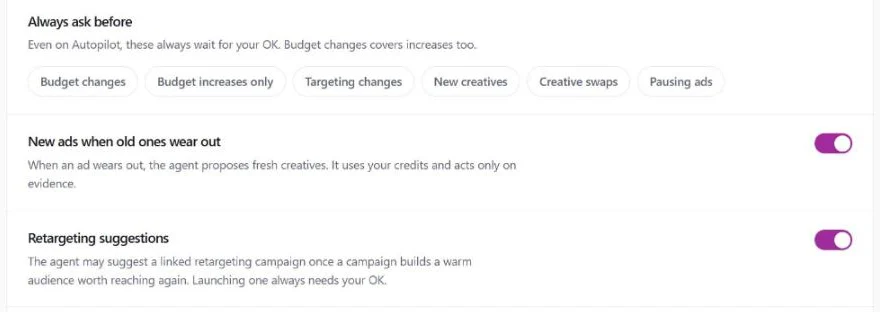
In Co-pilot mode, the default, the owner approves each replacement. Its card shows the tired ad, why it was flagged and the proposed replacement, then holds until you approve in the app or from your email. In Autopilot mode the agent can act on its own within your rules, and you can keep New creatives and Creative swaps on the Always ask before list. More on automation with approval, the full flow on our ad fatigue page, and the wider picture in Facebook ads automation.
It reads wear from results, so it needs working purchase or lead tracking. Ad Autopilot comes with the Studio plan, from $99 a month with 330 credits, and your first campaign is free for 30 days from when it starts delivering. A refresh that makes a new image or video uses credits; one that swaps in a creative you brought uses none.
How we checked
We read Meta's Business Help Center pages on creative fatigue recommendations, the glossary of reservation terms, pausing an ad set by frequency, fluctuations in ad performance, the learning phase, significant edits, editing campaigns and ads in review. The noise figures and rule tests come from our own Meta ad history and simulations built on it; with fewer than 200 purchases in the sample, purchases are the shakiest of the three numbers. The agent's rules are described from its own code and our help pages.
Frequently asked questions
What is ad fatigue?
Ad fatigue is when the same people have seen an ad so many times that they respond to it less, so clicks fall and each result costs more. Meta calls it creative fatigue and describes it as an audience seeing the same creative too many times. It builds over days and weeks, which is how you tell it apart from a single bad day.
What is creative fatigue?
Creative fatigue is Meta's name for ad fatigue. In Ads Manager, the Delivery column can show Creative limited when an ad's cost per result is higher than your past ads but less than double, and Creative fatigue when it is double or more. Meta weighs recent showings of the ad's image or video, including showings in other campaigns from your Page. Meta says the feature is only available for ad sets with one creative, and not for some ad types such as dynamic creative.
How do I know if my Facebook ad is fatigued?
Put the ad's latest 14 days next to the 14 days before them. Call it fatigued only when its click rate fell or its cost per result rose by more than its normal swings, ideally while its frequency was rising. If the ad set has a single creative, Ads Manager may also show Creative limited or Creative fatigue. One bad week is not enough: in our tests, a rule that compared one week with the week before flagged a healthy ad as tired about one week in three.
What frequency causes ad fatigue?
None of Meta's help pages we read gives a frequency at which fatigue starts. Meta's creative fatigue status is based on recent showings of the ad and on its cost per result against your past ads, and its glossary says frequency may average 1 to 2 per ad set or run much higher, depending on budget, audience size and schedule. Meta's help page on automated rules uses a frequency above 2 as an example of a rule you can set up; it does not present 2 as the point where fatigue begins. Watch frequency together with results: a rising frequency with steady results is not fatigue yet.
How often should I refresh ad creative?
There is no fixed schedule, and Meta's pages on fatigue and the learning phase give none. Meta advises against unnecessary edits and also calls testing new creative essential. We refresh on evidence: CamClo AI's Ad Autopilot reads every ad's results each day, proposes a replacement only when the two-week comparison shows real wear, and holds the new ad while the ad set is still learning. Keeping a few approved creatives ready for each ad set means you can swap one in the day an ad tires.
How do you fix ad fatigue?
Add a new ad with a materially different image or video to the same ad set, and keep the old ad running while you compare the two. Meta's recommendations also include expanding your audience and, for traffic or sales campaigns with a website destination, trying Advantage+ creative. Use creatives you already have first, keep the new ad on the same product, wait until the ad set is out of learning, and record how each swap did. If fresh ads keep losing, check your tracking and your offer.
Does editing an ad fix fatigue?
An edit gives the ad a fresh creative, at a cost. Meta says that once you change any element of a published campaign, the new version replaces the old one, the change cannot be reversed, and the metrics from before and after the edit cannot be told apart. A creative change also starts a new ad review and counts as a significant edit for the learning phase. Adding a new ad beside the old one gives you the fresh creative and keeps both sets of numbers.
Let the agent watch for wear
Ad Autopilot comes with the Studio plan and, by default, asks before it replaces an ad. Plans start with a 7-day trial for $1 with 20 credits.
See plans and the $1 trial