

Table of Contents
Yes, you can run Meta and Google Ads with Claude or ChatGPT, in three ways that differ by how much access you hand over: paste your numbers into a chat, connect the ad account read-only through a connector (an MCP server), or let the assistant make changes through a connector that can write. Pasting needs only an export from Ads Manager or Google Ads; a read-only connection needs a server for the platform and an assistant plan that lets you add it; making changes also needs a server with write tools, a plan that allows write actions, and limits you set on the ad platform's side.
Meta now runs its own ads MCP server for ChatGPT, Claude and Perplexity, and Google documents a Google Ads MCP server for developers. Below: how each assistant connects, what the two servers can change, prompts worth saving, and what the setup leaves to you.
Facts about Claude, ChatGPT, Meta and Google come from their own help centers and developer docs, and their plans and menus change often. Here is how we checked.
Three ways to run ads with Claude or ChatGPT
| Method | What the assistant can do | What you need | What can go wrong |
|---|---|---|---|
| 1. Paste your numbers | Read an export, compare periods, draft ad copy | A report exported from Ads Manager or Google Ads | Stale data; a wrong date range gives a confident wrong answer |
| 2. Connect read-only | Pull live reports and answer follow-up questions | An MCP server for the platform and an assistant plan that lets you add it | An untrusted server can carry hidden instructions |
| 3. Let it make changes | Create campaigns, edit budgets and ads, upload creative | A server with write tools, a plan that allows write actions, limits set on the platform | A wrong instruction you approve spends real money |
Start at level 2 and stay there until you trust the answers.
What an MCP server (a connector) is
MCP stands for Model Context Protocol. Its own site calls it an open-source standard for connecting AI applications to external systems, like a USB-C port for AI apps. Anthropic created it, and Claude and ChatGPT both support it. Meta's help center calls an MCP server a bridge between an AI agent and external systems such as APIs.
Claude calls a server you add a custom connector; ChatGPT calls it a custom MCP server. The server offers tools, each one action such as pulling a report or editing a budget, and some read while others write. You sign in to the ad platform through it, so it reaches the accounts your login can reach.
Claude for marketing: connecting Claude to Meta and Google Ads
Anthropic offers custom connectors in Claude, Cowork and Claude Desktop on the Free, Pro, Max, Ultra, Team and Enterprise plans. The Free plan is limited to one.
- Pro and Max: Customize > Connectors, then + Add, then Add custom connector. Enter a name and the server URL, and click Add.
- Team and Enterprise: an Owner or Primary Owner adds it in Organization settings > Connectors; each member then clicks Connect under Customize > Connectors.
- In a chat: the + button, then Connectors, switches it on.
Claude reaches a custom connector from Anthropic's cloud, so the server must be on the public internet; a server running only on your laptop can be set up in Claude Desktop, and claude.ai cannot reach it. Anthropic's advice: connect only to servers you trust, watch for prompt injection (hidden instructions in what a server returns), and click Allow always on a tool approval only for a tool you trust to run unsupervised. In Research, Claude can call connector tools without asking, so Anthropic suggests turning off tools that can write.
Claude Code for marketing, and Claude in Chrome
Claude Code adds a server in the terminal with claude mcp add --transport http <name> <url>, which suits a weekly analysis you want to rerun. Anthropic also offers Claude in Chrome, an extension that lets Claude read, click and navigate websites, on paid plans. Anthropic calls it still risky and says you remain responsible for every browser action Claude takes for you. We would not point a browser agent at Ads Manager: the ad platforms' own terms govern automated access, and the servers below were built for the job.
ChatGPT for marketing: connectors for Meta and Google Ads
In ChatGPT, adding a server by its URL is a custom MCP server. OpenAI gives it full access, reading and writing, on Business and Enterprise/Edu, and read and fetch access only on Pro; its article does not mention Plus, Go or Free. It works on the web only, and on Business only admins and owners can create and publish one.
The steps: open Plugins, select the plus button, then Add custom MCP server. Enter a name and the server URL, set up sign-in, tick I understand and want to continue, and select Create as a plugin. Install it, then type @ in a new chat and pick it. You don't need to turn on Developer Mode first. ChatGPT may ask you to confirm an action that writes or modifies data, and OpenAI says some especially risky actions may be blocked. OpenAI also lists ChatGPT agent, its earlier browser agent, as no longer available.
Not the same thing: ads inside ChatGPT
Many searches for "ChatGPT ads" or "ChatGPT Ads Manager" mean adverts shown inside ChatGPT. OpenAI began testing them in the US in February 2026 for logged-in adults on the Free and Go tiers. It says ads do not influence ChatGPT's answers and are labeled as sponsored, and that advertisers get only aggregate numbers such as views and clicks. In May 2026 it started a beta self-serve Ads Manager. That is a new place to buy ads, not a way to manage your Meta or Google campaigns.
The servers: Meta Ads MCP and Google Ads MCP
Meta's ads MCP server (the official Meta Ads MCP)
Meta launched Meta ads AI connectors in open beta in April 2026. Its ads MCP server, often searched for as the Facebook Ads MCP, is built and maintained by Meta, which calls it the authorized way to connect AI tools to Meta ads. Meta names ChatGPT, Claude and Perplexity as supported tools. Setup is one URL, https://mcp.facebook.com/ads, added in your AI tool, then a Facebook sign-in to an ad account you have permission to manage. Meta charges nothing extra to connect.
Connected, the agent can pull reports; create and edit campaigns, ad sets and ads; build ad creative from image or video files you upload; manage audiences and catalogs; read signal health; and run A/B tests. New campaigns are created as drafts by default, and actions need your authorization in the AI tool. Someone with full control of the business portfolio can set rules per ad account in Meta Business Suite under Settings > Integrations > Ads MCP server: block Create campaigns or Edit or set budget, or block budgets above an amount. Meta's server enforces them. If that menu item is missing, your account does not have access yet; Meta is rolling it out in phases.
Google's Google Ads MCP server
Google documents a Google Ads MCP server in its Google Ads API developer guide, with the code in Google's googleads organization on GitHub. It is a developer install: a Google Cloud project with the Google Ads API enabled, OAuth credentials, and Explorer, Basic or Standard API access for real accounts (a new project starts on Test access, for test accounts only). It runs on your computer, for example with Claude Code, or on Google Cloud Run, where you add its URL to Claude or ChatGPT as a custom connector.
It lists your accounts and runs Google Ads queries. Its changes are partial: creating assets, uploading video assets and managing labels, each through a propose-and-confirm step, and a read-only mode switches them off. Google states that it cannot create, modify, pause or enable campaigns, ad groups, ads, budgets or bids.
| Question | Meta's ads MCP server | Google Ads MCP server |
|---|---|---|
| Made by | Meta, hosted by Meta | Google; you host it |
| Setup | One URL and a Facebook sign-in | Google Cloud project, Google Ads API access and OAuth credentials |
| Reports | Yes | Yes, through Google Ads queries |
| Create or edit campaigns and ads | Yes; new campaigns start as drafts | No |
| Change budgets | Yes, unless your rules block or cap them | No, and no bids either |
| Creative | Builds ads from images and videos you upload | Creates assets and uploads video assets |
| Your controls | Rules per ad account in Business Suite | Propose-and-confirm, read-only mode |
| Status | Open beta, phased rollout | In the Google Ads API developer guides |
From Meta's ads MCP server page and help article and Google's developer guide.
Third-party servers
Third-party servers built on the platforms' public APIs exist too. Where an official server covers what you need, start there. Two examples, from their makers' own pages: Pipeboard's Meta Ads MCP, an independent project built on Meta's public APIs that says it can launch campaigns, upload creatives and update budgets; and Supermetrics MCP, which gives AI tools access to marketing data from Google Ads, Meta Ads and other sources.
What the platforms say about access
Meta says an account is unlikely to be banned simply for using its ads MCP server; bans come from breaking its advertising standards. Google's Google Ads API terms say account management through the API is governed by the Google Ads terms and conditions and that API use is subject to Google's policies.
Prompts worth using once you are connected
Name the account, the dates and the metric, and say whether the assistant may change anything. Replace the parts in brackets.
A weekly report
For ad account [name], report last week by campaign: spend, results, cost per result and return on ad spend, next to the week before. Say which attribution setting the numbers use. Put anything that moved by a quarter or more at the top. Change nothing.
Ads that lost ground
Compare the last 14 days with the 14 days before, ad by ad, for ads that spent at least [amount] in both. List the ones whose cost per result rose or click-through rate fell, side by side with frequency, and say whether the drop is in clicks, in conversions after the click, or in cost.
A budget sanity check
List every active campaign and ad set with its budget, yesterday's spend and spend this month. What would a full month at this rate cost against my monthly budget of [amount]? Flag anything that spent in the last 7 days with no results. Read only.
Copy variants from your best ad
Find my best ad by cost per purchase over the last 30 days, among ads with at least [number] purchases. Write five new versions of its primary text and headline in the same voice, each on a different angle, and name the angle. Do not create anything.
Before any change
Before any change, show me the exact campaign, ad set or ad, its current value, the new value and the expected daily spend after it, then wait for my yes.
What this setup does not do
- It works when you ask. Claude can run a saved task on a schedule (scheduled tasks in Cowork, on paid plans) and ChatGPT can run recurring tasks, but between runs nothing reads the account or reacts when a campaign starts overspending at night.
- It has no spending caps of its own. The limits are whatever the server or the platform enforces. On Meta, set the ads MCP server rules before you allow writes. Google's server cannot change budgets or bids at all.
- It works with the files you give it. Meta's server builds ads from images and videos you upload. Producing those files for every product, in each placement's size, is a separate job.
- It checks tracking only when you ask. A report built on a pixel that misses purchases reads as confidently as a correct one. Check first; our Meta Pixel Helper guide shows how.
- With write access, a mistake costs money. New Meta campaigns start as drafts, but a budget you confirm on a running campaign changes a running campaign.
The easier route: CamClo AI
Wiring a chat to your ad accounts works, but you still decide what to check each day, read every approval and make the ads. We built CamClo AI to take on that routine, in two forms.
Ad Autopilot: an agent that works every day
CamClo AI makes image and video ads for ecommerce brands and agencies, and its Ad Autopilot manages Meta (Facebook and Instagram) and Google Ads campaigns. The agent reads your store and your competitors, makes the image and video ads, launches the campaign once you have reviewed the plan, then improves it every day inside the limits you set.
- Every campaign is checked every day, without anyone opening a chat.
- It asks first by default. In Co-pilot mode every change waits for your OK, with its reason, in the app or from your email.
- Caps in code. Daily and monthly limits are enforced in code, so the agent cannot spend past them.
- Fresh ads when ads tire: it proposes new creatives, made in the same system, and its Tracking Doctor checks that your pixel or conversion tag reports purchases.
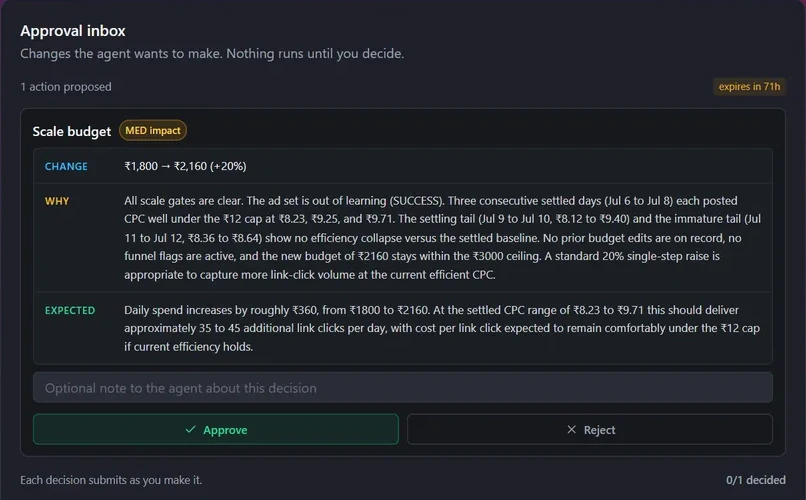
Ad Autopilot comes with the Studio plan, from $99 a month with 330 credits. Your first campaign is free for 30 days from when it starts delivering; ads it makes use your credits. The price never rises with your ad spend: your ad spend goes to Meta or Google as usual, and CamClo AI never takes a percentage of it. See how Ad Autopilot works and how approvals work.
Or keep working inside Claude or ChatGPT
If you like working in a chat, keep doing that. CamClo has its own connector, a remote MCP server, for Claude, ChatGPT, Gemini, Grok, Perplexity, Cursor and other AI apps that can add one with sign-in. You add one address, sign in to CamClo, and CamClo does the ad work behind the chat:
- Reports: Ad Autopilot results, tracking checks and what the agent did, for questions such as "Which ad is getting tired?"
- A preview before any change: changes to live campaigns need the "Make changes to your live ads" permission, which starts off. Each change is shown first, before and after, and applies only after your yes, with your caps and kill switch still in force.
- The ads themselves: image and video ads, asked for in your own words.
- Your limits: you choose what each app may do and a daily credit limit for that connection.
The apps' own plan rules still apply: in ChatGPT, CamClo can do everything on Business, Enterprise and Edu and can only read on Pro; Claude's Free plan allows one custom connector. Ad questions also need Ad Autopilot turned on with a Meta or Google Ads account connected. Guides: CamClo in Claude, CamClo in ChatGPT, all apps and the setup help article.
For the wider picture, see our guides to AI media buyers, Google Ads AI agents and Facebook ads automation.
How we checked
We read Anthropic's articles on custom connectors and Claude in Chrome; OpenAI's on custom MCP servers in ChatGPT and ads in ChatGPT; Meta's ads MCP server page and help article; Google's Google Ads MCP server guide and API terms; the MCP introduction; and related pages on the same sites. Third-party servers are described from their makers' own pages.
Frequently asked questions
Can ChatGPT run Facebook ads?
Yes, for ad accounts that have access. Meta's own ads MCP server names ChatGPT as a supported AI tool, and once connected it can pull reports and create and edit campaigns, ad sets and ads, with new campaigns created as drafts for your review. Meta says the connectors are in open beta and not every ad account has access yet. In ChatGPT, adding a server by its URL is a custom MCP server: OpenAI gives full access on Business, Enterprise and Edu on the web, and read and fetch access only on Pro.
Can Claude manage Google Ads?
Claude can read Google Ads data and make a few kinds of change through Google's Google Ads MCP server. The server lists your accounts and runs Google Ads queries, and after a propose-and-confirm step it can create assets, upload video assets and manage labels. It cannot create, pause or change campaigns, ads, budgets or bids, and it is a developer install with a Google Cloud project and OAuth credentials. CamClo AI's Ad Autopilot manages Meta and Google Ads campaigns, and its connector works inside Claude.
What is a Meta Ads MCP server?
An MCP server connects an AI assistant to another system through a standard set of tools. Meta's own ads MCP server is part of Meta ads AI connectors and links your ad account to ChatGPT, Claude, Perplexity and other supported tools: you enter one URL in the AI tool and sign in with Facebook. Third-party Meta Ads MCP servers also exist; they are built on Meta's public APIs and are not Meta's.
Is there an official Google Ads MCP server?
Yes. Google documents the Google Ads MCP server in its Google Ads API developer guides, with the code in the googleads organization on GitHub. It reads account data and makes partial changes only: assets, video uploads and labels, each after you confirm a proposed change. It also has a read-only mode, and it cannot change campaigns, budgets or bids.
Is it safe to give an AI assistant access to my ad account?
It is as safe as the limits around it. Use the platform's own server where one exists: Meta says using its ads MCP server on its own does not put an account at risk of a ban while your ads follow its policies, and someone with full control of the business portfolio can block actions or cap budgets for each ad account. Start read-only, read every approval prompt, and keep Allow always for tools you trust to run unsupervised, as Anthropic advises. Anthropic and OpenAI both warn that an untrusted server can carry hidden instructions.
Do I need a paid Claude or ChatGPT plan?
Not for Claude: Anthropic offers custom connectors on Free, Pro, Max, Ultra, Team and Enterprise, and the Free plan allows one. For ChatGPT, OpenAI's help article gives custom MCP servers full access on Business and Enterprise/Edu on the web and read and fetch access on Pro, and it does not list Plus, Go or Free. Meta charges nothing extra to connect its server, and your AI tool's own subscription terms still apply.
What is the difference between ChatGPT ads and using ChatGPT for ads?
ChatGPT ads are adverts shown inside ChatGPT, which businesses buy from OpenAI. OpenAI began testing them in the US in February 2026 and started a beta self-serve Ads Manager in May 2026. Using ChatGPT for ads means asking it to read or manage your Meta or Google Ads campaigns through a connector. The two are separate: a connector places nothing inside ChatGPT, and buying ChatGPT ads does not touch your Meta or Google accounts.
Hand the daily ad work to an agent
Ad Autopilot comes with the Studio plan, and its connector works in Claude and ChatGPT. Plans start with a 7-day trial for $1 with 20 credits.
See plans and the $1 trial