
TikTok safe zone checker
Free. Runs in your browser, nothing is uploaded.TikTok's safe zone for in-feed ads leaves out the top 12.5% (240 px), the bottom 34.4% (660 px), 11.1% (120 px) on each side and a column of buttons on the right of a 1080 x 1920 video. Keep text and logos inside it; ads with an anchor link need more room at the bottom.
Drop a 9:16 image or video
JPG, PNG, WebP, MP4 or MOV. It stays on your device.
Ads with an anchor link have their own zone, and the bottom band grows with each caption line.
Your ad shows here
TikTok safe zone
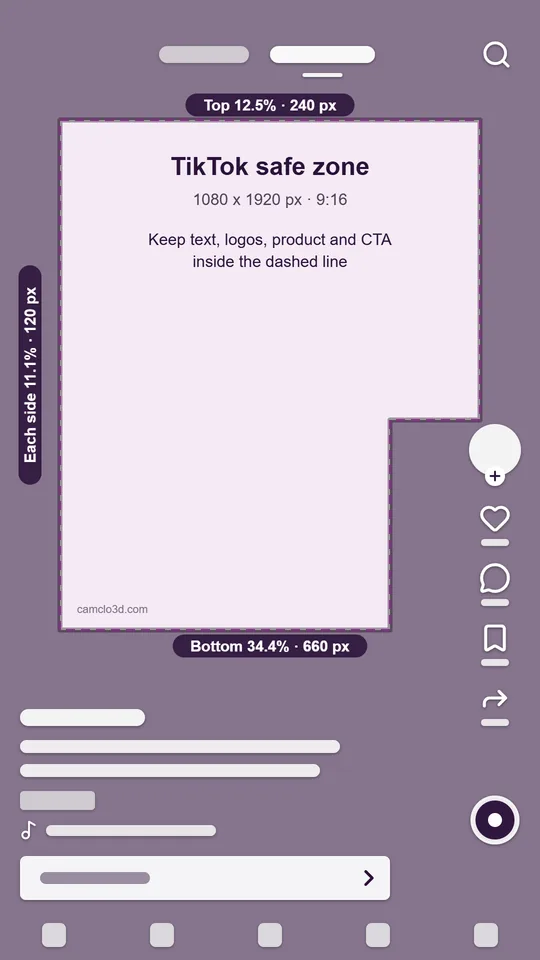
Keep text and logos out of these areas. Pixels on a 1080 x 1920 frame.
- Top
- 12.5%240 px
- Bottom
- 34.4%660 px
- Each side
- 11.1%120 px
- Right buttons, w x h
- 27.8% x 56.3%300 x 1080 px
- Safe area at widest, w x h
- 77.8% x 53.1%840 x 1020 px
Sizes marked w x h are measured from the frame edges. The white shapes stand in for the app's captions and buttons; they are not its exact layout.
The checked-ad download turns on once you add a file. The template and overlay are 1080 x 1920 and work in any video or image editor.
The TikTok safe zone in pixels
TikTok draws its safe zone rather than listing numbers, and "the safe zone size is determined by the dimension (vertical, horizontal, or square), ad caption length, and any additional formats used". The standard vertical safe zone is drawn at 720 x 1280; scaled to 1080 x 1920, it is:
| Keep clear | Share of frame | In TikTok's file (720 x 1280) | On 1080 x 1920 |
|---|---|---|---|
| Top | 12.5% | 160 px | 240 px |
| Bottom | 34.4% | 440 px | 660 px |
| Left and right, each | 11.1% | 80 px | 120 px |
| Right-hand buttons, from the edges (wide x high) | 27.8% x 56.3% | 200 x 720 px | 300 x 1080 px |
| Safe area at its widest | 77.8% x 53.1% | 560 x 680 px | 840 x 1020 px |
Put another way: on 1080 x 1920, the safe area runs from x 120 to x 960 and from y 240 to y 1260, and below y 840 it stops at x 780 to leave room for the buttons. In TikTok's file the side margins are drawn in a different colour from the interface areas, but both sit outside the safe area, so the checker shades them the same way.
Captions and anchors change the bottom zone
TikTok also publishes safe zone files for ads with an anchor, a link bar that sits above the account name. They come in four versions, for one to four lines of ad caption; the note inside the download says they "show how safe zone varied when clients provide different lines of copy". Drawn at 540 x 960, the bottom zone is:
| Caption lines | In TikTok's file (540 x 960) | On 1080 x 1920 | Share of frame |
|---|---|---|---|
| 1 | 406 px | 812 px | 42.3% |
| 2 | 439 px | 878 px | 45.7% |
| 3 | 473 px | 946 px | 49.3% |
| 4 | 507 px | 1014 px | 52.8% |
The anchor files also mark 126 px at the top (252 px on 1080 x 1920), 60 px on each side (120 px) and a wider button column that reaches 180 px in from the right edge (360 px) over the bottom 780 px of the frame (1560 px). Choose an anchor version under "TikTok safe zone file" in the checker to see it. For Spark Ads, TikTok shows up to four lines of the post's own caption, so a long caption takes more of the bottom of the frame.
How to use the TikTok safe zone checker
- Pick the file. TikTok is selected with the standard in-feed file. If your ad uses an anchor, pick the anchor version with your number of caption lines.
- Add your video or image. Drop it on the frame or choose a file. It plays in your browser and is never uploaded.
- Read the overlay. The shading shows what the app covers; the dashed line is the safe zone, including the step on the right for the buttons. Simple shapes stand in for the account name, caption, buttons and call-to-action button.
- Scrub to every text frame. Pause on the hook, the offer and the end card, since each can sit in a different spot.
- Download. Save the checked frame as a PNG, or download the guide template or the transparent overlay and put it on a layer above your video in your editor.
What to keep inside the TikTok safe zone
- The hook. Start on-screen text just under the top 240 px, where it is read first.
- Subtitles. Keep them above 1260 px, and in the lower half keep them left of 780 px so the buttons do not cover their ends. Centred subtitles that run wide are the most common casualty.
- Faces and product. Frame them centre or centre-left. The button column covers the right side of the lower half.
- Call to action wording. TikTok draws its own button in the bottom band, so painted CTA text belongs inside the safe zone, not at the very bottom.
Common mistakes: reusing a Reels layout without checking the sides (TikTok's file keeps 11.1% on each side against Meta's 6%); right-aligned text in the lower half; and writing a long ad caption with an anchor, which pushes the bottom zone past the middle of the frame.
How TikTok compares with Reels on 1080 x 1920: a creative inside TikTok's zone is inside Meta's too, apart from a thin strip, because Meta's top band is 29 px taller and its bottom band 12 px taller. The reverse is not true, since Meta allows text much closer to the sides and the right edge.
How CamClo AI sizes TikTok ads
Video Ads makes 9:16 vertical videos for TikTok, Reels and Shorts at 480p, 720p or 1080p, in formats such as UGC, POV and product demos. On-screen text is off unless you turn it on, and when it is on the script keeps the words in clear parts of the frame, away from the product. Video Ads does not apply TikTok's safe zone for you, so check the finished video here before you publish.
Image Ads has a 9:16 canvas. Its image brief asks for important content to stay away from the top and bottom of the frame, but it does not cover TikTok's right-hand buttons, so check each image here too.
Make TikTok-ready video ads
CamClo AI's Video Ads makes 9:16 video ads from your product photos, in formats such as UGC, POV and product demos. 7-day free trial with 20 credits.
Try Video AdsQuestions
What is the TikTok safe zone in pixels?
On a 1080 x 1920 video, TikTok's standard in-feed file marks the top 240 px, the bottom 660 px and 120 px on each side as outside the safe area, plus a button column on the right: below 840 px from the top, the safe area stops 300 px from the right edge. That leaves a safe area of 840 x 1020 px at its widest.
How do the TikTok numbers scale to 1080 x 1920?
TikTok's standard in-feed safe zone is drawn at 720 x 1280, with 160 px at the top, 440 px at the bottom, 80 px on each side and a 120 px button column over the bottom 720 px. Multiply by 1.5 for a 1080 x 1920 video: 240 px at the top, 660 px at the bottom, 120 px on each side and a 180 px column over the bottom 1080 px.
Does the TikTok safe zone change with caption length?
Yes. TikTok says the size depends on the video's shape, the ad caption length and any extra formats. Its files for ads with an anchor show the bottom zone growing from 812 px with one caption line to 1014 px with four, on a 1080 x 1920 video.
What size should a TikTok ad be?
Vertical 9:16 is TikTok's recommended shape, at 540 x 960 px or larger; 1080 x 1920 is the usual export. Non-Spark in-feed videos can be up to 10 minutes and 500 MB, as .mp4, .mov, .mpeg, .3gp or .avi, with a bitrate of at least 516 kbps.
Is the TikTok safe zone the same as Instagram Reels?
No. TikTok's file has a slightly smaller top band (12.5% against Meta's 14%), a similar bottom band (34.4% against 35%), wider side margins (11.1% against 6%) and a taller button column on the right. Switch between TikTok and Instagram Reels in the checker to compare them on your own file.
What about YouTube Shorts?
Google's guide to YouTube Shorts ads gives no pixel safe zone. It says horizontal assets serve with a blurred top and bottom in the vertical Shorts feed, and it suggests text overlays and designing for mobile. Until Google publishes numbers, keeping to TikTok's zone is a cautious choice; that is our suggestion, not a Google rule.