


Table of Contents
UGC ads are paid ads that look like a customer made them: a person talking to a phone camera, unboxing a parcel, trying on a jacket or giving a quick review in an ordinary room. The name comes from user-generated content, but many UGC ads today are made by paid creators or with AI, and they run as ads on TikTok, Instagram Reels, YouTube Shorts and Facebook. They work because they look like the posts around them, and they come with disclosure rules when the person on screen was paid or is not real.
We read every rule on the regulator's own site and every price on the vendor's own site. Here is how we checked.
What UGC ads are, and what they are not
"UGC" once meant anything customers posted about a brand without being asked. A UGC ad is different in one way that matters: the brand pays to run it. The video may come from a customer who gave permission, a creator hired to film it, or an AI tool, but it is an ad, placed in front of audiences the brand chooses.
| Type | Who makes it | Who pays | Where it runs |
|---|---|---|---|
| Organic UGC | A customer, unprompted | Nobody | The customer's own account |
| Influencer post | A creator with an audience | The brand pays for the post | The creator's account, to their followers |
| UGC ad | A paid creator, a customer who gave permission, or AI | The brand pays for the video and the ad spend | The brand's ads, to audiences it targets |
| Partnership ad (Meta) | A creator or another business | The brand | An ad with the partner's account in the header |
| Studio brand ad | An agency or production team | The brand | The brand's ads |
Partnership ads, formerly called branded content ads, are described in Meta's Business Help Center article About partnership ads.
You will also see UGC-style ads. That describes the look, not the source: vertical phone footage, a real room, one person talking, natural light. When the person on screen is generated, people call it AI UGC. The look is the same, and so are most of the rules, as the disclosure section below explains.
Why UGC ads work
- They look like the feed. A vertical video of one person talking fits between the posts people chose to watch, so it is less likely to be skipped on reflex than a produced commercial.
- People trust people. In Nielsen's 2021 Trust in Advertising study (U.S. highlights), recommendations from people they know were the most trusted channel, at 89%, and "real-life situations" was one of the top five message types. A UGC ad borrows some of that trust, which is exactly why regulators care who is really talking.
- They show the product in use. Worn, opened, poured or switched on, the product answers "what is it like?" better than a packshot does.
- They are cheap to vary. One brief can produce many openings, and testing hooks is how most ad accounts find winners. Fresh versions also help when an ad wears out; our piece on curing Meta ad fatigue covers that side.
- Platforms build for creator content. Meta says its partnership ads "leverage signals from both accounts for improved ranking and incremental performance".
Many UGC pages quote figures such as "4x higher click-through rates". We could not trace most of them to a published study, so they are not repeated here. Test on your own account.
The main UGC ad formats
Most UGC ads use one of a handful of formats. Each one answers a different question a shopper has, so pick the format for the question, not for the trend.
A person tells the camera one concrete thing they noticed and gives a verdict. Good for skincare, haircare and home products.
A parcel is opened on camera and the product is used for the first time. Good for gifts, packaging and first impressions.
The item is held up, then worn, with a quick cut between. Good for clothing, shoes, jewelry and bags.
A "POV:" caption drops the viewer into a relatable moment, and the product decides how it ends. Good for lifestyle products and humor.
Someone with a phone asks a passer-by what they are wearing or using. Good for fashion, drinks and everyday carry. Read the disclosure rules first.
Hands show how it works, step by step. Good for gadgets, kitchen tools and anything with a "how".
The problem, then the result. Good for cleaning, organizing and beauty, as long as the result is typical.
Someone tells an unrelated story while wearing or using the product, which stays in view as the aside. Good for audiences tired of hard sells.
UGC ads examples: scripts you can adapt
These are example scripts, not real brand ads. Each one opens on a specific line rather than a greeting or the product name, then shows the product doing its job.
| Format | Example product | Opening line | What happens next |
|---|---|---|---|
| Testimonial | A light moisturizer | "I was sure this would be too thin for my dry skin." | One specific thing she noticed, then a calm verdict to camera. |
| Unboxing | A canvas backpack | "Okay, this is the one I've been waiting for." | Tissue paper, a first look at the straps and pockets, then it goes on her back. |
| Try-on | A rain jacket | "This is supposed to pack into its own pocket." | He holds it up, a jump cut, he is wearing it and turns to show the hood. |
| POV | A steel water bottle | Caption: "POV: yours is the only water still cold at 4pm" | A coworker reaches for it; she smiles and takes a sip. |
| Street interview | Running shoes | "Hey, what are you wearing today?" | He points at the shoes, talks about the fit and turns one over to show the sole. |
| Product demo | A desk lamp | "Three things this lamp does that my old one didn't." | The dimmer, the warm and cool light settings, and the angle it holds. |
If an actor or an AI person delivers a line about their own results, read the disclosure rules below before you run it.
Three habits separate the scripts that work from the ones that sound like ads: one idea per video, lines a person would actually say, and a final shot where the product is clearly visible. For more on building the whole creative, see our guide to ad creative, and for sizes by placement, our Meta ads specs.
What UGC ads cost: real creators versus AI
| Option | Price (USD) | What you get | Worth knowing |
|---|---|---|---|
| CamClo AI | From $49/mo with 150 credits | Finished video ads from a product photo; an 8-second 720p ad costs 11 credits on the default model, so about 13 a month | 7-day free trial with 20 credits |
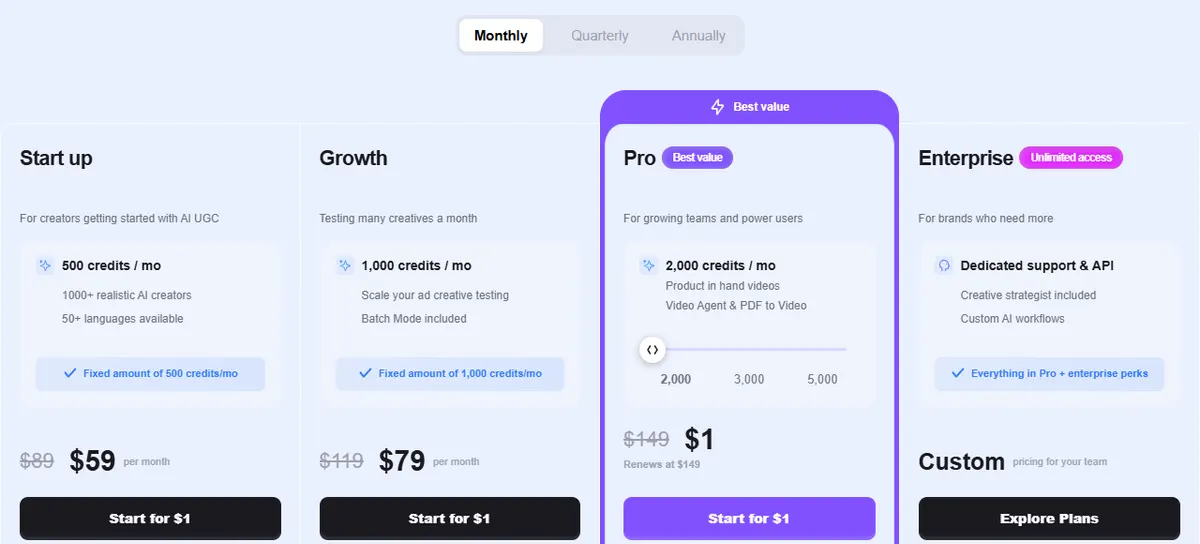
| MakeUGC | $59/mo Start up (500 credits) | 1,000+ AI creators and 50+ languages; product-in-hand videos are on Pro, $149/mo | Plans start with a $1 trial; unused credits expire each month |
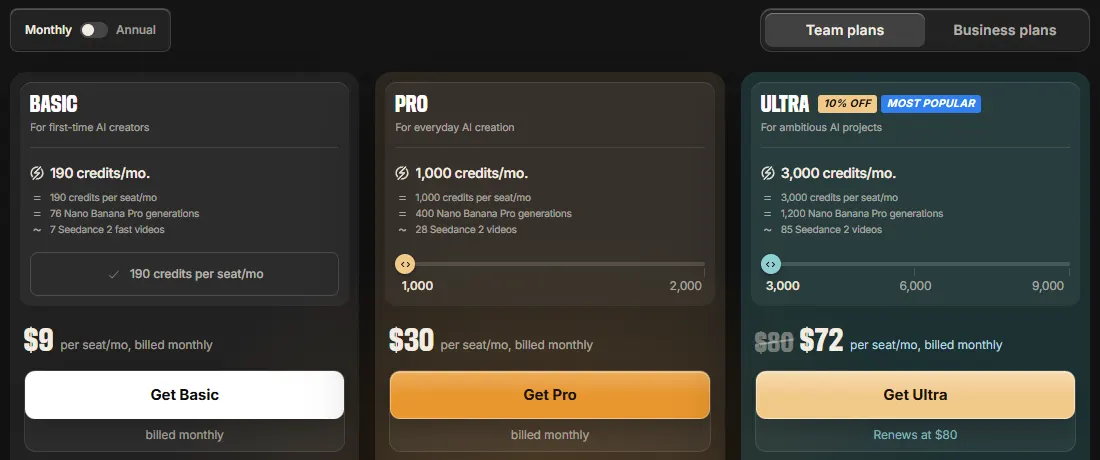
| invideo | $9 per seat/mo Basic (190 credits); Pro $30 per seat/mo (1,000 credits) | A general AI video platform with a UGC ads tool; invideo counts Basic's credits as about 7 Seedance 2 Fast videos | Unused credits do not roll over |
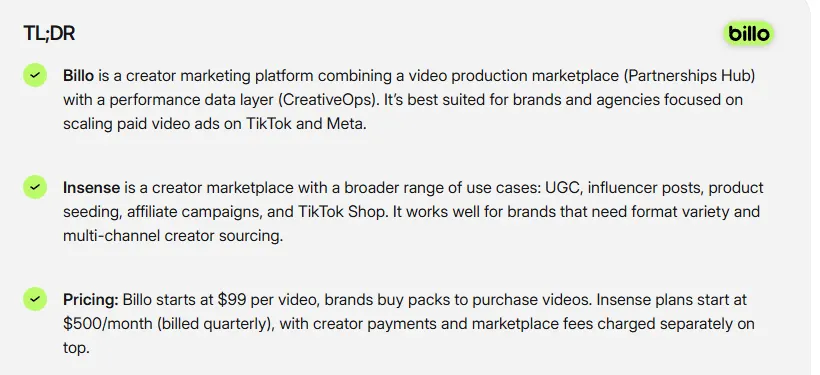
| Billo | From $99 per video | A video from a real creator; brands buy video packs and order from their balance | No subscription needed; its CreativeOps data layer is an optional add-on |
| Freelance creators | About $100 to $150 low end, $300 to $500+ high end, per piece | A video filmed by a creator you hire directly | An estimate from Shopify's UGC ads guide, citing Influee, not a price list |
AI plan prices are the entry plan on each vendor's pricing page, billed monthly. Billo's price is from its own site. The freelance range comes from Shopify's UGC ads guide. Confirm before you buy.
Price the finished ad, not the plan. The headline numbers hide what each option leaves out:
- Real creators charge for rights and changes. Billo's own guide to UGC rates puts most short-form videos around $200 and says usage rights, allowlisting and paid media activation "can easily double or triple costs". Revisions and extra versions usually cost more too.
- AI charges for retakes. Every new generation uses credits, so the real cost is per keeper. invideo's own cost write-up puts a finished AI UGC ad at about $125 on average across one documented run, and says roughly 85% of generated clips are rejected before a final ad is assembled. That is invideo's figure for its own workflow, not an industry average.
- Time is a cost too. A creator has to receive the product, film and deliver; an AI video is generated in minutes.
Disclosure rules for paid creators and AI people
UGC ads work because they look like a real person's honest opinion, so the rules focus on whether viewers are misled about who is talking and why. This section covers the US Federal Trade Commission, a new New York law and Meta's labels. It is general information, not legal advice, and rules differ by country, so check the ones where you advertise.
Paid creators: disclose the connection
Under the FTC's Endorsement Guides (16 CFR 255.5), a connection between the endorser and the seller that viewers would not expect, such as payment or free or discounted products, should be disclosed clearly and conspicuously. The test is whether "a significant minority of the audience" would not understand or expect the connection.
- Put it in the video. The Guides say a disclosure should appear in the visual part of an ad when the claim is visual, in the audio when the claim is spoken, and in both when the claim is made both ways. The FTC's endorsement FAQ adds that a disclosure in the video itself has the best chance of being clear, because viewers easily miss one in the description.
- Use plain words. The FAQ gives "Ad:", "Paid ad", "#ad", "Advertising:" and "Advertisement" as likely to be effective.
- Do not rely on the platform tool alone. The FTC's 2023 update says a platform's built-in disclosure tool might not be an adequate disclosure.
Actors and AI people presented as customers
This is the rule that matters most for AI UGC. The Guides say an ad that presents endorsements by what are represented, "expressly or by implication", to be actual consumers should use actual consumers, or clearly and conspicuously disclose that the people are not actual consumers (16 CFR 255.2(c)).
The Guides include an example that reads like a street interview ad: a "hidden camera" ad in which a spokesperson asks cafeteria patrons for their opinion of a cereal. Because viewers may take them to be actual customers, the Guides say "if actors have been employed, this fact should be clearly and conspicuously disclosed." An obvious dramatization, such as two shoppers in a scripted supermarket scene, is not treated as an endorsement at all.
Since the 2023 update, an endorser can be a party that only appears to be an individual, and the FTC's notice says that wording also covers fake review writers and endorsers that do not exist. So a generated person presented as a customer raises the same question as an actor: would viewers think this is a real customer?
AI avatars and the FTC rule on fake testimonials
The FTC's Rule on the Use of Consumer Reviews and Testimonials (16 CFR Part 465) took effect on October 21, 2024. It bans reviews and testimonials that misrepresent that they are by someone who does not exist, "such as AI-generated fake reviews", or by someone who had no actual experience with the business or its products, and it lets courts impose civil penalties for knowing violations.
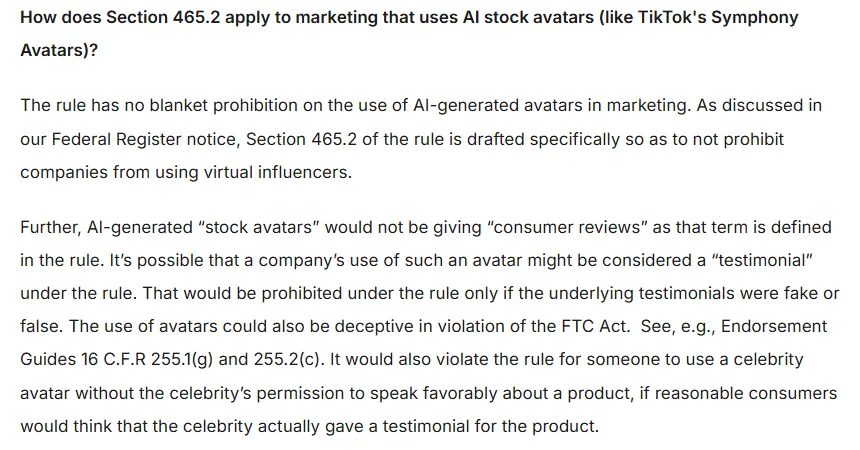
FTC staff answered the AI avatar question directly in their Q&A on the rule: there is no blanket ban on AI avatars in marketing, but a company's use of an avatar might be considered a testimonial, which the rule prohibits if the underlying testimonials are fake or false, and avatars can still be deceptive under the FTC Act.
In practice: an AI person can model, demonstrate or present your product. If the script has them describe personal results, such as "my skin cleared up in a week", base it on real customer testimonials you can document, keep it typical of what buyers get (the Guides ask advertisers to back up that a consumer's experience is representative, or disclose the generally expected result, under 255.2(b)), and disclose that the person on screen is not a real customer.
New York's synthetic performer law
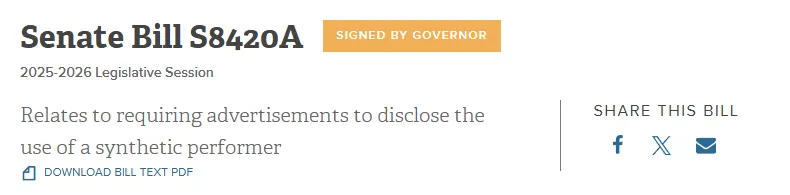
New York's Senate Bill S8420A was signed on December 11, 2025 and took effect 180 days later, in June 2026. A business that produces or creates an ad for the goods or services it deals in must conspicuously disclose in the ad that a "synthetic performer" is in it, where it has actual knowledge.
- What counts: a digitally created asset, made with generative AI or software, intended to look like a human performer who is not recognizable as any real, identifiable person. That describes most AI UGC characters.
- Penalties: $1,000 for a first violation and $5,000 for each one after.
- Exceptions: audio-only ads, AI used only to translate a human performer's language, and ads for films, shows or games where the synthetic performer is used the same way as in the work.
Platform labels and partnership ads
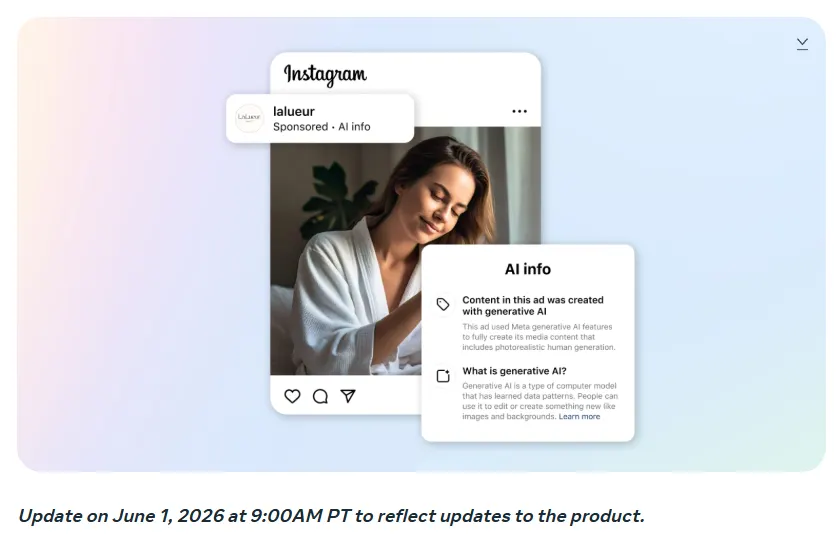
Meta's newsroom post on AI transparency in ads, updated on June 1, 2026, says Meta applies an "AI info" label to ads made or significantly edited with its own generative AI tools. When those tools add an AI-generated photorealistic human, the label sits next to the Sponsored label rather than behind the three-dot menu. Meta also says it will begin detecting ads made with third-party AI tools through industry-standard signals and will add an AI info label in About this ad when it does.
For real creators, Meta's partnership ads run with the creator's account in the ad's header, with the creator's permission, which tells viewers who is involved. Other platforms, TikTok included, publish their own rules on AI content in ads, so check the ad policy of each platform you run on. Platform labels help, but the FTC has said a platform's built-in disclosure tool might not be an adequate disclosure on its own, so keep your own disclosure in the video.
A quick disclosure checklist
- Paid or gifted creator shown as a user: say so in the video, on screen and in the voiceover if the claim is spoken.
- Actor or AI person shown as a customer: disclose that they are not real customers, or make the ad an obvious dramatization.
- Results claims: only from documented customer experience, typical of what buyers get.
- AI person in the ad: under New York's law, add a conspicuous synthetic performer disclosure.
- Customer and creator videos: keep written permission and the usage rights you paid for.
How to make UGC-style ads with AI
AI tools make UGC-style ads in two broad ways. Avatar tools have a stock AI presenter read your script. Scene tools generate the whole video, person, room and product, from your product photos. Our roundup of the best AI UGC video generators compares both kinds. The steps are similar either way:
- Start from real product photos. Front, back, a close-up of the label or texture, and an on-body shot if you have one. The better the photos, the closer the product on screen is to the one you ship.
- Pick a format for the shopper's question. Try-on for fit, demo for "how", testimonial for "does it work".
- Pick the placement first. Reels, TikTok and Shorts want 9:16; feeds often want 4:5 or 1:1.
- Get a script with a real hook. One idea, spoken the way a person talks, with the product clearly visible at the end.
- Check every frame. Labels, prints, logos, stitching and hands are where AI video slips.
- Add the disclosure the ad needs. Use the checklist above.
- Test several hooks. Run three to five openings, keep the winner and make new versions when it tires.
CamClo AI for UGC-style video ads
Best for: UGC-style video ads from a product photoCamClo AI is an AI studio for ecommerce teams. Its Video Ads tool starts from your product photos, not from an avatar. You pick a format and a placement, and it writes the script and generates the whole ad: the person, the setting, the voice and the sound.
- Formats: 15, including every format in this guide: UGC, UGC Virtual Try-On, Unboxing, Testimonial, Street Interview, POV, Product Demo, Before & After and Yapper (storytime), plus ASMR and produced styles such as Commercial and TV Spot.
- Output: sized for 10 placements, including Reels, TikTok, Shorts, Stories and Facebook and Instagram feeds, at 480p, 720p or 1080p, from 4 to 30 seconds per video ad.
- Remix Ads: pick a reference ad from the public ad libraries, or upload one, and CamClo AI makes a new ad for your product that follows its structure, up to 90 seconds.
- Pricing: plans from $49 per month with 150 credits. An 8-second 720p video ad costs 11 credits on the default model. There is a 7-day free trial with 20 credits.
Strengths
- Starts from your product photo, so the product on screen is the one you sell
- All the creator formats from this guide in one place
- Script, person, voice and sound generated together, sized for each placement
- Ads up to 90 seconds with Remix Ads
Limits
- Can seem a little expensive next to a single video model, but the credits cover the script, the UGC format and the sizing for each placement, not just a raw clip
To see every format with samples, visit the AI UGC video ad maker that starts from a product photo.
Real creators or AI: when to use which
Use real creators when
- The ad rests on a genuine testimonial or a results claim
- You want the creator's own audience, through partnership ads
- Proof depends on the real thing: texture, fit on a real body, taste
Use AI when
- You need many hooks and formats to test
- The product is new and not yet in customers' hands
- You need fresh versions often to fight ad fatigue
Many brands do both: a few real creator videos for the claims only a real customer can make, and UGC-style video ads made with AI to test openings and formats around them. If you want an AI presenter reading a script rather than a generated scene, our guide to HeyGen alternatives for UGC video ads compares the avatar tools.
How we checked
We read the live Google results for "what are ugc ads" and "ugc ads", then went to the original sources: the FTC's Endorsement Guides as revised in 2023 (the Federal Register text), the FTC's endorsement FAQ and its staff Q&A on the Consumer Reviews and Testimonials Rule, the New York State Senate's page for S8420A, Meta's newsroom and Business Help Center, and each vendor's pricing page in US dollars on monthly billing. We could not load TikTok's help center from our location, so we do not describe its settings, and we left out performance figures we could not trace to a source. This page is not legal advice; check the current rules before a campaign launches.
Frequently asked questions
What are UGC ads?
UGC ads are paid ads that look like user-generated content: a person filming a product on a phone, reviewing it, unboxing it or wearing it in an ordinary room. Many are now made by paid creators or with AI rather than by unpaid customers, and they run as ads in feeds such as TikTok, Instagram Reels, YouTube Shorts and Facebook.
How much do UGC ads cost?
With real creators, Billo says its videos start at $99 each, and Shopify's guide, citing Influee, puts a single piece at about $100 to $150 at the low end and $300 to more than $500 at the high end, with usage rights changing the price. AI tools charge a subscription: CamClo AI starts at $49 a month with 150 credits, where an 8-second 720p video ad costs 11 credits, and MakeUGC's Start up plan is $59 a month.
Do AI UGC ads need a disclosure?
Often, yes. FTC staff say there is no blanket ban on AI avatars, but an ad that presents people as actual customers should use actual customers or clearly disclose that they are not, and a testimonial that claims to come from someone who does not exist can break the FTC's rule on fake reviews and testimonials. New York has required a conspicuous disclosure of synthetic performers in ads since June 2026, and Meta adds an AI info label to ads made or significantly edited with its own generative AI tools. This is general information, not legal advice.
What is the difference between UGC ads and influencer marketing?
An influencer post runs on the creator's own account to reach their followers. A UGC ad is a video the brand pays for and runs as an ad to the audiences it chooses, so the creator's follower count matters less than how well the video sells. Meta's partnership ads sit in between: the ad runs with the creator's account in the header, with their permission.
Is UGC still worth it in 2026?
Yes, but the look alone no longer stands out, because feeds are full of phone-filmed ads. What still works is a specific hook, the product being used on camera, and honesty about who is talking. Test several hooks and formats rather than betting on one video.
Can I make UGC ads for free?
You can film them yourself, or ask customers for videos they have already made, but get their permission before you run a video as an ad. To try AI, CamClo AI has a 7-day free trial with 20 credits. MakeUGC's plans start with a $1 trial.
Make UGC-style ads from your product photos
Start a 7-day free trial with 20 credits.
See plans and the free trial

