

Table of Contents
An ad creative is the part of an ad that people actually see and hear: the image or video, the words on it and around it, and the call to action. Targeting and budget decide who sees an ad, and the creative decides whether they stop, understand the product and act.
This guide covers the formats and sizes each platform asks for, what makes a creative work, how to spot creative fatigue and test replacements, and how AI now makes and tests creatives, with the tools that rank for this search compared at the end.
Platform specs come from Meta's, Google's and TikTok's own help pages, and every tool price from the vendor's own site. Here is how we checked.
What is ad creative?
Ad creative is the content of an ad, as opposed to its targeting, budget or bid. On most ad platforms, one ad is made of these parts:
- The visual: a photo, a designed image, a set of carousel cards or a video.
- On-image or on-screen text: a short headline, a price or a caption placed in the visual itself.
- Primary text: the caption shown with the visual, above it in Facebook and Instagram feeds.
- Headline and call-to-action button: the short line and the button, such as Shop now or Learn more.
- Sound: voice, music and product sounds, in video.
Each version of that package is called a creative. One ad set can run several creatives at once, and comparing them is how advertisers find out which angle, format and opening actually sells. That is why the word is so often plural: you rarely run just one.
Ad creative vs ad copy
Ad copy is the words: the primary text, the headline, any on-image text and the call to action. Ad creative is the whole package, copy included. In daily use many marketers say creative when they mean the visual and copy when they mean the text, so when a brief asks for "new creative", check whether it means new images and video, new words, or both.
The two are judged together. A strong headline cannot save a visual nobody stops for, and a great video with a vague caption leaves people unsure what to do next.
Types of ad creative
- Static image. One image. The quickest to make and test, and a good fit for offers, catalog products and retargeting.
- Carousel. Swipeable cards, from 2 to 10 on Meta. Use them for a sequence (hook, features, close) or to show a range.
- Video. A product video, demo, unboxing, ASMR clip, testimonial or TV-style spot. Vertical 9:16 fills the screen in Reels, Stories, Shorts and TikTok.
- UGC-style video. A person talking to camera the way a customer would, shot like a phone video. It is a style rather than a spec; our guide to what UGC ads are covers it in depth.
- Catalog ads. Built automatically from your product feed, so the creative is your product photos plus the platform's templates.
Which format wins depends on the product and the audience. We compared three of them in static vs ASMR vs hyper-motion ads.
Ad creative sizes by platform
| Placement | Format | Ratio and size | Worth knowing |
|---|---|---|---|
| Facebook feed | Image | 4:5, 1440 x 1800 px | Meta suggests 50 to 150 characters of primary text and a 27-character headline |
| Facebook feed | Video | 4:5, 1440 x 1800 px | Captions and sound are optional but recommended |
| Instagram Reels | Video | 9:16, 1440 x 2560 px | Keep the top 14%, the bottom 35% and 6% on each side clear of text and logos |
| Facebook feed | Carousel | 1:1, at least 1080 x 1080 px | 2 to 10 cards |
| TikTok in-feed | Video | 9:16 vertical | Vertical is TikTok's recommended format |
| Google Demand Gen | Image | 1.91:1 at 1200 x 628, 1:1 at 1200 x 1200, 4:5 at 960 x 1200, 9:16 at 1080 x 1920 | Up to 20 images per ad, 5 MB each |
| Google Demand Gen, on YouTube | Video | 16:9, 1:1, 4:5 or 9:16 (9:16 for Shorts) | At least 5 seconds; under 10 seconds cannot run in YouTube in-stream; Google suggests over 15 seconds |
From Meta's Ads Guide, Google Ads Help (image and video assets for Demand Gen) and TikTok Ads Manager help. Specs change, so check before you export.
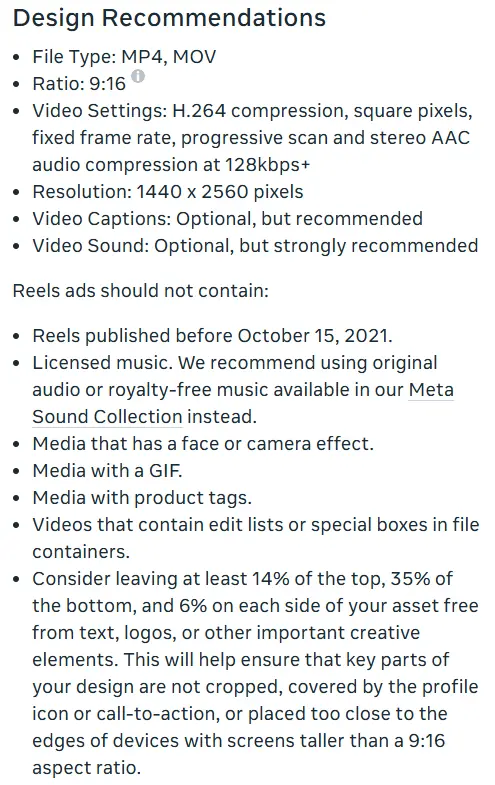
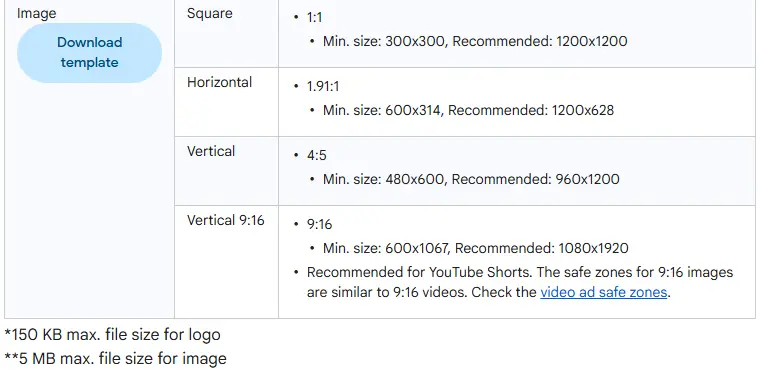
For every Meta placement, see our full Meta ads specs guide.
What makes an ad creative work
Google's research with Kantar on YouTube ads found that ads following its ABCDs (Attention, Branding, Connection, Direction) delivered as much as a 30% lift in short-term sales likelihood (Google/Kantar, April 2021). The same ideas hold for a static image in a feed:
- A hook in the first moment. The first frame, or the first line of the caption, has to earn the next second. Lead with the most specific thing you have: a problem, a result you can show, or a use nobody expects.
- Product clarity. People should know what is being sold without reading. Show the real product early and large enough to read at thumbnail size, and keep labels, prints and colors accurate. Google's own advice is to brand early and keep visuals bright and high-contrast.
- A reason to act now. The price, a bundle, free shipping or a limited run, but only if it is true. Give each creative one call to action.
- Proof. A demonstration, a real review or a side-by-side comparison, within your category's ad policies. Do not present an actor or an AI-generated person as a real customer.
- Made for the placement. Vertical 9:16 for Reels, Stories, Shorts and TikTok, text inside the safe zones, and captions for people watching without sound. Meta calls sound "optional, but strongly recommended" for Reels.
- A distinct angle. Each creative in a test should say something different: the price, a use case, a feeling, a comparison. Five versions of one idea only test that idea once.
Ad creative examples
Here is one product turned into five creatives, each built for a different job. The product is an insulated steel water bottle; swap in your own. Every claim below stands in for one you can prove.
| Creative | Job | Opening | Body | Call to action |
|---|---|---|---|---|
| Static image | Sales, warm audience | The bottle beaded with condensation on a desk late in the day, with a short line such as "Still cold at 6 pm" | Price and one proof point, such as capacity | Shop now |
| Carousel, 5 cards | Traffic, new audience | Card 1 asks "What is in your bag right now?" | Cards 2 to 4: leak-proof lid, fits a cup holder, dishwasher-safe | Card 5: the colors, then Learn more |
| UGC-style video, 15 s | Prospecting | "I stopped buying bottled water on my commute, here is why" | One specific moment: the first cold sip after a long drive | A verdict line, then Shop now |
| Product demo, 10 s | Consideration | Ice drops into the bottle in the first second | Lid on, shake, turn it upside down: no drip | Learn more |
| Retargeting image | Past visitors | A close-up of the exact color they viewed | A reason to finish, such as a bundle or a delivery date | Complete your order |
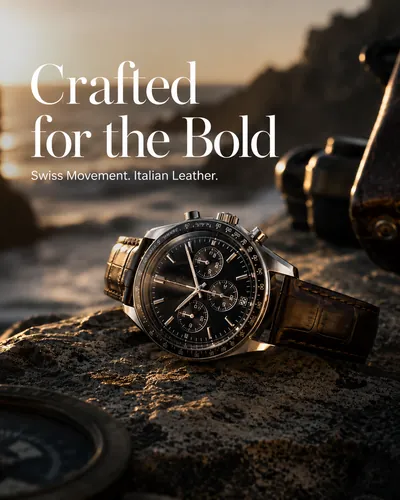
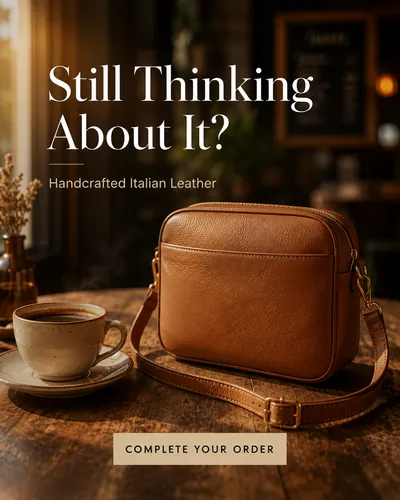
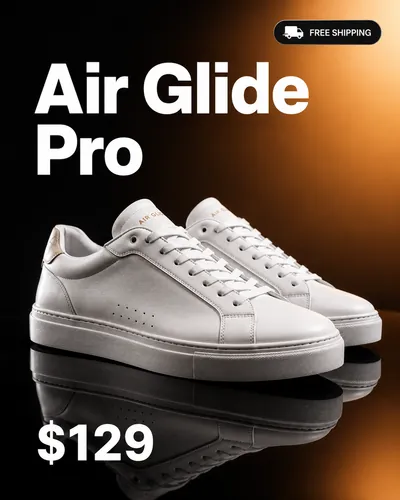
The same idea in practice: three sample image ads from CamClo AI's Image Ads page, each made for a different goal.
Creative fatigue: how to spot it
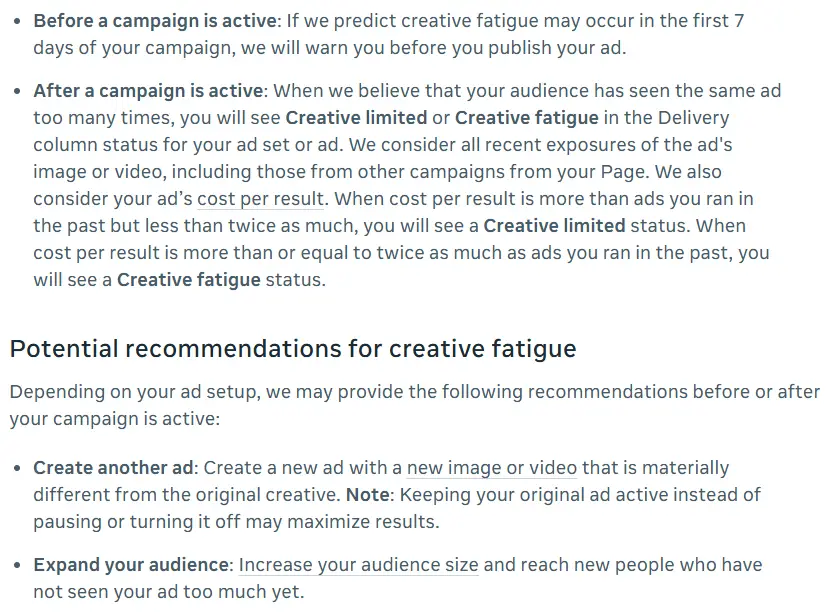
Creative fatigue is Meta's term for what happens when an audience has seen the same creative too many times: people engage less, and cost per result rises. Meta's help center describes two statuses in the Delivery column of Ads Manager:
- Creative limited: cost per result is higher than ads you ran in the past, but less than twice as much.
- Creative fatigue: cost per result is twice as much as your past ads, or more.
Meta counts all recent exposures of the image or video, including those from other campaigns on your Page, and can warn you before you publish if it predicts fatigue in the first 7 days. One catch: Meta says its creative fatigue recommendations are only available for ad sets with one creative, and not for Advantage+ catalog ads, dynamic creative or Advantage+ app campaigns. In an ad set with several ads, watch the numbers yourself.
What to watch week over week: frequency (the average number of times each person saw the ad) climbing, click-through rate falling and cost per result rising. One bad day is noise. A slide on all three against the week before is fatigue.
What to do when a creative gets tired
Meta's recommendations are to create another ad with a new image or video that is materially different from the original, to expand the audience so the ad reaches people who have not seen it much, or to try Advantage+ creative. It also notes that keeping the original ad active instead of pausing it may maximize results.
Materially different means a new angle, format or opening, not a new background color. There is no universal refresh date: the more you spend against the same audience, the faster frequency climbs, so large budgets on narrow audiences need new creatives most often. Have the next concept ready before the current one slips, rather than starting production when it does.
How CamClo AI's Ad Autopilot handles it
- It will not judge an ad on fewer than 2,000 impressions.
- It calls an ad tired when frequency is above 2.5 and, against the week before, click-through rate is down 10% or more or cost per result is up 15% or more.
- It answers with a new creative concept, made to avoid the tired one, that runs alongside it. The old ad is not paused just for being tired.
- It pauses an ad for poor results only past 2,000 impressions, and only when it has spent at least 1.5 times the target cost per result with no result, or sells far below breakeven.
In co-pilot mode the new creative comes to you for approval first. See Ad Autopilot, the AI agent for Meta and Google Ads, or read how agencies handle this in curing Meta ad fatigue.
How to test ad creatives
- Test concepts before details. Different angles, formats and openings first. Colors and button labels can wait until you have a winning idea.
- Change one thing per test. Meta's A/B testing best practices say results are more conclusive when the ad sets are identical except for the variable being tested.
- Run it long enough. Meta recommends at least 7 days, and A/B tests can run for up to 30. If your customers usually take longer than a week to buy, run the test longer.
- Keep audiences apart. Do not reach the test audience with other campaigns at the same time; Meta warns that overlap can contaminate results.
- Judge on what you pay for. Cost per purchase or lead and return on ad spend, not clicks alone. A creative that gets cheap clicks from people who never buy is not a winner.
- Write down what you learned. The angle, format, opening and result of every creative. The next round starts from the winner.
How AI makes and tests ad creatives
AI now sits on both sides of the loop: making creatives, and deciding which ones keep running.
Inside the ad platforms. Meta's Advantage+ creative "uses AI to generate and enhance ad variations across single image, video and carousel formats". Its tools include text generation, image generation, image expansion, image touch-up, background generation for catalog ads, video expansion and image animation. Meta reports a 2 to 3% lift in conversions from background generation on Advantage+ catalog ads, a 2% lift on Facebook Reels from video expansion, and 13% more conversions from related media. Those are Meta's own figures. Some enhancements are on by default, so preview your ads and switch off any that do not suit your brand.
Standalone AI tools. These start from your product photo or product page and produce finished creatives: images in every size, carousels, videos with scripts and voices, and copy variations. Some also push ads to your ad accounts and read the results back, which closes the loop from making to testing.
What AI still needs from you. The product facts (AI should not invent claims or offers), a check of every frame for product accuracy, the brand's judgment on tone, and the testing habits above. If you mainly need video, our roundup of the best AI video ad generators goes deeper, and Facebook ads automation covers the campaign side.
AI ad creative tools compared
These are the tools that appear in Google's results for ad creative and AI ad creative searches.
| Tool | Best for | Paid plans from | Free option | Makes | Publishes ads |
|---|---|---|---|---|---|
| CamClo AI | Image and video ads from a product photo, plus a campaign agent | $49/mo | 7-day free trial, 20 credits (card required) | Image ads, carousels, 15 video ad formats | Yes: Meta and Google Ads |
| AdCreative.ai | Static creatives at volume, with scoring | $39/mo ($20/mo billed yearly) | 7-day free trial (card required) | Banners, copy, product shoots, video | Pushes creatives to Meta, Google, LinkedIn |
| Creatify | Video ads with AI actors from a link | $39/mo | 10 credits a month, watermarked | AI actor video ads, image ads | Ad Launcher to Meta, TikTok, AppLovin; Pro adds a Performance Agent |
| Canva Grow | Teams already designing in Canva | See vendor site | See vendor site | Image ads, video avatar ads | Meta, TikTok, LinkedIn |
| Zeely | A guided launch on Facebook and Instagram | $29.95/mo | Not listed | Static, video and UGC-style ads | Facebook and Instagram |
Entry paid plan on each vendor's official site, in US dollars, billed monthly unless marked. "See vendor site" means we could not confirm it on an official page. Confirm before you buy.
1. CamClo AI
Best for: image and video ads from a product photo, plus an agent that runs the campaignsCamClo AI is an AI studio for ecommerce teams. You start from your product photos or a product page link, and it makes finished ad creatives: image ads, carousels and video ads with the script written for you. Ad Autopilot then plans, publishes and manages Meta and Google Ads campaigns, and adds fresh creatives as old ones tire.
- Image ads: pick a goal (sales, traffic, lead generation, retargeting or catalog sales) and one of 9 ad sizes, each marked with the placements it suits, from Instagram and Facebook feeds to Pinterest, LinkedIn and Google Display. Make up to 8 variations per run on paid plans, or a carousel of up to 5 slides built as hook, value and close. Each variation gets its own primary text, headline and call to action, written from a different angle so a test compares messages, not just pictures. Each image costs 1 credit.
- Video ads: 15 formats, including UGC, UGC Virtual Try-On, Unboxing, Product Demo, ASMR, Testimonial, POV and TV Spot, sized for 10 placements at 480p, 720p or 1080p, from 4 to 30 seconds. An 8-second 720p video ad costs 11 credits on the default model.
- Remix Ads: pick a proven ad from the public ad libraries, or upload one, and CamClo AI rebuilds its structure around your product, with finished video ads up to 90 seconds.
- Localization: ad copy and on-image text rewritten for other markets and languages, not translated word for word.
- Ad Autopilot: plans and publishes Meta and Google Ads campaigns (Search, Performance Max and Demand Gen), watches each creative for fatigue and prepares a new concept. Choose Observe, Co-pilot or Autopilot.
- Pricing: plans from $49 per month with 150 credits, and a 7-day free trial with 20 credits.
Strengths
- Starts from your real product photos, so the product in the ad is the one you sell
- Image, carousel and video creatives in one place, sized for each placement
- Copy written per variation, so tests compare different messages
- Tired creatives are caught and answered with a new concept, with your approval in co-pilot
Limits
- Can seem a little expensive next to a single image generator, but the credits cover the ad concept, the copy and the sizing for each placement, not just a raw image
See the AI image ad generator that starts from a product link and the UGC video ad maker.
2. AdCreative.ai
Best for: static ad creatives at volume, with scoringAdCreative.ai, an Appier group company, generates ad banners, headlines and copy, product photoshoots and video ads, and scores creatives before you spend. Its name matches this search, and it takes up much of Google's first page for it.
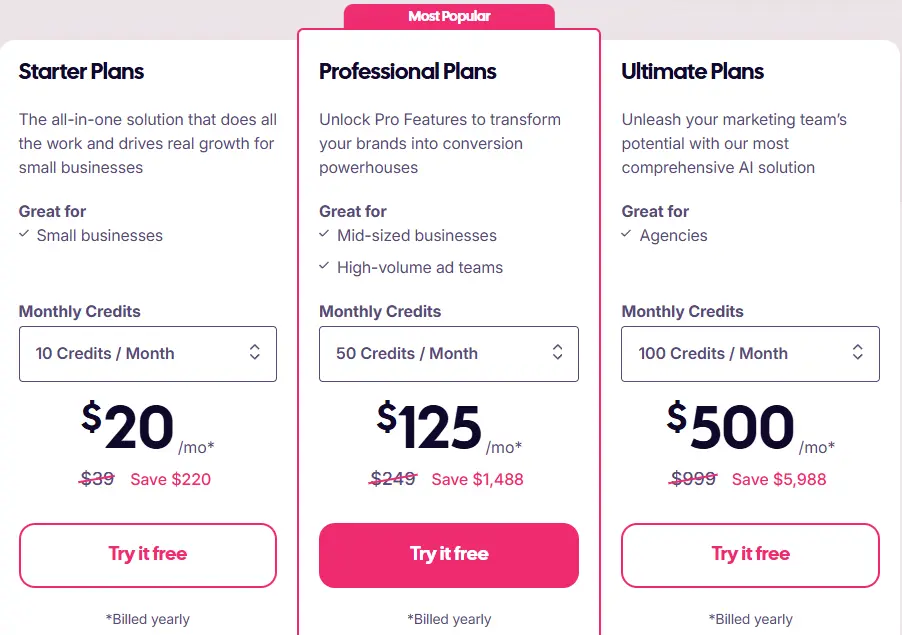
- Pricing: Starter is $39/month, or $20/month billed yearly, with 10 credits a month and 1 brand. Professional is $249/month ($125 billed yearly) with 50 credits and 10 brands. Ultimate is $999/month ($500 billed yearly) with 100 credits and 25 brands.
- What a credit buys: one download. Generating is unlimited; a credit is used when you download a creative.
- Publishing: its ad creatives page says you can connect ad accounts and push creatives to Meta, Google and LinkedIn.
- Free: a 7-day free trial. AdCreative.ai's help center says it asks for a card at sign-up and does not charge during the 7 days.
Strengths
- Unlimited generations; you pay per download
- Creative scoring and competitor insights in one tool
- Pushes creatives to Meta, Google and LinkedIn
Limits
- 10 downloads a month on Starter is a small testing budget
- A creative score is a prediction, not a test result
Pick this instead of CamClo AI if you mainly need many static banners in many sizes and want a predicted score before you spend.
3. Creatify
Best for: video ads with AI actors from a product linkCreatify turns a product link into video ads with AI actors, and also makes image ads. The Pro plan adds a competitor ad tracker, Ad Clone to remake an ad from a URL, and a Performance Agent with automations.
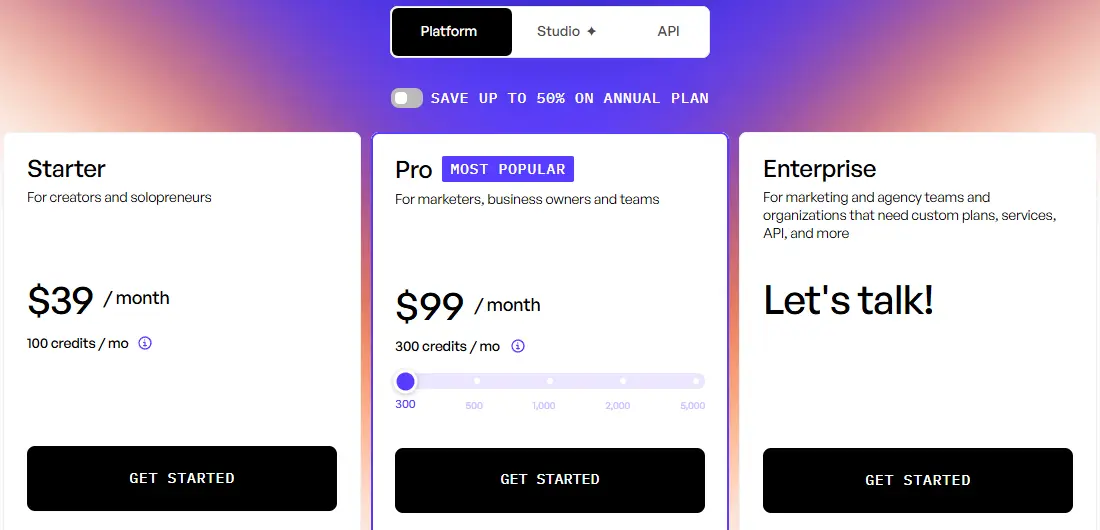
- Pricing: Starter is $39/month with 100 credits, 300 AI actors, 75+ languages and one generation at a time. Pro is from $99/month with 300 credits and 1,500 AI actors. Annual billing saves up to 50%.
- Publishing: the plan comparison lists an Ad Launcher for Meta, TikTok and AppLovin on Starter and Pro; the AI Performance Agent is Pro only.
- Free: 10 credits a month, enough for up to 2 video ads or 20 image ads, with a watermark.
Strengths
- Product link to video ad with an AI actor
- 75+ languages
- A free plan to test with
Limits
- Competitor tracking, Ad Clone and the Performance Agent are Pro features
- One generation at a time on Starter
Pick this instead of CamClo AI if you want an AI actor presenting your product in many languages, starting from a product URL.
4. Canva Grow
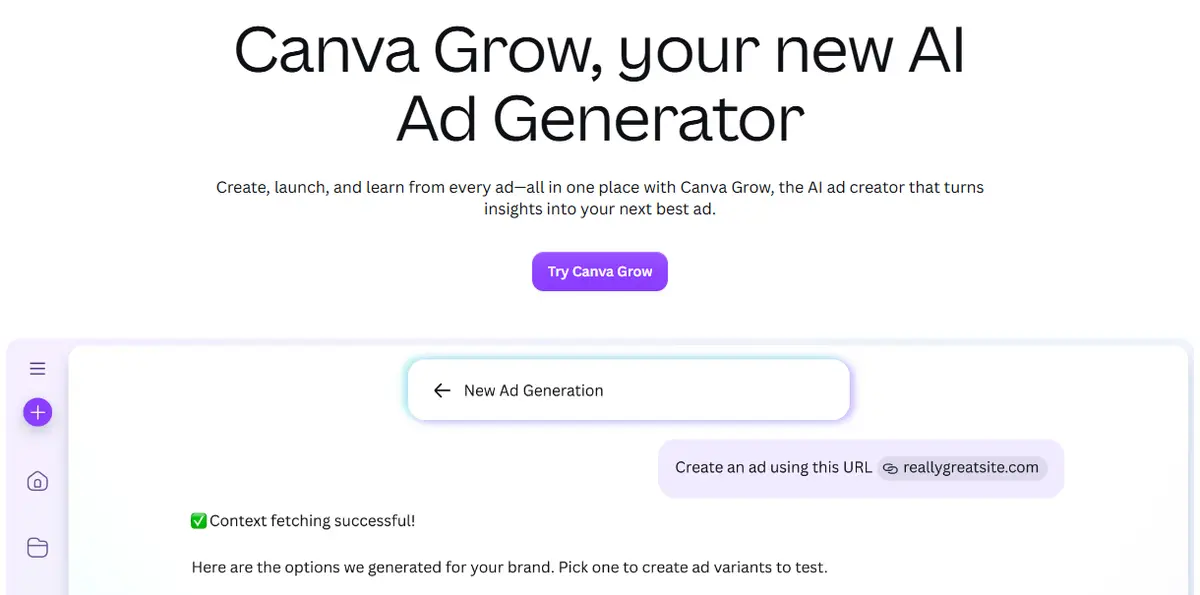
Best for: teams already designing in CanvaCanva Grow is Canva's ad workspace. You give it a website link, a business description or product photos; Canva AI proposes three ad concepts, then generates image ads or video avatar ads you can edit in the Canva editor. You publish to Meta, TikTok or LinkedIn from Canva and follow results in its Learn dashboard. With a connected Meta ad account, it can suggest new ads based on performance.
- Pricing: we could not confirm US dollar prices on Canva's own pages, so see vendor site. Generation uses Canva AI credits, and Canva says video avatar ads may use more credits than image ads.
- Free: which Grow features each Canva plan includes is not stated on the pages we read, so see vendor site.
Strengths
- Edit generated ads in the Canva editor you already use
- Publish to Meta, TikTok and LinkedIn without exporting
- Ad ideas suggested from Meta performance
Limits
- Suggested ads work with Meta accounts only for now
- Not available on Canva Education plans
Pick this instead of CamClo AI if your team already designs in Canva and wants ads, publishing and reporting in the same place.
5. Zeely
Best for: a guided launch on Facebook and InstagramZeely makes static ads, video ads and UGC-style ads, with AI headlines, calls to action and copy, plus AI avatars and image-to-video. You pick a product and a campaign goal, choose Facebook, Instagram or both, and the ads go to Meta for review.
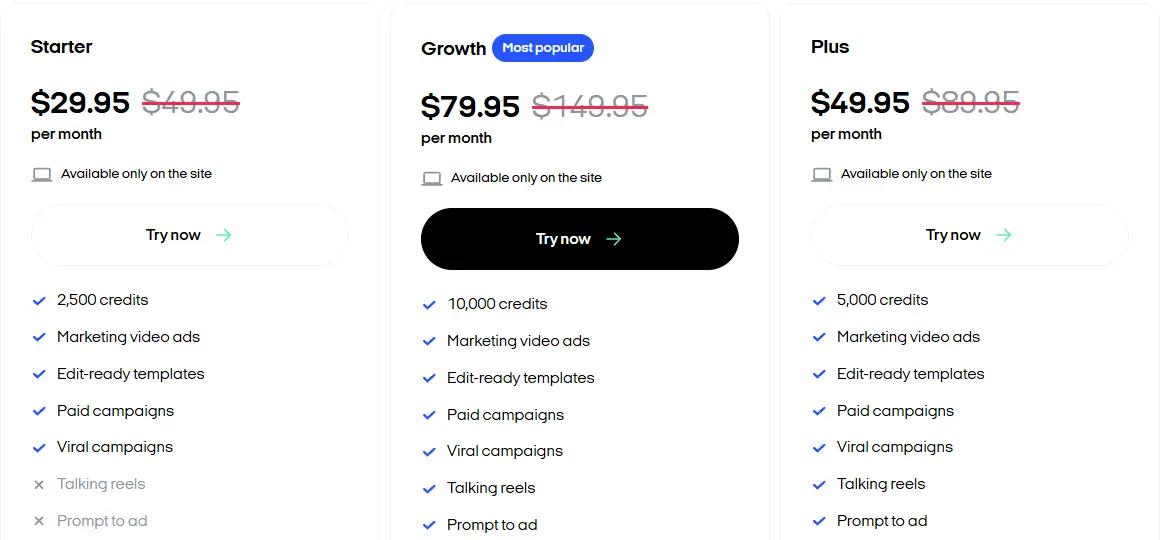
- Pricing: Starter is $29.95/month, shown against a crossed-out $49.95, with 2,500 credits. Plus is $49.95/month with 5,000 credits, and Growth $79.95/month with 10,000 credits. Talking reels, prompt to ad and brand-inspired remix are not on Starter.
- Free: the pricing page does not list a free plan or trial terms.
Strengths
- A low entry price
- Static and video ads in one tool
- A guided path from product to live Facebook and Instagram ads
Limits
- The pricing page does not say what a credit buys
- Starter leaves out talking reels and prompt to ad
Pick this instead of CamClo AI if you want a low-cost, guided way to make and launch your first Facebook and Instagram ads.
How we checked
We read Meta's Ads Guide and Business Help Center, Google Ads Help and TikTok Ads Manager's help listings for the specs and the fatigue and testing guidance, and each tool's own pricing, product and help pages for its prices and features, saving screenshots. TikTok's help pages would not open for us, so its row only states the format TikTok recommends, vertical 9:16. Where a vendor does not publish something, such as Canva's US prices or Zeely's trial, we say so instead of guessing.
The tools listed are the ones that appear in Google's US results for ad creative and AI ad creative searches. We did not run a scored benchmark, so there are no quality scores here. Output quality changes with every model update, so test with your own products before you commit.
Frequently asked questions
What is an ad creative?
An ad creative is the part of an ad that people see and hear: the image or video, any text on it, the caption and headline around it, and the call to action. Targeting, budget and bidding decide who sees the ad; the creative decides whether they stop and act. One ad set can run several versions at once, and each version is also called a creative.
What is the difference between ad copy and ad creative?
Ad copy is the words: the primary text, the headline, any on-image text and the call to action. Ad creative is the whole package people see, copy included, plus the image or video and the sound. Many marketers say creative when they mean only the visual, so check which one a brief means.
How often should you refresh ad creatives?
There is no fixed schedule. Refresh when the numbers slip against the week before: frequency climbing, click-through rate falling and cost per result rising. Meta shows Creative limited in Ads Manager when cost per result is higher than your past ads, and Creative fatigue when it is twice as high or more. Its advice is to add a materially different image or video and keep the original running.
How long should an ad creative test run?
Meta recommends A/B tests of at least 7 days and allows up to 30. Test one variable at a time, use an audience you are not reaching with other campaigns, and give the test enough budget to produce results. If your customers usually take more than a week to buy, run it longer.
What is the best AI tool for ad creatives?
It depends on what you start from. To make image and video ads from a product photo or link, and have an agent run the Meta and Google campaigns, CamClo AI covers the whole loop. AdCreative.ai suits static creatives at volume, Creatify suits video ads with AI actors from a product link, Canva Grow suits teams already designing in Canva, and Zeely suits sellers who want a guided launch on Facebook and Instagram.
How much does AdCreative.ai cost?
AdCreative.ai's Starter plan is $39 a month, or $20 a month billed yearly, with 10 credits a month. A credit is used when you download a creative, and generating is unlimited. Professional is $249 a month ($125 billed yearly) with 50 credits, and Ultimate $999 a month ($500 billed yearly) with 100 credits.
Need more ad creatives to test?
Make image and video ad creatives from your product photos with a 7-day free trial with 20 credits.
See plans and the free trial

