

Table of Contents
The best AI video ad generator depends on the ad you need. For finished product ads made from one photo or product link, in formats from UGC to TV spots, CamClo AI is our top pick; Creatify suits link-to-ad videos with AI actors, HeyGen and Arcads suit presenter and actor ads, Canva and InVideo AI suit template and editor-led ads, and Runway or Google Veo suit cinematic footage you cut into an ad yourself. Paid plans on this list start at $9 a month, and most tools have a free plan or trial.
We checked every price and feature on the vendor's own site. Here is how we compared them.
Quick picks by ad type
15 formats, from UGC and product demos to TV spots, made from one product photo or link, with the script written for you.
Paste a product URL and get a video ad with an AI actor and voiceover.
Stock AI avatars or a custom avatar of yourself, with 175+ languages and dialects on paid plans.
A library of 1,000+ AI actors, plus tools to translate, extend and re-cast an ad.
AI agents draft the video, then a full timeline editor lets you change every scene.
Canva Grow builds ads from your website and publishes them to Meta, TikTok and LinkedIn.
Generate hero shots with Gen-4.5 and edit real footage with Aleph 2.0.
Turn your images into short videos inside Google Ads, or use Veo 3.1 with a Google AI plan or the API.
Generates static and video ads, scores them, and launches them across seven ad channels.
The four kinds of AI video ad generator
The tools that rank for this search do different jobs. Knowing which kind you need does most of the comparison work for you.
| Kind | What you give it | What you get back | Tools on this list |
|---|---|---|---|
| Ad generators | A product photo, product link or brand assets | A finished ad with script, scenes and sound, sized for a placement | CamClo AI, Creatify, Pencil |
| Avatar and actor tools | A script | A presenter or AI actor speaking to camera | HeyGen, Arcads |
| Template and editor tools | A prompt, your clips and a template | An editable video you change scene by scene | Canva, InVideo AI |
| Video models | A prompt or an image | Raw clips you cut into an ad yourself | Runway, Google Veo |
You can combine two kinds: for example, generate the ad in one tool, then add captions, an offer or an end card in an editor.
AI video ad generators compared
| Tool | Best for | Paid plans from | Free option | Starts from |
|---|---|---|---|---|
| CamClo AI | Product ads in 15 formats, from UGC to TV spots | $49/mo | 7-day free trial, 20 credits (card required) | Product photo or product link |
| Creatify | Link-to-ad videos with AI actors | $39/mo | 10 credits a month, watermarked | Product link |
| HeyGen | Presenter ads in many languages | $29/mo ($24/mo billed yearly) | 3 videos a month, up to 1 min | Script |
| Arcads | AI actor UGC at volume | See vendor site | Free trial, terms not listed | Script |
| InVideo AI | Prompt to video with a timeline editor | $9/mo | None listed | Prompt |
| Canva | Template ads you edit and publish | US$144/yr (Pro) | Free plan, limited AI ad generation | Website link, prompt or template |
| Runway | Cinematic footage and editing | $15/mo ($12/mo billed yearly) | 125 one-time credits | Prompt, image or video |
| Google Veo | Google Ads and YouTube campaigns | API from $0.05/sec; Google AI Ultra (Veo 3.1) from $99.99/mo | No separate price listed in Google Ads | Images, prompt |
| Pencil | Ads with predicted performance | $14/mo ($11/mo billed yearly) | Six ads in a guided trial | Brand kit and product assets |
Entry paid plan on each vendor's official site, in US dollars, billed monthly unless marked. Canva's price is the yearly price on its US pricing page. "See vendor site" means the vendor does not publish a price. Promotions change often, so confirm before you buy.
The best AI video ad generators, tool by tool
Each entry covers what the tool makes, its price, its strengths and limits, and when to pick it instead of CamClo AI.
1. CamClo AI
Best for: finished product video ads in any format, from one photo or linkCamClo AI is an AI studio for ecommerce teams. Its Video Ads tool starts from your product photo or your product page link, from which it pulls the product image, name, description and selling points. You pick a format, a campaign goal and a placement, and it writes a scene-by-scene script, then generates the whole ad: the people, the setting and the sound, with voiceover, sound effects and, where the format suits it, music.
- Formats: 15, covering creator-style, product-only and produced ads: UGC, UGC Virtual Try-On, Testimonial, Street Interview, POV, Yapper, Unboxing, Product Demo, Product Showcase, Lifestyle, Before & After, Hyper Motion, ASMR, Commercial and TV Spot.
- Output: sized for 10 placements, including Instagram Reels, TikTok, YouTube Shorts, Facebook and Instagram feeds, LinkedIn and Pinterest, at 480p, 720p or 1080p, from 4 to 30 seconds per video ad.
- Campaign goals: the script changes with the goal you pick, such as sales, traffic, lead generation, retargeting or brand awareness.
- Remix Ads: pick a proven ad from a brand's ad library and CamClo AI rebuilds it around your product, up to 90 seconds.
- Image to video: animate any image with Seedance 2.5 (4 to 30 seconds), Seedance 2.0, Veo 3.1, Kling 3.0 or Gemini Omni Flash.
- Launching: Ad Autopilot, an AI media buyer for Meta and Google Ads, can launch the finished ads, then scale, pause and refresh them within spend caps you set.
- Pricing: plans from $49 per month with 150 credits. An 8-second 720p video ad costs 11 credits on the default model, so 150 credits cover about 13 of them. The 7-day free trial includes 20 credits.
Strengths
- Starts from your product photo or link, so the product on screen is the one you sell
- UGC, product demos, motion ads and full commercials in one tool
- Script, scenes and sound in one step, sized for each placement
- Ads up to 90 seconds with Remix Ads
Limits
- Can seem a little expensive next to a single video model or template tool, but the credits cover the script, the ad format and the sizing for each placement, not just a raw clip
See every format with sample ads on the AI video ad generator for product photos page, or bring a single still to life with the product photo to video tool.
2. Creatify
Best for: link-to-ad videos with AI actorsCreatify is an AI ad platform built around turning a product URL into a video ad: it writes the script and builds the ad with an AI actor, a voiceover and a template. The Pro plan adds Ad Clone (remake an ad from its URL), a competitor ad tracker and a performance agent.
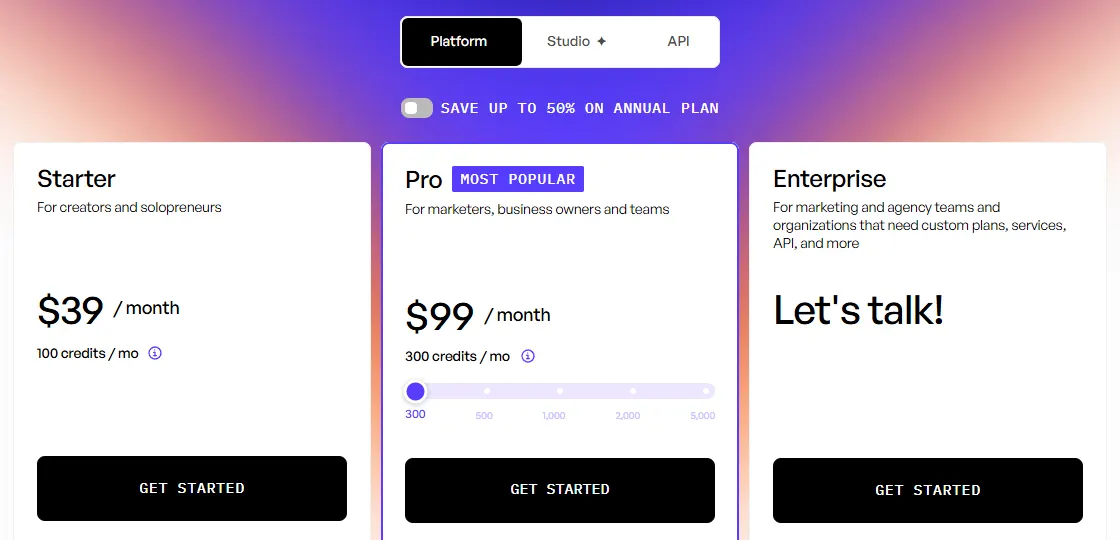
- Pricing: Starter is $39/month with 100 credits, 300 AI actors, 200+ ad templates, videos up to 2 minutes and one generation at a time. Pro is $99/month with 300 credits, 1,500 AI actors plus 3 custom avatars and videos up to 10 minutes. Creatify says annual billing saves up to 50%.
- Free: 10 credits a month, enough for up to 2 video ads or 20 image ads, with a watermark on exports.
- Languages: 75+.
Strengths
- From product link to finished ad with no script to write
- A large AI actor library and ad templates
- A free plan to test with
Limits
- Starter generates one video at a time
- Ad Clone and the competitor tracker need the $99 Pro plan
Pick this instead of CamClo AI if you want an AI actor presenting your product from a product page link, in one of 75+ languages.
What the credits buy: our Creatify pricing guide.
3. HeyGen
Best for: presenter ads in many languagesHeyGen is an AI avatar platform: pick a stock avatar or create one of yourself, add a script, and the avatar presents it. For ads, its Product Placement feature combines a product image, an avatar and a script into one video, and paid plans list over 175 languages and dialects.
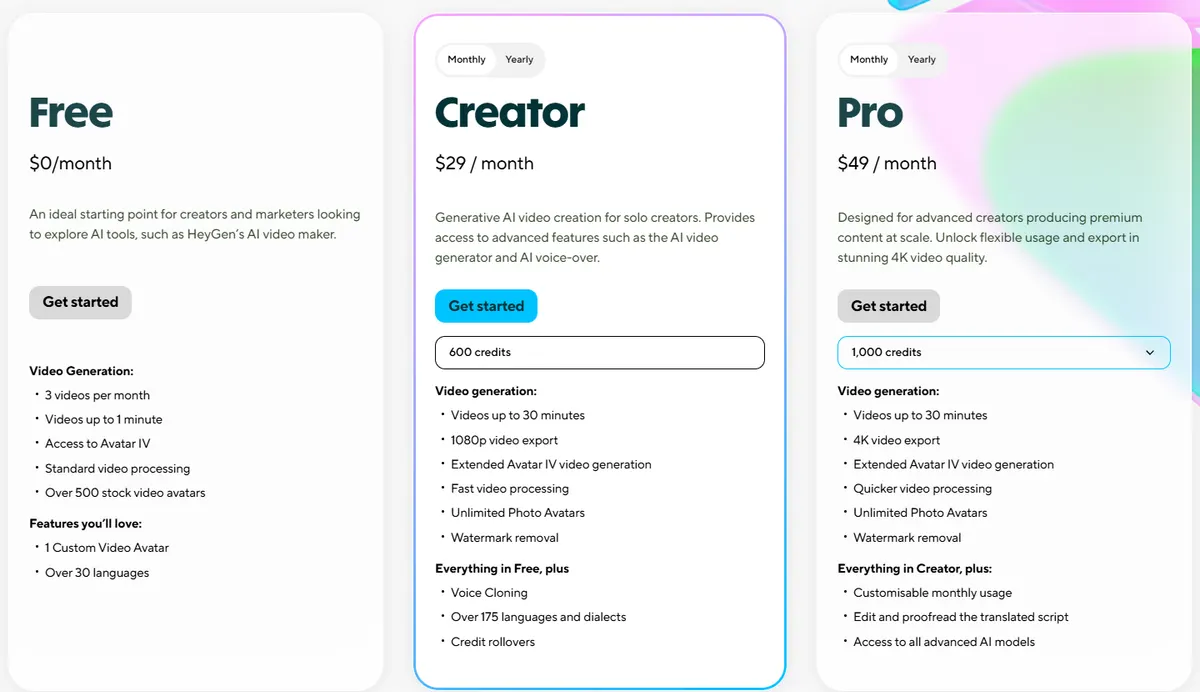
- Pricing: Creator is $29/month, or $24/month billed yearly, with 600 credits a month, videos up to 30 minutes, 1080p export and voice cloning. Pro starts at $49/month with 1,000 credits and 4K export.
- Free: 3 videos a month, up to 1 minute each, with 500+ stock avatars.
Strengths
- The same presenter across a whole series of ads
- Many languages from one script
- Long videos, up to 30 minutes on Creator
Limits
- Presenter-led by design, so it suits explainers more than product-only ads
- Credit use varies by avatar model, so check the cost per minute before you buy
Pick this instead of CamClo AI if you want the same AI presenter, or a custom avatar of yourself, fronting ads in many languages.
Credit costs per avatar model: our guide to HeyGen pricing and credits.
4. Arcads
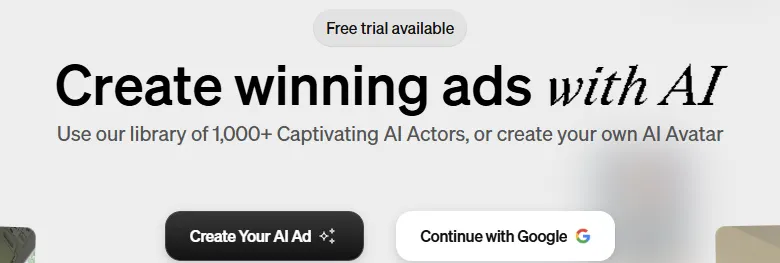
Best for: AI actor UGC ads at volumeArcads is an AI ad maker for performance marketers. Its library has more than 1,000 AI actors, or you can create your own AI avatar, and it adds ready-made ad presets and tools to translate, extend, caption and swap the actor in a video. Video models such as Seedance and Kling run in the same workspace.
- Pricing: Arcads does not publish plan prices on its site, so see vendor site.
- Free: the homepage says a free trial is available, without listing terms.
Strengths
- A large AI actor library, or your own avatar
- Tools to translate, extend and re-cast a winning ad
- Ad presets made for performance marketing
Limits
- No public price list, so you cannot compare costs before signing up
- Built around actors talking to camera
Pick this instead of CamClo AI if you want a big cast of AI actors delivering scripts to camera, and the same face across many ad variations.
More actor and creator tools: our guide to the best AI UGC video generators, and our Arcads pricing breakdown.
5. InVideo AI
Best for: prompt to video with a full timeline editorInVideo AI drafts a video from a prompt with its AI agents, then lets you finish it in a timeline editor with color, audio and multiplayer editing. Plans also include generative video models such as Seedance and premium stock footage.
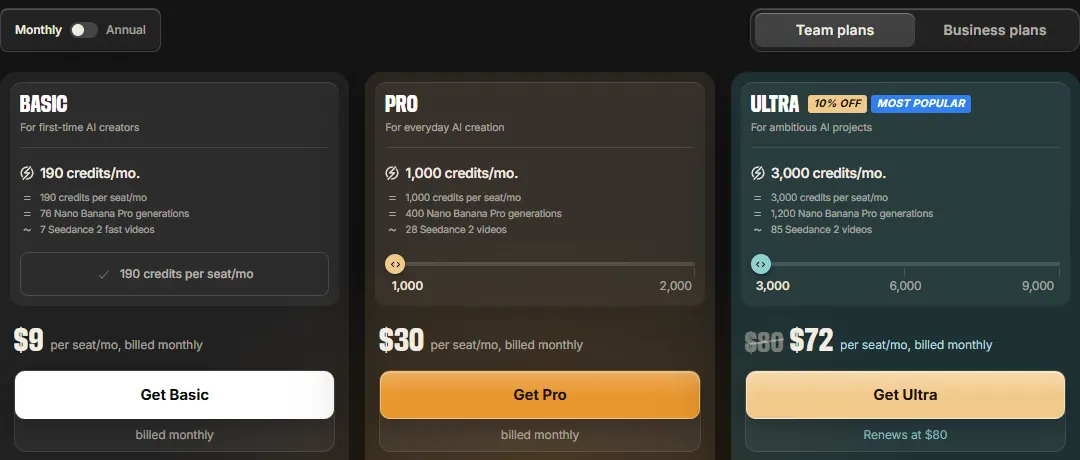
- Pricing: Basic is $9/month per seat with 190 credits. Pro is $30/month, or $25/month billed yearly, with 1,000 credits and access to Seedance 2.5. Ultra is $80/month, or $60/month billed yearly, with 3,000 credits. InVideo prices a 5-second Seedance 2.0 Fast clip at about 30 credits, and unused credits do not roll over.
- Free: no free plan is listed on the pricing page.
Strengths
- The lowest entry price on this list
- A real timeline editor for final changes
- Video models and stock footage in one app
Limits
- Basic has no Seedance 2.5 and only the Lite agent
- You shape the ad structure yourself
Pick this instead of CamClo AI if you want to edit every scene yourself and prefer a low monthly price.
Other options: our guide to InVideo alternatives.
6. Canva
Best for: template ads you edit and publish from one placeCanva is a design platform with an AI ad generator called Canva Grow. You drop in your website link and product visuals, chat with the AI to get ad concepts, edit them in the Canva editor, then publish straight to Meta, TikTok or LinkedIn, with Google Ads and Amazon Ads available through app integrations. For video, Canva AI makes 8-second clips with sound from a prompt, and Magic Video turns your own clips or photos into a 60-second video with templates, transitions and music.
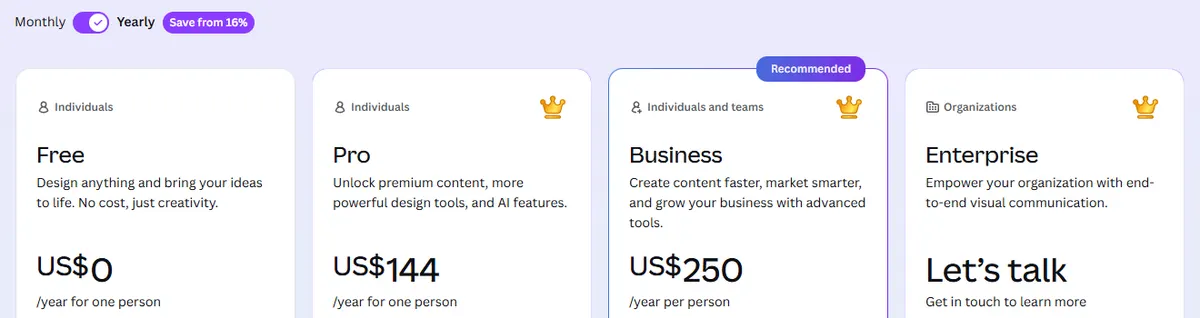
- Pricing (US page, yearly billing): Pro is US$144 a year for one person. Business is US$250 a year per person. Both have a free trial.
- Free: Canva Free includes limited access to the AI ad generator, and Canva says most Grow features need Pro, Business or Enterprise. Magic Video is included on every plan.
Strengths
- Templates, stock media and brand kits in one editor
- Publishes directly to Meta, TikTok and LinkedIn
- Static and video ads side by side
Limits
- Generated clips are short: 8 seconds with sound, or 6 without
- Most Grow ad features need a paid plan
Pick this instead of CamClo AI if your team already designs in Canva and wants template-based ads plus publishing in one place.
7. Runway
Best for: cinematic footage and editingRunway is a creative video studio. Its Gen-4.5 model generates video from text or images, Aleph 2.0 edits existing footage from a prompt, and paid plans add other models such as Kling 3.0 plus music, voice and sound effects generation. It makes the footage; you build the ad.
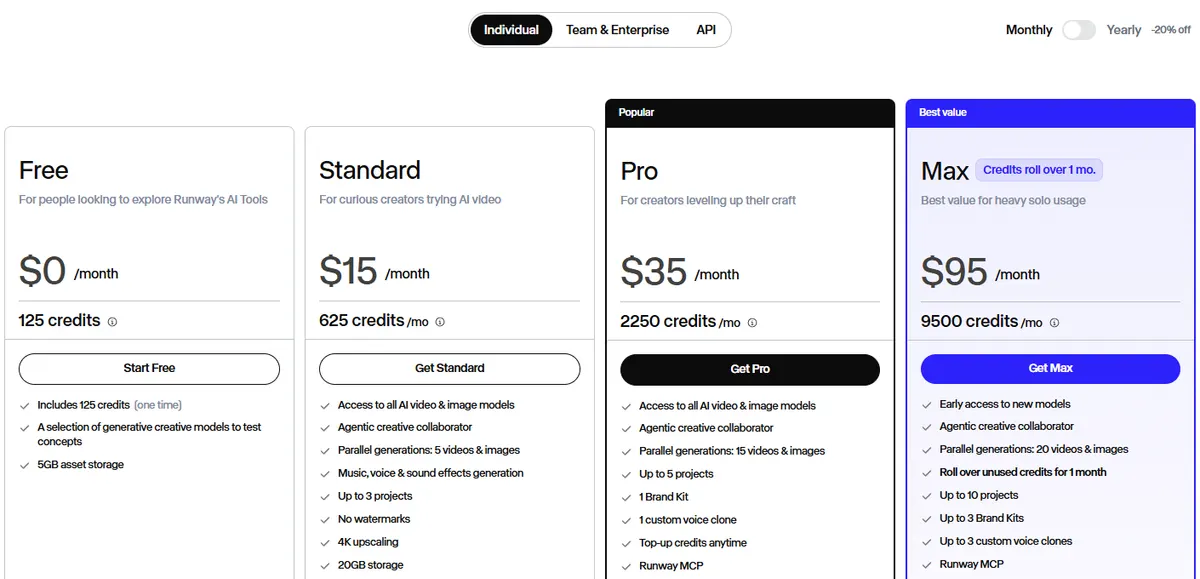
- Pricing: Standard is $15/month, or $12/month billed yearly, with 625 credits a month, which Runway puts at 52 seconds of Gen-4.5, plus no watermarks and 4K upscaling. Pro is $35/month, or $28/month billed yearly, with 2,250 credits and Seedance 2.5.
- Free: 125 one-time credits.
Strengths
- High-end visuals for brand films and hero spots
- Edits footage you already have
- Several video models and sound tools in one studio
Limits
- Standard's 625 credits cover under a minute of Gen-4.5 video
- Monthly credits on Standard and Pro do not roll over
- No ad formats or scripts; you direct every shot
Pick this instead of CamClo AI if you are making a brand film or hero commercial and want control over each shot.
Plan by plan: our Runway pricing guide.
8. Google Veo
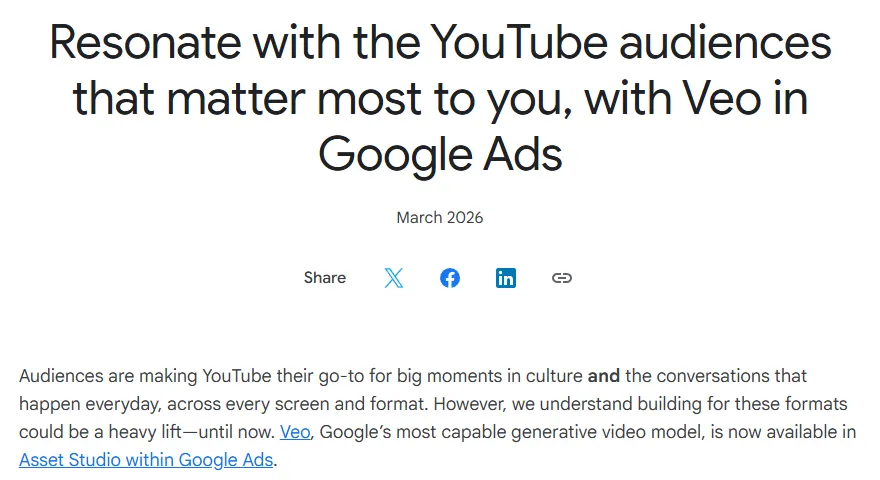
Best for: video for Google Ads and YouTube campaignsVeo is Google DeepMind's video model, and advertisers can reach it three ways. Inside Google Ads, Asset Studio turns up to three of your static images into videos of up to 10 seconds each. Google's paid AI plans also include Veo access. Developers can call Veo 3.1 through the Gemini API, priced per second.
- In Google Ads: Google announced Veo in Asset Studio in March 2026, for all campaigns and for auto-generated Demand Gen campaigns. The announcement lists no separate price.
- Google AI plans (US): AI Pro is $19.99/month with 1,000 Flow credits, and Google's plan FAQ says it unlocks a limited trial of Veo 3.1 Lite. Google lists video generation with Veo 3.1 on AI Ultra, from $99.99/month.
- API: per second of video, Veo 3.1 Lite from $0.05 at 720p, Fast from $0.10 and Standard $0.40. Clips run 4, 6 or 8 seconds, in 16:9 or 9:16, with native audio, and Standard and Fast clips can be extended 7 seconds at a time.
Strengths
- Built into Google Ads for YouTube and Demand Gen
- Sound generated with the picture
- A pay-per-second API for developers
Limits
- Short clips: up to 10 seconds in Google Ads, 8 seconds per API generation
- Google lists Veo 3.1 on the $99.99 Ultra plan; AI Pro gets only a limited Veo 3.1 Lite trial
- Outside Google Ads, you write every prompt and build the ad yourself
Pick this instead of CamClo AI if you run YouTube or Demand Gen campaigns and want quick video versions of images already in your Google Ads account.
Per-second and plan prices in detail: our Veo 3 pricing guide.
9. Pencil
Best for: ads with predicted performancePencil is a creative platform for performance marketers. Its AI agents generate text, images, video and ad creatives from your brand kit and product assets, give AI predictions and scores, and let you launch and track ads on Facebook, Instagram, TikTok, YouTube, Google Display, DV360 and LinkedIn.
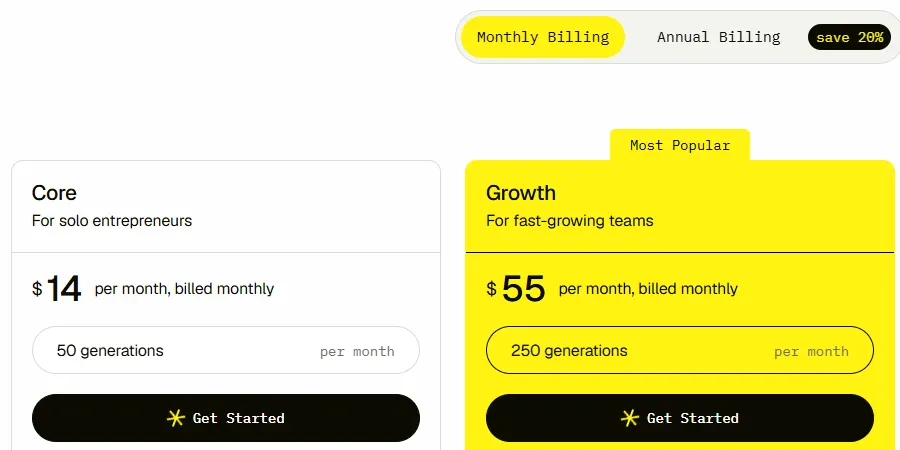
- Pricing: Core is $14/month, or $11/month billed yearly, with 50 generations a month. Growth is $55/month, or $44/month billed yearly, with 250 generations. Pro is custom priced with unlimited generations. Pencil counts a generation each time you ask an AI model to generate something, and unused generations do not roll over.
- Free: you can sign up and create six ads through a guided experience at no cost.
Strengths
- Predictions and creative insights before you spend
- Launch and track across seven ad channels
- Static and video ads from one brand library
Limits
- Core's 50 generations go quickly, since every generation counts
- Pencil recommends a full brand library and connected ad accounts for the best results
Pick this instead of CamClo AI if you want performance predictions and reporting next to creation, across several ad channels.
Which tool for which ad format
Most video ads fall into a handful of formats. Here is where each tool on this list fits.
- Product demos. The product in use, step by step. CamClo AI's Product Demo and Unboxing formats make these from a product photo; Runway or Veo can generate the shots if you script them yourself.
- Commercials and TV spots. A produced brand story. CamClo AI's Commercial and TV Spot formats write and generate the whole spot; Runway gives you shot-by-shot control.
- UGC and testimonials. A person reviewing, trying or reacting to the product. CamClo AI generates the whole scene; Arcads, Creatify and HeyGen use an AI actor or avatar. Our guides to what UGC ads are and the best AI UGC video generators go deeper.
- Motion ads. Product-only video with fast camera moves or close, satisfying detail. CamClo AI's Hyper Motion, Product Showcase and ASMR formats; our comparison of static, ASMR and hyper motion ads looks at when each one works.
- Template ads. Text, offers and product shots over a set layout. Canva and InVideo AI, where you edit every element.
- Presenter explainers. A person explaining a product or offer, often in several languages. HeyGen.
To try the formats on your own product, start with the video ad maker and a single product photo.
How we compared them
We chose the tools from Google's US results, AI Overview and the ranking roundups for "ai video ad generator", "best ai video ad generator" and "ai video ad maker". We then read each vendor's official pricing, product and help pages, saved screenshots, and recorded the entry paid plan, the free option, what each tool starts from and which ad types it makes. Where a vendor does not publish a price, as with Arcads, we say so instead of guessing. Canva's US page showed yearly prices, so we list those.
CapCut also appears in Google's AI answer for this search, but its official pages would not load for us when we checked, so we could not confirm its current ad features or prices and left it out. We did not run a scored benchmark, so there are no quality scores on this page. Output quality changes with every model release, so test your own product before you commit.
How to choose an AI video ad generator
- Start from what you already have. A product photo or link suits an ad generator, a script suits an avatar tool, and existing footage suits an editor or Runway's Aleph.
- Price the finished ad, not the plan. An 8-second 720p ad uses 11 of CamClo AI's 150 monthly credits, a 5-second Seedance 2.0 Fast clip uses about 30 of InVideo Basic's 190, and Creatify's free 10 credits cover up to 2 video ads.
- Check the product frame by frame. Labels, prints and logos are where AI video slips. Tools that start from your real product photo keep it closer to what you sell.
- Size for the placement. Reels, TikTok and Shorts want 9:16; feeds take 4:5 or 1:1. Our Meta ads specs guide has the details.
- Test formats, not only versions. A UGC ad, a demo and a motion ad give the platform genuinely different creative to learn from. Our guide to ad creative covers how to plan a test.
- Check the rules. Read each tool's terms on commercial use, and each platform's ad policy on AI content.
Frequently asked questions
Which AI video generator is best for ads?
It depends on the ad. For finished product ads from one photo or product link, in formats from UGC to TV spots, CamClo AI is built for the job. Creatify suits link-to-ad videos with AI actors, HeyGen suits presenter ads in many languages, Arcads suits AI actor UGC, Canva and InVideo AI suit template and editor-led ads, Runway suits cinematic footage, and Veo suits Google Ads and YouTube campaigns.
How much does an AI video ad generator cost?
Entry paid plans are $9 a month for InVideo AI Basic, $14 for Pencil Core, $15 for Runway Standard, $29 for HeyGen Creator, $39 for Creatify Starter and $49 for CamClo AI, and Canva Pro is US$144 a year. Arcads does not publish prices, and Veo in Google Ads lists no separate price. Compare the cost of a finished ad, not just the plan: on CamClo AI, an 8-second 720p video ad uses 11 of the 150 monthly credits.
Is there a free AI video ad generator?
Several tools have a free way in. CamClo AI has a 7-day free trial with 20 credits. Creatify's free plan gives 10 credits a month, enough for up to 2 watermarked video ads. HeyGen's free plan gives 3 videos a month of up to 1 minute, Runway gives 125 one-time credits, Pencil lets you make six ads in a guided trial, and Canva Free includes limited AI ad generation and Magic Video. InVideo AI lists no free plan.
Can I use AI videos for advertising?
Yes, in general, with some rules. Meta, for example, requires advertisers to disclose when ads about social issues, elections or politics contain images, video or audio that were digitally created or altered, and it shows AI info on ad images made or materially edited with its own generative AI tools. Other platforms have their own rules, so check each ad policy and the tool's terms for commercial use. Never present an AI person as a real customer.
How do I make a video ad with AI?
Start from a sharp product photo or your product page link, pick an ad format and a placement, and let the tool write the script or write your own. Generate a few versions, check the product frame by frame for changed labels, prints or logos, and add your offer and captions if the tool has not. Export at the size each placement needs, such as 9:16 for Reels, TikTok and Shorts, and test more than one format.
Do I need a music license for an AI video ad?
You need the right to use every sound in the ad. Music, voice and sound effects that a tool generates with the video are covered by that tool's terms, so check that they allow commercial use. For music you add yourself, use a library licensed for advertising, not tracks licensed for personal use only. CamClo AI generates the sound with each video ad, from voiceover and sound effects to music where the format calls for it, so you do not need to add a separate track.
Making video ads for your products?
Try CamClo AI free for 7 days with 20 credits.
See plans and the free trial

