

Table of Contents
The best InVideo alternative depends on what you make: CamClo AI for product and ecommerce video ads, HeyGen or Synthesia for AI presenters, Pictory for turning scripts and articles into stock-footage videos, and VEED, Descript or Canva for editing your own footage. InVideo AI itself now sells credit plans from $9 a month (Basic, 190 credits), plus a free plan with limited credits that reset every week.
We checked every price on the vendor's own site, in US dollars. Here is how we compared them.
InVideo AI pricing and free plan limits in 2026
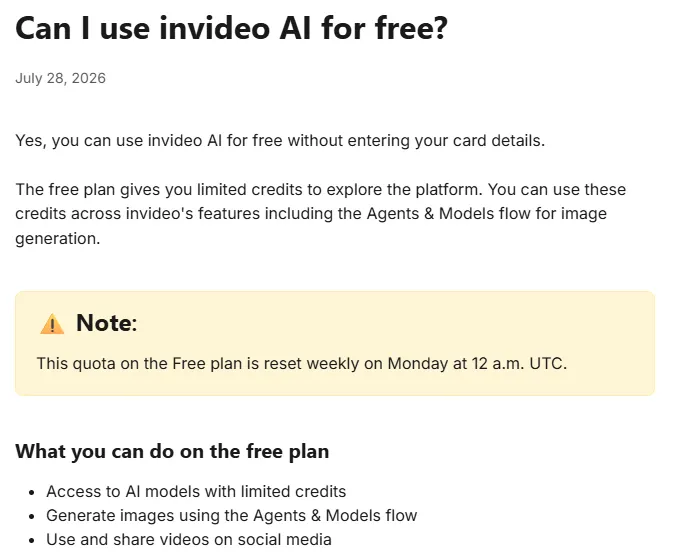
InVideo now presents itself as an agentic video editor. Its Agent Two works on a multitrack timeline, and the same subscription gives you third-party image and video models such as Seedance, Veo 3.1 and Nano Banana Pro. Everything AI is paid for in credits. Some ranking roundups still quote older plans called Plus, Max and Generative, priced by AI minutes. InVideo's pricing page lists these instead:
| Plan | Billed monthly | Billed yearly | Credits a month | What stands out |
|---|---|---|---|---|
| Free | $0 | $0 | Limited, reset weekly | No card needed; the number of credits is not published |
| Basic | $9 per seat | $9 per seat | 190 | Up to 5 seats, Agent Two Lite only, Seedance 2.0 Fast and 2.0 Mini only, 100 GB storage |
| Pro | $30 per seat | $25 per seat | 1,000 (2,000 tier available) | All models, including Seedance 2.5 at 1080p and Seedance 2.0 at 4K; up to 10 seats plus 10 free guest seats with 190 credits each |
| Ultra | $80 per seat ($72 first month) | $60 per seat | 3,000 (6,000 and 9,000 tiers) | Lowest cost per credit; up to 20 seats plus 20 free guest seats |
| Team and Scale | See vendor site | See vendor site | 1,600 or 4,000 per seat | Business plans for 5 to 30 seats |
| Enterprise | Custom | Custom | Custom | Through sales |
From InVideo's pricing page and its plan limits page. The Ultra monthly price showed a 10% first-month discount, renewing at $80. Larger Pro and Ultra credit tiers cost more.
The free plan is the part most people ask about, and InVideo gives few numbers for it. Here is what its help center and terms say:
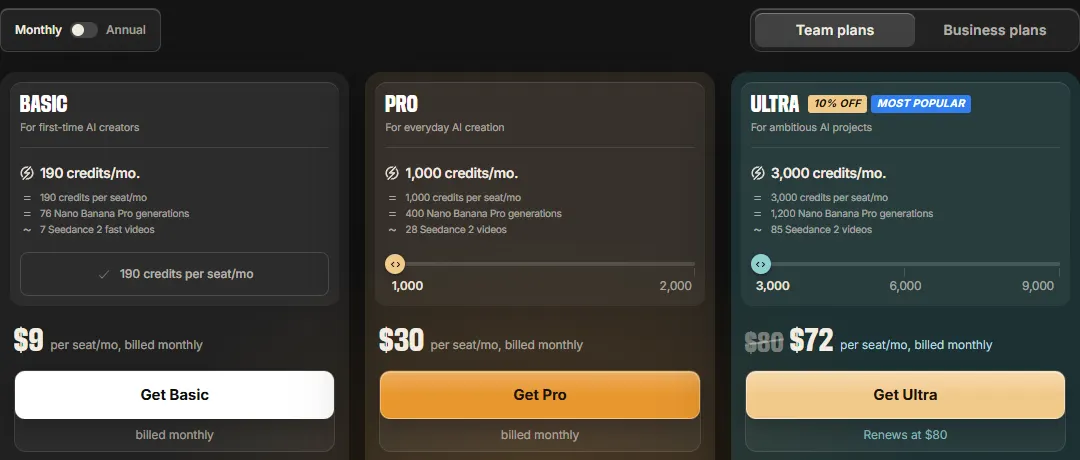
- No card is needed to use the free plan, according to the help article "Can I use invideo AI for free?"
- You get "limited credits" to use across InVideo's features, including AI models. The help center and pricing page do not say how many.
- The allowance resets weekly, on Monday at 12 a.m. UTC. When it runs out, you wait for the reset or upgrade.
- Watermark-free downloads are a paid feature. InVideo's help center says projects exported before subscribing keep their watermarks, and that once an account moves back to the Free plan, edited videos need a paid plan to download without a watermark.
- Commercial use: InVideo's terms (effective 8 July 2026) license the outputs you generate for commercial use and set no separate rule for the Free plan, while stock media inside a video follows its own license. Some roundups say the free plan bans commercial use; we did not find that in the current terms.
What an InVideo credit buys
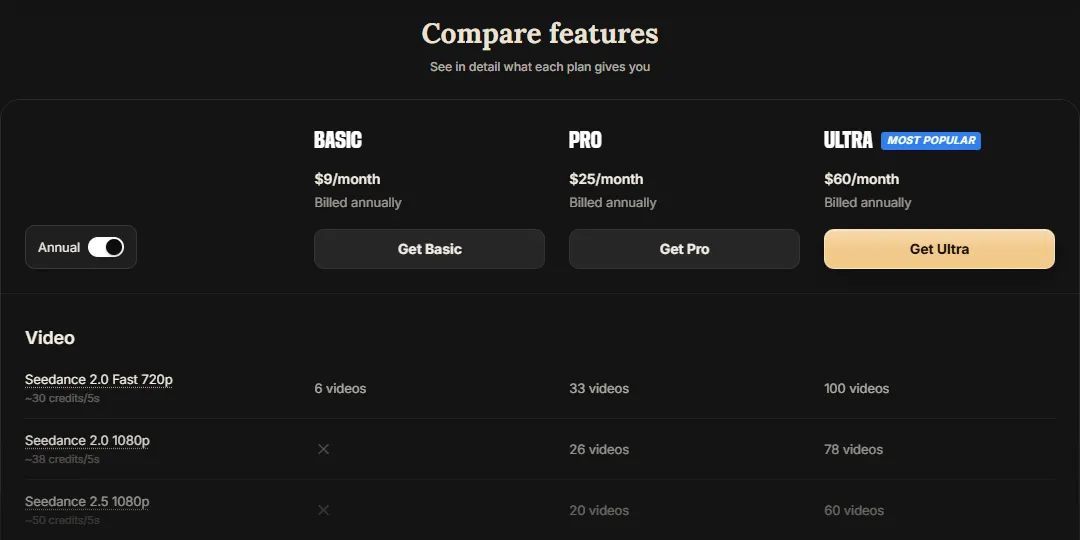
Video models on InVideo are priced per second, and the rate depends on the model, the resolution and whether the clip has sound. InVideo's own compare table puts it in 5-second clips:
| What you make | Credits (InVideo's estimate) | Basic, 190 credits | Pro, 1,000 credits | Ultra, 3,000 credits |
|---|---|---|---|---|
| Seedance 2.0 Fast, 720p | About 30 per 5 seconds | 6 clips | 33 clips | 100 clips |
| Seedance 2.0, 1080p | About 38 per 5 seconds | Not on Basic | 26 clips | 78 clips |
| Seedance 2.5, 1080p | About 50 per 5 seconds | Not on Basic | 20 clips | 60 clips |
| Nano Banana Pro image | About 2.5 per image | 76 images | 400 images | 1,200 images |
From the compare table on InVideo's pricing page. Manual timeline editing and exporting do not use credits.
In plain terms: Basic's 190 credits cover about 30 seconds of generated video a month on Seedance 2.0 Fast at 720p. Pro's 1,000 credits cover about 26 five-second clips at 1080p, a little over two minutes. If you want to compare models directly, our Seedance pricing guide covers what the same model costs elsewhere.
Why people look for InVideo alternatives
InVideo is a capable product, and for some people it is still the right one (see the next section). These are the reasons people most often switch, each checked against InVideo's own pages:
- Credits run out fast on video. At about 30 to 50 credits per 5 seconds, Basic covers about 6 short clips a month and Pro 20 to 33, before any retakes.
- Unused credits disappear. Plan credits reset every month and do not roll over.
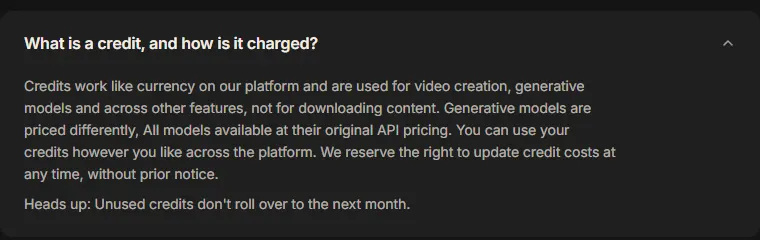
- Credit costs can change. InVideo's pricing FAQ says it reserves the right to update credit costs at any time, without prior notice.
- The $9 plan is limited. Basic has no Seedance 2.0 or 2.5, only the Fast and Mini versions, and only the Lite version of Agent Two.
- The free plan's size is not published, so you cannot tell in advance what a week of free use covers.
- Refunds are narrow. A refund request is only possible within 7 days of a purchase or renewal, and only if you have not used any credits or premium features in that period.
- It is now an editor and a model hub. InVideo presents itself as an agentic video editor. If you wanted a one-prompt video with stock footage, an AI presenter, or ads built around a product, a more focused tool can fit better.
When InVideo is still the right pick
- You edit on a timeline and want AI agents on top. Manual editing does not use credits, and exports are free.
- You want many models behind one bill, such as Seedance, Veo 3.1 and Nano Banana Pro.
- You work as a team. Pro and Ultra include free guest seats, and every paid plan has multiplayer editing.
- You want UGC-style ads from a product link and are happy to direct the agent step by step. InVideo's UGC ads flow casts a creator, has you approve each shot as a still, then animates them.
InVideo alternatives by use case
Starts from your product photo or product page link; 15 video ad formats with the script written for you.
Paste a script or a URL and get a video built from stock footage and an AI voice.
InVideo alternatives compared
| Tool | Best for | Paid plans from | Free option | You start from |
|---|---|---|---|---|
| InVideo AI (reference) | AI editing agents plus many models | $9/seat/mo (190 credits) | Limited credits, reset weekly | A prompt, your footage or a product link |
| CamClo AI | Product and ecommerce video ads | $49/mo (150 credits) | 7-day free trial with 20 credits | A product photo or product page link |
| HeyGen | AI avatars and translation | $29/mo ($24/mo billed yearly) | 3 videos a month, up to 1 min | A script and an avatar |
| Pictory | Scripts and articles to stock video | $29/mo ($25/mo billed yearly) | 14-day trial, 15 video minutes | A script, URL, slides or recording |
| Synthesia | Training and presenter videos | $29/mo ($18/mo billed yearly) | Basic plan, no card, no downloads | A script and an avatar |
| VEED | Browser editing and subtitles | See vendor site | Free plan, watermarked | Your footage |
| Descript | Editing recordings by text | $24/mo ($16/mo billed yearly) | 60 media minutes a month | Your recording |
| Canva | Templates for social video | $144/yr (Pro) | Free plan, up to 20 AI uses | A template and your clips |
Entry paid plan on each vendor's official site, in US dollars, billed monthly unless marked. Canva shows its US price per year. "See vendor site" means we could not confirm a US dollar price on an official page. Confirm before you buy.
The alternatives, tool by tool
Each entry covers what the tool is, what it costs, its strengths and limits, and when you should pick it instead of CamClo AI.
1. CamClo AI
Best for: product and ecommerce video adsCamClo AI is an AI studio for ecommerce teams. Its Video Ads tool starts from your product photo, or from a product page link that pulls the product in. You pick an ad format, and it writes the script and generates the whole ad: the person, the setting, the voice and the sound. There is no timeline to learn and no prompt to engineer.
- Formats: 15, including UGC, UGC Virtual Try-On, Unboxing, Product Demo, Product Showcase, Before and After, Testimonial, ASMR, Street Interview, POV and TV Spot.
- Output: sized for 10 placements, including Instagram Reels, TikTok, YouTube Shorts and Facebook and Instagram feeds, at 480p, 720p or 1080p, from 4 to 30 seconds per video ad.
- Remix Ads: pick a proven ad from a brand's ad library and CamClo AI rebuilds it around your product, up to 90 seconds, in the reference ad's language unless you ask for another.
- Product photo to video: Seedance 2.5 (4 to 30 seconds), Seedance 2.0, Google Veo 3.1 (up to 4K), Kling 3.0 and Gemini Omni Flash, for clips without an ad script.
- Pricing: plans from $49 per month with 150 credits. An 8-second 720p video ad costs 11 credits on the default model. There is a 7-day free trial with 20 credits.
Strengths
- Starts from your product photo, so the product on screen is the one you sell
- Ad formats where the product is used, worn or unboxed, not only shown
- Script, scene, voice and placement sizing in one step
- The credit cost is shown per ad, by length and resolution
- Ads up to 90 seconds with Remix Ads
Limits
- Can seem a little expensive next to a general video tool, but the credits cover the script, the ad format and the sizing for each placement, not just a raw clip
See the formats and sample ads on the AI video ad maker for product photos, or animate a still with the product photo to video tool.
2. HeyGen
Best for: AI avatars and translationHeyGen is an AI avatar platform: pick a stock presenter or make your own, give it a script, and it speaks to camera. It also translates videos with lip-sync, and the free plan needs no card.
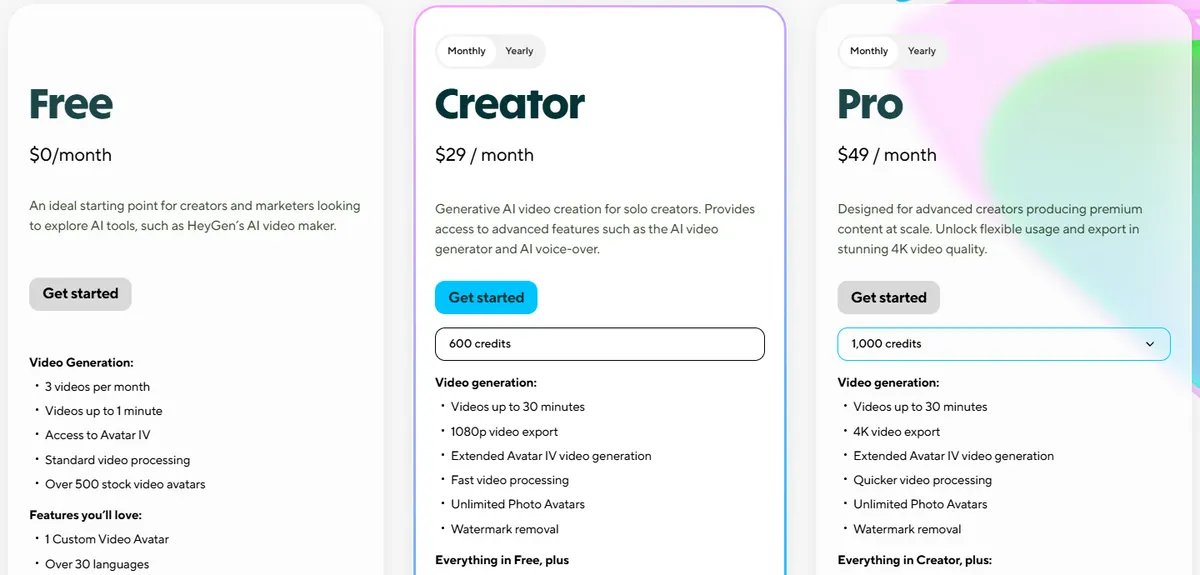
- Pricing: Creator is $29/month, or $24/month billed yearly, with 600 credits, videos up to 30 minutes, 1080p export, watermark removal, voice cloning and 175+ languages and dialects. Pro starts at $49/month with 1,000 credits and 4K export. Business is $149/month plus $20 per seat.
- Free: 3 videos a month, up to 1 minute each, with 500+ stock avatars and 30+ languages.
Strengths
- A usable free plan to test with
- 175+ languages and dialects on paid plans
- Credit rollovers listed on Creator
Limits
- Credits per video vary with the AI model, the length and the complexity
- Presenter-style video, with the product as a prop
Pick this instead of CamClo AI if you need a presenter explaining something, or the same video in many languages. Our HeyGen pricing and credits guide explains what a credit buys.
3. Pictory
Best for: turning scripts and articles into stock-footage videosPictory turns a script, a blog post URL or slides into a video built from stock footage, with an AI voiceover and captions. It also edits recorded video by text. If you used InVideo to turn a script into a stock-footage video with a voiceover, this is the most direct swap.
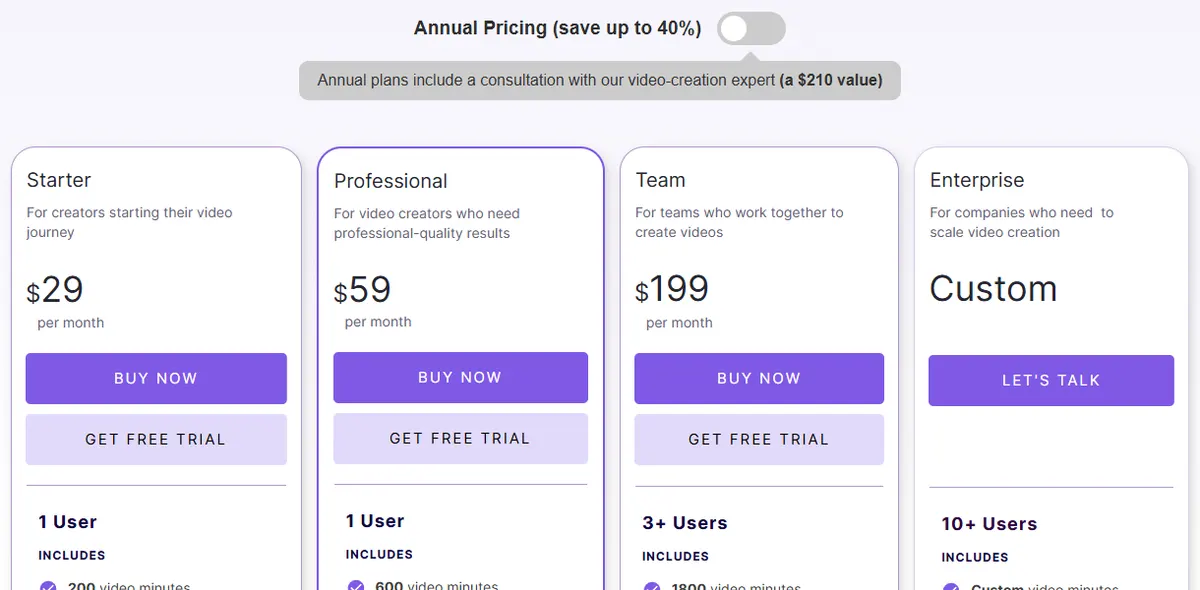
- Pricing: Starter is $29/month, or $25/month billed yearly, with 200 video minutes a month, no watermark, a library of 5 million stock videos, and 60 minutes of ElevenLabs AI voices a month in 29 languages. Professional is $59/month ($35 billed yearly), and Team is $199/month ($119 billed yearly).
- AI credits: Starter includes 100 AI credits a month, which Pictory says covers up to about 1 minute of generated video or 3 minutes of avatar video.
- Free: a 14-day trial with 15 video minutes and videos up to 5 minutes long.
Strengths
- Script or URL to a finished video with little setup
- Video minutes, not credits, cover most of the work
- Premium stock and AI voices included
Limits
- Generated AI video is a small allowance on Starter
- Stock footage, not your product, fills most scenes
Pick this instead of CamClo AI if you make explainers, blog-to-video or faceless channel videos from written content.
4. Synthesia
Best for: training and presenter videosSynthesia makes presenter videos with AI avatars, plus dubbing and translation. It is built for training, onboarding and internal communication more than social ads.
- Pricing: Starter is $29/month, or $18/month billed yearly, with about 10 minutes of video a month and 125+ avatars. Creator is $89/month, or $64/month billed yearly, with 180+ avatars and personal avatars.
- Free: a Basic plan with no card required and credits for up to 10 minutes of video a month. Downloads and removing the Synthesia logo start on Starter.
Strengths
- 160+ languages
- A free plan to build and preview with
Limits
- Paid plans cap video minutes each month
- Presenter-style video, not product-in-hand ads
Pick this instead of CamClo AI if you need a presenter for training, onboarding or a product walkthrough in many languages.
5. VEED
Best for: browser editing and subtitlesVEED is an online video editor with automatic subtitles, translation, AI voice and a set of generative tools. It suits people who have footage and want to finish it in the browser.
- Pricing: plans are Creator, Pro, Studio and Enterprise, charged per user. VEED lists prices in the visitor's local currency, so for US dollar prices see vendor site. Creator includes unlimited auto subtitles and no watermark; Pro adds translation into 50+ languages.
- Free: a free plan, with a watermark in the corner of videos.
Strengths
- Fast subtitles and translation
- Works in the browser with no install
Limits
- AI credits do not carry over between renewals
- An editor first; you bring the footage and the ad idea
Pick this instead of CamClo AI if you already shoot your own video and mainly need captions, trims and resizing.
6. Descript
Best for: editing recordings by editing textDescript transcribes your recording so you can edit the video by editing the words. Its AI co-editor, Underlord, and tools such as Studio Sound and Remove Filler Words clean up talking-head video and podcasts.
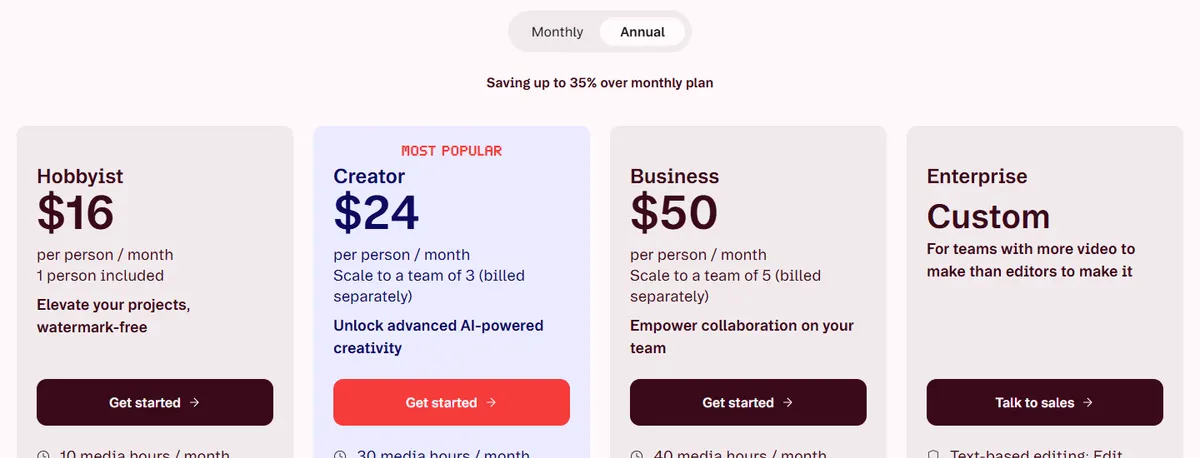
- Pricing: Hobbyist is $24/month, or $16/month billed yearly, with 10 media hours, 400 AI credits and watermark-free 1080p export. Creator is $35/month, or $24/month billed yearly, with 30 media hours, 800 AI credits, 4K export and video generation with AI models.
- Free: 60 media minutes a month, 100 one-time AI credits and 720p export.
Strengths
- Editing by transcript is quick for spoken video
- A free plan with monthly media minutes
Limits
- Built around recordings you already have
- Free AI credits are one-time, not monthly
Pick this instead of CamClo AI if you record yourself talking, such as podcasts, tutorials or webinars, and want to edit fast.
7. Canva
Best for: template-based social videoCanva's video editor sits inside its design suite. It has a multi-layer timeline, hook templates for social media, one-click captions, Highlights to find the best parts of your footage, and Magic Video, which builds an edit from your clips and a short prompt.
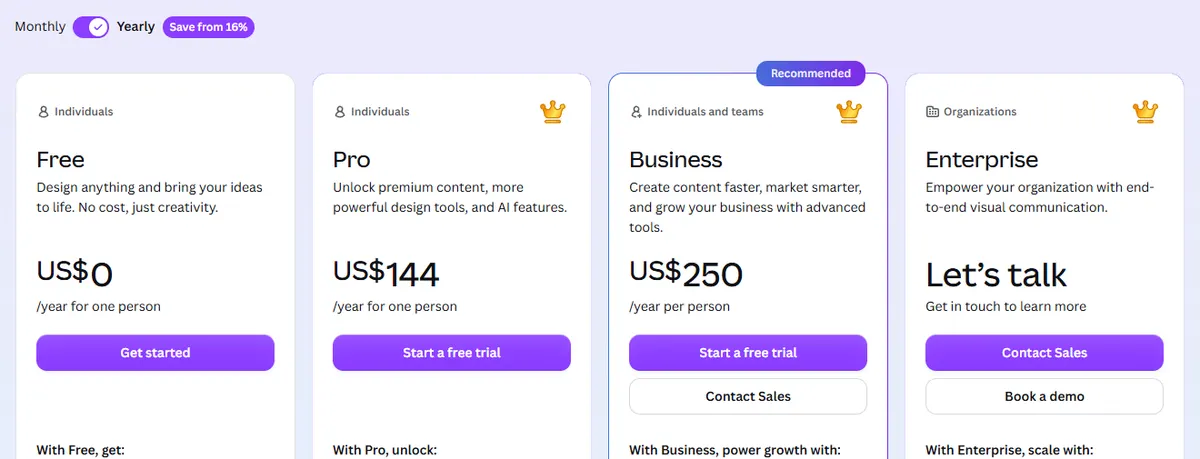
- Pricing: Pro is US$144 a year for one person, with premium templates and media and 10 times the AI use of Canva Free. Business is US$250 a year per person.
- Free: Canva Free includes 1.6M+ templates and up to 20 Standard or Premium AI uses.
Strengths
- Video, graphics and brand kits in one app
- A free plan that is useful on its own
Limits
- AI use is capped by plan; more costs an add-on
- Templates and your clips, not generated product scenes
Pick this instead of CamClo AI if your team already designs in Canva and needs quick social videos from templates.
How we compared them
We took the tools from Google's live results and AI overviews for "invideo alternatives" and "invideo ai alternative", then read each vendor's official pricing, help and product pages. We recorded the entry paid plan, the free option and what you start from, and saved screenshots of the pricing pages that showed US dollars. Synthesia and VEED showed local-currency prices in our screenshots, so we took Synthesia's US dollar prices from its US page and left VEED's as "see vendor site". CapCut appears in some roundups, but we could not reach an official CapCut pricing page, so it is not listed.
InVideo's facts come from its pricing page, plan limits page, help center and terms. We did not run a scored benchmark, so there are no quality scores on this page. Test your own product or script before you commit.
How to choose an InVideo alternative
- Start from what you have. A product photo, a script, a recording or a template each point to a different tool.
- Price the finished video, not the plan. Work out what one finished video costs on the plan you would buy. On InVideo Pro, 1,000 credits cover about 26 five-second clips at 1080p. On CamClo AI's $49 plan, 150 credits cover 8-second 720p video ads at 11 credits each, script and sizing included. On Pictory, most work comes out of video minutes.
- Check what the free option really gives you. A weekly allowance, a one-time trial and a free plan without downloads are very different things.
- Check rollover and refunds. Credits that expire monthly punish slow months, and a 7-day unused-only refund window gives little room to test.
- For ads, check the product frame by frame. Labels, prints and logos are where AI video slips.
If ads are the main job, our roundup of the best AI video ad generators compares more tools built for them, and our guide to HeyGen alternatives for UGC video ads covers AI actors and creator-style ads. To see how a product photo becomes a finished ad, visit the UGC and product video ad maker.
Frequently asked questions
Is InVideo AI free?
Yes, with limits. InVideo's help center says you can use InVideo AI for free without entering card details, with limited credits that reset every Monday at 12 a.m. UTC. It does not publish how many credits that is. Paid plans start with Basic at $9 a month for 190 credits.
How much does InVideo AI cost in 2026?
InVideo lists Basic at $9 per seat a month with 190 credits, Pro at $30 a month or $25 a month billed yearly with 1,000 credits, and Ultra at $80 a month or $60 a month billed yearly with 3,000 credits. Pro and Ultra have larger credit tiers, and there are Business and Enterprise plans for teams.
Do InVideo credits roll over?
No. InVideo's help center says paid-plan credits reset every month and unused plan credits do not roll over. Extra credits bought separately last up to 12 months, or until your paid subscription ends, whichever comes first.
Can I get a refund from InVideo?
Only in a narrow case. InVideo's terms allow a refund request within 7 days of a purchase or renewal if you have not used any credits or premium features in that period, and its help center says requests are reviewed case by case. You can cancel at any time, and the plan stays active until the end of the billing period.
Which AI is better than InVideo?
It depends on the job. For product and ecommerce video ads, CamClo AI starts from your product photo and writes the script for each ad format. For AI presenters, HeyGen or Synthesia. For turning scripts and articles into stock-footage videos, Pictory. For editing your own footage, VEED, Descript or Canva.
What is the best free alternative to InVideo?
Canva Free (up to 20 AI uses), Descript Free (60 media minutes a month and 100 one-time AI credits), HeyGen Free (3 videos a month, up to 1 minute each) and VEED Free (with a watermark) are the free plans on this list you can keep using. Synthesia's Basic plan covers up to 10 minutes of video a month, but downloads start on Starter. Pictory has a 14-day trial, and CamClo AI has a 7-day free trial with 20 credits.
Making video ads for your products?
Try CamClo AI on a 7-day free trial with 20 credits.
See plans and the free trial

