


Table of Contents
The cheapest paid way to use Veo is Google AI Plus at $4.99 a month in the US, which adds 200 Google Flow credits a month, enough for 10 Veo 3.1 Fast clips or 20 Veo 3.1 Lite clips. For free, Google's Flow help center says every account gets 50 Flow credits a day, and developers pay per second through the Gemini API, from $0.05 a second for Veo 3.1 Lite at 720p to $0.60 for Veo 3.1 at 4K.
One thing first: Veo 3 has been replaced. The model Google sells today is Veo 3.1, in three tiers (Lite, Fast and Standard, which Flow calls Quality), and Google shut Veo 3 down on the Gemini API on June 30, 2026. Below is every way to pay for it: Google AI plans and Flow credits, the Gemini API, Google Cloud, and apps that include Veo 3.1, with what one clip actually costs on each.
Every price and credit cost below comes from Google's own plans page, help centers and pricing pages, read in their US versions. Here is how we checked.
Veo 3 pricing at a glance
| Way to pay | Price (US) | What you get for Veo | Best for |
|---|---|---|---|
| Flow daily credits | $0 | 50 Flow credits a day: 5 Lite or 2 Fast clips | Trying Veo |
| Google AI Plus | $4.99/mo | 200 Flow credits a month: 20 Lite, 10 Fast or 2 Quality clips | A few clips a month |
| Google AI Pro | $19.99/mo | 1,000 Flow credits a month: 100 Lite, 50 Fast or 10 Quality clips | Regular creators |
| Google AI Ultra 5x | $99.99/mo | 10,000 Flow credits, half-price Lite and Fast, 4K upscaling, Lite at 0 credits on lower priority | Heavy use |
| Google AI Ultra 20x | $199.99/mo | 25,000 Flow credits, same Ultra rates | Studios and teams |
| Gemini API | $0.05 to $0.60 a second | Pay per second of video with sound, no free tier | Developers |
| Google Cloud | From $0.03 (video only) | Same with-sound figures as the API, plus cheaper video-only rates | Companies on Google Cloud |
| CamClo AI | $49/mo (150 credits) | Veo 3.1 Lite, Fast and Quality from a product photo, 1.5 to 32 credits a clip | Product videos and ads |
US prices from Google's plans page and Google's US price feed, billed monthly. Clip counts are our arithmetic on Google's Flow credit table, one generation each, from the monthly credits alone. Google's Flow help center calls the two Ultra plans "Ultra $100" and "Ultra $200".
Making product videos from a product photo rather than a text prompt? In CamClo AI's image to video tool you upload the photo and pick Veo 3.1, Seedance 2.5, Kling 3.0 or Gemini Omni Flash on one credit balance, and an 8-second Veo 3.1 Fast clip with sound at 1080p costs 8 credits, about $2.61 on the $49 Creator plan with 150 credits. There is a 7-day free trial with 20 credits (see plans).
Veo 3 or Veo 3.1: what you are paying for
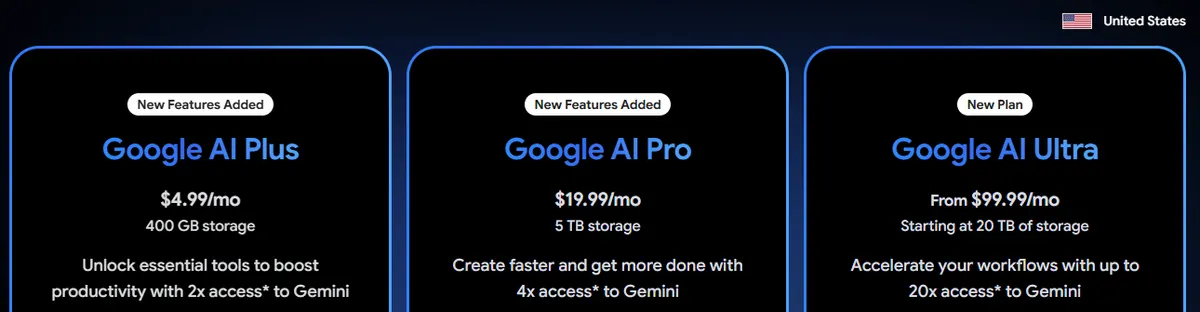
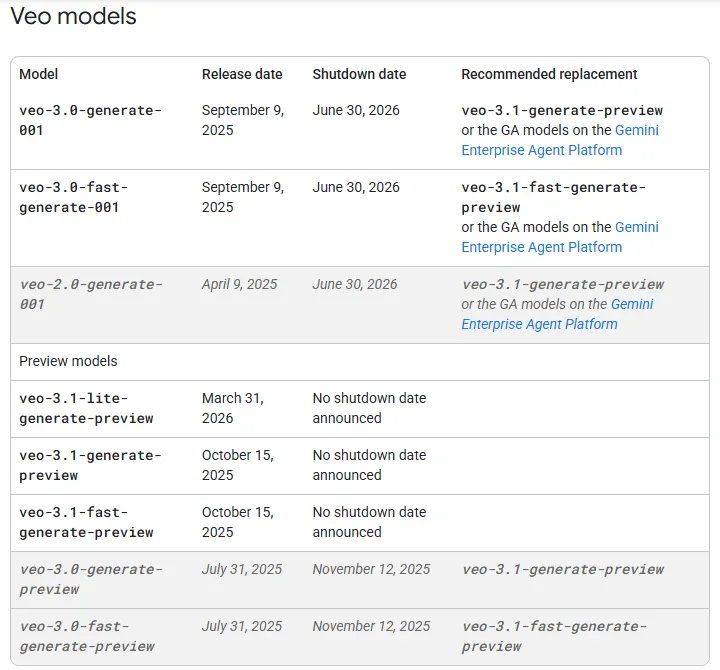
Google's deprecations page lists Veo 3, Veo 3 Fast and Veo 2 as shut down on the Gemini API on June 30, 2026, with Veo 3.1 as the replacement. Veo 3.1 has been on the API since October 15, 2025, and the cheaper Veo 3.1 Lite since March 31, 2026. Whichever way you pay, you are now buying one of these three tiers:
| Tier | Name in Flow | Resolutions (API) | Clip lengths | Extend (API) |
|---|---|---|---|---|
| Veo 3.1 (Standard) | Quality | 720p, 1080p, 4K | 4, 6 or 8 seconds | Yes |
| Veo 3.1 Fast | Fast | 720p, 1080p, 4K | 4, 6 or 8 seconds | Yes |
| Veo 3.1 Lite | Lite | 720p, 1080p | 4, 6 or 8 seconds | No |
From Google's Gemini API Veo documentation. All three tiers generate sound with the picture, in 16:9 or 9:16. On the API, 1080p and 4K clips must be 8 seconds long.
Many pages that rank for Veo 3 pricing still quote 2025 figures, such as a $250 a month Ultra plan or $0.75 a second. Those prices are out of date: the figures on this page are the ones Google lists today.
Google AI plans and Flow credits
If you are not a developer, you use Veo 3.1 in Google Flow, Google's AI filmmaking tool. Every Google AI plan adds a monthly allowance of Flow credits, and each Veo generation spends some of them. Google's Flow help center says you must be 18 or older and in a supported country, and Google's plans page says Veo 3.1 and Flow are available in more than 140 countries and territories.
| Plan | US price | Flow credits a month | Clips from those credits (Lite / Fast / Quality) | Storage |
|---|---|---|---|---|
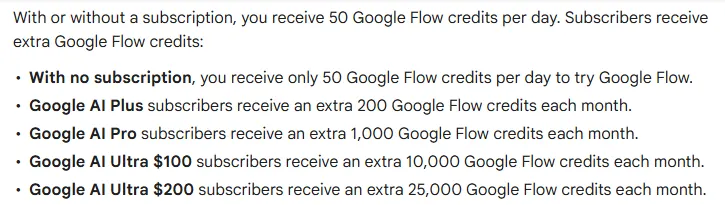
| Google AI Plus | $4.99/mo | 200 | 20 / 10 / 2 | 400 GB |
| Google AI Pro | $19.99/mo | 1,000 | 100 / 50 / 10 | 5 TB |
| Google AI Ultra 5x | $99.99/mo | 10,000 | 2,000 / 1,000 / 100 | 20 TB |
| Google AI Ultra 20x | $199.99/mo | 25,000 | 5,000 / 2,500 / 250 | 30 TB |
Every account also gets 50 Flow credits a day on top of these. The plans page's savings calculator lists Pro at $199.99 a year on annual billing. The plans also include Gemini, storage and other Google benefits, which is part of what you pay for.
What each Veo 3.1 clip costs in Flow credits
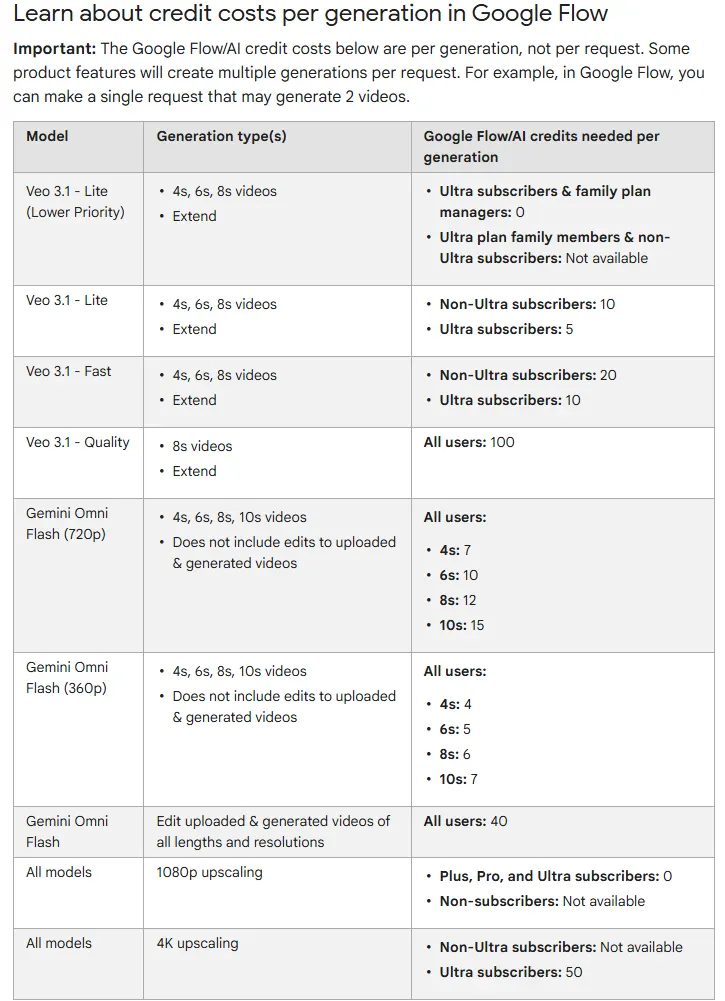
Flow charges a flat number of credits for each Veo generation. Ultra subscribers pay half on Lite and Fast, and get a lower-priority Lite queue that costs nothing.
| Model or step | Plus and Pro | Ultra |
|---|---|---|
| Veo 3.1 Lite | 10 credits | 5 credits |
| Veo 3.1 Lite, lower priority | Not available | 0 credits (subscribers and family plan managers) |
| Veo 3.1 Fast | 20 credits | 10 credits |
| Veo 3.1 Quality | 100 credits | 100 credits |
| 1080p upscaling | 0 credits | 0 credits |
| 4K upscaling | Not available | 50 credits |
Credits per generation from Google Flow's help center. Flow's table lists Quality for 8-second clips. Google notes that limits can change at any time and shows the current cost in Flow's prompt settings.
The rules that change what you really get:
- Length does not change the price. A 4, 6 or 8-second Lite or Fast clip costs the same credits, so 8-second clips give you the most video per credit.
- Credits are per generation, not per request. Google says a single request can create 2 videos, which spends twice the credits.
- Nothing rolls over. Monthly credits refresh at the start of each billing cycle, and unused daily credits do not carry to the next day either.
- Failed generations are free. Flow's help center says you are not charged credits when a generation fails.
- Extensions run on Lite. Flow's feature guide says any 8-second Veo 3.1 clip can be extended, but the extension uses Veo 3.1 Lite.
- Top-ups. Google One's help page says Pro and Ultra members can buy extra AI credits, for example 2,500, 5,000 or 20,000 at a time, but Plus members cannot, and nobody can in Japan. Flow's credits page says Plus subscribers can buy them too, so check your account. Neither page lists a price.
- Watermarks. Everything made in Flow carries an invisible SynthID watermark. A visible watermark is optional, except in India, South Korea and Vietnam, where Google applies it automatically.
What is a Flow credit worth? If you spend every monthly credit on Veo, a Pro credit works out at about 2 cents and an Ultra 5x credit at about 1 cent. That puts an 8-second Fast clip at about $0.40 on Pro and $0.10 on Ultra 5x, and a Quality clip at about $2.00 on Pro and $1.00 on Ultra 5x, before counting the daily credits or the rest of the plan.
Veo in the Gemini app
Older guides say a Google AI plan gets you a set number of Veo videos a day in the Gemini app. That has changed. Google's help center now says the Gemini app makes videos with Gemini Omni, Google's newer video model, and the plans page lists Omni Flash as the video model on every plan. If you want Veo 3.1 specifically on a consumer plan, use Flow, where you can pick Lite, Fast or Quality.
Gemini API pricing per second
Developers pay for Veo 3.1 per second of generated video on the Gemini API's paid tier. Every price includes sound, which is on by default.
| Tier | 720p | 1080p | 4K | 8-second clip at 1080p | 1 minute at 1080p |
|---|---|---|---|---|---|
| Veo 3.1 Standard | $0.40/sec | $0.40/sec | $0.60/sec | $3.20 | $24.00 |
| Veo 3.1 Fast | $0.10/sec | $0.12/sec | $0.30/sec | $0.96 | $7.20 |
| Veo 3.1 Lite | $0.05/sec | $0.08/sec | Not supported | $0.64 | $4.80 |
Paid tier prices from Google's Gemini API pricing page (page last updated 24 September 2026). The free tier lists Veo as not available. Clip and minute costs are our arithmetic.
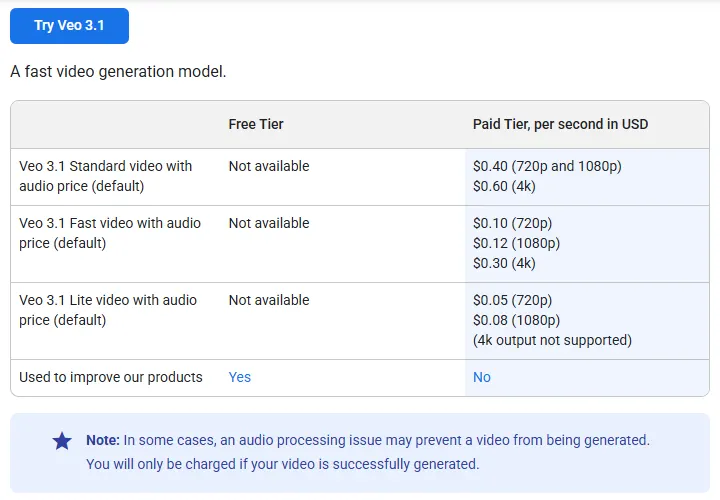
- You pay only for videos that are made. Google says that if an audio problem or a safety filter blocks a video, you are not charged.
- 1080p and 4K need 8-second clips. The 4 and 6-second options are for 720p.
- Extensions add 7 seconds at a time. Standard and Fast can extend a Veo video up to 20 times, to 148 seconds in total, at 720p. Lite cannot extend. The pricing page lists no separate rate for extensions.
- Download within 2 days. Google stores generated videos on its server for 2 days, then removes them.
- SynthID. Every Veo video carries Google's invisible SynthID watermark.
Google's video documentation now recommends its newer Gemini Omni Flash as the default video model on the API, at about $0.10 a second at 720p by Google's own reckoning, and suggests Veo 3.1 for scene extension, last-frame control or existing pipelines. If you only need short clips, price both before you build.
Google Cloud (Vertex AI) pricing
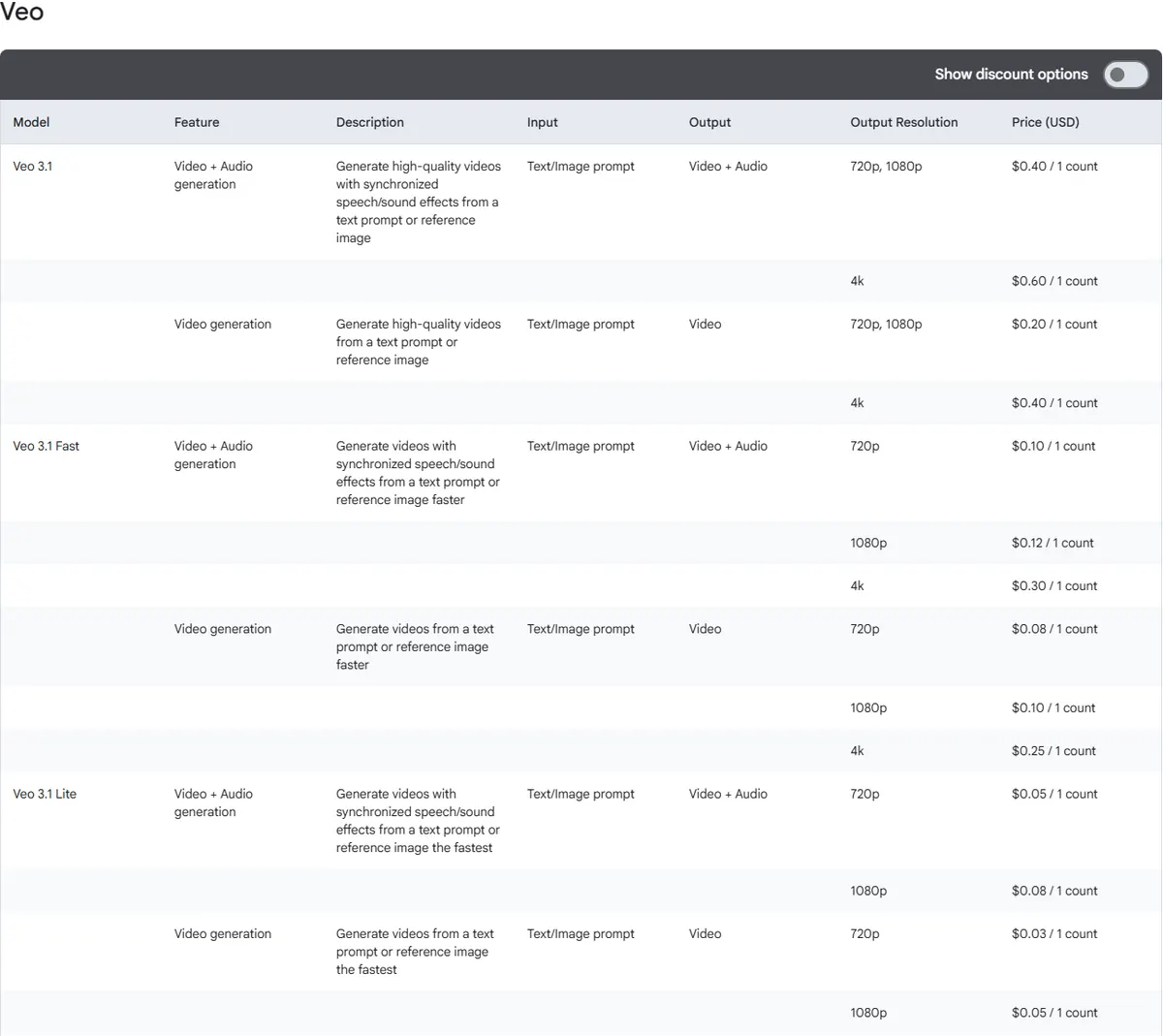
Companies that already run on Google Cloud can use Veo through Google's Gemini Enterprise Agent Platform; the old Vertex AI pricing address now redirects there. Its with-sound prices are the same figures as the Gemini API, and it also sells video without sound for less.
| Model | Video with sound | Video only |
|---|---|---|
| Veo 3.1 | $0.40 (720p, 1080p), $0.60 (4K) | $0.20 (720p, 1080p), $0.40 (4K) |
| Veo 3.1 Fast | $0.10 (720p), $0.12 (1080p), $0.30 (4K) | $0.08 (720p), $0.10 (1080p), $0.25 (4K) |
| Veo 3.1 Lite | $0.05 (720p), $0.08 (1080p) | $0.03 (720p), $0.05 (1080p) |
| Veo 3 | $0.40 (720p, 1080p) | $0.20 (720p, 1080p) |
| Veo 3 Fast | $0.10 (720p), $0.12 (1080p) | $0.08 (720p), $0.10 (1080p) |
| Veo 2 | Not offered | $0.50 (720p) |
From Google Cloud's generative AI pricing page. Google Cloud writes each price as "per 1 count" and does not define the unit on that page; the with-sound figures are identical to the Gemini API's per-second prices. Confirm the unit on your Cloud billing SKU before you budget. The Veo 3 rows are legacy: Google Cloud's Veo 3 model page gives Veo 3 a retirement date of June 30, 2026 and recommends moving to Veo 3.1.
Two things to know before you choose Cloud. Google's Veo 3.1 model page lists Provisioned Throughput and fixed quota as the ways to consume it, with pay-as-you-go marked as not supported, and lists us-central1 as the region. Google Cloud only charges for requests that succeed. New Google Cloud customers get a $300 Free Trial credit to spend over 90 days, though Google says access to some products may be limited during the trial, so check that Veo is covered before you count on it.
What an 8-second Veo 3.1 clip costs, compared
The same clip, priced four ways. Flow prices clips in credits and treats 1080p and 4K as upscaling steps on top of the generation.
| 8-second clip with sound | Gemini API | Flow (Plus, Pro) | Flow (Ultra) | CamClo AI |
|---|---|---|---|---|
| Lite, 720p | $0.40 | 10 credits | 5 credits, or 0 on lower priority | 4 credits |
| Lite, 1080p | $0.64 | 10 credits + free upscale | 5 credits + free upscale | 6 credits |
| Fast, 1080p | $0.96 | 20 credits + free upscale | 10 credits + free upscale | 8 credits |
| Standard (Quality), 1080p | $3.20 | 100 credits + free upscale | 100 credits + free upscale | 20 credits |
| Fast, 4K | $2.40 | Not available | 60 credits (10 + 50 to upscale) | 20 credits |
| Standard (Quality), 4K | $4.80 | Not available | 150 credits (100 + 50 to upscale) | 32 credits |
Gemini API and Flow figures from Google's pages; CamClo AI credits from its image-to-video tool. Plans: Google AI Plus $4.99 with 200 credits, Pro $19.99 with 1,000, Ultra from $99.99 with 10,000; CamClo AI Creator $49 with 150 credits.
For a steady monthly volume, Flow on a Google AI plan is the cheapest route to raw Veo clips, and Ultra's free lower-priority Lite queue is hard to beat for drafts. The Gemini API makes sense when you are building Veo into your own app or need exact control over resolution and length.
Apps and APIs that include Veo 3.1
You do not have to buy Veo from Google. Several tools include it inside their own plans, and the price then follows that tool's credits rather than Google's rates.
CamClo AI
Best for: Veo 3.1 product videos that start from your product photoCamClo AI is an AI studio for ecommerce teams. Its image-to-video tool offers Veo 3.1 alongside other video models, so you upload a product photo, describe the motion and pick the model, instead of writing a whole scene from text.
- Veo 3.1 options: Lite, Fast and Quality; clips of 4, 6 or 8 seconds in 16:9 or 9:16; 720p or 1080p on every mode and 4K on Fast and Quality (Lite at 1080p makes 8-second clips); sound on or off; and an optional end frame.
- Credits for an 8-second clip with sound: Lite 4 at 720p or 6 at 1080p, Fast 8 at 720p or 1080p and 20 at 4K, Quality 20 at 720p or 1080p and 32 at 4K. Without sound it costs less, from 1.5 credits for a 4-second Lite clip.
- Same credits, other models: Seedance 2.5 (4 to 30 seconds), Seedance 2.0, Kling 3.0 and Gemini Omni Flash, plus video ads in 15 formats sized for 10 placements, and Remix Ads up to 90 seconds.
- Pricing: Creator is $49 per month with 150 credits, and Studio plans start at $99 per month with 330. There is a 7-day free trial with 20 credits. The trial credits work on Veo 3.1, for example five 8-second Lite clips with sound at 720p, or one 8-second Quality clip.
Strengths
- Starts from your product photo, so the product in the clip is the one you sell
- Veo 3.1 next to Seedance, Kling and Gemini Omni Flash, on one credit balance
- Pick the output resolution directly, including 4K on Fast and Quality
- Finished video ads with a script when you need an ad, not just a clip
Limits
- Can seem a little expensive next to paying Google per second, but the same credits also cover the other video models and the video ad formats, with the script and the sizing for each placement, not just a raw Veo clip
Pay Google directly instead if you only need Veo, you are happy writing prompts from scratch, or you are building Veo into your own app.
To see the models side by side, visit the product photo to video tool. For finished ads with a script, see the AI video ad maker.
Developers can also reach Veo through API gateways that appear for this search:
- OpenRouter lists Veo 3.1 from $0.40 a second, the same as Google's Standard rate.
- Vercel AI Gateway lists Veo 3.1 from $0.20 a second for its lowest available configuration, routed through Google Vertex AI.
- Together AI has a Veo 3.0 page, but it said the model is not available on Together's serverless API.
A caution: some sites with Veo in their name rank for this search and sell their own credit plans. They are separate companies, not Google, so their prices and limits are theirs, not Google's.
Can you use Veo 3 for free?
- Flow's daily credits. Google's Flow help center says every account gets 50 Flow credits a day, with or without a subscription: 5 Lite or 2 Fast clips. People without a subscription may not be able to generate video at peak times, roughly 2 PM to 5 PM UTC, and cannot upscale to 1080p. Flow's getting-started article still lists a Google AI plan among the requirements, so check in Flow before you rely on it.
- Google Workspace. Flow's help center says qualifying Workspace plans, including Business Starter, Standard and Plus, include Flow with 50 daily credits at no extra charge.
- Students. Google's plans page offers students Google AI Pro free for 1 year; check the offer terms for eligibility.
- Google Cloud Free Trial. $300 of credit for 90 days for new Cloud customers, with Google's note that access to some products may be limited. Google also says the credit cannot pay for Gemini API costs in AI Studio.
- The Gemini API. No free tier for Veo.
- CamClo AI. A 7-day free trial with 20 credits.
For more ways to animate a photo at no cost, see our guide to free image to video AI tools.
Which way to pay for Veo fits you
- Just trying it. Use Flow's 50 daily credits, and make every clip 8 seconds, since length does not change the credit cost.
- A handful of clips a month. Google AI Plus at $4.99 gives 200 extra credits, or 10 Fast clips.
- Regular social video. Google AI Pro at $19.99 gives 1,000 credits, or 50 Fast clips, plus top-ups when you run out.
- High volume. Ultra 5x at $99.99 halves the Lite and Fast price and adds a free lower-priority Lite queue and 4K upscaling.
- Building an app. The Gemini API: Lite for drafts, Fast for most output, Standard for final shots. Budget $0.96 for an 8-second 1080p Fast clip.
- Enterprise controls. Google Cloud, where you also get cheaper video-only rates.
- Product videos and ads. CamClo AI, if you want to start from a product photo and have other models and ad formats on the same credits. Our piece on why general video models struggle with exact product detail explains what to check frame by frame.
Comparing video models more widely? See Kling AI pricing, Runway pricing and Seedance pricing, or our guide to Sora alternatives for product videos. If you sell physical products, the image to video tool for product photos lets you test Veo 3.1 against the other models on your own images.
How we checked
We read Google's AI plans page in its United States version and confirmed each plan price against the US dollar price feed that page loads. We read Google Flow's help center articles on credits, getting started and models, Google One's article on buying AI credits, the Gemini app's video article, the Gemini API pricing, Veo, video and deprecations pages, Google Cloud's generative AI pricing page and its Veo 3 and Veo 3.1 model pages, and the Google Cloud Free Trial terms. We also checked the reseller pages named above.
Clip counts, per-minute costs and the value of a Flow credit are our own arithmetic on Google's published figures, assuming one generation per clip and every monthly credit spent on Veo. Where Google's pages disagree, as with Flow's requirements for non-subscribers and who can buy extra credits, we say so. CamClo AI's Veo 3.1 options and credit costs come from its image-to-video tool. We did not score video quality, so test your own prompts before you commit.
Frequently asked questions
How much does Veo 3 cost?
Veo 3 has been replaced by Veo 3.1. In the US, Google AI Plus costs $4.99 a month with 200 Flow credits, Pro $19.99 with 1,000, Ultra $99.99 with 10,000 and the larger Ultra $199.99 with 25,000. In Flow, a Veo 3.1 clip costs 10 credits on Lite, 20 on Fast and 100 on Quality, and Ultra pays half on Lite and Fast. Through the Gemini API, Veo 3.1 costs $0.05 to $0.60 per second of video, depending on the tier and resolution.
Is Veo 3 free?
Partly. Google's Flow help center says every account gets 50 Flow credits a day, enough for five Veo 3.1 Lite clips or two Fast clips, though Flow's getting-started page lists a Google AI plan as a requirement, and people without a subscription may not be able to generate video at peak times. The Gemini API has no free tier for Veo. New Google Cloud customers get a $300 Free Trial credit for 90 days, though Google does not say whether it covers Veo, and CamClo AI has a 7-day free trial with 20 credits.
How much does an 8-second Veo 3.1 video cost?
Through the Gemini API, an 8-second clip with sound costs $0.40 on Lite at 720p, $0.96 on Fast at 1080p and $3.20 on Veo 3.1 at 720p or 1080p. At 4K it costs $2.40 on Fast and $4.80 on Veo 3.1. In Flow the price is a flat number of credits per clip whatever its length: 10 on Lite, 20 on Fast and 100 on Quality, or 5 and 10 on Ultra for Lite and Fast.
What is the difference between Veo 3.1 Lite, Fast and Standard?
They are three tiers of the same model. Lite is the cheapest, makes 720p or 1080p and cannot extend clips through the API. Fast costs twice as much as Lite at 720p and adds 4K. Standard, called Quality in Flow, gives the best result and costs four times as much as Fast at 720p. All three make 4, 6 or 8-second clips with sound.
Is Veo 3 still available?
No. Google's Gemini API deprecations page lists Veo 3, Veo 3 Fast and Veo 2 as shut down on June 30, 2026, with Veo 3.1 as the replacement, and Google Cloud's Veo 3 model page gives Veo 3 the same retirement date. Google Cloud's pricing page still lists Veo 3 and Veo 3 Fast at the same prices as Veo 3.1 and Veo 3.1 Fast, and Flow offers the Veo 3.1 models.
Can I use Veo in the Gemini app?
Google's help center says the Gemini app now makes videos with Gemini Omni, its newer video model, and the plans page lists Omni Flash as the video model on every plan. To choose Veo 3.1 on a Google AI plan, use Flow. Developers can use the Gemini API or Google Cloud.
Can I use Veo 3 to turn a product photo into a video?
Yes, through Veo 3.1, which replaced Veo 3. CamClo AI's image to video tool offers Veo 3.1 Lite, Fast and Quality: you upload a product photo, describe the motion and get a 4, 6 or 8-second clip in 16:9 or 9:16, at 720p or 1080p, or 4K on Fast and Quality. An 8-second Fast clip with sound at 1080p costs 8 credits, about $2.61 on the $49 Creator plan with 150 credits, and the same credits cover Seedance 2.5, Kling 3.0, Gemini Omni Flash and video ads. CamClo AI has a 7-day free trial with 20 credits.
Making product videos with Veo 3.1?
CamClo AI has a 7-day free trial with 20 credits.
See plans and the free trial

