

Table of Contents
OpenAI has closed Sora. According to OpenAI's help center, the Sora web and app experiences were discontinued on April 26, 2026, and the Sora API was set to be discontinued on September 24, 2026. If you used Sora for product clips, social videos or ads, you need a Sora alternative, and the right one depends on what you were making.
We checked every price on the vendor's own site. Here is how we compared them.
Prices checked 28 September 2026What happened to Sora
The Sora web and app experiences were discontinued.
The Sora API was discontinued, so apps built on it need a new video model.
OpenAI says Sora data is permanently deleted once any final export window has passed.
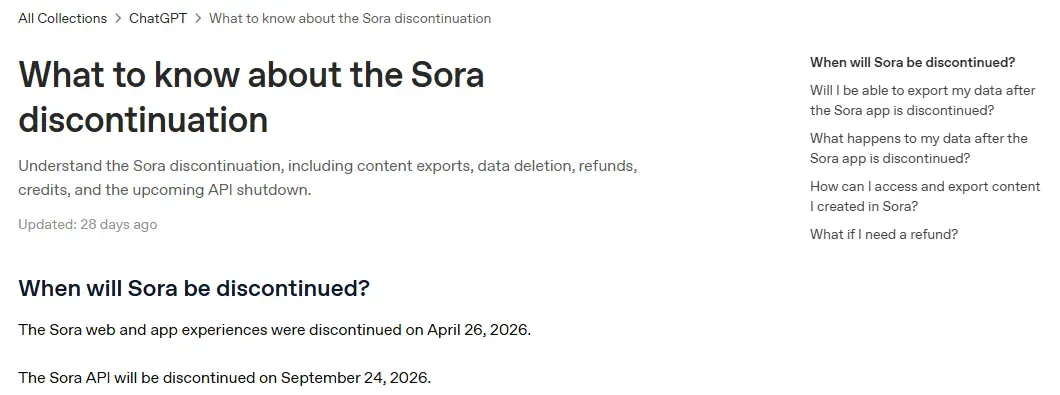
OpenAI's help article covers exports and refunds, but it does not name a replacement video model, and its API deprecations page lists no replacement either. That is the gap this page fills for one group of former Sora users: people who make videos of products they sell.
What changed since Sora closed
- Seedance 2.5 from ByteDance makes up to 30 seconds in one generation, with sound, and is now live in Dreamina.
- Wan 3.0 from Alibaba launched in August 2026 with 30-second clips at up to 1080p.
- MiniMax H3 is live in Hailuo, with 2K clips of up to 15 seconds.
- Kling 4.0 is in early access: on 28 September 2026, Kling's pricing page offered Kling 4.0 Flash as a beta for yearly Ultra subscribers.
Quick picks by use case
Starts from your product photo; 15 video ad formats with the script written for you.
Generate with Gen-4.5, then change real or AI footage with Aleph 2.0.
Kling 3.0 with native audio, from $6.99 for the first month. Kling 4.0 is in early access.
Seedance 2.5 runs up to 30 seconds per generation, with sound.
Sora alternatives compared
| Tool | Best for | Paid plans from | Free option | Photo to video | Native audio |
|---|---|---|---|---|---|
| CamClo AI | Product videos and UGC ads from a photo | $49/mo | 7-day free trial, 20 credits (card required) | Yes | Yes, on most models |
| Google Veo | Cinematic clips from text | $4.99/mo (Google AI Plus); API from $0.05/sec | None listed | Yes | Yes |
| Runway | Editing and directing footage | $15/mo ($12/mo billed yearly) | 125 one-time credits | Yes | Separate sound tools |
| Kling | Low-cost clips with sound | $6.99 first month, then $8.80/mo | Basic plan, no monthly credits | Yes | Yes |
| Seedance (Dreamina) | Longer single-shot clips | See vendor site | Free daily credits | Yes | Yes |
| Hailuo (MiniMax) | 2K clips on a budget | $14.99/mo ($8.40/mo billed yearly) | One-time trial credits | Yes | Yes |
| Luma | HDR and post-production | $30/mo ($25/mo billed yearly) | None listed | Yes | Third-party models only |
| Adobe Firefly | Teams already on Adobe | See vendor site | Free daily generations | Yes | Not stated |
| Wan | Free, open-source option | Wan 3.0 API from $0.05/sec | Wan 2.2 open weights | Yes | Yes (Wan 3.0) |
Prices are the entry paid plan on each vendor's official pricing page on 28 September 2026, in US dollars, billed monthly unless marked. Google's plan prices are for the US. "See vendor site" means we could not confirm a US dollar price on an official page. Promotions and annual billing change the price, so confirm before you buy.
The alternatives, tool by tool
Each entry covers what the tool is, what it is best for, its price, its strengths and limits, and when you should pick it instead of CamClo AI.
1. CamClo AI
Best for: product videos and UGC-style ads from a product photoCamClo AI is an AI studio for ecommerce teams. Instead of writing a scene from scratch, you start from your product photo or a video and pick the output: a product video, a finished video ad in a format such as UGC, unboxing or try-on, or a proven ad remixed around your product. It runs several leading video models in one workflow, so you can switch models without switching tools.
- Models for image to video: Seedance 2.5 (4 to 30 seconds), Seedance 2.0 (4 to 15 seconds), Google Veo 3.1 (4, 6 or 8 seconds, up to 4K), Kling 3.0 (5, 10 or 15 seconds), earlier Kling versions, and Gemini Omni Flash (3 to 10 seconds).
- Video ads: 15 formats, including UGC, UGC Virtual Try-On, Unboxing, Product Demo, Testimonial, ASMR, POV and TV Spot. The script is written for you from the product, and output is sized for Reels, TikTok, Shorts, feeds and more, at 480p, 720p or 1080p, from 4 to 30 seconds per video ad.
- Remix Ads: pick a proven ad from a brand's ad library and CamClo AI rebuilds it around your product, up to 90 seconds, in the reference ad's language unless you ask for another.
- Sora 2: CamClo AI used to offer it; it was retired from the model picker after OpenAI's shutdown.
- Pricing: plans from $49 per month (150 credits). The 7-day free trial includes 20 credits. As a guide, a 10-second 720p Seedance 2.0 clip costs 13 credits, and a 5-second Kling 2.6 Pro clip with audio costs 5.
Strengths
- Starts from your product photo, so the product in the video is the one you sell
- Several video models in one place, with vertical and square sizes for social
- Ad formats and scripts built in, not just raw clips
- Story-led formats too, such as TV Spot, a cinematic mini-story, plus animated styles from any image
- Ads up to 90 seconds with Remix Ads
Limits
- Can seem a little expensive next to a single video model, but the credits cover the script, the ad format and the sizing for each placement, not just a raw clip
If you mostly want to animate product photos, see our product photo to video tool. If you want finished ads with a script, see the UGC and product video ad maker.
2. Google Veo
Best for: cinematic clips from a text promptVeo is Google DeepMind's video model. The current version, Veo 3.1, generates video with sound from text or an image. People reach it through Google AI plans and Flow, Google's AI creative studio; developers pay per second through the Gemini API. Google's plans also include its newer Gemini Omni Flash video model.
- Pricing (checked 28 September 2026, US prices): Google AI Plus is $4.99/month with 200 Flow credits. Google AI Pro is $19.99/month with 1,000 Flow credits and a limited-time trial of Veo 3.1 Lite. Google AI Ultra starts at $99.99/month with 10,000 Flow credits. All three include Gemini Omni Flash.
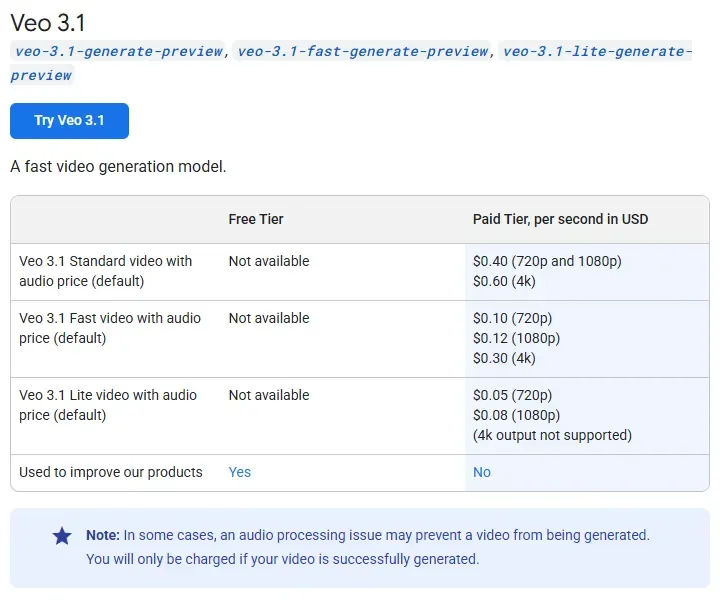
- API: per second of video with audio, Veo 3.1 Lite from $0.05, Fast from $0.10 and Standard $0.40 at 720p. Standard and Fast also render 4K.
- Output: clips of 4, 6 or 8 seconds that can be extended.
Strengths
- Sound is generated with the picture
- Starts from a prompt or an image
- A pay-per-second API for apps that ran on the Sora API
Limits
- The $4.99 and $19.99 plans carry 200 or 1,000 Flow credits; heavy use means the $99.99 Ultra plan
- 8-second clips need extending for longer videos
- You write the scene, the product setup and the ad structure yourself
Pick this instead of CamClo AI if you want cinematic scenes from a text prompt, you already pay for Google AI, or you need a per-second video API to replace the Sora API.
3. Runway
Best for: editing and directing footageRunway is a creative video studio. Its Gen-4.5 model generates video from text or images, and Aleph 2.0 edits existing footage, real or generated, from a prompt: swap a product's color, replace a background or remove an object. Paid plans also include third-party models such as Kling 3.0 and Seedance.
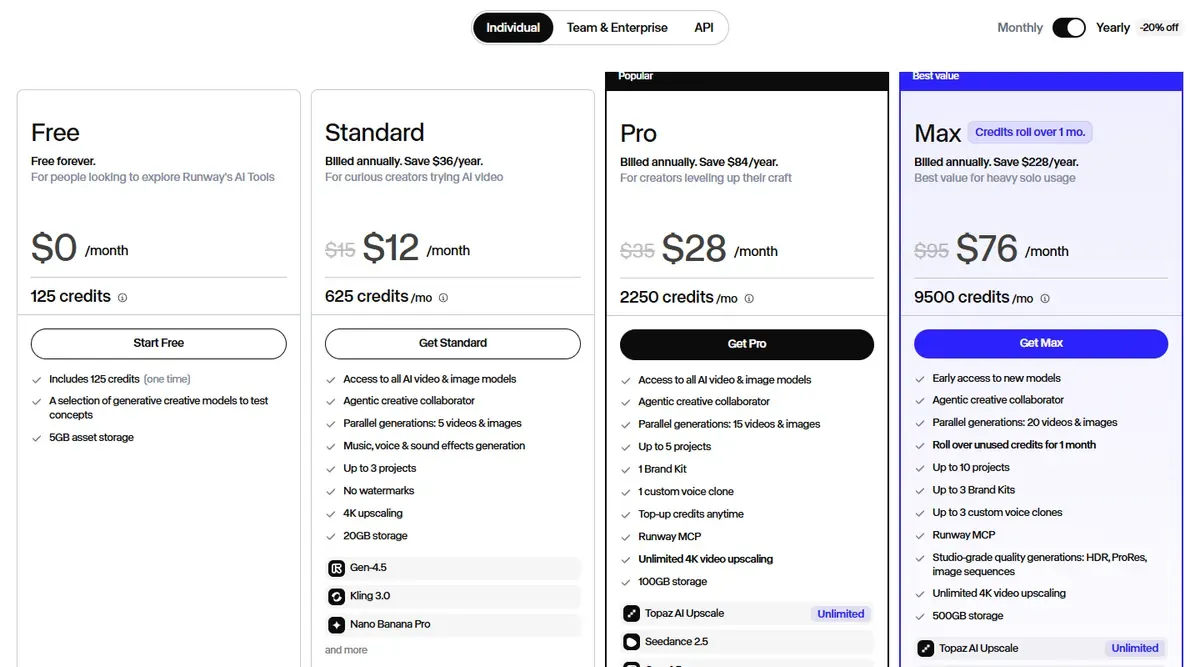
- Pricing (checked 28 September 2026): Standard is $15/month, or $12/month billed yearly, with 625 credits a month (about 52 seconds of Gen-4.5), no watermarks and 4K upscaling.
- Free: 125 one-time credits.
Strengths
- Edits footage you already have, including product shoots
- Several video models and sound tools in one studio
- No watermarks from the first paid plan
Limits
- 625 credits cover under a minute of Gen-4.5 video a month
- Monthly credits on Standard and Pro do not roll over
- A general creative tool, with no built-in ad formats for products
Pick this instead of CamClo AI if you need to edit existing footage or direct shots in detail, and you are comfortable building ads yourself.
4. Kling
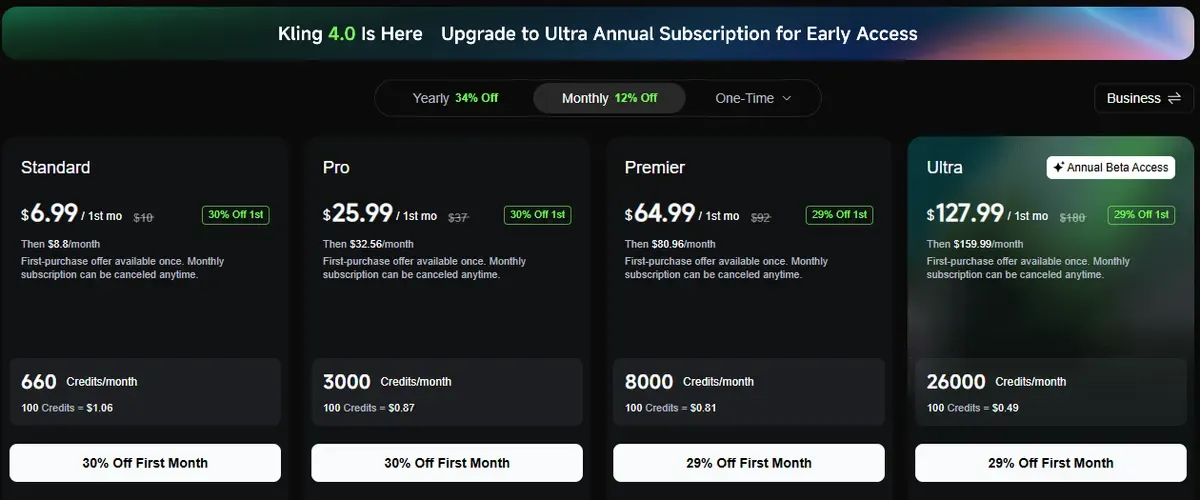
Best for: low-cost clips with soundKling is Kuaishou's video platform. Its Kling 3.0 series, including 3.0 Omni, generates video with native audio from text or images, in clips of up to 15 seconds according to Kling's own guide. Kling 4.0 is next: on 28 September 2026 the pricing page offered Kling 4.0 Flash as a beta for yearly Ultra subscribers.
- Pricing (checked 28 September 2026): Standard is $6.99 for the first month, then $8.80/month on monthly billing (list price $10), with 660 credits a month, 1080p or 4K output, watermark removal and commercial use.
- Free: a Basic plan with no monthly credits.
Strengths
- A low entry price for direct access to a current model
- Native audio and clips up to 15 seconds
- Commercial use included on Standard
Limits
- The entry price is promotional and changes often
- Credits run down quickly on long or 4K clips
- No product or ad workflow; you prompt every shot
Pick this instead of CamClo AI if you want the cheapest direct access to a current video model and you are happy to write prompts and put ads together yourself.
5. Seedance (on Dreamina)
Best for: longer single-shot clipsSeedance is ByteDance's video model. According to ByteDance Seed, the current version, Seedance 2.5, generates video and audio together, runs up to 30 seconds per generation and can extend a clip twice, and takes reference images and video to guide the shot. You can use it directly in Dreamina, ByteDance's creative app from CapCut, and inside several other tools on this list.
- Pricing (checked 28 September 2026): Dreamina's plan prices only show after sign-in, so see vendor site.
- Free: Dreamina offers free daily credits.
Strengths
- Up to 30 seconds in a single generation
- Video and sound generated together
- Follows reference images and video
Limits
- Plan prices are not public before sign-in
- A broad creative app, not built around product listings
- You set up product shots and ad structure yourself
Pick this instead of CamClo AI if you want Seedance directly, with free daily credits, and you do not need ad formats built around your product.
6. Hailuo (MiniMax)
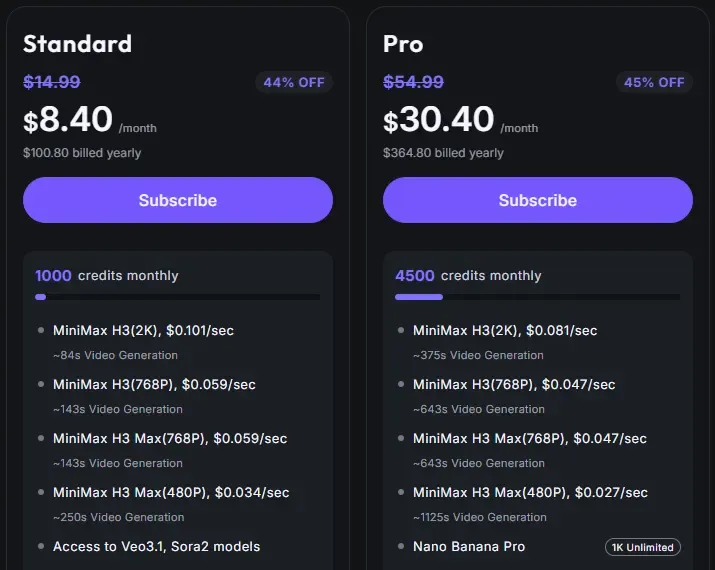
Best for: 2K clips on a budgetHailuo is MiniMax's video app. Its current model, MiniMax H3, makes clips of up to 15 seconds at up to 2K resolution, with native sound, from text or an image.
- Pricing (checked 28 September 2026): Standard is $14.99/month, or $8.40/month billed yearly ($100.80), with 1,000 credits a month. Hailuo's plan page puts that at about 84 seconds of H3 video at 2K.
- Free: one-time trial credits for Hailuo models.
Strengths
- 2K output and clips up to 15 seconds
- Native sound
- A low monthly cost on yearly billing
Limits
- The lowest price needs a yearly commitment
- Free credits are one-time, not monthly
- A general creative tool, with no product ad workflow
Pick this instead of CamClo AI if you want high-resolution clips at a low yearly price and will write the scripts and prompts yourself.
7. Luma
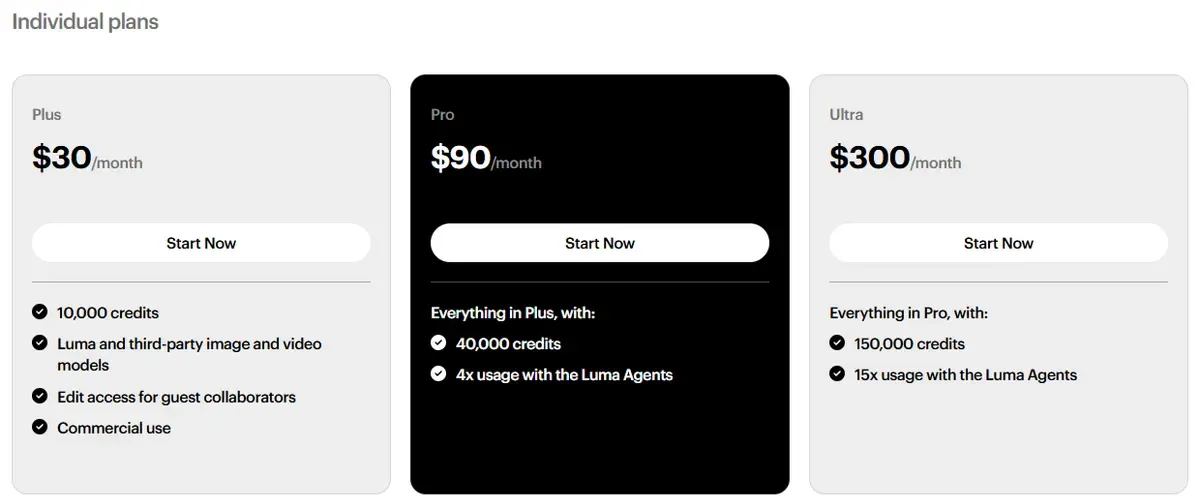
Best for: HDR output and post-productionLuma's Ray3.2 model makes 5- or 10-second clips from text or an image, up to 1080p, with HDR and EXR options for color grading. Luma's plans also include third-party models such as Seedance, Kling and Veo 3.1.
- Pricing (checked 28 September 2026): Plus is $30/month, or $25/month billed yearly, with 10,000 credits and commercial use.
- Free: no free plan is listed on the pricing page.
Strengths
- HDR and EXR files for professional color pipelines
- Luma and third-party models in one plan
- Commercial use from the first paid plan
Limits
- No free plan listed
- Ray3.2 does not list sound; audio comes from third-party models
- Built for creative teams rather than product listings
Pick this instead of CamClo AI if you finish video in professional grading software and need HDR or EXR files.
8. Adobe Firefly
Best for: teams already working in Adobe appsFirefly is Adobe's generative AI app. It turns text or images into video with Adobe's own Firefly Video model or partner models, including Google Veo 3.1, Runway Gen-4.5, Luma Ray 3.14 and Kling 3.0. Adobe says video made from an image with its Firefly models is commercially safe, as long as the uploaded image does not break anyone else's rights.
- Pricing (checked 28 September 2026): Adobe's plan page shows prices for the visitor's region, so for US dollar prices see vendor site. Plans start with Firefly Standard (2,000 credits a month) and include a set number of five-second videos, for example up to 40 on Firefly Pro.
- Free: free daily generations without a plan.
Strengths
- Adobe's model and partner models behind one login
- A clear commercial-use statement for Firefly-model output
- Fits teams already working in Adobe apps
Limits
- Image-to-video clips run about five seconds, per Adobe's FAQ
- Video counts are capped by plan, and partner models cost credits
- No product ad formats or scripts
Pick this instead of CamClo AI if your team lives in Adobe apps and wants Adobe's commercial-use terms around its own model.
9. Wan
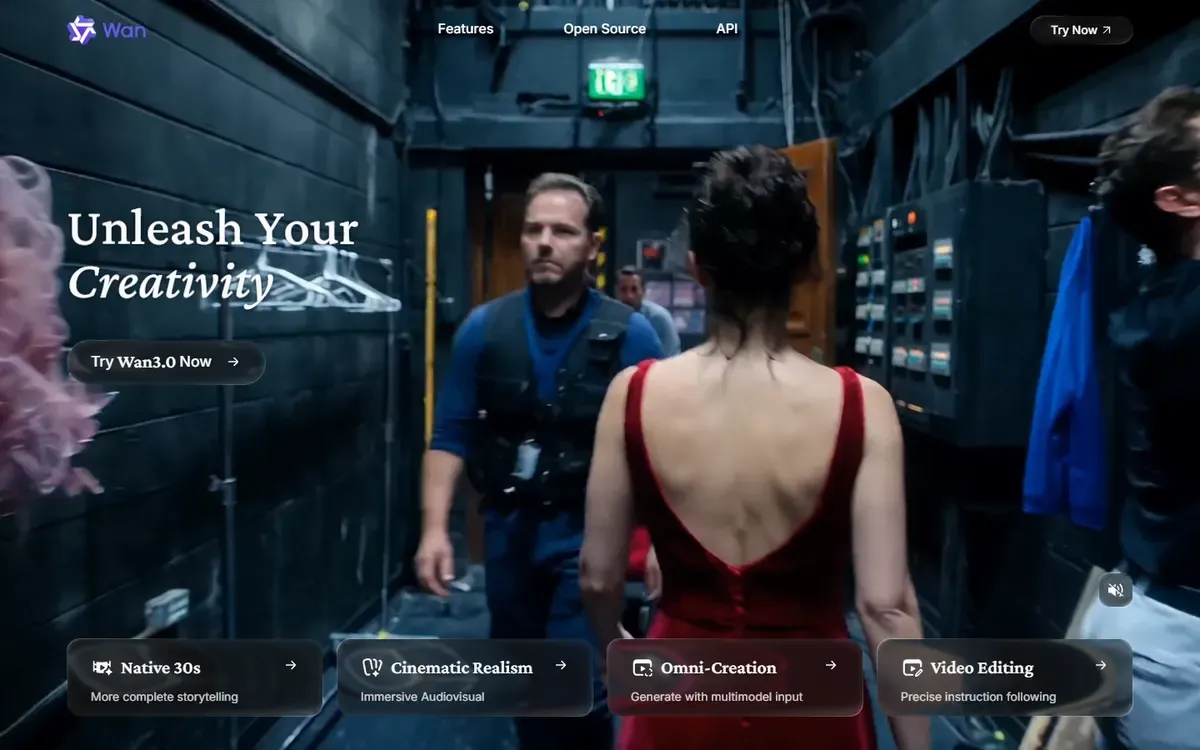
Best for: a free, open-source optionWan is Alibaba's family of video models. The hosted Wan 3.0, launched in August 2026, makes clips of up to 30 seconds at up to 1080p with sound, from text, images, audio, video or even a document. The earlier Wan 2.2 is published as open weights on GitHub, so you can run it on your own hardware at no cost per clip.
- Pricing (checked 28 September 2026): the Wan 3.0 API on Alibaba Cloud Model Studio costs $0.05 per second at 480p, $0.10 at 720p and $0.20 at 1080p. For app plans on wan.video, see vendor site.
- Free: Wan 2.2 open weights, if you have a capable GPU and the time to set it up.
Strengths
- Open weights you can run yourself
- No per-clip fee when self-hosted
- The hosted Wan 3.0 reaches 30 seconds at 1080p with audio
Limits
- Self-hosting needs technical skill and GPU hardware
- The open version (2.2) is older than the hosted model (3.0)
- Alibaba says Wan 3.0's audio and on-screen text are still improving
Pick this instead of CamClo AI if you have the technical skill and hardware, want no per-clip cost, or need generation to stay on your own machines.
How we compared them
We read each vendor's official pricing and model pages on 28 September 2026, saved screenshots of them, and recorded the lowest monthly paid plan, the free option, and whether the tool can start from an image and generate sound. Where a price could not be confirmed on an official page, we wrote "see vendor site" instead of guessing.
We judged fit for product sellers on five questions: can it start from a product photo, can it output vertical video, how long can a clip be, does it make sound, and what does a month of use cost. We did not run a scored benchmark, so there are no quality scores on this page. Output quality changes with every model release; test your own products before you commit.
How to choose a Sora alternative for product videos
- Start from the product photo. Text-only prompts invent details. Image to video keeps the real product in frame, which matters on product pages and in ads.
- Check the details frame by frame. Prints, logos, stitching and labels are where video models slip. Our earlier piece on why general video models struggle with exact product detail goes deeper on this.
- Match the format to the channel. Reels, TikTok and Shorts want 9:16. Product pages often want 1:1 or 16:9.
- Price the month, not the clip. Credits, resolution and audio all change the cost. Work out how many finished videos you need each month.
- Pick a tool that is likely to stay. Sora's shutdown is a reminder to keep your source photos and scripts, so you can move tools without starting over.
If you want a person on camera talking about your product, our guide to HeyGen alternatives for UGC video ads compares the AI actor and creator tools.
Frequently asked questions
Is Sora still available?
No. OpenAI's help center says the Sora web and app experiences were discontinued on April 26, 2026, and that the Sora API would be discontinued on September 24, 2026. Both dates have now passed.
What replaced the Sora API?
OpenAI has not named one. Its API deprecations page lists the Videos API and the Sora 2 models as shut down on September 24, 2026, with no recommended replacement. Developers who need a video API can move to Google's Gemini API, where Veo 3.1 Lite starts at $0.05 per second of 720p video, to Alibaba's Wan 3.0 API, from $0.05 per second at 480p, or to the APIs from Runway, Luma or Kling.
What is the best Sora alternative for product videos?
For turning product photos into product videos and UGC-style ads, CamClo AI is built for the job: you start from the photo and pick a video or an ad format. For cinematic clips from a text prompt, Google Veo and Runway are the closest replacements. On a tight budget, Kling's Standard plan starts at $6.99 for the first month, and Wan's open weights are free if you can run them yourself.
Can I turn a product photo into a video?
Yes. Every tool in this comparison can start from an image. Use a sharp, well-lit photo, describe the motion you want (a slow turn, a hand picking the product up, a walk), keep the product in frame, and check the result for changed details such as prints, logos or stitching before you publish.
Is there a free Sora alternative?
Yes, for trying them out. CamClo AI has a 7-day free trial with 20 credits. Runway has 125 one-time credits, Dreamina has free daily credits, Hailuo has one-time trial credits, Adobe Firefly has free daily generations, and Kling has a free Basic plan without monthly credits. For free use with no limit, Wan 2.2's open weights run on your own GPU with some technical setup.
Can I still get my old Sora videos?
OpenAI's help article describes how to export Sora content and says that data is permanently deleted once any final export window has passed. Check that article for the current status before you rely on an export.
Moving your product videos off Sora?
Try CamClo AI free for 7 days with 20 credits.
See plans and the free trial

