


Table of Contents
Image to video AI costs from $2.49 to $49 a month for an entry plan, and from a few cents to about $1.60 for a short clip. The plan price is rarely the price of a video: most tools sell credits, and what a clip costs depends on the model, the length, the resolution and whether it has sound.
For product videos and ads, CamClo AI starts at $49 a month with 150 credits, which cover current models such as Veo 3.1, Kling 3.0 and Seedance 2.5 as well as finished video ads. Below are the entry plan, what it buys and the cost per video for 12 image to video AI tools, worked out from each vendor's own numbers.
We read every plan on the vendor's own pricing page, help center or FAQ. Here is how we checked.
How image to video AI is priced
Tools charge in one of four ways, and the way decides how far a plan goes:
- Monthly credits: a balance each month, and each clip uses credits by model, length and resolution (CamClo AI, Kling, Runway, PixVerse, Vidu, Viggle, Pixlr, HeyGen).
- A set number of uses: a monthly allowance of AI uses or videos (Canva Pro, Adobe Firefly).
- Per second: API pricing billed by the second of video (Google's Gemini API, from $0.05 per second for Veo 3.1 Lite at 720p).
- Per frame: credits charged for every frame of the clip (Magic Hour).
Canva, Adobe and Magic Hour show prices in your local currency, so their US dollar prices are not quoted here. Two things move the real cost of a clip more than the plan price: how many takes you need before one is usable, and whether you pay extra for sound or a higher resolution.
Quick picks by need
From $49 a month with 150 credits; Veo 3.1, Kling 3.0 and Seedance 2.5 in one place.
Standard is $10 a month with 800 credits, up to 200 videos by Vidu's count.
Firefly Standard covers up to 20 five-second videos a month.
Standard is $15 a month with 625 credits, about 52 seconds of Gen-4.5.
Image to video AI pricing compared
| Tool | Entry paid plan | What it includes | Cost per video | Watermark and commercial use |
|---|---|---|---|---|
| CamClo AI | $49/mo | 150 credits; Veo 3.1, Kling 3.0, Seedance 2.5, Gemini Omni Flash and more, plus video ads | 2 to 5 credits for a 5 to 8 second clip (about $0.65 to $1.63) | No watermark and commercial use on paid plans |
| Canva | Varies by region | Canva Pro: up to 200 Premium AI uses a month, shared across AI tools | One use per clip; clips are 5 seconds with no sound | Not stated |
| Adobe Firefly | Varies by region | Standard: 2,000 credits, up to 20 five-second videos; Pro: 4,000, up to 40 | Not stated in US dollars | No watermark; Firefly-model video is commercially safe, Adobe says |
| Magic Hour | Varies by region | 1 credit per frame at the base rate | 180 credits for a 5-second 720p Kling 2.6 video (Magic Hour's example) | Commercial use with a subscription or credit pack |
| Kling | $6.99 first month, then $8.80/mo | Standard: 660 credits a month | From 30 credits for a 5-second Kling 3.0 clip (about $0.40) | Watermark removal and commercial use for subscribers |
| HeyGen | $29/mo ($24/mo billed yearly) | Creator: 600 credits | Not stated for photo clips | Watermark removal on Creator |
| Viggle | $9.99/mo ($7.99/mo billed yearly) | Pro: 80 credits a month, every model except Seedance | Not stated | No watermark on Pro |
| PixVerse | $8/mo billed yearly | Standard: 1,200 credits every 30 days, up to 720p | Not stated | Not stated |
| Vidu | $10/mo ($8/mo billed yearly) | Standard: 800 credits a month | Up to 200 videos by Vidu's count, about $0.05 each | No watermark and commercial use on paid plans |
| Pixlr | $2.49/mo | Plus: 80 AI credits a month | About 4 fast videos (about $0.62 each); Premium about 50 for $9.99 (about $0.20 each) | No watermark on exports, Pixlr says |
| Runway | $15/mo ($12/mo billed yearly) | Standard: 625 credits a month, about 52 seconds of Gen-4.5 | About $1.44 for 5 seconds of Gen-4.5, billed monthly | No watermarks on Standard |
| Google Veo (Gemini API) | Pay per second | Veo 3.1 Lite from $0.05 per second at 720p | About $0.40 for an 8-second 720p Veo 3.1 Lite clip | See Google's terms |
Entry paid plan on each vendor's official site, in US dollars, billed monthly unless marked. "Varies by region" means the vendor shows prices in the visitor's local currency and we could not confirm a US dollar price on an official page. Costs per video are worked out only from numbers the vendor publishes; "Not stated" means the vendor does not give one. Promotions change often, so confirm before you buy.
The tools, one by one
Each entry gives the entry plan, what a video costs and who the tool suits.
1. CamClo AI
Best for: product videos and video ads from a product photoCamClo AI is an AI studio for ecommerce teams. Its Image to Video tool animates a product or model photo with several current video models in one place, and its Video Ads tool turns the same photo into a finished ad with the script written for you.
- Plans: Creator is $49 a month with 150 credits. Studio plans start at $99 a month with 330 credits.
- What a video costs: a 5-second Kling 2.5 Turbo clip is 2 credits (about $0.65 on Creator), an 8-second 720p Veo 3.1 Lite clip with sound is 4 credits (about $1.31), and a 5-second Kling 3.0 clip with sound or a 5-second 720p Gemini Omni Flash clip is 5 credits (about $1.63).
- Models: Seedance 2.5 (4 to 30 seconds, up to 1080p), Seedance 2.0 (4 to 15 seconds), Veo 3.1 (4, 6 or 8 seconds, up to 4K), Kling 3.0 (5, 10 or 15 seconds), Gemini Omni Flash (3 to 10 seconds, up to 4K) and earlier Kling versions. Several models also take a last frame, so you decide where the clip ends.
- Video ads: 15 formats, including UGC, Unboxing, Product Demo, UGC Virtual Try-On and ASMR, from 4 to 30 seconds at 480p, 720p or 1080p. Remix Ads rebuilds a proven ad around your product, up to 90 seconds.
Strengths
- Starts from your product photo, so the product in the clip is the one you sell
- Veo 3.1, Kling 3.0, Seedance 2.5 and Gemini Omni Flash in one place, on one credit balance
- Clips up to 30 seconds, and up to 4K on Veo 3.1 and Gemini Omni Flash
- The same credits make a finished video ad from the same photo
Limits
- Can seem a little expensive next to a single video model, but the credits cover several current models, the ad formats and scripts, and the sizing for each placement, not just a raw clip
To animate product photos, start with the AI image to video tool for product photos. For finished ads with a script, see the video ad maker that starts from a product photo.
2. Canva
Best for: short clips inside a design you are already makingCanva's Image to Video tool animates a photo or graphic inside the Canva editor. Smart mode adds motion automatically; Custom mode lets you describe the motion you want.
- Pricing: Canva shows prices for your region. Canva Pro includes up to 200 uses of Premium AI tools a month, shared across all of them, and Image to Video counts toward that allowance.
- What a video costs: one AI use per clip; Canva does not price clips separately.
- Good to know: clips are fixed at 5 seconds (Canva notes some come out at 3), have no audio and keep the image's aspect ratio. Canva also says face animation is not fully supported.
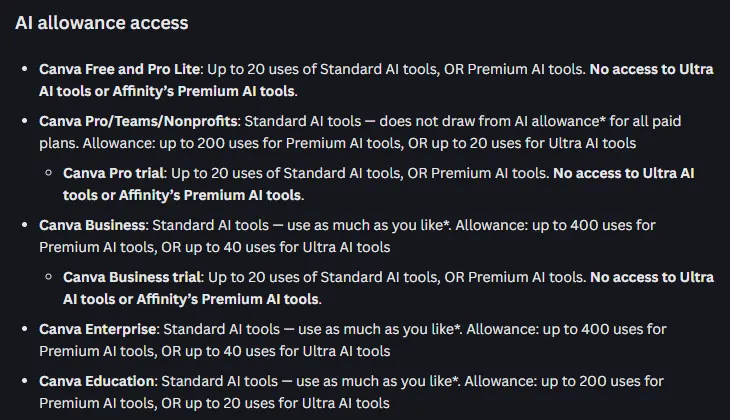
Pick this if you already design in Canva and want a few moving images for a post or a slide, with music and text added in the same editor.
3. Adobe Firefly
Best for: commercially safe clips with no watermarkFirefly is Adobe's generative AI app. Its image to video tool animates an upload or an AI image with Adobe's own Firefly Video Model, and Adobe's page also lists partner video models from Google, Runway, Luma and OpenAI.
- Pricing: Adobe shows prices in your local currency. Firefly Standard has 2,000 credits a month and up to 20 five-second videos; Firefly Pro has 4,000 credits and up to 40.
- No watermark: Adobe says Firefly "does not add a watermark to any videos you generate", whether you use its own model or a partner model.
- Commercial use: Adobe says videos made from your image with Adobe Firefly models are commercially safe, as long as the image you upload does not violate anyone's rights.
Pick this if you need clean clips for commercial work and a set number of videos a month suits your volume.
4. Magic Hour
Best for: paying per frame across several modelsMagic Hour is a browser-based AI video studio. Its own image to video tool runs on the LTX-2.5 model, which makes sound along with the picture, and paid plans add models such as Kling, Veo and Seedance.
- Pricing: Magic Hour shows prices in your local currency. On paid plans each frame costs 1 credit at the base rate.
- What a video costs: Magic Hour's own example is 180 credits for a typical 5-second 720p Kling 2.6 video.
- Commercial use: only with a subscription or a credit pack; otherwise Magic Hour allows personal, non-commercial use.
Pick this if you want to pay for exactly the frames you make, across several video models.
5. Kling
Best for: Kling's own models at a low monthly priceKling is Kuaishou's video platform and the home of the Kling models, including Kling 3.0, which makes video with sound. For every tier in detail, see our Kling AI pricing guide.
- Pricing: Standard is $6.99 for the first month, then $8.80/month on monthly billing (list price $10), with 660 credits a month.
- What a video costs: the cheapest 5-second Kling 3.0 clip is 30 credits, about $0.40 on Standard. Kling's own guide puts Standard at "33 720p videos", but it does not say which model that assumes, so budget with the per-clip rates.
- On paid plans: brand watermark removal, 1080p and 4K video, and commercial use.
Pick this if you want Kling's motion at the lowest monthly price and are happy on one model family.
6. HeyGen
Best for: talking photos with a voiceHeyGen is best known for AI avatars. Its image to video tool adds pans, zooms and motion to a photo and can make a portrait speak, with lip sync. Our HeyGen pricing guide covers what its credits buy.
- Pricing: Creator is $29/month, or $24/month billed yearly, with 600 credits.
- What a video costs: HeyGen does not state a per-clip cost for photo animation.
- Good to know: watermark removal starts on Creator.
Pick this if you want a photo of a person to talk to camera rather than just move.
7. Viggle
Best for: character motion from a template or your own clipViggle maps motion from a template, or from a video you upload, onto the person or character in your photo, so the image dances, walks or gestures on cue.
- Pricing: Pro is $9.99/month, or $7.99/month billed yearly, with 80 credits a month, no watermark and every model except Seedance.
- What a video costs: Viggle does not state credits per clip on its pricing page.
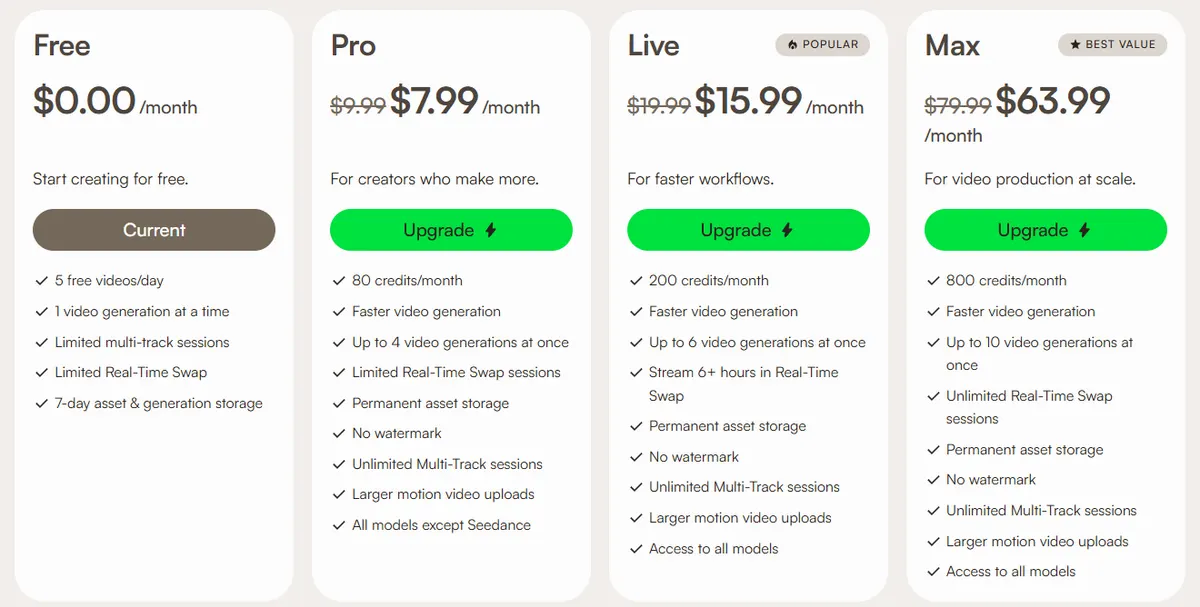
Pick this if you want a person or character in a photo to copy a specific move.
8. PixVerse
Best for: several third-party models in one appPixVerse is an AI video app with its own models. From the Pro plan up, it adds third-party video models such as Seedance 2.5, MiniMax H3 and Wan 3.0.
- Pricing: Standard is $8/month billed yearly ($96), with 1,200 credits every 30 days, 60 daily credits and video up to 720p.
- What a video costs: the plan page does not say how many credits a clip uses.
Pick this if you want to compare several video models in one app and pay yearly.
9. Vidu
Best for: high volume and first and last frame controlVidu's image to video tool can take a first and a last frame and animate the motion between them, which helps when a clip has to start and end on specific shots.
- Pricing: Standard is $10/month, or $8/month billed yearly ($96), with 800 credits a month. Premium is $28/month billed yearly ($336) with 4,000 credits.
- What a video costs: Vidu puts Standard at up to 200 videos, about $0.05 each, and Premium at up to 1,000. These are Vidu's maximums, so expect fewer on longer or higher-resolution clips.
- On paid plans: 720p and 1080p video, 6 to 8 second clips, commercial use and downloads without a watermark.
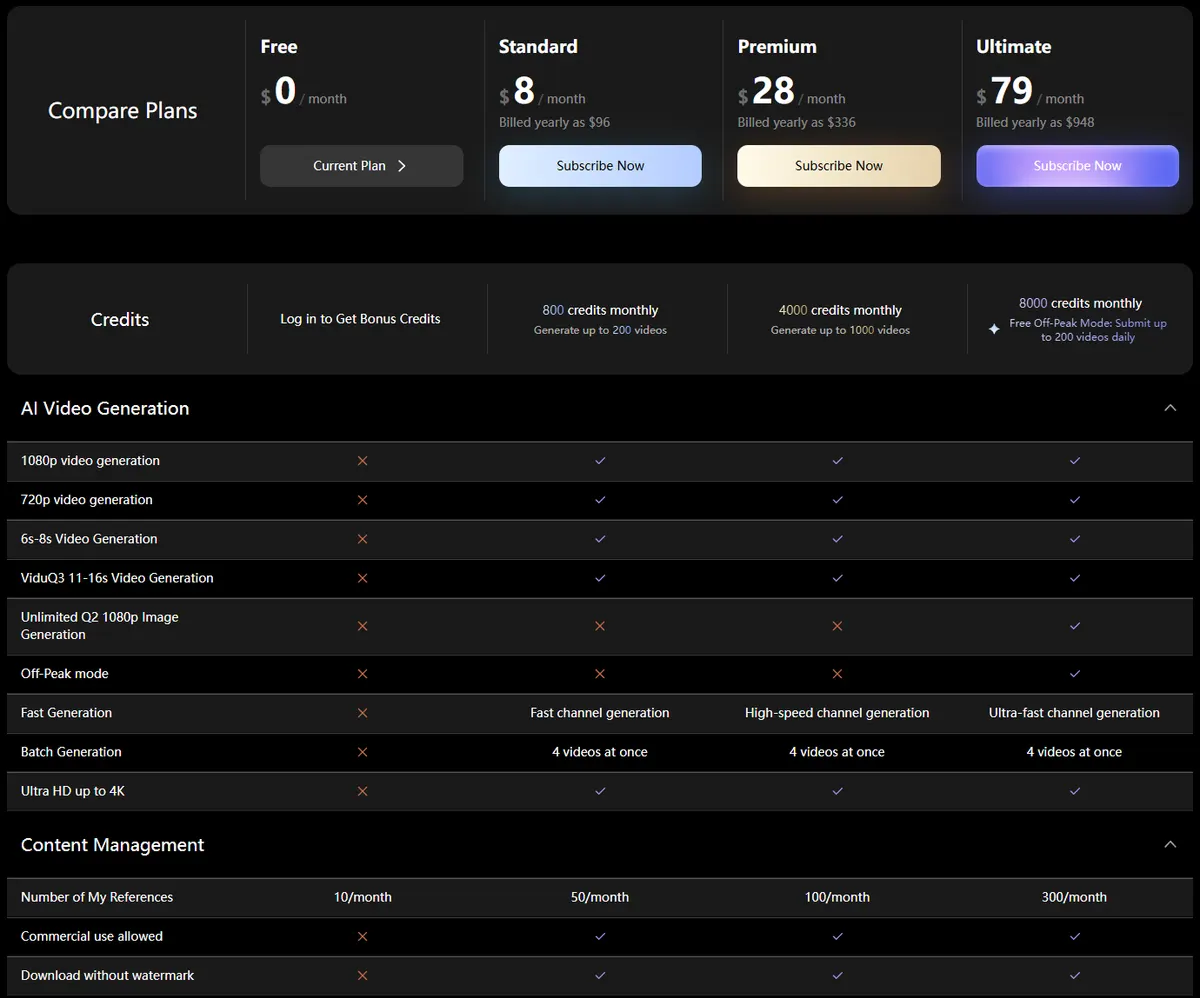
Pick this if you need many short clips a month, or clips that move between two set frames.
10. Pixlr
Best for: the lowest entry pricePixlr is an online photo editor with an AI Video Generator that offers three models: Fast (Seedance Lite), Pro (Kling V2) and Ultra (Google Veo).
- Pricing: Plus, the lowest entry price on this list, is $2.49/month with 80 AI credits a month. Premium is $9.99/month with 1,000 credits.
- What a video costs: Pixlr estimates Plus covers about 4 fast AI videos (about $0.62 each) and Premium about 50 (about $0.20 each).
- No watermark: Pixlr's FAQ says there are no watermarks on any exports.
Pick this if you need a handful of clips a month and already use Pixlr for photo edits.
11. Runway
Best for: a professional video studio with editing toolsRunway is a creative video studio with its own Gen-4.5 model and, on paid plans, third-party models such as Kling 3.0 and Seedance 2.5. Our Runway pricing guide breaks down each plan.
- Pricing: Standard is $15/month, or $12/month billed yearly, with 625 credits a month. Pro is $28/month billed yearly with 2,250 credits.
- What a video costs: Runway puts Standard's 625 credits at 52 seconds of Gen-4.5, which makes 5 seconds about $1.44 on monthly billing.
- No watermark: "No watermarks" is listed as a Standard plan feature.
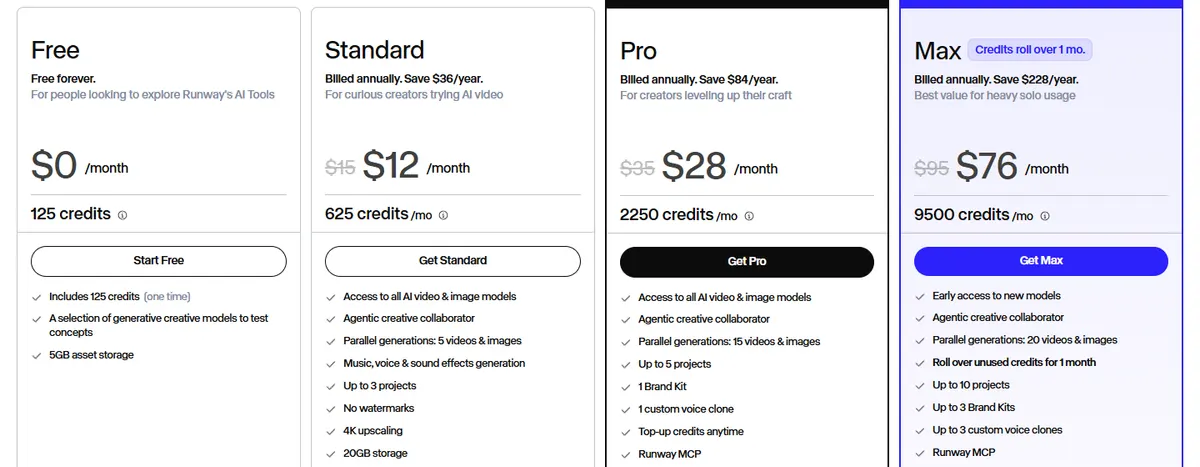
Pick this if you also edit footage and want generation and editing in one studio.
12. Google Veo (Gemini API and Gemini app)
Best for: developers who want to pay by the secondGoogle's video models are sold two ways: by the second in the Gemini API, and inside the Gemini app on paid plans. Our Veo 3 pricing guide has every rate.
- Gemini API: billed per second of video. Veo 3.1 Lite starts at $0.05 per second at 720p, the lowest video rate on Google's pricing page, so an 8-second 720p clip is about $0.40. Veo 3.1 and Gemini Omni Flash are billed from the first request.
- Gemini app: Google says Gemini Omni will replace Veo in the app. It makes 10-second videos with sound, including from up to five photos, on paid plans.
Pick this if you have a developer and want to pay only for the seconds you generate.
ChatGPT, Sora and Grok
- ChatGPT and Sora. OpenAI's help center says the Sora web and app experiences were discontinued on April 26, 2026, and the Sora API on September 24, 2026.
- Grok Imagine. xAI's FAQ says every image and video Grok makes carries a Grok watermark that cannot be removed, and that 720p videos drop to 480p once you hit your tier's 720p cap.
You can also run an open-weight model such as Wan 2.2 yourself. There is no per-clip fee, but you pay in hardware and time: its smaller 5B model needs a GPU with at least 24GB of memory and takes technical setup.
How to work out the real cost of a product video
- Price the clip you keep, not one take. If you keep one take in three, a 5-credit clip really costs 15 credits, so a model that gets it right in fewer takes can cost less overall than a cheaper one.
- Check what sound and resolution add. In CamClo AI, for example, a 5-second Kling 3.0 clip is 4 credits without sound and 5 with it, and most tools charge more for 1080p and 4K.
- Match the length to the placement. A 5 to 8 second clip covers most product page loops and ad openers; longer clips cost more for every take.
- Check the rights on the plan you buy. Kling and Vidu keep commercial use for paid plans, Magic Hour for subscriptions and credit packs, and Adobe says Firefly-model video is commercially safe.
- Check product details frame by frame. Prints, logos and labels are where video models slip, and a redo costs as much as the first take. Our piece on why general video models struggle with exact product detail goes deeper.
If you sell products and want the tools compared on quality and workflow rather than price, see our guide to the best AI image to video tools for ecommerce, or animate a product shot in CamClo AI's photo to video generator.
How we checked
We picked the image to video tools that come up most often in Google's US results and in ranking roundups. For each one we read the official pricing page, help center or FAQ and recorded the entry paid plan in US dollars, what it includes, the cost per video where the vendor states the numbers to work it out, and the watermark and commercial-use terms. We saved screenshots of the pages we could reach without logging in.
Every cost per video here is arithmetic on the vendor's own published numbers; where a vendor does not publish them, we say so instead of estimating. Some vendors show prices in the visitor's local currency; where we could not confirm a US dollar price on an official page, we wrote "varies by region". We did not score output quality, so test with your own images before you commit.
Frequently asked questions
How much does image to video AI cost?
Entry plans run from $2.49 a month (Pixlr Plus) to $49 a month (CamClo AI Creator, which also covers finished video ads), and a short clip costs from a few cents to about $1.60, depending on the model, the length, the resolution and whether it has sound. Google's Gemini API bills by the second instead, from $0.05 per second for Veo 3.1 Lite at 720p.
What is the cheapest image to video AI?
By entry price, Pixlr Plus at $2.49 a month, which Pixlr estimates covers about 4 fast AI videos. By videos per dollar, Vidu Standard at $10 a month, which Vidu puts at up to 200 videos. The cheapest clip is not always the cheapest usable clip: retries, sound and resolution all add to the cost.
How much does a 5-second AI video cost?
On the numbers vendors publish: about $1.44 for 5 seconds of Runway Gen-4.5 on the Standard plan billed monthly, about $0.40 for the cheapest 5-second Kling 3.0 clip on Kling Standard, and 2 to 5 credits in CamClo AI depending on the model, about $0.65 to $1.63 on the Creator plan. In Google's Gemini API, Veo 3.1 Lite costs $0.05 per second at 720p.
Which image to video AI tools allow commercial use?
On paid plans, most of them. Kling and Vidu list commercial use for subscribers, Magic Hour allows it with a subscription or credit pack, Adobe says video made with its Firefly models is commercially safe as long as your image does not break anyone's rights, and CamClo AI's paid plans include commercial use with no watermark. Check each tool's terms for the plan you buy.
Can ChatGPT turn an image into a video?
Not through Sora any more. OpenAI's help center says the Sora web and app experiences were discontinued on April 26, 2026, and the Sora API on September 24, 2026. Google's Gemini app makes video from photos with Gemini Omni on paid plans.
What does CamClo AI charge for image to video?
Plans start at $49 a month for Creator with 150 credits. A 5-second Kling 2.5 Turbo clip is 2 credits, an 8-second 720p Veo 3.1 Lite clip with sound is 4, and a 5-second Kling 3.0 or Gemini Omni Flash clip is 5, so about $0.65 to $1.63 a clip on Creator. The same credits pay for finished video ads in 15 formats, and new customers can start with a 7-day free trial with 20 credits.
Turning product photos into video?
CamClo AI plans start at $49 a month with 150 credits, for every current video model and finished video ads in one place.
See plans

