


Table of Contents
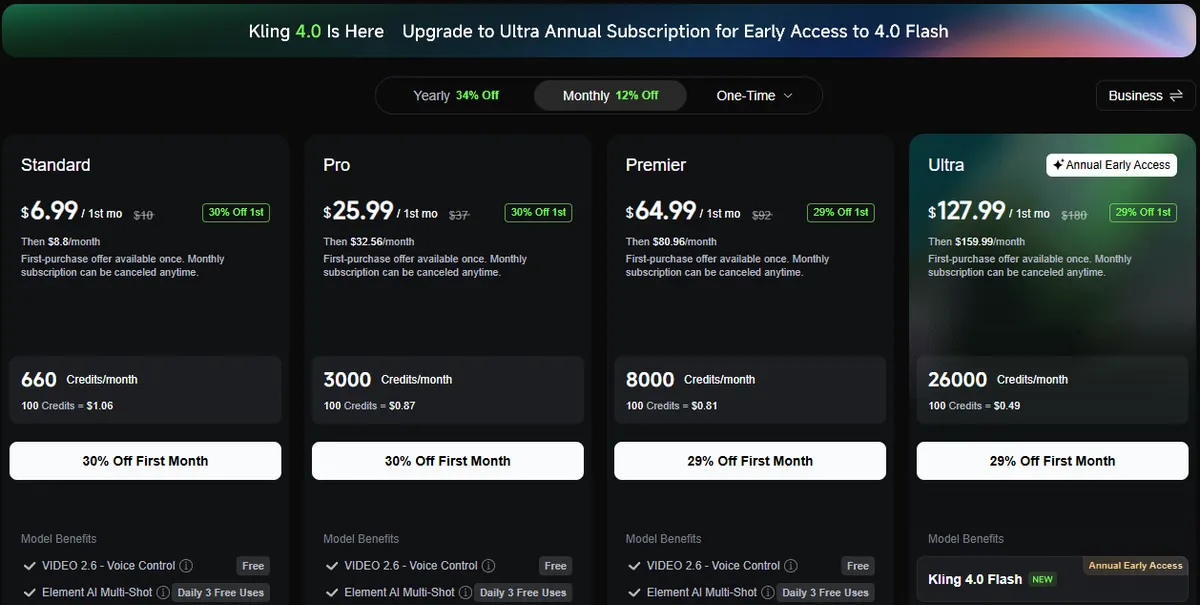
Kling AI's cheapest monthly plan is Standard: $6.99 for the first month, then $8.80 a month, with 660 credits a month, or $79.20 a year on yearly billing. The free Basic plan costs $0, but it comes with no monthly plan credits, Kling's watermark and no commercial use. Below is every Kling AI pricing option, what a credit buys on Kling 3.0, how many videos each plan makes, the API rates and how to get Kling 4.0.
We read every price on Kling's own pages. Here is how we checked.
Kling AI pricing at a glance
| Plan | First month | Monthly after that | Billed yearly | Credits a month | Per 100 credits (yearly) |
|---|---|---|---|---|---|
| Basic | $0 | $0 | $0 | No monthly plan credits | n/a |
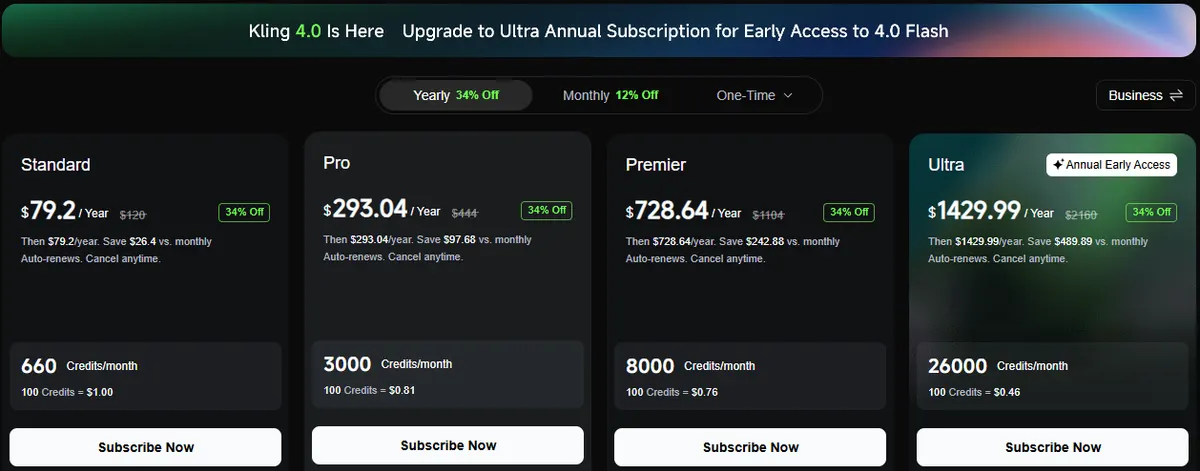
| Standard | $6.99 | $8.80 (list $10) | $79.20 ($6.60/mo) | 660 | $1.00 |
| Pro | $25.99 | $32.56 (list $37) | $293.04 ($24.42/mo) | 3,000 | $0.81 |
| Premier | $64.99 | $80.96 (list $92) | $728.64 ($60.72/mo) | 8,000 | $0.76 |
| Ultra | $127.99 | $159.99 (list $180) | $1,429.99 ($119.17/mo) | 26,000 | $0.46 |
From Kling's membership page, in US dollars. The first-month price is a one-time offer on a first purchase. Yearly plans are charged once a year; the monthly equivalent in brackets is our division. Kling also sells a one-week pass, credit packs and a Team plan, covered below.
Making product videos from a product photo? In CamClo AI's image to video tool, a 5-second Kling 3.0 clip with audio costs 5 CamClo AI credits in Standard mode, about $1.63 on the $49 Creator plan with 150 credits, and the same credits also run Seedance 2.5, Veo 3.1 and Gemini Omni Flash on the same photo. The Creator plan has a 7-day free trial with 20 credits.
First-month, monthly and yearly prices
Every paid plan has three prices, and which one you pay depends on how you sign up:
- First month: 29 to 30% off the list price. Kling says this first-purchase offer is available once.
- Monthly after that: the renewal price, about 12% below list. Standard renews at $8.80, Pro at $32.56, Premier at $80.96 and Ultra at $159.99.
- Yearly: 34% off list, charged up front. Standard is $79.20 a year, which Kling says saves $26.40 against 12 months at $8.80.
Yearly billing wins even after the first-month discount: a year of Standard on monthly billing costs $103.79 ($6.99 plus 11 months at $8.80), against $79.20 billed yearly. The credits per month are the same either way. What changes is the price of each credit, which falls from $1.33 per 100 on Standard monthly after the first month to $0.46 per 100 on Ultra yearly.
What each Kling plan includes
| Benefit | Basic | Standard | Pro | Premier | Ultra |
|---|---|---|---|---|---|
| Monthly credits | None | 660 | 3,000 | 8,000 | 26,000 |
| 1080p and 4K video | No | Yes | Yes | Yes | Yes |
| Watermark removal | No | Yes | Yes | Yes | Yes |
| Commercial use | No | Yes | Yes | Yes | Yes |
| Videos per generation | 1 | 4 | 4 | 4 | 4 |
| Video extension | No | Yes | Yes | Yes | Yes |
| Daily free credits for subscribers | No | Yes | Yes | Yes | Yes |
| Elements you can create | 30 | 50 | 150 | 150 | 500 |
| Priority access to new features | No | No | Yes | Yes | Yes |
| Kling 4.0 Flash | No | No | No | No | Early access, yearly billing |
From the subscription comparison on Kling's membership page. Every paid plan also lists unlimited queued tasks, fast-track generation, VIDEO 2.6 voice control marked as free and three free Element AI Multi-Shot uses a day. Ultra adds beta test invites where they apply.
The practical line is between Basic and Standard. Anything you plan to publish for a business needs a paid plan, because Basic output is watermarked and not licensed for commercial use. Above Standard, you are mostly buying more credits at a lower price per credit.
Is Kling AI free? The Basic plan
Yes. Kling's own credit guide describes Basic as "$0; free forever", with no monthly credits and generated content that is not for commercial use. It also lacks 1080p and 4K output and watermark removal, and makes one video per generation instead of four.
You can still get credits without paying. Kling's plan FAQ says non-subscribers can claim monthly free credits when they log in, valid for 31 days, and Kling runs promotions such as a trial package you claim by signing in. It does not publish the amounts on its public pages. Many guides still quote 66 free credits a day; Kling's current pages do not state that number, so treat it as unconfirmed and check your balance after you sign in.
If you need commercial rights for a small test, the cheapest route is the one-week Standard pass at $1.19 (below). For more free options across tools, see our guide to free image-to-video AI.
How many credits a Kling video uses
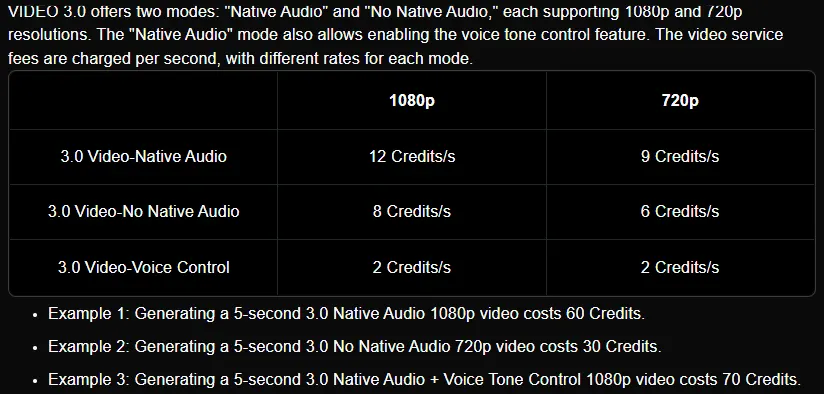
Kling charges video per second, and the rate depends on the model, the resolution and whether you turn on native audio. Kling 3.0 makes clips of 3 to 15 seconds. These are Kling's published rates:
| Model and setting | 720p | 1080p |
|---|---|---|
| Kling 3.0, native audio | 9 credits/s | 12 credits/s |
| Kling 3.0, no audio | 6 credits/s | 8 credits/s |
| Voice tone control (added) | 2 credits/s | 2 credits/s |
| Kling 3.0 Omni, no video input, audio on | 9 credits/s | 12 credits/s |
| Kling 3.0 Omni, no video input, audio off | 6 credits/s | 8 credits/s |
| Kling 3.0 Omni, with a video input | 12 credits/s | 16 credits/s |
From Kling's Kling 3.0 and Kling 3.0 Omni user guides. Omni with a video input does not support native audio yet. Native 4K for the Kling 3.0 series costs 30 credits a second, per Kling's credit guide.
Multiplied out for the durations people use most:
| Kling 3.0 setting | 5 seconds | 10 seconds | 15 seconds |
|---|---|---|---|
| 720p, no audio | 30 | 60 | 90 |
| 720p, native audio | 45 | 90 | 135 |
| 1080p, no audio | 40 | 80 | 120 |
| 1080p, native audio | 60 | 120 | 180 |
| Native 4K | 150 | 300 | 450 |
Credits per clip: our arithmetic on Kling's per-second rates. Voice tone control adds 10 credits per 5 seconds.
One figure to be careful with: Kling's credit guide says Standard's 660 credits cover "33 720p videos". That is 20 credits a video. Kling does not say which model that assumes, and the cheapest 5-second Kling 3.0 clip is 30 credits, so budget with the per-second rates.
How many Kling videos each plan makes
| Plan | 5 s, 720p, audio (45) | 5 s, 1080p, audio (60) | 10 s, 1080p, audio (120) | 15 s, 1080p, audio (180) |
|---|---|---|---|---|
| Standard (660) | 14 | 11 | 5 | 3 |
| Pro (3,000) | 66 | 50 | 25 | 16 |
| Premier (8,000) | 177 | 133 | 66 | 44 |
| Ultra (26,000) | 577 | 433 | 216 | 144 |
Kling 3.0 clips per month from the plan's monthly credits, rounded down, before retakes and not counting daily bonus credits.
In dollars, a 5-second 1080p Kling 3.0 clip with audio works out at about $0.80 on Standard, $0.65 on Pro, $0.61 on Premier and $0.37 on Ultra at the monthly price after the first month. On yearly billing it is about $0.60, $0.49, $0.46 and $0.27. Those are costs per generation, not per usable clip: if you keep one take in three, triple them. Kling's llms.txt file says failed generations do not use credits.
Kling 4.0 pricing and availability
Kling 4.0 is arriving in stages. This is what Kling's own pages say:
- Homepage: it leads with "All-New Kling 4.0".
- Membership page: a banner reads "Kling 4.0 Is Here: Upgrade to Ultra Annual Subscription for Early Access to 4.0 Flash", and Kling 4.0 Flash appears only on Ultra, marked "Annual Early Access".
- User guide banner: "Kling 4.0 Coming Soon", with early access to Kling 4.0 Flash and a new creation page.
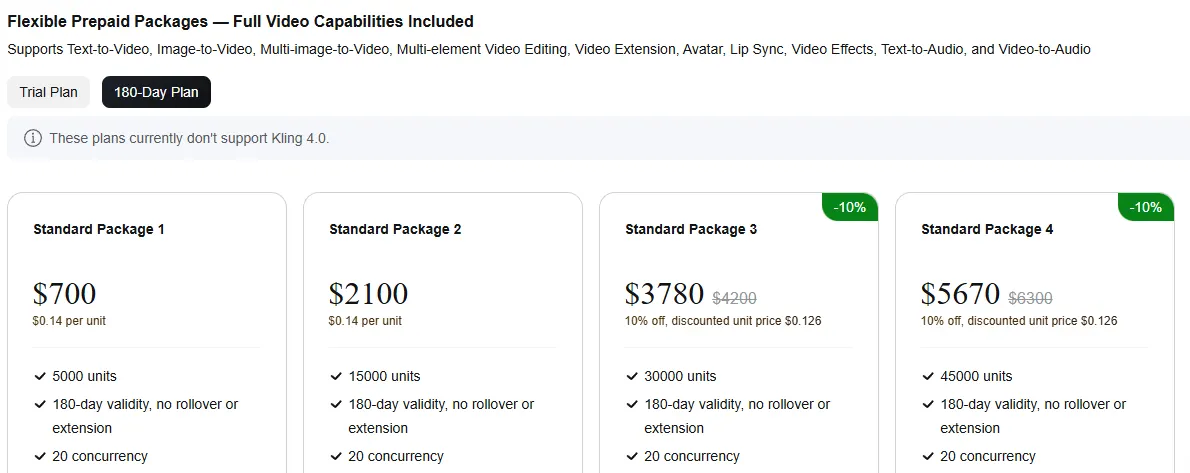
- API: the developer pricing page says "These plans currently don't support Kling 4.0."
So the only route into Kling 4.0 that Kling's pages list right now is Ultra on yearly billing, at $1,429.99 a year. Kling has not published what Kling 4.0 Flash costs in credits on its public pages, so we cannot tell you how far 26,000 credits go on it. If you do not need it today, Standard or Pro on Kling 3.0 costs far less.
Weekly pass, credit packs and team plans
One-week Standard pass
Under "One-Time", Kling sells a Standard membership for one week at $1.19 with 80 credits. It carries Standard's benefits, including watermark removal and commercial use, but Kling's FAQ excludes 7-day pass users from the daily bonus credits. 80 credits is one 5-second 1080p Kling 3.0 clip with audio, or two 5-second 720p clips without audio. This pass is why Kling's pages say "Plans from $1.19".
Credit packs
You can top up without changing plans. Kling's in-app purchase page needs a sign-in, so these pack prices come from the llms.txt file Kling publishes on kling.ai:
| Pack price | Credits | Per 100 credits |
|---|---|---|
| $5 | 330 | $1.52 |
| $10 | 660 | $1.52 |
| $20 | 1,320 | $1.52 |
| $50 | 3,500 (200 bonus) | $1.43 |
| $100 | 7,500 (900 bonus) | $1.33 |
| $200 | 16,000 (2,800 bonus) | $1.25 |
| $600 | 48,000 (8,400 bonus) | $1.25 |
| $1,200 | 96,000 (16,800 bonus) | $1.25 |
Pack prices and bonuses from Kling's llms.txt; confirm in the app before you buy. Purchased credits last 2 years, per Kling's plan FAQ.
Packs cost more per credit than every subscription except Standard on monthly billing, which works out at $1.33 per 100 after the first month. Kling's FAQ also says owning credits does not grant subscription benefits: watermark removal and 4K need an active plan. They make sense on top of a plan in a busy month, or to keep a balance that does not expire after 31 days.
Team plan
The Team plan costs $79 per seat a month (list $99), or $59 per seat a month billed yearly ($708 per seat a year), with 10,000 credits per seat per month. Kling's Team plan FAQ sets a minimum of 3 seats and a maximum of 15, so the smallest team costs $237 a month. It adds a shared team workspace, asset sharing with role-based permissions and data isolation, and it works on the Kling website only, not the mobile apps. Team credits cost $0.79 per 100 on monthly billing and $0.59 on yearly billing, more per credit than Ultra, so the Team plan is worth it for the shared workspace rather than the price. Kling 4.0 Flash is not listed on it.
Kling API pricing
The API is billed separately from the web plans, through prepaid packages of units. One unit lists at $0.14.
- Trial packages: $9.80 for 100 units or $98 for 1,000 units (30% off $14 and $140 on a first buy, up to 5 purchases), valid 30 days, 5 tasks at a time.
- 180-day packages: $700 for 5,000 units and $2,100 for 15,000 units at $0.14 each, then $3,780 for 30,000, $5,670 for 45,000 and $7,560 for 60,000 at $0.126 each. 20 tasks at a time, no rollover or extension.
- Custom packages: by inquiry for larger volumes.
| Model and setting | 720p | 1080p | 4K |
|---|---|---|---|
| Kling 3.0 Turbo, native audio | $0.112/s | $0.14/s | n/a |
| Kling 3.0, no audio | $0.084/s | $0.112/s | $0.42/s |
| Kling 3.0, native audio | $0.126/s | $0.168/s | $0.42/s |
| Kling 3.0 Omni, no video input, native audio | $0.112/s | $0.14/s | $0.42/s |
| Kling 3.0 Omni, with a video input | $0.126/s | $0.168/s | $0.42/s |
| Motion Control | $0.126/s | $0.168/s | n/a |
List prices at $0.14 a unit from Kling's developer pricing page. Kling 3.0 Omni with no video input and no audio matches Kling 3.0 with no audio.
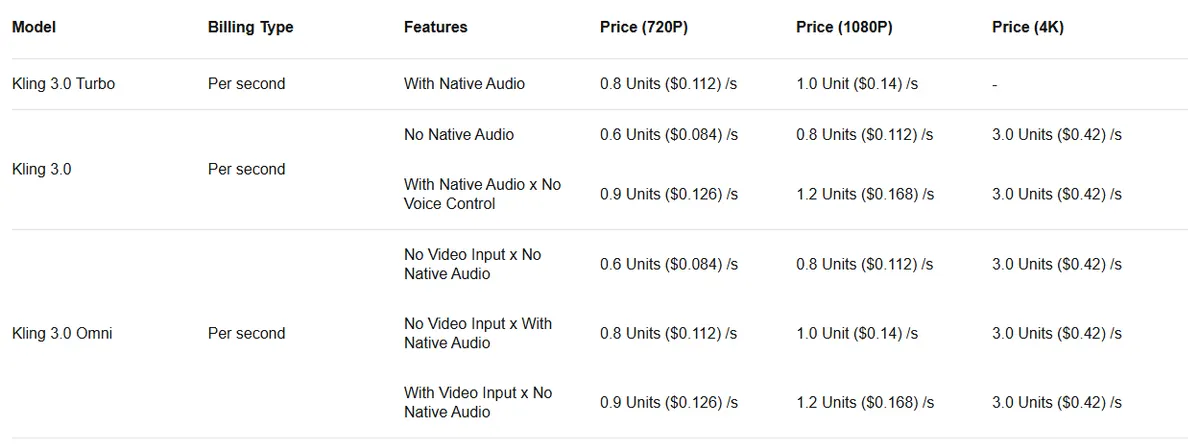
A 5-second 1080p Kling 3.0 clip with audio is 6 units: $0.84 at list, $0.76 at the $0.126 package rate and about $0.59 at the trial rate. That is close to the $0.80 the same clip costs on Standard's monthly price, so developers pay roughly what a Standard subscriber does per clip, with no monthly plan to keep.
Credit rules that change what you pay
- Monthly credits last 31 days and do not roll over. When a subscription ends, unused monthly credits expire.
- Purchased credits last 2 years, and daily bonus credits for subscribers expire at midnight local time on the day they are issued.
- The soonest-expiring credits are spent first, so bonus and monthly credits usually go before purchased ones.
- Upgrades to a higher tier, or from monthly to yearly, take effect straight away. A same-tier purchase on the same billing cycle, or a lower-tier purchase, waits until the current plan ends, and only one subscription is active at a time.
- Credits cannot be transferred or cashed out.
- Commercial use is granted to paid subscribers, on the condition that the output is not used to build a product that competes with Kling.
- Cancelling: on the web, go to Profile, then Manage Plan, then Cancel Subscription. App store subscriptions are cancelled in Apple or Google Play settings.
Is Kling cheaper than Runway?
Per second of video, yes, at the entry level. Runway's Standard plan is $15 a month, or $12 billed yearly, for 625 credits, which Runway says is 52 seconds of Gen-4.5 a month (60 credits per 5 seconds). Kling Standard at $8.80 a month gives 660 credits, which is 55 seconds of 1080p Kling 3.0 with native audio, or 110 seconds at 720p without audio. Runway's free plan has 125 one-time credits. Price is not quality, though, so test both on your own material. Our Runway pricing guide, Veo 3 pricing guide and Seedance pricing guide break down the other big video models the same way.
Using Kling inside CamClo AI
CamClo AI: Kling next to other video models
Best for: product videos and ads from a product photoCamClo AI is an AI studio for ecommerce teams. Its image to video tool runs several Kling versions next to Seedance, Google Veo and Gemini Omni Flash, so you can try the same product photo on different models from one credit balance.
- Kling versions: Kling 3.0 (Standard or Pro, 5, 10 or 15 seconds, audio on or off, start and end frame), Kling 2.6 Pro (5 or 10 seconds, with or without audio), Kling 2.5 Turbo (Standard or Pro, 5 or 10 seconds) and Kling 2.1 (Pro or Master, 5 or 10 seconds), up to 1080p.
- Other models: Seedance 2.5 (4 to 30 seconds), Seedance 2.0 (4 to 15 seconds), Google Veo 3.1 (4, 6 or 8 seconds, up to 4K) and Gemini Omni Flash (3 to 10 seconds, up to 4K).
- Video ads: 15 formats, including UGC, Unboxing, Product Demo, Testimonial and TV Spot, with the script written for you and output sized for 10 placements such as Reels, TikTok and Shorts, at 480p, 720p or 1080p, from 4 to 30 seconds. Remix Ads rebuilds a proven ad around your product, up to 90 seconds.
- Pricing: plans from $49 per month with 150 credits, and a 7-day free trial with 20 credits.
| Kling in CamClo AI | 5 seconds | 10 seconds | 15 seconds |
|---|---|---|---|
| Kling 3.0 Standard, with audio | 5 | 10 | 15 |
| Kling 3.0 Standard, no audio | 4 | 8 | 12 |
| Kling 3.0 Pro, with audio | 7 | 14 | 21 |
| Kling 3.0 Pro, no audio | 5 | 10 | 15 |
| Kling 2.6 Pro, with audio | 5 | 10 | n/a |
| Kling 2.6 Pro, no audio | 3 | 5 | n/a |
| Kling 2.5 Turbo, Standard or Pro | 2 or 3 | 4 or 5 | n/a |
| Kling 2.1, Pro or Master | 4 or 10 | 8 or 20 | n/a |
CamClo AI credits, not Kling credits. The cost shows in the panel before you generate. Kling 3.0 and Kling 2.1 Master need a plan, the trial or purchased credits.
Strengths
- Kling 3.0 next to Seedance, Veo and Gemini Omni Flash, on one credit balance
- Starts from your product photo, with an optional end frame
- Finished video ads with scripts and placement sizes, not only raw clips
- Ads up to 90 seconds with Remix Ads
Limits
- Can seem a little expensive next to a Kling plan alone, but the credits cover several video models, the ad formats, the script and the sizing for each placement, not just a raw clip
Use Kling directly instead if you only need raw Kling clips in volume, or you need what CamClo AI does not offer: Kling 4.0 Flash, native 4K Kling output, Kling 3.0 Omni with a video input, or Motion Control.
Using Kling inside CamClo AI makes sense when the clip is for a product you sell: you start from the product photo, compare Kling with Seedance or Veo on the same image, and make a finished ad from the same product in the video ad maker. For a wider comparison of models for this job, see the best AI image-to-video tools for ecommerce.
Which Kling plan should you pick
- Just trying it: Basic for free, or the $1.19 one-week pass if the test clip needs commercial rights and no watermark.
- A few clips a month: Standard. Go yearly at $79.20 if you will keep it, since a year of monthly billing costs $103.79.
- Regular social content: Pro, at about 50 five-second 1080p clips with audio a month.
- High volume or an agency: Premier or Ultra. Ultra has the lowest price per credit, and on yearly billing it is the only way into Kling 4.0 Flash.
- A team sharing assets: the Team plan, from 3 seats at $79 each.
- Building an app: the API, starting with a $9.80 trial package.
- Product videos and ads: turn product photos into video in CamClo AI, with Kling and the other models in one place.
If you are weighing other video models too, our guide to Sora alternatives for product videos compares Kling with Veo, Runway, Seedance and more.
How we checked
We read Kling's membership page in its monthly, yearly and one-week views, plus the Team plan page and its FAQ, the plan FAQ, the Kling 3.0 and Kling 3.0 Omni user guides, Kling's credit guide, the developer pricing page and the llms.txt file Kling publishes on kling.ai. All prices were shown in US dollars, and we saved screenshots of the pages we quote. Credit pack prices come from the llms.txt file because the in-app purchase page needs a sign-in. The clips-per-plan and cost-per-clip figures are our arithmetic on Kling's published rates, and we did not generate test videos, so there are no quality scores here. Runway's prices come from its own pricing page. Kling changes its offers often, so confirm the price on Kling's site before you buy.
Frequently asked questions
How much does Kling AI cost?
Kling's Basic plan is free. Standard costs $6.99 for the first month, then $8.80 a month, with 660 credits; Pro $25.99, then $32.56, with 3,000 credits; Premier $64.99, then $80.96, with 8,000 credits; and Ultra $127.99, then $159.99, with 26,000 credits. Billed yearly, the four paid plans cost $79.20, $293.04, $728.64 and $1,429.99.
Is Kling AI free?
Yes, the Basic plan costs $0. It has no monthly plan credits, no 1080p or 4K output, no watermark removal and no commercial use. Kling's FAQ says non-subscribers can claim monthly free credits when they log in, but its public pages do not say how many. For commercial use, the cheapest option is a one-week Standard pass at $1.19 for 80 credits.
How many credits does a Kling video use?
On Kling 3.0, video is charged per second: 6 credits at 720p and 8 at 1080p without audio, 9 and 12 with native audio, plus 2 a second for voice tone control. A 5-second 1080p clip with audio uses 60 credits, and native 4K uses 30 credits a second. Standard's 660 monthly credits cover about 11 five-second 1080p clips with audio.
How much does Kling 3.0 cost?
In the Kling app, a 5-second Kling 3.0 clip costs 30 to 60 credits at 720p or 1080p, which is about $0.40 to $0.80 at Standard's $8.80 monthly price. Through the API, Kling 3.0 costs $0.084 to $0.168 a second at list price, or $0.42 a second in 4K.
Can I use Kling 3.0 without a Kling subscription?
Yes. Kling 3.0 is one of the models in CamClo AI's image to video tool, next to Seedance 2.5, Veo 3.1 and Gemini Omni Flash on one credit balance. There, a 5-second Kling 3.0 clip with audio costs 5 CamClo AI credits in Standard mode or 7 in Pro mode, and the Creator plan costs $49 a month with 150 credits and a 7-day free trial with 20 credits. Kling's own API is another route, billed through prepaid packages rather than a plan.
How do I get Kling 4.0?
Kling offers Kling 4.0 Flash as early access to Ultra subscribers on yearly billing, which costs $1,429.99 a year. It is not listed on Standard, Pro or Premier, Kling has not published its credit cost, and Kling's API packages do not support Kling 4.0 yet.
Do Kling credits expire?
Yes. Monthly plan credits last 31 days and do not roll over, and any left expire when the subscription ends. Purchased credits last 2 years, and daily bonus credits for subscribers expire at midnight local time. Kling spends the credits that expire soonest first.
Making product videos with Kling?
Try Kling 3.0, Seedance, Veo and Gemini Omni Flash on the same product photo in CamClo AI. Get a 7-day free trial with 20 credits.
See plans and the free trial

