
Instagram Story safe zone checker
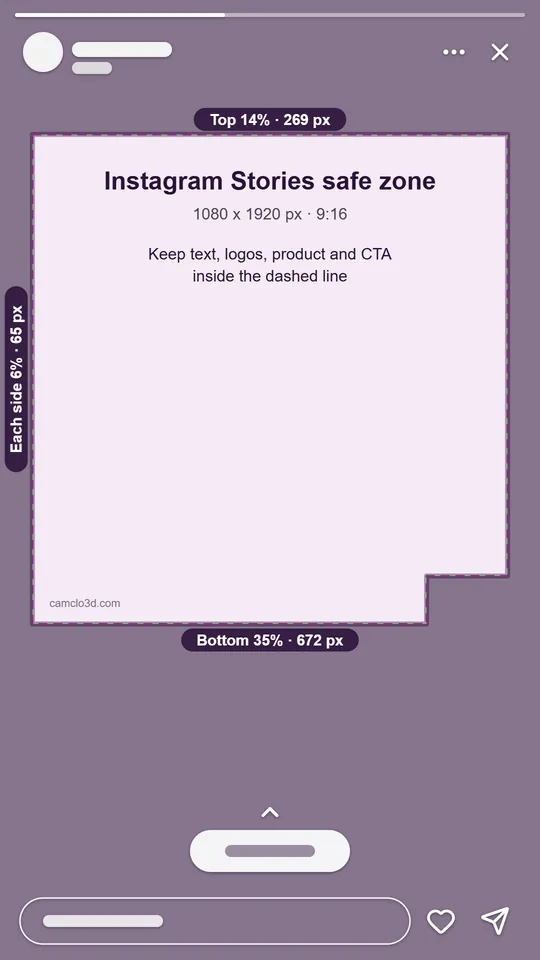
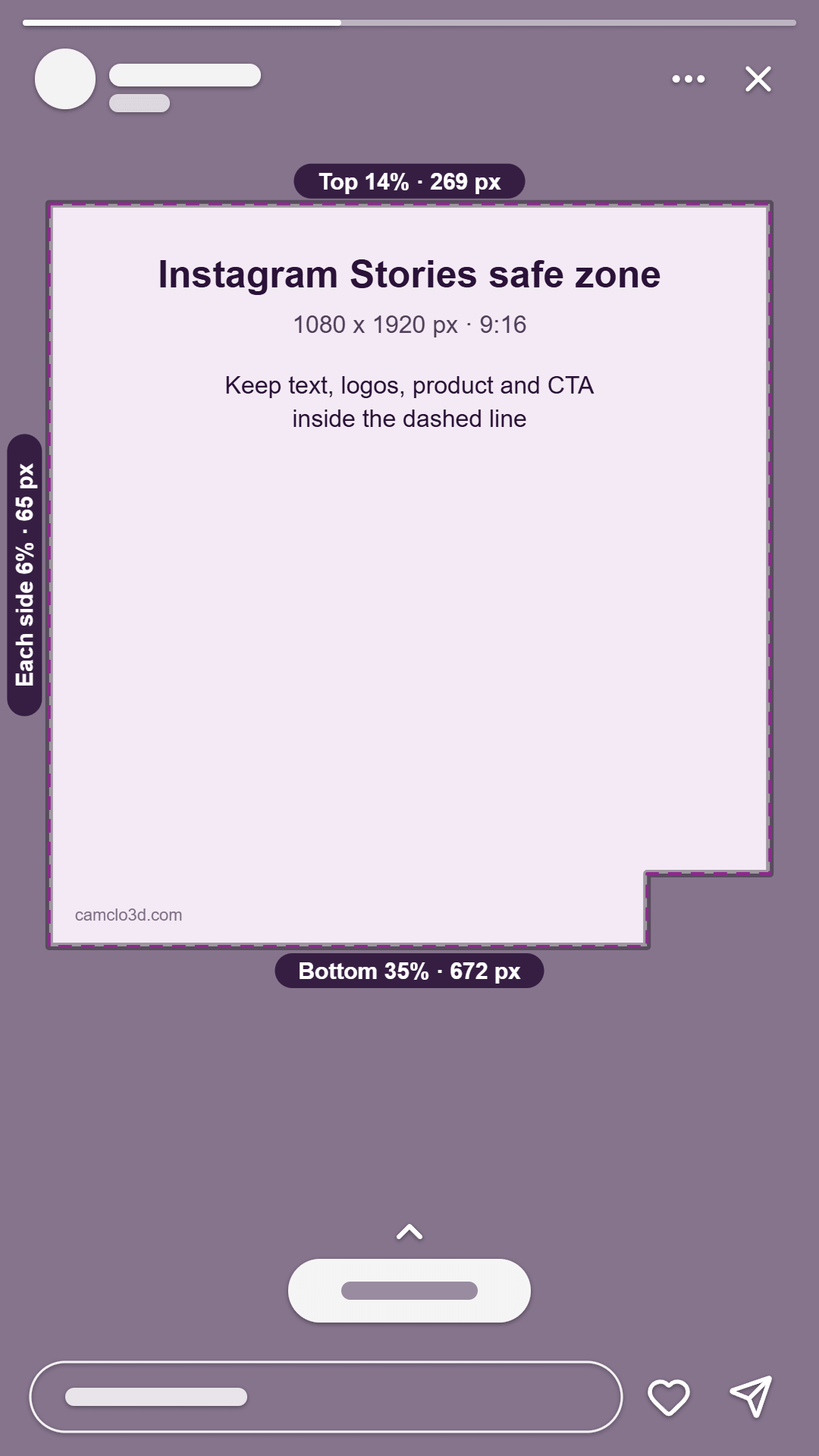
Free. Runs in your browser, nothing is uploaded.Meta's safe zone for Instagram Stories ads is the same as for Reels: keep text, logos and key visuals out of the top 14% (269 px), the bottom 35% (672 px) and 6% (65 px) on each side of a 1080 x 1920 story. Upload your story below to see what the app covers.
Drop a 9:16 image or video
JPG, PNG, WebP, MP4 or MOV. It stays on your device.
Your ad shows here
Instagram Stories safe zone
Keep text and logos out of these areas. Pixels on a 1080 x 1920 frame.
- Top
- 14%269 px
- Bottom
- 35%672 px
- Each side
- 6%65 px
- Lower-right corner, w x h
- 21% x 40%227 x 768 px
- Safe area, w x h
- 88% x 51%950 x 979 px
Sizes marked w x h are measured from the frame edges. The white shapes stand in for the app's captions and buttons; they are not its exact layout.
The checked-ad download turns on once you add a file. The template and overlay are 1080 x 1920 and work in any video or image editor.
The Instagram Story safe zone in pixels
For Instagram Stories image and video ads alike, Meta asks you to leave roughly 14% of the top, 35% of the bottom and 6% on each side free of text, logos and other key creative elements, so the profile icon and the call to action do not cover or crop them. Meta's safe zone diagram also blocks a lower-right corner, 21% in from the right edge and 40% up from the bottom. In pixels:
| Keep clear | Share of frame | On 1080 x 1920 | On 1440 x 2560 |
|---|---|---|---|
| Top | 14% | 269 px | 358 px |
| Bottom | 35% | 672 px | 896 px |
| Left and right, each | 6% | 65 px | 86 px |
| Lower-right corner (wide x high) | 21% x 40% | 227 x 768 px | 302 x 1024 px |
| Safe area left in the middle | 88% x 51% | about 950 x 979 px | about 1267 x 1306 px |
Meta recommends 1440 x 2560 px for Stories ads, with a 1% aspect ratio tolerance; 1080 x 1920 is the same 9:16 shape. The pixel values are our conversion of Meta's percentages, rounded to the nearest pixel.
Why other guides say 250 px
Many story guides, and Google's AI overview for the search, tell readers to leave somewhere between 155 and 250 px at the top and the bottom. A figure like that does exist for Facebook Stories video ads, which should keep "roughly 14% (250 pixels) of the top and 20% (340 pixels) of the bottom" free of text and logos. Instagram Stories image and video ads use 14%, 35% and 6%.
The Instagram numbers are the stricter set: 672 px at the bottom clears Facebook's 20% as well. If one creative runs in Instagram and Facebook Stories, design to 14%, 35% and 6%.
| Placement | Top | Bottom | Sides |
|---|---|---|---|
| Instagram Stories image and video ads | 14% | 35% | 6% |
| Instagram Reels and Facebook Reels ads | 14% | 35% | 6% |
| Facebook Stories video ads | 14% (250 px) | 20% (340 px) | No number given |
How to check a story ad
- Pick the placement. Instagram Stories is selected. Switch to Reels, TikTok or Facebook Reels to compare the same file.
- Add your story. Drop a 9:16 image or video on the frame, or choose a file. It stays in your browser.
- Read the overlay. Shaded areas are what the app covers; the dashed line is the safe zone. Simple shapes stand in for the progress bar, the profile row and the call to action.
- Scrub through videos. Instagram may split video ads of 16 seconds or longer into separate Stories cards, so every part of the video needs readable text, not only the opening.
- Download. Save the checked frame as a PNG, or download the guide template or the transparent overlay to design against in your editor.
A file that is not 9:16 gets a warning, and you can preview it cropped to fill the screen or fitted with bars.
What to keep inside the Story safe zone
- Headline and offer. Start text below 269 px. The top band holds the progress bar and the profile row with the account name.
- Logo. Keep it inside the dashed line. The top-left corner, a common spot for logos, sits right under the profile row.
- Product. Keep it between 269 px and 1248 px from the top and inside the side lines, the part of the frame the app leaves clear.
- Call to action. The app draws its own button in the bottom band, so a painted "Swipe up" or "Shop now" arrow at the bottom competes with, or sits under, the real one. Point to it from inside the safe zone instead.
- Small print. Terms and prices at the very bottom are the first thing to be covered. Put them inside the zone or in the ad text.
Common mistakes: designing to the 250 px guides, which leaves the lower part of your text under the call to action; running text to the right edge in the lower half; and reusing a 4:5 feed image, which is cropped or shown with bars in Stories.
How CamClo AI sizes story ads
Image Ads has a 9:16 Story canvas for Stories and Reels. For that canvas the image brief includes a safe zone instruction to keep important content away from the top and bottom of the frame. It is an instruction, not a hard crop, so check each result here before it goes live.
Video Ads makes 9:16 vertical videos at 480p, 720p or 1080p. On-screen text is off unless you turn it on, and when it is on the script keeps the words in clear parts of the frame, away from the product. It does not apply a placement safe zone for you, so drop the finished video into this checker too.
Make story-sized image ads
CamClo AI's Image Ads makes ad images from your product photos, including a 9:16 Story canvas for Stories and Reels. 7-day free trial with 20 credits.
Try Image AdsQuestions
What is the Instagram story safe zone?
For ads, Meta asks you to keep text, logos and key visuals out of the top 14%, the bottom 35% and 6% on each side of a 9:16 story. On a 1080 x 1920 frame that is 269 px at the top, 672 px at the bottom and 65 px on each side, leaving about 950 x 979 px. Meta's diagram also blocks a lower-right corner 21% wide and 40% high.
Is the safe zone the same for Stories and Reels?
For ads, yes. Meta gives Instagram Stories and Instagram Reels the same guidance: roughly 14% of the top, 35% of the bottom and 6% on each side kept clear. The interfaces look different, but the zone to design for is the same.
What size is an Instagram story ad?
9:16. Meta recommends 1440 x 2560 px, and 1080 x 1920 is the same shape. Image ads take JPG or PNG up to 30 MB with a minimum width of 500 px. Video ads take MP4, MOV or GIF up to 4 GB, from 1 second to 60 minutes, and Meta allows a 1% aspect ratio tolerance.
Do organic stories use the same safe zone?
Meta publishes safe zone numbers for ads, not for organic stories. Organic stories also have a profile row at the top and a reply field at the bottom, so the ad numbers are a sensible default for anything you post, but treat that as our recommendation rather than an Instagram rule.
What about Facebook Stories?
Facebook Stories video ads should keep roughly 14% (250 pixels) of the top and 20% (340 pixels) of the bottom free of text and logos, with no side number set. Designing to the Instagram numbers, 14%, 35% and 6%, clears the Facebook figures too.
Is my file uploaded?
No. The checker opens your image or video in your browser and draws the overlay on your device. The PNG downloads are made on your device as well.