


Table of Contents
The best AI product photography tools turn one plain product photo into studio, lifestyle and on-model shots without a photoshoot. CamClo AI is our top pick for ecommerce brands because it makes all three from the same photo and turns them into ads and video on the same credits; Photoroom suits quick marketplace edits, Claid suits large catalogues and API work, and Pebblely is the simplest low-cost option for lifestyle backgrounds. Paid plans with a published dollar price start at $9 a month.
Below are 8 tools, most of them from Google's top results and the roundups that rank for this search, with what a usable image costs and which plans let you sell with the images. Pic Copilot still appears in those roundups but is shutting down, so it gets a note instead of a place.
We checked every price and feature on the vendor's own site. Here is how we compared them.
Quick picks by use case
New backgrounds, on-model shots up to 4K, catalogue poses, ads and video from one product photo.
Web, iOS and Android apps with AI backgrounds and AI fashion models, from $12.99 a month.
One credit pool for photoshoots, on-model images, cutouts and upscaling, with an API.
40+ background themes or your own prompt, from $9 a month for 30 images.
Studio, lifestyle and on-model formats up to 4K, from $10 a month with 3 team seats.
AI product photography tools compared
| Tool | Best for | Paid plans from | Free option | Shots it makes | Commercial use |
|---|---|---|---|---|---|
| CamClo AI | Studio, lifestyle and on-model shots, plus ads and video | $49/mo | 7-day free trial with 20 credits | Studio, lifestyle, on-model | Images made with paid credits |
| Photoroom | Fast edits on your phone | $12.99/mo ($7.50/mo billed yearly) | Free plan, personal use only | Studio, lifestyle, on-model | Paid plans |
| Claid | Large catalogues and API work | $15/mo ($9/mo billed yearly) | 50 credits | Studio, lifestyle, on-model | Claid says it claims no copyright in outputs |
| Pebblely | Low-cost lifestyle backgrounds | $9/mo | No free trial | Studio, lifestyle, necklaces on a model | You own the photos, per its FAQ |
| Flair | Art-directed scenes | $10/mo ($8/mo billed yearly) | 5 images, 1 video | Studio, lifestyle, on-model | Company license from Pro+ ($35/mo) |
| Pixelcut | A low-cost all-rounder for small teams | $10/mo ($8/mo billed yearly) | Limited tools, no watermark | Studio, lifestyle, on-model | Pro and Business |
| Adobe Firefly | Teams that work in Adobe apps | See vendor site | Free daily generations | Studio, lifestyle | Adobe calls Firefly model results commercially safe |
| Canva app (Imgkits) | Quick scenes inside a Canva design | None listed | Free with any Canva plan, per the listing | Lifestyle | See vendor site |
Entry paid plan on each vendor's official site, in US dollars, billed monthly unless marked. Adobe showed us prices only in local currency, so we give no dollar price. "See vendor site" means the price or terms are not published where we looked. Plans change often, so confirm before you buy.
What one AI product photo costs
The plan price hides the number that matters: how many usable images it buys. This is what each vendor publishes for its entry plan.
| Tool | Entry plan | Monthly allowance | What one image uses |
|---|---|---|---|
| CamClo AI | Creator, $49 | 150 credits | 0.5 credits for a new background or cutout (300 a month); 1 to 3 for an on-model shot (50 to 150) |
| Photoroom | Pro, $12.99 | 8,000 AI credits, 1,000 exports | Up to 4,000 basic AI Backgrounds or 1,600 AI Fashion Models at 1K; downloads capped at 1,000 |
| Claid | Essentials, $15 | 500 credits | 4 credits per AI Photoshoot (Standard) or 10 (Studio Quality); 4 per AI Fashion image |
| Pebblely | Lite, $9 | 30 images | 1 image; unused images do not roll over |
| Flair | Pro+, $35 (first plan with a commercial license) | 80 generated images | 1 image; instant image and ad generation count 4 times |
| Pixelcut | Pro, $10 | 600 AI credits | AI Backgrounds up to 300 a day; credits apply to some AI models and vary by model |
Allowances from each vendor's pricing page, before any retries. Adobe Firefly and the Canva app do not publish a per-image cost in dollars.
Studio, lifestyle and on-model: which tool for which shot
Most product pages need three kinds of image, and not every tool makes all three.
- Studio packshots. The product on white or a plain color, for marketplace main images and the first slot of a gallery. CamClo AI, Photoroom, Claid and Pixelcut all remove and replace backgrounds; our guide to the best AI background removers compares that step on its own.
- Lifestyle scenes. The product on a kitchen counter, a bathroom shelf or a café table. Every tool here makes these; they differ in control, from Pebblely's themes to Flair's prop canvas.
- On-model shots. Clothing, shoes, jewelry and bags worn by a person. CamClo AI, Photoroom, Claid, Flair and Pixelcut make them; Pebblely shows necklaces on a model but not clothing, and Firefly's background generator and the Canva app do not describe an on-model feature. For fashion-only tools, see our guide to AI fashion model generators.
The best AI product photography tools, tool by tool
What each tool does, its price, its strengths and limits, and when to pick it instead of CamClo AI.
1. CamClo AI
Best for: studio, lifestyle and on-model shots from one product photo, plus adsCamClo AI is an AI studio for ecommerce teams. You upload one product photo and choose the shot you need: a clean cutout, a new scene, or the product on a model. The same photo then feeds image ads, video ads and short clips, so a product page and its ad campaign come from one upload.
- Studio shots: Remove Background cuts the product out for 0.5 credits, and you can download it on a transparent or white background.
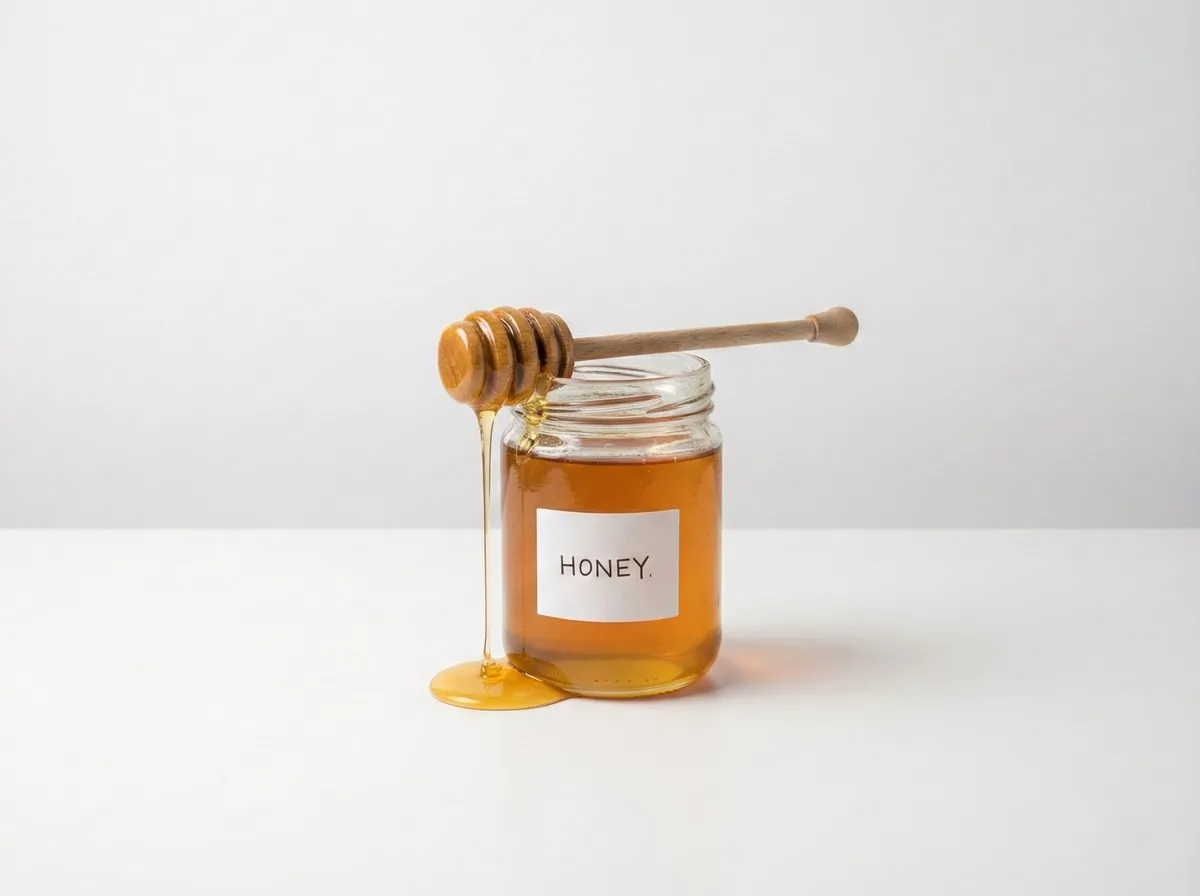
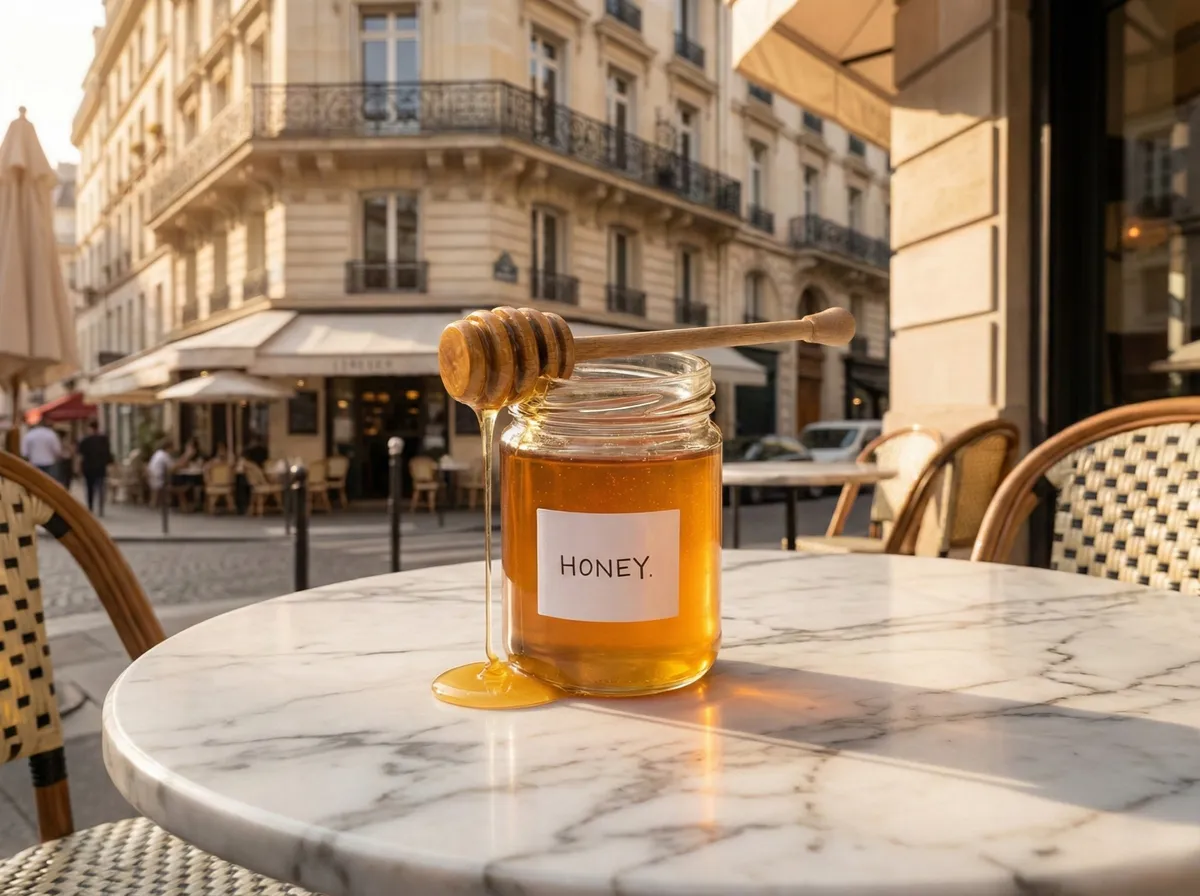
- Lifestyle scenes: Change Background keeps your product and builds a new scene around it from a description of up to 500 characters, such as "a sunlit marble tabletop with soft shadows", for 0.5 credits on paid plans. Smart Edit handles any other change from a plain-language instruction, with a choice of editing models and up to 4 variations per run, depending on the model.
- On-model shots: for wearables, Product Photography creates the model from a text prompt and Virtual Try-On puts the item on a library model or your own model photo, in Fast, Balanced or Quality mode at 1K, 2K or 4K, for 1 to 3 credits. Catalogue Studio then makes up to 12 poses of the same model in the same outfit.
- Whole catalogues: the AI Assistant runs one instruction across a batch of up to 500 product photos, and shows the plan and the credit cost before you approve.
- Beyond the photo: Image Ads turns a product into ad creatives sized for placements such as Instagram and Facebook feeds, Stories, TikTok, Pinterest and Google Display, at 1 credit per image. Image to Video animates a finished shot, and Ad Autopilot launches and manages the ads on Meta and Google Ads.
- Pricing: plans from $49 per month with 150 credits, which covers 300 new backgrounds or 50 to 150 on-model shots. There is a 7-day free trial with 20 credits. Images made with paid credits can be used commercially.
Strengths
- Studio, lifestyle and on-model shots in one place
- Keeps the product from your photo and changes what is around it
- On-model output up to 4K, with up to 12 matching poses
- The same credits make image ads, video ads and clips
Limits
- Can seem a little expensive next to a single background tool, but the credits cover more than a raw output: the scene, the on-model shot, the edits and the ad all come from the same pool
See how the AI product photography tool makes on-model shots from a flat lay, or restage any product with the AI background changer.
2. Photoroom
Best for: fast edits on your phonePhotoroom is an AI photo editor on the web, iOS and Android, with an API and a Shopify integration. It removes backgrounds, generates new ones from a text prompt or a reference image, places garments on virtual models with AI Fashion Models, and edits in batches.
- Pricing (US prices): Pro is $12.99/month, or $89.99 a year ($7.50/month), with 8,000 AI credits and 1,000 exports. Max is $34.99/month, or $20.99/month billed yearly, with 25,000 credits, 3,000 exports, the Video Generator and the Shopify integration. Ultra starts at $99/month and adds 4K. AI Fashion Models run at 1K on Pro, 2K from Max and 4K on Ultra.
- Free: a free plan, which Photoroom's terms limit to personal, non-commercial use.
Strengths
- Unlimited core tools such as background removal on paid plans
- Full apps on phone and web
- A low yearly price for Pro
Limits
- Pro caps downloads at 1,000 a month
- 2K on-model images need Max, and 4K needs Ultra
Pick this instead of CamClo AI if you shoot and edit on your phone and mostly need quick cutouts and scenes for marketplace listings.
Every plan in detail: our Photoroom pricing guide and the CamClo AI vs Photoroom comparison.
3. Claid
Best for: large catalogues and API workClaid, from Let's Enhance, is an AI product photography suite. AI Photoshoot places products into editorial and lifestyle scenes, AI Fashion Models turn a garment into on-model shots, and the same credits pay for background removal, upscaling, relighting and short AI videos. Claid says it keeps logos, branding and product shapes, and the API automates all of it.
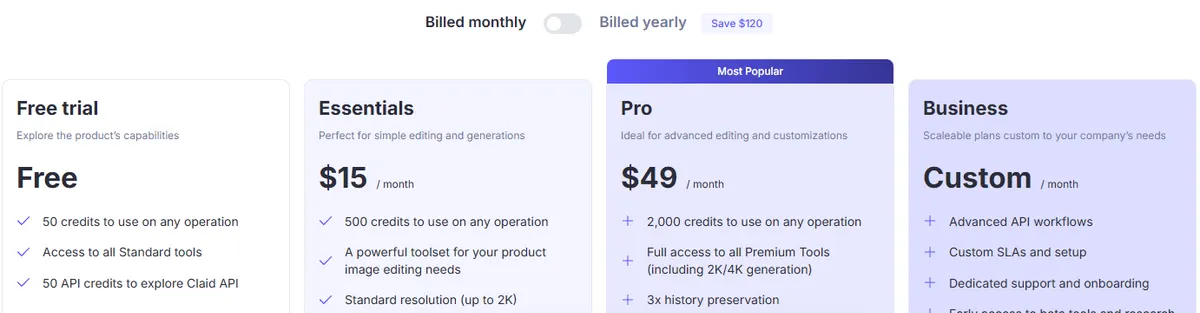
- Pricing: Essentials is $15/month, or $9/month billed yearly, with 500 credits and output up to 2K. Pro is $49/month, or $35/month billed yearly, with 2,000 credits, 2K and 4K generation, batch processing and brand kits. An AI Photoshoot costs 4 credits at Standard quality or 10 at Studio Quality, and an AI Fashion image costs 4.
- Free: 50 credits for any tool, plus 50 API credits.
Strengths
- A clear credit price for every operation
- Enhancement and generation in one credit pool
- An API for automated catalogue work
Limits
- Essentials stops at 2K
- Batch processing and brand kits need Pro
Pick this instead of CamClo AI if you process thousands of catalogue images through an API and want enhancement and scenes billed per operation.
4. Pebblely
Best for: low-cost lifestyle backgroundsPebblely does one job: you upload a product photo, then pick one of 40+ background themes or write your own prompt, and it generates styled scenes for listings, social posts, emails and ads. Basic and Pro add bulk generation. Its product categories run from skincare and candles to furniture and watches.
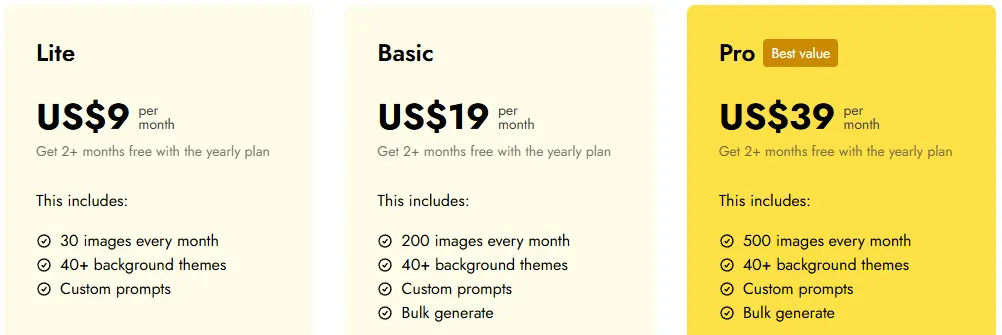
- Pricing: Lite is $9/month for 30 images, Basic $19/month for 200 images, and Pro $39/month for 500 images. Yearly plans cost $90, $179 and $379.
- Free: Pebblely's FAQ says it does not offer free trials. It also says you own the photos you generate, and that unused images do not roll over.
Strengths
- The lowest entry price on this list
- A fixed number of images, so costs are easy to plan
- Very little to learn
Limits
- On-model shots on its site are limited to necklaces, with no clothing on models
- No free trial, and unused images expire each month
Pick this instead of CamClo AI if you sell hard goods such as candles, skincare or drinks and only need themed lifestyle backgrounds at a low monthly price.
5. Flair
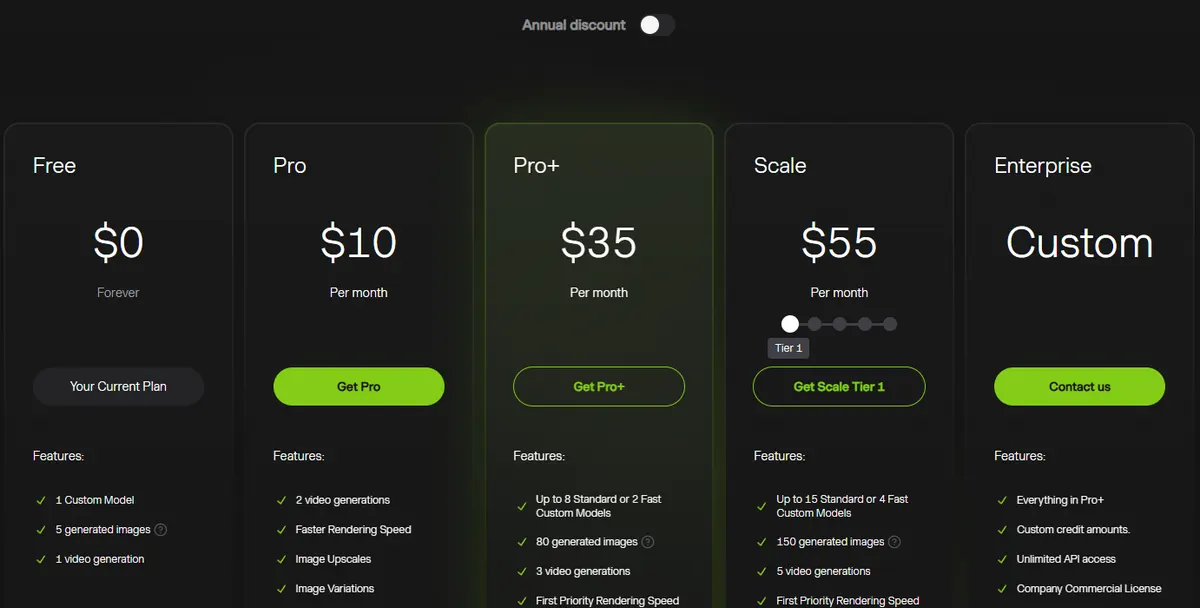
Best for: art-directed scenesFlair is a design canvas for product imagery: you drag and drop props to stage a scene, then the AI renders it around your product. It can train custom models on your products, fit clothing and jewelry onto AI models with patterns and logos preserved, and make product videos. Enterprise includes API access.
- Pricing (monthly billing): Pro is $10/month. Pro+ is $35/month with 80 generated images, 3 video generations, up to 8 standard custom models and a company commercial license. Scale starts at $55/month with 150 images. Yearly billing lowers these to $8, $26 and $38 a month. Instant image generation and ad generation use 4 times the image quota.
- Free: 5 generated images, 1 video generation and 1 custom model.
Strengths
- Hands-on control over props and composition
- Custom models trained on your own products
- On-model shots for clothing and jewelry
Limits
- The company commercial license starts at Pro+
- 80 images a month on Pro+ is a small allowance for a catalogue
Pick this instead of CamClo AI if you are a designer who wants to compose each scene by hand, or a brand building campaign concepts around a few hero products.
6. Pixelcut
Best for: a low-cost all-rounder for small teamsPixelcut is an AI photo editor with a Product Studio: upload one product photo, pick a Studio or Lifestyle scene or describe your own, and generate variations up to 4K. Its On Model format places items on AI models, bulk tools edit whole folders, and an API is available.
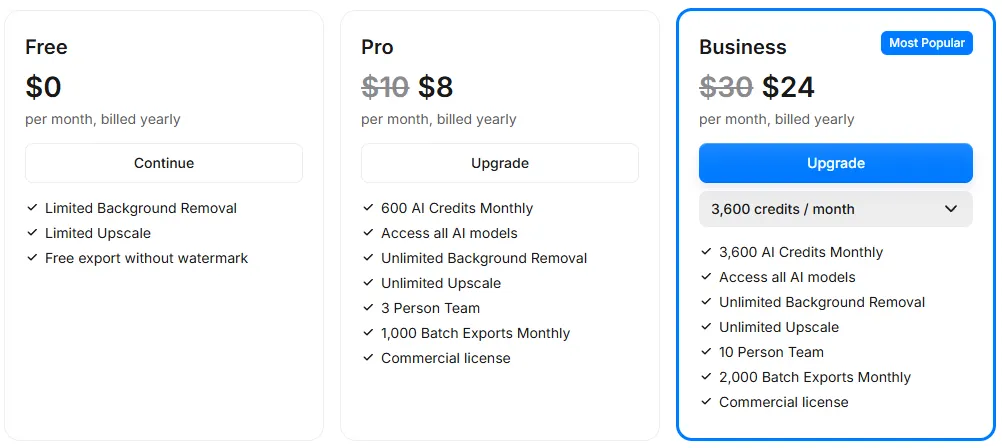
- Pricing: Pro is $10/month, or $8/month billed yearly, with 600 AI credits, unlimited background removal and upscaling, 1,000 batch exports, 3 team members and a commercial license. Business is $30/month, or $24/month billed yearly, with 3,600 credits and 10 team members. AI Backgrounds are capped at 300 a day on Pro.
- Free: limited background removal and upscaling, with exports free of a watermark.
Strengths
- Studio, lifestyle and on-model formats at a low price
- Team seats included on Pro
- A free plan with no watermark on exports
Limits
- Credit use varies by the AI model you choose
- Daily caps on AI Backgrounds
Pick this instead of CamClo AI if you want a cheap editor that a small team can share for everyday product images.
7. Adobe Firefly
Best for: teams that already work in Adobe appsFirefly is Adobe's generative AI app. Its AI background generator detects the product in your photo, separates it and generates a new setting around it, and you can refine the result with Generative Fill or open it in Photoshop on the web or Adobe Express. It accepts JPG, PNG or WebP files up to 100 MB.
- Pricing: Firefly Standard includes 2,000 generative credits a month, Pro 4,000, Pro Plus 10,000 and Premium 50,000. Adobe's plan page showed us prices only in local currency, so see vendor site for dollar prices.
- Free: free daily generations with an Adobe account, no plan needed.
Strengths
- Works with Photoshop and Adobe Express
- Adobe describes results from its Firefly model as commercially safe
- A free way to try it
Limits
- A general creative tool, so you write the prompts and set up each shot
- No dedicated on-model workflow for garments on its product photo pages
Pick this instead of CamClo AI if your designers already live in Photoshop and want product scenes inside the same Creative Cloud workflow.
8. Canva app (by Imgkits)
Best for: quick scenes inside a Canva designAI Product Photos is a third-party app in Canva's app directory, made by Imgkits rather than by Canva. You upload a product image, type a prompt for the scene, and the app creates the product photo inside your Canva design, where it can use your Brand Kit.
- Pricing: the FAQ on the Canva listing says the app is free to use with any Canva plan. The listing shows no usage limits, resolution or commercial terms, so see vendor site for those.
Strengths
- Sits next to your Canva layouts and templates
Limits
- No resolution, usage limits or commercial terms on the listing
- A prompt-only scene maker, with no on-model or batch features described
Pick this instead of CamClo AI if your team designs listings and social posts in Canva and needs the odd product scene without leaving it.
Pic Copilot is closing
Pic Copilot, an ecommerce design tool with AI fashion models, virtual try-on and background generation, still appears in many roundups for this search. Its own site now carries a service closure notice: it stopped accepting payments from new users on 27 September 2026, and the website and its services close on 7 December 2026 at 23:59:59 (UTC+8). Existing users can finish tasks and download their content until then. Pro subscriptions active on 27 September get a full refund for that period, sent automatically to the original payment method from 8 October 2026.
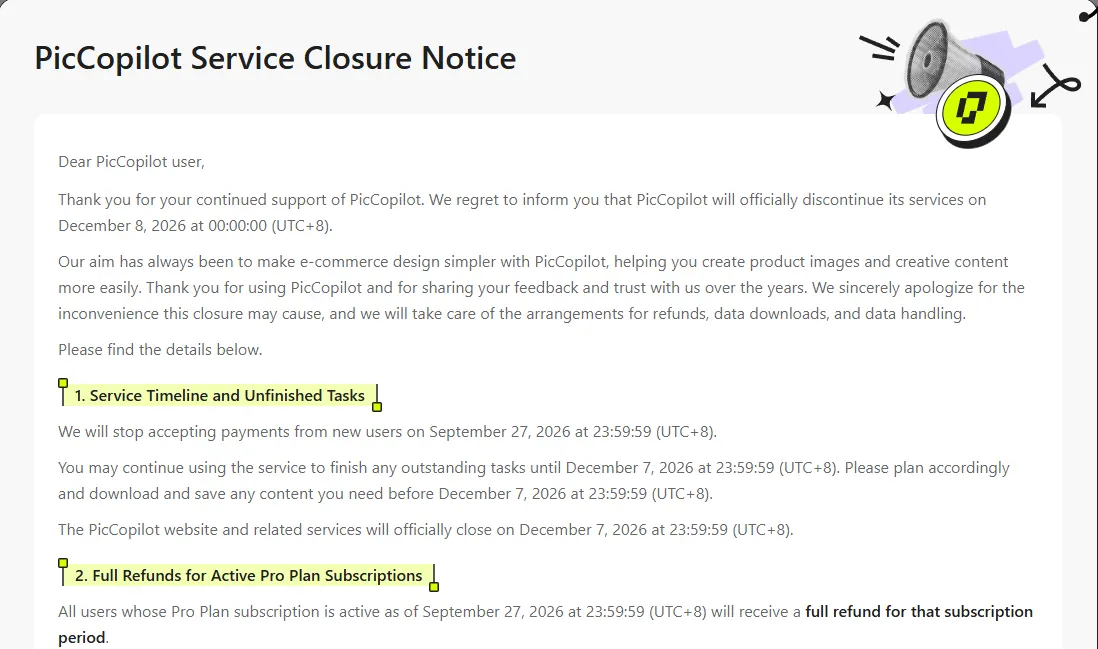
If you use it today, download your images now. For the same on-model and background work, see the CamClo AI vs Pic Copilot comparison or start with virtual try-on for your garments.
How to choose an AI product photography tool
- List the shots you need. A marketplace seller may only need packshots and a few scenes; a fashion brand needs on-model images, ideally with the same model across a collection.
- Test your hardest product. Small label text, logos, reflective surfaces and fine prints are where AI slips. Run the same photo through two or three tools and compare each result with the real item.
- Price the usable image. Divide the monthly allowance by what one image uses, allow for retries, and check export caps and resolution: product pages with zoom want 2K or 4K.
- Check the rights and the rules. Several free plans are personal use only, and marketplaces set their own image rules; our guide to Amazon product photography has the current requirements.
- Think past the photo. If the same product also needs ads and short videos, one tool that makes them from the same shot saves a second subscription.
If you are still deciding between AI and a studio, our guide to ecommerce product photography covers when each makes sense, and what product photography costs in 2026 puts studio and AI prices side by side. Fashion brands weighing specialist on-model tools can also read the CamClo AI vs Botika comparison.
How we compared them
We pulled the live US Google results for "best ai product photography tools", "ai product photography" and "best ai product photo generator", including Google's AI answers, and read the roundups that rank for them. Photoroom, Claid, Pebblely and Flair appear in every roundup we read, Adobe Firefly and Pixelcut in several, and the Canva app ranks on page one. General image generators also appear in Google's AI answer; we kept to tools built around an uploaded product photo.
For each tool we read the official pricing, product and help pages, saved screenshots, and recorded the entry plan, the free option, what one image uses, the shot types and the commercial rights. Prices are in US dollars: Photoroom's come from the US price list its pricing page loads, and Adobe showed us only local-currency prices, so we give none. We did not run a scored quality test, so there are no quality scores here; try your own products before you commit.
Frequently asked questions
Which AI is best for product photos?
For ecommerce brands that need studio, lifestyle and on-model shots from the same product photo, CamClo AI, which also turns those shots into ads and video. Photoroom is the quickest for marketplace edits on a phone, Claid suits large catalogues and API work, Pebblely is the simplest low-cost option for lifestyle backgrounds, and Flair suits designers who want to stage each scene with props.
What is the best free AI app for product photography?
Several tools have a free way in. Claid gives 50 free credits, Flair's free plan makes 5 images, Pixelcut's free plan exports without a watermark, Adobe Firefly gives free daily generations with an Adobe account, and Photoroom's free plan is for personal, non-commercial use only. Pebblely does not offer a free trial. CamClo AI has a 7-day free trial with 20 credits. Check the commercial terms before you sell with any free image.
Can AI be used for product photoshoots?
Yes, for most catalogue, marketplace and social images. You photograph the product once, clearly and in even light, and the AI makes the studio, lifestyle and on-model versions. Check every result against the real product for color, label text, logos and proportions before you publish, and check each marketplace's image rules, which are stricter for the main image than for the rest of the gallery.
How much do AI product photography tools cost?
Entry paid plans are $9 a month for Pebblely (30 images), $10 for Pixelcut and Flair, $12.99 for Photoroom, $15 for Claid and $49 for CamClo AI with 150 credits. Adobe showed us only local-currency prices, so check its site for dollar prices. Compare the cost of a usable image, not the plan: a new background costs 0.5 credits on CamClo AI's paid plans, and an AI Photoshoot costs 4 credits on Claid.
Can ChatGPT make product photos?
A general image model like ChatGPT can create a product scene from a prompt or from a photo you upload, but it can change small details such as label text, logos or proportions, so check every image closely. Product photography tools are built to keep the product from your photo and change what is around it, and they add catalogue features such as batch runs, set output sizes and on-model shots.
Shooting your whole catalogue?
Start the 7-day free trial with 20 credits.
See plans and the free trial

