

Table of Contents
Amazon product photography has to follow Amazon's image rules: the main image shows only the product, on a pure white background (RGB 255, 255, 255), filling 85% of the frame, in a JPEG, PNG, TIFF or non-animated GIF file of at least 500 pixels on the longest side, or 1,000 pixels if you want shoppers to be able to zoom. The other image slots can show angles, the product in use, scale and details, and Amazon recommends at least six of them plus a video. You can shoot the photos yourself, book a studio from $39 a photo plus a booking fee, or make them with AI, as long as they show the real product and any AI-generated person is tagged.
Every rule on this page comes from Amazon's own Seller Central help pages for the US store, and every studio price from the vendor's own site. Here is how we checked.
Amazon product image requirements at a glance
| Requirement | Amazon's rule |
|---|---|
| File formats | JPEG (recommended), TIFF, PNG or non-animated GIF. PDF, EPS, BMP and app files such as PSD are not accepted. |
| Image size | 500 to 10,000 pixels on the longest side. 1,000 pixels or more turns on zoom. |
| Resolution | At least 72 dpi |
| Quality | Clear, not pixelated, no jagged edges. Do not artificially enlarge small images. |
| Color mode | RGB preferred. Convert CMYK to RGB. Grayscale only for gray or silver metal products. |
| File preparation | Minimal or no compression, JPEGs saved at the highest quality, layers removed |
| File names | Optional. Naming files product ID, variant code and extension, such as B000123456.MAIN.jpg, lets a bulk upload assign them automatically; otherwise you assign them after upload. |
| Number of images | One compliant main image required; at least six more and one video recommended |
| Time to appear | Up to 24 hours after upload, if Amazon selects the image for display |
From Amazon's Product image guide and Technical image file requirements for the US store. Other marketplaces and some categories add their own rules.
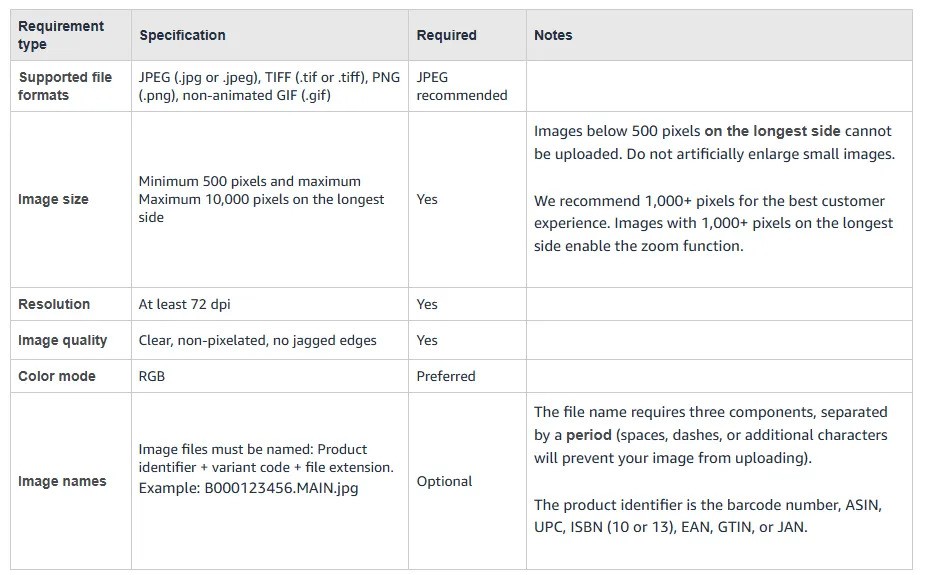
Some popular guides still say you need 1,600 pixels for zoom or that a listing takes only seven images. Amazon's current guide says 1,000 pixels on the longest side turns zoom on, and its clothing guide allows up to eight alternate images for each parent or child product. Two more points that catch sellers out: uploading an image does not guarantee Amazon will show it, because Amazon chooses from the images every seller of that product submits, and Amazon says it may modify submitted images to meet its requirements.
Amazon main image requirements
The main image is the one shoppers see in search results and first on the product page. Amazon's product image guide says it must:
- Sit on pure white: RGB 255, 255, 255, not an off-white or light gray.
- Fill the frame: the product takes up 85% of the image, and no part of it is cut off.
- Show one view of one unit: the front only, not the front and back together, plus only the accessories that come with it.
- Leave out extras: no props that are not included and could confuse the customer, and no packaging unless it is a real feature, such as a carrying case or a gift basket.
- Look real: a realistic, professional-quality image with the product's true scale, quantity and color. No placeholders.
- Skip mannequins: no part of a mannequin, whether clear, solid-color, flesh-toned or a framework. Amazon's clothing guide also rules out hangers and holders.
Amazon's Quick Start Style Guide, which its style guide page still points sellers to, adds that borders, watermarks, text or other decorations on an image can trigger a quality alert on the listing. Its clothing guide spells it out for the main image: no borders, logos, watermarks, text, color blocks, inset images or other graphics.
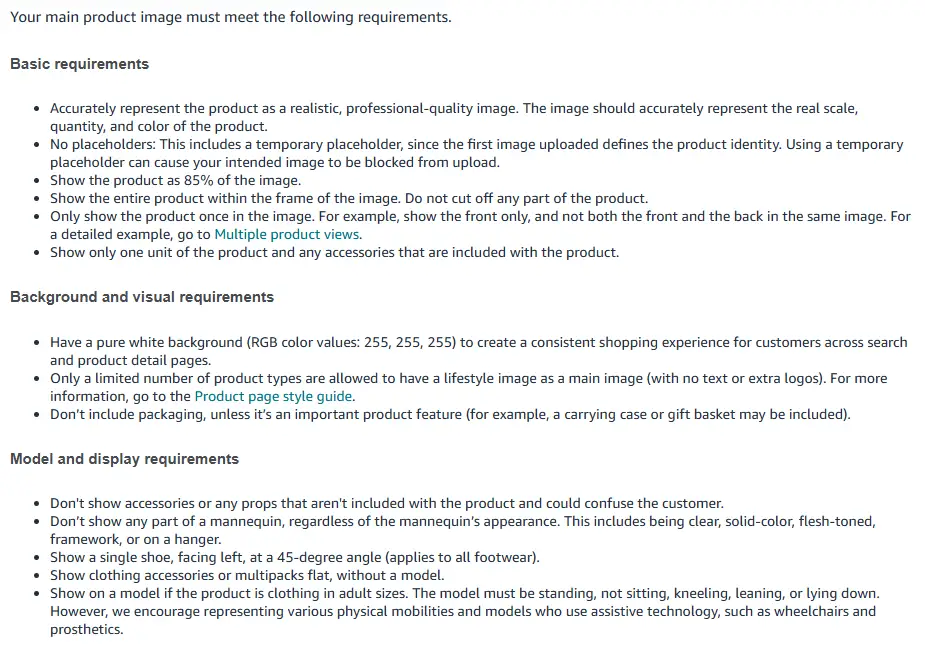
What happens if the main image breaks the rules? Files that fail the technical checks cannot be uploaded at all. Images that fail the content rules may be removed, and if a product has no compliant main image, Amazon says it may temporarily remove the listing from search until one is provided.
The fastest way to get the white right is to cut the product out rather than trust the backdrop: a lit white sweep usually photographs as light gray. Our background remover for Amazon-ready white images downloads the cutout on exact 255, 255, 255 white, and our roundup of the best background removers compares the other options.
Rules for clothing, shoes and furniture
Amazon's general guide and its clothing guide add category rules that change how you shoot:
- Adult clothing: the main image is on a model, and the model must be standing, not sitting, kneeling, leaning or lying down. Amazon says it encourages models with various physical mobilities, including people who use wheelchairs or prosthetics.
- Children's and baby undergarments, leotards, swimwear and similar form-fitting items: photographed lying flat, without models, in every image.
- Clothing accessories and multipacks: shown flat, without a model.
- Clothing main image details: a frontal view, an aspect ratio close to 3:4, no folded products, no visible tags or packaging, and no distracting accessories such as large earrings, bags or sunglasses. Photos only, not sketches or drawings.
- Every color: each child product (for example, each color) needs its own main image, and children's wear images must be at least 1,000 pixels.
- Mannequins: none visible, except for stockings and socks.
- Footwear: a single shoe, facing left, at a 45-degree angle.
- Lifestyle main images: allowed only for beds, bed frames, mattresses, rugs, rug pads and sofas, with no text or extra logos.
Because adult clothing needs a model in the main image, ghost-mannequin and flat-lay shots belong in the other slots. Our guides to ghost mannequin photos and flat-lay photography cover how to make those well.
What to put in each Amazon image slot
After the main image, Amazon calls the rest image variants, each with a code. When you upload in Image Manager, Amazon pre-selects the variant types that your category's style guide suggests. A listing that covers what a shopper would check in a store usually looks like this:
| Slot | What to show | Rules to watch |
|---|---|---|
| 1. Main (MAIN) | The product alone, front or at a flattering angle | Every main image rule above |
| 2. Other angles | Back, side or top (codes such as BACK, SIDE, TOPP) | One clear view per image |
| 3. Close-up detail | Texture, stitching, ports, labels or the clasp | 1,000+ pixels so shoppers can zoom |
| 4. In use | The product worn, held or used in a real setting | Props are fine here, but the product must stay accurate |
| 5. Scale | Next to a hand or an everyday object, or with dimensions | Show the real size |
| 6. Features | An infographic with a few short callouts | Text is allowed; no reviews, star imagery, claims such as free shipping, or Amazon logos and badges |
| 7. What is in the box | Everything the customer receives | Only what is actually included |
| 8. Size, fit or comparison | A size chart, fit notes or variants side by side | Must match the title and the listing |
| Video | An overview, demo, unboxing or setup | MOV or MP4, up to 1080p, 16:9 or 9:16, up to 5 GB |
Slot order is a suggestion; the rules come from Amazon's Product image guide, Upload images page and Shoppable video guide. Amazon also has a swatch slot (SWCH) and safety image slots (PS01 to PS06).
Text in the secondary images needs care. It is allowed, but if you upload country-specific images, Amazon says the text must be in that country's official language or English. For video, Amazon says your seller account must have been active for more than three months, and it reports that sellers who added video saw an average 23.8% increase in sales compared with products without one (its internal data from January to June 2024). One catch for clothing and other softlines: Amazon's video troubleshooting notes say the video is hidden on desktop when the listing has six or more images.
Can you use AI images on Amazon?
Yes, within Amazon's rules. Its product image guide does not ban images made or edited with AI. What it requires is that every image accurately represents the product you sell and matches the title, and that the main image is a realistic, professional-quality image with the product's real scale, quantity and color.
There is one rule written specifically for AI. If an image or video contains photorealistic people who were entirely generated by AI, you must tag the file before uploading it. Amazon says some jurisdictions may require the disclosure, and that it will add a notice for shoppers where applicable.
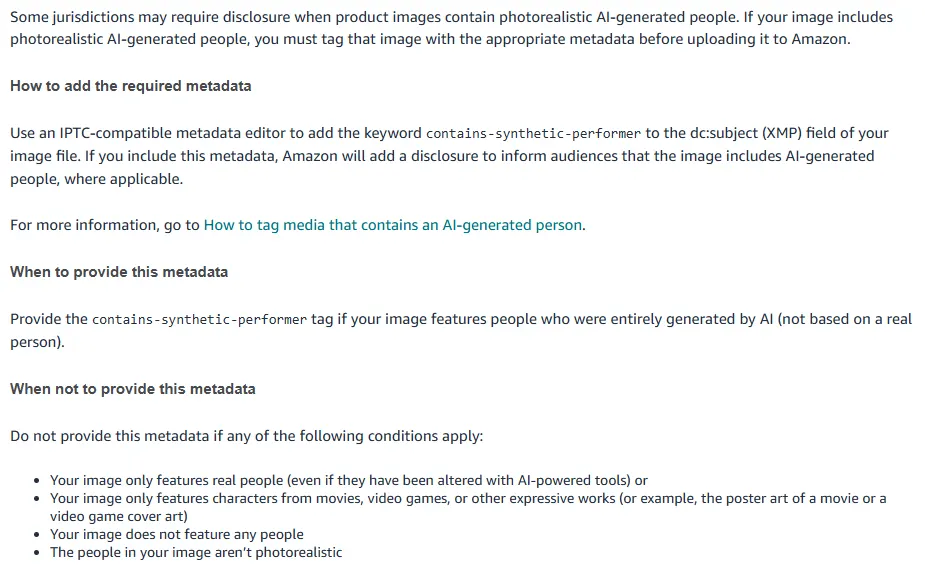
How to add the tag. The keyword is contains-synthetic-performer, and it goes in the XMP dc:subject field. Amazon's help page gives three ways to add it:
- Windows: right-click the file, choose Properties, open the Details tab and type the keyword into the Tags field. Leave the Subject field alone, because it writes to a different place.
- Mac: open the file in Preview, press Cmd+I, open the Keywords tab, click the plus button and type the keyword.
- Command line: with exiftool, run
exiftool -XMP-dc:Subject+=contains-synthetic-performer image.jpg. Running it twice writes the keyword twice, which does not break anything but bloats the file.
Tag the final file after your last edit, since re-saving in some editors can drop metadata. Do not add the tag when the image only shows real people, even if they were altered with AI tools, when it shows no people, or when the people are not photorealistic.
Where AI edits cross Amazon's lines:
- Changing the product itself, such as its color, print, shape or texture, so the image no longer matches what ships.
- Blowing up a small, soft image to pass the size rules. Amazon says not to artificially enlarge small images, so start from the largest, sharpest original you have and check any upscaled file at full size.
- A generated model who is sitting or leaning in the main image for adult clothing, or any AI-added props in the main image that are not included in the sale.
Ways to get Amazon listing photos, compared
There are three routes: make the images yourself with AI, book a studio, or shoot at home. The studios below appear in Google's top results for Amazon product photography.
| Option | Best for | Price from | What the entry price includes | How it works |
|---|---|---|---|---|
| CamClo AI | Apparel and accessory sellers making their own white-background, on-model and lifestyle images | $49/mo (150 credits) | Cutouts on pure white, on-model images from flat-lays, extra poses, lifestyle backgrounds, upscaling | Self-serve in the browser, from your product photo |
| soona | Choosing shots from a studio shoot | $39 per photo, plus a $149 studio fee per booking | Amazon A+ basic pack: 8 photos, 5 infographics and a full-body model for $629 | Ship samples, join the shoot live, edits in 24 to 72 hours |
| Shootify | A done-for-you listing set | $690 per product | 5 images: hero on white, 2 on-white or detail, 1 infographic, 1 AI lifestyle | Ship from anywhere in the US; files in 6 to 8 business days |
| ProductPhotography.com | Large or multi-piece products | $995 per package | 5 assets: 1 hero shot, 2 lifestyle photos, 2 infographics | Ship to its Las Vegas studio; a project manager plans the shots |
| Do it yourself | Simple products and tight budgets | Your kit and your time | As many shots as you take | Camera or phone, tripod, white sweep and light |
Entry prices on each vendor's official site, in US dollars. soona's studio fee is waived with a membership (from $13 a month, billed annually); models and styling cost extra. Confirm before you buy. For a wider look at budgets, see our product photography cost guide.
1. CamClo AI
Best for: making compliant white-background and on-model images from your own product photoCamClo AI is an AI studio for ecommerce teams, built around clothing, footwear, bags and jewelry. For Amazon, you use a few of its tools in order, starting from a photo of the real product:
- Main image on white: Remove Background cuts out the product and downloads it as a JPG on pure white (RGB 255, 255, 255), a transparent PNG or a WebP. Crop so the product fills 85% of the frame before you upload.
- On-model images for adult clothing: AI product photography that turns flat-lays into on-model photos, with ten aspect ratio options, including 3:4, 1:1 and "match input", at 1K, 2K or 4K. Describe a standing, front-facing pose, then run the result through Remove Background to get an exact white.
- More angles of the same look: Catalogue Studio makes up to 12 new poses of the same model in the same outfit from one photo, with presets such as back view, side profile, three-quarter and close-up details. Keep standing poses for the main image; seated ones suit the other slots.
- Your own model or a new one: Virtual Try-On dresses a model photo you upload, or one from its library, in your garment. Model Swap changes the model in an existing on-model photo, at up to 4K.
- Lifestyle slots: Change Background puts the product in a scene you describe, such as a kitchen counter or a sunlit street.
- Zoom: Image Upscaler outputs 1,024, 2,048 or 4,096 pixels on the longest side, for 1, 1 or 2 credits.
- Pricing: plans from $49 per month with 150 credits. An on-model image costs 1 to 3 credits, depending on quality mode and resolution. There is a 7-day free trial with 20 credits. Images from the generation tools made during the trial carry a watermark, and Amazon does not allow watermarks, so upload files made on a paid plan. Background removal and upscaling are not watermarked.
Strengths
- Starts from a photo of your real product, not a text prompt
- Exact 255, 255, 255 white built into the download
- On-model main images for adult clothing without booking a shoot
- Back, side and detail angles plus lifestyle scenes from the same photo
Limits
- Can seem a little expensive next to a single background remover, but the credits cover on-model images, extra poses, lifestyle scenes and upscaling, not just a cutout
You still check each file against Amazon's rules before upload: the 85% crop, one view in the main image, the product's true color and print, and the contains-synthetic-performer tag when a generated model appears, such as one from Product Photography or Model Swap. CamClo AI does not add that tag for you. For a walkthrough of the on-model step, see turning a flat-lay into on-model images, or start with the on-model product photography tool.
2. soona
Best for: picking shots from a real studio shootsoona is a content studio: you plan a shoot online, send product samples, watch the shoot live from its platform and approve shots as they happen. You pay for the photos you keep.
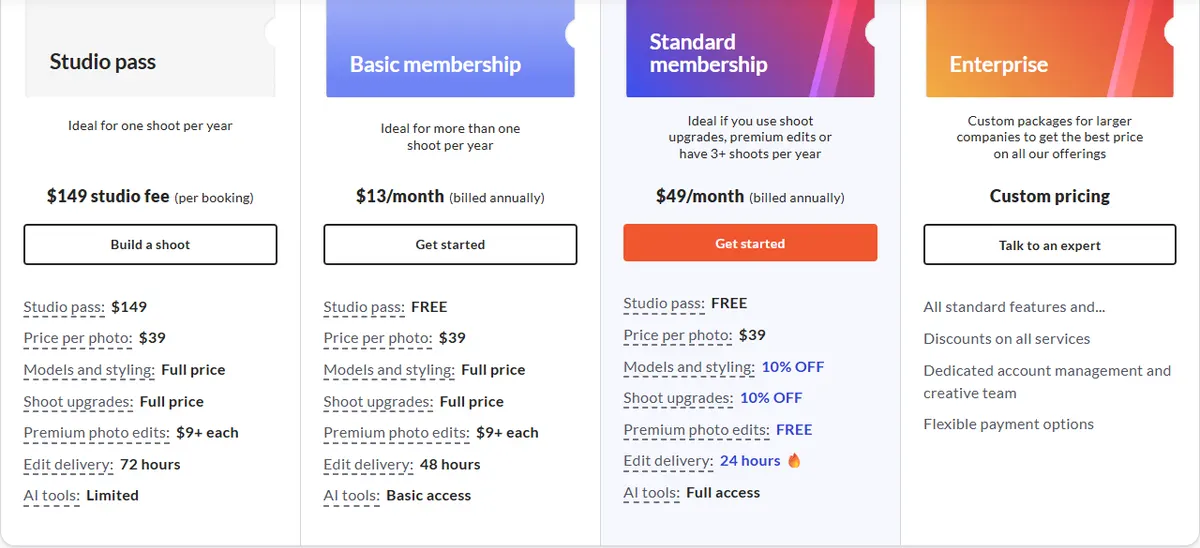
- Pricing: $39 per photo and $93 per video clip, plus a $149 studio fee per booking. A Basic membership at $13/month billed annually removes the studio fee; Standard at $49/month billed annually adds free premium edits, 10% off models and styling, and 24-hour delivery.
- Amazon packs: the A+ basic pack is $629 for 8 photos, 5 pre-designed infographics and a full-body model for one product; the A+ premium pack is $999; a 360 spin video pack is $261.
Strengths
- Real photos, and you only pay for the shots you choose
- Amazon packs that include infographics and a model
- Video and UGC from the same studio
Limits
- Models, styling and shoot upgrades cost extra
- You ship samples and wait for the shoot and edits
Pick this instead of CamClo AI if you want real photography from a studio and would rather choose shots than make them.
3. Shootify
Best for: a complete, done-for-you Amazon image setShootify is a Miami studio that produces full Amazon listing sets: the hero image on white, on-white detail shots, infographics, AI lifestyle images, A+ content and listing video. You ship the product from anywhere in the US.
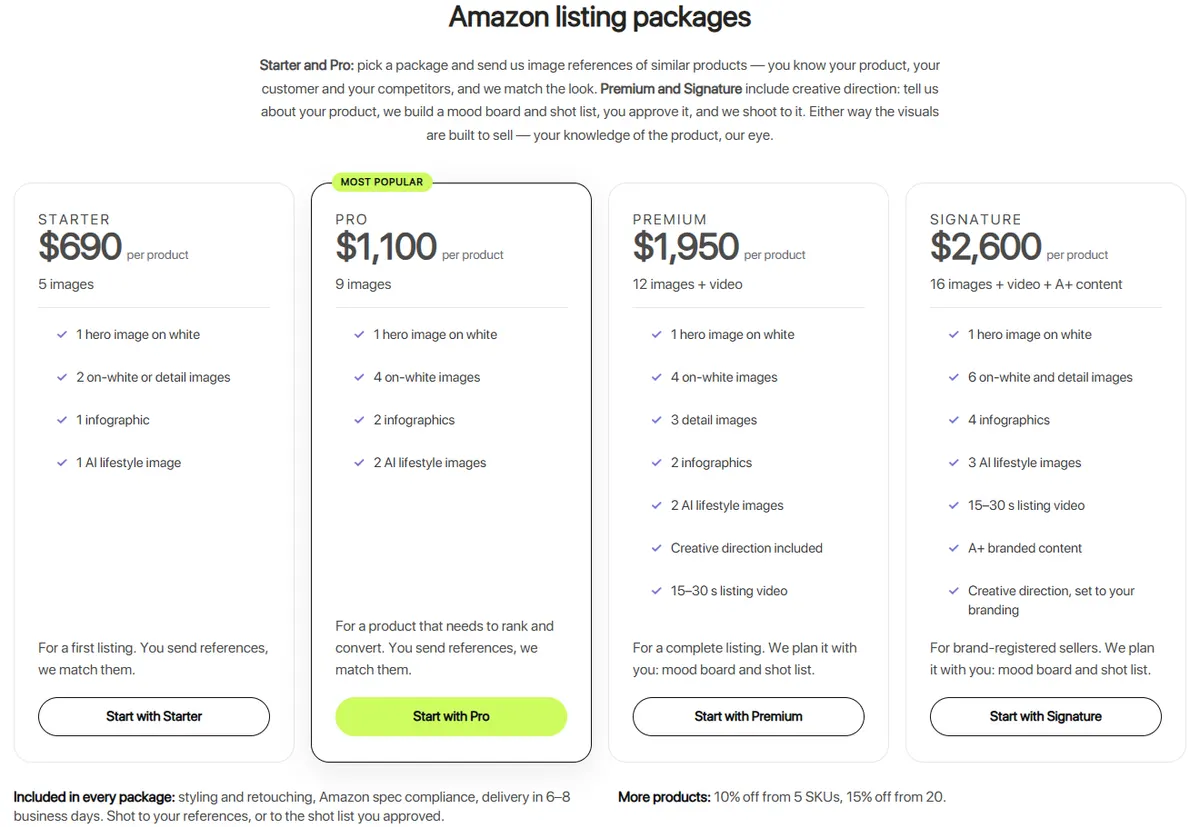
- Pricing: Starter is $690 per product for 5 images, Pro $1,100 for 9, Premium $1,950 for 12 images and a 15 to 30 second video, and Signature $2,600 for 16 images, video and A+ content.
- Turnaround and extras: 6 to 8 business days (rush 3 to 4). 10% off from 5 products and 15% off from 20. On-model photos are an add-on, priced on request.
Strengths
- The whole set, infographics included, from one order
- Styling, retouching and Amazon spec checks in every package
- Volume discounts from 5 products
Limits
- Priced per product, so a large catalog adds up
- On-model shots are an extra, priced on request
Pick this instead of CamClo AI if you want a studio to plan and deliver the whole listing, infographics and video included, and have a small number of products.
4. ProductPhotography.com
Best for: large or multi-piece productsProductPhotography.com is a mail-in studio in Las Vegas. Its Amazon packages combine hero shots on white, lifestyle photos on custom sets, and infographics, with a project manager for each order.
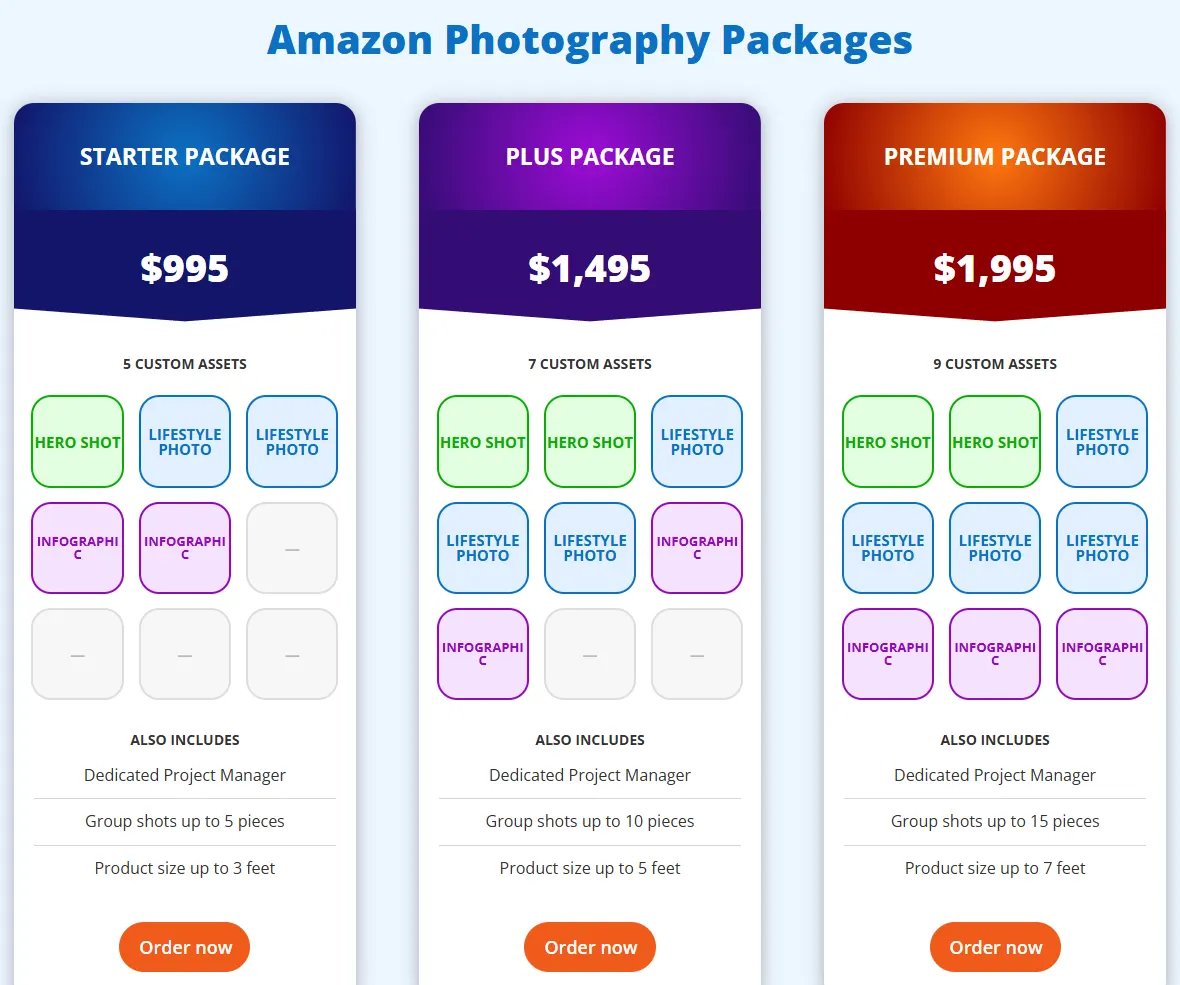
- Pricing: Starter is $995 for 5 assets (products up to 3 feet, group shots up to 5 pieces), Plus $1,495 for 7 assets (up to 5 feet), and Premium $1,995 for 9 assets (up to 7 feet).
- Other services: hand modeling, ghost mannequin photos, and 3D renders built from CAD files before samples exist.
Strengths
- Handles products up to 7 feet and group shots
- A project manager plans the shot list with you
- 3D renders when you have no sample yet
Limits
- The highest entry price of the studios here
- Delivery times are listed on a separate page, so check before you order
Pick this instead of CamClo AI if you sell large, heavy or multi-piece products, or need images from CAD files before samples are made.
How to shoot Amazon product photos yourself
For simple products, a home setup works. Amazon's own seller blog lists a camera or smartphone, a tripod (it notes many start at around $25), a white background, white bounce cards and a light tent or lightbox. Then:
- Build a white sweep. Clip a flexible white sheet to a table and tape the other end to the wall, so the background curves with no visible corner. Large items need a stand-mounted sweep or wide craft paper.
- Light it evenly. Use soft window light or softboxes on both sides, and bounce cards to fill shadows.
- Lock the camera. A tripod keeps every angle sharp and consistent from shot to shot.
- Shoot big. Aim for 2,000 pixels or more on the longest side, so you can crop the product to 85% and still stay above the 1,000-pixel zoom threshold.
- Make the white exact. Check the background with an eyedropper tool. If it reads below 255, 255, 255, set it in editing or cut the product out with a background remover that exports on pure white.
- Export correctly. JPEG at the highest quality, RGB rather than CMYK, layers flattened, and no PSD files.
- Name files for bulk upload (optional). Use the ASIN or barcode, the variant code and the extension, such as B000123456.MAIN.jpg and B000123456.PT01.jpg, separated by periods with no spaces or dashes, and Amazon assigns each image automatically. With any other file name, you assign the images after upload.
For the other slots, the wider craft of lighting, styling and lifestyle scenes is in our ecommerce product photography guide.
Amazon image checklist before you upload
- Main image: pure white (255, 255, 255), product at 85% of the frame, one view, one unit, nothing cut off, no text, logos or watermarks.
- Size: 1,000 pixels or more on the longest side, so zoom works.
- Category rules: adult clothing on a standing model, children's form-fitting items flat, a single shoe facing left at 45 degrees, no mannequins.
- Every image: matches the title and the real product, with no reviews, star imagery, claims such as free shipping, or Amazon logos and badges.
- AI people: any photorealistic AI-generated person tagged with
contains-synthetic-performerin the final file. - After upload: allow up to 24 hours, then check the product page to see which images Amazon is showing.
How we checked
We read Amazon's Seller Central help pages for the US store: the Product image guide, Technical image file requirements, Image guidelines for clothing, Product page style guides and the Quick Start Style Guide they link to, Upload images, How to tag media that contains an AI-generated person, and the Shoppable video guide. Rules differ by marketplace and category, so check your category's style guide in Seller Central as well. Studio prices come from each vendor's own pricing or Amazon page, in US dollars, and we saved screenshots of them. CamClo AI's tools, output options, credit costs and plan price were checked against the product's current settings. We did not test output quality, so there are no scores on this page.
Frequently asked questions
What are Amazon's product image requirements?
Every listing needs a main image of the product alone on a pure white background (RGB 255, 255, 255), filling 85% of the frame, with nothing cut off and no props or packaging that are not part of the sale. Files must be JPEG, TIFF, PNG or non-animated GIF, 500 to 10,000 pixels on the longest side and at least 72 dpi, and RGB is preferred. Every image must match the product and the title, and none may show reviews, star ratings, claims such as free shipping, or Amazon logos and badges.
What size should Amazon product images be?
Between 500 and 10,000 pixels on the longest side. Amazon recommends 1,000 pixels or more, because that turns on zoom. Shooting at 2,000 pixels or more leaves room to crop the product to 85% of the frame and still stay above 1,000.
How many images can an Amazon listing have?
One compliant main image is required. Amazon recommends at least six additional images and one video, and its clothing guide allows up to eight alternate images for each parent or child SKU. Uploading does not guarantee display: Amazon chooses which images to show from all the sellers of a product.
Can I use AI-generated images on Amazon?
Amazon's image guide does not ban AI images, but every image must accurately show the product you sell, and the main image must be a realistic, professional-quality image. If an image shows photorealistic people who were entirely generated by AI, you must add the keyword contains-synthetic-performer to the file's XMP dc:subject field before you upload it, and Amazon adds a disclosure where applicable.
How much does Amazon product photography cost?
soona charges $39 per photo plus a $149 studio fee per booking (waived with a membership from $13 a month, billed annually), Shootify's Amazon packages start at $690 per product for 5 images, and ProductPhotography.com's start at $995 for 5 assets. CamClo AI plans start at $49 a month with 150 credits, where an on-model image costs 1 to 3 credits, and there is a 7-day free trial with 20 credits.
Can a mannequin or flat-lay photo be the main image for clothing?
Not for adult clothing. Amazon wants adult clothing on a standing model in the main image and does not allow any part of a mannequin. Children's and baby undergarments, leotards, swimwear and similar form-fitting items must be shown flat without a model, and clothing accessories and multipacks are shown flat too.
Making images for your Amazon listings?
CamClo AI has a 7-day free trial with 20 credits.
See plans and the free trial

