


Table of Contents
The best AI background remover for product photos is the one that gets your hardest edges right, keeps up with your volume and costs what you can afford per image. For ecommerce teams we rank CamClo AI first, because the cutout goes straight into new backgrounds, on-model photos and ads, and one run can take up to 500 products; Pixelcut, Photoroom and Claid cost about 1 to 3 cents a cutout at volume, and Path's human editors, from $0.39 an image, are the safe choice for glass and flyaway hair. remove.bg, the long-time default, closes its standalone site on 1 December 2026.
We checked every price and limit on the vendor's own site. Here is how we compared them.
remove.bg is closing on 1 December 2026
Many roundups still recommend remove.bg. Its own site now says the standalone service is ending, and its background removal is moving into Canva, which remove.bg became part of in 2021.
Monthly subscribers: any final renewal on or after this date is free.
At 9:00am CET the website, accounts and self-service API stop. Unused pay-as-you-go credits expire.
Background removal lives on in Canva, which remove.bg says uses the same technology. The API moves to Leonardo.ai.

If you use remove.bg today, export your invoices and credit usage report before 1 December, because remove.bg says you cannot download them afterward. Annual subscribers get a pro-rata refund without doing anything, and enterprise API contracts continue as normal. Developers moving to the Leonardo.ai remove-background API should note one detail in its documentation: PNG output is capped at 10 megapixels, and Leonardo suggests WebP for larger images that need transparency.
Quick picks by use case
0.5 credits a cutout, then new backgrounds, on-model photos and ads from the same product.
Background removal with no credit cost on paid plans, from $12.99 a month.
Best AI background removers compared
| Tool | Best for | Paid plans from | Cost per cutout | Free option | Bulk |
|---|---|---|---|---|---|
| CamClo AI | Cutouts that become scenes, on-model photos and ads | $49/mo (150 credits) | 0.5 credits, about $0.16 on Creator | 7-day free trial with 20 credits | Up to 500 images per AI Assistant workflow |
| Photoroom | Marketplace listings | $12.99/mo ($89.99/yr) | No credit cost on paid plans; API $0.02 | 100 exports a month | Batch editing, 1,000 exports a month on Pro |
| Claid | Catalogs and APIs | $15/mo ($9/mo billed yearly) | 1 credit, $0.03 on Essentials monthly | 50 credits | Batch processing on Pro and Business |
| Canva | Teams in Canva, remove.bg users | See vendor site | Included in paid plans | Paid plans only | 50 images per folder |
| Adobe Firefly | Free one-off cutouts | Photoshop US$22.99/mo (annual plan) | Free in Firefly | Free with an Adobe account | Enterprise users, or the Firefly AI Assistant |
| Pixelcut | Unlimited cutouts on a small budget | $10/mo ($8/mo billed yearly) | Unlimited on Pro; API $0.05 | Limited, no watermark | 1,000 batch exports a month on Pro |
| Removal.ai | Paying per image | $5.99/mo for 100 images | About 4 to 6 cents monthly; $0.23 to $0.63 in lifetime packs | Previews at 0.25 MP | Bulk tool, desktop apps and API |
| Picsart | Social posts and templates | $15/mo ($126/yr) | Included in Pro | Free web remover | 50 images at once on Pro |
| Path | Glass, hair and lace edited by hand | From $0.39 per image | From $0.39; $1.19 for hair and fur masking | First 2 images edited free | Large batches, 6 to 96 hour turnaround |
Entry paid plan on each vendor's official site, in US dollars, billed monthly unless marked. Cost per cutout assumes the plan's whole allowance goes on background removal. "See vendor site" means we could not see a US dollar price on the vendor's own site. remove.bg is left out because its standalone service closes on 1 December 2026. Confirm prices before you buy.
File formats and size limits
A cutout is only as useful as the file you get back. Transparency needs PNG, WebP or AVIF; JPG cannot store it, so a JPG cutout is always on a solid color. These are the limits each vendor publishes:
| Tool | Upload | Download |
|---|---|---|
| CamClo AI | JPG, PNG or WebP, up to 20 MB | Transparent PNG, WebP, or JPG on pure white |
| Photoroom API (Basic) | PNG, JPEG, WebP or HEIC, up to 50 MB and 6,000 px on the widest side | PNG, JPEG or WebP |
| Claid | Up to 10 MB on Essentials, 20 MB on Pro | Up to 64 MP on Essentials, 128 MP on Pro; transparency in PNG, WebP or AVIF |
| Canva | JPG, PNG, HEIC or HEIF, under 9 MB | PNG; uploads above 10 MP come back at 10 MP |
| Adobe Firefly | JPG, PNG or WebP, up to 50 MB | PNG |
| Pixelcut | JPG, PNG or HEIC, up to 50 MB and 6,000 x 6,000 px | Transparent PNG or a white background |
| Removal.ai | JPG or PNG, up to 12 MB; resized above 36 MP | Full resolution with credits; free previews at 0.25 MP |
| Picsart | Not published | Transparent PNG or a white background |
| remove.bg (until 1 Dec) | JPG, PNG or WebP, up to 22 MB | HD up to 50 MP; free previews up to 0.25 MP |
From each vendor's product, pricing, help or API pages. Photoroom's app limits are not published in the same detail, so the row shows its Remove Background API.
Two practical rules follow. For marketplace main images, download on pure white: Amazon, for example, asks for a main image on RGB 255, 255, 255 and at least 1,000 pixels on the longest side for zoom, as our Amazon product photography guide explains. For banners, ads and new scenes, keep a transparent PNG or WebP so you can place the product anywhere. If your originals are small, run them through one of the best AI image upscalers before you cut them out, not after.
The best background removers, tool by tool
Each entry covers what the tool is, its price, its free option, how it handles bulk jobs and edges, and when to pick it instead of CamClo AI.
1. CamClo AI
Best for: ecommerce teams that need the cutout and what comes after itCamClo AI is an AI studio for ecommerce product images and ads. Its Remove Background tool cuts the product out of your photo, and the same account takes that product into a new scene, onto a model or into an ad, so the cutout is the first step of a listing rather than the last.
- Remove Background: 0.5 credits per image. Upload a JPG, PNG or WebP of up to 20 MB, then download a transparent PNG, a WebP, or a JPG flattened onto pure white (RGB 255, 255, 255). Failed runs are refunded automatically.
- Edges: a refine brush erases leftover background or restores parts of the product, working at the image's full resolution, with undo and redo.
- New backgrounds: Change Background puts the product in a scene you describe in up to 500 characters, for 0.5 credits per image on paid plans.
- On-model photos: Product Photography turns flat lays and product shots into on-model photos for 1 to 3 credits, depending on the quality setting and 1K, 2K or 4K resolution.
- Bulk: the AI Assistant (in beta) runs one workflow over up to 500 product images, JPG, PNG or WebP of up to 10 MB each. It shows a plan with the credit cost before anything runs, and you can download the results as one ZIP.
- Pricing: plans from $49 per month with 150 credits, enough for 300 cutouts. There is a 7-day free trial with 20 credits.



Strengths
- Cutout, new scene, on-model photo and ad in one place
- Exact white for marketplace main images, or transparency for layouts
- An erase and restore brush for hair and fine edges
- Up to 500 products in one run through the AI Assistant
Limits
- Can seem a little expensive next to a single-purpose remover, but the same credits cover what happens after the cutout: new backgrounds, on-model photos and ads, not just a transparent PNG
See the background remover for white and transparent product photos, put the cutout in a new setting with the AI background changer for product photos, or move flat lays onto a model with AI product photography. For a whole catalog, the AI Assistant runs the same steps on every product.
2. Photoroom
Best for: marketplace sellers who want cutouts plus listing toolsPhotoroom started as a background remover app and is now a product photo editor with AI backgrounds, shadows, batch editing and an API. Its pricing page says the API handles over 3 million images a day for companies such as Decathlon and Depop.
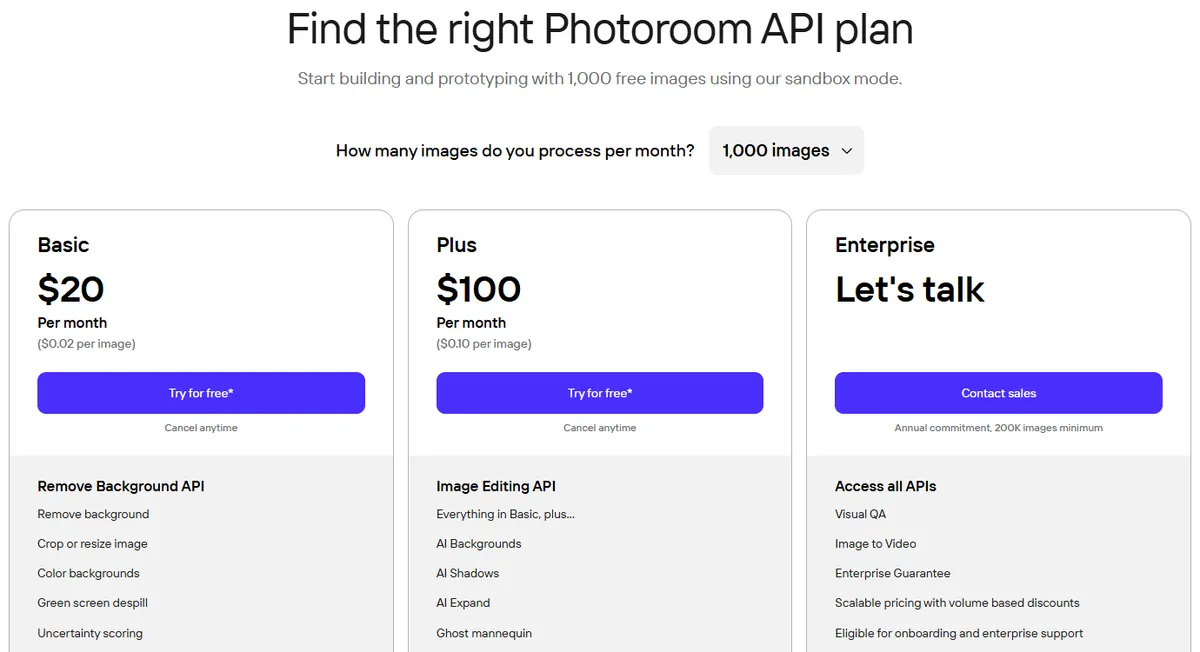
- Pricing: Pro is $12.99/month or $89.99/year, Max $34.99/month or $250/year, and Ultra $99/month or $990/year, from the US price data on Photoroom's pricing page. Background Remover is a core tool with no credit cost on every paid plan, within fair-use limits.
- Exports: 100 a month on Free, 1,000 on Pro and 3,000 on Max, per Photoroom's help center. Each image in a batch counts as one export, and 4K images need Ultra.
- API: the Remove Background API is $20/month for 1,000 images ($0.02 each). It returns PNG, JPEG or WebP and adds an uncertainty score and green screen despill.
- Free: the free plan allows 100 exports a month, or 25 a week.
Strengths
- Background removal uses no credits on paid plans
- Batch editing and listing tools in one app
- One of the cheapest remove-background APIs we found
Limits
- Monthly export caps apply to batches too
- 4K images need the $99 Ultra plan
- Photoroom says credit amounts can vary by country
Pick this instead of CamClo AI if you mainly need clean cutouts and listing templates in a phone-friendly app, or a low-cost background removal API. Our Photoroom pricing guide breaks down its plans in detail.
3. Claid
Best for: catalog workflows and APIsClaid, from the company behind Let's Enhance, is an AI product photo suite and API for ecommerce brands and marketplaces. Background removal costs 1 credit, and the same credits pay for upscaling, AI backgrounds, shadows and fashion models.
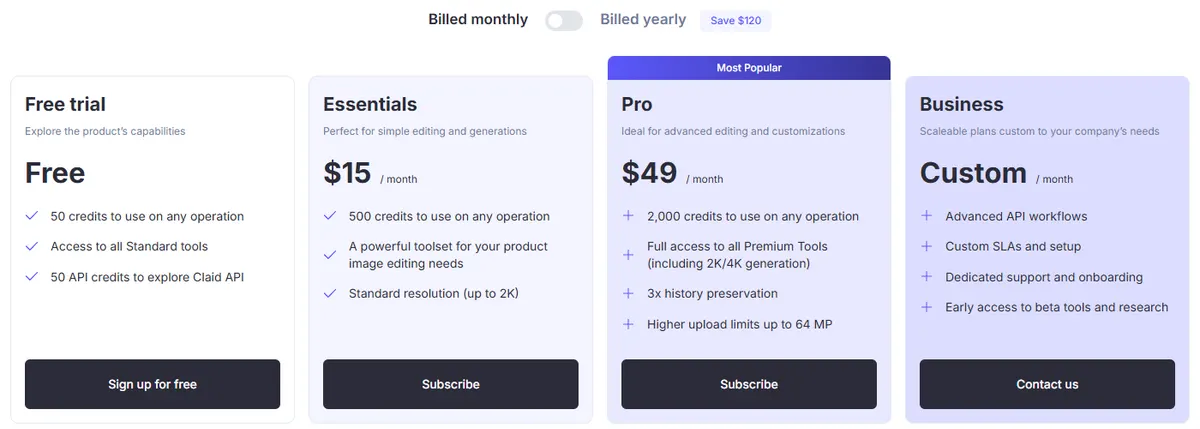
- Pricing: Essentials is $15/month, or $9/month billed yearly, with 500 credits. Pro is $49/month, or $35/month billed yearly, with 2,000 credits. At 1 credit a cutout, Essentials works out to 3 cents a cutout on monthly billing.
- Free: 50 credits, plus 50 API credits.
- Bulk: batch processing on Pro and Business, and a full API.
- Edges and output: the API's default "products" mode is tuned for product, grocery and food images, with "general" and "cars" modes and an option to name the object to keep. Transparent output needs PNG, WebP or AVIF. Downloads reach 64 MP on Essentials and 128 MP on Pro.
Strengths
- A low cost per cutout, lower still on yearly billing
- A removal mode tuned for products
- Cutouts, upscaling and backgrounds from one credit pool
Limits
- Batch processing needs Pro or Business
- The lowest prices need a yearly plan
- Essentials is standard resolution, up to 2K
Pick this instead of CamClo AI if you run a large catalog through an API or a workflow builder and want cutouts, upscaling and backgrounds billed from one credit pool.
4. Canva, the new home of remove.bg
Best for: teams already designing in CanvaCanva's Background Remover works inside its design editor, and remove.bg says Canva uses the same background-removal technology. You can remove a background inside a design, from your uploaded images, or across a whole folder.
- Pricing: included with paid plans. Canva showed us local prices only, so for US dollar prices see vendor site.
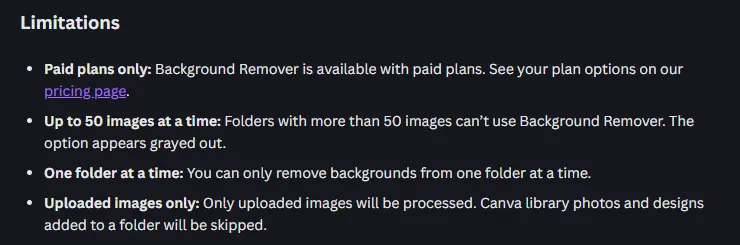
- Bulk: up to 50 images in a folder at a time, one folder at a time, uploaded images only. Running a whole folder creates a new "Edited" copy and leaves the originals unchanged.
- Formats: upload JPG, PNG, HEIC or HEIF; download a PNG. Canva's help center says Background Remover works on photos under 9 MB, and uploaded photos above 10 MP are downscaled to 10 MP after the background is removed.
- Edges: erase or restore parts of the cutout by hand.
Strengths
- remove.bg's technology inside a full design tool
- Bulk removal by folder, with originals kept
- Video background removal on the same plans
Limits
- Paid plans only
- 50 images per bulk run
- Photos above 10 MP come back at 10 MP
- For automated volume, remove.bg points to Leonardo.ai's API instead
Pick this instead of CamClo AI if your team already designs in Canva, or you used remove.bg and want the same cutouts without learning a new tool.
5. Adobe Firefly and Photoshop
Best for: free one-off cutouts, with Photoshop for hand finishingAdobe's free background remover runs in Firefly: upload an image and download a PNG with a transparent background. Adobe says it detects fine details like hair, fur and transparent objects. For a cutout that needs finishing by hand, Adobe suggests pulling the image into Photoshop.
- Pricing: the Firefly remover is free with an Adobe account. Photoshop is US$22.99/month on an annual plan billed monthly.
- Formats: JPG, PNG or WebP of up to 50 MB in, PNG out.
- Bulk: Adobe offers batch removal to enterprise users, or through the Firefly AI Assistant.
Strengths
- Free, with large 50 MB uploads
- A route into Photoshop for manual masks
Limits
- PNG is the only download format
- Batch removal is for enterprise users or the AI Assistant
- Hand refinement means a Photoshop plan and the skills to use it
Pick this instead of CamClo AI if you need a few free cutouts, or you already work in Photoshop and want full manual control of every edge.
6. Pixelcut
Best for: unlimited cutouts on a small budgetPixelcut is an AI photo editor for small sellers and creators, on the web and on phones. Its free web remover needs no sign-up and downloads HD cutouts without a watermark.
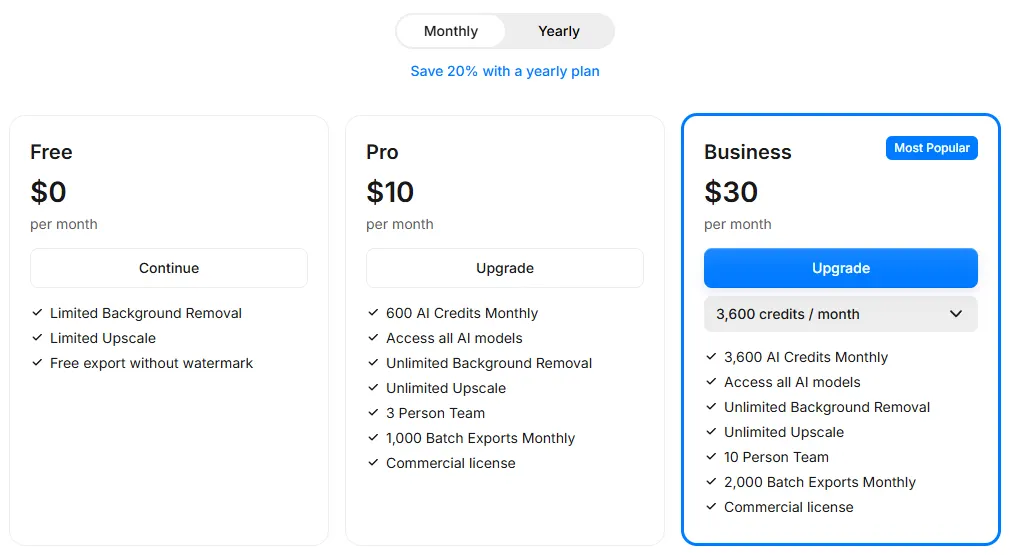
- Pricing: Pro is $10/month, or $8/month billed yearly, with unlimited background removal, 1,000 batch exports a month and a commercial license. Business is $30/month, or $24/month billed yearly, with 2,000 batch exports.
- Free: limited background removal, with exports free of watermarks.
- Bulk: Pixelcut says its bulk remover handles up to 10,000 images in one batch, with the same sizing, padding and background on every photo, downloaded as a ZIP.
- API: 5 credits per background removal at 1 cent a credit, so $0.05 an image.
- Formats: JPG, PNG or HEIC up to 50 MB and 6,000 x 6,000 px; transparent PNG or white background out.
Strengths
- Unlimited removal from $10 a month
- Free HD downloads without a watermark
- Bulk sizing, padding and ZIP download
Limits
- Batch exports are capped at 1,000 a month on Pro
- The free plan's limit is not published as a number
- Its API costs more per image than Photoroom's
Pick this instead of CamClo AI if you want the lowest monthly price for unlimited cutouts and a general photo editor is enough.
7. Removal.ai
Best for: paying per imageRemoval.ai is a dedicated background remover with a web tool, a bulk remover, desktop apps, a Photoshop plugin and an API. One credit buys one full-resolution download.
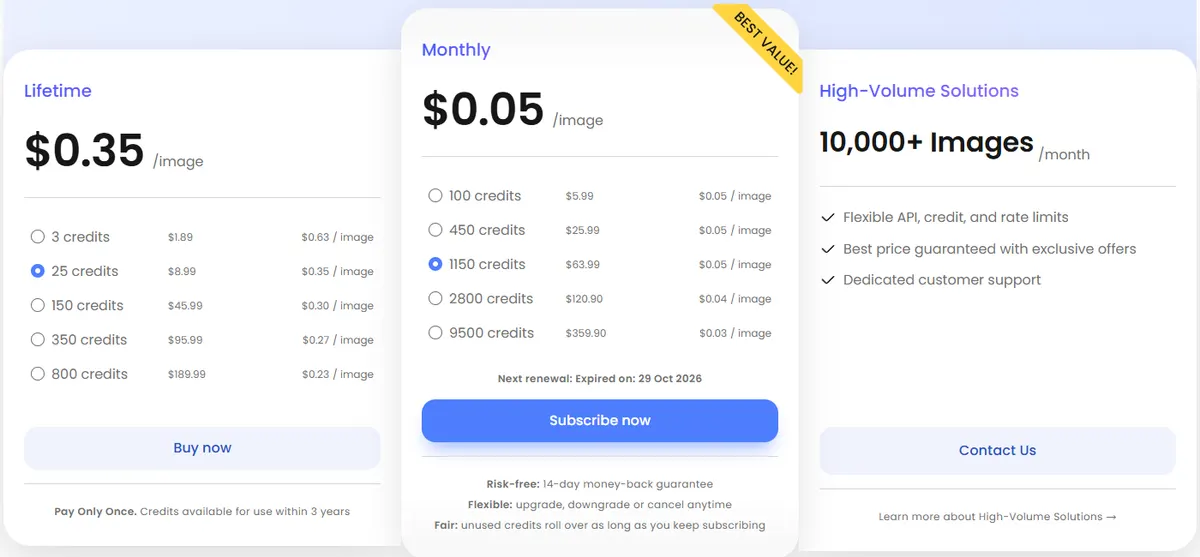
- Pricing: monthly plans run from $5.99 for 100 credits to $359.90 for 9,500, and unused credits roll over, up to five times the monthly amount, while you stay subscribed. Lifetime packs run from $1.89 for 3 credits to $189.99 for 800, usable for 3 years.
- Free: unlimited previews at 0.25 megapixels for personal use, plus 1 free full-resolution download when you sign up.
- Formats: JPG or PNG up to 12 MB; images above 36 MP are resized.
- Guarantee: subscriptions come with a 14-day money-back guarantee.
Strengths
- Small plans and one-off packs
- Credits roll over on subscriptions
- A 14-day money-back guarantee
Limits
- No WebP or HEIC uploads
- Large images are resized above 36 MP
- Costs more per cutout than Pixelcut or Photoroom at volume
Pick this instead of CamClo AI if you need a steady number of plain cutouts each month, or only a few a year, and nothing else.
8. Picsart
Best for: social posts and templatesPicsart is a broad photo and video editor with a free web background remover, templates, many AI image and video models and, on paid plans, AI agents that plan and make content.
- Pricing: Pro is $15/month or $126/year, from the US price data on Picsart's pricing page, with advanced background and object removal and bulk edits of up to 50 images at once. Ultra, from $47/month, raises bulk edits to 100.
- Free: the web background remover is labelled free; its limits are not listed on that page.
- Output: transparent PNGs or white backgrounds.
Strengths
- Cutouts, templates and video in one app
- Bulk edits of 50 images on Pro
Limits
- A general creative app, not a product photo tool
- Free limits and file limits are not published
- Bulk runs stop at 50 or 100 images
Pick this instead of CamClo AI if your cutouts mostly go into social posts and you want templates, video and many AI models in the same app.
9. Path
Best for: glass, hair and lace edited by handPath is a background removal service, not an AI tool: its designers remove every background by hand. It is the option to compare AI cutouts against when every edge has to be right, such as glassware, jewelry or a curly-haired model against a wire fence.
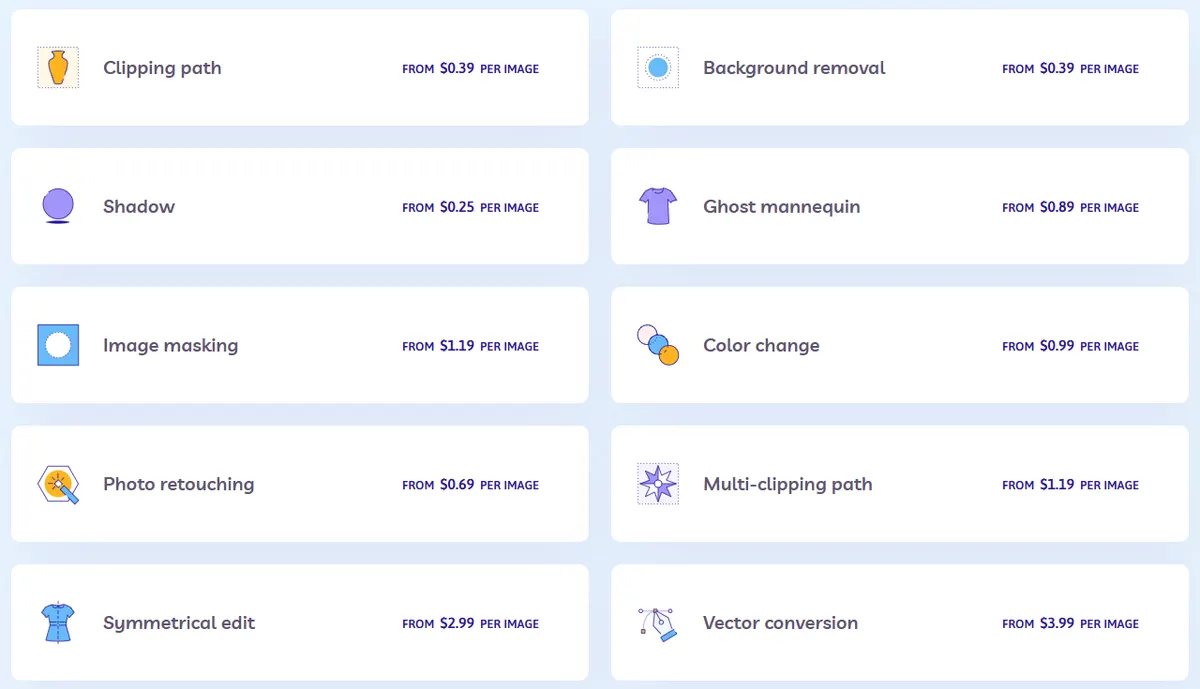
- Pricing: background removal from $0.39 an image, image masking for hair, fur and complex borders from $1.19, ghost mannequin from $0.89 and shadows from $0.25. The final price depends on how complex each image is and on the turnaround you choose.
- Turnaround: 6, 12, 24, 48 or 96 hours. 24 hours is the default; faster costs more and slower costs less.
- Credits: each Path credit is worth $1 and does not expire. Extra sizes or formats of the same image cost 20 cents a file at the standard turnaround.
- Free: your first two images are edited at no charge, without entering a card.
Strengths
- People, not a model, decide where the edge is
- Hair, fur and see-through items handled by hand
- Shadows and ghost mannequin in the same order
Limits
- Much more per image than AI tools
- Hours, not seconds
- The exact price comes after Path assesses each image
Pick this instead of CamClo AI if the product is glassware, jewelry or anything with see-through or fine edges, every image must be perfect, and you can wait a day. For clothing, our guide to ghost mannequin AI compares the AI route.
How to test edges on your own products
Every vendor shows a clean demo. Your own products are the test that matters, so run the same small set of photos through two or three tools before you commit to a plan. Include:
- Hair and fur. A model shot with loose strands, or a faux-fur or knitted item. Look for a halo of the old background between the strands.
- Transparent and reflective items. A glass bottle, a clear case, sunglasses. Check that the see-through parts stay see-through, and have not turned solid or been cut away, and that no reflection of the old room is left inside the glass.
- Fine fabric. Lace, mesh, tulle and chiffon. Check that the holes in the lace are cut out and that sheer fabric has not turned opaque.
- White on white. A white product on a white backdrop. Check for bitten edges where the two meet.
- Shadows. Decide whether you want the contact shadow kept, removed or added back, and check what each tool does with it.
- A dark background check. View every cutout at 100% zoom on black as well as on white. Fringes that hide on white show up on dark.
If a cutout is close but not perfect, a refine brush, like the ones in CamClo AI and Canva, fixes it faster than a re-run. If it has to be perfect at scale, such as a glassware catalog, hand masking costs more per image but removes the checking step. And if the problem is a stray object rather than the background, a magic eraser tool is the better fix. Our guide to ecommerce product photography covers how to shoot products so they cut out cleanly in the first place.
How we compared them
We started from the tools that appear in Google's results and the ranking roundups for "best AI background remover", "best background removal service" and "best background remover for product photos". We then read each vendor's official pricing, product, help and API pages and recorded the entry paid plan, what one cutout costs, the free option, bulk limits, and the file formats and sizes each tool accepts and returns.
Photoroom and Picsart showed us local prices rather than US dollars, so their US dollar prices come from the US price data published on their own pricing pages. Canva showed us no US price, so its row says "see vendor site". Screenshots are only of pages that showed US dollars or no prices. We did not run a scored benchmark, so there are no quality scores on this page: edge quality changes with every model update and with every product, so test your own hardest shots before you commit.
Frequently asked questions
What is the best AI background remover for product photos?
For ecommerce teams, CamClo AI: a cutout costs 0.5 credits, downloads as a transparent PNG, a WebP or a JPG on pure white, and the same credits then take the product into new backgrounds, on-model photos and ads. For the lowest cost per cutout at volume, look at Pixelcut, Photoroom and Claid. For glass, fine hair and lace that must be perfect, a hand-editing service such as Path is the safest choice.
Is there a free AI background remover?
Yes. Adobe Firefly removes backgrounds for free with an Adobe account and downloads a PNG. Pixelcut's web remover gives free HD downloads without a watermark, within its free plan's limits. Photoroom's free plan allows 100 exports a month, and Removal.ai and remove.bg give free previews at 0.25 megapixels. CamClo AI has a 7-day free trial with 20 credits.
What is happening to remove.bg?
remove.bg says its standalone website will no longer be available from 1 December 2026 at 9:00am CET. Background removal moves into Canva, which remove.bg says uses the same technology, and the self-service API moves to Leonardo.ai. Unused pay-as-you-go credits expire on 1 December 2026, and enterprise API contracts continue as normal.
How much does background removal cost per image?
About 1 to 3 cents per cutout on Pixelcut, Photoroom and Claid plans used in full, $0.02 on Photoroom's Basic API, $0.05 on Pixelcut's API, and about 4 to 6 cents on Removal.ai's monthly plans. On CamClo AI a cutout is 0.5 credits, about 16 cents on the $49 Creator plan, and the same credits also cover new backgrounds and on-model photos. Hand editing at Path starts at $0.39 an image, or $1.19 for hair and fur masking.
Can I remove backgrounds from hundreds of product photos at once?
Yes, with limits that differ by tool. CamClo AI's AI Assistant runs one workflow over up to 500 product images and downloads the results as one ZIP. Canva processes up to 50 images in a folder at a time, Picsart's Pro plan bulk edits up to 50 at once, and Pixelcut says its bulk remover handles up to 10,000 images in one batch, with 1,000 batch exports a month on Pro. Claid lists batch processing on its Pro and Business plans. For automated pipelines, Photoroom, Pixelcut and Claid all sell APIs.
Should I download a cutout as PNG, JPG or WebP?
Use PNG or WebP when you need a transparent background, for example to place the product on a new scene or a colored banner. Use JPG on pure white for marketplace main images, since JPG cannot store transparency. Keep the full-size original too, so you can cut it out again if an edge needs fixing.
Cut it out, then make it sell
Start with a 7-day free trial with 20 credits.
See plans and the free trial

