

Table of Contents
The best AI image upscaler for product and fashion photos is the one that keeps what is really there: the weave of the fabric, the text on the label and the face of the model. For online stores our pick is CamClo AI, which upscales to exact 1K, 2K or 4K sizes for 1 or 2 credits next to the rest of your product photo tools; Topaz Gigapixel is the pick for detail-critical desktop work, and Upscayl is the best free option if your computer has a capable graphics card.
We read every vendor's own pricing, product and help pages. Here is how we checked.
Quick picks by use case
Pick 1K, 2K or 4K; 1 credit up to 2K, 2 credits at 4K, no watermark.
Face Recovery and Text & Shapes models, with local rendering on Mac or PC.
Creative mode adds detail; Precision mode stays faithful for photos and products.
Up to 16x and 512 megapixels, with a Gentle mode for small text.
Settings for products, fashion, faces and packaging, plus an upscaling API.
Firefly Upscaler, Topaz Bloom and Topaz Gigapixel in one editor.
Unlimited upscales on Pro at $10 a month, on web, iPhone and Android.
3 free credits and 3 free downloads every month, up to 8x.
Best AI image upscalers compared
| Tool | Best for | Paid plans from | Free option | Max upscale | Runs on |
|---|---|---|---|---|---|
| CamClo AI | Product and fashion photos in one studio | $49/mo (150 credits) | 7-day free trial with 20 credits | 1K, 2K or 4K (4,096 px) | Browser |
| Topaz Labs | Faces, fine detail, local work | Web app $109/yr; Gigapixel $149/yr or $29/mo | Web tool free on up to 10 images | 8x on the web tool | Mac, PC or browser |
| Magnific | Creative upscales, plus a faithful mode | See vendor site | Free plan with basic tools, personal use | 16x | Browser |
| Let's Enhance | Print and very large files | $12/mo ($9/mo billed yearly) | 10 credits, watermarked, up to 8 MP | 16x, up to 512 MP | Browser |
| Claid | Large catalogues and API | $15/mo ($9/mo billed yearly) | Free trial with 50 credits | Up to 559 MP (API) | Browser and API |
| Adobe Firefly | Teams already on Adobe | See vendor site | Free with an Adobe account | 4x | Browser |
| Pixelcut | Quick upscales on a phone | $10/mo ($8/mo billed yearly) | 3 upscale downloads a day, no watermark | Up to 16K | Browser, iPhone, Android |
| Upscale.media | Occasional free upscales | See vendor site | 3 credits and 3 downloads a month | 8x | Browser |
| Upscayl | Free, private upscaling | Cloud Pro $24.99/mo | Desktop app free and open source | 16x | Windows, macOS, Linux |
Entry paid plan on each vendor's official site, in US dollars, billed monthly unless marked. Topaz's web app price was a sale price (listed down from $199 a year). "See vendor site" means the official page showed us prices in another currency, so we could not confirm a US dollar price. Confirm before you buy.
Creative or faithful: the setting that matters for product photos
Every tool on this list uses AI to add pixels, but they do not all try to do the same thing. Some modes are built to stay faithful to the original. Others are built to invent new detail, which is great for AI art and a risk for anything you sell, because a customer expects the label, the print and the stitching in the photo to match the parcel they receive. Here is what the vendors themselves say:
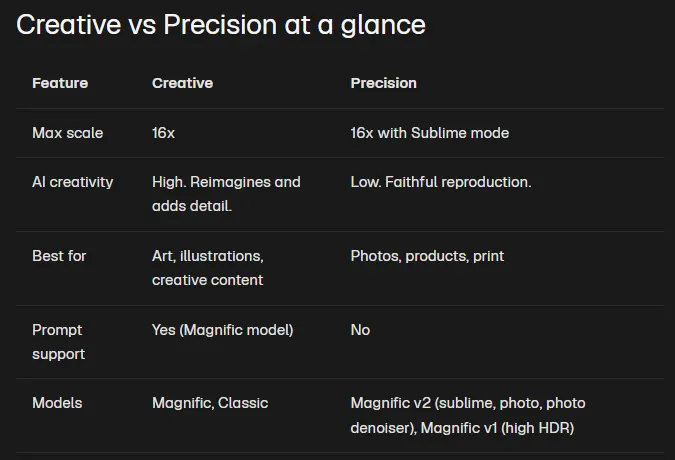
- Magnific splits its upscaler into Creative mode, which "reimagines and adds detail", and Precision mode, which it describes as faithful reproduction for "photos, products, print". Its API documentation says Precision preserves small text and fine details without adding new elements.
- Pixelcut runs a Fast Upscale model by default and offers Creative Upscale, which it says can "creatively add new details", with Creativity and Resemblance sliders.
- Adobe Firefly lets you pick Topaz Bloom, which has a Creativity slider, or Topaz Gigapixel, which has a Face recovery option.
- Let's Enhance uses its Prime mode by default and recommends Gentle when an image has small text or fine detail to preserve.
- Topaz Gigapixel includes Text & Shapes and Face Recovery among its models.
- Claid offers upscaling by asset type, including product photos, fashion photos, faces and people, and text and packaging.
The rule for a store is simple: use the faithful setting for anything that shows a real product, and keep creative modes for mood images and AI art.
The upscalers, tool by tool
Each entry covers what the tool is, what it costs, what is free, its strengths and limits, and when to pick it instead of CamClo AI.
1. CamClo AI
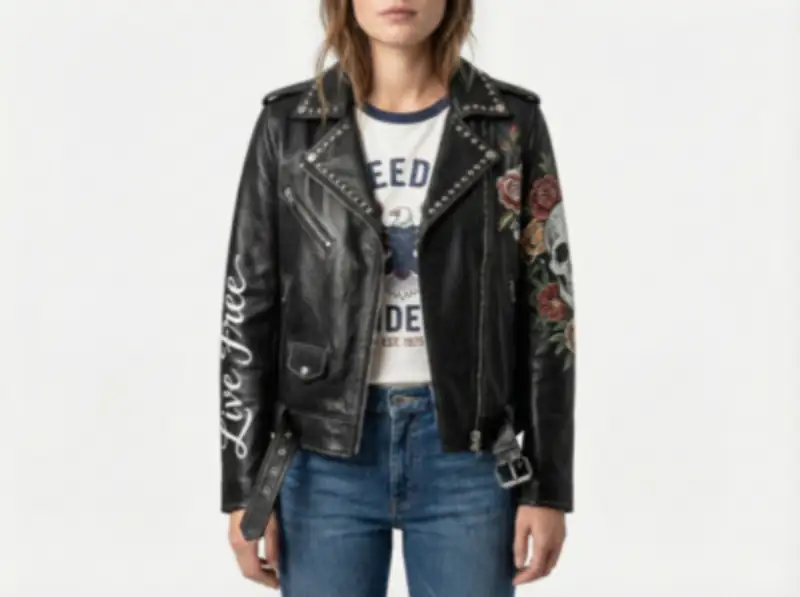
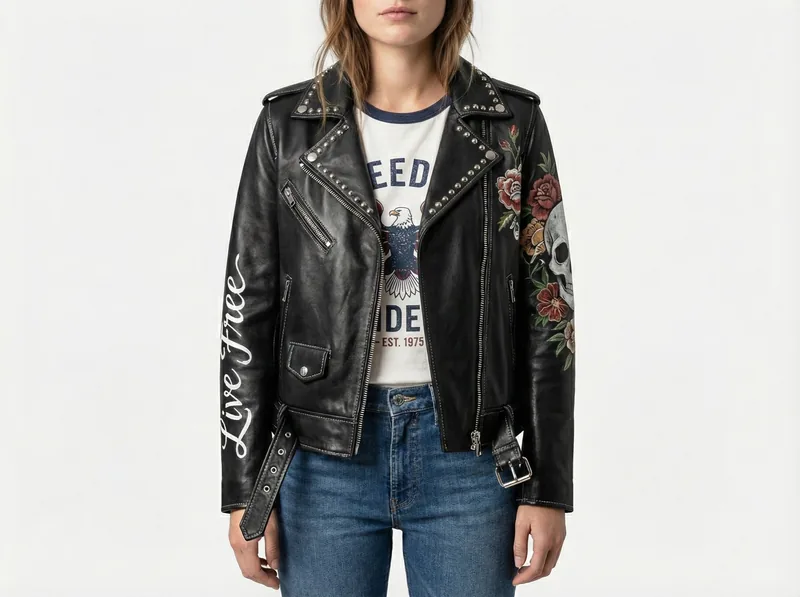
Best for: product and fashion photos, next to the rest of your product photo toolsCamClo AI is an AI studio for ecommerce teams, and its Image Upscaler is built for the photos those teams already have: packshots, flat-lays and on-model images. You choose the size you need rather than a multiplier, and you download a file with no watermark.
- Sizes: 1K, 2K or 4K, meaning 1,024, 2,048 or 4,096 pixels on the longest side. The tool works out the scale from your photo, up to 15 times the original in one run, and greys out any size your photo already exceeds.
- Cost: 1 credit for 1K or 2K and 2 credits for 4K, shown on the button before you run it. A run that fails gives the credits back.
- Files: upload JPG, PNG or WebP up to 20 MB, and download the result as PNG, JPG or WebP.
- Around it: background removal and replacement, object removal, on-model images from flat-lay photos (1 to 3 credits each, at 1K, 2K or 4K), virtual try-on and image to video, in the same account.
- Pricing: plans from $49 per month with 150 credits, which covers 150 upscales at 1K or 2K, or 75 at 4K. There is a 7-day free trial with 20 credits.
Strengths
- You pick the final pixel size, so there is no maths before you spend a credit
- 2K matches the 2,048 pixels Shopify says usually displays best for square product images
- 1 credit per upscale up to 2K, and no watermark on the file
- Upscaling sits next to background removal, on-model photos and video in one studio
Limits
- Can seem a little expensive next to a single upscaler, but the credits also cover background removal, on-model photos, try-on and video, not just an enlarged file
See more before-and-after examples, including cosmetics and jewellery, on the AI image upscaler for product photos page.
2. Topaz Labs (Gigapixel and Topaz for Web)
Best for: faces, fine detail and local work on your own computerTopaz Labs makes Gigapixel, a desktop upscaler for Mac and Windows that also works as a plugin for Photoshop and Lightroom Classic, and Topaz for Web, a browser app. Topaz says Gigapixel has nine enhancement models; its feature list includes High Fidelity, Low Res, Text & Shapes, Art & CG, Recover, Redefine and Face Recovery, plus newer Wonder and Standard MAX models.
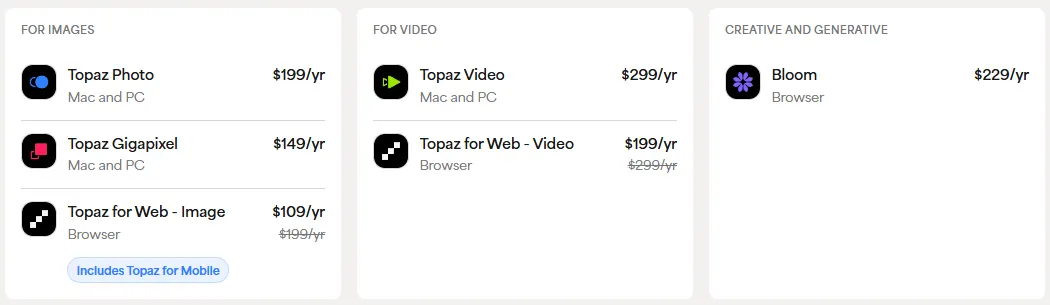
- Pricing: Gigapixel is $149 a year or $29 a month on monthly billing. Topaz for Web - Image was on sale at $109 a year (from $199). All six Topaz apps come in Topaz Studio at $399 a year. Personal licences allow commercial use for organisations under $1M in annual revenue; larger ones need a Pro licence, such as Gigapixel Pro at $499 a year.
- Output: the web tool upscales up to 8x. Gigapixel's page promotes 6x lossless zoom.
- Free: the web tool is free to try on up to 10 images with no watermarks.
Strengths
- Dedicated models for faces and for text and shapes
- Local rendering, so files never leave your computer
- Batch work and plugins for Photoshop and Lightroom Classic
Limits
- Businesses over $1M in revenue need the more expensive Pro licence
- Choosing between many models takes some learning
- An upscaler only; background and on-model work need other tools
Pick this instead of CamClo AI if you retouch photos on the desktop, need fine control over faces and text, or cannot upload client files to the cloud.
3. Magnific
Best for: creative upscales, with a faithful mode for productsMagnific's upscaler has two modes: a Creative mode that adds new texture and detail, and a Precision mode that stays close to the original. According to Magnific's help center, Freepik is now Magnific, so the upscaler sits inside a wider creative suite with image, video and audio models and stock content, all paid for from one credit pool.
- Modes: Creative takes an optional text prompt and "reimagines and adds detail". Precision, up to 16x with Sublime mode, is for "photos, products, print" and has a Portraits preset tuned for faces and skin.
- Pricing: the pricing page showed us prices in rupees, so for US dollar prices see vendor site. Premium includes 20,000 AI credits a month, and the pricing page lists the Magnific upscalers on its paid plans, with Topaz's upscalers added from Premium+.
- Free: a Free plan with limited access to basic AI tools, for personal use with attribution.
Strengths
- Two clear modes: creative for art, faithful for products
- Up to 16x in Precision mode
- Upscaling sits next to image and video generation
Limits
- Creative mode adds new detail by design, which can alter labels, prints and faces
- Credits are shared with every other tool in the suite
- The Free plan is for personal use only
Pick this instead of CamClo AI if you upscale AI-generated art or mood images and want the upscaler to add detail, or you already pay for the Magnific suite.
4. Let's Enhance
Best for: print and very large filesLet's Enhance is a browser upscaler aimed at print and large formats. It upscales up to 16x and to as much as 512 megapixels, uses a Prime mode by default for portraits, products and textures, and switches to Gentle for small text and fine detail. It also has an Old Photo mode and edits up to 20 images at once. Let's Enhance, Inc. also makes Claid, number 5 on this list.
- Pricing: Starter is $12 a month, or $9 a month billed yearly, with 100 credits, where 1 image uses 1 credit, and output up to 256 megapixels. Pro is $32 a month ($24 billed yearly) with 300 credits, and Max is $45 a month ($34 billed yearly) with 500 credits and output up to 512 megapixels. Unused credits roll over while you stay subscribed, up to a cap.
- Free: 10 credits when you sign up, with no card needed; free downloads are watermarked and capped at 8 megapixels.
Strengths
- Very large output sizes for print
- A Gentle mode for small text and fine detail
- Simple pricing: 1 image, 1 credit
Limits
- Free results carry a watermark
- Credits are lost at the end of the billing period if you cancel
Pick this instead of CamClo AI if you print large posters, canvases or signage and need files far bigger than 4K.
5. Claid
Best for: large catalogues and automation through an APIClaid is a product photo suite from Let's Enhance, Inc., with upscaling next to background removal, AI photoshoots, AI fashion models, outpainting and video. Its upscaler has settings by asset type, including product photos, fashion photos, faces and people, and text and packaging, and its API can output images up to 559 megapixels.
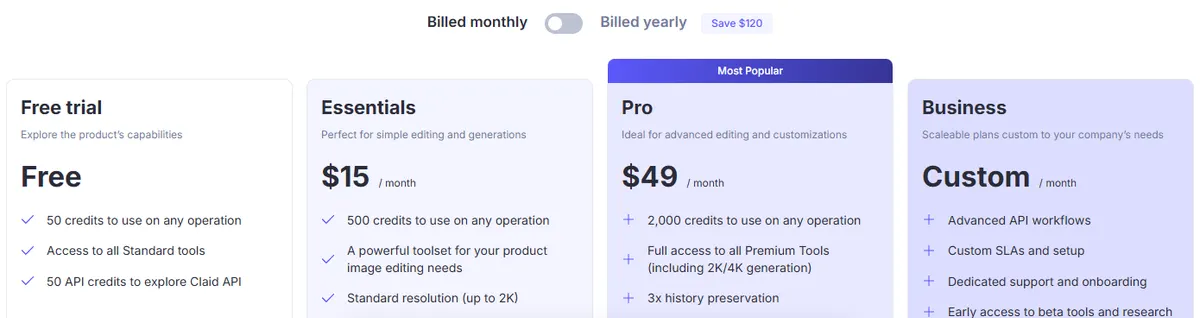
- Pricing: Essentials is $15 a month, or $9 a month billed yearly, with 500 credits and standard resolution up to 2K. Pro is $49 a month, or $35 billed yearly, with 2,000 credits, 4K and batch processing. An upscale uses 2 to 8 credits.
- Free: a free trial with 50 credits, plus 50 API credits.
Strengths
- Settings for fashion, faces and packaging text
- An API for processing whole catalogues
- Other product photo tools on the same credits
Limits
- 4K and batch processing need the Pro plan
- An upscale can cost up to 8 credits
Pick this instead of CamClo AI if you need to upscale thousands of seller or supplier images automatically through an API.
6. Adobe Firefly
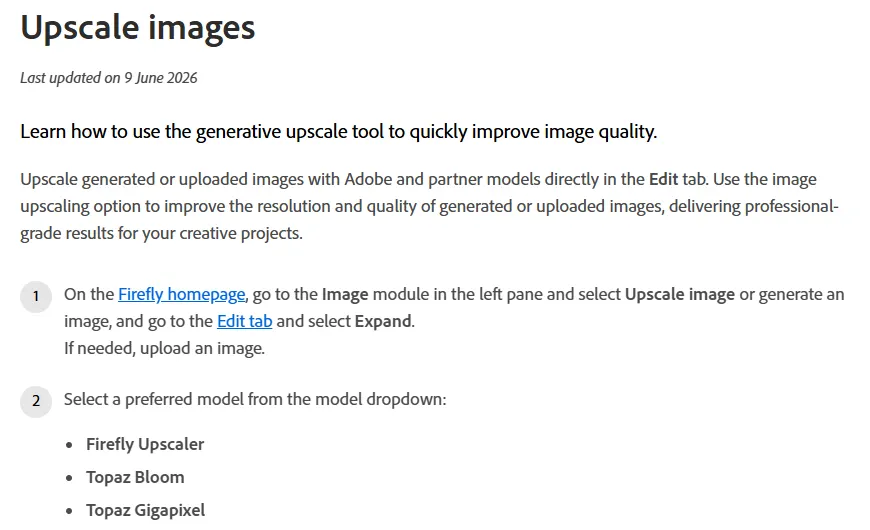
Best for: teams already working in Adobe appsAdobe's Firefly image editor has an Upscale action with three models: Adobe's own Firefly Upscaler and two partner models, Topaz Bloom and Topaz Gigapixel. You choose 2x or 4x and see the expected width and height before you start. Bloom has a Creativity slider, and Gigapixel has a Face recovery option for blurry or low-resolution faces.
- Pricing: Adobe shows plan prices for the visitor's region, so for US dollar prices see vendor site. Credit use varies by model and is shown next to the Upscale button.
- Free: Adobe says the upscaler is free to use with an Adobe account. Files can be JPEG, PNG or WebP up to 100 MB.
Strengths
- Adobe's model and two Topaz models in one place
- Face recovery with the Gigapixel model
- A free way in with an Adobe account
Limits
- Tops out at 4x
- Credit cost differs by model
Pick this instead of CamClo AI if your team already works in Adobe apps and wants the upscale inside the same editor.
7. Pixelcut
Best for: quick, low-cost upscales on a phonePixelcut is a photo editor for small sellers and creators on the web, iPhone and Android. Its upscaler enlarges to 4K, 8K or 16K with a Fast Upscale model and offers a Creative Upscale when you want the AI to add detail. It takes JPG, PNG and HEIC files up to 50 MB and 6,000 by 6,000 pixels.
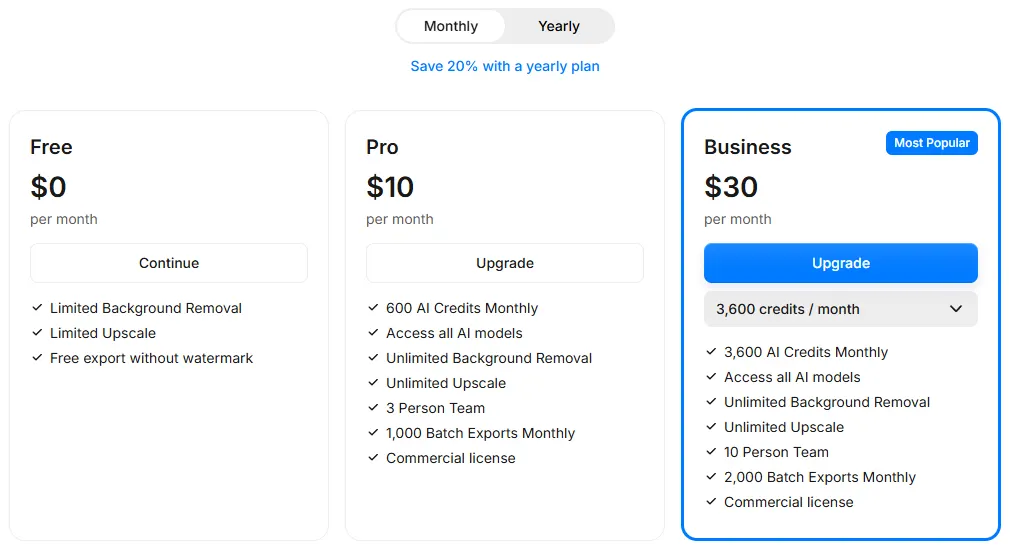
- Pricing: Pro is $10 a month, or $8 a month billed yearly, with unlimited upscales, 1,000 batch exports a month, 600 AI credits and a commercial licence.
- Free: the web upscaler is free for up to 3 downloads a day, with no watermark and no sign-up; the Free plan also includes limited background removal.
Strengths
- Unlimited upscales for $10 a month
- Mobile apps, and HEIC files straight from a phone
- Batch exports on Pro
Limits
- The free upscaler stops at 3 downloads a day
- Creative Upscale can change product details, so stay on Fast Upscale for listings
Pick this instead of CamClo AI if you only need upscaling and background removal, mostly from your phone, at the lowest monthly price.
8. Upscale.media
Best for: occasional free upscales in the browserUpscale.media is a browser upscaler from the team behind Erase.bg. It offers 2x, 4x or 8x upscaling without a watermark, works in a mobile browser, and adds bulk processing and an API for businesses.
- Pricing: credit subscriptions and one-time credit packs, where an upscale generally uses 1 credit. The pricing page showed us prices in rupees, so for US dollar prices see vendor site.
- Free: 3 free credits and 3 free downloads every month.
Strengths
- No install and a free monthly allowance
- Up to 8x with no watermark
- Bulk processing and an API when you grow
Limits
- 3 free images a month is enough to test, not to run a store
- Paid credits are non-refundable
Pick this instead of CamClo AI if you only upscale a few images a month and want to pay nothing.
9. Upscayl
Best for: free, private upscaling on your own computerUpscayl is a free, open-source desktop upscaler for Windows 10 and later, macOS 12 and later, and Linux, released under the AGPL-3.0 licence. It upscales up to 16x, offers several models, and can batch-upscale many images in one go. There is also a paid Upscayl Cloud version that runs online.
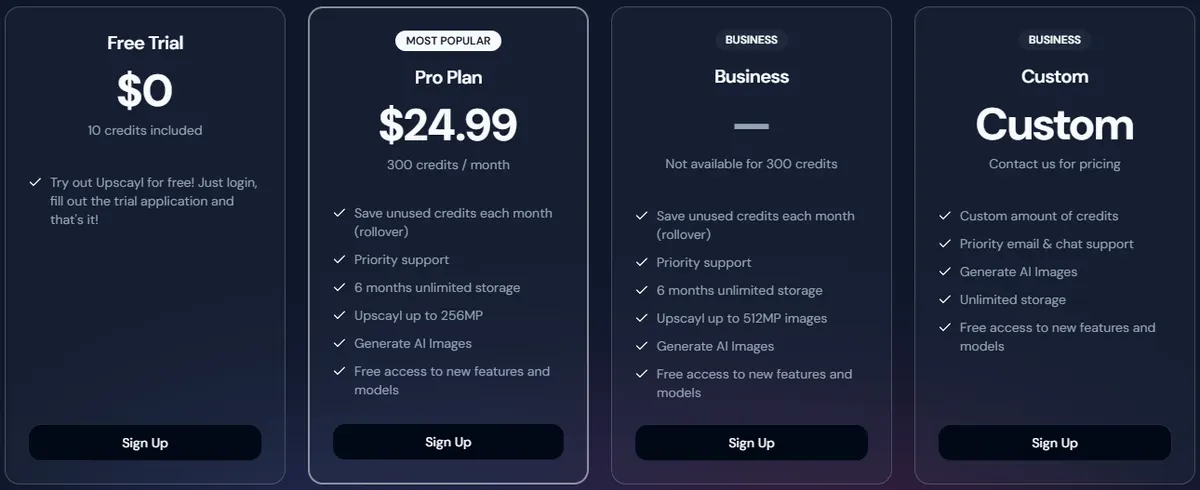
- Pricing: the desktop app is free. Upscayl Cloud Pro is $24.99 a month with 300 credits and images up to 256 megapixels.
- Free: the full desktop app, plus a Cloud trial with 10 credits.
- Hardware: Upscayl's README says you need a Vulkan-compatible graphics card, and that many integrated graphics chips do not work.
Strengths
- Free with no per-image cost
- Files stay on your computer
- Batch upscaling of many images at once
Limits
- Needs a capable graphics card
- Speed and results depend on your hardware and model choice
Pick this instead of CamClo AI if you have a good graphics card, want to upscale without paying per image, or must keep files offline.
Best free AI image upscalers
Every tool here can be tried for free, but the free allowances are very different. This is what each one gives you without paying.
| Tool | What is free | Worth knowing |
|---|---|---|
| CamClo AI | 7-day free trial with 20 credits | 20 credits cover 20 upscales at 1K or 2K, or 10 at 4K |
| Upscayl | The full desktop app, free and open source | Needs a Vulkan-compatible graphics card |
| Upscale.media | 3 credits and 3 downloads every month | No watermark, up to 8x |
| Pixelcut | Up to 3 upscale downloads a day, no sign-up on the web tool | No watermark on exports |
| Topaz Labs | Web tool free on up to 10 images | No watermark |
| Claid | Free trial with 50 credits | An upscale uses 2 to 8 credits |
| Let's Enhance | 10 credits at sign-up, no card | Watermarked, output up to 8 MP |
| Adobe Firefly | Upscaler free with an Adobe account | 2x or 4x |
| Magnific | Free plan with basic AI tools | Personal use only, with attribution |
From each vendor's official pricing or product page.
Best local AI upscaler
A local upscaler runs on your own computer, so product photos from an unreleased collection or a client shoot never leave it. Two tools on this list do that:
- Upscayl is free and open source for Windows, macOS and Linux, and batch-upscales many images at once. It needs a Vulkan-compatible graphics card; its README warns that many integrated graphics chips will not work.
- Topaz Gigapixel runs on Mac and PC with unlimited local rendering, and Topaz says files never leave your computer when you render locally. It costs $149 a year and adds dedicated Face Recovery and Text & Shapes models.
If your laptop has no suitable graphics card, a browser tool will be faster than fighting the hardware.
What size product photos need
Upscale to the size your sales channel uses, not to the biggest number a tool offers. Bigger files load more slowly and give the AI more pixels to invent.
- Amazon: images must be 500 to 10,000 pixels on the longest side, and 1,000 pixels or more turns on zoom. Amazon's image guide also says: "Do not artificially enlarge small images." Start from the largest, sharpest original you have and check any upscaled file at full size. Our Amazon product photography guide covers the rest of the rules.
- Shopify: product images can be up to 5,000 by 5,000 pixels or 25 megapixels and must be under 20 MB, and Shopify says 2,048 by 2,048 pixels usually displays best for square product images.
- Print and large banners: work out the pixels you need from the print size, then pick a tool with room to spare, such as Let's Enhance at up to 512 megapixels.
For most store pages, a 2K file (2,048 pixels on the longest side) is enough; keep 4K for zoom, hero banners and print. You can upscale product photos to 2K or 4K in CamClo AI and, if you are starting from flat-lays, turn flat-lay photos into on-model images at up to 4K in the first place, so there is less to upscale.
How to test an upscaler on your own product photos
Vendor samples are chosen to look good. Before you commit, run the same three product photos through two or three tools and compare them side by side at 100% zoom.
- The fabric crop. Pick a knit, denim, linen or lace close-up. A good upscale keeps the real weave; a poor one smooths it into plastic or paints on a pattern that was not there.
- The label crop. Pick a care label, a size tag, an ingredients panel or a printed logo. Every letter should match the original. Invented or misspelt text is the clearest sign of a creative mode at work.
- The face crop. Pick an on-model shot and check the eyes, teeth, hairline and skin. Faces are where over-sharpening is easiest to spot, and where a tool can quietly change who the model looks like.
- The detail crop. Jewellery, stitching, zips and buttons should keep their shape and count.
- The colour check. Put the original and the upscale next to each other. The product colour should not shift.
Upscaling makes a sharp photo bigger; it will not fix a photo that is out of focus. If the original is blurry, reshoot it or generate a new image. For the steps that come before upscaling, our guides to ecommerce product photography and the best background removers cover shooting and cut-outs, and our comparison of AI fashion model generators covers on-model images.
How we checked
We started from the live Google results for "best ai image upscaler" and "ai image upscaler for ecommerce" in the US; every other tool on this list appears in those results or in the roundups that rank for them. We read each vendor's official pricing, product and help pages, saved screenshots, and recorded the entry paid plan, the free option, the maximum upscale, where the tool runs, and whether it has faithful, face or text settings. Magnific, Adobe and Upscale.media showed us prices in another currency, so we wrote "see vendor site" instead of converting them.
We did not run a scored benchmark, so there are no quality scores on this page. Upscalers change with every model release, and results depend on your photos, so use the test above on your own products before you choose.
Frequently asked questions
What is the best AI image upscaler?
It depends on the photo. For product and fashion photos, CamClo AI upscales to exact 1K, 2K or 4K sizes for 1 or 2 credits, next to background removal and on-model photo tools. For detail-critical desktop work, Topaz Gigapixel has dedicated Face Recovery and Text & Shapes models. For creative upscales of AI art, Magnific's Creative mode is the specialist. The best free option is Upscayl, a free, open-source desktop app, if your computer has a Vulkan-compatible graphics card.
Is there a free AI image upscaler?
Yes. Upscayl's desktop app is free and open source. Online, Upscale.media gives 3 credits and 3 downloads a month, Pixelcut's web upscaler is free for up to 3 downloads a day without a watermark, Let's Enhance gives 10 credits at sign-up (watermarked, up to 8 megapixels), Topaz's web tool is free on up to 10 images, Claid's free trial has 50 credits, and Adobe Firefly's upscaler is free with an Adobe account. CamClo AI has a 7-day free trial with 20 credits.
Can ChatGPT upscale photos?
Not as a dedicated feature. OpenAI's help center describes ChatGPT Images as a way to create images and to edit an uploaded image by describing the change you want, and it warns that edits may extend beyond the area you select. Because ChatGPT edits are generated from your description rather than being a straight enlargement of your file, check label text, logos, prints and faces against the original. For a product photo, a dedicated upscaler with a faithful mode is the safer choice.
Which AI upscaler is best for product photos?
One that keeps the product exactly as it is, so use a faithful setting rather than a creative one. Good options are CamClo AI (1K, 2K or 4K), Magnific's Precision mode, which Magnific recommends for photos, products and print, Let's Enhance's Gentle mode for small text, Topaz Gigapixel's Text & Shapes and Face Recovery models, and Claid's settings for products, fashion, faces and packaging. Creative modes can add detail that was never on the product.
What resolution should product photos be?
On Amazon, images need 500 to 10,000 pixels on the longest side, and 1,000 pixels or more turns on zoom; Amazon also asks sellers not to artificially enlarge small images. Shopify accepts images up to 5,000 by 5,000 pixels (25 megapixels) and says 2,048 by 2,048 pixels usually displays best for square product images. A 2K upscale fits most store pages; keep 4K for zoom, print and large banners.
Will upscaling change the details of my product?
It can. Creative and generative modes are built to add detail: Magnific says its Creative mode reimagines and adds detail, and Pixelcut says its Creative Upscale adds new details. Faithful modes aim to keep the original. Whatever tool you use, zoom to 100% and compare fabric texture, label text, logos and faces with the original before you publish.
Upscaling product photos for your store?
Start a 7-day free trial with 20 credits.
See plans and the free trial

