

Table of Contents
An AI fashion model generator puts your clothes on a realistic AI model, starting from a flat lay, a ghost mannequin shot or a photo you already have, so you get on-model product images without a photoshoot. For a clothing catalogue, CamClo AI is our top pick, because one account covers try-on, model swap, new poses and batch runs of up to 500 products with the same model throughout. Botika, FASHN and The New Black are the strongest specialists, and below we compare all 10 tools on fabric accuracy, model consistency, batch volume, commercial rights and price per image.
We checked every price on the vendor's own site. Here is how we compared them.
Quick picks by use case
Try-on, model swap, 20+ new poses from one photo, and batches of up to 500 products.
About $0.08 a standard image, with bulk generation from the $35 plan.
AI fashion model generators compared
| Tool | Best for | Paid plans from | Cost per image | Free option | Commercial use |
|---|---|---|---|---|---|
| CamClo AI | Whole catalogues: try-on, model swap, poses, batches | $49/mo (150 credits) | About $0.16 to $0.33 (0.5 to 1 credit a try-on) | 7-day trial for $1 with 20 credits | Yes, outputs made with paid credits |
| Botika | Retouched studio-style shots | $55/mo ($46/mo billed yearly) | About $1.10 (1 credit a photo on Pro) | 8 free credits | Yes, no usage rights fees |
| FASHN | Developers and an API | $19/mo | From about $0.10 (from 1 credit) | 10 free credits | Yes |
| The New Black | Low-cost bulk runs with brand presets | $15/mo | About $0.08 (Standard) to $0.23 (Pro AI) | 3 free credits | Yes, on any plan |
| Photoroom | Stores that also need background edits | See vendor site | See vendor site | Free plan, personal use only | Paid plans only |
| WeShop AI | Low entry price | $9.99/mo ($7.99/mo billed yearly) | Not listed | Free points on sign-up | Depends on its usage rights |
| Claid | Synthetic model library and API | $15/mo ($9/mo billed yearly) | About $0.12 (4 credits) | 50 free credits | Yes, no licensing fees |
| Modelia | A flat monthly fee for heavy use | $30/mo; all-inclusive from $109/mo | About $0.60 on Creator (3 credits) | 20 credits a month, watermarked | Yes on paid plans |
| On-Model | Very large batch jobs | See vendor site (euros) | See vendor site | Free plan, up to 25 images a month, watermarked | Yes |
| Uwear | Enterprise QA, pay as you go | No plan: $0.10 a credit, from $17 | From $0.30 (from 3 credits) | None | Yes |
Prices are the entry paid plan on each vendor's official pricing page, in US dollars, billed monthly unless marked. Cost per image is the plan price divided by the images it covers at the lowest listed credit cost, rounded; higher resolutions and quality modes cost more. "See vendor site" means the page showed local currency or euros, not US dollars. Confirm before you buy.
What matters for a clothing catalogue
A general image generator can draw a person in a dress. An AI model for clothing catalogues needs more than that, so these are the five things we looked at for each tool:
- Fabric and fit. The print, the logo, the knit texture and the hemline have to survive the generation. Every tool here starts from your garment photo rather than a text prompt, which is what keeps the product real.
- Model diversity. AI-generated models for fashion should cover the ages, body types and skin tones your customers have, so check how you pick them: a library with filters, a written description, or your own photos.
- Consistency. The same face across 50 or 500 products looks like one brand. Look for saved custom models, face references or reusable model profiles.
- Batch volume. How many products go in one run, how many generations run at once, and whether the results come back organized by product.
- Rights and price per image. Who owns the output, whether ads are allowed, and what one finished image costs once you divide the plan price by the images it covers.
The generators, tool by tool
Each entry covers what the tool is, its price, how it handles batches and consistent models, its strengths and limits, and when you should pick it instead of CamClo AI.
1. CamClo AI
Best for: putting a whole catalogue on models, with the same model throughoutCamClo AI is an AI studio for ecommerce teams. For clothing it has four on-model tools, all on one credit balance, plus a batch assistant that runs them across a catalogue.
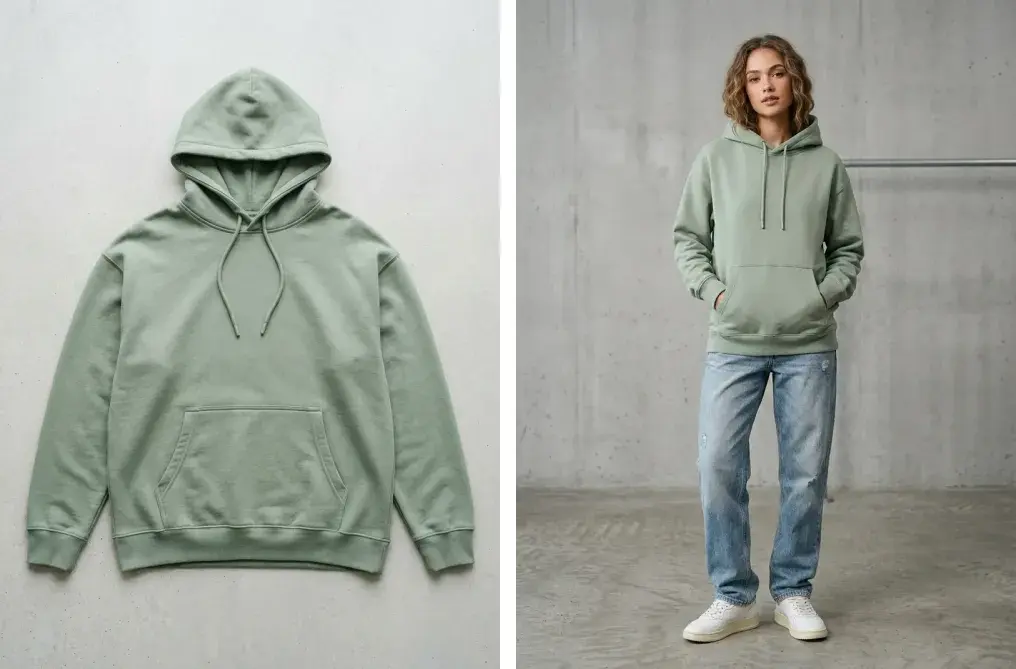
- Virtual Try-On: upload a flat lay or ghost mannequin photo of one garment, pick a model from the library (filter by gender, age group and region) or upload your own, and add a styling note such as "tuck in shirt" if you want one. 1K, 2K or 4K output, from 0.5 to 1 credit an image.
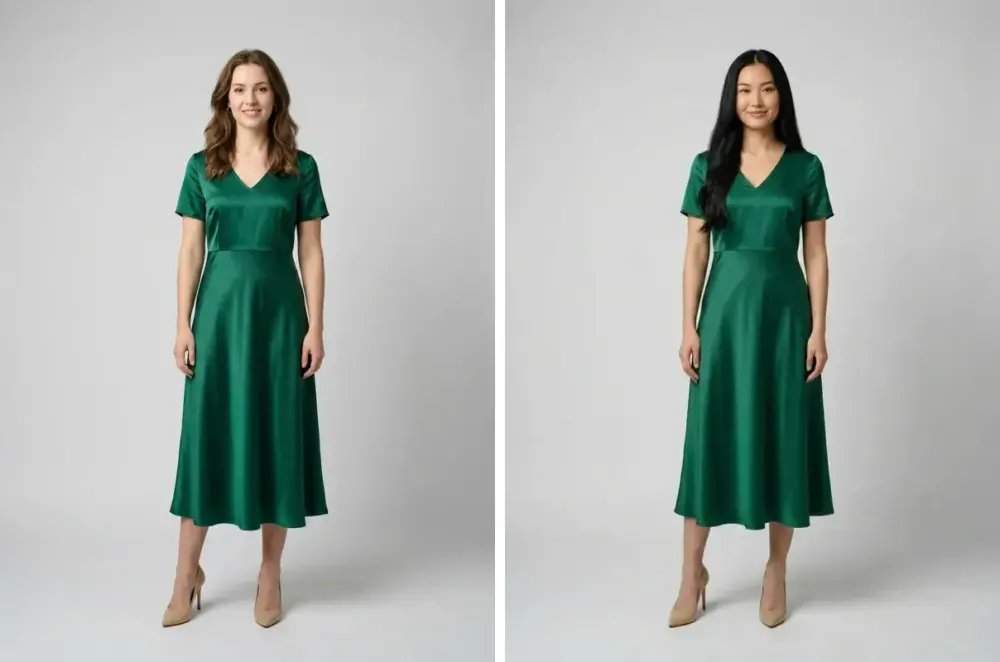
- Model Swap: keep the outfit in an on-model photo and change the person. Describe a new age, look or body type, or match a face reference so one brand face repeats across the catalogue. 0.5 to 1 credit, with no extra charge for a face reference.
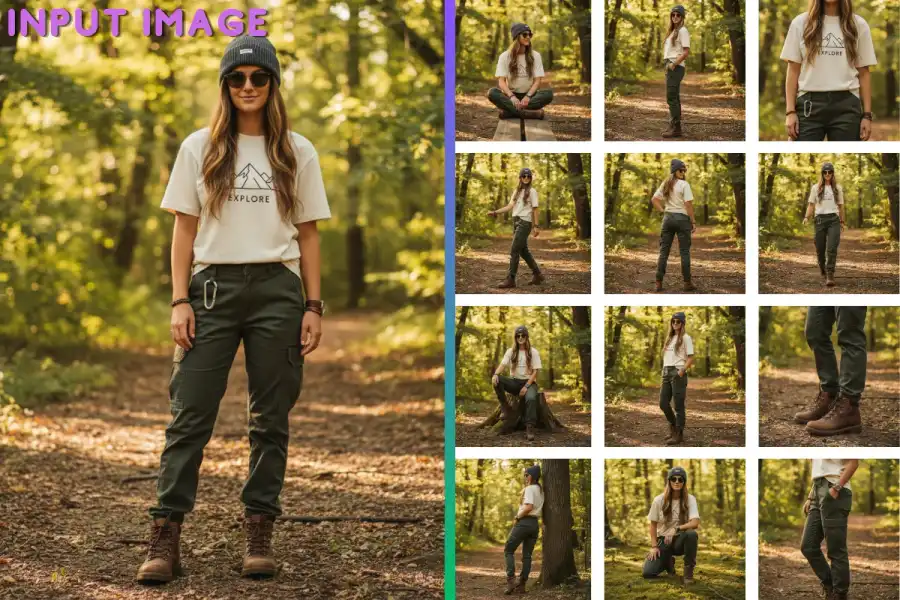
- Catalogue Studio: upload one model photo and get 20+ new poses of the same model in the same outfit, from front, back and side views to close-up details. From 0.5 credits a pose on paid plans.
- Product Photography: when you have no model photo at all, upload the product and describe the model and the scene.
- Batches: in the AI Assistant (in beta), upload up to 500 product images, write one brief and pin a model reference so every product lands on the same person. You approve the plan and its credit cost before anything runs, and download the whole workflow as one ZIP.
- Video: animate a finished on-model image into a short clip, or make a UGC Virtual Try-On video ad in which the creator holds the piece up, then wears it.
- Pricing: plans from $49 per month with 150 credits, and Studio plans from 330 up to 5,000 credits a month. There is a 7-day trial for $1 with 20 credits. Images made with paid credits are yours to use commercially.
Strengths
- Try-on, model swap, new poses and video in one account, on one credit balance
- The same model across a catalogue: saved custom models, a face reference, or one pinned model for a batch
- Up to 500 products in one batch, with the cost shown before anything runs
- A model library you can filter by gender, age group and region
- 4K output and styling notes such as "roll up sleeves"
Limits
- Can seem a little expensive next to a single-purpose model generator, but the credits cover try-on, model swap, new poses, backgrounds and video for each product, not just one raw on-model image
To start from a flat lay, see the AI virtual try-on tool for clothes. To change the person in photos you already have, see the AI model swap tool, and for more angles of one look, the AI pose generator for catalogues.
2. Botika
Best for: studio-style catalogue shots with retouching includedBotika turns a flat lay, hanger or ghost mannequin photo into on-model photography, in the model, pose and background you pick. It also offers bulk upload for a collection, video from your images, and a Shopify app.
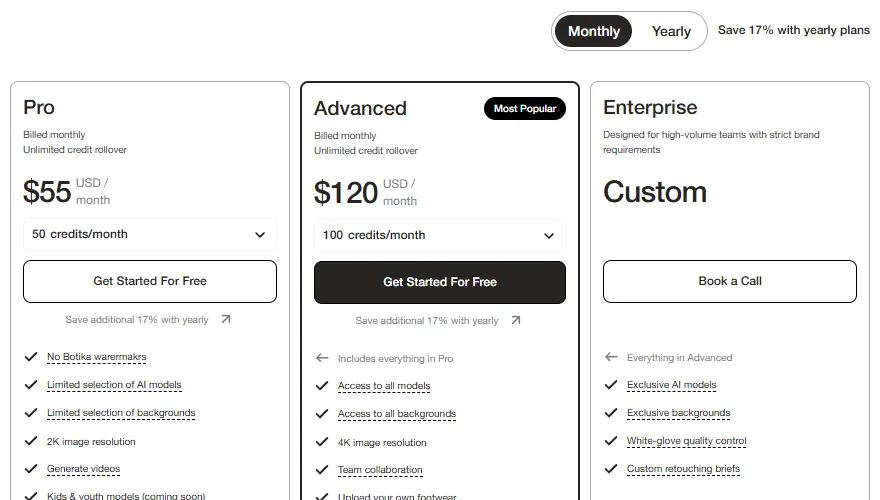
- Pricing: Pro is $55/month with 50 credits, 2K output and a limited selection of models. Advanced is $120/month with 100 credits, 4K and every model. Each photo costs 1 credit and each video 5. On yearly billing, Pro is $46/month with 600 credits a year and adds 2 retouch rounds per photo.
- Free: 8 free credits to test the platform.
- Speed and rights: Botika says processing takes about 15 minutes, and that generated photos are free from usage rights fees for commercial use, with limits on reselling them or presenting its AI models as real people.
Strengths
- Retouch rounds on every photo with yearly plans
- Takes flat lay, hanger or ghost mannequin photos
- Unused credits roll over while you stay subscribed
Limits
- About $1.10 a photo on Pro, the highest here
- Pro gets a limited model selection and 2K output
- Retouch rounds are for yearly plans only
Pick this instead of CamClo AI if you want fewer, polished catalogue shots with a retouch pass included, and you are happy to pay more per image for it.
3. FASHN
Best for: developers and teams building on an APIFASHN is a fashion AI platform with virtual try-on, product to model, model swap, consistent models and short videos. Its product to model tool converts flat lays, mannequin and ghost mannequin shots into on-model images, and the same tools are available through an API.
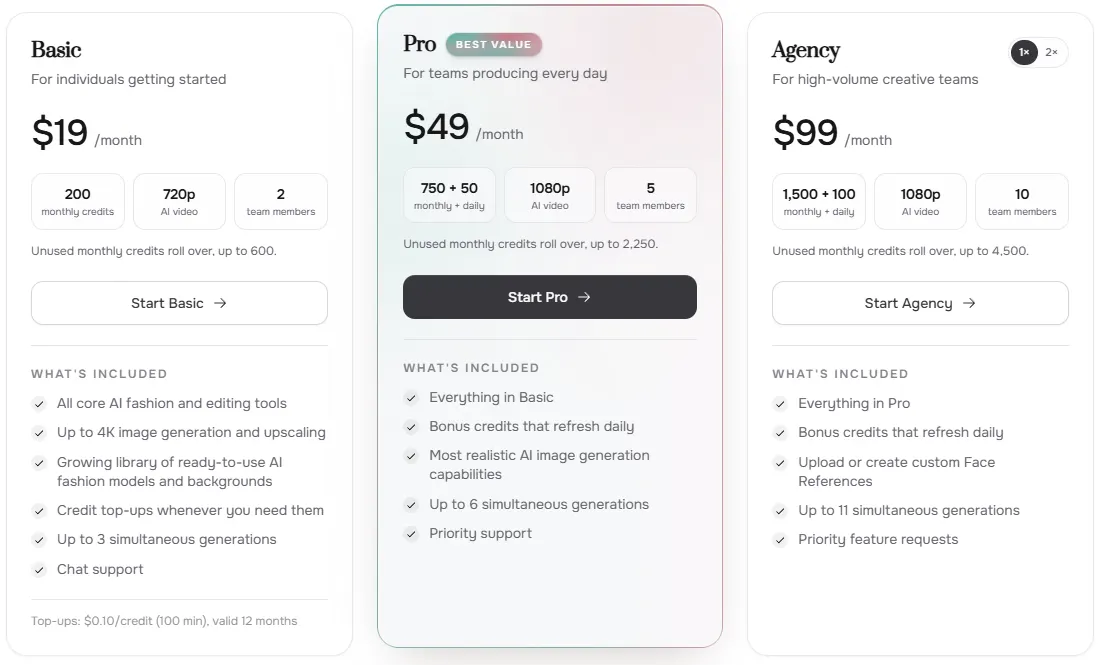
- Pricing: Basic is $19/month with 200 credits and up to 3 generations at once. Pro is $49/month with 750 monthly credits plus 50 daily bonus credits. Agency is $99/month with 1,500 monthly and 100 daily credits, and lets you upload your own Face References. Most tools start at 1 credit per output, and yearly billing saves about two months.
- Free: 10 free credits for new accounts.
- Speed and rights: FASHN says most on-model images are ready in around 10 seconds on default settings, and up to around 55 seconds at higher resolution and quality. It says all generated images can be used for ecommerce, marketing and other business purposes.
Strengths
- From about $0.10 an image on Basic
- Fast single images
- An API for your own site or app
Limits
- Uploading your own faces needs the $99 Agency plan
- Basic runs 3 generations at a time
- Higher resolutions cost more credits per image
Pick this instead of CamClo AI if you are a developer wiring on-model generation into your own storefront or app and want to pay per API call.
4. The New Black
Best for: low-cost bulk runs with brand presetsThe New Black is a fashion AI platform that turns a product photo, flat lay or mannequin shot into on-model images. One model reference can be reused across product to model, try-on and bulk generation, and brand presets called Visual DNA keep the look consistent. It also covers fashion design, tech packs, lookbooks and Shopify publishing.
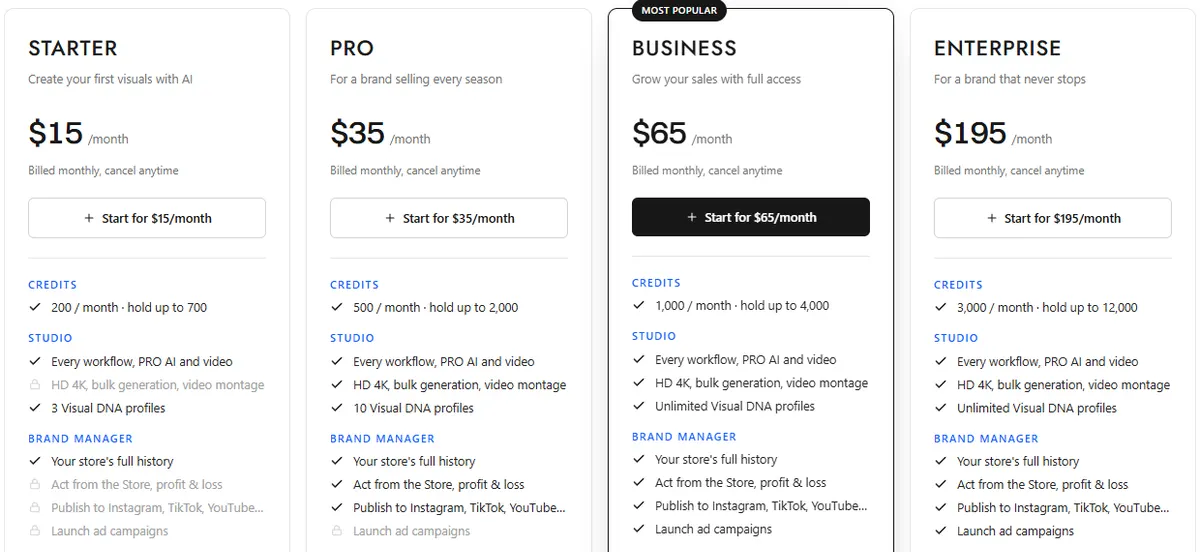
- Pricing: Starter is $15/month with 200 credits. Pro is $35/month with 500 credits, and is the first plan with HD 4K and bulk generation of a whole catalogue. Business is $65/month with 1,000 credits. An image costs 1 credit on Standard AI and 3 on Pro AI, and a video about 10.
- Free: a new account opens with 3 free credits.
- Speed and rights: The New Black says an image comes back in about 15 seconds, and that everything you generate is yours to sell, print, publish and register on any plan.
Strengths
- About $0.08 a Standard image on Starter
- Bulk generation of a whole catalogue from Pro
- Plain commercial terms on every plan
Limits
- Starter locks HD 4K and bulk generation
- Pro AI images cost 3 credits each
- A broad platform with design and store tools, so there is more to learn
Pick this instead of CamClo AI if a low cost per standard image matters most, or you also design your own garments and want tech packs and lookbooks in the same app.
5. Photoroom
Best for: stores that also need background and batch editsPhotoroom is a product photo editor best known for background removal. Its AI Fashion Models tool takes a flat lay or a photo of someone wearing your product and puts it on a virtual model from a diverse portfolio, with the pose and background you choose. You can save your own custom models in Brand Kit and reuse them for later collections.
- Pricing: the pricing page showed prices in the visitor's local currency, not US dollars, so see vendor site. Plans are Pro, Max, Ultra and a custom Enterprise plan.
- Free: a free plan for personal use, and free trials of paid plans.
- Batch and rights: output in 2K and 4K, Batch editing for hundreds of images, and Virtual Model in the Photoroom API. Photoroom's help center says free accounts cannot be used commercially; paid plans can.
Strengths
- Background removal, retouching and resizing in the same app
- Custom models saved in Brand Kit
- Virtual models available through an API
Limits
- The free plan is for personal use only
- Fashion models are one feature of a general product photo editor
- 4K output is only on the Ultra plan and above
Pick this instead of CamClo AI if you sell a mix of clothing and hard goods and want one editor for cutouts, batch edits and virtual models.
6. WeShop AI
Best for: a low entry priceWeShop AI is an AI image and video platform for sellers. Its AI Fashion Model Generator takes a flat lay, a mannequin photo or a product-only garment image and generates models in different body types, skin tones, ages, poses and backgrounds. Plans also include general image and video models such as Kling 3.0 and GPT Image 2.
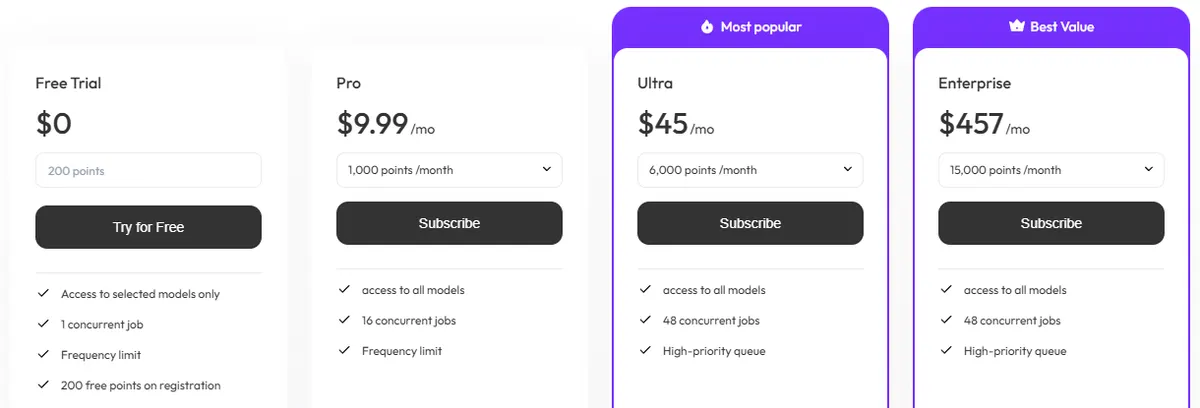
- Pricing: Pro is $9.99/month with 1,000 points, or $7.99/month billed yearly. Ultra is $45/month with 6,000 points. The pricing page does not list how many points one fashion model image uses, and points expire at the end of each billing cycle.
- Free: free points on sign-up, for selected models, with 1 job at a time.
- Batch and rights: the tool takes up to 9 uploads at a time, and Pro runs 16 jobs at once. On commercial use, the tool page says results can be used for ads and ecommerce "depending on the platform's usage rights".
Strengths
- The lowest monthly entry price among the tools with US dollar prices
- General image and video models in the same plan
- 16 jobs at once on Pro
Limits
- Points per fashion model image are not listed on the pricing page
- Up to 9 uploads at a time
- Commercial use depends on its usage terms
Pick this instead of CamClo AI if you want the cheapest monthly plan and plan to use general image and video models as much as fashion models.
7. Claid
Best for: a ready library of synthetic models, including plus-size and kidsClaid is an AI product photography suite. Its AI fashion model generator puts clothes on 100+ AI models of different ethnicities and age groups, including plus-size and kids, or on photos of your own models. You choose one of 8 studio-like poses or describe the pose in a prompt. Claid says ghost mannequins and flat lays work best, and it is still perfecting model-to-model generation.
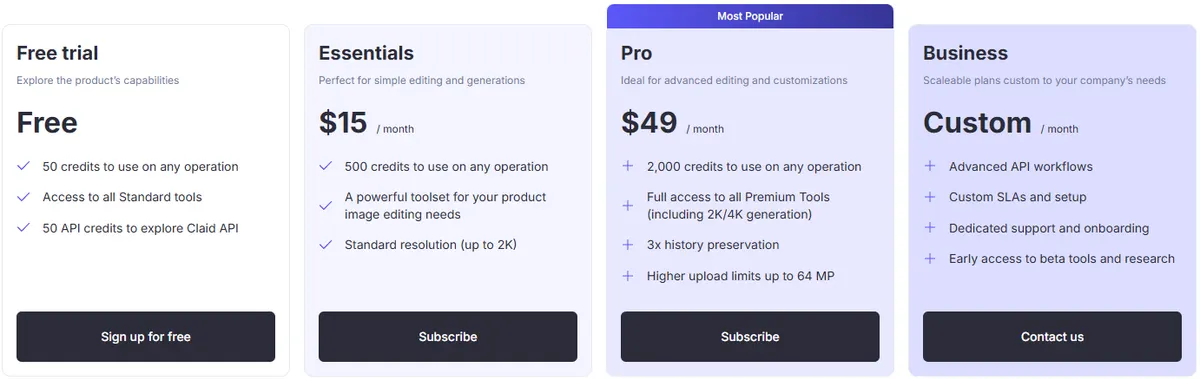
- Pricing: Essentials is $15/month, or $9/month billed yearly, with 500 credits and output up to 2K. Pro is $49/month, or $35/month billed yearly, with 2,000 credits and 2K or 4K. An AI Fashion image costs 4 credits, so that is 125 images a month on Essentials and 500 on Pro.
- Free: 50 free credits, enough for 12 AI Fashion images.
- Batch and rights: an API for high volumes. Claid says its models are 100% synthetic and safe to use in ecommerce photography, paid ads, social media and print, with no licensing fees.
Strengths
- Plus-size and kids models in the library
- A clear no-licensing-fee statement
- An API to automate listings
Limits
- Each fashion image uses 4 credits
- Essentials stops at 2K
- Swapping the model in existing on-model photos is still being perfected
Pick this instead of CamClo AI if you need plus-size or kids models from a ready-made library, or an API to process listings automatically.
8. Modelia
Best for: a flat monthly fee for heavy useModelia turns a flat lay, mannequin or model photo into on-model images, and has separate tools for mannequin to model, consistent characters, reposing and video. Every image carries C2PA content credentials, and it also comes as a Shopify app.
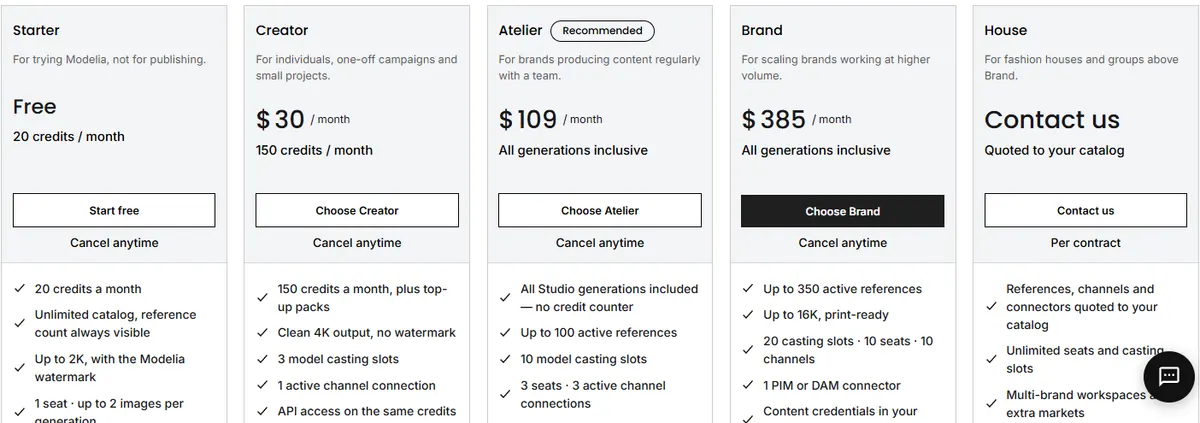
- Pricing: Creator is $30/month with 150 credits, and a standard image costs 3 credits at 2K or 4K, so about 50 images. Atelier is $109/month with all Studio generations included for up to 100 active products, and Brand is $385/month for up to 350. Self-serve plans are monthly only.
- Free: Starter has 20 credits a month at up to 2K with a Modelia watermark, and Modelia says it is for trying the tool, not for publishing.
- Consistency: 3 model casting slots on Creator, 10 on Atelier and 20 on Brand. On the inclusive plans, Modelia says very high months go into a longer queue.
Strengths
- No credit counting from Atelier up
- Model casting slots for a consistent cast
- Content credentials on every image
Limits
- About $0.60 an image on Creator
- Inclusive plans are capped by active products (100 on Atelier)
- No yearly discount on self-serve plans
Pick this instead of CamClo AI if you create a lot of images for a catalogue of up to about 100 active products and want one flat monthly fee.
9. On-Model
Best for: very large batch jobsOn-Model, from PiktID, turns flat lays, packshots or existing product page photos into on-model images and can swap the model in images you already have. You pick from 70+ AI models or upload one frontal photo of your brand model to keep the same face across the catalogue.
- Pricing: On-Model lists its plans in euros only, so see vendor site. Custom model upload, 4K output and API access are on the Pro plan and above.
- Free: a free plan with 75 credits a month (up to 25 images) at 1080p with a watermark, and a 14-day free trial on paid plans.
- Batch and rights: batches of up to 10,000 SKUs per job, downloaded as a zip, plus a REST API. On-Model says all generated content is yours to use commercially without extra licensing fees.
Strengths
- Up to 10,000 SKUs in one batch job
- A free plan to test with
- A REST API with TypeScript and Python SDKs
Limits
- Prices only in euros
- Custom models, 4K and the API need Pro
- Free images are watermarked at 1080p
Pick this instead of CamClo AI if you process thousands of SKUs in each drop and want a batch or API pipeline built only for that.
10. Uwear
Best for: enterprise catalogues with QA, paid as you goUwear is AI visual production for fashion ecommerce teams. It turns ghost mannequin and flat lay photos into on-model images, can put each new outfit on your own model photos, and runs batch workflows and automations through its Studio, an API or MCP. Enterprise work starts with a scored sample report on your own garments.
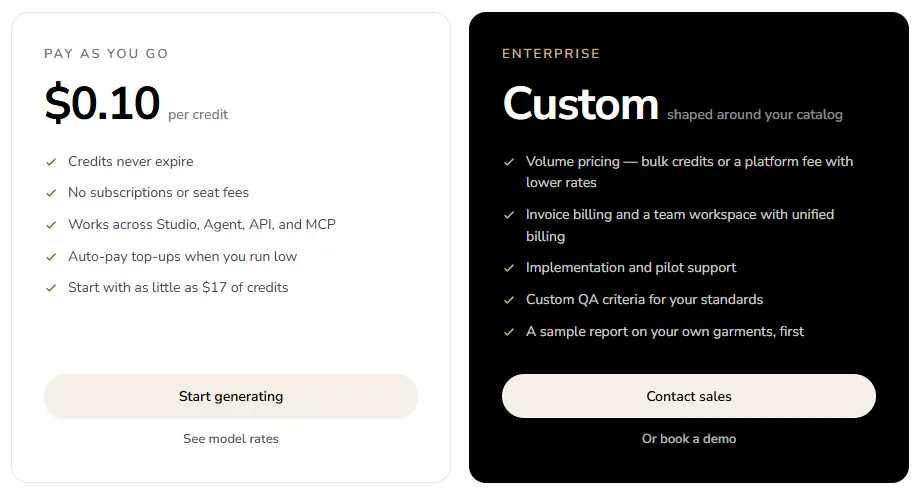
- Pricing: no subscription. Credits cost $0.10 each, from 3 credits a photo depending on the image model, with a $17 minimum purchase. Credits never expire. Enterprise pricing is custom.
- Free: none; Uwear says it has no free tier.
- Rights: Uwear's terms say you own the AI-generated images and may use them for any legal commercial purpose.
Strengths
- No subscription, and credits never expire
- QA scoring and retries built for enterprise volume
- Runs through an API and automations
Limits
- No free tier
- Art direction and QA are part of a sales-led enterprise setup
- Cost per photo depends on the image model you pick
Pick this instead of CamClo AI if you run an enterprise catalogue and want proof on your own garments, with QA on every image, before you commit.
What 1,000 on-model images a month costs
If you are comparing an AI model shot service for fashion brands with 1,000+ SKUs, the entry plan matters less than what a month of real volume costs. Here is how each tool's published plans cover 1,000 images a month:
| Tool | How 1,000 images a month is covered |
|---|---|
| CamClo AI | The Studio plan with 1,100 credits is $299/month, and a try-on is 0.5 credits at 1K or 2K (1 at 4K). New catalogue poses use 0.5 credits each. |
| Botika | Enterprise, which Botika describes as designed for high-volume teams, priced on request. |
| FASHN | Pro at $49/month has 750 monthly credits plus 50 bonus credits a day, and Agency at $99/month has 1,500 plus 100 a day. Images start at 1 credit. |
| The New Black | Business at $65/month has 1,000 credits, at 1 credit per Standard image (Pro AI images are 3). |
| Photoroom | See vendor site. |
| WeShop AI | Points per fashion image are not listed, so see vendor site. |
| Claid | Pro at $49/month covers 500 AI Fashion images; beyond that, the custom Business plan. |
| Modelia | Atelier at $109/month includes all generations for up to 100 active products, and Brand at $385 up to 350, so the limit is products, not images. Above 350 products, House is quoted. |
| On-Model | Priced in euros, so see vendor site. Batches take up to 10,000 SKUs per job. |
| Uwear | From $300 in credits (3 credits at $0.10 per photo), with no subscription. |
From each vendor's pricing page. Retries, higher resolutions and extra poses per product add to the count, so size the plan to images per SKU times SKUs. Our guide to what product photography costs compares this with a studio shoot.
How we compared them
We started from the tools that appear in Google's current results and ranking roundups for "AI fashion model generator", then read each vendor's official pricing, product and help pages. For each one we recorded the entry plan, what one image costs on it, the free option, how it handles batches and consistent models, and what its terms say about commercial use, and we saved screenshots of the pricing pages that showed US dollars. Photoroom's page showed local currency and On-Model's shows euros, so for those two we wrote "see vendor site".
Cost per image is the plan price divided by the images it covers at the lowest listed credit cost, rounded. We did not run a scored benchmark, so there are no quality scores on this page. Output quality changes with every model update, so test your own garments before you commit.
How to choose an AI fashion model generator
- Start from your best garment photo. A sharp, evenly lit flat lay or ghost mannequin shot with the whole piece visible gives every tool here its best chance. If you still shoot on a mannequin, our guide to ghost mannequin AI covers the setup.
- Test your hardest items first. Prints, sheer fabric, ribbed knits and small logos are where AI models slip. Zoom to 100% and compare with the real garment.
- Lock one model per brand face. Save it as a custom model or face reference before you start the catalogue, not halfway through.
- Show sizes honestly. If you want size-inclusive images, generate the garment on the body types you actually sell, and do not imply a fit you have not checked.
- Price the catalogue, not the plan. Multiply images per product by products, add retries, and compare what that month costs.
- Check the rights before the first ad. Paid plans usually allow commercial use; free plans often do not.
For try-on tools compared in more depth, see our comparison of AI virtual try-on tools for clothes. If most of your photos already have a model in them, our guide to AI model swap explains how changing the person works. To change the outfit rather than the person, our AI clothes changer comparison covers those tools.
Frequently asked questions
What is the best AI fashion model generator?
For a clothing catalogue, CamClo AI is our top pick: one account covers virtual try-on, model swap, new poses from one photo and batch runs of up to 500 products, with the same model kept across them. Botika is strongest if you want retouching included, FASHN if you are building on an API, and The New Black if a low price per standard image matters most.
How does an AI fashion model generator work?
You upload a photo of the garment, usually a flat lay, a ghost mannequin shot or a photo on a mannequin, and pick or describe a model. The tool generates a photo of that model wearing the garment, keeping its color, print and shape, with new lighting and shadows. Most tools also let you reuse the same model, change the pose or background, and turn the result into a short video.
Can I turn mannequin photos into model photos?
Yes. Botika, FASHN, The New Black, WeShop AI, Modelia and Uwear all say they accept mannequin or ghost mannequin photos, and Claid says ghost mannequins and flat lays work best. In CamClo AI, a flat lay or ghost mannequin photo goes straight into Virtual Try-On. Use a sharp, evenly lit photo with the whole garment visible.
How much does an AI fashion model generator cost?
Among the tools with US dollar prices, entry plans on monthly billing ran from $9.99 a month (WeShop AI) to $55 a month (Botika), and CamClo AI plans start at $49 a month with 150 credits. Per image on monthly billing, published rates range from about $0.08 for a standard image on The New Black to about $1.10 on Botika's Pro plan. Divide the plan price by the images it covers, and check whether 4K, bulk runs and commercial use are included at that price.
Can I keep the same AI model across my whole catalogue?
Yes, in most tools. CamClo AI lets you save your own models, match a face reference in Model Swap, or pin one model for a whole batch. FASHN has Face References, The New Black has a reusable model reference, Modelia has model casting slots, Photoroom saves custom models in Brand Kit, and Claid and On-Model let you upload your own model. Keep one reference per brand face and reuse it for every product.
Can I use AI model photos commercially?
Usually yes, on paid plans. CamClo AI, Botika, FASHN, The New Black, Claid, On-Model and Uwear all allow commercial use of what you generate (on CamClo AI, with paid credits). Photoroom allows it on paid plans only, Modelia's free Starter plan is not for publishing, and WeShop AI's tool page makes it depend on its usage rights. You also need the rights to the garment photos and any model faces you upload.
Is there a free AI fashion model generator?
For testing, yes. CamClo AI has a 7-day trial for $1 with 20 credits. Claid gives 50 free credits, FASHN 10, Botika 8 and The New Black 3. Modelia and On-Model have free plans with watermarked images, Photoroom's free plan is for personal use only, and WeShop AI gives free points when you sign up. Uwear has no free tier.
What is a good WeShop AI alternative?
It depends on why you are switching. For try-on, model swap, new poses and batches of up to 500 products in one account, CamClo AI. For a low price per standard image with bulk runs, The New Black. For an API, FASHN or Claid. For a flat monthly fee with no credit counting, Modelia.
Can AI models replace a photoshoot for ecommerce?
For standard catalogue and product page images, often yes: you photograph the garment flat or on a mannequin and generate the model shots. Keep a real shoot for hero campaigns if you want one, and check every AI image for changed prints, logos, hems and fit before it goes live, because a wrong detail leads to returns.
Putting your catalogue on models?
CamClo AI has a 7-day trial for $1 with 20 credits.
See plans and the $1 trial

