

Table of Contents
You took a great product photo. The garment looks perfect. The lighting is clean. The fit is right.
And then you realise: every customer seeing that photo is looking at the same person. Same skin tone. Same body type. Same height. Same market.
You sell to thousands of different people. Your product page shows one of them.
That gap between who you serve and who you show on your product pages is where AI model swap comes in. It is not a cosmetic fix. It is a structural change to how ecommerce brands produce visual content, and the numbers behind it are significant enough to treat it as a commercial priority rather than a diversity checkbox.
This guide covers what AI model swap actually is, how the technology works under the hood, where it fits in a real ad and content workflow, and what the data says about why it moves the metrics that matter.
What Is AI Model Swap?
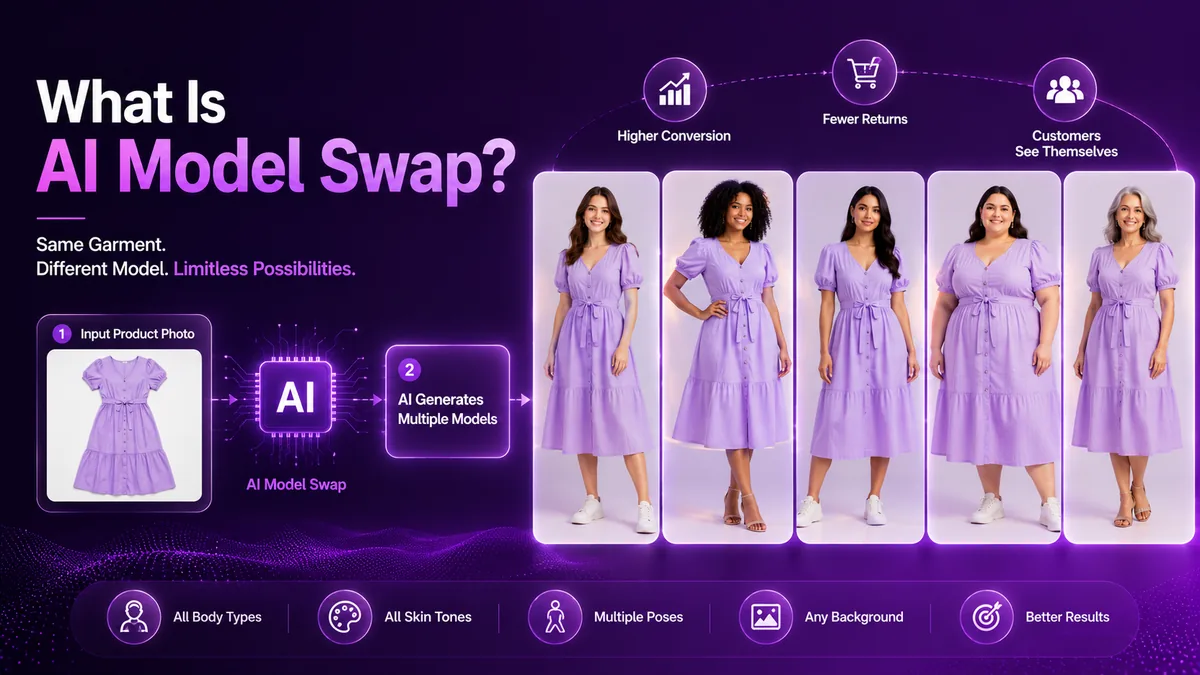
AI model swap is the process of taking an existing on-model product image and re-rendering the garment on a completely different AI-generated model, without reshooting.
The clothing stays identical: the fabric, the colour, the cut, the drape, the stitching, every physical property of the garment. The only thing that changes is the person wearing it.
That sounds simple. The execution is not.
A genuine AI model swap does not paste a garment onto a different body the way a basic photo editor would. The AI has to understand the three-dimensional physics of the garment, how it would sit, stretch, fold, and hang on a different body with different proportions, and then render that in a way that looks like a photograph taken in a studio rather than a generated image.
When it works properly, the output is indistinguishable from a real shoot. When it does not work properly, you see distortion at the garment edges, unnatural fabric physics, colour drift between the source and the output, or anatomical inconsistencies in the model. This is the quality gap that separates production-ready AI model swap tools from demo-quality ones.
What you can change with AI model swap
- Skin tone across the full spectrum
- Body type: petite, plus-size, athletic, tall, curvy
- Height and proportions
- Age: young adult, mature, senior demographics
- Ethnicity and facial features for regional market alignment
- Hair colour and style, eye colour, and overall styling
- Gender presentation for unisex or gender-fluid fits
- Background and setting
What stays the same
- The garment colour, exactly as shot
- Fabric texture and surface detail
- Fit and silhouette
- Any print, pattern, or embroidery
- Styling details like buttons, zips, seams
- The pose and framing you originally shot
Model swap is not virtual try-on
These two get confused constantly, and they work in opposite directions. Virtual try-on changes the garment on a model: you upload clothing and place it on someone, which is how a flat-lay becomes an on-model photo. Model swap changes the model under the garment: the clothing stays exactly as photographed while the person wearing it changes. If your starting point is a flat-lay on a table, you need virtual try-on first. Model swap takes it from there. Our guide to turning a flat-lay into on-model imagery covers the first half of that chain. To change the outfit in a photo you already have, see our comparison of the best AI clothes changers.
The Problem AI Model Swap Actually Solves
To understand why this technology exists and why adoption is accelerating, you need to start with a number.
Poor fit is the leading cause of apparel returns, accounting for 53% of all returns, according to Coresight Research's survey of US apparel brands and retailers, where size and fit came top ahead of colour (16%) and damage (10%). Online apparel return rates in 2026 run between 20% and 30%, with some fashion segments seeing rates as high as 50%.
Processing a single return costs between $10 and $65 per item across ecommerce once you factor in reverse logistics, labour, inspection, and restocking. Apparel sits in the middle of that band, modelled at roughly $25 to $35 all-in, and it has the highest return rate of any product category.
These are not abstract operational metrics. They are the direct cost of a shopper buying something they cannot properly visualise on their own body.
Online fashion conversion sits at roughly 2 to 3%, while shoppers in a physical store are 10 to 20 times more likely to buy, because they can try the product before deciding. The core reason for that gap is fit and fabric confidence. Static product images on a single model type give a significant proportion of your shoppers limited information about how a garment will actually look on them.
Here is the commercial chain that AI model swap interrupts:
Shopper lands on your PDP. They see the garment on a model who does not share their body type, height, or skin tone. They cannot visualise how it will look on them. They either abandon the page entirely, or they buy anyway and return when it does not match their expectation. Either way, you lose.
Showing the same product on a model that reflects the shopper is not a soft inclusivity gesture. It is a conversion and returns lever backed by hard data. Virtual try-on technology is reported to cut return rates by 20 to 30% in early deployments. Published figures vary widely by category and by how each deployment is measured, so treat that as directional rather than a benchmark, but the direction is consistent: reducing fit and appearance uncertainty reduces the returns it causes. The underlying mechanism has peer-reviewed support too, with research on advertising model body-size similarity finding that shoppers judge a product differently depending on how closely the model's body matches their own.
How AI Model Swap Works: The Technical Reality
Understanding what happens inside the process helps you evaluate whether a tool is actually doing it properly.
1Garment Segmentation
The AI first isolates the garment from everything else in the source image. Because model swap starts from a photo that already has someone wearing your product, this means separating the clothing from the model's body, skin, hair, and background.
This is where the first quality signal appears. A basic segmentation captures the rough outline of the garment. A precise segmentation captures:
- Fine edge detail on lace, fringe, mesh, and sheer fabrics
- Transparent or semi-transparent layers
- Complex silhouettes with ruffles, asymmetric hems, or layered cuts
- Accessories integrated with the garment such as attached belts or hood drawstrings
If the segmentation is imprecise, every subsequent step inherits that imprecision. A clean, well-lit source shot is the single biggest thing you control here.
2Model Conditioning
The target model is specified. On CamClo that happens in one of two ways: a written prompt describing the model you want, or a Face Reference image that the generated model is matched to at roughly 85 to 95% accuracy.
The target model is not just a silhouette. It is a full physical specification: how light hits different skin tones, how the model's proportions will interact with the garment's cut, the expression, and the background environment. All of these parameters affect how the final image reads, and the more specific your prompt is, the more predictable the output.
Face Reference is what makes catalogue consistency possible. A generic prompt gives you a different person on every product. A reference face gives you the same recurring model across your whole catalogue, or a regional brand ambassador used consistently in one market. That is the difference between a set of images that belong together and a set that were obviously generated one at a time.
3Garment-Conditioned Generation
This is the core step. The AI takes the isolated garment and the target model specification and generates a new photorealistic image. The technology underneath is a diffusion model fine-tuned specifically for garment fidelity rather than general-purpose image generation.
The key distinction here is important: the output is not a composite or a collage. It is a fully generated image where the AI renders how the garment would physically appear on that specific body. That includes realistic fabric physics: how denim creases at the knee, how silk drapes differently on a petite frame versus a tall one, how a knit stretches across a wider chest.
General-purpose image generation tools are not designed for this. They optimize for visual aesthetics, not for garment-specific fidelity. A tool that uses generic diffusion without garment-specific fine-tuning will often produce output where the fabric texture, colour, or pattern drifts between the source and the output. That is the difference between a tool built for fashion production and a tool that can generate fashion imagery.
4Quality Verification
No AI generation pipeline is right 100% of the time, so the last step is a review gate before anything enters your asset pipeline. What to inspect on every output:
- Garment edge coherence (no halos, blur, or ghosting along clothing edges)
- Colour fidelity versus the original garment
- Fabric texture preservation
- Anatomical consistency in the model
- Garment distortion, particularly around prints and seams
The economics of this step are what make it workable. On CamClo every generation lands in your results history for review before you use it, a failed generation refunds its credits automatically, and anything that comes back soft can be re-run in Balanced or Quality mode, or at 2K or 4K, for a credit or two more. Complex silhouettes and sheer fabrics are worth starting in a higher mode rather than re-running from Fast. A quality gate you can afford to apply on every image is what separates AI model swap as a production workflow from AI model swap as a demo that works 60% of the time.
Where AI Model Swap Fits in a Real Ecommerce Workflow
Product Detail Pages
The most immediate application. Most PDPs carry 4 to 8 images per product. With AI model swap, a brand that currently has one hero shot on one model type can build a full set of diversity variants without a single additional booking. A practical PDP setup might look like:
- 1 hero shot on the primary market model
- 3 additional shots on models representing different demographics and body types
- 1 size-guide variant showing proportional fit differences between body types
This gives the shopper visual confidence regardless of who they are. It also gives the brand automatic representation depth across its entire catalog.
Ad Creative Production
AI model swap is not limited to product pages. The same workflow applies to ad creative.
If you are running Meta ads and your creative shows a garment on one model type, you are showing that creative to a diverse audience of potential buyers, many of whom cannot see themselves in the ad. A model swap workflow lets you produce multiple ad variants with the same garment on different models, which opens the door to genuine audience matching.
A brand targeting both a 25 to 34 year old South Asian demographic and a 35 to 44 year old European demographic can show the same product in both campaigns with model variants that actually reflect each audience. That is a fundamentally different creative strategy than running the same image to both segments and hoping it converts.
CamClo handles exactly this workflow across its two products: AI Suite does the creative production, and Ad Studio takes it to campaign. Upload a product image, swap the model, generate the ad creative, and launch the campaign to Meta or Google Ads without leaving the platform. The model swap and the ad production happen in the same tool, which eliminates the multi-platform workflow that normally adds hours to the process. We measured what that does to click-through in our model swap ad CTR case study.
Global Market Expansion
A use case that does not get enough attention: entering a new regional market without a market-specific photoshoot.
A fashion brand expanding from the UK into Southeast Asia, the Middle East, or Latin America faces a quiet but commercially significant problem. Product photography shot for one market often does not reflect local shoppers. The same garment shown on a model who does not represent the regional audience creates friction that suppresses conversion in that market.
Traditionally, fixing this meant commissioning a local market shoot. That adds weeks to the expansion timeline and significant cost. With AI model swap, a brand can run its existing product library through region-appropriate model variants and deploy localised product pages in days rather than weeks. Same products. Local-feeling presentation. Fraction of the cost.
Size Inclusivity at Catalog Scale
For brands offering extended sizing, AI model swap addresses a problem that most solve poorly or not at all: showing every product on a model that actually represents the size being sold.
Clothing retailers experience some of the highest return rates in ecommerce. In Yotpo's fashion ecommerce survey, 88% of fashion shoppers said they had returned an item bought online in the past year, and apparel return rates frequently reach 20% to 40%. A significant driver of those returns is size mismatch, specifically the gap between what a shopper sees on a straight-size model and what they receive in an extended size.
Shooting extended sizes separately requires a separate model booking, a separate studio session, and separate post-production for every product in the size range. Most brands either cannot afford this or deprioritize it. The result is that plus-size shoppers see a straight-size model on every size 2X product page, which is both commercially damaging and a clear signal that the brand is not genuinely thinking about them.
With AI model swap, showing a size 2X product on a body that reflects what a size 2X actually looks like is a generation job. It does not require a separate shoot budget.
The Business Case: Numbers That Matter
Let us put real numbers to this for a mid-size fashion brand with 300 active SKUs that wants to show each product on three model variants.
Traditional photoshoot approach
A studio shoot day costs between $5,000 and $15,000 for a mid-range production once you add the photographer, models, stylist and studio rental. To shoot 300 SKUs on 3 models each would require multiple shoot days. A realistic estimate for the creative production alone: $45,000 to $90,000. Timeline: 4 to 8 weeks from brief to live assets. And those assets are fixed. If you want to test a different model type, add a regional variant, or refresh for a new season, you start the process again.
AI model swap approach
300 SKUs multiplied by 3 model variants produces 900 generated images. On CamClo a model swap costs 1 to 3 credits depending on generation mode and resolution, roughly $0.20 to $0.60 per image, which puts 900 images in the low hundreds of dollars rather than the high tens of thousands. Timeline: hours to days depending on batch size. And because the workflow is repeatable, adding new model variants for a new market or a new collection is another batch job, not another shoot.
At catalogue scale you do not click through 900 generations by hand. Drop the batch into the AI Suite assistant, describe the treatment once, and it fans that one step template across every image in the upload, writing a prompt tailored to each individual product photo and running several pipelines at a time. You approve the plan and the cost before anything is spent.
McKinsey finds personalization most often drives a 10 to 15% revenue lift, with company-specific results spanning 5 to 25% depending on sector and execution. Even at the conservative end, applying that to a brand doing $2 million per year in online revenue represents $200,000 in additional revenue from better visual representation at the product-image level.
The economics are not marginal. They are an order of magnitude different, and they compound with every new collection and every new market you enter.
What Separates a Production-Ready Tool from a Demo
Not every AI model swap tool delivers production-ready output. The quality difference between the best and worst tools in this category is significant enough to be worth evaluating carefully before committing to a workflow.
| What to evaluate | Why it matters |
|---|---|
| Garment fidelity | Fabric texture, colour, and fit must be preserved exactly across model variants |
| Edge coherence | No halos, blur, or ghosting along garment edges |
| Input requirements | Model swap needs an on-model source. If you shoot flat-lays, the tool needs virtual try-on too, or you are buying half a workflow |
| Face consistency | A reference-matched face keeps one recurring model across a catalog. Prompt-only tools give you a different person on every product |
| Bulk processing | Catalog-scale production requires batch generation, not single-image tools |
| Cost of a re-run | Some outputs will need regenerating. If a retry is expensive, quality control stops happening |
| Quality tiers | Sheer fabrics and intricate prints need a higher-fidelity mode than a plain cotton tee |
| Brand visual consistency | Output should match your existing catalog lighting and aesthetic |
Browser extensions and one-off demo tools are built for consumer experimentation, not catalog production. They may work on a single garment in controlled conditions and fail on complex silhouettes, sheer fabrics, or prints with intricate patterns. A production-grade tool handles your entire SKU library at consistent quality and integrates into your content workflow rather than sitting outside it.
AI Model Swap and Ad Performance: The Specific CamClo Workflow
Most discussions of AI model swap focus on the product page. The connection to paid ad performance is equally significant and less covered.
When your Meta ad creative shows a garment on a model who does not reflect a segment of your audience, that segment converts at a lower rate. Not because the product is wrong for them, but because the creative creates a representation gap at the moment of highest intent.
CamClo's workflow closes that gap at the production level rather than trying to compensate for it at the campaign management level. The process works like this:
- Upload your product photo into the AI Suite
- Select the model variant appropriate for the audience segment you are targeting, by prompt or face reference
- Generate the ad creative with that model
- Push the campaign to Meta or Google Ads from inside the same platform
The model swap, the ad creation, and the campaign launch happen in one workflow rather than across three separate tools. If you want the campaign side to run itself after that, Ad Autopilot takes over the monitoring, budget shifts and creative refresh.
For an agency managing multiple ecommerce clients across different demographic markets, this means producing genuinely differentiated creative for each audience segment without multiplying the production effort. The same garment, the right model, the right audience, the right conversion.
Key Data Points
The numbers worth remembering
- Poor fit accounts for 53% of all apparel returns (Coresight Research)
- Online apparel return rates run between 20% and 30%, with some segments reaching 50%
- Fashion ecommerce conversion sits at roughly 2 to 3%, while in-store shoppers are 10 to 20 times more likely to buy
- Virtual try-on is reported to cut return rates by 20 to 30% in early deployments, though published results vary widely by category
- Processing a single return costs $10 to $65 per item across ecommerce, with apparel modelled at roughly $25 to $35
- Personalization most often drives a 10 to 15% revenue lift, spanning 5 to 25% by sector and execution (McKinsey)
- 88% of fashion shoppers returned an item bought online in the past year (Yotpo)
- A brand with 300 SKUs showing 3 model variants replaces a $45,000 to $90,000 multi-day photoshoot with a batch generation run in the low hundreds of dollars
Show every shopper a model who looks like them
One on-model photo becomes a full set of variants across body types, skin tones, ages and markets. Try it free for 7 days, and the ad workflow is in the same platform.
Try AI Model SwapFrequently Asked Questions
What is AI model swap?
Taking a photo that already shows a person wearing your product and re-rendering the garment on a different AI model, without reshooting. The fabric, colour and fit stay identical. The skin tone, body type, age, ethnicity or styling changes.
How is it different from virtual try-on?
They work in opposite directions. Virtual try-on is how a flat-lay becomes an on-model photo: you upload clothing and place it on someone. Model swap changes the model under the garment, so the clothing stays exactly as photographed while the person wearing it changes. Virtual try-on also has a shopper-facing use, where the buyer sees the garment on their own body. CamClo covers both in the same platform, and most brands chain them.
Does it work on all garment types?
Yes on most, when the source image is clean and well-lit. Model swap needs a photo that already has someone wearing the product, so if all you have is a flat-lay, run virtual try-on first and swap from the result. Very sheer fabrics or complex prints need higher-quality segmentation to preserve detail, so start those in Balanced or Quality mode rather than Fast.
Can I use it for ad creative?
Yes. CamClo lets you swap the model, create the ad, and launch to Meta or Google Ads in one workflow. No separate tools needed.
How long does it take?
A single swap generates in under a minute. A 300 SKU catalogue at three model variants each is 900 images, which you run as a bulk batch in the AI Suite assistant rather than one at a time: one step template fanned across every image, several pipelines running at once, with the plan and the total cost shown for approval before anything is spent.
Does the garment colour change?
It should not. Colour fidelity is a primary quality metric. If you see colour drift between source and output, the tool is not doing proper garment-conditioned generation.
How many variants should I produce per product?
Start with three: your primary model, one body diversity variant, and one regional variant if you sell across markets. Moving from one model to two or three per product is where most of the conversion impact comes from.
What does it cost versus a photoshoot?
A studio shoot day runs $5,000 to $15,000. A model swap on CamClo costs 1 to 3 credits depending on mode and resolution, roughly $0.20 to $0.60 per image, with Face Reference adding 2 credits. For 300 SKUs at three variants each, the difference is tens of thousands of dollars versus a few hundred. Full plan pricing is on the pricing page.
Can I keep the same face across my whole catalogue?
Yes. Face Reference mode takes a photo of the exact person you want and matches the generated model to it at roughly 85 to 95% accuracy, which is how brands keep a consistent recurring model or a regional brand ambassador across a catalogue. Make sure you have that person's consent and image rights.
Will it replace photographers?
For catalog production, largely yes. For editorial campaigns and hero imagery where art direction matters, no. Most brands end up shifting shoot budgets toward campaign content and letting AI handle catalog scale.
Sources
- Coresight Research and Alvanon on sizing, fit and online returns (Sourcing Journal), the source of the 53% fit figure
- Yotpo fashion ecommerce returns survey (Chain Store Age), the source of the 88% figure
- Ecommerce return rate benchmarks by category, 2026
- Returns processing cost per item by vertical, 2026
- Average conversion rate for fashion ecommerce
- McKinsey, The value of getting personalization right or wrong is multiplying
- Shopify, product photography pricing
- Vazquez et al., advertising model BMI similarity and perceived product quality, Journal of Consumer Behaviour
Return rate, conversion and personalization figures cited here are drawn from published ecommerce industry research and reflect the ranges reported in those sources. Photoshoot costs vary considerably by market, team and production standard. CamClo credit costs are current at time of writing and are subject to change; see the pricing page for the live figures. Generation quality depends on source image quality, and no AI generation pipeline is correct 100% of the time.


