

Table of Contents
The best AI virtual try-on tool depends on who is doing the trying on. For brands that need on-model product photos and try-on videos from a flat lay, CamClo AI, FASHN and The New Black lead; for shoppers who want to see clothes on their own photo, Google's free Try On is the quickest start. Below we compare 7 virtual try-on tools for clothes, with what each is best for and what it costs.
We checked every price on the vendor's own site. Here is how we compared them.
Try-on for brands and try-on for shoppers
"Virtual try-on" covers two different jobs, and most tools are built for one of them.
For brands and sellers
You upload a product photo and pick a model, and the tool makes an on-model image, and sometimes a video, for your product page, marketplace listing or ads. CamClo AI, FASHN, The New Black and Kling work this way.
For shoppers
You upload a photo of yourself and see a garment from a store on your own body before you buy. Google's Try On, Picsart and FitRoom are the common choices here.
Want to understand what happens inside the model? Our explainer on how virtual try-on for clothes works covers the technology.
Quick picks by use case
Try-on, model swap, flat lay to model and try-on video ads from one product photo.
Separate try-on flows for shoes, jewelry, bags and hats, from $15 a month.
Kolors Virtual Try-On in about 10 to 13 seconds, then animate it with Kling.
Try tops, bottoms and dresses on your own photo in Google Search and Shopping.
From $8 a month billed yearly, with 10 free credits a month to test.
AI virtual try-on tools compared
| Tool | Best for | Paid plans from | Free option | Built for | Video |
|---|---|---|---|---|---|
| CamClo AI | On-model photos and try-on videos from a product photo | $49/mo (150 credits) | 7-day trial for $1, 20 credits | Brands and sellers | Yes: image to video and try-on video ads |
| FASHN | Try-on API and fitting rooms | $19/mo (200 credits); API $0.075 per image | 10 credits for new accounts | Brands and developers | Yes, 720p on Basic, 1080p on Pro |
| The New Black | Shoes, jewelry, bags and clothes | $15/mo (200 credits) | 3 free credits at sign-up | Brands and designers | Yes, about 10 credits a video |
| Kling AI | Try-on next to a video tool | $6.99 first month, then $8.80/mo | Basic plan, no monthly credits | Sellers and creators | Yes, with Kling's video models |
| Google Try On | Free try-on while shopping on Google | Free | Free for shoppers | Shoppers; merchants opted in automatically | No |
| Picsart | Try-on inside a photo editor | See vendor site | Free app; free trial on most plans | Shoppers and creators | Separate video tools |
| FitRoom | Low-cost plans for small stores | $16/mo ($8/mo billed yearly) | 10 credits a month, watermarked | Small stores and shoppers | Not listed |
Entry paid plan on each vendor's official site, in US dollars, billed monthly unless marked. Picsart's plan page showed some prices in another currency from our location, so we could not confirm a US dollar price. Promotions and yearly billing change the price, so confirm before you buy.
The best AI virtual try-on tools, tool by tool
Each entry covers what the tool does, its price, its strengths and limits, and when you should pick it instead of CamClo AI.
1. CamClo AI
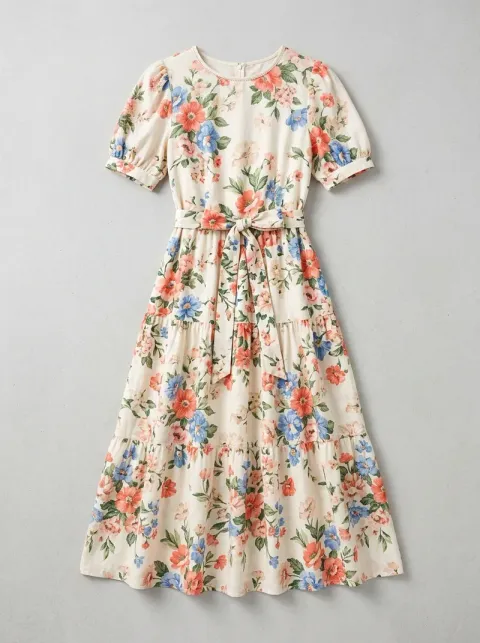
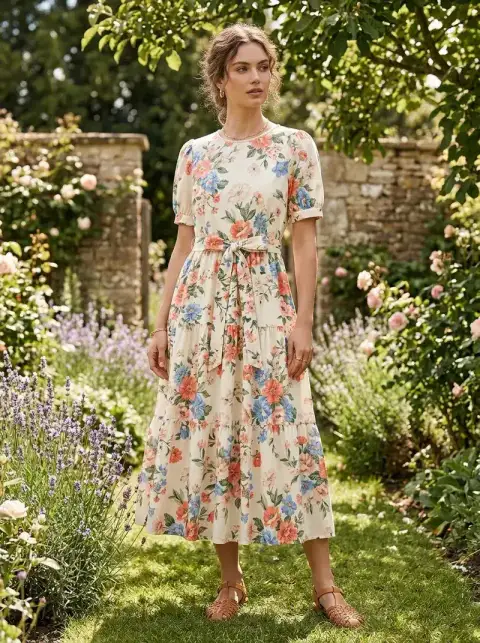
Best for: on-model product photos and try-on videos from a product photoCamClo AI is an AI studio for fashion and ecommerce brands. Its Virtual Try-On puts your garment, shoes or jewelry on a model from its library or on a model photo you upload, with nothing to mask and no garment category to pick. From the same account you can swap the person in a photo you already have, turn a flat lay into an on-model photo, and animate the result into a video or a try-on video ad.
- Virtual Try-On: one product photo plus a model. Choose Fast, Balanced or Quality mode at 1K, 2K or 4K, and add an optional styling note such as "tuck in the shirt". Each image costs 1 to 3 credits.
- Around the try-on: Model Swap changes the person in an existing photo while the garment, pose and lighting stay the same. Product Photography turns a flat lay into an on-model photo without a model photo.
- Video: animate a try-on image in Image to Video, from 3 to 30 seconds depending on the model, or make a UGC Virtual Try-On video ad, one of 15 video ad formats, where a person holds up the piece and then wears it.
- A whole catalogue: in the AI assistant, describe a job such as a try-on and then a short video for each product, approve the plan, and it runs across your batch of photos.
- Pricing: plans from $49 per month with 150 credits, which covers 50 to 150 try-on images depending on mode and resolution. Start with a 7-day trial for $1 with 20 credits.
Strengths
- Starts from your product photo, on a library model or your own model photo
- Clothes, shoes, jewelry, bags and eyewear, with no masks or garment categories
- Try-on, model swap, flat lay to model and video in one account
- Up to 4K images, and try-on video ads with the script written for you
Limits
- Can seem a little expensive next to a single try-on tool, but the credits also cover model swaps, flat lay to model photos and try-on videos and ads, not just one raw try-on image
To see examples and how it works, visit the AI virtual try-on tool for clothes, shoes and jewelry. To change the person in photos you already have, see AI model swap for fashion photos.
2. FASHN
Best for: a try-on API and fitting rooms for your own storeFASHN is a fashion-only AI platform with a web app, an iOS app and a developer API. Its Virtual Try-On shows clothing, shoes or accessories on a model from its library or on an uploaded photo of a person, for campaign images or for a fitting room where shoppers upload their own photo on your site.
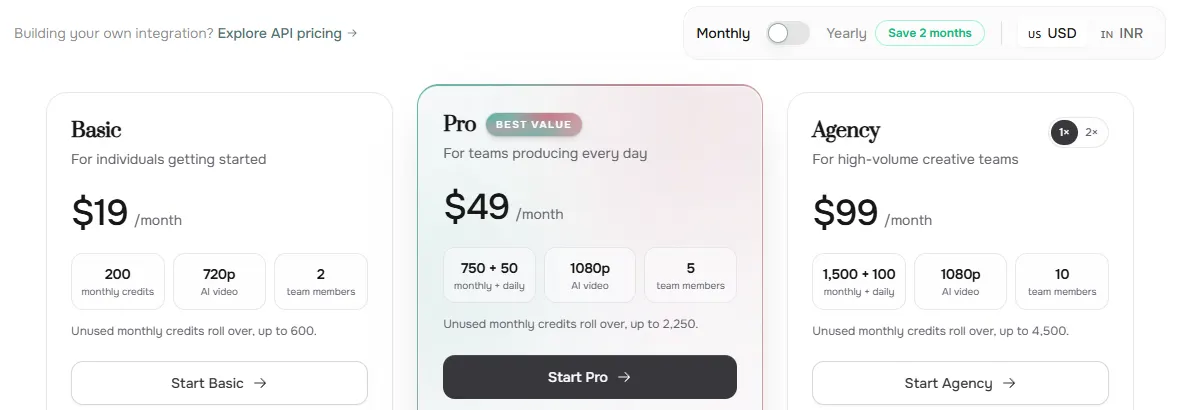
- Pricing: Basic is $19/month with 200 credits and 720p video. Pro is $49/month with 750 monthly plus 50 daily credits and 1080p video. Agency is $99/month. Yearly billing saves about two months.
- Per image: a try-on in the app costs 1 to 3 credits by mode and resolution. The API costs $0.075 per credit with a $7.50 minimum, and Virtual Try-On v1.6 uses 1 credit per image.
- Free: 10 credits for every new account.
Strengths
- Built only for fashion, with try-on, model swap, product to model and consistent models
- An API for building try-on into your own site or app
- Images up to 4K, and unused monthly credits roll over up to a cap
Limits
- Video is 720p on Basic; 1080p starts on Pro
- Uploading your own custom faces needs Agency at $99/month
- A fitting room on your site needs developer work through the API
Pick this instead of CamClo AI if you want to build try-on into your own store or app through an API, or you only need still try-on images at a low, fixed cost per image.
3. The New Black
Best for: shoes, jewelry, bags and clothes on modelsThe New Black is an AI fashion studio for brands and designers. Its try-on puts clothes, shoes, bags, jewelry and headwear on a model you supply, with a separate flow for each, and the same workspace adds model walks, product and model 360s, UGC videos, lookbooks, tech packs and a Brand Manager that connects to Shopify.
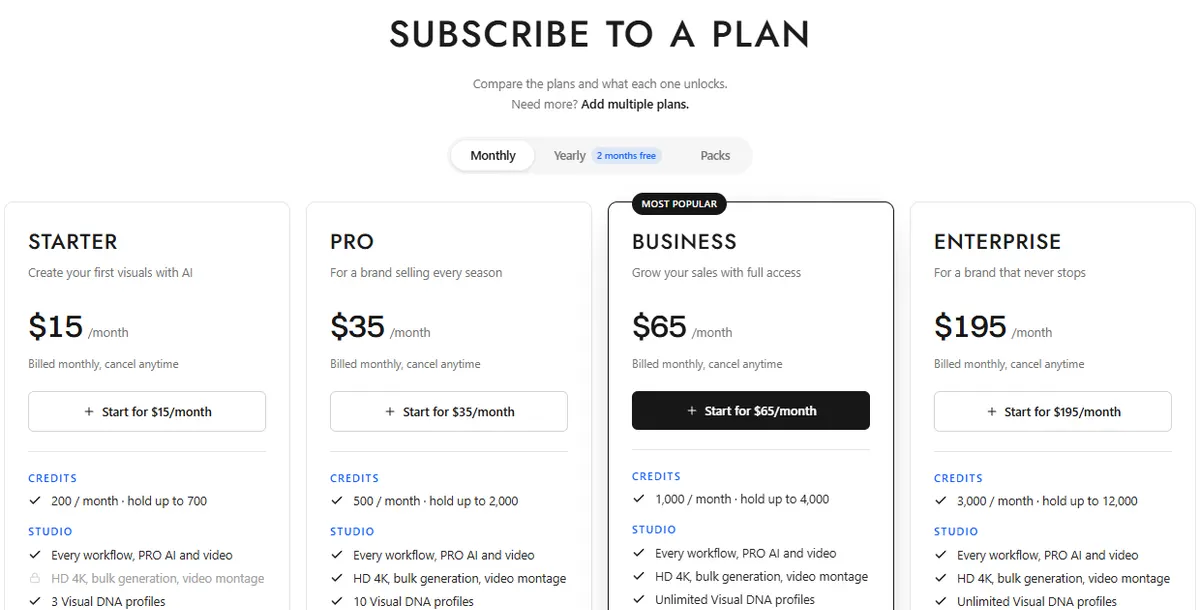
- Pricing: Starter is $15/month with 200 credits, Pro $35 with 500, Business $65 with 1,000 and Enterprise $195 with 3,000. Yearly billing gives two months free. The New Black says 1 credit is about 1 image and 10 credits about 1 video.
- Free: its try-on page says a new account opens with three free credits.
Strengths
- Dedicated try-on for shoes, rings, necklaces, bracelets, bags and hats
- Video tools such as model walk and 360 views in the same studio
- Credits roll over while a plan is active
Limits
- HD 4K and bulk generation start on Pro, not Starter
- Launching ad campaigns from the studio needs Business at $65/month
- A broad studio, so try-on is one tool among many to learn
Pick this instead of CamClo AI if accessories are most of your catalogue and you want a separate try-on flow for each type, or you also want lookbooks and tech packs in the same tool.
4. Kling AI
Best for: quick try-on next to a video toolKling is Kuaishou's video and image platform. Its Virtual Try-On runs on the Kolors image model, which is where Kolors Virtual Try-On lives today: upload a product image and a model image, and Kling's guide says the result arrives in about 10 to 13 seconds, in five aspect ratios. You can then animate it with Kling's video models.
- Pricing: Standard is $6.99 for the first month, then $8.80/month on monthly billing (list price $10), with 660 credits a month. The pricing page does not list what a try-on costs in credits, so see vendor site.
- Free: a Basic plan with no monthly credits.

Strengths
- Results in seconds
- Try-on and video generation in one account
- A low first-month price
Limits
- Kling's guide advises against bottoms-only images, intricate prints and folded garments
- It also advises against seated, leaning or complex poses in the model photo
- The entry price is promotional, and try-on credit costs are not listed
Pick this instead of CamClo AI if you already make videos in Kling and want quick try-on images of simple tops and dresses to animate there.
5. Google Try On
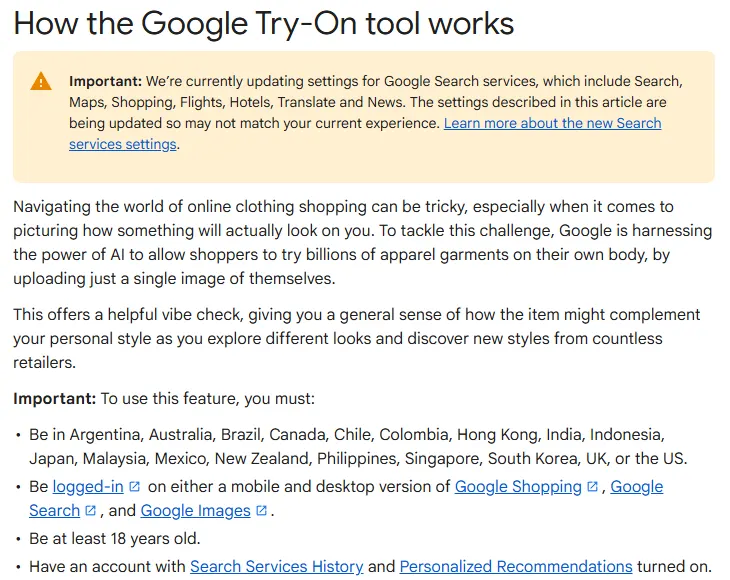
Best for: free try-on for shoppers on GoogleGoogle's Try On lets shoppers upload one photo of themselves, a full-body shot or a selfie, and see garments from many retailers on their own body in Google Search, Shopping and Images. For merchants, Google's help center says any merchant with a shopping feed that is eligible for free listings is opted in automatically. Developers can also call Google's Virtual Try-On model, virtual-try-on-001, on Vertex AI, which returns 1 to 4 images per request. Google's separate Doppl try-on app is no longer available: its Google Labs page and its App Store listing no longer load.
- Price: free for shoppers, and merchants are included through free listings. For the Vertex AI model, see vendor site.
- Who can use it: signed-in shoppers aged 18 or over in the US, the UK, India, Japan, Brazil and other listed countries.
- What you can try on: tops, bottoms and dresses, plus shoes according to Google's merchant help. Lingerie, swimwear and accessories are not supported.
Strengths
- Free, with nothing to install
- Works across products from many retailers
- Nothing to set up for merchants with eligible free listings
Limits
- Only on Google, not on your own product pages
- No Try it on button on sponsored Shopping ads
- Needs sign-in and personalization settings turned on
Pick this instead of CamClo AI if you are a shopper checking how a garment might look on you, or a merchant who wants try-on in Google's free listings at no cost.
6. Picsart
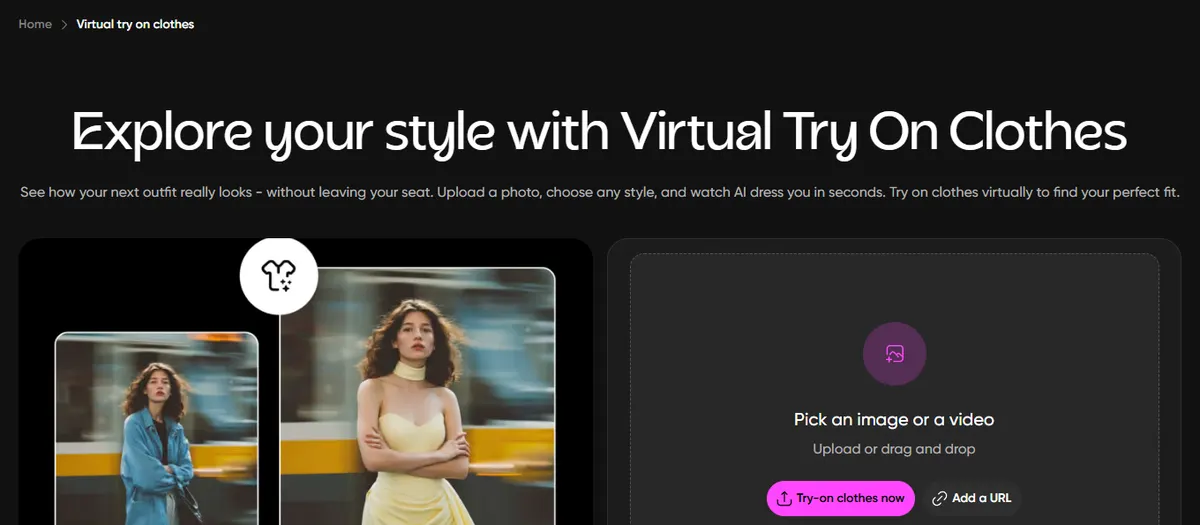
Best for: trying outfits on your own photo inside a photo editorPicsart is a photo and video editor. Its Virtual Try On Clothes tool lets you upload a photo and pick an outfit category, from dresses and wedding gowns to tops, pants, men's wear and costumes. When we checked, the tool ran on GPT Image 2.
- Pricing: Picsart's plan page showed some prices in another currency from our location, so see vendor site.
- Free: a free app, and Picsart says most plans include a free trial, depending on account history.
Strengths
- Try-on sits inside a full photo and video editor
- Outfit categories for quick ideas, from dresses to costumes
- Web and mobile apps
Limits
- Built for personal styling and creative edits rather than catalogue production
- Try-on is one tool in a large app, not a dedicated fashion product
- We could not confirm a US dollar price
Pick this instead of CamClo AI if you want to try outfits on your own photo and then keep editing the picture in the same app.
7. FitRoom
Best for: low-cost still try-on for small storesFitRoom, from SilverAI JSC, is a web and iOS try-on app. Upload an outfit and a model photo, or pick a model from its collection of women, men, kids and older models, and FitRoom says the result usually takes 10 to 15 seconds. It also sells a try-on API.
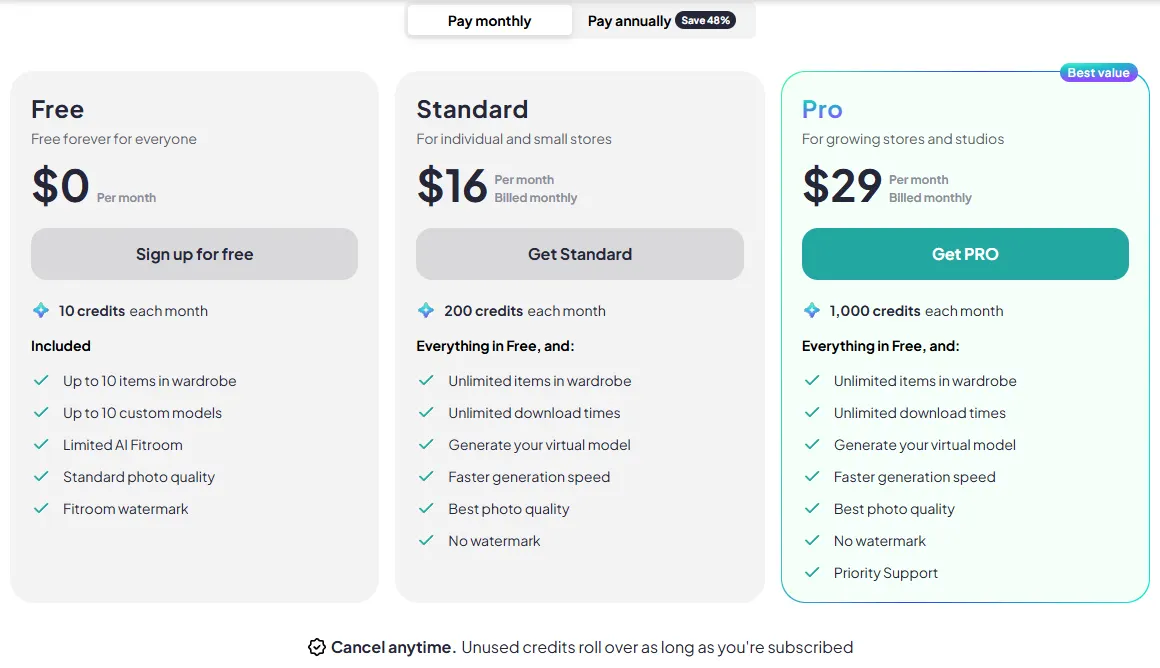
- Pricing: Standard is $16/month with 200 credits a month, or $8/month billed yearly. Pro is $29/month with 1,000 credits a month, or $15/month billed yearly.
- Free: 10 credits a month, standard photo quality and a FitRoom watermark.
Strengths
- A low price on yearly billing
- Fast results and a ready-made model collection
- A free plan every month and an API
Limits
- Free results carry a watermark at standard quality
- The pricing page does not say how many credits a try-on uses
- No video listed
Pick this instead of CamClo AI if you run a small store and want a low monthly price for still try-on images.
How we compared them
We started from Google's top results and the ranking roundups for "best AI virtual try-on", "virtual try on clothes" and "AI virtual try-on tools" in the US, and kept the tools that appeared there. We then read each vendor's official pricing, product and help pages, saved screenshots, and recorded the entry plan, the free option, what can be tried on and whether the tool makes video. Where a price was not public, or showed only in another currency, we wrote "see vendor site".
Since the last version of this page we added The New Black, Picsart, FitRoom and Google's Try On, which replaces the old Vertex AI entry, and dropped the tools that no longer rank for these searches. Kolors Virtual Try-On, which the old version listed on its own, now runs inside Kling, so it is covered there. If you were comparing SellerPic, our guide to SellerPic and FASHN alternatives covers it.
We did not run a scored benchmark, so there are no quality scores on this page. Try-on quality changes with every model release, so test your own products before you commit.
How to choose an AI virtual try-on tool
- Decide who the try-on is for. Product pages, marketplace listings and ads need a brand tool. Checking an outfit on yourself needs a shopper app.
- Start with a clean product photo. One item, fully visible, on a plain background works best; Kling's and The New Black's upload guides both ask for one. Our guide to flat lay photography shows how to shoot one.
- Check the details. Prints, logos, text and trims are where try-on slips. Compare the result with the real garment before you publish, and remember that try-on shows how a garment may look, not exactly how it fits.
- Price the image, not the plan. For example: $0.075 per try-on image on FASHN's API, about one image per credit on The New Black's $15 plan with 200 credits, or 1 to 3 credits per image on CamClo AI's $49 plan with 150 credits.
- Decide if you need motion. A dress looks different when it moves. If you sell on Reels, TikTok or Shorts, pick a tool that turns the try-on into video.
If you want to change the outfit in any photo, rather than put your product on a model, our guide to the best AI tools for changing clothes in photos compares the clothes changers.
Frequently asked questions
What is the best AI virtual try-on tool?
For brands that need on-model product photos and try-on videos from a product photo, CamClo AI covers the most in one place: try-on, model swap, flat lay to model, and video. FASHN is the pick for a try-on API, The New Black for dedicated shoe, jewelry and bag try-on, and Kling for quick try-on next to a video tool. For shoppers, Google's Try On is free.
How does AI virtual try-on work?
You give the tool two images: the product, ideally a flat lay or a clean packshot, and a person, either a model from the tool's library or your own photo. An image model then generates a new photo of that person wearing the product, keeping the pose and redrawing folds, shadows and drape. Some tools can then turn that image into a short video.
Is there a free virtual try-on for clothes?
Yes. Google's Try On is free for signed-in shoppers in the US, the UK, India and a number of other countries. FitRoom has 10 free credits a month with a watermark, FASHN gives new accounts 10 free credits, and Kling has a free Basic plan. CamClo AI has a 7-day trial for $1 with 20 credits.
What is the best virtual try-on app for shoppers?
Google's Try On is the easiest place to start because it is free and built into Google Search, Shopping and Images: upload a full-body photo or a selfie, then use Try it on for a top, bottom or dress. Picsart and FitRoom also let you try outfits on your own photo on the web or in their apps. Google's separate Doppl app is no longer available.
How much does AI virtual try-on cost?
Paid plans start at $6.99 for the first month on Kling, $15/month on The New Black (200 credits, about one image per credit), $16/month on FitRoom ($8/month billed yearly), $19/month on FASHN (200 credits) and $49/month on CamClo AI (150 credits, 1 to 3 credits per try-on image). FASHN's API charges $0.075 per try-on image.
Does Amazon offer virtual try-on?
Yes, for shoppers. Amazon's US store has a Virtual Try-On page in its Clothing, Shoes & Jewelry department, which Amazon describes as using AI to render clothing onto your image, and its shopping app uses augmented reality for items such as sunglasses and makeup. It works on products sold on Amazon, so it does not make images for your own store.
Can AI virtual try-on handle shoes, jewelry and bags?
Some tools can. CamClo AI and FASHN accept shoes and accessories as the product image, and The New Black has separate try-on flows for shoes, jewelry, bags and hats. Google's Try On covers tops, bottoms, dresses and shoes, but not accessories, lingerie or swimwear. Kling's guide is written for clothing.
Can I turn a virtual try-on image into a video?
Yes, in several tools. In CamClo AI you can animate a try-on image in Image to Video, or make a UGC Virtual Try-On video ad where a person holds up the piece and then wears it. FASHN, The New Black and Kling also make video from an image. Check prints and logos frame by frame, because video models can change small details.
Is virtual try-on worth it for a clothing brand?
For product photos it usually is: one flat lay can become on-model images on several body types without booking a shoot. Test your hardest items first, such as prints, sheer fabrics and structured jackets, and compare the results with a real photo before you replace a shoot. Try-on shows how a garment may look, not exactly how it will fit.
Putting your products on models?
Try CamClo AI for 7 days for $1, with 20 credits.
See plans and the $1 trial

