

Table of Contents
Ghost mannequin AI turns a clothing photo, shot on a model, a mannequin, a hanger or laid flat, into a product image where the garment keeps its worn shape with nobody inside, and it redraws the parts a body hid, such as the inside of the collar. Free options include Photostudio.io (3 images a month) and AdWorker (free starter credits, no account), and most paid plans we checked start at $10 to $15 a month, or $4.90 for a one-time credit pack. Below: how the effect is made by hand and with AI, the tools compared, and the checks to run before you publish.
We checked every price and feature on the vendor's own site. Here is how we checked.
What the ghost mannequin effect is
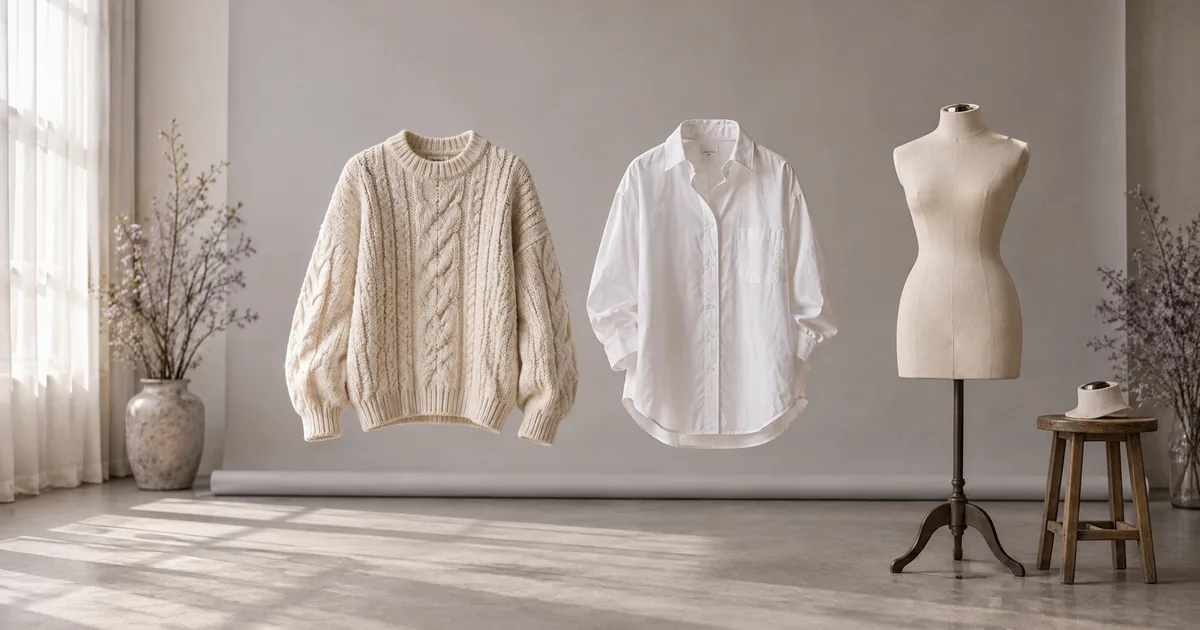
The ghost mannequin effect, also called the invisible mannequin or hollow man effect, shows a garment holding the shape it has when worn, with no model or mannequin in the frame. The shoulders are filled, the collar stands open and you can see the inside back of the neck, as if an invisible person were wearing it.
Stores use it because it shows cut and structure without a body in the way, and because a catalog shot this way looks uniform: the same angle, scale and light for every product. It sits between a flat lay and an on-model photo.
| Shot | What it shows | What it takes | Amazon US main image, adult clothing |
|---|---|---|---|
| Flat lay | The whole garment, its color and details, laid flat | A surface and a camera overhead | No: main images must be on a model |
| Ghost mannequin | The worn shape, neckline and structure, with no body | A mannequin and retouching, or an AI tool | No: same rule |
| On-model | Fit, drape and length on a person | A model shoot, or an AI model | Yes |
Amazon rule from its US Seller Central clothing image guide. For how to shoot the first kind, see our flat lay photography guide.
How ghost mannequin photos are made by hand
The traditional effect is a composite of two or more photos, not a single shot.
- Dress a mannequin with removable parts. Photographers use forms whose neck, chest or arm pieces come off, and pin or clip the garment at the back so it sits smoothly at the front.
- Shoot the front, then the back, with the camera, lens height and lights locked so every product in the catalog matches.
- Shoot the inside of the neck. Take the neck piece off, or turn the garment inside out, and photograph the inside back of the collar with its label. Joining this photo to the front is known as neck joint editing.
- Composite it in an editor. Cut out the garment, remove the mannequin, place the inside-neck photo behind the front opening, shape it to fit, add a soft inner shadow and put the result on a white background.
Studios price it as an extra. ProductPhotography.com lists white-background photos from $33 each plus $30 per photo for ghost mannequin, and soona lists ghost mannequin styling at $129 an hour. Our guide to product photography costs covers the rest of a shoot budget.
How AI ghost mannequin tools work
AI tools replace the second photo and the retouching. You upload one photo of the garment on a model, on a mannequin, on a hanger or laid flat. The tool finds the garment, removes the body, mannequin or hanger and the background, and generates the parts that were never photographed: the inside of the collar, the back of the neck and the insides of the sleeves.
That last step is generated, not recovered. The AI draws a plausible interior, which is why every result needs the checks further down this page. Some tools let you add real information: AdWorker takes an optional inside-label photo and a second angle, The New Black asks which garment to recreate when a photo shows several, and Photoroom has an optional prompt field. Vendors use the term 3D ghost mannequin for results where the shoulders and sleeves have volume and the collar stands open, rather than a flat cutout.
The vendors are candid about where it struggles. The New Black's feature page says sheer and lace garments can come back cloudier, that open backs, halternecks and deep cowls make the AI invent an interior it can barely see, and that a tightly cropped garment cannot be completed convincingly. AdWorker says results on lace or mesh may vary.
Can you do it with a prompt?
General AI image editors can attempt the effect from an instruction such as:
Remove the mannequin and the background. Keep the garment exactly as it is, including color, print, buttons and length. Show it as if worn by an invisible body, with the inside back of the collar visible. Pure white background.
We did not test general image models for this page. The dedicated tools below add garment-type and angle settings and, in some cases, an inside-label input. Either way, run the same checks before you publish.
Manual vs AI ghost mannequin
| By hand | With AI | |
|---|---|---|
| Photos per view | A main photo plus an inside-neck photo | One photo; some tools take an inside-label photo too |
| What you need | A mannequin with removable parts, lights, a camera and a retoucher | A clean photo on a model, mannequin, hanger or flat surface |
| Inside of the collar | Photographed, so it is real | Generated, so it must be checked |
| Cost per image | Studio add-ons such as $30 a photo on top of the shot | 1 to 5 credits on the tools that publish it, depending on quality |
| Best for | Hero products, sheer or complex garments | Large catalogs, resale stock, fast drops |
Manual prices from ProductPhotography.com. Credit costs from the AI tools' own pages below.
Quick picks
Puts the garment on an AI model, then adds back, side and close-up views.
1 credit per Standard image, and a turntable clip from front and back.
Takes an inside-label photo for the collar; credit packs from $4.90.
Ghost mannequin AI tools compared
| Tool | Best for | Source photos | Cost per image | Paid plans from | Free option |
|---|---|---|---|---|---|
| CamClo AI | On-model photos from ghost mannequin or flat-lay shots (no ghost effect itself) | A garment photo; flat-lay or ghost-mannequin shots work best | 1 to 3 credits per on-model image | $49/mo (150 credits) | 7-day free trial with 20 credits |
| Photoroom | Ghost mannequin alongside other photo edits | Flat, hanging, mannequin or model | AI credits in the app; $0.10 via the API | See vendor site; API from $100/mo | Free trial; 1,000 API sandbox calls a month |
| WearView | 3D shape and 4K output | Flat lay, hanger, mannequin or model | 2 credits HD, 3 at 2K, 5 at 4K | $49/mo ($40/mo billed yearly) for ghost mannequin | No free trial; money-back guarantee |
| The New Black | Ghost mannequin plus 360 video | Model, mannequin or flat | 1 credit Standard, 3 Pro | $15/mo (200 credits) | Free credits at signup |
| AdWorker | Trying free with no account | Model, flat lay or hanger, plus an optional label shot | 1 credit (Basic mode) | Packs from $4.90 (60 credits) | Free credits, no account needed |
| Photta | Matching angles | Mannequin, hanger or flat lay | 4 credits at 2K, 5 at 4K | $14/mo ($140 a year) | Free to start, no card |
| Photostudio.io | Free monthly images | Mannequin, flat lay or hanger | 2 credits (one image) | $12/mo ($9.60/mo billed annually) | 3 images a month, no card |
| Snappyit | Making them on a phone | Flat lay, hanger, dress form or model | Not published | $12.90/mo (120 credits) | 6 free credits |
| PhotoGPT | A quick test with no login | A clothing photo, by type and angle | Not published | $10/mo (500 credits) | Try without logging in |
Entry paid plan for the listed use, on each vendor's official site, in US dollars, billed monthly unless marked. Photta's dollar prices come from the US version of its pricing page, because our browser was shown rupees. "See vendor site" means we could not confirm a US dollar price on an official page. Confirm before you buy.
The tools, one by one
1. CamClo AI
Best for: putting ghost mannequin and flat-lay shots on AI modelsCamClo AI is an AI studio for ecommerce teams. It does not make the ghost mannequin effect itself. It covers the next step: its Fashion Studio tools take the ghost mannequin or flat-lay shot you already have and turn it into on-model photos and extra catalog views, and Image to Video animates the result. That matters because Amazon requires adult clothing main images on a model, and Google Merchant Center recommends clothing worn by people. CamClo's own help center lists flat-lay and ghost-mannequin shots as the best input for its Virtual Try-On.
- Virtual Try-On: upload the garment photo, pick a model from the library (filtered by gender, age group and region) or upload your own model photo, and add an optional styling note such as "tuck in shirt". Fast, Balanced or Quality mode at 1K, 2K or 4K, for 1 to 3 credits per image.
- Product Photography: upload only the product photo and describe the model and scene, and the AI creates the model. Also 1 to 3 credits per image.
- Pose Generator: turn one on-model image into up to 12 poses of the same model in the same outfit, or pick up to 10 preset views such as back, side profile, three-quarter and close-ups. From half a credit per pose on paid plans.
- Image to video: animate the finished photo into a short clip for product pages and social media.
- Pricing: plans from $49 per month with 150 credits, and a 7-day free trial with 20 credits.
Strengths
- Starts from the ghost mannequin or flat lay you already have, with no model to book
- A library model, your own model photo, or a model the AI creates
- Back, side and close-up views from one on-model image
- Photos and video from the same garment photo
Limits
- Can seem a little expensive next to a single ghost mannequin tool, but the credits cover the on-model photo, the extra poses and the video, not just one edited image
See the virtual try-on tool for ghost mannequin and flat-lay photos and the AI pose generator for back, side and close-up catalog views.
2. Photoroom
Best for: ghost mannequin alongside your other product photo editsPhotoroom is an AI photo editor for product sellers, on the web, iOS, Android and Shopify. Its Ghost Mannequin tool takes a flat, hanging, mannequin or model photo, removes everything but the garment and reconstructs the hidden parts, in the app, in Batch or through the API. Settings include a Quality level, which changes resolution and credits used, an aspect ratio and an optional prompt.
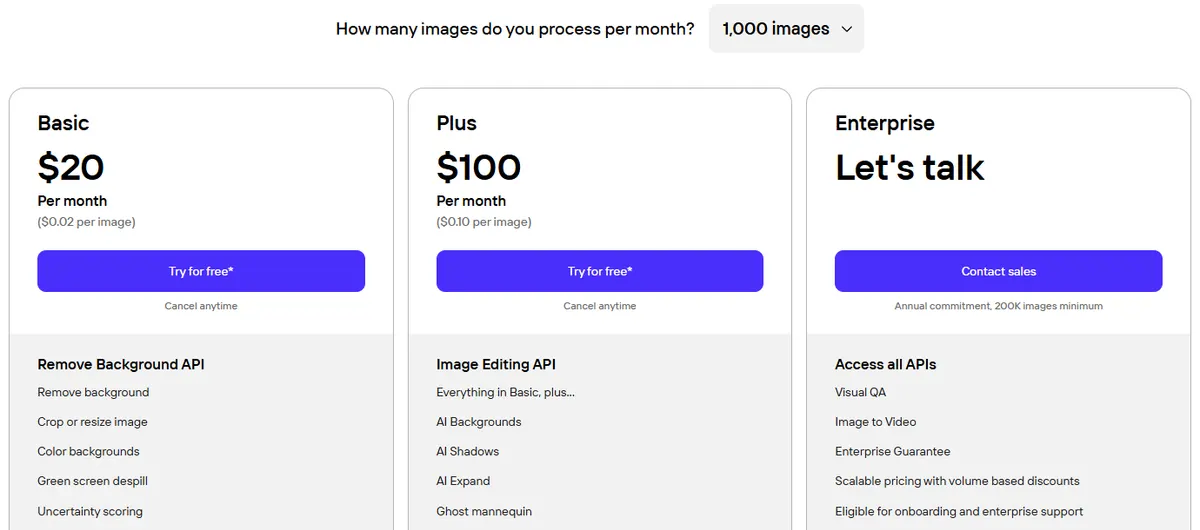
- Pricing: Ghost Mannequin uses AI credits. Photoroom's plan page showed us rupees and says credit amounts vary by region, so for US prices see vendor site. On the API, Ghost Mannequin is in the Plus plan: $100 a month for 1,000 images, or $0.10 per image.
- Free: a free trial on paid plans, and 1,000 free sandbox calls a month on the API, with a watermark on the results.
Strengths
- Accepts all four kinds of source photo
- Batch, Shopify and API routes for big catalogs
- Backgrounds, shadows and AI models in the same app
Limits
- We could not find the credit cost of one ghost mannequin image on its pricing page or help center
- API output defaults to 1K, with 2K and 4K on Enterprise, per its API docs
Pick this if you already edit product photos in Photoroom, or want ghost mannequin in your own software through an API. Our Photoroom pricing guide covers its plans.
3. WearView
Best for: 3D-shaped results and 4K outputWearView is an AI fashion photography app. Its generator takes a flat lay, hanger, mannequin or model photo and returns what it calls a 3D ghost mannequin: filled shoulders, an open collar and sleeves with volume. It exports in HD, 2K or 4K, in batches if needed.
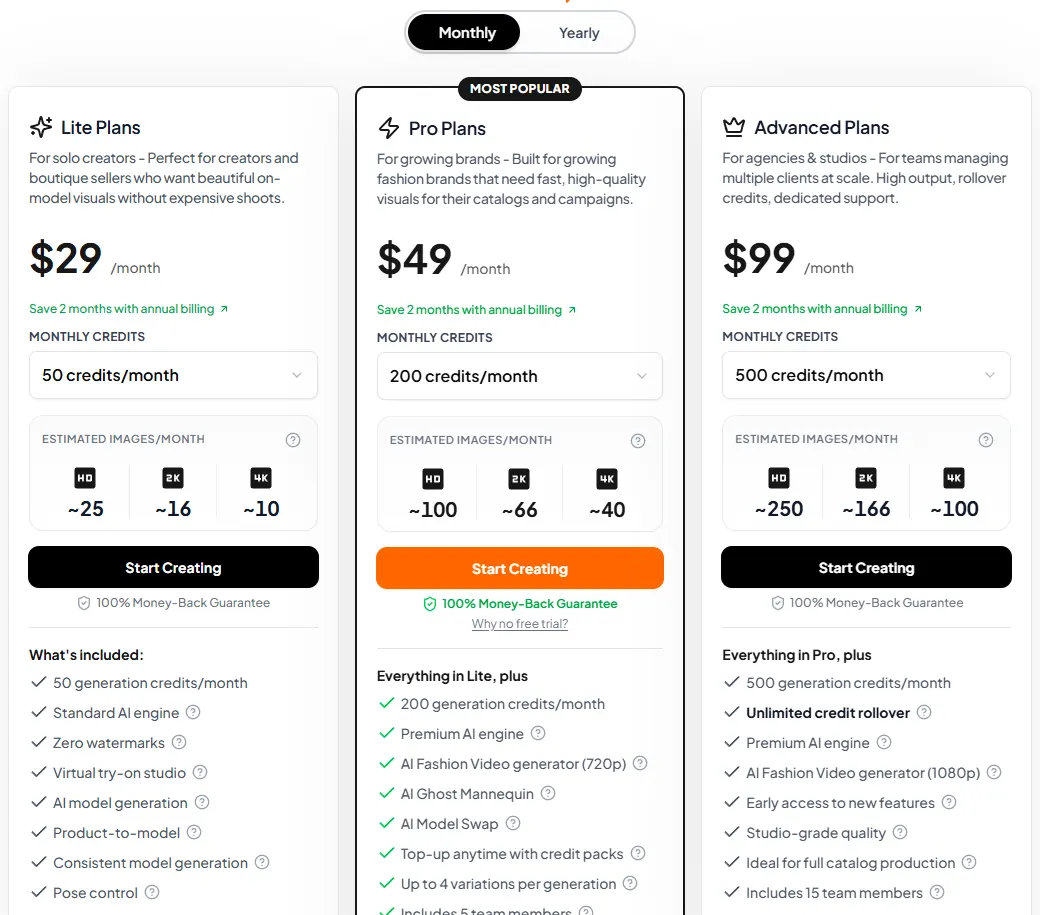
- Pricing: AI Ghost Mannequin is listed on the Pro plan, $49/month or $40/month billed yearly, with 200 credits. An image costs 2 credits in HD, 3 at 2K and 5 at 4K. The $29 Lite plan does not list it.
- Free: no free trial; the pricing page offers a money-back guarantee.
Strengths
- 3D volume from a single flat photo
- Up to 4K output
- Model swap and try-on in the same plan
Limits
- Ghost mannequin starts on the $49 Pro plan, with no free trial
- At 5 credits each, 4K images use credits fast; WearView estimates about 40 a month on Pro
Pick this if you want 3D-looking results at up to 4K and will use its other fashion tools too.
4. The New Black
Best for: ghost mannequin images plus 360 product videoThe New Black is an AI studio for fashion brands. Its ghost mannequin feature takes the garment on a model, on a mannequin or laid flat; if the photo shows several pieces, you name the one to recreate. Front and back results can go into Product 360, which makes a turntable clip of 5 to 30 seconds.
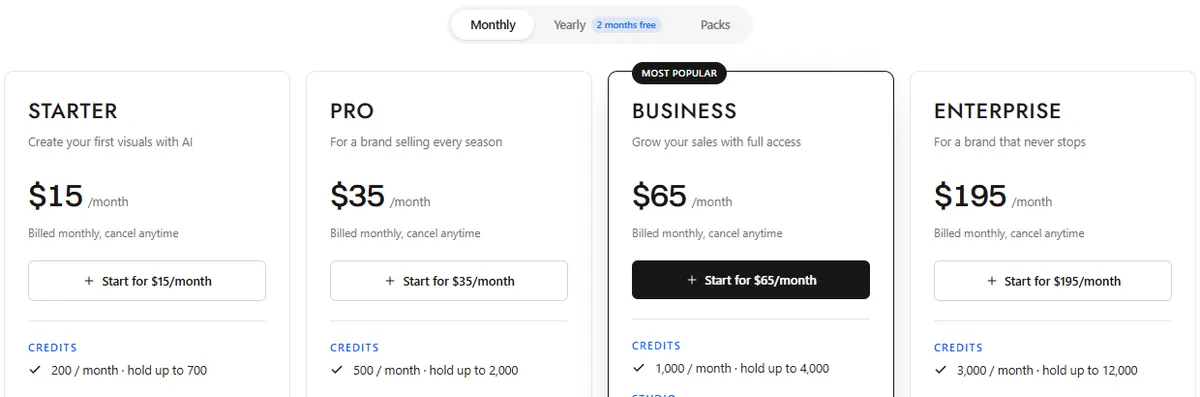
- Pricing: Starter is $15/month with 200 credits (you can hold up to 700), and yearly billing gives two months free. A ghost mannequin costs 1 credit on Standard or 3 on Pro, per attempt.
- Free: free credits at signup.
Strengths
- A low credit cost per Standard image
- Picks one garment out of a multi-piece photo
- Turntable video from the results, plus a Shopify app and API
Limits
- HD 4K and bulk generation are not on Starter
- A broad fashion studio, with many tools to learn
Pick this if you want ghost mannequin images and turntable videos in one place.
5. AdWorker
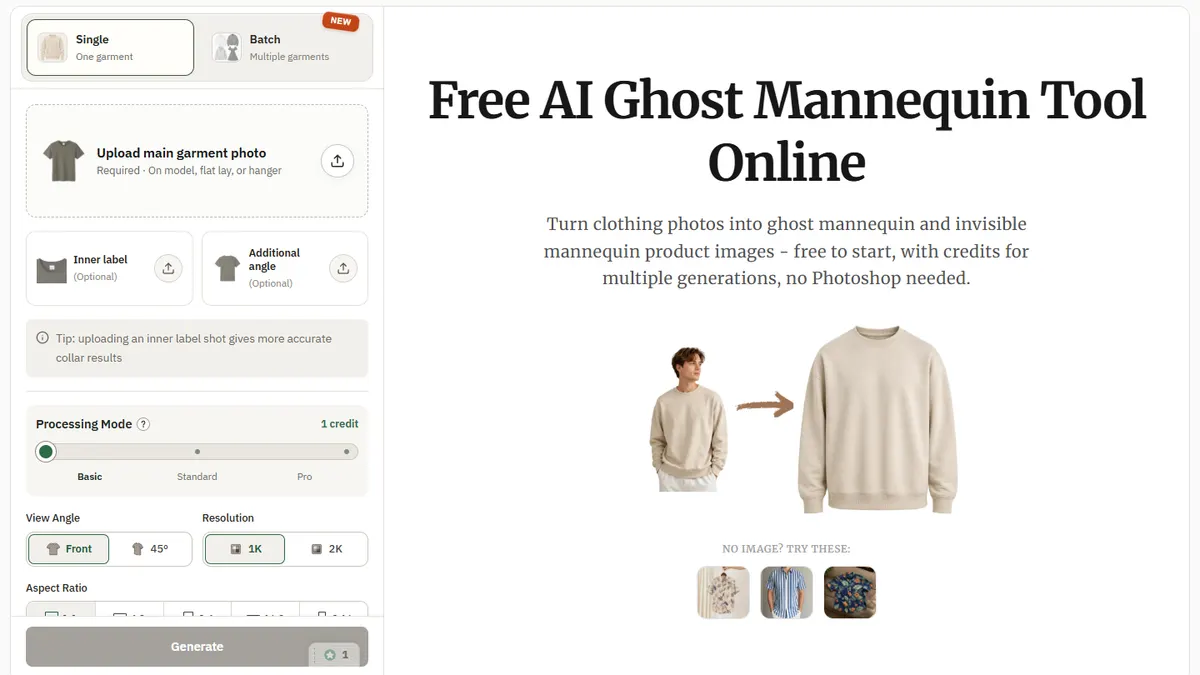
Best for: trying it free, then paying per imageAdWorker is a set of AI image tools for online sellers. Its ghost mannequin tool takes an on-model, flat lay or hanger photo, plus an optional inside-label shot, which it says gives more accurate collar results, and an optional extra angle. You choose a processing mode, a front or 45-degree view, 1K or 2K and one of five aspect ratios, for one garment or a batch.
- Pricing: credit packs from $4.90 for 60 credits up to $149 for 4,000. An image costs 1 credit in the default Basic mode.
- Free: free credits to start, with no account needed.
Strengths
- A real inside-label photo can guide the collar
- Pay-as-you-go packs, no subscription needed
- Single or batch mode
Limits
- Output tops out at 2K
- Its own FAQ says lace or mesh results may vary
Pick this if you want to test on your own garments without signing up, or you only need a few images at a time.
6. Photta
Best for: matching front, back and side viewsPhotta is an AI fashion photography app. Its ghost mannequin tool takes a garment on a mannequin, a hanger or a flat lay, and processes front, back, side and 45-degree views, keeping necklines, collars and interior labels, it says.
- Pricing: Hobby is $14/month, or $140 a year, with 150 credits a month, and each month's credits last 60 days. A ghost mannequin costs 4 credits at 2K, or 5 at 4K.
- Free: free to start, with no card required.
Strengths
- Several angles of the same garment
- 2K by default, 4K on request
- Try-on, model and pose tools in the same plan
Limits
- At 4 credits an image, Hobby's 150 credits cover 37 ghost mannequin images a month
- Hobby runs one ghost mannequin at a time
Pick this if you need front, back and side views that match across a catalog.
7. Photostudio.io
Best for: free monthly images on a white backgroundPhotostudio.io is an AI product photography platform for fashion ecommerce. Upload a mannequin, flat lay or hanger photo, and it returns a ghost mannequin image on a pure white background, keeping labels, logos and stitching as shot, it says. The same photo can also become flat lay, on-model and detail images, at 2 credits per image whichever tool you use.
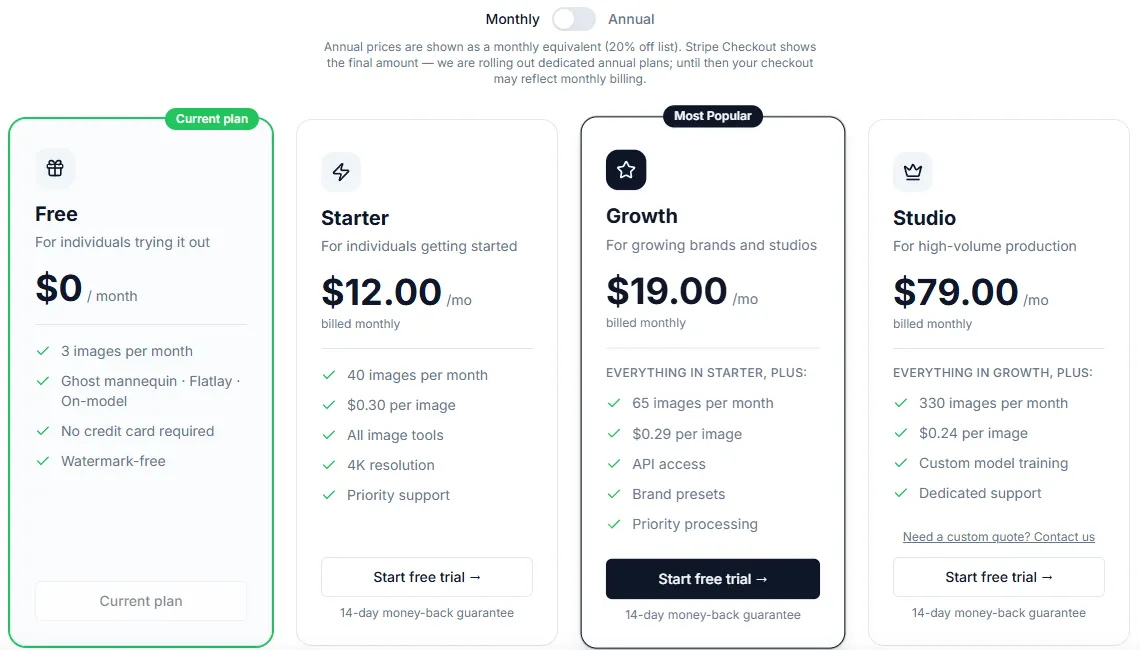
- Pricing: Starter is $12/month, or $9.60/month billed annually, for 40 images ($0.30 per image). One-time packs start at $19 for 50 images.
- Free: 3 images a month, with no credit card.
Strengths
- A free allowance every month
- One-time packs with no subscription
- A whole product-page image set from one photo
Limits
- Starter covers 40 images a month
- Its pricing page says annual plans are still rolling out, so checkout may show monthly billing
Pick this if you want a few free images every month, or white-background images for marketplaces.
8. Snappyit
Best for: making ghost mannequin images on a phoneSnappyit is an AI product photography app for the web, iOS and Android. It accepts a flat lay, hanger, dress form or on-model photo; you choose the garment category, add optional notes, and pick the quality, up to 4K, and the number of variations. Its own guide tells you to compare the result with the real garment before you download it.
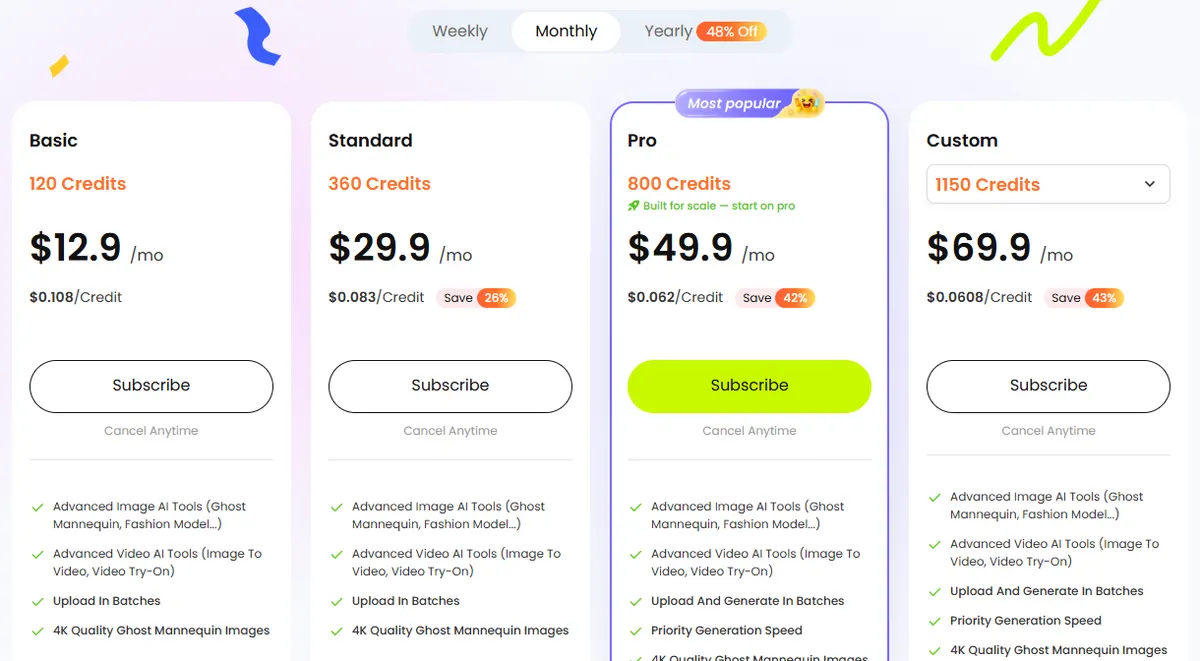
- Pricing: Basic is $12.90/month with 120 credits on monthly billing; weekly and yearly billing are also offered. The credit cost per image is not published; its FAQ says it depends on quality and the number of variations.
- Free: 6 free credits.
Strengths
- Mobile apps as well as the web
- 4K ghost mannequin images on every paid plan
Limits
- The credit cost of one image is not listed
- Basic lists batch uploads; batch generation is listed from the $49.90 Pro plan
Pick this if you shoot and list your stock from your phone.
9. PhotoGPT
Best for: a quick test without logging inPhotoGPT is a general AI photo editor with a ghost mannequin tool you can try without logging in. You upload a JPG, PNG or WebP of up to 16 MB, choose the clothing type (top, pants, skirt, outfit set and others) and pick a front, side or back angle.
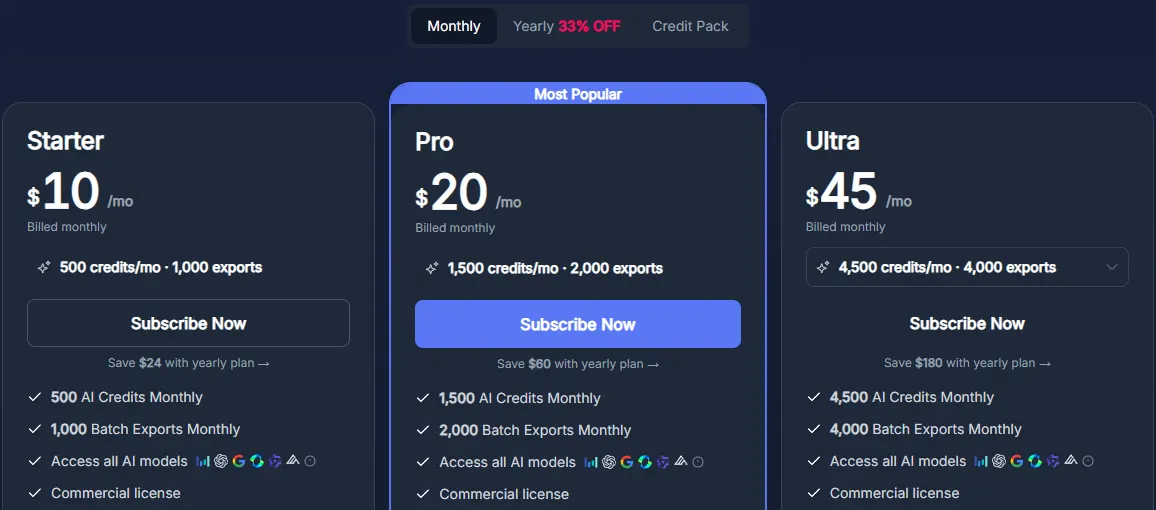
- Pricing: Starter is $10/month with 500 credits and 1,000 exports. The pricing page does not list what a ghost mannequin image costs.
Strengths
- No login needed to try it
- Clothing type and angle presets
Limits
- A general photo editor rather than a fashion specialist
- The credit cost of a ghost mannequin image is not published
Pick this if you want to see the effect on one of your garments in a minute, before choosing a tool.
How to shoot a photo for AI ghost mannequin tools
The AI can only keep what it can see, so the source photo decides most of the result.
- Show the whole garment. Nothing cut off at the hem, cuffs or shoulders. The New Black says a tightly cropped garment cannot be completed convincingly.
- Prepare it as it will be sold. Steam out creases, remove lint, and do up the buttons and zips you want closed.
- Use a plain, light background and even light, with no harsh shadows or clutter.
- Shoot straight on, and take the back as its own photo if you want a back view.
- Photograph the inside label if your tool accepts it, as AdWorker does.
- Keep the setup fixed for every product, so the whole catalog matches.
For camera height, lighting and settings, the same steps as a flat lay apply; our flat lay photography guide covers them in detail.
Quality checks before you publish
Every AI ghost mannequin image contains generated parts, so compare it with the real garment before it goes live.
- Look at the neck opening first. The New Black's advice: if the inside of the collar reads correctly, the rest almost always does. Check that no label, size tag or text has been invented there.
- Shape and length. Sleeve length, hem, side seams and proportions should match the garment, not an average one.
- Prints, logos and text. Same place, same size, not mirrored and not garbled.
- Color. Amazon requires the color in the image to match the product for sale.
- Hardware and details. Count the buttons, and check zips, pockets, drawstrings and stitching.
- Edges and see-through parts. Lace, mesh, fringe and sheer panels are where the tools themselves warn of weaker results.
- Consistency across the set. The same angle, scale, crop, shadow and background for every product.
- Size and background for the channel. Amazon's zoom needs 1,000 pixels or more on the longest side, and main images need a pure white (#FFFFFF) background.
- AI metadata. Google Merchant Center requires images created with generative AI to carry metadata saying so, such as the IPTC DigitalSourceType value, and asks you not to remove it.
Where ghost mannequin images can and cannot go
Amazon US: the clothing image guide says main images must be photographed on a model, and it prohibits main images showing a visible mannequin, hanger or holder, or folded products. The exceptions go the other way: children's and baby undergarments, leotards, swimwear and similar form-fitting items must be shown without models, and accessories must not be on models. For adult clothing, a ghost mannequin image goes in the alternate images, of which Amazon allows up to eight.
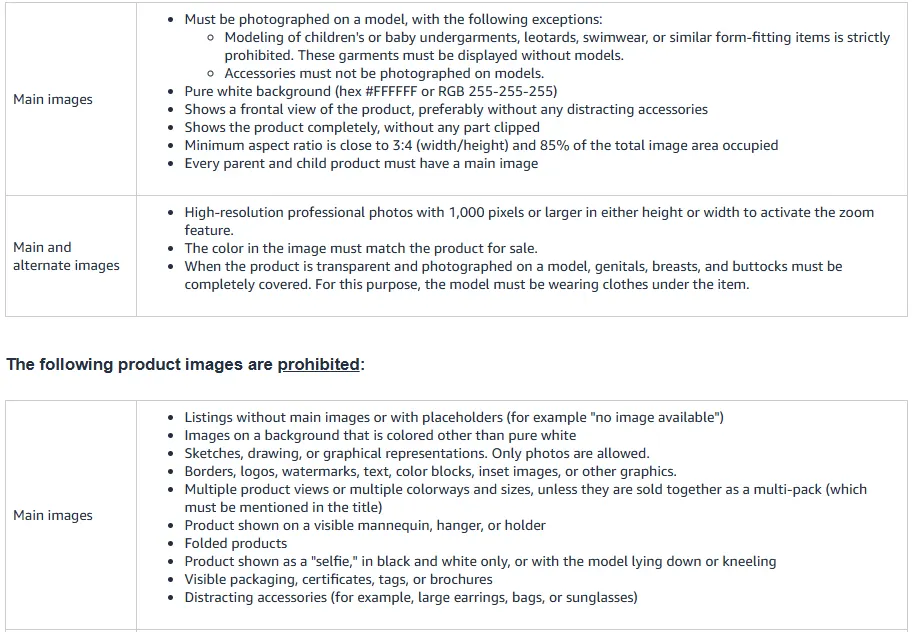
Google Merchant Center recommends images of clothing worn by people. Your own store has no such rule, so you choose the order. A set that covers both needs: an on-model photo first, then a ghost mannequin or flat lay for shape and detail, then close-ups. Our Amazon product photography guide covers the rest of Amazon's image rules.
If you already have ghost mannequin or flat-lay shots, you do not need a model shoot for the on-model image: a virtual try-on for clothing photos puts the same garment on an AI model. Our earlier walk-through of turning flat-lay clothing into AI model photos shows the steps.
How we checked
We listed the tools that rank in Google's US top 10 for "ghost mannequin ai" and two close searches. We read each tool's ghost mannequin page, pricing page and, where one exists, its help center or API docs, and saved screenshots of the pages we could view in US dollars. Photoroom's plan page and Photta's pricing page showed us rupees, so Photoroom's plan prices say "see vendor site" and Photta's dollar prices come from the US version of its page. Where a vendor does not publish what one image costs, we say so.
We did not run a scored quality test, so there are no quality scores here. Results depend on the garment and the source photo: try two or three tools on your hardest pieces, such as a sheer blouse or a deep neckline, before you commit.
Frequently asked questions
What is ghost mannequin AI?
Ghost mannequin AI is software that turns a clothing photo into a ghost mannequin image, where the garment keeps its worn shape with no model or mannequin visible. You upload the garment on a model, a mannequin, a hanger or laid flat. The AI removes the body or support and the background, then generates the hidden parts, such as the inside back of the collar.
Is there a free AI ghost mannequin tool?
Yes, for small volumes. Photostudio.io offers 3 free images a month with no card, AdWorker gives free credits with no account needed, Snappyit gives 6 free credits, The New Black gives free credits at signup, and PhotoGPT can be tried without logging in. For regular use, paid plans on these tools start at $10 to $15 a month, or $4.90 for an AdWorker credit pack.
What is the difference between a ghost mannequin and a regular mannequin?
A regular mannequin stays in the photo, so shoppers see the form under the clothes. A ghost mannequin is removed: the photographer shoots the garment on a mannequin with removable parts, then edits the mannequin out and adds a photo of the inside of the neck, so the garment looks worn by an invisible body. AI tools now produce the same look from a single photo.
Do I need a mannequin to make ghost mannequin photos?
Not with AI. Most tools on this page accept a flat lay or a hanger photo as well as a mannequin or model photo, and generate the worn shape from it. Whatever you shoot, show the whole garment with nothing cropped. For the manual method you need a mannequin with a removable neck piece.
Can a ghost mannequin image be the main image on Amazon?
Not for most adult clothing. Amazon's US clothing image guide says main images must be photographed on a model, and it prohibits a visible mannequin, hanger or holder in main images. Children's and baby undergarments, leotards, swimwear and similar form-fitting items must be shown without models, and accessories must not be on models. Ghost mannequin images of adult clothing belong in the alternate images.
Can I turn a ghost mannequin photo into an on-model photo?
Yes. Virtual try-on tools such as CamClo AI take a ghost mannequin or flat-lay shot and put the garment on a model, either one you pick or one the AI creates. CamClo's help center recommends flat-lay or ghost-mannequin shots as the input. Check prints, buttons and length against the real garment, and follow each marketplace's rules for AI-generated images.
Already have ghost mannequin or flat-lay shots?
Put them on AI models with CamClo AI. Try it with the 7-day free trial with 20 credits.
See plans and the free trial

