


Table of Contents
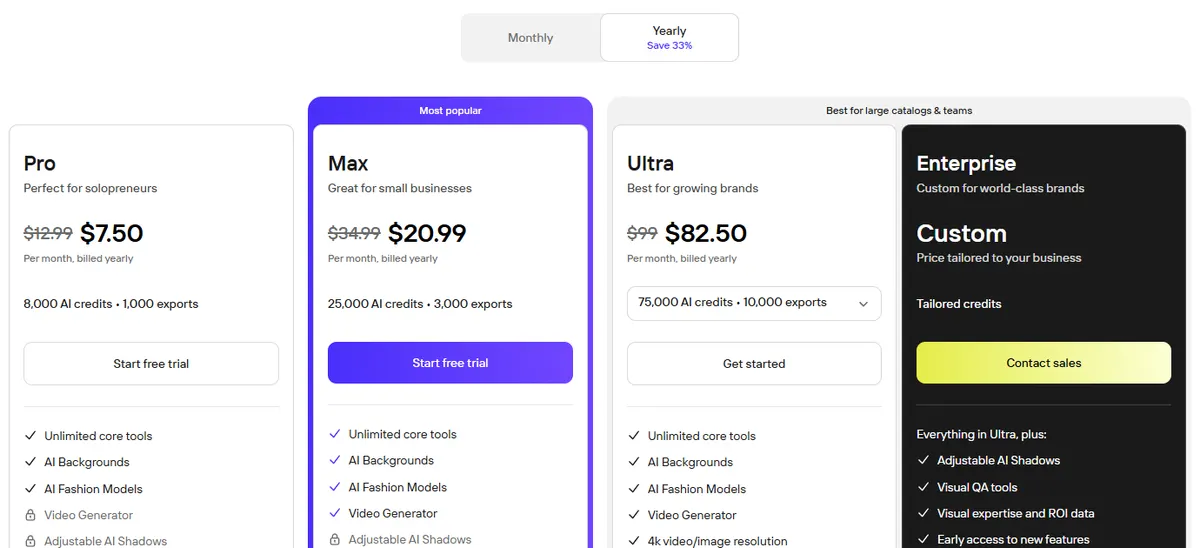
Photoroom pricing starts at $12.99 a month for the Pro plan in the US, or $7.50 a month if you pay for a year. The free plan costs $0, but it is for personal, non-commercial use only and allows 100 exports a month. Max is $34.99 a month, Ultra starts at $99, and the separate Photoroom API starts at $0.02 per image.
Below is every plan for the app, web, teams and API, what AI credits and exports actually buy, how the app store prices differ, and the alternatives worth comparing if you sell products online.
Every price comes from the vendor's own pricing page, help center or app store listing, in US dollars. Photoroom shows prices in your local currency, so the figures here are the ones it lists for the United States. Here is how we checked.
Photoroom plans and prices at a glance
| Plan | Monthly | Billed yearly | AI credits a month | Exports a month | Built for |
|---|---|---|---|---|---|
| Free | $0 | $0 | A low limit (number not published) | 100 | Personal, non-commercial use |
| Pro | $12.99 | $7.50/mo | 8,000 | 1,000 | Solo sellers and resellers |
| Max | $34.99 | $20.99/mo | 25,000 | 3,000 | Small businesses; adds video and Shopify |
| Ultra | From $99 | From $82.50/mo | 75,000 to 750,000 | 10,000 to 100,000 | Large catalogs; adds 4K |
| Enterprise | Custom | Custom | Custom | Custom | SSO, SLA, visual QA |
US prices from Photoroom's pricing page. Yearly prices are per month, paid once a year, and Photoroom's FAQ says VAT and GST are already included. Free plan limits are from Photoroom's help center.
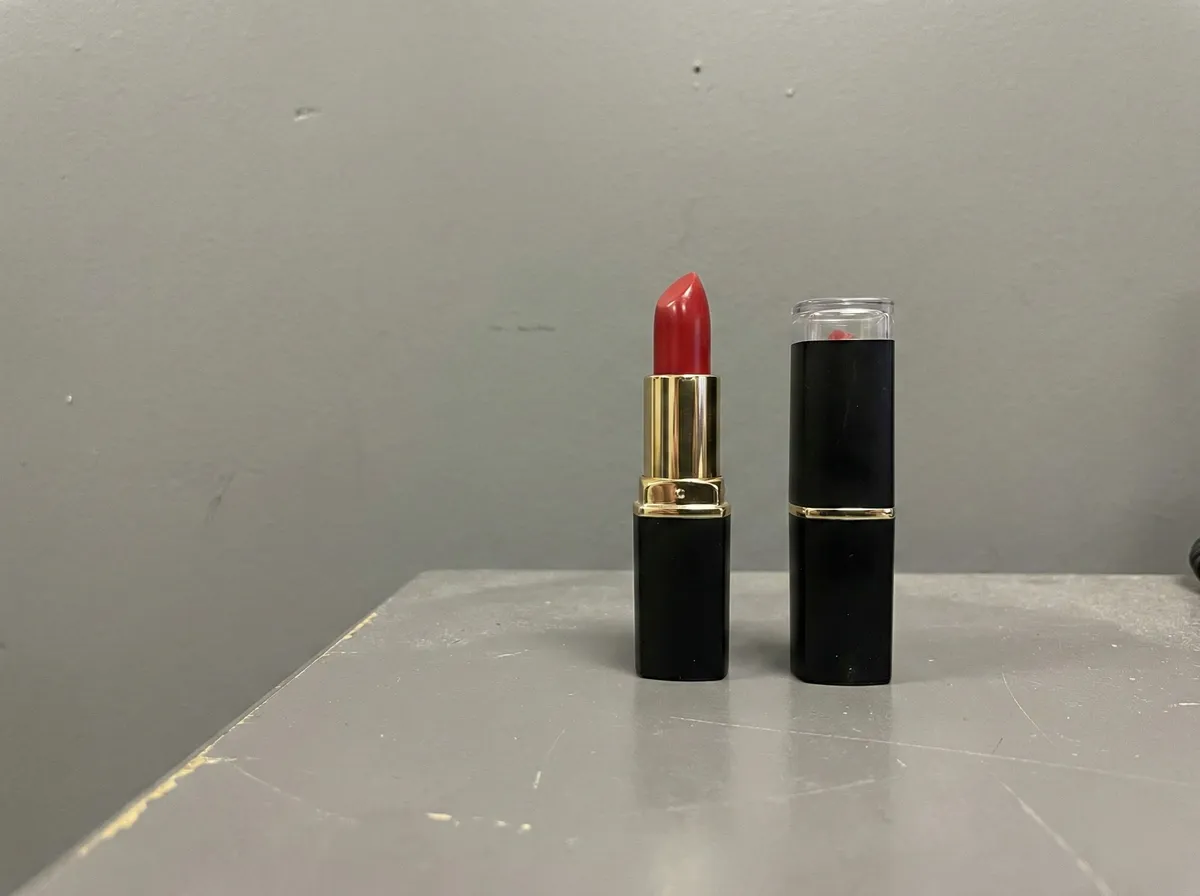
Need on-model photos of your products, not just cutouts? In CamClo AI, one flat lay or product shot becomes an on-model product photo from 1 credit at 1K, about $0.33 on the $49 Creator plan with 150 credits. The Creator plan comes with a 7-day free trial with 20 credits.
What the free plan includes
Photoroom creates a free Space for you the first time you log in. According to its help center, a free Space comes with:
- 100 exports a month. Every image you download, save, share or publish counts as one export.
- Limited features and a low AI limit. Some features are not available at all, and there is a low cap on AI generations.
- A daily limit on the basic tools. Background Remover, AI Expand, Image Enhancer, preset AI Shadows, Resize and Retouch have a daily cap that is much lower on free Spaces.
- No commercial use. Photoroom's terms grant free accounts a license "for your own personal, non-commercial purposes".
- No Batch Mode and no API. Both need a paid subscription.
That last point on commercial use settles it for most sellers: if the photos go on a store, a marketplace listing or an ad, you need a paid plan. Photoroom says free trials are often available the first time you subscribe, giving 7 days of the plan you pick, and you are not charged if you cancel before the trial ends.
What each paid plan adds
- Pro ($12.99 a month, or $7.50 billed yearly). 8,000 AI credits and 1,000 exports a month, unlimited core tools, AI Backgrounds and AI Fashion Models at 1K. No Video Generator, no 4K and no Shopify integration.
- Max ($34.99 a month, or $20.99 billed yearly). 25,000 credits and 3,000 exports, plus the Video Generator, AI Fashion Models at 2K and the Shopify integration. Photoroom's help center adds faster processing and priority support.
- Ultra (from $99 a month, or $82.50 billed yearly). Everything in Max plus 4K images and video, in four sizes (below).
- Enterprise (custom). Adds adjustable AI Shadows, visual QA tools, ROI data, early access to new features, an SLA, SSO and dedicated onboarding.
| Ultra tier | Monthly | Billed yearly | AI credits | Exports |
|---|---|---|---|---|
| Ultra | $99 | $82.50/mo | 75,000 | 10,000 |
| Ultra x2 | $198 | $165/mo | 150,000 | 20,000 |
| Ultra x5 | $495 | $413/mo | 375,000 | 50,000 |
| Ultra x10 | $990 | $825/mo | 750,000 | 100,000 |
From the Ultra menu on Photoroom's pricing page, US prices.
What Photoroom's AI credits buy
Photoroom's pricing page lists how many generations each plan's credits cover if you spend them all on one tool. Here are the ones that matter most for product photos:
| Tool | Pro | Max | Ultra |
|---|---|---|---|
| AI Backgrounds Studio (basic) | 4,000 | 12,500 | 37,500 |
| AI Backgrounds Studio HD | 1,000 | 3,125 | 9,375 |
| AI Fashion Models, 1K | Up to 1,600 | Up to 5,000 | Up to 15,000 |
| AI Fashion Models, 2K | Not included | Up to 185 | Up to 555 |
| AI Fashion Models, 4K | Not included | Not included | Up to 310 |
| Video Generator | Not included | Up to 50 | Up to 150 |
| Edit with AI | Up to 400 | Up to 1,250 | Up to 3,750 |
Photoroom's figures: "the maximum generations possible using all your credits on a single feature". Mixing tools draws on the same pool.
How credits and exports work
Every paid plan has two separate allowances, and it is worth understanding both before you pick a tier.
- Core tools cost no credits. Background Remover, Retouch, AI Product Fixer, preset AI Shadows, AI Fill, AI Expand and Resize, and Image Enhancer are included on every paid plan within fair-use limits. Applying a white background or a template does not use credits either.
- AI credits pay for generation. Video, virtual models, AI Backgrounds Studio and Edit with AI draw from one shared pool per Space. Video costs more than images, and higher resolutions cost more than lower ones. In Batch, each image counts as one generation.
- Exports cap what you can download. Every image you save, from the editor, Batch or a Shopify sync, counts as one export. The limit applies to images up to 2K, resets monthly (also on yearly billing), and Photoroom warns you at 80% and 100%. At the limit, exports pause until the reset or an upgrade.
- Running out means upgrading or waiting. Photoroom's help center lists those two options when credits run out before renewal. Failed generations are refunded automatically, and poor results can be reported for a possible refund, up to 20 a day.
- Allowances vary by country. Photoroom's FAQ says the monthly credit amount may vary by region, so a plan outside the US can come with a different number of credits.
Photoroom pricing for teams
Photoroom charges per Space, not per person. A Space is a shared workspace, and its subscription decides what everyone in it can use. According to Photoroom's help center:
- Up to 50 people per Space at no extra cost, you plus 49, on every plan including Free.
- The team shares one pool of AI credits and exports. Inviting more people does not raise the limits.
- Each Space needs its own subscription. Your Pro plan does not carry over into a teammate's Space.
- Per-seat billing is gone. Teams that used to pay for each member were moved to a plan that matches their spend; the help center's example moves a 10-seat team to Ultra.
So a team of ten pays the same as one person. The real question is whether 1,000 or 3,000 shared exports a month cover everyone. If several people each export a few hundred images, plan on Max or Ultra.
Photoroom API pricing
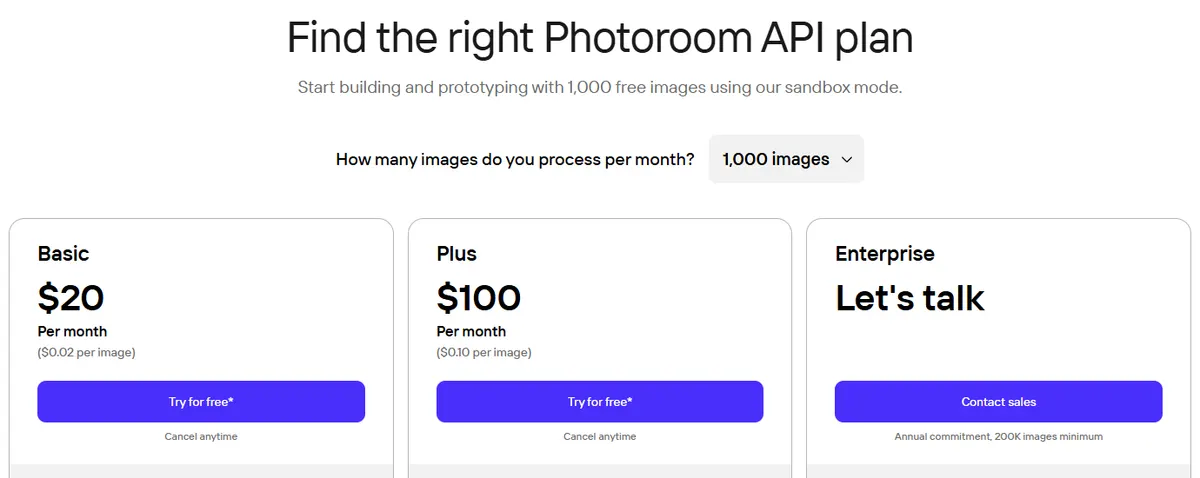
The Photoroom API is a separate product. The app plans do not include it: Photoroom's FAQ says API and MCP usage "use a separate allowance", and the help center says the API does not use AI credits. It has three plans:
| API plan | Per image | 1,000 images | 10,000 images | 100,000 images | What it covers |
|---|---|---|---|---|---|
| Basic | $0.02 | $20/mo | $200/mo | $2,000/mo | Remove Background API: cutouts, crop and resize, color backgrounds, green screen despill, uncertainty scoring |
| Plus | $0.10 | $100/mo | $1,000/mo | $10,000/mo | Image Editing API: everything in Basic plus AI backgrounds, AI shadows, AI expand, ghost mannequin, flat lay, virtual try-on, virtual model, product staging and more |
| Enterprise | Custom | Annual commitment, 200,000 images minimum, volume discounts | All APIs, including image to video and visual QA | ||
From Photoroom's API pricing page. The per-image price stays the same at every step from 1,000 to 1,000,000 images a month.
The rules that come with it:
- Free to try, no card needed. You get 1,000 sandbox calls a month on the Image Editing API (results are watermarked) and 10 free production calls on the Remove Background API when you create an account.
- Monthly plans only. Annual pricing is for teams above 200,000 images a year, through sales.
- No rollover. Unused images do not carry over to the next month, and moving to a bigger plan mid-month drops what you had left.
- Plans can cross over. A Plus call on the Basic plan is charged at $0.10, and a background removal on the Plus plan at $0.02.
- No refunds for API users, according to Photoroom's refund policy.
Here is how that compares with other product-photo APIs from the same search results:
| API | Background removal | AI backgrounds and edits | Smallest plan |
|---|---|---|---|
| Photoroom (reference) | $0.02 per image | $0.10 per image | $20/mo for 1,000 images |
| Pixelcut API | 5 credits ($0.05) | 10 credits ($0.10) for generated backgrounds, upscaling, try-on or outpainting | $10/mo for 1,000 credits |
| Claid API | 2 credits | 3 credits for AI backgrounds, 2 for AI edit or AI fashion | $59 one-time for 1,000 credits; 50 free API credits |
| remove.bg API | Pricing now on Leonardo.ai | Not applicable | See vendor site |
Pixelcut charges $0.01 per API credit. Claid sells self-serve API credits in a one-time pack of 1,000 for $59 on its API pricing page. remove.bg's pricing page now sends API buyers to Leonardo.ai, so we did not quote a price for it.
App store prices, weekly plans and refunds
- Weekly, monthly or yearly. Photoroom's help center lists all three billing periods and says there is no lifetime subscription. Weekly plans get weekly export limits: 250 on Pro and 750 on Max.
- Where you pay changes the price. On desktop you pay by credit card; on phones you pay through the Apple App Store or Google Play. Apple's US listing shows Photoroom Pro purchases of $5.99, $9.99 and $89.99 and Photoroom Max purchases of $15.99, $34.99 and $249.99, without naming the billing period for each. That may explain why prices such as $9.99 turn up in reviews and forums.
- Refunds within 7 days. Pro, Max and Ultra subscribers can ask for a refund within 7 days of their last payment. It is not guaranteed, and App Store refunds go through Apple.
- Upgrades apply at once. You get the new plan's credits straight away and the billing date resets; downgrades apply at the next renewal.
Is Photoroom worth the money?
For clean cutouts and simple backgrounds at volume, yes. Pro on yearly billing works out at $7.50 for up to 1,000 exports a month, which is under a cent per image if you use them all, and up to 50 people can share it. The monthly plans come to about 1 to 1.3 cents per export at full use.
It gets more expensive when you need more than cutouts. Video starts on Max, AI Fashion Models at 2K start on Max, 4K needs Ultra at $99 a month, and the API is billed on top of any app plan. If your catalog needs on-model product photos, new scenes and ads rather than white backgrounds, compare the alternatives below on what a finished image costs, not on the entry price. Our guide to what product photography costs in 2026 puts those numbers next to studio and freelance rates.
Photoroom alternatives for ecommerce product photos
These are the alternatives that appear in Google's current results and ranking roundups for Photoroom pricing and Photoroom alternatives, with every price checked on the vendor's site.
Cutouts, new scenes, on-model photos up to 4K, and video ads from the same product photo.
Background removal, upscaling and AI backgrounds from $10 a month.
One credit pool for upscaling, cutouts and AI photoshoots, with an API.
Templates, brand kits and background removal; remove.bg is moving into it.
| Tool | Best for | Paid plans from | Free option | Background removal |
|---|---|---|---|---|
| Photoroom (reference) | Cutouts and AI backgrounds at volume | $12.99/mo ($7.50/mo billed yearly) | Personal use only, 100 exports a month | Unlimited on paid plans (fair use) |
| CamClo AI | On-model photos, scenes and ads from one product photo | $49/mo | 7-day free trial with 20 credits | Half a credit per image |
| Pixelcut | Closest like-for-like app | $10/mo ($8/mo billed yearly) | Free plan, exports without a watermark | Unlimited on paid plans; limited on free |
| Claid.ai | Catalog enhancement and API | $15/mo ($9/mo billed yearly) | 50 free credits | 1 credit per image |
| Canva | Design suite with cutouts | US$18/mo (US$144/yr) for Pro | Free plan, up to 20 AI uses | Included in Pro's AI tools (fair use) |
Entry paid plan on each vendor's official pricing page, in US dollars, billed monthly unless marked. Confirm before you buy.
1. CamClo AI
Best for: on-model photos, new scenes and ads from one product photoCamClo AI is an AI studio for ecommerce teams. Background removal is one tool among many: the same product photo can become an on-model photo, a new lifestyle scene, a set of catalog poses or a video ad, so you are not paying for a cutout tool and a model tool separately.
- Background removal: JPG, PNG or WebP up to 20 MB, downloaded as a transparent PNG or on a white background, for half a credit per image. See the background remover for product photos.
- Product photography: turn a flat lay or product shot into an on-model photo at 1K, 2K or 4K, for 1 to 3 credits depending on the mode and resolution. See the AI product photography tool.
- Change Background: describe the scene you want and the product is placed in it, for half a credit per image on paid plans. See the AI background changer.
- Catalogue Studio: up to 12 new poses of the same model and outfit from one photo.
- Bulk: the AI Suite assistant takes up to 500 product photos in one batch and runs the same steps on each, such as a cutout or an on-model photo.
- Pricing: Creator is $49 a month with 150 credits, and Studio plans start at $99 a month with 330 credits. There is a 7-day free trial with 20 credits.

Strengths
- Goes past cutouts: on-model photos, new scenes, poses and edits in one place
- On-model photos at up to 4K from the entry plan
- Batches of up to 500 photos through the assistant
- The same photos can become product videos and video ads
Limits
- Can seem a little expensive next to a single background remover, but the credits cover on-model photos, new scenes and edits of your product, not just a cutout
If your photos also need to move, the same product shot can go into the video ad maker. For a wider look at model tools, see our comparison of AI fashion model generators.
2. Pixelcut
Best for: Photoroom-style editing at a lower monthly pricePixelcut is the closest like-for-like alternative: a web and mobile editor for product photos with background removal, upscaling, AI backgrounds, generative fill and batch editing. Its credits also pay for a long list of third-party image models.
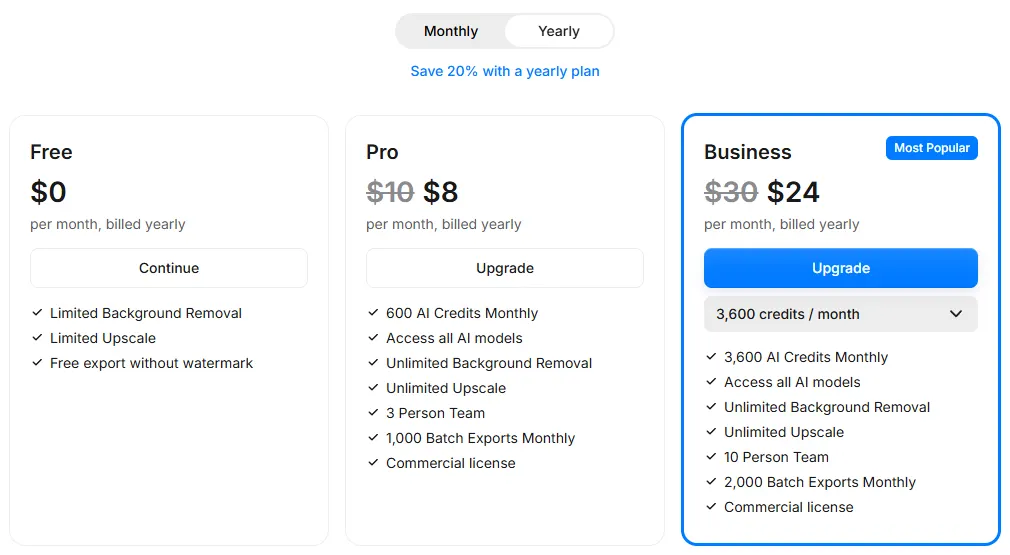
- Pricing: Pro is $10 a month, or $8 a month billed yearly, with 600 AI credits, unlimited background removal and upscaling, a 3-person team, 1,000 batch exports a month and a commercial license. Business is $30 a month, or $24 billed yearly, with 3,600 credits, a 10-person team and 2,000 batch exports.
- Free: limited background removal and upscaling, with exports free of a watermark.
- API: $0.01 per credit, from $10 a month; a background removal uses 5 credits and upscaling, generated backgrounds, try-on or outpainting 10.
Strengths
- A lower monthly price than Photoroom Pro
- A free plan that exports without a watermark
- Unlimited background removal on paid plans
Limits
- Teams of 3 or 10 people, against Photoroom's 50 per Space
- Batch exports stop at 1,000 or 2,000 a month
- API cutouts cost $0.05 each, against $0.02 on Photoroom's Basic API
Pick this instead of CamClo AI if you mainly need cutouts and simple AI backgrounds for listings, want the lowest monthly price, and like editing on your phone.
3. Claid.ai
Best for: enhancing large catalogs, often through an APIClaid.ai, from Let's Enhance, is an AI product photo suite: upscaling and enhancement, background removal, AI Photoshoot scenes, AI Fashion, AI video and outpainting. One monthly credit pool covers every tool, and an API handles whole catalogs. For upscaling on its own, see our AI image upscaler comparison.
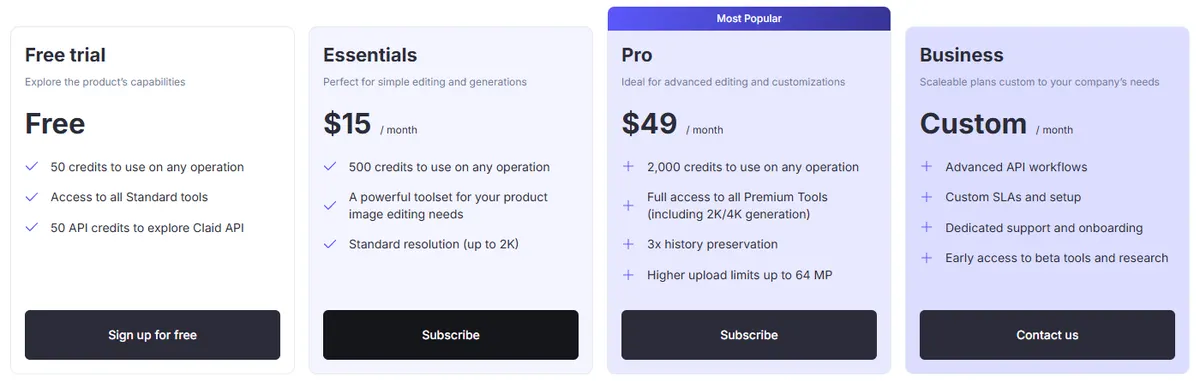
- Pricing: Essentials is $15 a month, or $9 a month billed yearly, with 500 credits and output up to 2K. Pro is $49 a month, or $35 billed yearly, with 2,000 credits and premium tools including 2K and 4K generation. Business is custom.
- What a credit buys: a background removal is 1 credit, an AI Photoshoot 4 (10 at Studio quality), an upscale 2 to 8, and 5 seconds of AI video 60.
- Free: 50 credits plus 50 API credits. API credits are sold separately from the web plans, from $59 for a one-time pack of 1,000.
Strengths
- Upscaling and enhancement for low-resolution photos
- One credit pool across every tool
- An API for catalog-scale processing
Limits
- Every background removal uses a credit
- Essentials stops at 2K; 4K generation needs Pro
- AI video is costly in credits, at 60 per 5 seconds
Pick this instead of CamClo AI if your catalog photos mostly need enhancing, resizing and cleaning at scale, especially through an API.
4. Canva
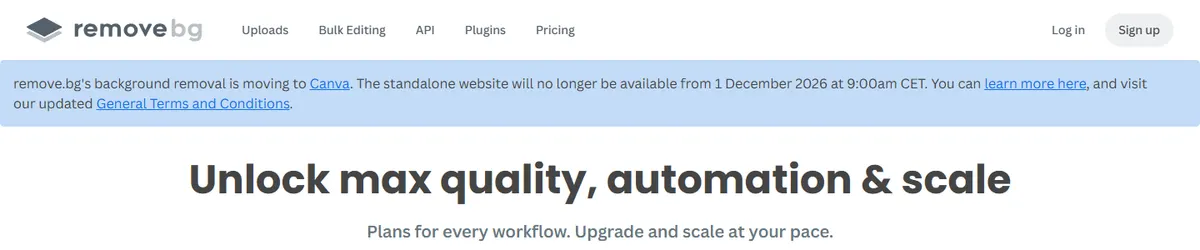
Best for: teams that design social posts and ads as well as edit photosCanva is a design platform. Its Pro plan includes AI tools such as background removal alongside templates, brand kits and social scheduling. Canva also owns remove.bg, and remove.bg's pricing page says its background removal is moving to Canva, with the standalone site closing on 1 December 2026.
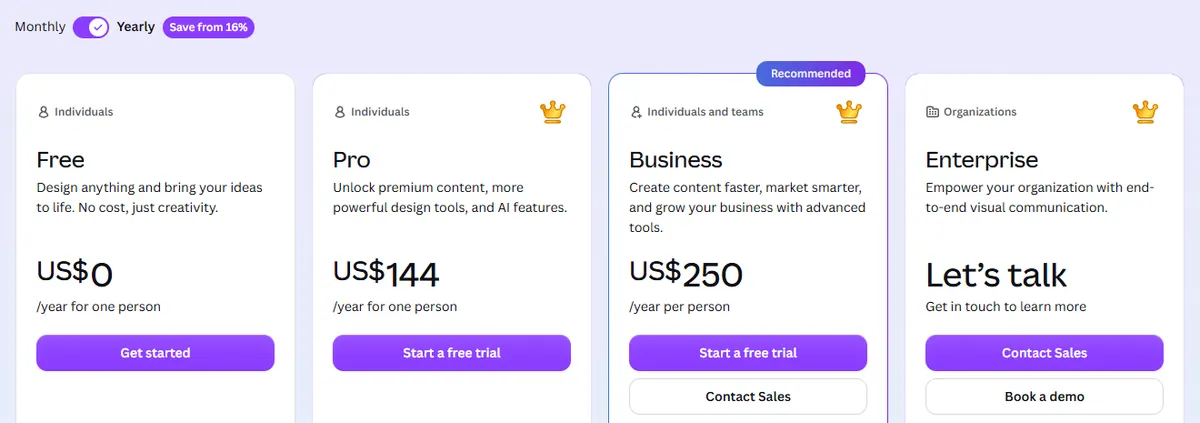
- Pricing (US prices): Pro is US$18 a month or US$144 a year for one person. Business is US$25 a month or US$250 a year per person. Enterprise is custom. Prices exclude tax.
- Free: a Free plan with up to 20 Standard or Premium AI uses, and free trials on Pro and Business.
- remove.bg users: pay-as-you-go credits expire on 1 December 2026, and API pricing has moved to Leonardo.ai.
Strengths
- Listings, ads and social posts designed in the same app
- Brand kits and team tools
- remove.bg's cutouts are moving in
Limits
- Business is priced per person
- AI use is capped by each plan's allowance
- Not built around generating product photos or on-model shots
Pick this instead of CamClo AI if your team spends as much time designing posts and ads from templates as it does editing product photos.
For a wider field of cutout tools, including free ones, see our roundup of the best background removers.
How we checked
We read Photoroom's pricing page, API pricing page and help center, switching between monthly and yearly billing and reading every Ultra tier and API volume step. Photoroom shows prices in the visitor's local currency and says credit allowances vary by country, so we recorded the prices the page lists for the United States. Mobile prices come from Apple's US App Store listing. For the alternatives, we started from the tools in Google's current results for Photoroom pricing and Photoroom alternatives, then read each vendor's own pricing page, saved screenshots, and wrote "see vendor site" wherever a US dollar price was not published. CamClo AI's details come from its own product configuration. We did not run a scored quality test, so there are no quality scores here: try your own products before you commit.
How to choose a Photoroom plan or alternative
- Count exports, not credits. Most sellers run out of exports first. Add up how many images the whole team downloads in a month.
- Check commercial rights. Photoroom's free plan is personal use only, so price in at least Pro if the images will sell anything.
- Match resolution to the channel. Photoroom's export limit covers images up to 2K, and 4K needs Ultra. Marketplaces rarely need 4K; print and zoom-heavy product pages may.
- Keep the API separate in your budget. No Photoroom app plan includes API calls.
- Price the finished image. A cutout on white, an on-model photo and a lifestyle scene cost very different amounts in every tool. Our guide to ecommerce product photography lists which shots a product page needs.
Frequently asked questions
How much does Photoroom cost?
Photoroom's US prices are: Pro at $12.99 a month or $7.50 a month billed yearly (8,000 AI credits and 1,000 exports), Max at $34.99 a month or $20.99 a month billed yearly (25,000 credits and 3,000 exports), Ultra from $99 a month or $82.50 a month billed yearly (75,000 credits and 10,000 exports), and custom Enterprise pricing. The free plan costs $0 but is for personal use only.
Is Photoroom free?
Partly. The free plan costs nothing, but Photoroom's help center says free accounts are for personal, non-commercial use only, with 100 exports a month, limited features, a low limit on AI generations and no Batch Mode or API. Selling products with the images needs a paid plan. A 7-day free trial is often available the first time you subscribe.
How much does the Photoroom API cost?
The API is billed separately from the app plans. The Basic plan (Remove Background API) costs $0.02 per image, from $20 a month for 1,000 images. The Plus plan (Image Editing API, with AI backgrounds, shadows, expand, ghost mannequin and virtual try-on) costs $0.10 per image, from $100 a month. Plans are monthly, unused images do not roll over, and Enterprise needs an annual commitment of at least 200,000 images. You can test with 1,000 watermarked sandbox calls a month.
Does one Photoroom plan cover my whole team?
Yes. Photoroom charges one subscription per Space, and up to 50 people (you plus 49) can work in a Space at no extra cost on any plan. Everyone shares the Space's AI credits and exports, and the limits do not grow when you add people.
Why is Photoroom's price different in the app?
Photoroom offers weekly, monthly and yearly billing, and on phones you pay through Apple or Google. Apple's US App Store listing shows Photoroom Pro purchases of $5.99, $9.99 and $89.99 and Photoroom Max purchases of $15.99, $34.99 and $249.99. Prices and credit allowances also vary by country, so check the price shown to you before you subscribe.
What is the best Photoroom alternative for product photos?
For on-model photos, new scenes and ads from one product photo, CamClo AI is built for the job. Pixelcut is the closest like-for-like app, from $10 a month, and its free plan exports without a watermark. Claid.ai suits catalog enhancement through an API, and Canva suits teams that also design social posts. remove.bg's standalone site closes on 1 December 2026 as it moves into Canva.
How much does CamClo AI cost for product photos?
CamClo AI's Creator plan is $49 a month with 150 credits, and Studio plans start at $99 a month with 330 credits. A background removal costs half a credit, a new scene with Change Background costs half a credit on paid plans, and an on-model photo from a flat lay or product shot costs 1 to 3 credits depending on the mode and resolution, up to 4K. The same credits also pay for video ads made from the photo. There is a 7-day free trial with 20 credits.
Need more than cutouts from your product photos?
CamClo AI has a 7-day free trial with 20 credits.
See plans and the free trial

