
CamClo AI vs Botika
Pick CamClo AI if you want on-model photos plus poses, edits, video and ads from one account; pick Botika if a human team retouching every photo matters most.
 Kush AFounder, CamClo AIUpdated September 29, 2026
CamClo AI
An AI studio for ecommerce and fashion brands that makes on-model photos, new poses, edits, videos and ads, and runs Meta and Google Ads campaigns.
Botika
An AI fashion photography platform that puts clothing from flat lay, mannequin or on-model photos onto its own AI models, with human retouching on yearly plans and short videos.
The short answer
For most ecommerce and fashion brands, CamClo AI is the better pick: it costs less per on-model photo at entry-plan prices, works from written instructions and your own models, and adds poses, edits, video, ads and Meta and Google Ads campaigns to the same account. Botika is a focused clothing photo tool whose standout is human retouching on yearly plans, so it suits teams that want a done-for-you fix service more than creative range.
Choose CamClo AI if
- You want more than model photos: try-on, model swaps, new poses, edits, video and ads all draw on one credit balance.
- You sell shoes, bags, jewelry or other wearables as well as clothing.
- You want to describe what you need in words, such as a styling note, the model you want or an edit, instead of only picking presets.
- You shoot whole catalogues: up to 500 products in one assistant request with the same model pinned, and up to 12 new poses from one photo.
- You want the photos to become video ads and campaigns that run on Meta and Google Ads with approvals you control.
Choose Botika if
- You want a human team to fix flawed photos: yearly plans include 2 or 3 retouch rounds per photo, with fixes in up to 1 or 2 business days depending on the plan.
- You want unused credits to roll over for as long as you stay subscribed.
- You are a large label that wants exclusive AI models, exclusive backgrounds and custom retouching briefs on an Enterprise contract.
- You want an iOS app as well as the web platform.
CamClo AI vs Botika at a glance
| CamClo AI | Botika | |
|---|---|---|
| Best for | Ecommerce and fashion brands that want product photos, videos, ads and campaigns in one account | Clothing brands that want studio-style on-model photos with retouching included on yearly plans |
| What it makes | On-model photos (try-on and product photography), model swaps, new poses, edits, videos, image ads and video ads | On-model photos from flat lay, mannequin or on-model shots, plus short videos made from those images |
| Product types | Clothing, accessories, shoes and other wearable products | Clothing; jewelry, footwear and cosmetics are not supported as products (Advanced can add your own footwear to flat lay outfits), and accessories may be removed or changed |
| Models and control | Model library filtered by gender, age group and region, plus your own saved models; written styling notes, prompts and face references | More than 50 AI models and 37 backgrounds (a limited selection on Pro); no text prompts and no custom models except on Enterprise |
| Poses and angles | Catalogue Studio makes 1 to 12 new poses of the same model and outfit from one photo | Pick a pose, including back poses, for flat lay and mannequin looks; on-model photos keep the original pose |
| Output resolution | 1K, 2K or 4K on any paid plan | 2K on Pro, 4K on Advanced and Enterprise |
| Batch runs | Up to 500 products in one AI Assistant request, with a model or style pinned across them | Bulk upload in the on-model workflow; flat lay and mannequin looks are made one at a time, with no daily cap |
| Video | Image-to-Video on models such as Seedance 2.5 (up to 30 seconds), Veo 3.1, Kling 3.0 and Gemini Omni Flash (up to 4K) | Short clips in motion styles such as zoom in, casual and runway walk, 5 credits each; length not published |
| Ads and campaigns | Image Ads, Video Ads in 15 formats, Remix Ads up to 90 seconds, and Ad Autopilot for Meta and Google Ads with approvals and spending caps | No ad maker or campaign management; you publish the images and videos yourself |
| Retouching and fixes | Self-serve: regenerate in Quality mode or fix details with Smart Edit, Magic Eraser and Generative Fill; failed generations refund their credits | Human retouch rounds on yearly plans (2 on Pro, 3 on Advanced); white-glove quality control on Enterprise |
| Starting price and trial | $49 a month (Creator, 150 credits); 7-day free trial with 20 credits | $55 a month (Pro, 50 credits) or $46 a month billed yearly; 8 free credits to test |
| Apps and integrations | Web app; connects your Meta and Google Ads accounts for Ad Autopilot | Web platform and an iOS app; its Shopify App Store listing says the app is not currently available |
Shaded cells mark the stronger option for an ecommerce brand.
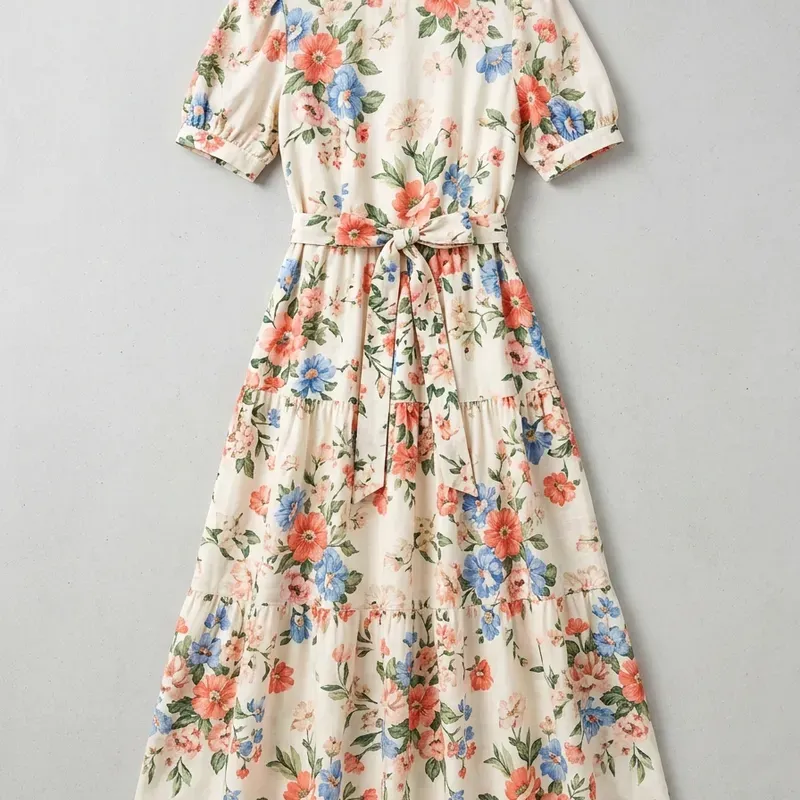
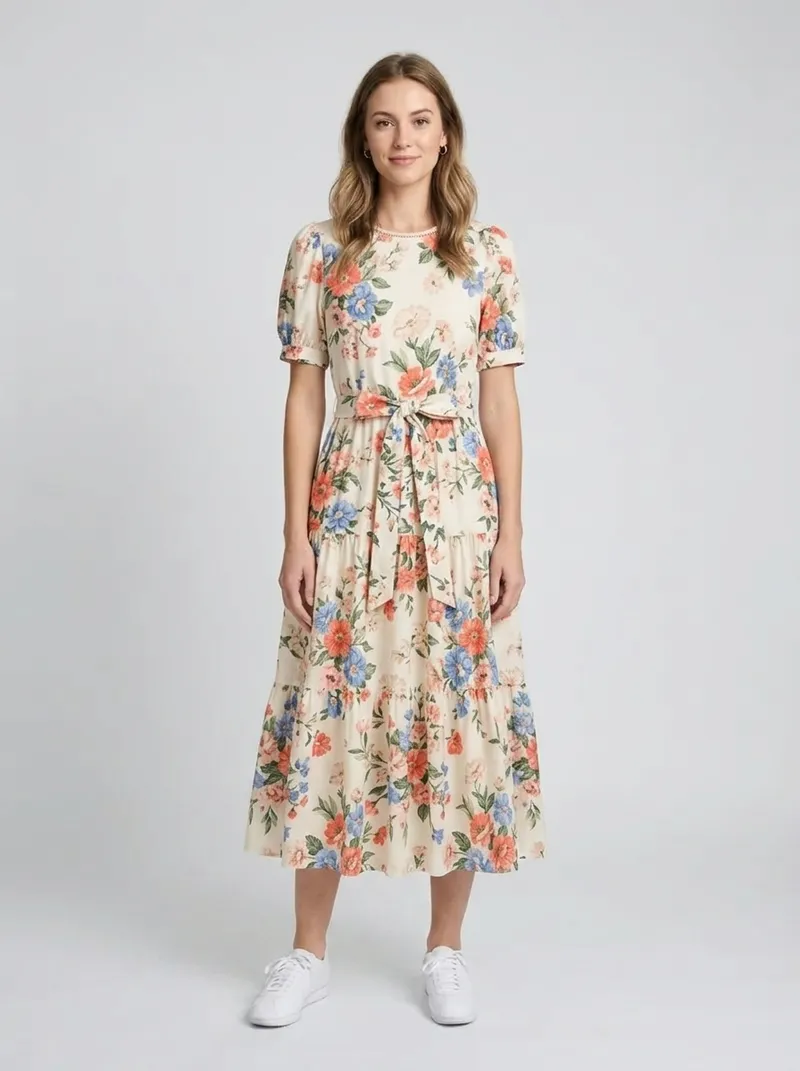
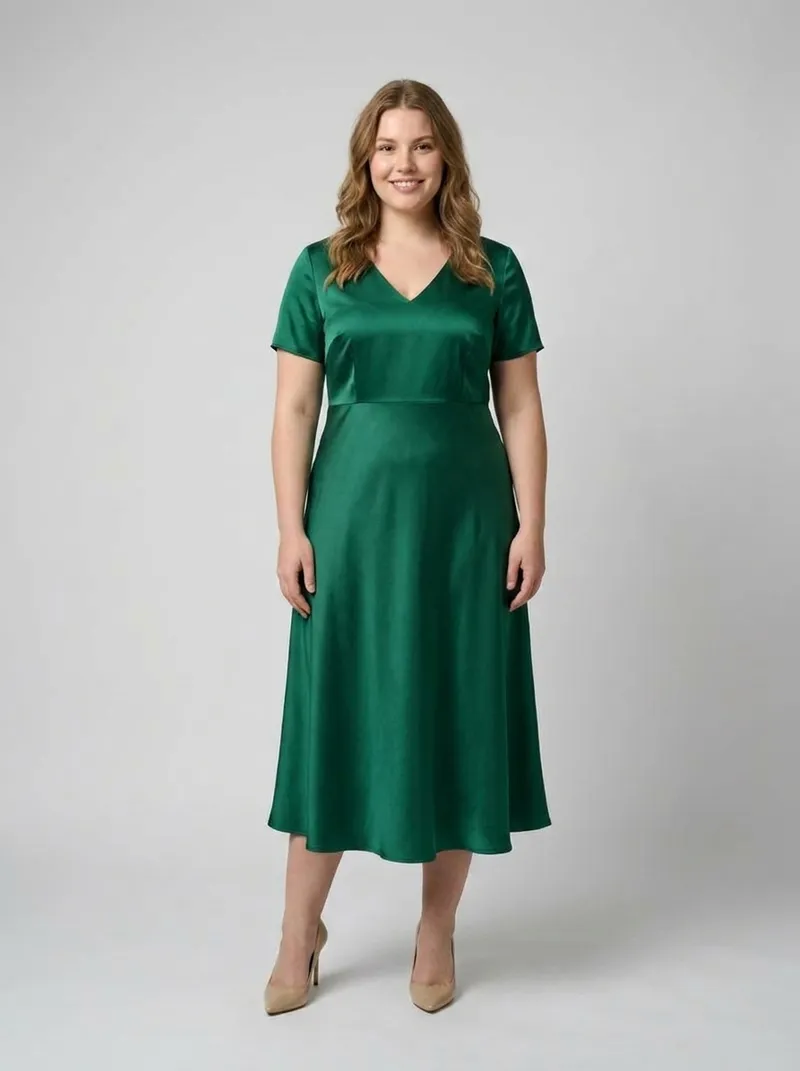
What CamClo AI makes
How each tool makes on-model photos
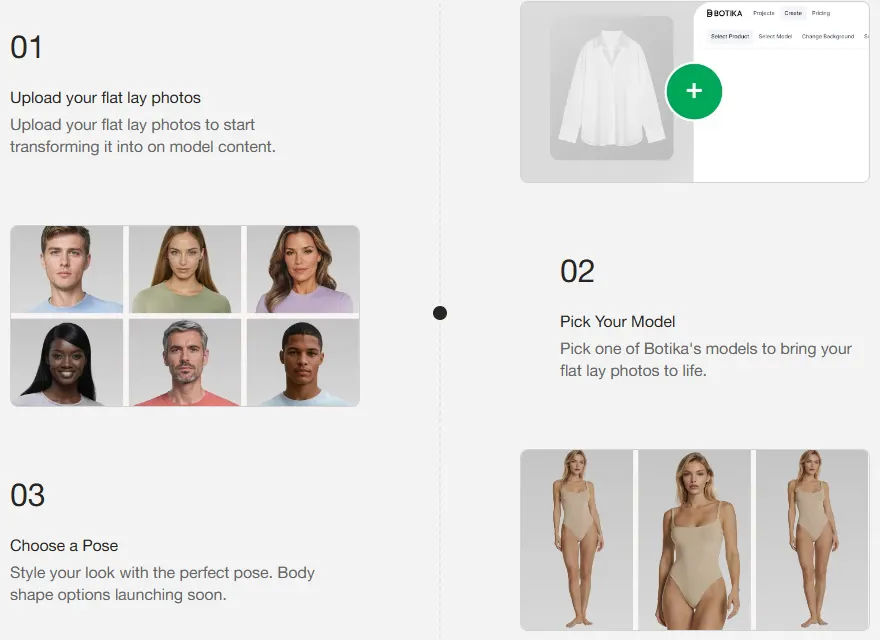
Botika (botika.io now redirects to botika.com) is built around three workflows, according to its FAQ:
- On-model: upload a photo of someone wearing the clothing, including cropped or headless shots. Botika keeps the pose and body type, replaces the person with one of its AI models and updates the background.
- Flat lay and mannequin: upload front or back shots of the garment, then pick a model, a pose and a background.
- AI video: turn those images into short clips.
Botika says it takes about 15 minutes to process photos and that it built its own AI models trained on fashion data.
CamClo AI splits the same job across four tools, so you can start from whatever photo you have:
- AI virtual try-on for clothes: put a flat lay or product photo of the garment on a model from the library or on your own uploaded model, with an optional styling note such as tucking in a shirt. Fast, Balanced and Quality modes run at 1K, 2K or 4K for 1 to 3 credits.
- AI product photography: generate an on-model photo from a product photo and an optional written prompt, in the aspect ratio you choose. It takes clothing, accessories, shoes and other wearables.
- AI model swap: change the person in a photo you already have to a model you describe, or match a face reference, at up to 4K.
- AI pose generator for catalogues: make 1 to 12 new poses of the same model and outfit from one photo, chosen by the AI, described by you, or picked from preset poses, from 0.5 credits a pose.
For a wider look at this category, see our guide to the best AI fashion model generators for ecommerce.
Models, prompts and catalogue scale
Botika keeps tight control over its outputs. Its help center says it offers more than 50 AI models, male and female, and 37 backgrounds, and that you cannot use your own models or backgrounds or change a model's makeup, hairstyle or expression. Its FAQ adds that it does not make images from text prompts and cannot create new clothing or new models. Pro includes a limited selection of models and backgrounds, and Advanced unlocks all of them. On Enterprise, Botika builds exclusive models and backgrounds for a brand.
CamClo AI gives you more direct control. You can save your own models next to the library, write what you want in plain words, and edit any result afterwards with Smart Edit.
| CamClo AI | Botika | |
|---|---|---|
| Pick a model from a library | Yes, filtered by gender, age group and region | Yes, more than 50 models (a limited selection on Pro) |
| Use your own model | Yes, upload and save it; Model Swap can also match a face reference | No; exclusive models are built by Botika on Enterprise |
| Describe changes in words | Yes: styling notes, prompts and Smart Edit | No text prompts |
| Product types | Clothing, accessories, shoes and other wearables | Clothing; your own footwear can complete flat lay outfits on Advanced |
| Bulk runs | Up to 500 products per AI Assistant request, with a model or style pinned | Bulk upload in the on-model workflow; flat lay and mannequin looks one at a time |
In CamClo's AI Assistant, you describe the job, check the plan and its credit cost, and approve it before anything runs. Batch results land in a folder per product.
Retouching and quality checks
This is where Botika stands out. On yearly plans, each photo includes a fix service: you click Photo Issue and Botika's team retouches the image. Pro includes 2 retouch rounds per photo, with fixes in up to 2 business days, and Advanced includes 3 rounds with fixes in up to 1 business day. The fix service is not included with monthly billing, and its help center says fix requests above 100 photos a day per user get lower priority until the next day. Enterprise adds white-glove quality control and custom retouching briefs applied to every image.
Botika also notes that its safety filter can flag semi-transparent garments or some lingerie photos by mistake, and that photos marked unsupported do not use credits.
In CamClo AI, fixes are self-serve and immediate. You can regenerate in Quality mode or at 4K, change a detail with Smart Edit, and remove or add elements with Magic Eraser and Generative Fill. If a generation fails, its credits are refunded automatically. For catalogues with strict standards, running a Fast 1K draft first and a Quality 4K final keeps costs down.
Video, ads and campaigns
Botika's AI fashion video generator starts from an on-model, flat lay or mannequin photo. You choose a motion style, such as zoom in, casual or runway walk, and can swap in a new model or background. A video costs 5 credits. Botika does not publish the clip length or resolution, and it does not make ads or run campaigns.
CamClo AI goes from the photo to a running campaign:
- Image-to-Video: the model picker includes Seedance 2.5 (4 to 30 seconds, up to 1080p), Veo 3.1, Kling 3.0 and Gemini Omni Flash (up to 4K), each priced by length and resolution.
- Video Ads: 15 formats, including UGC, UGC Virtual Try-On, POV, unboxing and lifestyle, for Reels, TikTok, YouTube and Shorts.
- Remix Ads: finished ads up to 90 seconds, modelled on ads you pick.
- Image Ads: static ads and carousels sized for Meta, Google Display, Pinterest and other placements.
- Ad Autopilot: plans, launches and manages Meta (Facebook and Instagram) and Google Ads campaigns across Search, Performance Max and Demand Gen, in Observe, Co-pilot or Autopilot mode, with spending caps and approvals for big changes.
If video is your main need, our comparison of AI image-to-video tools for ecommerce goes further.
What one photo costs on each plan
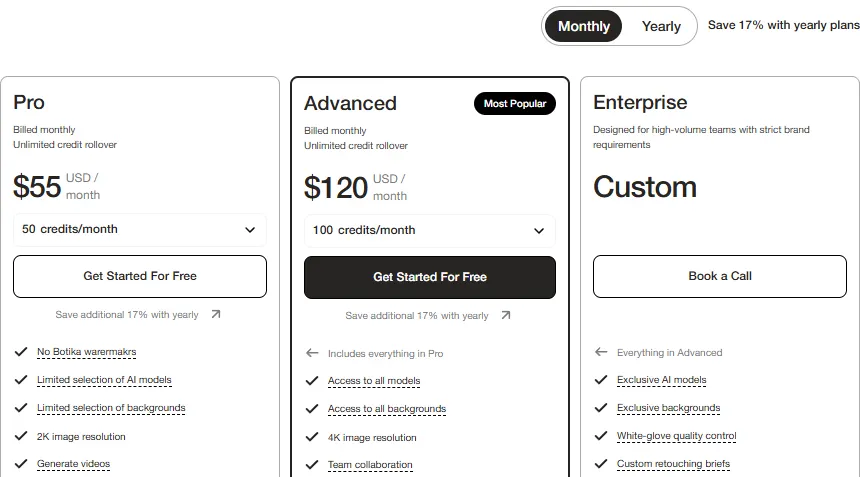
Botika charges 1 credit per photo and 5 per video, and each plan has a credit dropdown that changes the price. These are the prices its pricing page showed in US dollars. Yearly prices are per month, billed once a year, and include 17% off.
| Botika plan | Billed monthly | Billed yearly | Per photo |
|---|---|---|---|
| Pro, 50 credits a month | $55 | $46 a month (600 credits a year) | $1.10 monthly, $0.92 yearly |
| Pro, 100 credits a month | $105 | $88 a month (1,200 a year) | $1.05 monthly, $0.88 yearly |
| Pro, 150 credits a month | $150 | $125 a month (1,800 a year) | $1.00 monthly, $0.83 yearly |
| Advanced, 100 credits a month | $120 | $100 a month (1,200 a year) | $1.20 monthly, $1.00 yearly |
| Advanced, 500 credits a month | $560 | $467 a month (6,000 a year) | $1.12 monthly, $0.93 yearly |
| Enterprise | Custom pricing (book a call) | ||
Advanced also comes with 200, 300 and 400 credits a month at $230, $342 and $452 billed monthly. Other Botika pages quote lower starting prices ($25 a month on its products page and $33 a month in its llms.txt file), and its FAQ says any plan can start from 20 credits a month, but the smallest option on its pricing page was 50 credits a month and none of the listed plans started that low.
CamClo AI's Creator plan is $49 a month for 150 credits, about $0.33 a credit. A try-on, product photo or model swap costs 1 to 3 credits (about $0.33 to $0.98), a face reference in Model Swap adds 2 credits, and a new catalogue pose costs from 0.5 credits. Studio plans run from $99 a month for 330 credits to $999 a month for 5,000 credits, where a 1-credit photo works out at about $0.20. See CamClo AI pricing for every plan.
Pricing: CamClo AI vs Botika
| CamClo AI | Botika | |
|---|---|---|
| Entry plan | Creator: $49 a month with 150 credits | Pro: $55 a month with 50 credits, or $46 a month billed yearly (600 credits a year) |
| What the entry plan includes | Every AI Suite tool, including Virtual Try-On, Product Photography, Model Swap, Catalogue Studio, Smart Edit and Image-to-Video, with images up to 4K | 2K images, a limited selection of models and backgrounds, video and no watermarks; 2 retouch rounds per photo on yearly billing only |
| Higher plans | Studio: from $99 a month for 330 credits to $999 a month for 5,000 credits | Advanced: $120 to $560 a month for 100 to 500 credits (from $100 a month billed yearly), with 4K and all models; Enterprise: custom |
| Free trial | 7-day free trial with 20 credits | 8 free credits to test the platform |
| Cost of one photo | 1 to 3 credits for a try-on, product photo or model swap (about $0.33 to $0.98 on Creator; a Model Swap face reference adds 2); from 0.5 credits for a new catalogue pose | 1 credit a photo: about $1.10 on Pro monthly, $0.92 on Pro yearly, $1.20 on Advanced monthly |
| Cost of one video | Priced by model, length and resolution; a 5-second 720p clip on Gemini Omni Flash is 5 credits (about $1.63 on Creator) | 5 credits a video (about $5.50 on Pro monthly); clip length not published |
| Unused and extra credits | Plan credits refresh each billing cycle; extra credits from 50 at a time ($0.33 a credit on Creator) | Unused credits roll over while you stay subscribed; one-off packs of up to 150 credits |
Botika prices were read from botika.com/pricing in US dollars, with both the monthly and yearly toggles and every credit option. CamClo AI prices are from its pricing page. Per-photo figures divide the plan price by its credits.
Switching from Botika to CamClo AI
- 1
Use up your remaining Botika credits and download your finished photos first: Botika says rollover credits expire as soon as you cancel.
- 2
Start CamClo AI's 7-day free trial with 20 credits. Run a few best-selling garments through Virtual Try-On or Product Photography at Fast 1K, 1 credit each, and compare them with your Botika results.
- 3
Pick a model from the library or upload and save your own, then pin it in the AI Assistant to run the rest of the catalogue, up to 500 products in one request.
- 4
For photos already on a model, use Model Swap to change the person and Catalogue Studio to add up to 12 new poses from each image.
- 5
Turn your best images into clips with Image-to-Video or Video Ads, then connect your Meta or Google Ads account in Ad Autopilot when you are ready to run campaigns.
Try CamClo AI on your own products
Start with a 7-day free trial and 20 credits.
Start your free trialFrequently asked questions
Is CamClo AI a good Botika alternative?+
Yes, for most ecommerce and fashion brands. CamClo AI does the same core job of putting garments from flat lay, product or on-model photos onto AI models, and adds written instructions, your own saved models, up to 12 new poses from one photo, batches of up to 500 products, video, ads and Meta and Google Ads campaigns. Botika remains a good choice if you want its team to retouch every photo, which it includes on yearly plans.
How much does Botika cost compared with CamClo AI?+
Botika's pricing page lists Pro at $55 a month for 50 credits ($46 a month billed yearly for 600 credits a year) and Advanced at $120 a month for 100 credits ($100 a month billed yearly for 1,200 credits a year), with Enterprise priced on request. A photo is 1 credit and a video 5, so a photo costs about $0.83 to $1.20. CamClo AI starts at $49 a month for 150 credits, and a try-on or product photo is 1 to 3 credits, about $0.33 to $0.98 on that plan.
Is Botika free?+
No, Botika is a paid subscription, but its FAQ says you can test the platform with 8 free credits before choosing a plan. CamClo AI has a 7-day free trial with 20 credits.
Can Botika create images from a text prompt?+
No. Botika's FAQ says it does not make images from text or custom prompts and cannot create new clothing or new models. You upload a clothing photo and pick a model, a pose for flat lays and a background. In CamClo AI you can add a styling note to a try-on, describe the model you want in Model Swap, write a prompt in Product Photography and make other changes with Smart Edit.
Does Botika work for shoes, jewelry or accessories?+
Botika's FAQ says it focuses on clothing only and does not yet support jewelry, footwear or cosmetics, and that accessories in a photo may be removed or changed. Its Advanced plan lets you upload your own footwear to complete a flat lay outfit. CamClo AI's Product Photography works with clothing, accessories, shoes and other wearable products.
Which is better for turning flat lays into on-model photos?+
Both do it well, and CamClo AI is the better fit for full catalogues. Botika takes a flat lay or mannequin photo, then you pick one of its models, a pose and a background, one look at a time, because its bulk upload covers the on-model workflow. CamClo AI's Virtual Try-On takes a flat lay or product photo and a library model or your own, at 1K, 2K or 4K, and the AI Assistant can run up to 500 products in one request with the same model pinned.
Can Botika make video ads or run ad campaigns?+
Botika turns images into short clips in motion styles such as zoom in, casual and runway walk, at 5 credits a video, for product pages, campaigns or social. It does not publish ads or manage campaigns. CamClo AI makes image ads, video ads in 15 formats and Remix Ads up to 90 seconds, and its Ad Autopilot runs Meta and Google Ads campaigns with spending caps and approvals you control.