
CamClo AI vs Pippit
Pick CamClo AI if you sell products and want ads that run as paid Meta and Google campaigns; pick Pippit if you mainly need low-cost social videos and organic posting.
 Kush AFounder, CamClo AIUpdated September 29, 2026
CamClo AI
CamClo AI is an AI ad studio and media buyer for ecommerce and fashion brands: it makes product video ads, image ads and on-model product photos, then launches and manages Meta and Google Ads campaigns within limits you set.
Pippit
Pippit is an AI content tool, powered by CapCut according to its own site, that turns product links, photos and prompts into marketing videos, avatar videos and images, then schedules them as posts on TikTok, Instagram and Facebook.
The short answer
For an ecommerce or fashion brand that wants its ads to sell, CamClo AI is the better choice: it scripts and films product video ads in 15 formats, makes image ads and on-model photos, and then runs them as Meta and Google Ads campaigns within limits you set. Pippit, which its site says is powered by CapCut, is a low-cost creator suite with a free plan, stock avatars, a strong editor and organic posting to TikTok, Instagram and Facebook, but its official pages show no paid campaign management. Choose Pippit if organic social content is the whole job.
Choose CamClo AI if
- You sell products, especially fashion, and want video ads built to sell: 15 ad formats from UGC and unboxing to POV and a try-on reveal, scripted from your product page.
- You want the ads to run as paid campaigns: Ad Autopilot plans, launches and manages Meta and Google Ads campaigns inside spending caps you set.
- You want to rebuild ads that already work: Remix Ads finds ads in public ad libraries and remakes them for your product as finished ads of up to 90 seconds.
- You need on-model product photos, virtual try-on and image ads with ready platform copy, all from the same credits.
Choose Pippit if
- You want to start free: Pippit has a free plan with daily credits and no card, and paid plans from $101 a year.
- You mostly post organic content and want one scheduler with analytics for TikTok, Instagram and Facebook, including TikTok Shop links in videos.
- Presenter videos are central to your content: Pippit has a stock avatar library, custom avatars and a video translator.
- You want a full timeline editor to trim, caption and restyle videos by hand.
CamClo AI vs Pippit at a glance
| CamClo AI | Pippit | |
|---|---|---|
| Best for | Ecommerce and fashion brands that want ads made and run as paid campaigns | Sellers and creators who want quick social videos, avatars and organic posting |
| Video ad formats | 15 ad formats (UGC, UGC Virtual Try-On, Unboxing, Testimonial, POV, Street Interview, TV Spot, ASMR and more), each with its own script rules | Prompt-led Video Agent (Lite, Agent, Sora 2 or Veo 3.1 modes), reference-video mimic and trend templates |
| Video models and length | Video ads on Seedance 2.5 (4 to 30 s) or Seedance 2.0 (4 to 15 s) up to 1080p; Remix Ads up to 90 s; Veo 3.1, Kling 3.0 and Gemini Omni Flash in image to video, up to 4K | Seedance 2.0 and 2.5 (single takes up to 30 s, two extensions), Sora 2 and Veo 3.1; 4K export |
| Fashion and product photos | On-model photos from flat lays, virtual try-on, model swap and a pose generator for catalogue sets | Product photos with AI backgrounds, AI model images, sales posters and batch editing |
| Image ads | Single ads and carousels for 7 goals, sized per placement, each with primary text, headline and CTA; 1 credit per image | Image Agent for posters, social posts and product visuals in many styles |
| Avatars | Avatar Video from a photo with 82 voice presets or your own audio; ad formats with people speaking on camera | Stock avatar library, custom photo and video avatars, and talking photos |
| Editing | Describe changes to edit image ads; Smart Edit, background tools, Video Edit and Video Extend | Full timeline editor: trim, merge, captions, color, green screen, plus batch image editing |
| Remix a proven ad | Search the Meta and TikTok ad libraries (plus Google and LinkedIn for image ads) and rebuild an ad for your product | Remix viral videos and copy a reference video's structure, script and style |
| Paid Meta and Google campaigns | Ad Autopilot plans, launches and manages campaigns, with Observe, Co-pilot and Autopilot modes, spending caps and budget steps of 20% or less | Not found on Pippit's official pages |
| Organic posting and analytics | Not offered; CamClo AI reports on paid campaign results | Schedules posts to TikTok, Facebook and Instagram up to 30 days ahead, with follower, impression and engagement analytics |
| Starting price | Creator: $49 a month with 150 credits | Free plan; Starter $101 a year or $9 a month (US prices) |
| Free trial or plan | 7-day free trial with 20 credits | Free plan with daily credits, no credit card required |
Shaded cells mark the stronger option for an ecommerce brand.
What CamClo AI makes



Product video ads
Both tools start from a product link or photo, but they aim at different jobs. CamClo AI is built around the ad itself. Its AI video ad generator has 15 named formats, each with its own rules for the hook, camera, voice and ending: UGC, Commercial, Product Showcase, Product Demo, Unboxing, Lifestyle, Before and After, Hyper Motion, UGC Virtual Try-On, Testimonial, ASMR, TV Spot, Street Interview, POV and Yapper. It reads your product page, writes a scene-by-scene script that fits a spoken-word budget for the length you pick, and films it with native sound. Video ads run 4 to 15 seconds on Seedance 2.0 or 4 to 30 seconds on Seedance 2.5, at 480p, 720p or 1080p, sized for 10 placements from Instagram Reels and TikTok to YouTube and Pinterest.
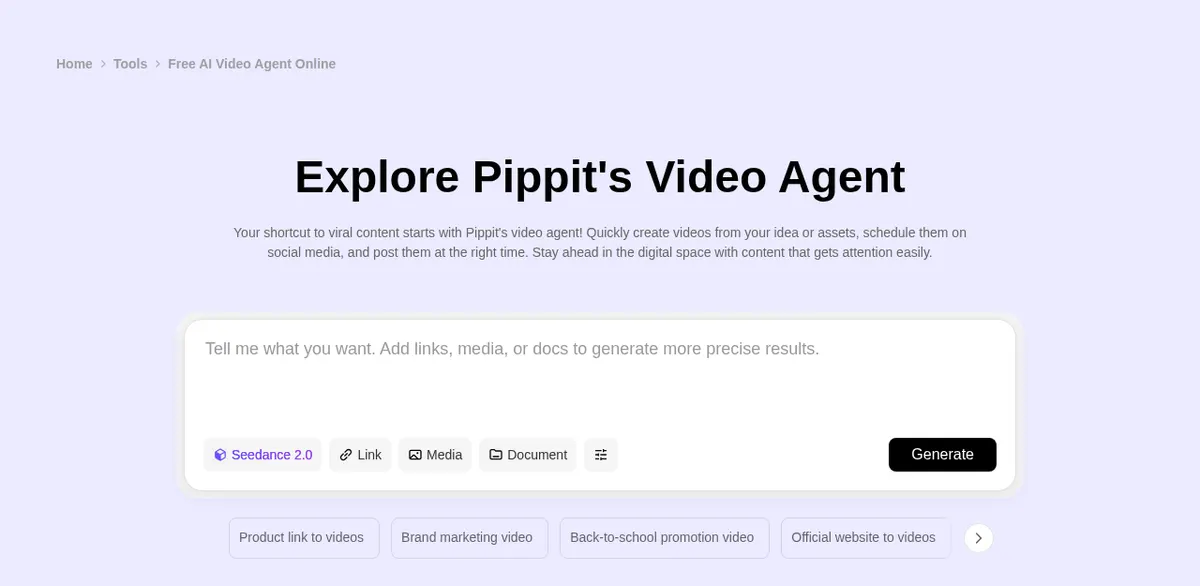
Pippit leads with a general Video Agent. You type a prompt, add a link, media or a document, and choose Lite mode (which Pippit describes as mainly for marketing videos), Agent mode, Sora 2 or Veo 3.1. Agent mode can follow the narrative structure, script and style of a reference video, and Pippit's Seedance 2.5 page describes single takes of up to 30 seconds, up to two rounds of extension and 4K export. Pippit also offers trend templates and a Story Studio for longer multi-scene projects.
Remixing an ad that already works
Both tools can follow a reference. Pippit's "Remix viral videos" and reference-video mode work from a clip you bring or a template you pick. CamClo AI's Remix Ads searches the public ad libraries of Meta and TikTok for video ads (and Google and LinkedIn for image ads), or takes an ad you upload, then rebuilds that ad's structure for your own product as a finished ad of up to 90 seconds. For story-led work, the TV Spot format builds a three-act mini-story with the product at the turning point.
For more tools in this space, see our guide to the best AI video ad generators.
Avatars and editing
This is where Pippit is strongest. Its avatar tools include a library of stock AI avatars you can filter by gender, age and scene, custom avatars made from your own photo or video, and AI talking photos. Paid plans include 1 (Starter), 3 (Plus) or 10 (Pro) customized video avatars and unlimited photo avatars, and the avatar script picker lists English, Portuguese, French, Indonesian and 24 more languages. Pippit also has a video translator for audio and captions, and a full editor for trimming, merging, captions, color, background removal and green screen.
CamClo AI handles presenters differently. Its UGC, Testimonial, Street Interview and Yapper formats generate a person who speaks on camera as part of the ad, with the voice's age, region and accent written into the script so it fits your market. For a classic talking head, Avatar Video in the AI Suite animates a photo of a person from a short script (up to 200 characters, with 82 voice presets) or from your own audio. Editing is built around changes you describe: image ads are edited in plain language, and Video Edit and Video Extend change or lengthen a clip you upload.
If a library of stock presenters and a timeline editor are central to your work, Pippit is the better fit. If you want the person to be part of a product ad that is ready to launch, CamClo AI does more of that work for you. Our guide to AI avatar video generators compares more options.
Publishing vs running paid campaigns
Pippit publishes organic posts. You connect TikTok, Facebook and Instagram accounts, schedule posts on a calendar up to 30 days ahead, and its analytics show follower growth, impressions and post engagement. It can also add TikTok Shop product links to TikTok videos when you publish or schedule them. Pippit's own scheduler page says LinkedIn scheduling is not supported yet.
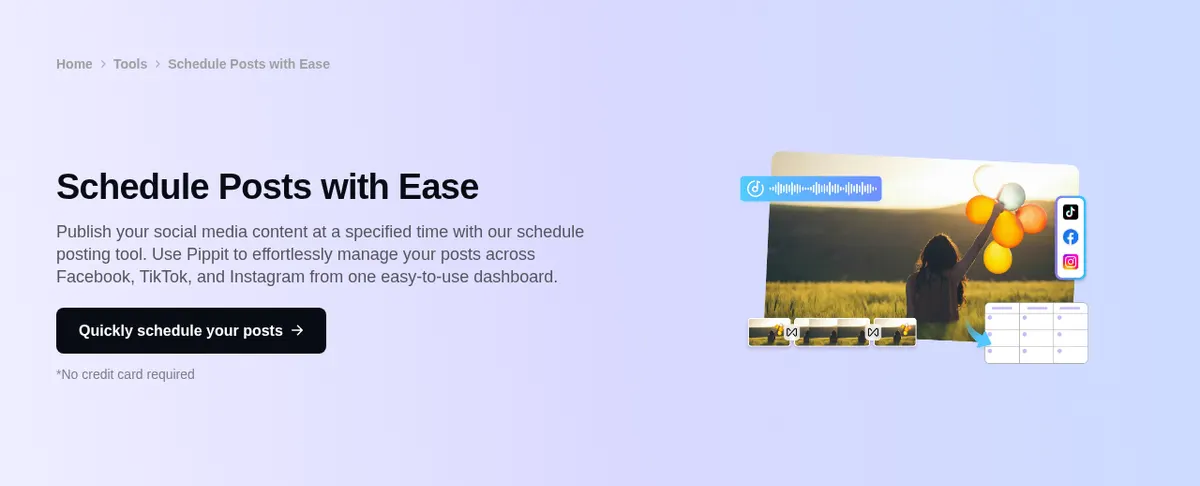
What we did not find on Pippit's official pages is paid campaign management: no way to set budgets, audiences or bids, or to launch and optimize campaigns in Meta Ads or Google Ads. Its "social advertising" tool page describes making ad videos, resizing them, publishing them to connected social accounts and tracking their performance.
CamClo AI's Ad Autopilot covers that paid side. It starts from your website and the result you want, researches your market and account history, and builds a campaign plan you review. It publishes Meta campaigns (Facebook and Instagram) and Google Ads campaigns (Search, Performance Max and Demand Gen), created paused unless you choose to start delivery right away. Then it watches results and proposes or takes the next move within your limits:
- Three modes: Observe (recommendations only), Co-pilot (every action waits for your approval, in the app or from the email) and Autopilot (routine actions within your limits, while bigger changes still come back to you).
- Limits enforced in code: daily and monthly spending caps, budget changes of 20% or less at a time, and pausing rather than deleting.
- Safety nets: a stop-loss rule on Meta's own servers and a single kill switch that pauses the agent across your account.
- Fresh creative: when an ad fatigues it can make a new image or video ad for the product, and when a campaign expands into a new country it localizes the copy and the text on the image.
Read more about how an AI media buyer works.
Image ads and product photos
CamClo AI's AI image ad generator makes single ads (up to 8 variations per run) and carousels (up to 5 slides) for 7 goals: sales, traffic, lead generation, retargeting, catalog sales, brand awareness and engagement. Ads are sized for placements such as Instagram and Facebook feeds and stories, TikTok, YouTube, Pinterest, LinkedIn and Google Display, with the areas that platform buttons cover kept clear. Each variation also gets its own primary text, headline and call to action for the ad platform, and each image costs 1 credit.
For fashion catalogues, CamClo AI's AI product photography turns flat lays and product shots into on-model photos, next to virtual try-on, model swap and a pose generator for full catalogue sets. In video, the UGC Virtual Try-On format has a person hold up the garment and then wear it.
Pippit's Image Agent and image studio cover product photos with AI backgrounds, sales posters, social posts in many styles, an image editor, an AI model tool, background removal and batch editing. It is a flexible design tool for social content; CamClo AI goes further on fashion catalogue work and on outputs that are ready to run as ads.
What you pay for
The two price lists are hard to compare line by line, because the credits buy different things. Pippit's US pricing page lists:
- Free: $0 with free daily credits and no credit card; watermark removal comes with the paid plans.
- Starter: $101 a year, or $9 a month on monthly billing, with 1,575 credits a month. Pippit also listed a $1.50 promotional price for a Starter month.
- Plus: $246 a year or $22 a month, with 3,885 credits a month.
- Pro: five sizes from 8,645 to 59,000 credits a month, at $540 to $3,599 a year or $47 to $312 a month.
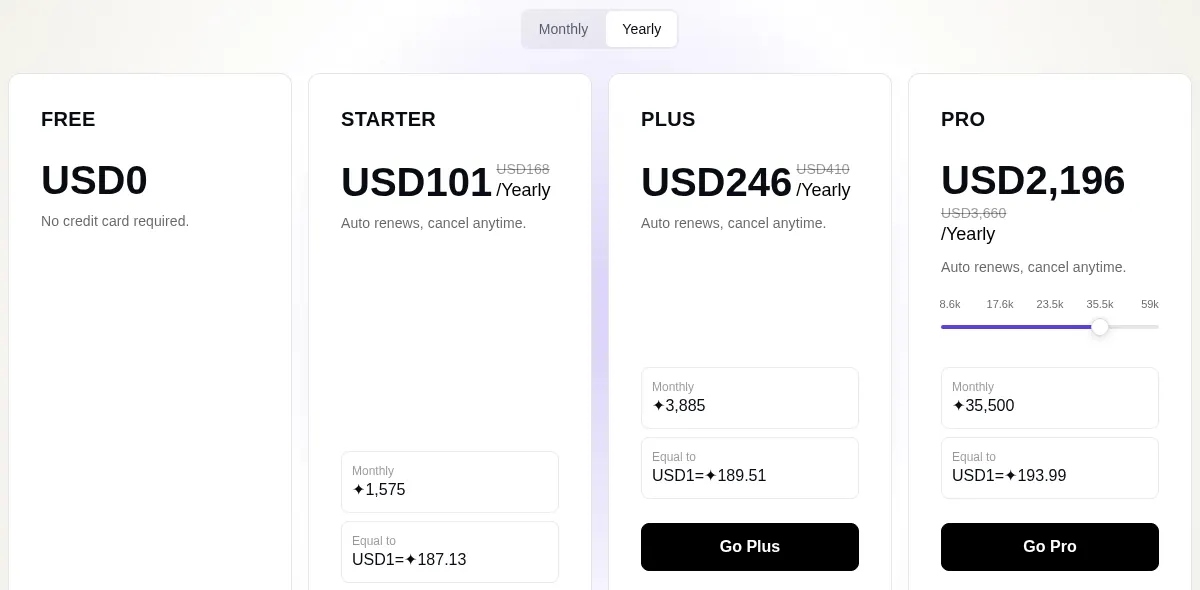
Apart from the $1.50 Starter month, every paid price was listed as a discount of about 40% on a higher list price, so check Pippit's site for the current offer. Pippit's help center says plan credits expire when the subscription ends, purchased credits last two years, and each tool's credit cost is shown in the app.
CamClo AI's Creator plan is $49 a month with 150 credits, and Studio plans run from $99 a month for 330 credits to $999 a month for 5,000 credits (see pricing). An 8-second 720p video ad costs 11 credits on Seedance 2.0, a 15-second 720p ad on Seedance 2.5 costs 25, and image ads cost 1 credit per image. Ad Autopilot is billed in credits too, either 3 credits for each day the agent works or a flat 80 credits per campaign per month, never a share of your ad spend. Next to a single creative tool, CamClo AI can seem a little expensive, but the credits cover more than a raw output: a scripted, formatted ad and, when you want it, the campaign that runs it.
Pricing: CamClo AI vs Pippit
| CamClo AI | Pippit | |
|---|---|---|
| Entry plan | Creator: $49 a month | Starter: $101 a year, or $9 a month billed monthly (shown as discounts from $168 and $15) |
| What the entry plan includes | 150 credits a month, spent across video ads, image ads, product photos, Remix Ads and Ad Autopilot | 1,575 credits a month, watermark removal, upscaling up to 4K, 1 custom video avatar, unlimited photo avatars and 500 GB storage |
| Higher plans | Studio plans from $99 a month (330 credits) up to $999 a month (5,000 credits) | Plus: $246 a year or $22 a month (3,885 credits). Pro: $540 to $3,599 a year or $47 to $312 a month (8,645 to 59,000 credits) |
| Free trial or free plan | 7-day free trial with 20 credits | Free plan at $0 with free daily credits and no credit card; paid plans remove the watermark |
| Typical output cost | 8-second 720p video ad: 11 credits (Seedance 2.0). 15-second 720p video ad: 25 credits (Seedance 2.5). Image ad: 1 credit per image | Not listed on the pricing page; Pippit says each tool's credit cost is shown in the app |
| Paid campaign management | Ad Autopilot: 3 credits per day the agent works, or 80 credits per campaign per month; ad spend is billed by Meta or Google | Not found on Pippit's official pages |
Pippit prices are in US dollars from www.pippit.ai/pricing as shown to a visitor in the United States (the site answered "Unavailable in your area" from India). Pippit's paid plans were on promotion, so check the vendor site for the current price. CamClo AI prices and credit costs are its published plan and credit rates on the same date.
Switching from Pippit to CamClo AI
- 1
Start CamClo AI's 7-day free trial with 20 credits.
- 2
Download the Pippit videos and images you want to keep, then add your products to CamClo AI by pasting each product page URL; it reads the images, name, description and selling points for you.
- 3
Make a first test set: one short video ad in a format you already use, such as UGC or a product showcase, plus image ads for your main placements, or remix a proven ad from the ad library.
- 4
Connect your Meta or Google Ads account and let Ad Autopilot build a campaign plan. Keep it in Co-pilot mode at first, so every change waits for your approval.
- 5
Keep your usual scheduler for organic posts if you need one; CamClo AI takes over the paid campaigns and the creative that feeds them.
Try CamClo AI on your own products
Start with a 7-day free trial and 20 credits.
Start your free trialFrequently asked questions
Is CamClo AI a good Pippit alternative?+
Yes, if you sell products and want ads that run as paid campaigns. CamClo AI makes product video ads in 15 formats, image ads and on-model product photos, and its Ad Autopilot launches and manages Meta and Google Ads campaigns within limits you set. Pippit is the better pick if you mainly want low-cost social videos, stock avatars and organic posting to TikTok, Instagram and Facebook.
How much does Pippit cost compared with CamClo AI?+
Pippit's US pricing page lists a free plan, Starter at $101 a year or $9 a month with 1,575 credits a month, Plus at $246 a year or $22 a month with 3,885 credits, and Pro from $540 a year or $47 a month. CamClo AI's Creator plan is $49 a month with 150 credits, and Studio plans start at $99 a month. The credit counts are not comparable one to one: CamClo AI credits pay for finished, scripted ads (an 8-second 720p video ad is 11 credits) and for Ad Autopilot's campaign management.
Is Pippit owned by CapCut?+
Pippit's website says it is powered by CapCut, its older address pippit.capcut.com redirects to pippit.ai, and its subscription help page gives a capcut.com support email. It is sold as a separate product with its own plans and credits.
Can Pippit run Facebook, Instagram or Google ad campaigns?+
Pippit can schedule and publish organic posts to TikTok, Facebook and Instagram and show post analytics. We found no feature on its official pages for setting budgets, audiences or bids, or for launching and optimizing paid campaigns in Meta Ads or Google Ads. CamClo AI's Ad Autopilot does that for Meta campaigns on Facebook and Instagram and for Google Ads Search, Performance Max and Demand Gen campaigns.
Which is better for clothing and fashion brands?+
CamClo AI. It has a set of fashion tools: on-model product photography from flat lays, virtual try-on, model swap, a pose generator for catalogue sets, and a UGC Virtual Try-On video ad format where a person holds up the garment and then wears it. Pippit's AI model tool shows a garment on AI models, and its Video Agent can show an avatar wearing an outfit or holding a product, which suits simpler social content.
Does CamClo AI make avatar videos like Pippit?+
Yes, in a different way. Avatar Video in CamClo AI's AI Suite animates a photo of a person from a short script with one of 82 voice presets, or from your own audio, and video ad formats such as UGC, Testimonial and Street Interview generate a person speaking on camera inside the ad. Pippit has a stock avatar library and custom avatars, so it suits presenter-led content better.
Can I try CamClo AI for free before switching from Pippit?+
Yes. CamClo AI has a 7-day free trial with 20 credits. That is enough for a short video ad and a few image ads made from your own products.