

Table of Contents
Video content dominates the internet. However, traditional video production requires cameras, actors, lighting, and editing teams. This process costs time and money. AI avatar video generators offer a solution. These tools turn text into professional videos with realistic digital presenters.
We analyzed the market to find the most effective tools available today. This article compares the top AI avatar video generators. We will examine their features, pricing, and video quality. We will help you choose the right software for your needs, whether you need a free solution or a professional platform.
Why Use an AI Avatar Video Generator?
Companies and creators use AI video tools to scale production. The benefits are clear and measurable.
Cost Reduction
You will save money on equipment and talent. No need for cameras, studios, or actors.
Speed
You will generate videos in minutes, not days. Go from script to final video in a single session.
Global Reach
These tools translate content into dozens of languages instantly, letting you reach international audiences.
Consistency
Your brand message remains uniform across all videos. The same avatar, the same tone, every time.
If you search for terms like AI avatar video generator or AI avatar video, you likely need a tool that simplifies creation without sacrificing quality. The following section reviews the top platforms.
Top 6 AI Avatar Video Generators (Free and Paid)
We selected these tools based on lip-sync accuracy, voice quality, ease of use, and cost.
1 CamClo AI Avatar Video Generator
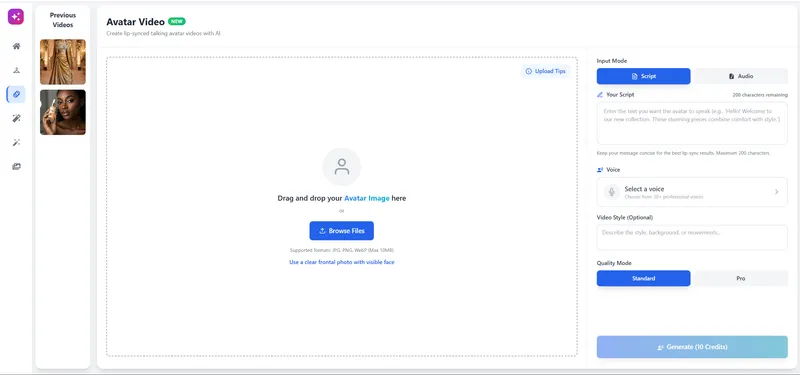
Unlike generic avatar tools, CamClo AI specializes in e-commerce and retail presenters. It is designed for brands that need to create product explainer videos and fashion showcases quickly.
Key Features
CamClo AI provides a wide range of realistic avatars. The platform supports multiple languages, which allows you to reach a global audience. The interface is intuitive. You type your script, select an avatar, and the engine generates the video. It offers precise lip-syncing technology that matches the avatar's mouth movements to the audio track.
Pros
- High-fidelity avatar rendering
- Simple user interface for beginners
- Fast rendering times for short and long videos
- Competitive pricing models
Cons
- Fewer pre-made templates compared to older competitors
2 HeyGen
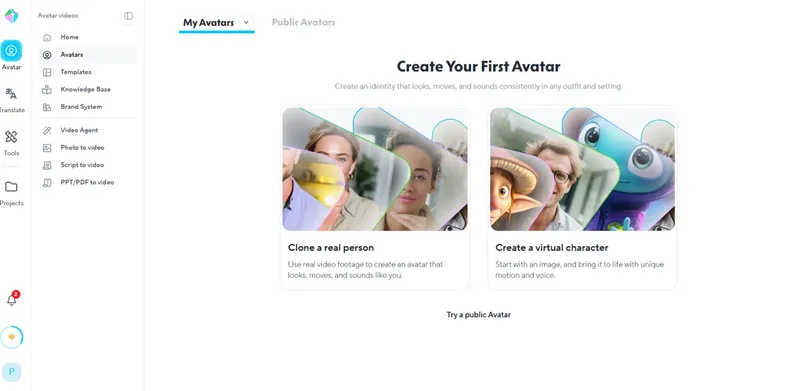
HeyGen is a popular choice in the AI avatar video market. It creates realistic avatars and offers a feature to clone your own voice.
Key Features
HeyGen allows you to upload a photo and animate it. It also offers a "studio" avatar option with higher resolution. The tool integrates with platforms like Zapier and Canva.
HeyGen moved from unlimited plans to credits in May 2026. Our guide to HeyGen alternatives for UGC video ads covers what changed and what a video now costs.
Pros
- Excellent lip-sync technology
- Allows custom avatar creation from photos
- Large library of templates
Cons
- High-resolution exports cost more credits
- Free plan puts a watermark on videos
3 Synthesia
Synthesia was one of the first major players in this space. It focuses heavily on the corporate sector. Large companies use it for learning and development.
Key Features
It offers over 140 AI avatars and supports 120 languages. Synthesia allows teams to collaborate on video projects. You can edit videos just like a slide deck.
Pros
- Standard industry security features (SOC 2)
- High-quality voiceovers
- Extensive stock media library
Cons
- One of the more expensive options
- Cannot edit video gestures in detail on lower plans
4 D-ID
D-ID specializes in animating still faces. It focuses on the technology that makes a static photo speak.
Key Features
D-ID offers a "Creative Reality Studio." You use this to animate faces generated by AI art tools like Midjourney. It also has a live streaming API for developers.
Pros
- Animates any face, including historical figures or art
- Strong API for developers
- Fast processing speed
Cons
- Movements sometimes look less natural than full-body avatars
- Focus is on the face, not body language
5 Elai.io
Elai.io allows you to build customized AI videos from text. It has a unique feature that turns blog posts into videos automatically.
Key Features
You paste a URL to an article, and Elai picks the text to create a video script. It includes varied avatars and voice cloning options.
Pros
- "URL to Video" feature saves time
- Affordable entry-level plans
- Clean user interface
Cons
- Voice selection is smaller than Synthesia or CamClo AI
- Rendering times vary during peak hours
6 Colossyan
Colossyan focuses on the learning and workplace training market. It creates videos that look like formal presentations.
Key Features
This tool allows you to place two avatars in the same scene. They will hold a conversation. It is useful for interview simulations or customer service training.
Pros
- Dual-avatar conversation mode
- Auto-translation features
- Screen recording tools included
Cons
- Avatar gestures are somewhat limited
- Lip-sync sometimes misses rapid speech
The Reality of Free Plans
Most companies offer a free tier, but they restrict it by:
- Watermarks: The video will have the company logo over it.
- Time Limits: You will only create 1 or 2 minutes of video per month.
- Limited Assets: You will not access premium voices or 4K resolution.
If you need an AI avatar video free for a quick test or personal use, the free trials from HeyGen or D-ID are sufficient. However, for professional results without watermarks, you must invest in a paid plan. Tools like CamClo AI and Synthesia offer tiered pricing to match your budget.
When to Upgrade to a Paid Plan
You will need a paid subscription when:
- You require commercial rights to the video.
- You need to remove watermarks.
- You need videos longer than 1 minute.
- You require high-definition (1080p or 4K) downloads.
How to Choose the Right AI Avatar Video Generator
Selecting the right tool depends on your specific goals. Here are the factors you must consider.
1. Lip-Sync Quality
This is the most important element. If the lips don't sync with the sound, the video looks phony. Viewers will lose trust. CamClo AI and HeyGen both achieve strong results in this aspect.
2. Voice Variety
A bad, computer-generated voice ruins an otherwise good video. Look for tools that provide "neural" voices. These voices sound human. They pause, breathe, and change tone naturally. Make sure the tool supports your audience's languages.
3. Customization
Can the tool allow you to upload your own background images? Can you add your company logo? Flexible design tools let you keep your brand consistent across all videos.
4. Ease of Use
You want to save time. The interface must be simple. You should not need video editing skills to use an AI avatar video generator. Test the dashboard during the free trial to ensure it fits your workflow.
Use Cases: Who Needs AI Avatar Videos?
We see three main groups benefiting from this technology.
Learning & Development
Training managers use AI avatars to create course material. Updating an old video is easy. You simply change the text script, and the video updates. You do not need to re-record with an actor.
Marketing & Sales
Sales teams send personalized videos to prospects. Instead of a cold email, the prospect receives a video where an avatar addresses them by name. This increases engagement rates.
Customer Support
Support teams create "How-to" videos. An avatar explains how to use a product. It reduces the number of support tickets and helps customers solve problems fast.
Future Trends in AI Video
The technology behind AI avatar video creation advances every month. Here is what we expect to see soon.
- Full Body Movement: Current avatars mostly move their heads and hands. Future versions will walk and interact with objects.
- Real-Time Interaction: Avatars will soon respond to voice commands in real-time, acting as live customer service agents.
- Emotional Intelligence: AI voices will better understand the emotion in the script. They will sound happy, sad, or urgent based on the text.
Conclusion
Video content is essential for communication in 2026. An AI avatar video generator solves the problems of cost and complexity.
If you need a tool that balances quality, ease of use, and realism, CamClo AI Avatar Video Generator is a strong option.
For those seeking an AI avatar generator free for testing, most tools on this list offer a trial. However, serious business use requires a professional plan.
Our Recommendation
We recommend you test three tools from this list. Write a short script. Generate a video on each platform. Compare the results. You will find the tool that fits your workflow and meets your quality standards.
The future of video is automated. By adopting these tools now, you will stay ahead of the competition.


