Table of Contents
Choose Seedance 2.5 for a continuous shot longer than 15 seconds: ByteDance Seed offers up to 30 seconds per generation, versus the 15-second maximum from Kling AI. For shorter product shots, compare Kling 3.0 Standard or Pro with Seedance 2.5 using the same garment image in our Image to Video workflow. Our image-to-video pricing guide explains how billing works; judge clothing accuracy separately from price.
Kling 3.0 vs Seedance 2.5 at a glance
As of November 3, 2026, Kling Video 3.0 Standard and Pro and Seedance 2.5 offer the following options. Kling 3.0 Omni, other Kling generations and Seedance 2.0 are separate models. Model-family capabilities differ from the settings available in our Image to Video workflow.
| Model-wide capability | Kling Video 3.0 | Seedance 2.5 |
|---|---|---|
| Single-generation duration | Up to 15 seconds | Up to 30 seconds |
| Reference inputs | Reference capabilities vary between Standard/Pro and Omni workflows | Up to 30 images, 10 video clips and 10 audio clips, per ByteDance Seed’s launch announcement |
| Output size | Native 4K in the 3.0 series, per Kuaishou’s results announcement | A 4K variant with Draft mode, per BytePlus’s 4K announcement |
| Storyboard and editing controls | Storyboard and camera-angle adjustments in Kling AI’s user guide | Timestamp, character and element edits in BytePlus’s editing announcement |
Our Image to Video options offer output resolutions up to 1080p for both models.
| Image to Video option | Kling 3.0 Standard/Pro | Seedance 2.5 |
|---|---|---|
| Shared image input | Starting image plus motion prompt | Starting image plus motion prompt |
| Duration | 5, 10 or 15 seconds | 4–30 seconds |
| Output resolution | Up to 1080p | 480p, 720p or 1080p |
| Frame and camera direction | Start/end-frame support; motion prompt | Starting-image and motion-prompt workflow |
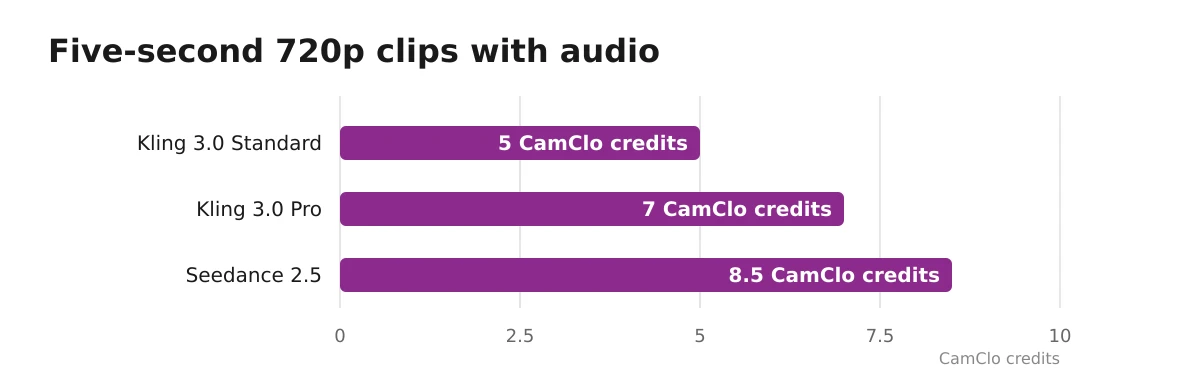
| Five-second 720p example | Standard with audio: 5 credits; Pro with audio: 7 credits | 8.5 credits |
Kling 3.0 Standard and Pro offer audio on or off.
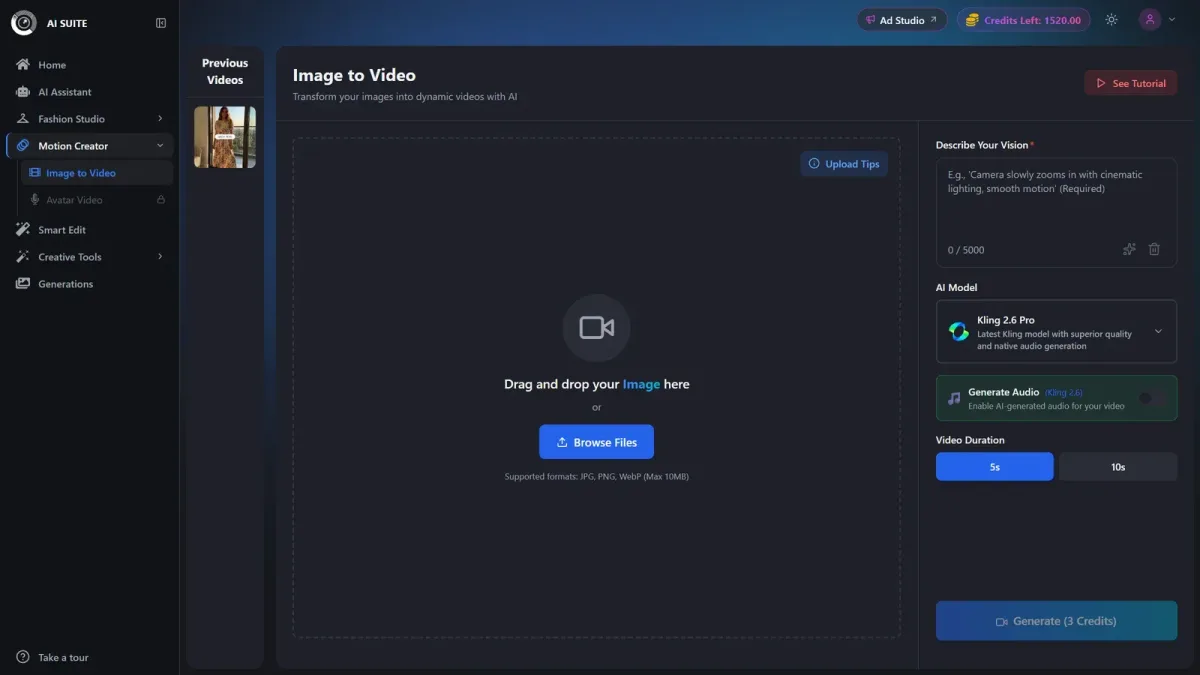
Open Image to Video, upload your image, describe the motion and select the model and settings. Review the exact credit cost on Generate. Upload a JPG, PNG or WebP up to 10 MB, with a shortest side of at least 300 pixels, as specified in our upload guide. The result is an MP4. You can also access Seedance through BytePlus’s Seedance 2.5 page. Availability and billing can differ by provider and country.
Opening frames, references and camera control serve different jobs
A starting frame anchors the opening composition; a reference collection guides creative intent without making every reference an exact frame.
- Opening frame: use an approved image with the product details already visible and correct.
- Ending frame: set a desired destination. Inspect folds, occlusions and intermediate garment shapes throughout the transition.
- References: guide identity, products, movement or sound. Choose the Standard/Pro or Omni workflow that supports the references you need.
- Camera direction: request one camera setup and one restrained action, such as a locked camera with a gentle turn. Compare the resulting movement and framing with the brief.
- Targeted edits: Seedance’s timestamp and element editing lets you revise specific parts of an existing video.
Seedance 2.5 supports up to two extensions after generation. An extended sequence builds on generated footage; an edited sequence revises it. A finished ad can also combine several shorter clips.
Native resolution describes generated detail. Upscaling increases delivery dimensions afterward, so inspect logo and knit accuracy in the source clip first.
Inspect garment fidelity before choosing a winner
Choose the output that preserves the garment throughout the movement. For a printed dress, evaluate silhouette and pattern stability. Inspect the opening, middle and ending frames, plus every turn, fold or hand crossing; then watch at normal speed.
| Check | Pass | Reject |
|---|---|---|
| Repeat spacing, motif count and placement stay consistent | Drifting stripes, melting checks, invented motifs | |
| Logo | Letter shapes, spelling, placement and proportions remain accurate | Rewritten text, missing embroidery, changing marks |
| Silhouette and construction | Hem, neckline, lapels, pockets and seams retain their shape | Morphing cut, moving seams, altered fit |
| Fabric behavior | Folds, reflections and stretch suit the visible material | Sliding knit texture, liquid-looking stiffness, implausible stretch |
| Hands and faces | Anatomy stays coherent through movement | Merged fingers, distorted faces, limbs merging with clothing |
| Sneaker geometry | Toe, sole, laces, eyelets and paired proportions remain consistent | Changing sole profile, disappearing laces, mismatched shoes |
| Camera compliance | Requested framing and movement occur | Unrequested rotation, zoom, cuts or product cropping |
Kuaishou’s launch announcement claims high accuracy for branded text, making Kling worth considering for logo-bearing products. Reject altered product details even when lighting and motion look attractive.
Four same-image briefs for a fair comparison
Use the same approved image and source framing, a five-second duration and 720p resolution for both models. Leave optional references and ending frames out of this baseline. Test additional controls separately.
- Printed dress. Prompt: “Locked camera, full garment visible. The model makes a gentle quarter-turn and settles. Preserve the dress silhouette, hem length, print placement, colors and all garment details. No cuts or added elements.” Inspect repeat patterns, neckline and hem during the turn.
- Structured jacket. Prompt: “Locked camera, waist-up product framing. The model makes one small arm movement and returns to the starting pose. Preserve lapels, seams, buttons, pockets and jacket fit. No cuts or added elements.” Inspect lapel edges, closures and the arm-to-body boundary.
- Knitwear. Prompt: “Locked camera, torso framing. The model makes a restrained torso shift and becomes still. Preserve knit texture, ribbing, neckline, cuffs and garment proportions. No cuts or added elements.” Inspect stitch direction, stretched texture and cuff changes.
- Sneaker. Prompt: “Locked close-up of the on-foot sneaker. The wearer slowly lifts the heel slightly and lowers it. Preserve the toe shape, sole profile, laces, eyelets, logo and shoe proportions. No cuts or added elements.” Inspect the outsole and upper throughout movement.
Record the version, tier, settings, prompt, credit cost and accepted or rejected result for every attempt. Include failures when calculating costs. Keep any Seedance 2.0 results separate from Seedance 2.5.
What do matched five- and ten-second clips cost?
At 720p with audio, Kling 3.0 Standard costs 5 credits for five seconds or 10 credits for ten seconds; Pro costs 7 or 14 credits. Seedance 2.5 costs 8.5 credits for five seconds or 16.5 credits for ten seconds. Our Kling AI pricing in 2026 and Seedance 2.5 pricing pages give the pricing details.
| Model/tier and audio option | Output size | 5-second credits | 10-second credits |
|---|---|---|---|
| Kling 3.0 Standard, audio on | 720p | 5 | 10 |
| Kling 3.0 Standard, audio off | 720p | 4 | 8 |
| Kling 3.0 Pro, audio on | 720p | 7 | 14 |
| Kling 3.0 Pro, audio off | 720p | 5 | 10 |
| Seedance 2.5 | 720p | 8.5 | 16.5 |
These are our platform credits. Kling’s own credits, Dreamina promotions and BytePlus API dollar prices use other billing systems. Review the cost on Generate after changing settings.
Example: credits per accepted clip
Assume four five-second attempts per model, with audio on for Kling Standard, produce two accepted clips each:
- Kling Standard: 4 × 5 credits = 20 credits spent. 20 ÷ 2 accepted clips = 10 credits per accepted clip.
- Seedance 2.5: 4 × 8.5 credits = 34 credits spent. 34 ÷ 2 accepted clips = 17 credits per accepted clip.
A higher rejection rate can make the cheaper model more expensive per accepted clip. Count assembly, replacement music, voice-over, resizing and finishing separately from source-generation costs.
Use Image to Video for clips and Video Ads for advertising
Use Image to Video for garment demonstrations, product-page motion and editor-ready source footage. Use Video Ads when you need advertising copy, product framing, music or voice-over for a finished ad.
Our Video Ads lineup includes Seedance 2.0 and 2.5; Image to Video offers a broader model selection. Apply brand-kit colors, fonts and tone to feed, story and reel creatives. Plan the advertising soundtrack around the final script and placement.
Approve the clothing before adding copy or placement variants. To compare other models, see Seedance 2.5 vs Veo 3.1 for Fashion Product Videos and Seedance 2.5 vs Gemini Omni Flash for Fashion Product Videos.
Choose by the shot, then approve the clothing
| Your requirement | Choose |
|---|---|
| One continuous generation longer than 15 seconds, up to 30 seconds | Seedance 2.5 |
| Short product shot with start/end-frame support and optional audio | Kling 3.0 Standard or Pro |
| Reference-heavy or targeted-editing workflow | A provider offering the Seedance reference or editing controls you need |
| Native 4K | A provider/model variant offering native 4K generation |
| Accurate prints, logos, seams and silhouette | Whichever output passes garment inspection |
Start with one approved garment image and a shared five-second brief in our studio. Scale only after the clothing passes inspection.