

Table of Contents
Which is better, GPT Image 2.6 or Seedream 5.5? In our GPT Image 2.6 vs Seedream 5.5 test, we ran both models on the same prompts and the same photos across five everyday image jobs, from a text-heavy ad to a transparent cutout. Seedream 5.5 made the most realistic images: real skin texture, natural colour and scenes that look photographed rather than rendered. It was also about 3x faster, and in CamClo AI it costs a third of what GPT Image 2.6 costs at its default setting. GPT Image 2.6 wins when a job needs a dense layout followed to the letter, a pattern copied motif for motif, 4K or an SVG file. Below are the results side by side, plus how Seedream 5.5 compares with Nano Banana 2.1 and with earlier Seedream versions.
CamClo AI offers both models in Smart Edit and Image Ads, and Seedream 5.5 is the default in both. We ran every model ourselves, with the same prompts and the same input photos. Here is how we tested.
GPT Image 2.6 vs Seedream 5.5: which wins in each category?
Every winner below comes from our own results, not from the makers' claims.
| Category | Winner | Why |
|---|---|---|
| Realism | Seedream 5.5 | Real skin texture and natural colour. GPT Image 2.6 looks airbrushed and slightly oversaturated at the same prompt. |
| Text spelling | Tie | Both spelled every word of a 4:5 skincare ad correctly. |
| Exact layout | GPT Image 2.6 | Drew the round badge and big button as asked. Seedream 5.5 added a wordmark nobody asked for. |
| Pattern fidelity | GPT Image 2.6 | Kept an embroidered jacket motif for motif. Seedream 5.5 kept the style but moved the motifs. |
| Multi-step edits | Seedream 5.5 | Both changed only the bag in the second edit, but GPT Image 2.6 left a strap standing up in the air in the first. |
| Transparent PNGs | Seedream 5.5 | Kept the exact sneaker with clean edges. GPT Image 2.6 reshaped the toe and the sole. |
| Try-on garment length | GPT Image 2.6 | Kept a maxi dress at full length. Seedream 5.5 shortened it to mid-calf. |
| Speed | Seedream 5.5 | About 20 seconds per 2K image, against about 68 seconds. |
| Price | Seedream 5.5 | 0.5 credits per image in CamClo AI's Smart Edit, against 1.5 for GPT Image 2.6 at its default. List price $0.035 per 2K image plus $0.008 per input photo, against about $0.07 to $0.11. |
| Max resolution | GPT Image 2.6 | 4K. Seedream 5.5 stops at 2K, about 4.6 megapixels. |
| SVG files | GPT Image 2.6 | Makes SVG files from a text prompt. Seedream 5.5 cannot. |
Seedream 5.5 wins on realism, speed and price, plus cutouts and multi-step edits. GPT Image 2.6 wins on precision: exact layouts, exact patterns, garment length, 4K and SVG. On the five everyday jobs below, each model won two and one was a tie.
Test 1: an ad with exact text
We asked both models for a 4:5 feed ad for a skincare serum, with a headline, a subline, a small round "Dermatologist tested" badge and a rounded "Shop now" button, and told them to write nothing else. Both spelled every word correctly.
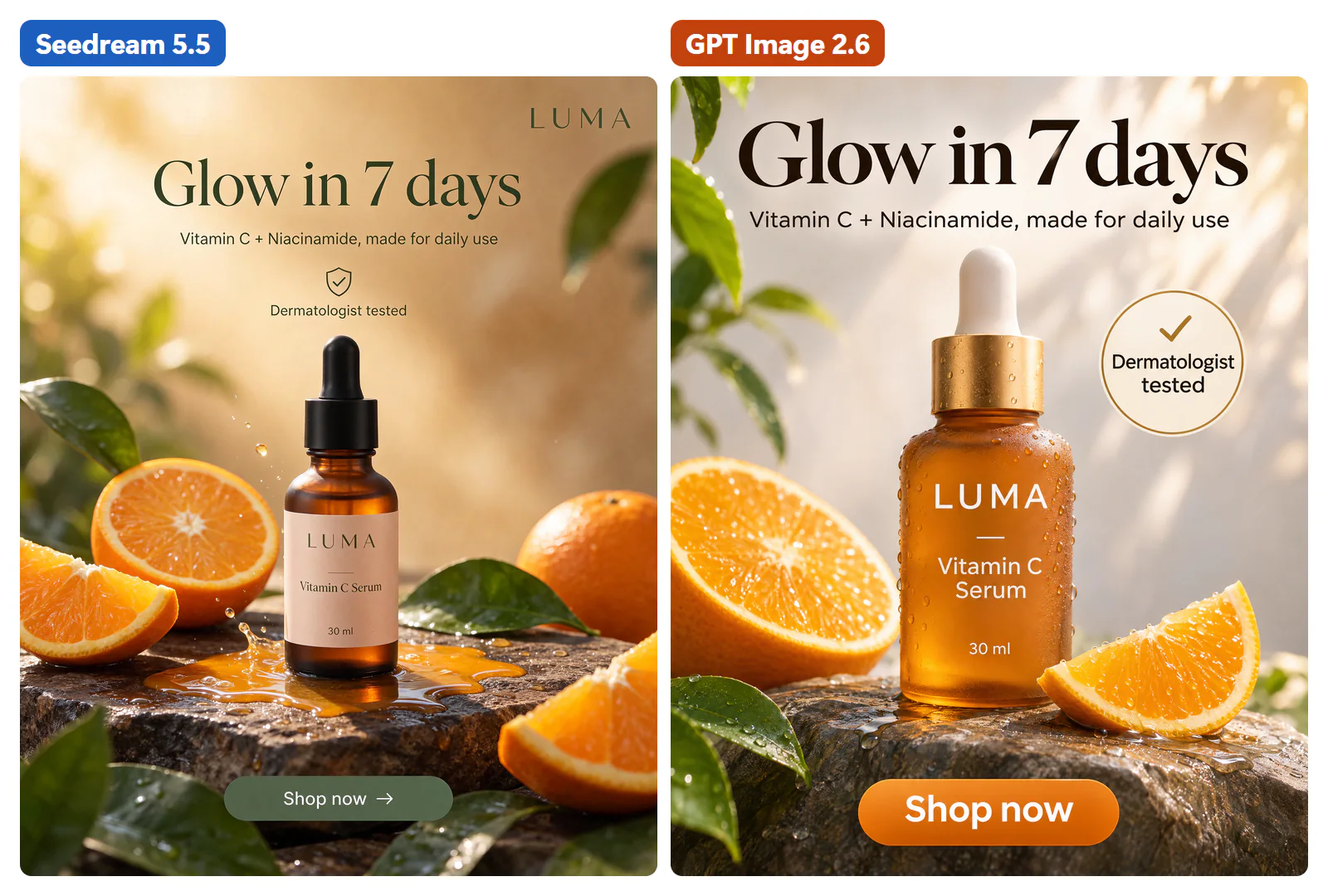
The difference is in how literally each model read the brief. GPT Image 2.6 followed the layout more literally, with a round badge and a big button. Seedream 5.5 produced something that looks more like a premium brand's real ad, but it added a brand wordmark at the top that nobody asked for and drew the badge as an icon with text under it instead of a round badge.
Verdict: tie. Pick GPT Image 2.6 when the layout must match a brief exactly. Pick Seedream 5.5 for a more premium look, and check the result for extra elements.
Test 2: an embroidered jacket on a street
We took a flat photo of a denim jacket with dense floral embroidery and asked for it worn by a model walking down a city street. The prompt asked both models to keep the jacket identical.
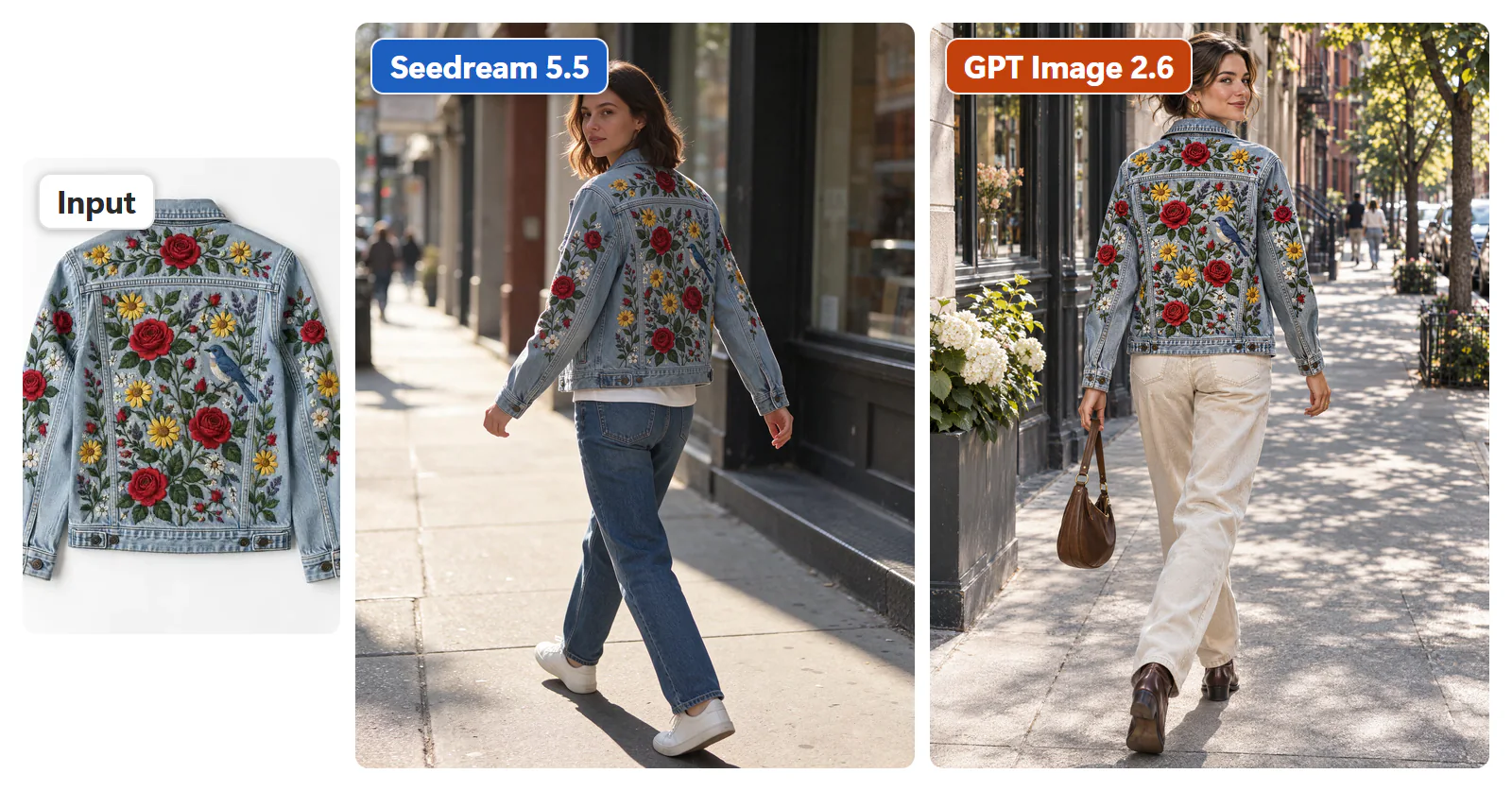
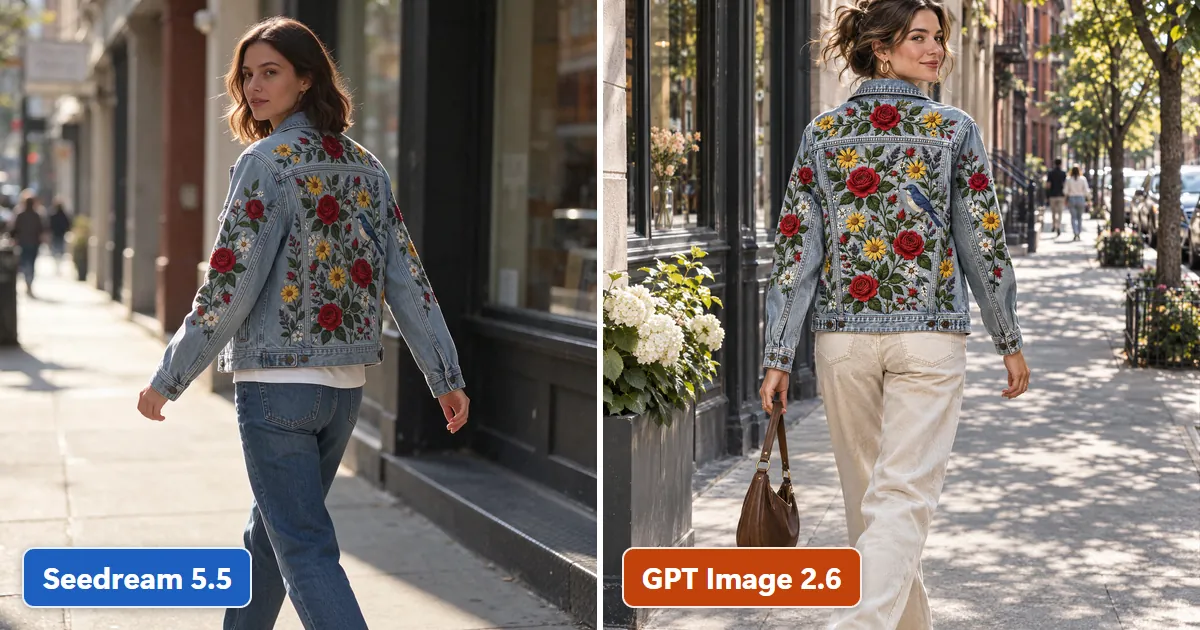
GPT Image 2.6 kept the embroidery motif for motif, with the roses, sunflowers and the bird in the same places as on the input. Seedream 5.5 kept the style of the embroidery, with the same roses, sunflowers and bird, but rearranged where they sit on the back and sleeves. At a glance both look right. Next to the product photo, only GPT's matches.
Verdict: GPT Image 2.6, for exact pattern placement. If your product's print or embroidery has to match stitch for stitch, this matters.
Test 3: virtual try-on from two photos
We gave both models a photo of a woman in a T-shirt and jeans and a photo of a floral maxi dress, and asked for her wearing the dress with her face, pose and background unchanged.
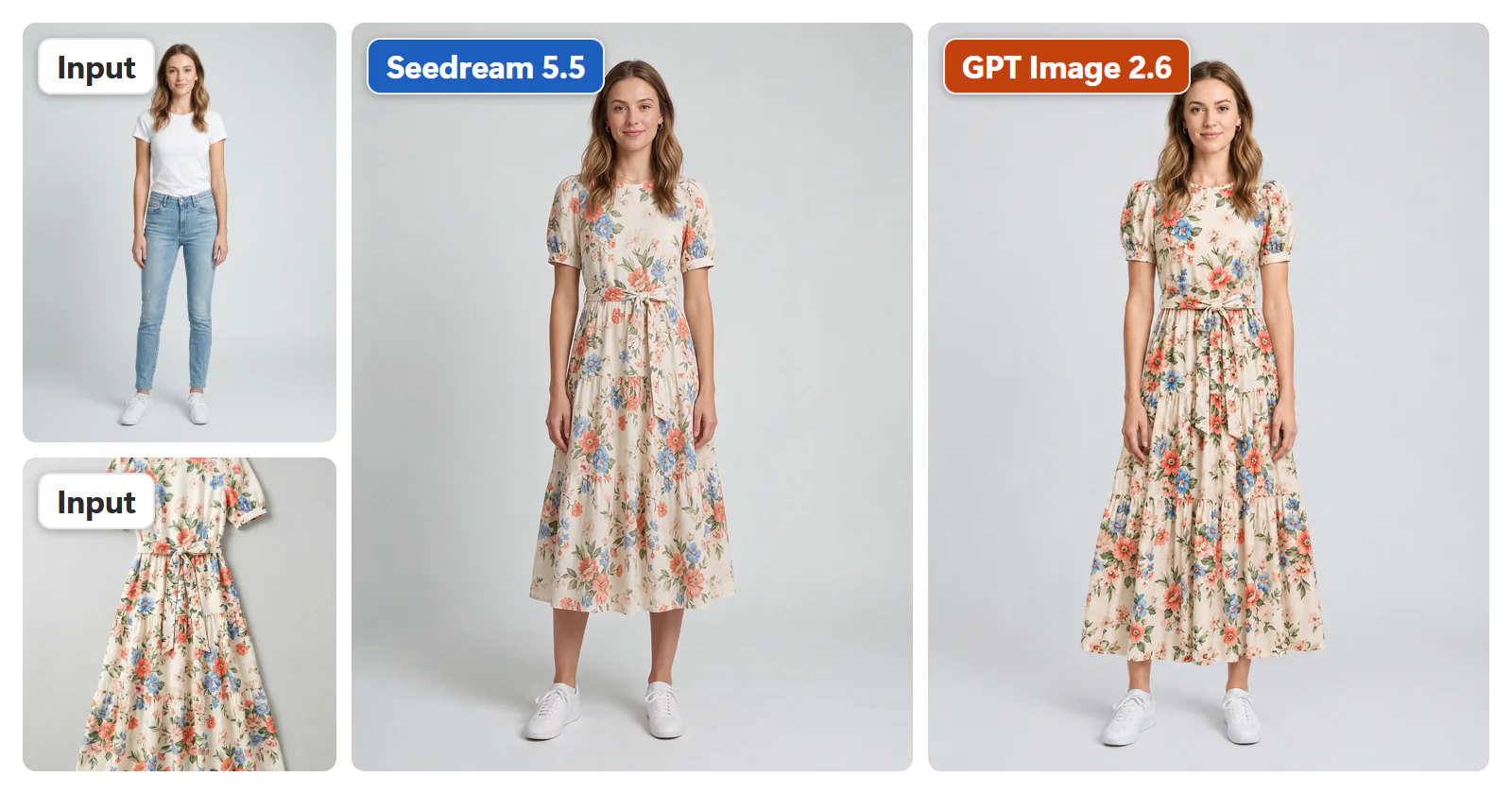
Both models put her in the floral dress with its belt and puff sleeves. GPT Image 2.6 kept her face and the dress's maxi length. Seedream 5.5 shortened the dress to mid-calf, which would mislead a shopper about the product. Seedream's photo looks more natural, but the length is wrong.
Verdict: GPT Image 2.6. Whichever model you use, check the hem length against your product photo before you publish a try-on.
Test 4: a two-step edit
In step 1 we asked both models to put a tan handbag on a white marble café table by a window. In step 2 we gave each model its own step 1 result and asked it to change only the bag to burgundy and keep everything else the same.
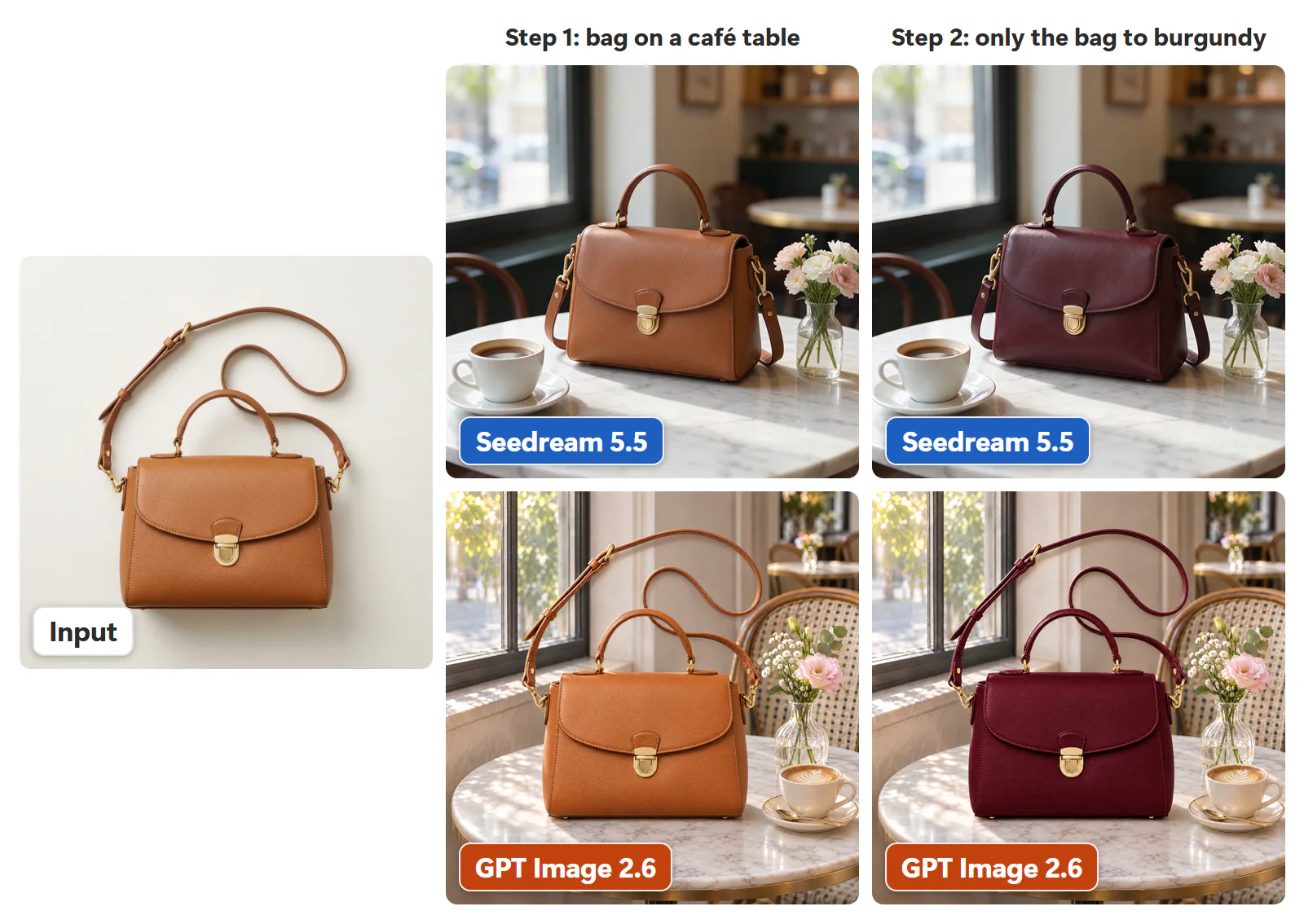
Step 2 was a draw: both models changed only the bag's colour and kept the table, the cup, the flowers and the light. Step 1 decided it. GPT Image 2.6 left the bag's long shoulder strap standing up in the air, as if it were stiff wire, which no real photo would show. Seedream 5.5's scene looked natural, with the strap hanging the way a real one would.
Verdict: Seedream 5.5, for a natural first scene. Both handled the follow-up edit that changed one thing.
Test 5: a transparent sneaker cutout
We asked both models to cut out a white sneaker on a fully transparent background and keep every detail of the shoe the same. The figure shows each result on a checkerboard so the transparency is visible.
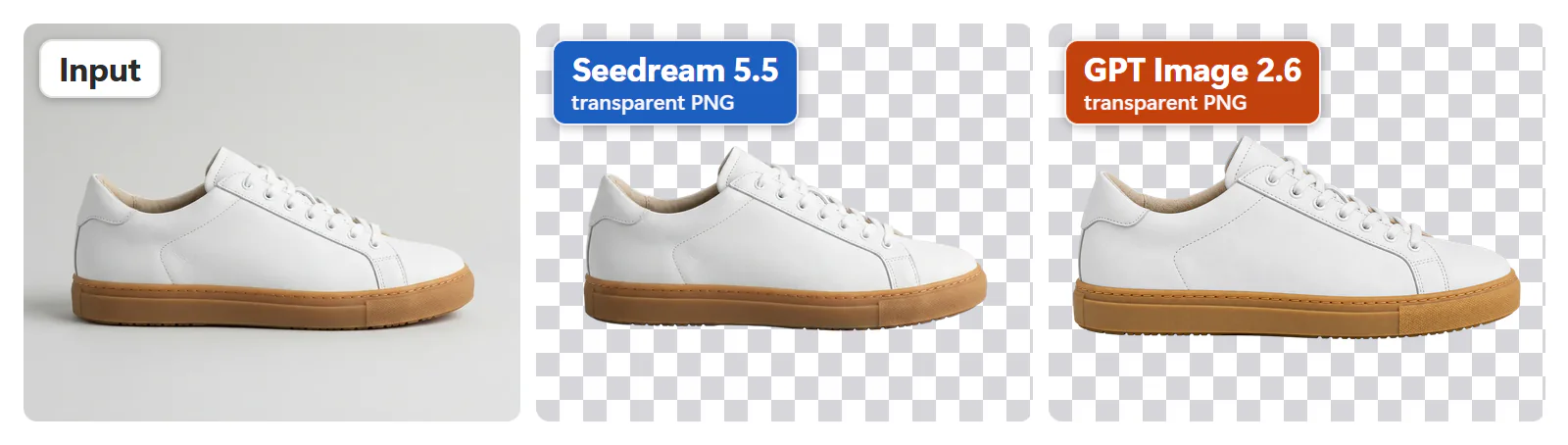
Seedream 5.5 kept the exact shoe, with clean edges. GPT Image 2.6 returned a transparent PNG too, but it reshaped the toe and the sole. For a product listing, a cutout that changes the product is not usable.
Verdict: Seedream 5.5.
Which looks more real? Skin and colour
Realism is the main reason Seedream 5.5 is now the default in CamClo AI's Smart Edit and Image Ads. At the same prompt, GPT Image 2.6 gives skin an airbrushed finish and pushes colours slightly too far. Seedream 5.5 shows what a camera would: pores, freckles and natural colour.
To be fair to GPT Image 2.6, we tried to prompt it out of the airbrushed look. We added one sentence to the prompt: "a real photograph from a professional fashion shoot, 50mm lens, real skin with visible pores, no retouching, colours not oversaturated". We also turned on OpenAI's complexity: high setting, which costs nothing extra.
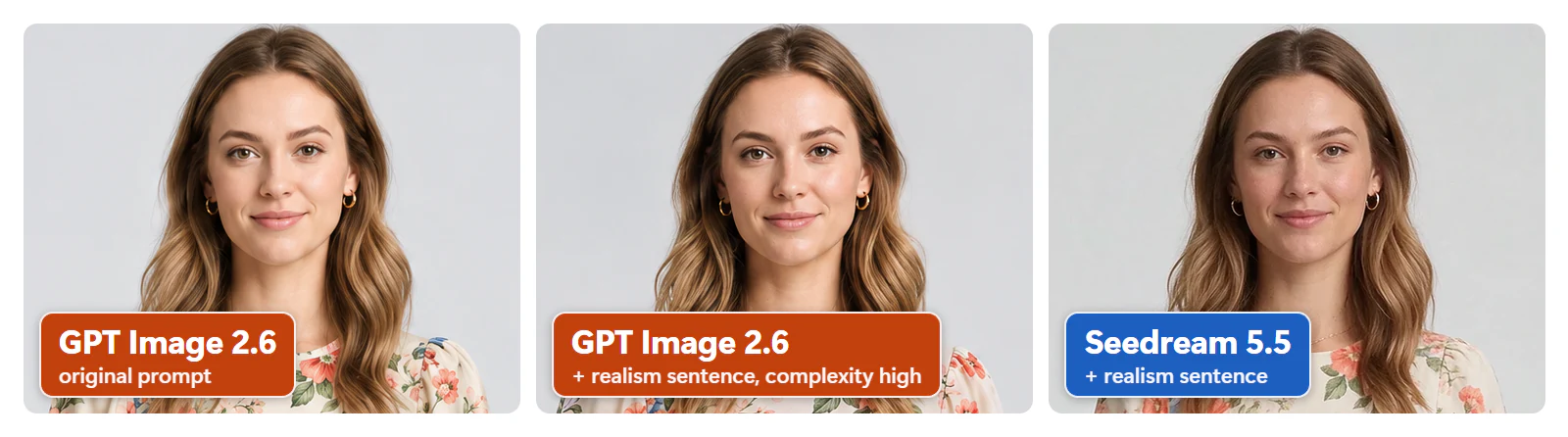
Both changes help: GPT Image 2.6 becomes clearly more natural, with less smoothing and calmer colour. Seedream 5.5 still looks the most like a real photograph. If you use GPT Image 2.6 for people, add a realism sentence like the one above to your prompt, and set complexity to high if you call OpenAI's API yourself.
Speed and price
Seedream 5.5 averaged about 20 seconds per 2K image. GPT Image 2.6, in its Quality mode at high and 2K, averaged about 68 seconds.
At provider list prices, Seedream 5.5 costs $0.035 per 2K image plus $0.008 per input photo, against about $0.07 to $0.11 per image for GPT Image 2.6 at high and 2K in our runs. In CamClo AI's Smart Edit, Seedream 5.5 costs 0.5 credits per image, or 1 credit when you use 5 or more input photos, and no model in Smart Edit costs less. GPT Image 2.6 at its default (Quality mode, high, 2K) costs 1.5 credits, three times as much.
Seedream 5.5 vs Nano Banana 2.1
Google's Nano Banana is the other model most people weigh against Seedream, so we also ran Seedream 5.5 against Nano Banana 2.1: the same photos and the same prompts, at 896x1200 for try-on and product photos and at 2K for model swap.
- Virtual try-on, 9 cases: Nano Banana 2.1 won 3, Seedream 5.5 won 1, 5 ties. Nano Banana 2.1 kept the person's original face. Seedream 5.5 redrew faces sharper, but they drifted from the original, and it shortened a maxi dress and let a bodysuit's black base show above the jeans. Seedream's win was a pair of sneakers drawn sharper, with a readable tongue label. In the 5 ties, both kept logos exact.
- Product photography, 5 cases: all ties.
- Model swap, 12 cases: about even. Seedream 5.5 showed more real skin and a more convincing plus-size body. Nano Banana 2.1 matched a face reference slightly more closely in 1 of 3 face cases. Seedream 5.5 took about 18 seconds per image, Nano Banana 2.1 about 29.
- Resolution: Nano Banana 2.1 makes 4K. Seedream 5.5 stops at 2K.
Verdict: about even. Pick Nano Banana 2.1 when a person's face must stay exactly as photographed, or when you need 4K. Pick Seedream 5.5 for more real skin and faster renders. Both are in CamClo AI's Smart Edit. For what Google charges for each version, see our Nano Banana pricing guide.
Seedream 5.5 vs Seedream 5.0 and 4.5
Seedream 5.5 is ByteDance's update to Seedream 5.0 Pro and Flash. Three changes matter for fashion and product work:
- Steadier multi-step editing. When you edit the same photo several times, it keeps the subject, the composition and the parts you did not touch more consistent from one round to the next. In our two-step bag edit, Seedream 5.5 changed only the bag in the second round.
- Transparent PNGs from words or photos. It can make a transparent image straight from a text prompt, which Seedream 5.0 cannot, and it can build one from up to 10 ordinary reference photos. Seedream 5.0 needed a single PNG that already had transparency.
- Same reach on inputs. Like 5.0, it takes up to 10 reference images and outputs up to 2K, choosing the shape from your photo or your prompt.
If you used Seedream 4.5 in CamClo AI: we moved from Seedream 4.5 straight to Seedream 5.5, so the Seedream model in Smart Edit is now 5.5.
Where Seedream 5.5 falls short
- No 4K. For 4K in CamClo AI's Smart Edit, you can pick GPT Image 2.6, Nano Banana Pro or Nano Banana 2.1.
- Exact pattern placement. It keeps a print's style but can move individual motifs.
- Garment length and faces in try-on. It shortened a maxi dress, and against Nano Banana 2.1 its faces drifted from the original.
- Literal layouts. It can add elements a brief did not ask for, like the extra wordmark in the ad test.
- No SVG. GPT Image 2.6 can make SVG files from a text prompt. Seedream 5.5 cannot.
One thing that looks like a limit is not: Seedream 5.5 needs no aspect ratio setting. It keeps your photo's shape or reads the shape from the prompt, so "a 16:9 banner" gets you a 16:9 banner.
Which model should you use?
- Model photos, lifestyle shots and cutouts: Seedream 5.5, the most real looking, fastest and cheapest of the two.
- Detailed prints, fixed ad layouts, 4K or SVG: GPT Image 2.6.
- A person's exact face in try-on, or 4K try-on: Nano Banana 2.1.
- High volume: Seedream 5.5, at about 3x the speed of GPT Image 2.6 and a third of the credits.
How to use both in CamClo AI
You do not have to choose once. In Smart Edit, Seedream 5.5 is the default model, and you can switch to GPT Image 2.6 for any single edit, for example a text-heavy ad, then switch back. Smart Edit also has Nano Banana Pro, Nano Banana 2.1 and other models in the same picker. To make SVG files with GPT Image 2.6, ask the AI Assistant in the AI Suite.
In Image Ads, Seedream 5.5 is the default as well, and you can switch to GPT Image 2.6 for an ad whose layout must follow a brief exactly. On a paid plan, Seedream 5.5 images in Smart Edit and Image Ads use your plan's monthly free images before any credits.
For more on the tools around these models, see our comparisons of the best AI product photography tools and the best virtual try-on tools for clothes.
How we tested
We sent the same prompt to both models for each job and kept the first image from each, one image per model per case. GPT Image 2.6 ran in its Quality mode (OpenAI's Sunburst model) at quality high and 2K. Seedream 5.5 ran at 2K on BytePlus ModelArk, ByteDance's model platform. The inputs were our own product photos and model photos, and the times are what each request took from start to finish. The Nano Banana 2.1 comparison used the same photos and prompts for both models. The cover image at the top of this page was made with Seedream 5.5.
One image per case is a small sample, and every model has good and bad draws. Treat these results as a guide to each model's tendencies, and run your own hardest products through both before you commit a catalogue to one of them.
Frequently asked questions
Which is better, GPT Image 2.6 or Seedream 5.5?
It depends on the job. In our tests on the same prompts and photos, Seedream 5.5 won on realism, speed and price: the most natural skin and colour, about 20 seconds per 2K image against about 68, and a third of the credits in CamClo AI. GPT Image 2.6 won on precision: it followed a dense ad layout more literally, kept an embroidered pattern motif for motif and kept a maxi dress at full length, and it makes 4K images and SVG files.
Which looks more realistic, GPT Image 2.6 or Seedream 5.5?
Seedream 5.5. At the same prompt, GPT Image 2.6 made skin look airbrushed and colours slightly oversaturated, while Seedream 5.5 showed pores, freckles and natural colour. A realism sentence in the prompt and OpenAI's complexity high setting made GPT Image 2.6 clearly more natural, but Seedream 5.5 still looked the most like a real photograph.
Is Seedream 5.5 better than Nano Banana?
Not across the board. Against Nano Banana 2.1 on the same photos and prompts, it came out about even. Nano Banana 2.1 won 3 of 9 try-on cases, mostly by keeping the person's original face, against 1 for Seedream 5.5 and 5 ties. Product photography was 5 ties out of 5. Model swap was about even over 12 cases: Seedream 5.5 showed more real skin and ran faster (about 18 seconds per image against about 29), and Nano Banana 2.1 matched a face reference slightly more closely in 1 of 3 face cases. Nano Banana 2.1 also makes 4K, which Seedream 5.5 does not.
What is the best AI image model for fashion photography?
For realistic fashion and product photos, Seedream 5.5 was the best model in our tests: the most natural skin and colour, about 20 seconds per image, and the lowest price in CamClo AI's Smart Edit. GPT Image 2.6 is the better pick when a print must keep every motif in place or a layout must follow a brief exactly. In CamClo AI, Seedream 5.5 is the default model in Smart Edit and Image Ads.
Which AI model is best for virtual try-on?
It depends on the garment and the person. Against GPT Image 2.6, Seedream 5.5 made the more natural photograph but shortened a maxi dress to mid-calf. Against Nano Banana 2.1, its faces drifted from the original, where Nano Banana 2.1 kept them. Whichever model you use, check the face and the hem length before you publish.
What is new in Seedream 5.5 compared with Seedream 5.0?
Seedream 5.5 keeps a subject and scene more consistent across several rounds of editing, can make a transparent PNG straight from a text prompt (Seedream 5.0 Pro and Flash cannot), and can build a transparent image from up to 10 reference photos that need no transparency of their own. Like Seedream 5.0, it takes up to 10 reference images and outputs up to 2K.
Is Seedream 5.5 cheaper than GPT Image 2.6?
Yes. In CamClo AI's Smart Edit, Seedream 5.5 costs 0.5 credits per image (1 credit with 5 or more input photos), and no model in Smart Edit costs less. GPT Image 2.6 at its default (Quality mode, high, 2K) costs 1.5 credits, three times as much. At provider list prices, Seedream 5.5 is $0.035 per 2K image plus $0.008 per input photo, and GPT Image 2.6 came to about $0.07 to $0.11 per image at high and 2K in our runs.
Is Seedream 5.5 faster than GPT Image 2.6?
Yes, about 3x faster. Seedream 5.5 averaged about 20 seconds per 2K image in our test, and GPT Image 2.6 in its Quality mode at high and 2K averaged about 68 seconds.
Does Seedream 5.5 do 4K?
No. Seedream 5.5 goes up to 2K, about 4.6 megapixels. For 4K in CamClo AI's Smart Edit, you can pick GPT Image 2.6, Nano Banana Pro or Nano Banana 2.1.
Can Seedream 5.5 make transparent PNGs?
Yes. Ask for a transparent background and it returns a transparent PNG. In our sneaker test it kept the exact shoe with clean edges, while GPT Image 2.6 reshaped the toe and the sole. Seedream 5.5 cannot make SVG files; GPT Image 2.6 can.
Which model is better for text-heavy ads?
Both spelled every word correctly in our skincare ad test. GPT Image 2.6 followed the requested layout more literally; Seedream 5.5 looked more like a premium brand's ad but added an extra wordmark. If the layout must match a brief exactly, use GPT Image 2.6; otherwise either works, as long as you check for extra elements.
Try Seedream 5.5 and GPT Image 2.6 on your own products
Both models are in CamClo AI's Smart Edit and Image Ads, with Seedream 5.5 as the default. Start with a 7-day trial for $1 with 20 credits.
Try Smart Edit