

Table of Contents
Captions' cheapest paid plan is Lite at $4.99 a month, but it only works in the Android app. On iPhone, web and desktop the entry plan is Basic at $9.99 a month with 200 AI credits, and Max, the plan Captions puts first on its pricing page, is $24.99 a month with 500 credits. The free plan costs nothing and covers basic editing, with a one-time 60 to 200 credits according to Captions' help center.
Below is every plan, what uses credits and how fast, the rules on rollover and refunds, and the places where Captions' own pages disagree. Captions is made by Mirage, the company that used to be called Captions, so Mirage Captions pricing is the same thing. At the end we compare alternatives for people who mainly make product ads.
We read every price on Captions' own pricing page and help center. Here is how we checked.
Captions AI pricing at a glance
| Plan | Monthly price | AI credits | What it adds |
|---|---|---|---|
| Free | $0 | 60 to 200, one time | Captions, trim, zoom, transitions, voiceover, resize, one caption template |
| Lite | $4.99 | None listed | Android only: caption styles, dubbing, teleprompter, AI script, eye contact, denoise |
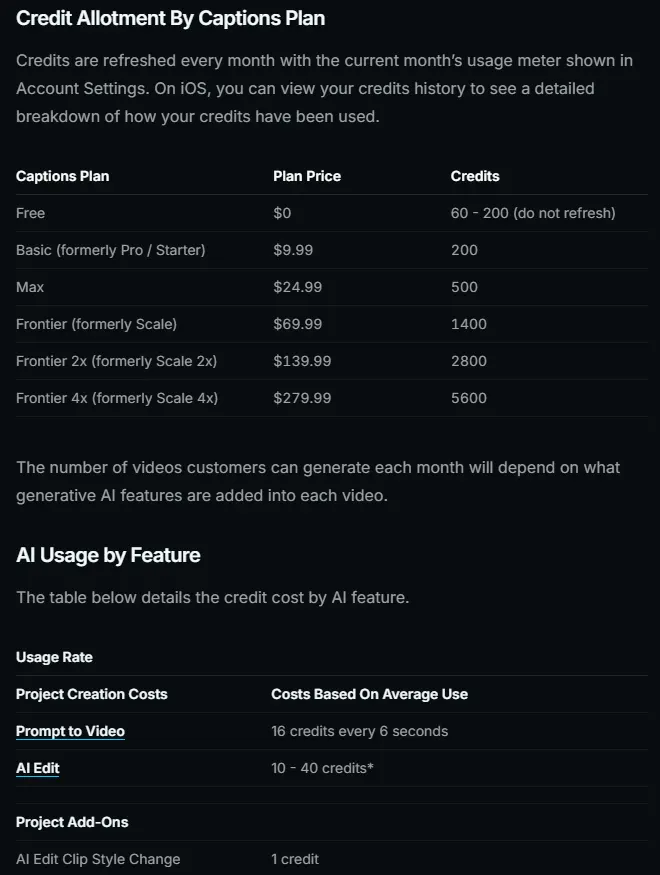
| Basic (was Pro) | $9.99 | 200 a month | No watermark, script generator, teleprompter, caption and dub, AI editing tools |
| Max | $24.99 | 500 a month | AI actors, up to 30 AI Twins, AI Ads, AI Edit, Clips, chat-based editor, AI image and video models |
| Frontier (was Scale) | $69.99 | 1,400 a month | Everything in Max, faster generations, Captions' top tier of AI models |
| Frontier 2x | $139.99 | 2,800 a month | Frontier with twice the credits |
| Frontier 4x | $279.99 | 5,600 a month | Frontier with four times the credits, and access to top-up credits |
| Enterprise | Custom | Custom | Bulk credit discounts, custom seats, account team, training data exclusion |
US dollar prices from Captions' pricing page (Max, Frontier, Enterprise) and help center (Free, Lite, Basic, Frontier 2x and 4x). The pricing page says its features and prices reflect iOS plans; the help center says you may see a local-currency price at checkout that is above or below the USD price.
Making product ads rather than presenter videos? CamClo AI starts from your product photos or a product page link, writes the script and generates the whole video ad, and an 8-second 720p ad costs 11 credits on the default model, about $3.60 on the $49 Creator plan with 150 credits. There is a 7-day free trial with 20 credits. See the video ad maker and CamClo AI plans.
Why the pricing page shows only three plans
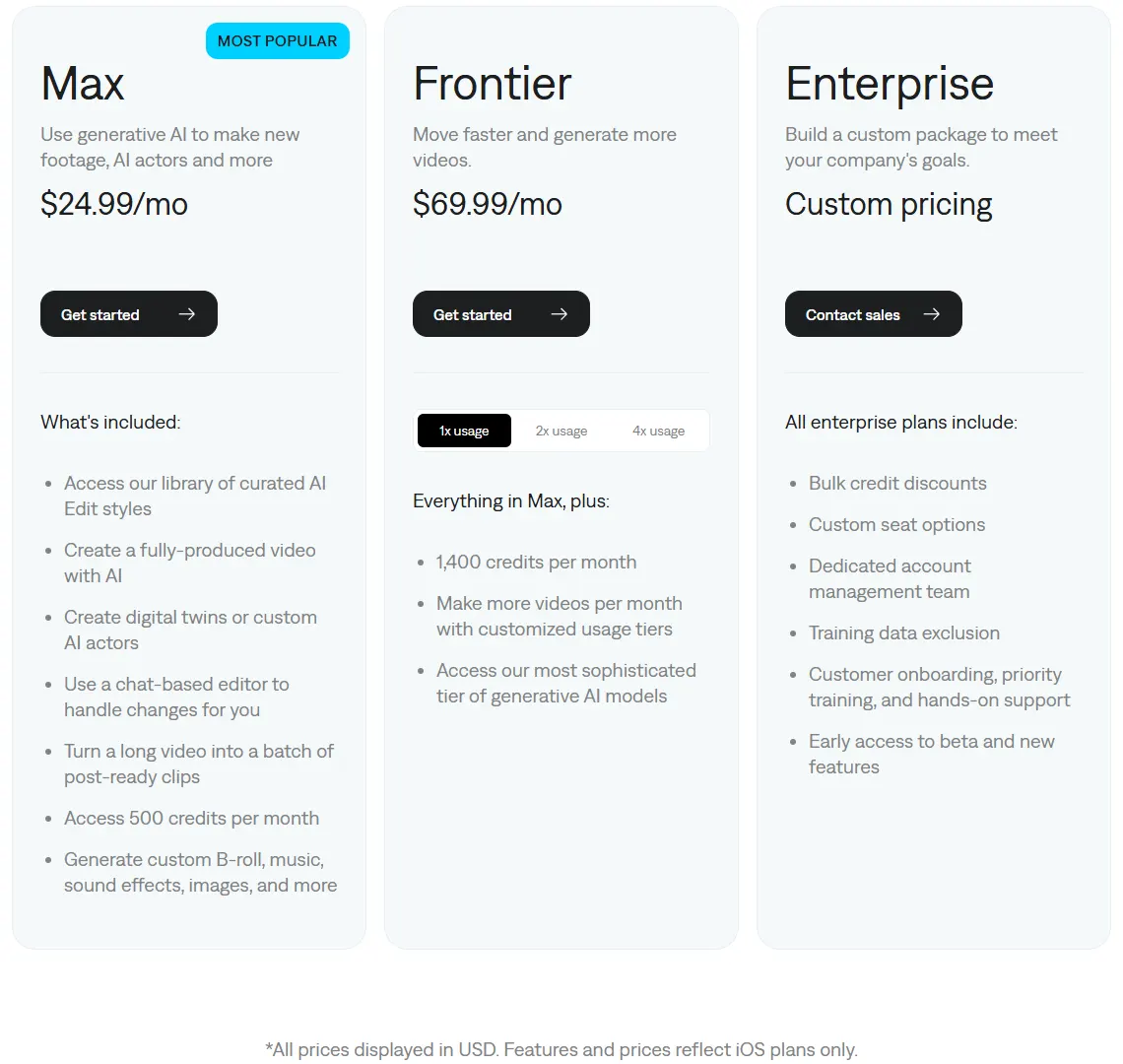
The pricing page lists Max, Frontier and Enterprise, with a footnote that "features and prices reflect iOS plans only." The two cheaper plans, Basic and Lite, are listed in the help center's plans article instead. Basic is also in the US App Store's list of in-app purchases.
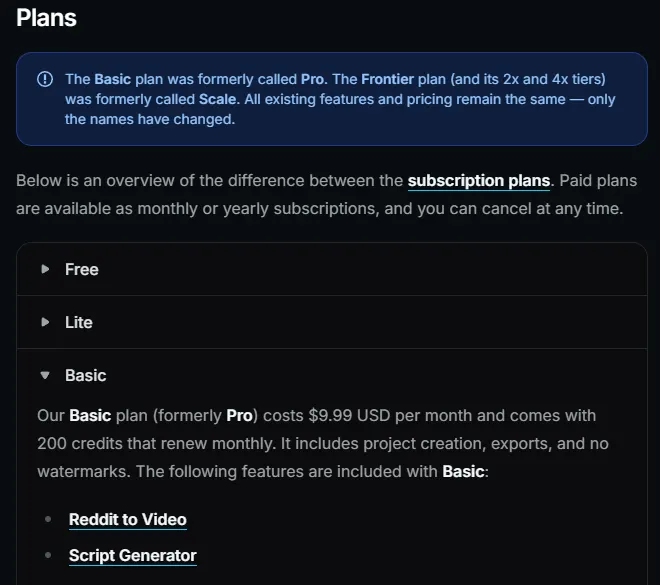
Two renames confuse older reviews. Basic used to be called Pro (the credits table also lists Starter as an old name), and Frontier used to be called Scale. Captions says the features and prices stayed the same and only the names changed. A review that quotes "Pro at $9.99" or "Scale at $69.99" is describing today's Basic and Frontier.
What each Captions plan includes
- Free ($0). Captions, camera, trim, zoom, sounds, media, voiceover, transitions and resizing, with one caption template ("Eclipse") and no watermark, per the help center. If you use any other feature, Captions asks you to upgrade.
- Lite ($4.99 a month). Sold in the Android app for manual editing: importing and translating captions, dubbing, caption styles, the teleprompter with AI script, AI eye contact, denoise and generated sounds. It can only be used on Android; on iPhone or desktop you need Basic, Max or Frontier.
- Basic ($9.99 a month, 200 credits). Project creation and exports with no watermark, Reddit to Video, the script generator, camera and teleprompter, caption and dub, and AI editing tools for eye contact, denoise, censoring, zoom, voiceover, title cards, text and trimming. AI voices, sound effects and Soundraw music are available; AI image and video models are not.
- Max ($24.99 a month, 500 credits). Everything in Basic plus chat-based editing, AI Edit, Clips, Mirage-generated AI actors, up to 30 AI Twins, two video generations at once, and the AI image and video models. The pricing page's comparison marks AI Creator, AI Ads, AI Skits, AI Twin, AI Translate, AI Lipdub and AI Voice Clone as included on Max and Frontier but not on Free.
- Frontier ($69.99 to $279.99 a month). Everything in Max with 1,400, 2,800 or 5,600 credits, faster generations and what Captions calls its "most sophisticated tier of generative AI models."
- Enterprise (custom). Bulk credit discounts, custom seat options, a dedicated account team, training data exclusion, onboarding and early access to new features.
Watch for the Basic watermark. Captions' help center says that if you use Max-only features on Basic, such as the Co-Editor, AI Edit, AI-generated images or videos, or AI Creator (for users who are not grandfathered), your export carries a watermark. Remove those features from the project or upgrade to Max.
How Captions credits work
Captions says that "every AI feature, generating images, videos, sounds, music, voiceovers, text prompt to videos, and AI Edits" draws from your credit balance. Credits are also spent on projects you never export: any generation that uses AI uses credits. These are the rates in its credits article:
| What you do | Credits |
|---|---|
| Prompt to Video (AI actor) | 16 credits every 6 seconds |
| AI Edit (auto-edits your footage) | 10 to 40, depending on duration, model and settings |
| AI Edit clip style change | 1 |
| AI image | 1 to 6, by model |
| AI video clip | 8 to 140, by model |
| AI music | 2 (Soundraw), 3 (Lyria 3 Pro) or 10 (ElevenLabs Music) |
| Chat-based editing | 2 per message, 1 per action, plus any generation |
| Audio isolation | 2 per minute |
From Captions' credits article. Its feature summary gives lower ranges (images 1 to 3, video 1 to 20, music 1 to 2 credits) than its per-model table, so we show the per-model figures.
What a Captions credit buys
Every plan with monthly credits works out at about 5 cents a credit: $9.99 for 200, $24.99 for 500, $69.99 for 1,400 and $279.99 for 5,600. Bigger plans buy more credits and features, not cheaper credits. Here is what Max and Frontier cover at Captions' listed rates:
| What you make | Credits each | Per month on Max (500) | Per month on Frontier (1,400) |
|---|---|---|---|
| 30-second Prompt to Video | 80 | 6 | 17 |
| 60-second Prompt to Video | 160 | 3 | 8 |
| Veo 3.1 clip, 4 seconds | 64 | 7 | 21 |
| Veo 3.1 Fast clip, 6 seconds | 36 | 13 | 38 |
| Seedance 2.0 clip | 61 | 8 | 22 |
| Kling 2.1 clip | 140 | 3 | 10 |
| AI Edit of your footage | 10 to 40 | 12 to 50 | 35 to 140 |
Our arithmetic from Captions' published rates, rounded down, before retakes, B-roll or music. Captions lists a clip length only for the Veo rows; for the other models it gives one cost with no clip length, which we count as one clip. The credits article does not list a separate rate for AI Ads, whose scripts are capped at 1 minute.
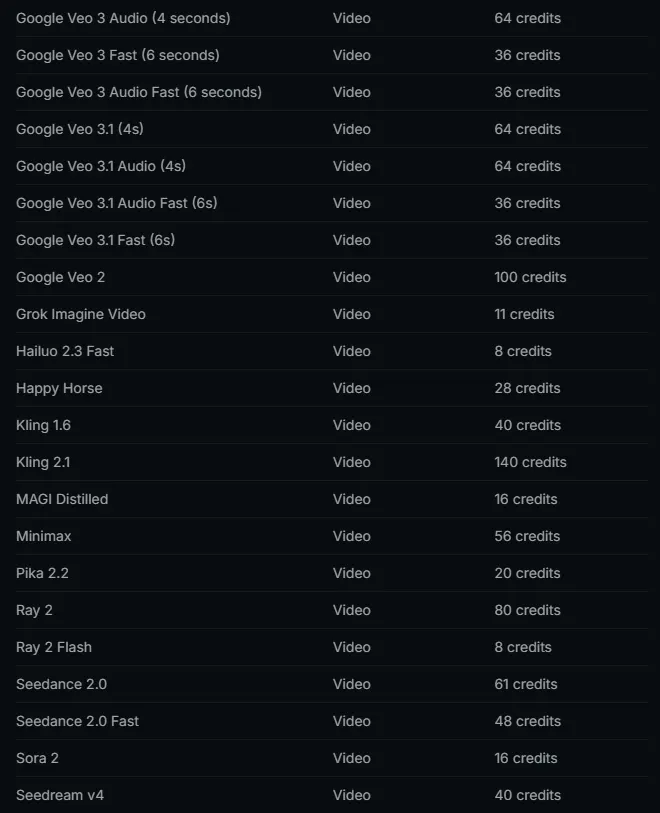
For ad makers, that means a month on Max covers about six 30-second AI actor videos made from a prompt, and every retake costs the same again. In plan terms, a 30-second Prompt to Video uses about $4 of credits.
Rollover, top-ups and cancellation
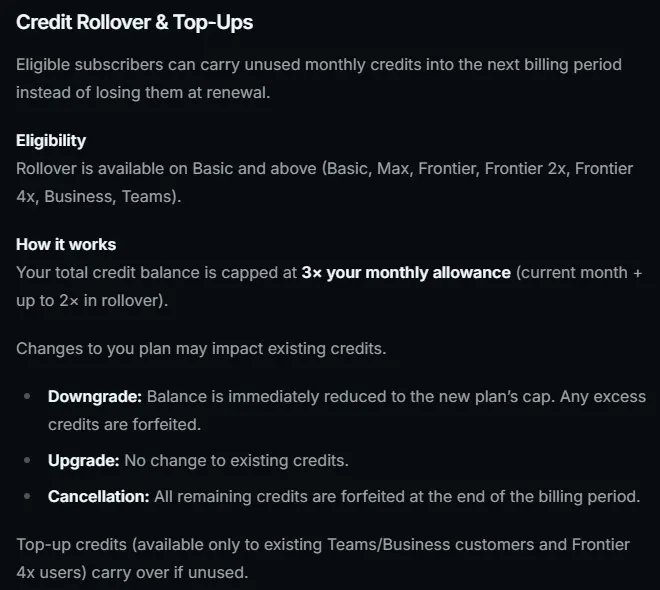
- Rollover. On Basic and above, unused monthly credits carry into the next billing period. Your balance is capped at 3 times your monthly allowance, so 1,500 credits on Max.
- Plan changes. Upgrades take effect straight away, with the price prorated, and do not change your existing credits. According to the credits article, a downgrade cuts your balance to the new plan's cap immediately, and the excess is lost; the pricing page adds that your current plan stays active until the end of the billing cycle.
- No credit packs for most people. Captions says "it is not possible to buy individual credits"; you upgrade instead. Top-up credits exist only for existing Teams and Business customers and Frontier 4x subscribers, and those carry over.
- Cancelling. Credits stay usable until the end of the billing period and are then forfeited. Subscriptions renew unless you cancel at least 24 hours before the period ends.
- Free credits. The one-time free allowance never refreshes.
Where Captions' own pages disagree
When we checked, four points differed between Captions' pages. When in doubt, run one small test and check the usage meter in Account Settings (on iOS there is also a credits history).
- Free credits. The pricing page lists no AI credits on Free; the help center says free accounts get 60 to 200 one-time credits.
- Rollover. The pricing page FAQ and the credits article say unused credits roll over, up to 3 times the allowance. A separate help article on Mirage credits says they "do not roll over."
- Video rate. The credits article prices Prompt to Video at 16 credits every 6 seconds. The Mirage credits article says "each second of generated Mirage video costs 8 credits", which is 48 credits for 6 seconds.
- Free watermark. The help center says free exports of the basic features have no watermark. Captions' site summary for AI tools says the free plan has a "watermark on export", and it still uses the old names Pro and Scale.
Monthly or yearly, and where you pay
- Yearly billing. Captions says a yearly plan "bills for 12 months upfront, at a discounted rate", but the pricing page shows no yearly prices. The US App Store listing shows Basic yearly at $64.99 and Basic weekly at $5.99; no yearly Max price appears in that list.
- Where you subscribe. Through the Apple App Store, Google Play or the Captions website. An App Store subscription follows your Apple ID and a Play subscription your Google account; a website subscription follows the login method you signed up with.
- Refunds. App Store and Google Play refunds go through Apple or Google. On the website, monthly plans are non-refundable, though you can cancel any time to stop future charges.
- Seats. A subscription is for one user and cannot be shared. Legacy Teams and Business customers can now add seats without the old $40 per seat charge, and the Enterprise plan offers custom seat options.
Mirage API pricing
Developers pay for the Mirage API by usage, separately from the app plans:
- Add Captions: $0.15 per minute of input video, rounded up to the next minute. A 2.5-minute video is billed as 3 minutes, or $0.45.
- Mirage Avatar X video generation: $0.15 per second of output, billed in 6-second steps. A 10.2-second video is billed as 12 seconds; a 30-second video costs $4.50.
Which Captions plan to pick
- Captions and trims only: the free plan, as long as you avoid the paid features.
- Android only, manual edits: Lite at $4.99.
- Editing footage you record yourself: Basic at $9.99, for the teleprompter, AI script, eye contact and denoise tools.
- AI actors, AI Twins or AI Ads: Max at $24.99. Budget about 80 credits per 30-second Prompt to Video.
- Several AI videos a week: Frontier, and only Frontier 4x can buy top-ups when you run out.
Alternatives to Captions for product ads
Captions is an editing app first, with AI actors and a link-to-ad feature on top. If your main job is ads for products you sell, or you only need part of what Captions does, here is how CamClo AI compares with Descript and Submagic, two editors that come up often in reviews of Captions' pricing.
| Tool | Best for | Paid plans from | Free option | Starts from |
|---|---|---|---|---|
| Captions (reference) | Editing plus AI actors | $4.99/mo on Android, $9.99/mo elsewhere; $24.99/mo for AI actors and AI Ads | Free plan (help center: 60 to 200 one-time credits) | Your footage, a prompt or a product link |
| CamClo AI | Video ads from a product photo or link | $49/mo | 7-day free trial with 20 credits | Product photos or a product page link |
| Descript | Editing recordings like a document | $24/mo ($16/mo billed yearly) | 1 media hour a month, 100 one-time AI credits | Your footage |
| Submagic | Captions and quick edits for short clips | $19/mo ($12/mo billed yearly) | Free to try, no card | Your footage |
Entry paid plan on each vendor's official pricing page, in US dollars, billed monthly unless marked. Confirm before you buy.
1. CamClo AI
Best for: video ads from a product photo or product pageCamClo AI is an AI studio for ecommerce teams. Its Video Ads tool starts from the product, not from an actor or your own footage: you add product photos or paste a product page link, pick an ad format, and it writes the script and generates the whole ad, with the person, the setting, the voice and the sound.
- Formats: 15, including UGC, UGC Virtual Try-On, Unboxing, Product Demo, Testimonial, Street Interview, POV and ASMR, plus produced styles such as Commercial and TV Spot.
- Output: sized for 10 placements, including Reels, TikTok, Shorts, Pinterest and Facebook and Instagram feeds, at 480p, 720p or 1080p, from 4 to 30 seconds per video ad.
- Remix Ads: pick an ad from the public ad libraries, or upload one, and CamClo AI builds a new ad for your product that follows its structure, up to 90 seconds.
- Pricing: plans from $49 a month with 150 credits. An 8-second 720p video ad costs 11 credits on the default model, and a 15-second one costs 20. Subscribers can top up from 50 credits without changing plan, and bought credits carry forward. There is a 7-day free trial with 20 credits.
Strengths
- Starts from your product photo or product page, so the product on screen is the one you sell
- Formats where the product is used, worn or unboxed, with the script written for you
- Sized for each placement in the same step
- Credit top-ups on any paid plan, without upgrading
Limits
- Can seem a little expensive next to an all-in-one editing app, but the credits cover the script, the ad format and the sizing for each placement, not just a raw clip
To see every format and how an ad is built, visit the AI video ad maker that starts from a product photo.
2. Descript
Best for: editing recorded video by editing the transcriptDescript is a video and podcast editor where you edit the video by editing its text. Like Captions, it adds AI tools for eye contact, filler words and sound, plus AI video generation and avatars.
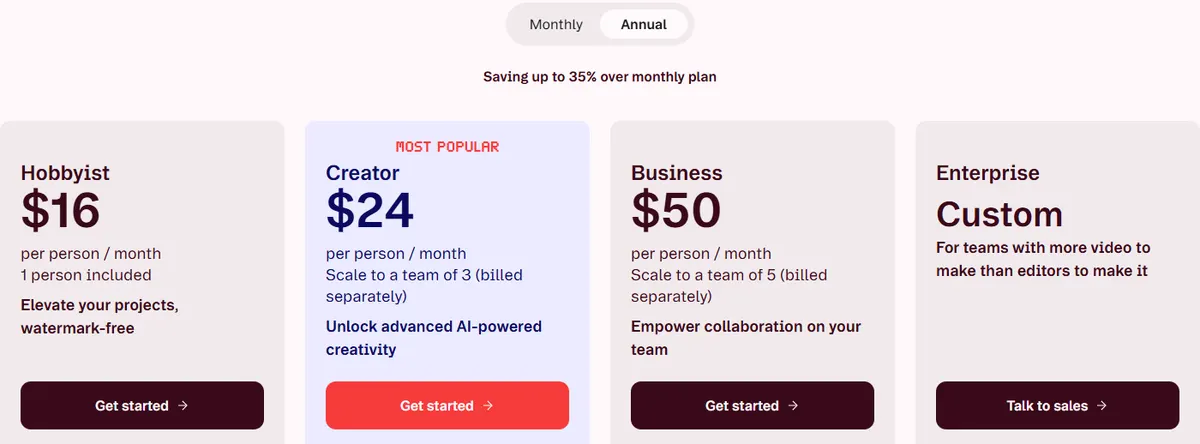
- Pricing: Hobbyist is $24/month, or $16/month billed annually, with 10 media hours, 400 AI credits and 1080p watermark-free export. Creator is $35/month ($24 billed annually) with 30 media hours, 800 AI credits, 4K export and video generation. Business is $65/month ($50 billed annually); its plan card lists custom avatars from a photo or text, and dubbing with proofreading in 30+ languages.
- Free: 1 media hour a month, 100 one-time AI credits and 720p export.
Strengths
- Edit video like a document, which suits long recordings
- Top-ups for media hours and AI credits on Creator and Business
- 4K export from Creator
Limits
- Media hours cap how much footage you can upload or record each month
- An editing tool first, so the ad structure is up to you
Pick this instead of CamClo AI if you record yourself or your team and mostly need to edit that footage, including long videos and podcasts.
3. Submagic
Best for: captions and quick edits on short clipsSubmagic is built for short-form video: it adds AI captions, B-roll, zooms and audio cleanup to clips you upload, and sells credits that it counts as a set number of videos a month.
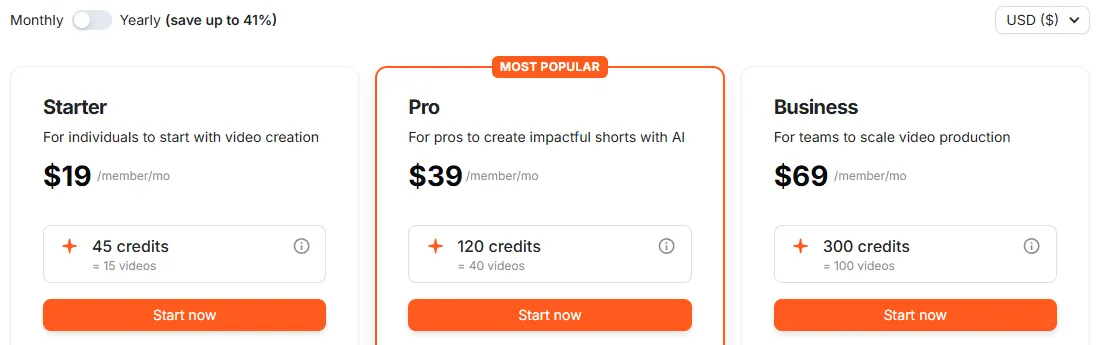
- Pricing: Starter is $19/month, or $12/month billed yearly, with 45 credits (Submagic says 15 videos), videos up to 2 minutes, 1080p, no watermark and AI auto captions. Pro is $39/month ($23 yearly) with 120 credits (40 videos) and 5-minute videos. Business is $69/month ($41 yearly) with 300 credits (100 videos), 30-minute videos and 4K at 60 FPS.
- Free: you can try it without a card; the pricing page does not list the free allowance.
Strengths
- Credits are stated as a number of videos, so the monthly cost per video is clear
- No watermark from the first paid plan
Limits
- Starter caps videos at 2 minutes
- 4K export only on Business
Pick this instead of CamClo AI if you already film your own clips and only need captions and quick edits at a known cost per video.
If you want an AI presenter on camera rather than a generated scene, our breakdowns of HeyGen pricing and credits and Arcads pricing cover the avatar tools, and our guide to HeyGen alternatives for UGC video ads compares Captions with them. New to the format? Start with what UGC ads are.
How we checked
We read Captions' pricing page and its help center articles on plans, credits, rollover, watermarks, billing and the API, and saved screenshots of the pages we quote. Basic, Lite and the Frontier 2x and 4x prices come from the help center, because the pricing page shows only Max, Frontier and Enterprise. The yearly Basic price comes from the US App Store listing, the only official place we found a yearly USD price. The "what a credit buys" figures are our own arithmetic from Captions' published rates, rounded down. For Descript and Submagic we read each official pricing page on both billing toggles. We did not run a scored quality test, so there are no quality scores here.
If you are weighing several AI video tools for ads, see our best AI UGC video generators roundup, or go straight to the UGC and product video ad maker to try a format on your own product.
Frequently asked questions
How much does Captions AI cost?
Captions lists a free plan, Lite at $4.99/month (Android only), Basic at $9.99/month with 200 credits, Max at $24.99/month with 500 credits, Frontier at $69.99/month with 1,400 credits (or $139.99 and $279.99 for 2,800 and 5,600 credits), and custom Enterprise pricing. Yearly billing is discounted, but the pricing page does not list yearly prices.
Is Captions AI free to use?
Partly. The free plan covers captions, trimming, zoom, transitions, voiceover and resizing, with one caption template. Captions' help center says free accounts get a one-time 60 to 200 credits that do not refresh, while the pricing page lists no AI credits for Free. AI actors, AI Ads, AI Edit and AI-generated media need Max or above.
Is Mirage the same as Captions?
Mirage is the company and Captions is its app. Mirage says it was formerly known as Captions and rebranded in 2025. The app plans are the ones on this page; the Mirage API is priced separately, at $0.15 per minute for captions and $0.15 per second for Mirage Avatar X video.
Do Captions credits roll over?
On Basic and above, yes, according to Captions' pricing page and credits article: unused credits carry into the next month, up to a balance of 3 times your monthly allowance. Downgrading cuts your balance to the new plan's cap, and cancelling forfeits what is left at the end of the billing period. A separate Mirage help article still says credits do not roll over, so check your balance in Account Settings.
Can I buy more Captions credits?
Mostly no. Captions says it is not possible to buy individual credits; you upgrade to the next plan instead. Top-up credits are available only to existing Teams and Business customers and to Frontier 4x subscribers.
Is the Captions app worth it?
It depends on what you make. For editing your own talking videos, Basic at $9.99 covers the AI script, teleprompter, eye contact and denoise tools. For AI actors and AI Ads you need Max at $24.99, where 500 credits cover about six 30-second Prompt to Video projects a month at Captions' listed rate. If you mainly need video ads for products you sell, a tool that starts from the product photo, such as CamClo AI, may fit better.
Is there a Captions alternative for product video ads?
Yes. CamClo AI is built for video ads of products you sell: you add product photos or paste a product page link, pick one of 15 formats such as UGC, Unboxing or Product Demo, and it writes the script and generates the ad, sized for placements such as Reels, TikTok and Shorts. An 8-second 720p video ad costs 11 credits on the default model, and plans start at $49 a month with 150 credits. There is a 7-day free trial with 20 credits. Captions is the better fit if you mainly edit footage you record yourself.
Making video ads for your products?
Try CamClo AI with a 7-day free trial with 20 credits.
See plans and the free trial

