

Table of Contents
These 15 Black Friday ad examples pair five brand campaigns featured in Hootsuite’s campaign roundup with ten concepts you can adapt to your own products. Start with 4:5 feed images and 9:16 Stories or Reels, following our Ad Studio guide, then check your placement’s specifications. You can turn registered product photos into finished image or video creatives without starting from a new photoshoot.
Use the brand campaigns as inspiration for your own layouts, and test layout separately from discount depth.
Choose an example by offer, format and campaign stage
Choose a starting point based on what shoppers need next: a clear price, help choosing a gift, a reason to sign up or a reminder to act. Prices and spending thresholds below are in US dollars; adapt the headlines and CTAs to your offer.
| Example | Format | Offer | Opening hook | Stage |
|---|---|---|---|---|
| 1. Price stack | Feed image | Was $120, now $90 | New price | Launch |
| 2. Outfit bundle | Feed image | Complete-look bundle | Styled outfit | Launch |
| 3. 437 | Calendar graphic | Scheduled deals | Week at a glance | Warm-up |
| 4. Glossier | Social post | Sale announcement | Sale opening | Launch |
| 5. Princess Polly | Social post | Follower exclusivity | Access privilege | Launch |
| 6. Home Depot | Gift carousel | Gifts under $100 | Budget shortcut | Discovery |
| 7. Dick’s Sporting Goods | Reminder Reel | Sale reminder | Gift-budget list | Reminder |
| 8. Early access | Feed or Story | Signup access | Product glimpse | Warm-up |
| 9. Countdown | Story sequence | Time-limited offer | Real deadline | Closing |
| 10. Free gift | Feed or Story | Gift with $150 spend | Visible bonus | Launch |
| 11. Color grid | Feed image | Shared sale offer | Shade comparison | Consideration |
| 12. Creator try-on | Reel | Product plus offer | Fit in motion | Consideration |
| 13. Unboxing | Reel | Gift edit | Tactile reveal | Discovery |
| 14. Last chance | Reel | Closing sale | Deadline | Closing |
| 15. Cyber Monday | Feed and Reel | Current Monday offer | Fresh edit | Refresh |
For each concept, decide what shoppers should notice first, what action they should take and what you want to test. The production checks below help keep the product, offer and placement aligned.
1–5. Black Friday ad examples that make the offer easy to scan
1. Was/now hero-product price stack
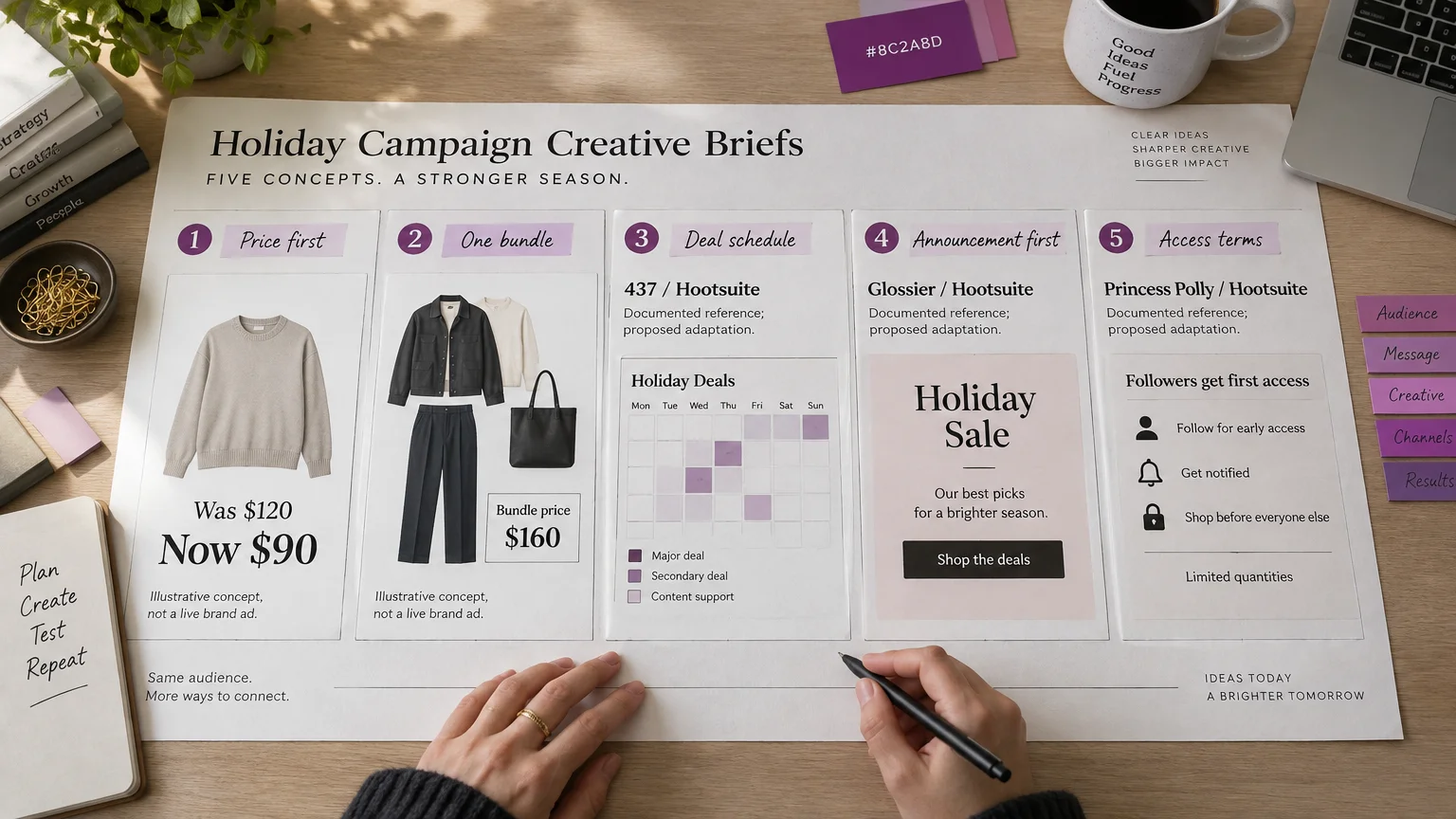
4:5 feed. Assume a knit sweater was $120 and is now $90. Place it beside a small former price and a dominant sale price. Make the silhouette and new price the first things shoppers notice, with terms nearby.
Headline: Your winter layer, less. CTA: Shop the sweater. Test whether the price stack makes the offer easier to understand. Build from an approved photo, then recompose for 9:16. Check knit texture, edges and price rendering. Use a genuine former price, as specified by U.S. eCFR pricing guidance; check local rules elsewhere.
2. On-model outfit bundle
4:5 feed. Show an approved on-model jacket, trousers and bag together. Give the bundle one price area and a short list of what is included.
Headline: The whole look, together. CTA: Shop the outfit. Test a complete look against individual products. Collect accurate references for every included SKU, approve the combined composition, then generate the ad. Check proportions, availability and bundle conditions. A single registered jacket does not automatically supply accurate trousers or accessories.
3. 437’s deals-at-a-glance calendar
Adapt as a 4:5 feed image. 437 presents its Black Friday week in a clean calendar graphic, giving shoppers a way to see the schedule at a glance.
For apparel, arrange your daily offers in equal cells with the active deal emphasized. Headline: Your sale-week planner. CTA: See the schedule. Test whether a calendar makes changing offers easier to follow. Build from an approved schedule and product reference; inspect every date. For a 9:16 Story, show one active deal rather than shrinking the whole week.
4. Glossier’s sale announcement
Adapt as a 4:5 feed image. Glossier announces its Black Friday sale in a social post, putting the sale itself at the center of the message.
For your version, make the sale message the largest element, the product second and eligibility third. Headline: Black Friday starts here. CTA: Shop the sale. Test an announcement-led layout against a product-led one. Build a single-image ad from an approved product photo, then make a separate 9:16 composition. Check contrast, applicable categories and destination pricing.
5. Princess Polly’s exclusive promotion
Adapt for feed or Story. Princess Polly’s Black Friday promotion is exclusive to its social followers. Make that access privilege central to your version.
Place the access message above an approved fashion image, with redemption instructions alongside it. Headline: Your follower-only offer. CTA: Unlock the offer. Test whether explaining access makes the next step clearer. Build 4:5 and 9:16 versions; verify who qualifies, any code and the redemption destination. Keep cost-affecting terms close to the price, following U.S. FTC offer guidance.
Whether you lead with price, a complete outfit, a schedule or exclusive access, make the offer easy to scan before asking shoppers to act.
6–10. Turn gift discovery and sale timing into visual briefs
6. Home Depot’s gift-guide carousel, adapted to fashion
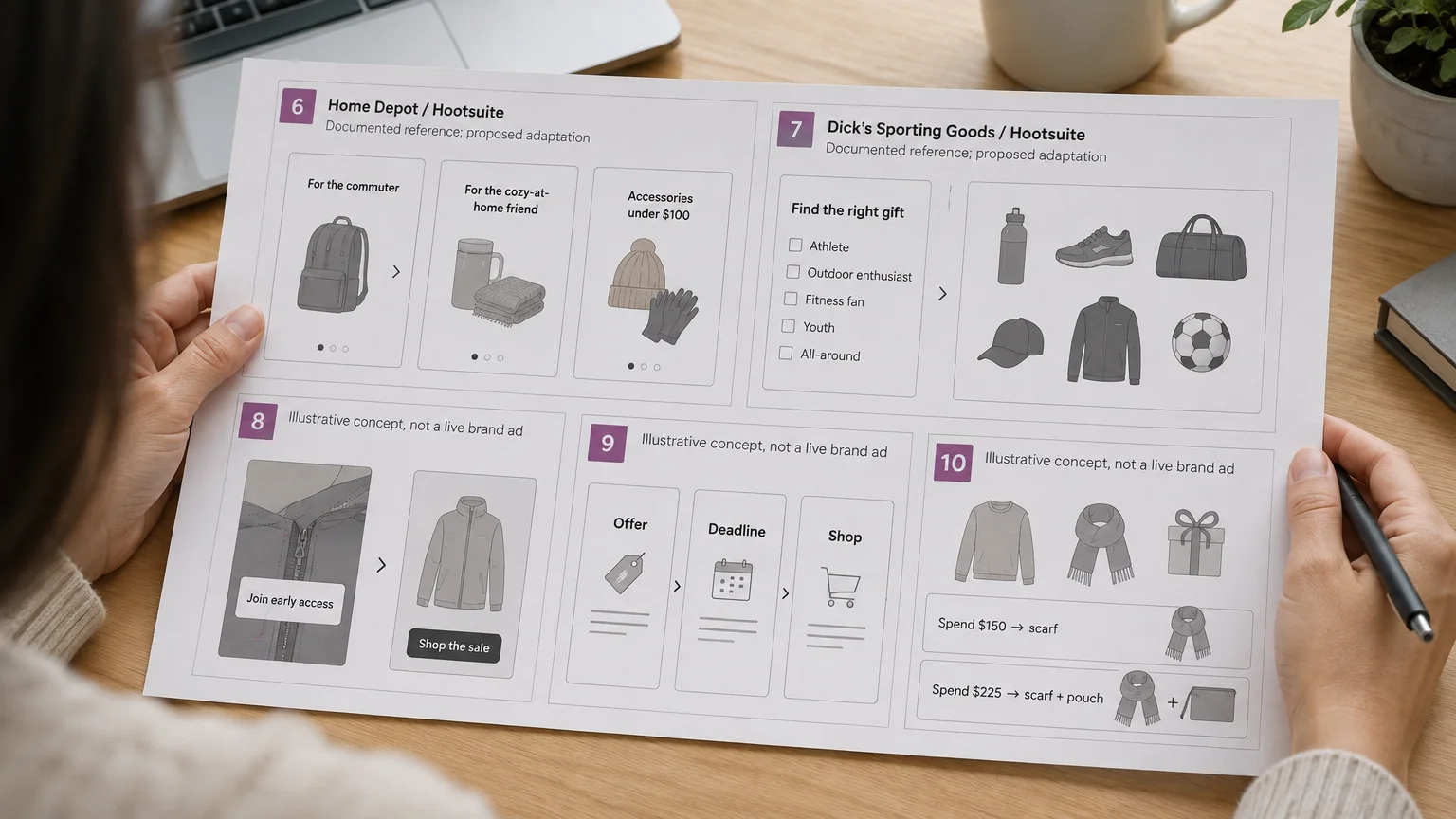
Adapt as a 4:5 carousel. Home Depot’s gift-guide examples include gifts under $100. Translate that shopping shortcut into cards organized by recipient, use case or budget.
Storyboard one grouping per card: commuter accessories, cozy-at-home pieces and accessories under a $100 budget. Headline: Find their everyday favorite. CTA: Explore the gift edit. Test these groupings against a mixed assortment. Gather each item’s assets, build approved carousel compositions and check prices, product identity and collection links.
7. Dick’s Sporting Goods’ sale-reminder Reel
Adapt as a 9:16 Reel. Dick’s Sporting Goods’ sale-reminder Reel features a shopper’s gift-budget list. The list gives the ad a recognizable unfinished task.
For fashion, open on recipient names, cut to relevant products, then reveal the real sale deadline. Headline: Still on your gift list? CTA: Finish your gift list. Test the shopping-task hook against a product-only opening. Build from approved gift assets and a list storyboard; inspect budget arithmetic, text size and product continuity.
8. Early-access teaser with a signup destination
4:5 feed and 9:16 Story. Crop tightly into the sweater from example 1. Pair the detail with an early-access message and a clear signup action leading to a dedicated landing page.
Headline: Get first access. CTA: Join early access. Test a partial reveal against a full-product teaser. Build teaser and launch images from approved detail and full-product photos. At launch, reveal the sweater and replace the signup message with the actual offer. Check eligibility and make sure the landing page matches the ad.
9. Countdown Story frames
9:16 sequence. Use three frames: product plus offer; closing date, time and time zone; product plus shopping action. Keep the deadline in a consistent position and reserve space for controls and the link sticker.
Headline: Shop before it ends. CTA: Shop the sale. Test deadline prominence without changing the deadline itself. Build image variations or a motion sequence; inspect every frame. Only count down a genuine limit: the FTC dark-pattern report identifies misleading countdowns as problematic.
10. Free-gift threshold composition
Feed or Story. Show the hero garment and actual gift together. Assume a free scarf with a $150 spend, or a tiered offer adding a pouch at $225. Keep each threshold beside its gift.
Headline: A little extra, included. CTA: Shop qualifying styles. Test a visible bonus against text alone. Build from garment and gift references; inspect identity, exclusions and availability. For the tiered version, stack Spend $150 → scarf above Spend $225 → scarf + pouch. Align thresholds on the left and small images of the included gifts on the right. Recompose separately for 4:5 and 9:16.
Match the next action to the message: browse a gift edit, join early access or shop before a genuine deadline. Make any bonus visible alongside its spending requirement.
11–15. Show product choice, movement and the next reason to shop
11. Color-variant grid
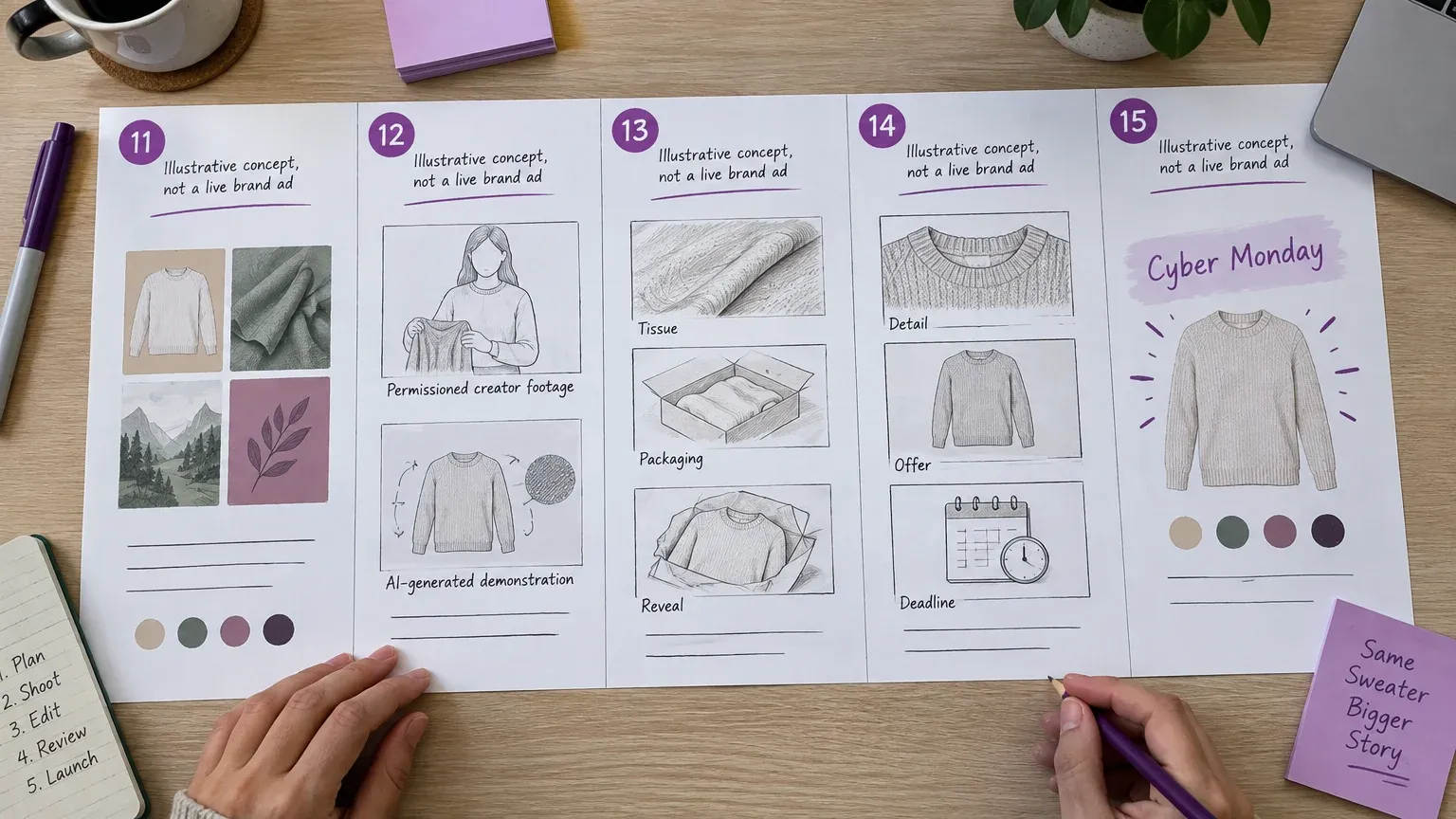
4:5 feed. Arrange four actual color variants in equal cells beneath one shared offer strip. Readable shade names turn the image into a comparison tool.
Headline: Find your color. CTA: Choose your shade. Test a choice-led layout against one hero color. Build from accurate references for every variant; preserve each product’s actual shade. Check hue, stock and variant links, then restack the grid for 9:16 to keep every option visible.
12. Creator-led try-on
9:16 Reel. Open on a full outfit, move to garment detail and finish on the offer. Headline: See the fit in motion. CTA: Explore the fit. Test movement-led versus static presentation.
Use creator footage you have permission to use, with truthful claims and appropriate relationship disclosures, addressed in FTC influencer guidance for U.S. campaigns. Alternatively, generate a clearly identified AI product demonstration from approved references and inspect fit, construction and motion. It cannot replace authentic testimony: the FTC testimonial rule addresses misrepresented experience.
13. ASMR-style unboxing
9:16 Reel. Storyboard tissue opening, packaging detail and a close-up product reveal. The first tactile action and sound provide the hook.
Headline: Unwrap your next favorite. CTA: Discover the gift edit. Test a sensory opening against an immediate product reveal. Build from accurate product and actual packaging references. Inspect hands, material interactions, audio and continuity. Label generated unboxing as a product demonstration and reserve customer-experience claims for genuine footage.
14. Last-chance Reel cuts
9:16 Reel. Reuse the sweater, palette and typography from examples 1 and 8. Cut from knit detail to an accurate offer, then to the genuine closing deadline.
Headline: Your final chance to shop. CTA: Shop before the deadline. Test deadline-first versus product-first sequencing. Build from approved campaign references, preserving garment identity between cuts. Check pacing, currency, closing time and text placement around interface controls. Keep essential terms readable throughout the sequence.
15. Cyber Monday creative refresh
4:5 feed and 9:16 Reel. Keep the same sweater family, but change the crop and give the current Monday message first priority.
Headline: Your Monday edit is here. CTA: Shop Cyber Monday. Test a refreshed composition against a minimally updated version while keeping the offer consistent. Reuse approved product references and styling. Check current prices, exclusions, stock and destination links; retire expired Black Friday wording. A fresh crop and headline can carry the refresh while the discount stays the same.
Keep genuine creator testimony distinct from AI product demonstrations, and preserve a recognizable campaign identity as you move from product discovery to closing reminders and Cyber Monday.
Build the creative family from product photos
Existing product photos can supply the starting assets, but multi-product and motion concepts need additional references.
| Examples | Required assets | Main production check |
|---|---|---|
| 1, 8, 9, 14, 15 | Product and detail photos | Identity across stages |
| 2, 6, 10 | Every included product | Accurate grouping |
| 3–5, 7 | Product assets and verified promotion | Dates and eligibility |
| 11 | Every real color variant | Hue and availability |
| 12 | Permissioned footage or approved AI references | Truthful presentation |
| 13 | Product and packaging references | Physical continuity |
- Register and verify. In our studio, register a product using up to five photos or a product URL. Inspect imported product information before generation.
- Prepare source imagery. When needed, use our AI Suite to prepare on-model imagery, then approve it before creating finished ads in Ad Studio. Establish or select a reusable Brand Kit for logo, colors and fonts.
- Choose the output. Use our Image Ads for singles, variations and carousels at one credit per generated image: four variations cost four credits; five carousel slides cost five. For motion, choose our Video Ads, with 13 styles and durations from 4 to 30 seconds. Select the intended format and generate the asset.
- Inspect the placement. Preview at phone size. Recompose for each placement, reserving space for captions, controls and stickers. Consult the placement-specific Meta ads specs.
- Extend the identity. Carry the palette, product crops and offer hierarchy into the landing-page hero, email header and SMS-linked destination. Match currency, eligibility, deadlines and time zones everywhere.
A static price stack generally requires fewer source assets than a complete outfit or packaging sequence. Compare performance separately from production effort.
Prepare, submit and refresh the campaign
Work backward from launch, leaving time for creative checks and ad review:
- T−14 days: Finalize offers, permissions and source assets.
- T−10: Generate concepts.
- T−7: Complete adaptations and quality checks.
- T−3: Submit with contingency time.
- Sale launch: Monitor delivery, prices and destinations.
- Cyber Monday: Refresh messages, assets and links.
Google’s review guidance says most ads are reviewed within one business day, but recommends submitting several days ahead when approval is needed by a particular date.
For a controlled comparison, record what you expect to improve and change one creative element. Keep the product, offer, destination and audience consistent, and compare under similar delivery conditions. Before release, verify former prices, terms, currency, permissions, AI product accuracy and deadlines.
For example 14, compare the two opening sequences while keeping the rest of the campaign consistent:
| Hypothesis | Control | Variant | Fixed conditions | Chosen measurement |
|---|---|---|---|---|
| Deadline-first sequencing may increase clicks | Product-first opening | Deadline-first opening | Same sweater, offer, destination, audience and delivery conditions | Link click-through rate |
Start with one manageable family: launch image, reminder and Cyber Monday refresh. Use our workflow to create multiple ad variations without losing the campaign’s identity.


