

Table of Contents
To create multiple ad variations for Meta and Google, reuse accurate product inputs, generate treatments in batches, then package finished Meta compositions and clean Google assets. Our Ad Studio supports up to 8 single-image variations per paid-plan set at one credit per image. The 12-output workflow below includes a copyable naming sheet and a platform handoff checklist to help you automate production without losing track of what changed.
How can I create multiple image ad variations for Meta and Google without designing each one manually?
Generate variations in batches from reusable product inputs, then package them for each destination. Produce finished compositions for Meta, but supply clean images, logos, headlines, and descriptions separately for Google responsive Display.
Gather product photos, verified selling points, accurate offer terms, logos, brand colors, font guidance, destination URLs, and publishing permissions. You need a generation tool, spreadsheet, image editor, and access to Meta and Google accounts. Basic creative judgment and campaign-interface skills are sufficient; precise garment corrections may need specialist retouching.
Step 1: Define the comparison and map four treatments to 12 outputs
Choose the objective, control creative, and primary metric before generating images. For a purchase campaign, prioritize cost per purchase against your allowable acquisition cost.
| Candidate variable | Decision |
|---|---|
| Product shot | Keep the approved photograph |
| Model | Keep model, pose, and lighting |
| Background | Change across four treatments |
| Headline | Keep approved wording |
| Format | Compare within matching placements |
Worked example: Four backgrounds become 12 outputs
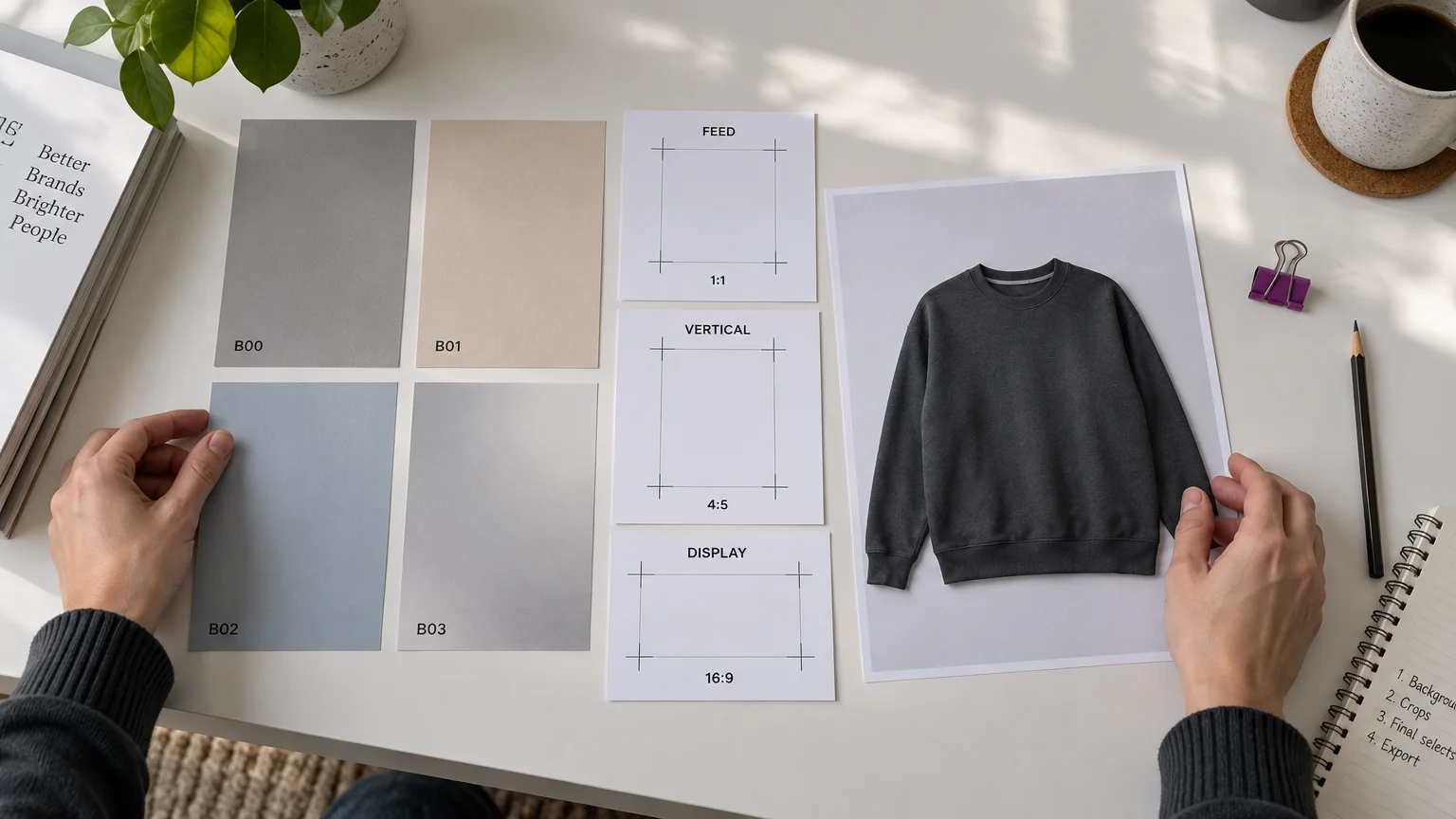
Assume SKU SW01 is a charcoal sweatshirt with an approved on-model photo, no discount, English copy, and landing page example.com/products/sw01. Fix the message as “Meet your everyday layer.” B00 is the neutral studio control; B01 is warm solid, B02 cool solid, and B03 a subtle neutral gradient.
Four treatments × three delivery packages = 12 outputs.
| Output ID | Background | Destination / ratio | Copy ID | Control ID |
|---|---|---|---|---|
| B00-MF | Neutral studio | Meta feed / 4:5 | M01 | B00-MF |
| B01-MF | Warm solid | Meta feed / 4:5 | M01 | B00-MF |
| B02-MF | Cool solid | Meta feed / 4:5 | M01 | B00-MF |
| B03-MF | Neutral gradient | Meta feed / 4:5 | M01 | B00-MF |
| B00-MV | Neutral studio | Meta vertical / 9:16 | V01 | B00-MV |
| B01-MV | Warm solid | Meta vertical / 9:16 | V01 | B00-MV |
| B02-MV | Cool solid | Meta vertical / 9:16 | V01 | B00-MV |
| B03-MV | Neutral gradient | Meta vertical / 9:16 | V01 | B00-MV |
| B00-GD | Neutral studio | Google landscape / 1.91:1 | G01 | B00-GD |
| B01-GD | Warm solid | Google landscape / 1.91:1 | G01 | B00-GD |
| B02-GD | Cool solid | Google landscape / 1.91:1 | G01 | B00-GD |
| B03-GD | Neutral gradient | Google landscape / 1.91:1 | G01 | B00-GD |
M01 and V01 identify approved embedded copy; G01 identifies uploaded Google text. Concepts that deliberately change several elements answer a different question from a background-only comparison. Use random assignment for a controlled comparison, following NIST’s experimental-design guidance. Balanced replication can improve statistical sensitivity.
Step 2: Prepare a faithful product image before changing the setting
Approve the product representation before generating backgrounds. Check your input photographs for color, seams, closures, texture, logos, proportions, and fit.
Use a suitable on-model or lifestyle base, then hold it constant. Reject invented pockets, distorted branding, altered garment lengths, or misleading drape. Use real photography when transparency, reflective finishes, or distinctive construction cannot be reproduced faithfully. Choose specialist retouching for exact logo and edge corrections.
Keep claims accurate too. For US-facing advertising, the FTC’s advertising guidance considers pictures and words together when assessing deception. Other markets have their own requirements.
Step 3: Generate the treatments in Ad Studio
In our Ad Studio, register the product once, then create three batches of four images for the 12 outputs.
- Upload up to five product photos or import a product URL. Review product details and selling points.
- Apply an optional Brand Kit for the logo, colors, and font style.
- Open Image Ads, select the product, goal, aspect ratio, and variation count.
- Specify each background treatment and the fixed message. Include embedded copy in Meta compositions; keep Google marketing images free of promotional text.
- Generate four-output batches for feed, vertical, and landscape. Inspect every result against its assigned treatment.
- Use an editor for exact placement adaptations or corrections when generation changes something that should remain fixed.
Each four-image batch costs four credits, for a total of 12 image-generation credits. Regenerations and upstream image work add usage. Replace unplanned copy differences with the approved copy, and correct any changes to elements that should stay fixed.
Step 4: Package assets separately for Meta, responsive Display, and Performance Max
Meta feed and vertical placements
Use finished compositions for Meta, with placement-specific framing. Package the images as 4:5 feed and 9:16 vertical versions, then preview eligibility in the selected placements.
In Ads Manager, select the campaign and ad set, add approved media and copy, assign placement-specific assets through available customization controls, and inspect previews. Do not assume legacy Dynamic Creative controls apply to every account.
Meta Blueprint’s creative tools include image expansion, text generation, and background generation. Review their changes. For Reels video, follow Meta’s 9:16 video recommendation. Check each Reels destination before assigning an image.
Google responsive Display
Supply clean images and separate copy assets. Follow Google’s responsive Display creation guide for 1200 × 628 landscape and 1200 × 1200 square images. Use these working sizes and minimum dimensions when preparing images and logos:
| Asset | Ratio | Working size, pixels | Minimum, pixels |
|---|---|---|---|
| Google landscape | 1.91:1 | 1200 × 628 | 600 × 314 |
| Google square | 1:1 | 1200 × 1200 | 300 × 300 |
| Google square logo | 1:1 | 1200 × 1200 | 128 × 128 |
| Google landscape logo | 4:1 | 1200 × 300 | 512 × 128 |
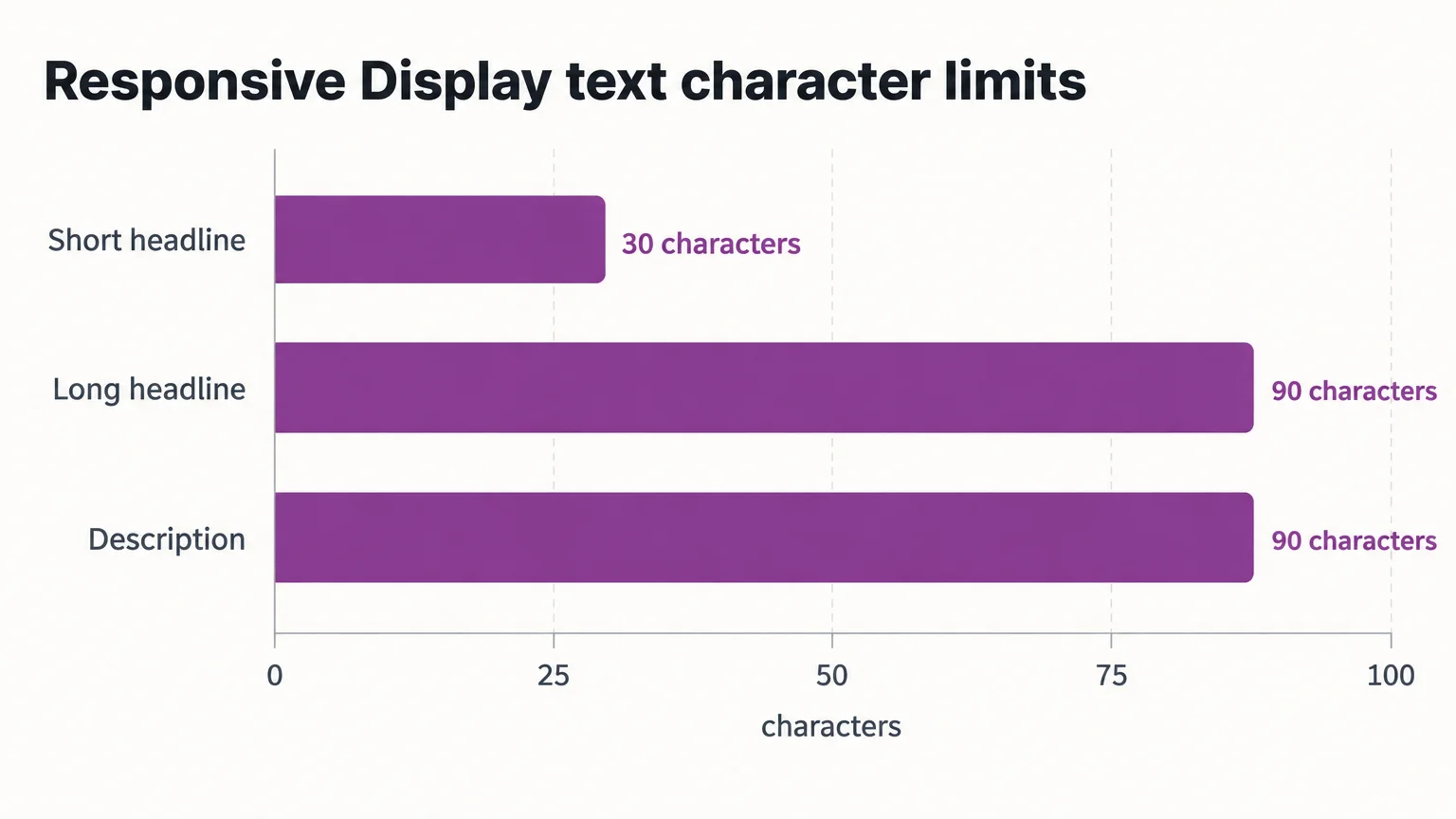
Add square imagery to the four landscape outputs. Responsive Display supports up to 15 marketing images and five logos, with these text limits:
| Text asset | Quantity | Maximum characters each | G01 example |
|---|---|---|---|
| Short headline | 1–5 | 30 | Meet your everyday layer. |
| Long headline | 1 | 90 | Meet your everyday layer: discover the charcoal sweatshirt. |
| Description | 1–5 | 90 | Explore the charcoal sweatshirt and view product details. |
Write complementary assets, with a long headline that works without a description. Add the business name and final URL.
Go to Campaigns → Ads → plus → Responsive display ad, select an ad group, upload images and logos, optionally add a YouTube video, then complete text, URL, tracking, and previews.
Your production files are distinct from the combinations Google automatically assembles from supplied assets. Google’s responsive Display overview explains that selection uses performance history. These combinations are not evenly allocated independent tests. Automated creative features still need supplied assets with meaningful variation.
For dynamic remarketing, connect an eligible product feed to support product-based personalization, including previously viewed products. Keep product identities, availability, and landing pages aligned.
Google Performance Max
Performance Max needs its own complete asset group. Google’s asset-group specifications allow 20 images total across all ratios and recommend keeping important content within the center 80%. Supply the remaining campaign-specific assets too. Responsive Search ads are a separate text workflow.
Step 5: Check product fidelity, cropping, copy, and URLs
Approve assets only after checking the actual export and destination preview.
- Every asset: verify dimensions, sharpness, product accuracy, logos, message, approval status, and working URLs with tracking parameters.
- Meta: preview feed and vertical placements separately. Keep products and readable copy clear of interface overlays.
- Google: remove embedded promotional copy. Google’s responsive Display quality guidance advises avoiding overlaid text, blur, distortion, heavy filters, borders, collages, and unsuitable composite backgrounds. Use clean, centered logos.
- Landing page: match the advertised product, offer, availability, and language.
Step 6: Name every asset and map it to reporting
Use SKU_BGTEST_B02_META_FEED_4x5_EN_V01: product, concept family, treatment, platform, placement, ratio, language, and revision. B02 identifies a background treatment; its placement versions are adaptations of that treatment.
Copy the output table into your asset spreadsheet, then add these filenames:
| Asset ID | Filename |
|---|---|
| B00-MF | SW01_BGTEST_B00_META_FEED_4x5_EN_V01 |
| B01-MF | SW01_BGTEST_B01_META_FEED_4x5_EN_V01 |
| B02-MF | SW01_BGTEST_B02_META_FEED_4x5_EN_V01 |
| B03-MF | SW01_BGTEST_B03_META_FEED_4x5_EN_V01 |
| B00-MV | SW01_BGTEST_B00_META_VERTICAL_9x16_EN_V01 |
| B01-MV | SW01_BGTEST_B01_META_VERTICAL_9x16_EN_V01 |
| B02-MV | SW01_BGTEST_B02_META_VERTICAL_9x16_EN_V01 |
| B03-MV | SW01_BGTEST_B03_META_VERTICAL_9x16_EN_V01 |
| B00-GD | SW01_BGTEST_B00_GOOGLE_DISPLAY_1.91x1_EN_V01 |
| B01-GD | SW01_BGTEST_B01_GOOGLE_DISPLAY_1.91x1_EN_V01 |
| B02-GD | SW01_BGTEST_B02_GOOGLE_DISPLAY_1.91x1_EN_V01 |
| B03-GD | SW01_BGTEST_B03_GOOGLE_DISPLAY_1.91x1_EN_V01 |
Record the shared fields: concept family BGTEST, changed variable background, destination URL example.com/products/sw01, and approval status. At upload, add campaign, ad, and asset IDs as applicable. Enter recognizable labels where supported, then use platform IDs to connect each file to its reporting. Record platform-generated edits as additional versions when available.
Step 7: Review the campaign handoff and activate deliberately
Our Ad Autopilot provides a reviewable campaign plan and publishes paused for user activation. Google Search, Performance Max, and Demand Gen management within the tool is in early access.
- Hand over approved files, the asset spreadsheet, URLs, objective, primary metric, markets, and spending limits.
- Review the campaign plan. Confirm that the campaign’s audience, budget, markets, and ads match your approved brief.
- Configure autonomy and spending controls.
- Inspect the paused campaign, tracking, destination URLs, actual ads, and approval settings. Activate after approval.
- Record platform IDs. Use native upload when appropriate for the approved asset package.
Set spend limits from your allowable acquisition cost and test budget. Check conversion tracking before judging results.
Recap: Approve four treatments, package 12 outputs, preserve the IDs
Keep the comparison traceable from production through reporting: approve the product and backgrounds, check each destination’s assets, and connect every file to its campaign record.
For experiment design, placement details, and refresh planning, find the creative-testing, Meta Ads Specs, and ad-fatigue articles in our production and testing guides. When your approved package is ready, review our Ad Autopilot campaign controls before launch.


