

Table of Contents
Shortlist these Botika alternatives by workflow: FASHN for try-on/API, WearView for collections, Uwear for pay-as-you-go production, Claid for automation, Modelia for experimentation, our studio for imagery-to-ads, and Picjam for catalog production. Monthly entry plans include FASHN Basic at $19 for 200 credits, WearView Lite at $29 for 50 credits, and our Creator plan at $49 for 150 credits. Credit consumption differs by operation.
We offer one of the alternatives below, so we have a stake in this comparison. Evaluate each tool against your own garments, production requirements and approval standards.
Botika alternatives at a glance
Choose by the production problem you need to solve: garment detail, repeatable models, automation, video or finished creative. Consider switching if your current workflow struggles with prints, logos, apparent fit, model choice, production friction or cost per approved output.
What Botika already offers
Botika’s current pricing lists Pro at $55 monthly or $46 per month billed annually. Its paid offering includes retouch support. Botika’s trial FAQ lists eight free credits. Compare alternatives against those terms.
How to compare the tools
Compare accepted inputs, garment controls, model identity and diversity controls, batch handling, video, licensing, integrations and effective cost. Test the controls you need against your own product requirements.
Prices are in US dollars as of October 25, 2026. Check local taxes, currency and availability. For broader fitting and visualization needs, see our comparison of AI virtual try-on tools.
| Tool and best fit | Workflow and garment controls | Model, access and video capabilities | Billing and evaluation |
|---|---|---|---|
| FASHN: focused try-on | Fashion try-on; small lettering, intricate patterns and reflections need review. | Developer workflow; two Basic team members; Basic includes 720p video. | Basic: $19/month, 200 credits. Unused monthly credits roll over up to 600. |
| WearView: collection imagery | Self-serve fashion imagery with HD, 2K and 4K output options. | Lite excludes short videos; Pro includes access. | Lite: $29/month, 50 credits. Pro: $49/month, 200 credits. |
| Uwear: flexible production | Photo production with credit consumption determined by image model and resolution. | Pay-as-you-go production; most photos consume three to 12 credits. | Uwear credit purchases start at $17 for 170 credits. |
| Claid: API automation | On-model fashion production with repeatable model identity. | API workflows; AI Fashion uses four credits; five-second video uses 60 credits. | Claid credit pricing lists operation charges and a 50-credit trial. Request current paid-plan pricing. |
| Modelia: creative exploration | Catalog and reference-based exploration; Starter outputs up to 2K. | Starter exports carry the Modelia watermark. | Modelia Creator pricing: $30/month, 150 credits. Starter includes 20 monthly credits. |
| Our studio (CamClo AI): product-to-ad production | Product photos and existing-model photos; Model Swap preserves garment, pose and lighting. | 100+ models; consistent model/outfit references; Catalogue Studio generates up to 12 poses; browser workflows handle up to 500 products; Image to Video. | Creator: $49/month plus applicable taxes, 150 credits and watermark-free exports. The $1 trial includes 20 credits and watermarked results. |
| Picjam: catalog production | Picjam’s input guidance identifies clean flat lays or ghost-mannequin shots as usual inputs. | Catalog-oriented production from prepared product photography. | Request current pricing for your production volume. |
Before committing production volume, work through these purchasing requirements:
- Inputs: test your exact flat-lay, ghost-mannequin, hanger or existing-model photos in the intended operation.
- Access: check API eligibility, Shopify connections, team permissions, batch limits, concurrency and billing terms.
- Controls and charges: establish which plans include reusable faces, custom models, body types and poses, plus video and editing charges.
- Publication: confirm commercial-use permission, trial watermark rules, reference-image rights and channel restrictions.
1. FASHN: focused fashion try-on and developer workflows
Best for: brands prioritizing fashion try-on and a developer integration route. Check API charges separately from the browser subscription.
FASHN’s Basic plan costs $16 per month billed yearly and permits unused monthly credits to accumulate up to 600. Its two-member allowance supports a small production team, while included 720p video provides a starting point for motion content.
FASHN’s try-on guidance warns that small lettering, intricate patterns, reflections and heavy occlusion can vary. Include difficult garments in your trial and inspect those details before using the output in your store.
2. WearView: collection imagery with plan-gated video
Best for: self-serve collection imagery, with video available only on an eligible plan. Test a small collection to evaluate face reuse, body proportions and pose control together.
WearView’s annual option charges $290 for Lite, equivalent to $24 per month. Lite excludes short videos; Pro unlocks access. Budget for video credits as well as the subscription.
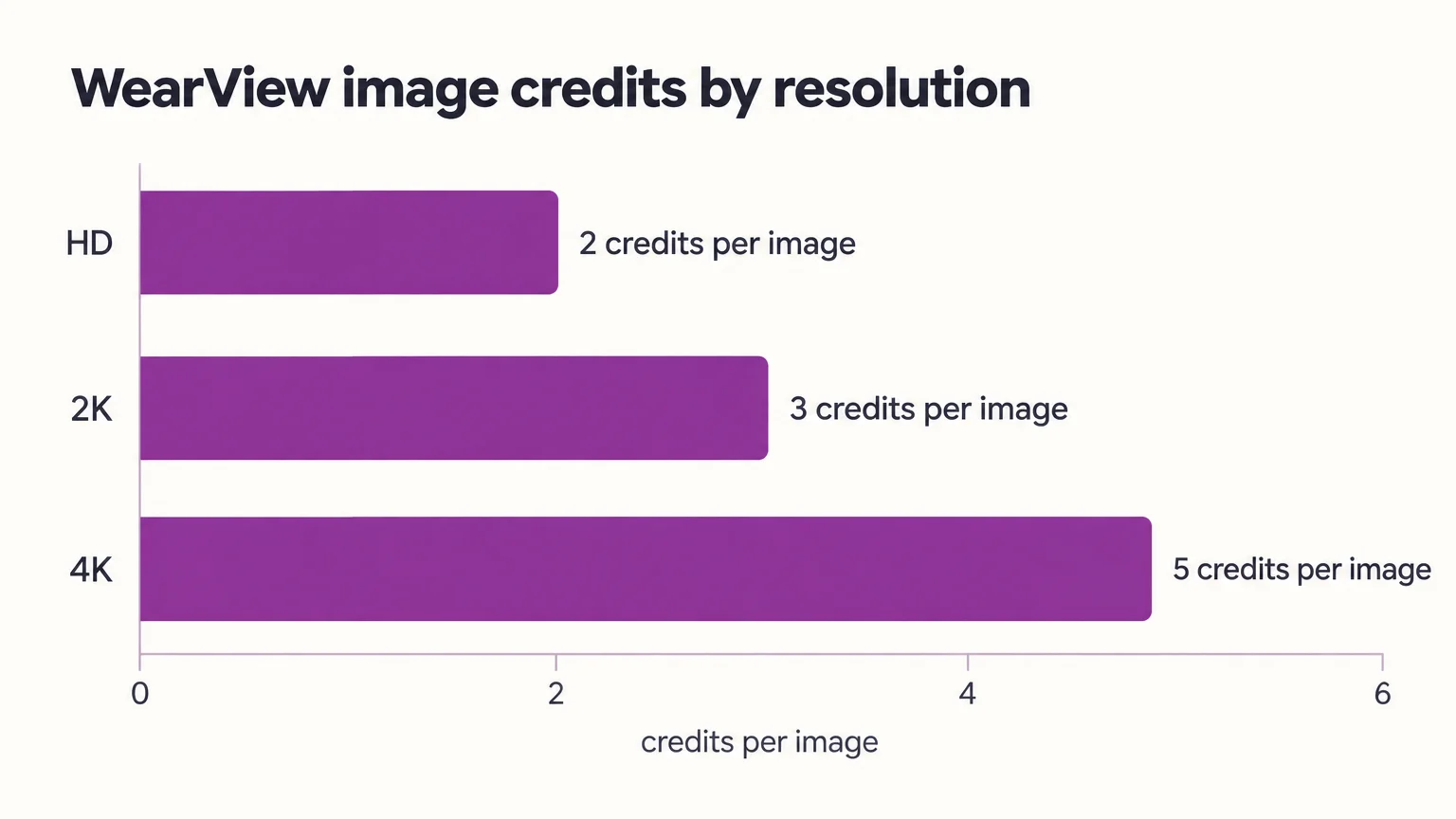
WearView’s credit guide lists two credits per HD image, three for 2K and five for 4K. Choose the resolution you intend to publish before comparing production costs.
3. Uwear: pay-as-you-go fashion production
Best for: teams preferring credit purchases over a recurring subscription allocation.
Uwear’s photo guidance says most photos consume three to 12 credits, equivalent to $0.30–$1.20, depending on the generation model and resolution. Ten attempts consume $3–$12 in credit value.
The minimum credit purchase is $17 for 170 credits. Track both the purchase cost and the credit value consumed by each batch.
4. Claid: repeatable models and API-led production
Best for: teams standardizing model identity and automating on-model production. Claid’s fashion studio offers repeatable model identity and API workflows.
Claid charges four credits for AI Fashion and 60 for a five-second video. One still plus one video therefore starts at 64 credits, before retries or finishing.
Its 50-credit trial can help you evaluate still-image production, but it does not cover a five-second video.
5. Modelia: creative experimentation before paid production
Best for: exploring fashion-image directions before committing to a production setup.
Modelia’s Starter allowance provides 20 monthly credits and outputs up to 2K with a watermark. Use that allowance for early creative exploration, then assess the $30 Creator plan and its 150 monthly credits for ongoing work. Confirm commercial permissions as well as watermark and resolution limits.
6. Our studio: imagery, edits, video and ads together
Best for: teams that need to turn a product photo into an on-model still, corrected image, video and finished ad in one browser workspace.
Start with Virtual Try-On or Product Photography, correct details with Smart Edit, generate poses, then move an approved still into Image to Video and ad creation. Our AI Assistant supports workflows for up to 500 products, maintains model and outfit references, and requests approval before generations consume credits.
Creator includes AI Suite, Ad Studio, Ad Autopilot and watermark-free exports. Ad Studio applies brand-kit colors, fonts and tone to platform-specific creative; Ad Autopilot launches and optimizes Meta and Google campaigns. Check account permissions and set an advertising budget.
Our seven-day trial terms specify $1 for 20 credits and watermarked results, renewing at $49 monthly unless canceled before the trial ends. Evaluate garment accuracy with the same approval standards you use for any replacement.
7. Picjam: catalog production from clean product shots
Best for: catalog teams starting with clean flat-lay or ghost-mannequin product photography.
Request current pricing for your expected catalog volume. Use a representative clean product shot to assess the workflow before committing a larger batch.
Validate garment details and collection consistency
Test shortlisted tools on your actual products, using the same approval criteria for every candidate.
Prints, logos and apparent fit
Approve only outputs that preserve commercially important details. Use the same source assets and comparable briefs, including small lettering, reflective fabrics, layering and difficult prints.
| Check | Pass | Rework | Reject |
|---|---|---|---|
| Logo and print | Correct wording and placement | Minor repair is feasible | Wrong wording or design |
| Seams and texture | Construction remains readable | Localized softness | Invented construction |
| Color | Matches approved reference | Correctable lighting shift | Misrepresents product color |
| Hem and silhouette | Believable product proportions | Small crop correction | Changed length or apparent fit |
| Video continuity | Stable garment and identity | Removable opening or ending | Detail changes within clip |
Record pass, rework or reject, plus correction time. Inspect garment details and model identity throughout each video.
One model across a collection
Reusable identity controls let you maintain the same face across a collection. Check which plans include custom identities, body-type controls and reusable poses.
Claid offers repeatable model identity; our AI Assistant maintains model and outfit references. Our 100+ model library supplies variety, while Catalogue Studio generates up to 12 poses. Test identity continuity and body-type control rather than relying on library size or pose count.
Hold model references, pose, crop, lighting and background steady across a small collection before scaling. To explore more model options, see our AI fashion model generators roundup.
Calculate cost per approved image, not cost per credit
The cheaper replacement is the one with the lower cost per approved deliverable after retries and corrections. Each credit balance buys a mix of operations at different rates.
Worked example: resolution and retries
Assume WearView Lite, 20 HD attempts, ten approved images and no extra editing. The $29 monthly plan includes 50 credits, or $0.58 per credit:
| Output or allocation | Credits consumed | Allocated cost |
|---|---|---|
| One allocated credit | 1 | $0.58 |
| One HD attempt | 2 | $0.58 × 2 = $1.16 |
| One 2K attempt | 3 | $0.58 × 3 = $1.74 |
| One 4K attempt | 5 | $0.58 × 5 = $2.90 |
| 20 HD attempts | 20 × 2 = 40 | $0.58 × 40 = $23.20 |
| Each approved image when ten pass | 40 ÷ 10 = 4 on average | $23.20 ÷ 10 = $2.32 |
You still pay $29, with ten credits remaining. That means $2.90 in cash spent per approved image, compared with $2.32 in consumed-credit value. The difference is the unused balance.
For image-plus-video sets, add still attempts, corrective edits, upscaling, video attempts and external finishing, then divide by approved sets. Check rollover, expiry, failed-operation charges, annual commitments and idle balances. A quoted test-run cost is not a subscription price.
Trials, publication rights and production savings
Publish trial outputs only after confirming commercial rights, watermark rules, reference-image permissions and channel restrictions. A watermark-free export still needs commercial-use permission.
Treat vendor photography-savings claims and individual case studies as starting points for your business case. Measure source preparation, elapsed production time, review, retouching and approval rate. Measure conversion and returns after launch rather than inferring them from generation speed.
Pick your shortlist and migrate without disrupting the catalog
Choose two tools that fit your requirements and test them on identical source assets before canceling Botika.
Pick this if
| Your priority | Start with |
|---|---|
| Focused try-on and developer access | FASHN |
| Collection imagery with eligible-plan video | WearView |
| Purchased production credits | Uwear |
| Repeatable identity and API production | Claid |
| Creative exploration before scaling | Modelia |
| Imagery, corrective editing, video and ads | Our studio (CamClo AI) |
| Clean-shot catalog production | Picjam |
Before canceling Botika
- Save approved source photos, model and pose references, backgrounds, crops and lighting briefs.
- Preserve SKU mappings and file naming. Confirm rights to transfer references and likenesses; model identity portability requires permission and technical support.
- Verify browser access, API billing, native Shopify connections, team roles, concurrency and automation entitlements.
- Run parallel production on representative products. Compare approved-output cost and collection continuity before switching.
For source preparation, follow our hanger-to-model photo guide.
Quick buying questions
Is Botika free?
Botika offers eight free trial credits; its Pro plan costs $55 monthly or $46 per month billed annually. Other options include Modelia’s 20-credit monthly Starter allowance, Claid’s 50-credit trial and our paid seven-day trial.
Which source photos can I use?
Picjam accepts clean flat lays and ghost-mannequin shots as usual inputs. Our Model Swap accepts existing-model photos while preserving the garment, pose and lighting. Test hanger photos in the intended workflow before purchasing volume.
Which alternatives include video?
FASHN Basic, WearView Pro and Claid offer video workflows, alongside our Image to Video tools. WearView Lite excludes short videos; eligible plans charge operations according to their credit schedules.
Which tool is best for printed garments?
The best choice is the tool that preserves lettering, print placement and texture on your own garments. Run a matched trial and include any corrective editing in your approval decision.
Which alternative costs less?
The lowest-cost option depends on your cost per approved deliverable, not its credit price alone. Include rejected attempts, resolution, editing, video and external retouching, and compare both consumed-credit value and subscription cash spend.
Can I keep one model across a collection?
Yes, where reusable identity controls are supported and included in your plan. Test face, body proportions, pose and lighting together across several products.
Switch when the replacement passes your catalog checks. If you also need imagery, corrective editing, video and ad production together, explore our studio.


