
Table of Contents
The best virtual try-on tools for large clothing catalogues depend on how your team works: shortlist FASHN and Claid for developer-led production, our studio for browser workflows of up to 500 products on Studio, and Botika or WearView as alternatives. FASHN API limits allow 100 run requests per 60 seconds; Claid’s fashion API allows 60 generation requests per minute. Catalogue capacity measures intake; simultaneous generations and finished-image throughput determine scheduling.
Which virtual try-on tools work best for producing images across a large clothing catalogue?
FASHN and Claid suit teams building catalogue pipelines; our studio suits shared-brief browser production. Consider Botika for native bulk photo operations, WearView for enterprise integration, and Pebblely for product scenes and backgrounds.
| Tool and route | Best for | Scale | Consistency approach | USD pricing basis |
|---|---|---|---|---|
| FASHN, developer route | Programmable try-on sampling | 1 to 4 samples per v1.6 request | Reusable model references; validate pose and garment fidelity | 7.5 cents per credit, API on-demand |
| Claid, developer route | Fashion-generation integration | Up to five garments combined in one outfit | Outfit inputs; ask about identity and pose controls | Two credits per output; request the applicable USD credit price |
| Our studio, browser route | Shared-brief catalogue workflows | 50 products on Creator; 500 on Studio | Shared model and workflow instructions | Creator $49; Studio $99 starting monthly prices |
| Botika, browser bulk route | Bulk fashion-photo operations | Multiple-photo uploads; ask about the upload ceiling | Bulk editing; test reference controls during a pilot | Botika credit pricing: one credit per photo; five per video. Request USD package pricing. |
| WearView, enterprise route | Custom bulk integration | High-volume bulk processing; establish the maximum batch size | Include catalogue reference controls in the agreed scope | Pro $490 paid annually; enterprise quoted separately |
| Pebblely, adjacent browser tool | Product scenes and backgrounds | Multiple products per generation; ask about the current ceiling | Shared background direction | Pro $39 per month, 500 images |
Prices and limits are current as of November 10, 2026. Prioritize throughput and integration, model and pose controls, garment fidelity, approval and retry costs, then downstream outputs.
For catalogues of 100, 300 or 500 SKUs, start by organizing the source assets. Existing flat-lay, mannequin or worn garment photographs can become generated on-model images, subject to each tool’s input requirements.
These workflows generate merchant catalogue assets. Shopper-facing fitting experiences serve a different purpose. FASHN’s try-on guidance explicitly says its tool does not measure the body or predict the correct garment size. Use generated images to communicate appearance; use measurements and size guidance for fit.
FASHN and Claid: developer-led catalogue pipelines
1. FASHN: best for programmable try-on sampling
FASHN suits developers who want repeatable try-on jobs with explicit sampling and charging rules. Its v1.6 API charges one credit per output image, including each requested sample. On-demand pricing is 7.5 cents per credit, with a minimum purchase of 100 credits.
The trade-off is implementation work. FASHN also offers an agent-led workspace, reusable models, editing and video. Budget browser subscriptions and newer endpoint charges separately from the v1.6 API.
2. Claid: best for fashion-generation API integration
Claid suits teams integrating fashion generation into an existing production system. It provides defined request limits alongside enterprise pricing options, including volume pricing, custom contracts and service-level agreements. Obtain the applicable USD credit price or enterprise quote before setting a dollar budget.
Compare intake, output sampling and request allowances separately:
| Operating measure | FASHN v1.6 route | Claid fashion API | Our Studio browser route |
|---|---|---|---|
| Products per browser workflow | API job orchestration | API job orchestration | Up to 500 |
| Garment inputs per request | Ask about the input cap | Up to five outfit pieces | Individual SKU jobs within workflow |
| Outputs per request | 1 to 4 samples | Ask about the output cap | Selected tool and settings determine output count |
| Generation request allowance | 100 per 60 seconds | One per second; 60 per minute | Browser-operated workflow |
| Status request allowance | 50 per 10 seconds | Ask about the polling allowance | Browser-operated workflow |
| Concurrent generations | Establish the concurrency allowance | Establish the concurrency allowance | Eight images and four videos |
| Queue behavior | Establish queue capacity | Establish queue capacity | Workflow proceeds within concurrency allowance |
| Access or plan required | API credit balance | Applicable API agreement and credits | Studio; Creator allows 50 products |
Request allowances govern submission frequency, not delivery speed. Generation latency, polling, queues, downloads, retries and review all affect delivery. For Botika, WearView and Pebblely, establish concurrency, queue capacity and any API-rate limits before contracting.
A developer pipeline needs SKU-to-job mapping, persistent status tracking, controlled submission and selective retrieval. Plan PIM or DAM handoff, filenames and approval metadata before scaling. For the production sequence, see our bulk product photography workflows.
Our studio, Botika and WearView: browser and enterprise choices
3. Our studio: best for browser-operated catalogue workflows
Our Assistant plans multi-product creative work from instructions, photographs or a store link. Monthly subscriptions include Creator at $49 with 150 credits and Studio from $99 with 330 credits. Creator allows four image and two video generations at a time; Studio allows eight and four respectively.
Plan for both spending and scheduling: accepting a catalogue does not mean generating every asset at once. Production runs within the plan’s concurrency allowance, and each generation has its own charge. Studio tiers reach $999 monthly; enterprise starts at $1,000 monthly.
4. Botika: best for bulk fashion-photo operations
Botika suits teams wanting native bulk uploads and edits. Establish the upload ceiling, concurrency and USD package pricing before budgeting a catalogue.
Allow one credit per generated photo and five per video. Multiply SKUs by required assets, then add reruns to size the package you need.
5. WearView: best for enterprise bulk integration
WearView’s enterprise offering includes high-volume bulk processing and custom API integrations. Agree on maximum batch size and throughput as part of the enterprise scope.
Its public Pro subscription is $490 paid once a year. Budget that subscription separately from enterprise API integration.
6. Pebblely: adjacent choice for product backgrounds
Pebblely suits product-scene and background production. Its Pro plan costs $39 monthly for 500 images and includes bulk generation.
Pebblely supported selecting up to 25 products in its 2024 bulk workflow. Check the current bulk ceiling before committing the catalogue.
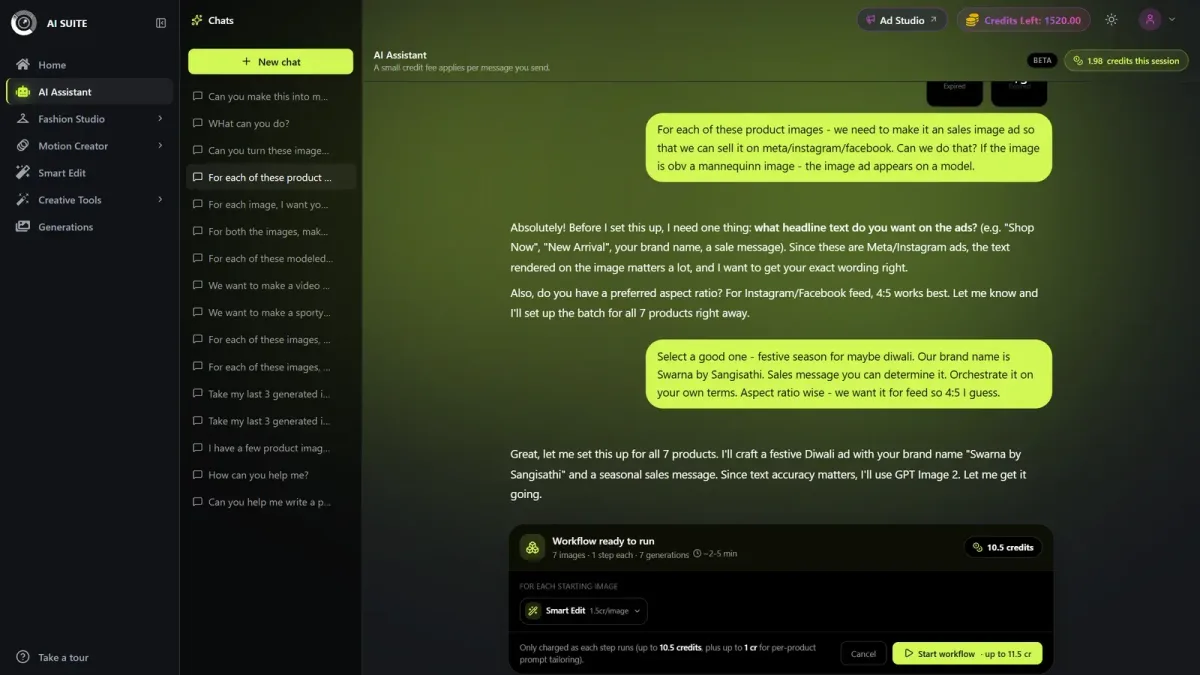
Which AI creative platforms can process hundreds of ecommerce products from a single brief?
Our AI Assistant supports shared-brief production for up to 500 products on Studio, including imagery, poses, ads and video steps. FASHN and Claid provide developer routes for repeating instructions across catalogue jobs. Pebblely supports multi-product background generation, a narrower task than fashion garment transfer.
| Operating model | How instructions repeat | Important distinction |
|---|---|---|
| Our browser workflow | Shared brief across individual product jobs | Each generation has its own charge |
| FASHN or Claid pipeline | Developer repeats saved settings across API jobs | Requires developer orchestration |
| Pebblely bulk generation | Background direction across selected products | Background and scene production |
Our Assistant intake guidance covers six ordinary attachments per turn, bulk batches up to 500 products on Studio or 50 on Creator/free accounts, and store-link imports up to 100 products at a time. Import size governs intake; workflow capacity governs the catalogue job.
Workflow approval authorizes generation spending. You approve the proposed card or plan, then charges begin on Generate or Start workflow. We refund failed generations. You review completed-image quality after generation charges begin.
A shared brief should specify references, framing and output counts. Combining garments into one outfit or creating a group shot needs its own instructions. Copy, ad layouts and video steps each need a defined scope and budget.
Keep model identity, poses and garment variants consistent
You can reuse model and pose references across a catalogue, but identity, body position and garment fidelity need separate checks. Set pose, lighting and product-detail requirements alongside the shared identity reference.
Create a style specification covering model reference, pose list, framing, background, lighting, outfit rules and export dimensions. Our multi-product workflow supports selecting a shared model; our Catalogue Studio controls include 20 preset poses, custom descriptions, Auto, Manual and Reference modes, and same or varied backgrounds.

Catalogue Studio offers 20+ new poses from an on-model photograph. When your source is a flat-lay or mannequin image, garment transfer supplies that starting asset.
Keep each colorway mapped to its own reference and filename. Use a product photograph for each colorway when accurate shade and print placement matter. Check logos, seams, length, texture and layering against those source assets.
Retain the source asset, variant, model reference, pose, settings and approval status for every output. That makes selective reruns possible while preserving the approved catalogue.
Budget a 300-SKU catalogue by approved images
Budget for approved catalogue assets, not just generated images. Assume 300 SKUs, three approved images per SKU, an 80% acceptance rate, 20 seconds of review per attempt and a loaded reviewer cost of $30 per hour.
Using FASHN v1.6 at one credit per output and 7.5 cents per credit, the generation and review budget is $272:
Example: 300 SKUs with three approved images each
| Step | Calculation | Planning result |
|---|---|---|
| Required images | 300 × 3 = 900 | 900 approved images |
| Generation attempts | 900 / 0.8 = 1,125 | 225 attempts beyond the first 900 |
| Generation usage | 1,125 × 7.5 cents | $84, consuming 1,125 credits |
| Review time | 1,125 × 20 / 60 = 375 minutes | 6.3 hours |
| Review labor | 375 × $30 / 60 | $188 |
| Combined budget | $84 + $188 = $272; $272 / 900 | 30.2 cents per approved image |
Generation alone costs 9.4 cents per approved image at an 80% acceptance rate. Integration, setup, storage, exports and taxes are additional costs; prepaid balances and purchase increments affect checkout spending.
At the same specification, 100 SKUs require 300 approved images; 500 require 1,500. Claid charges two credits per output, so 1,125 attempts consume 2,250 credits. Botika charges one credit per photo, so 1,125 attempts consume 1,125 credits. Convert these totals to dollars using the applicable package pricing. Our credit usage depends on the selected tools and steps. Budget video separately and replace the estimates with pilot results; see bulk AI generation costs for broader budgeting.
Run a fidelity pilot and check every batch before publishing
Pilot scorecard and batch acceptance
Run a representative pilot using your actual difficult garments: readable logos, complex prints, textured fabrics, layering and multiple colorways. Define publishable quality before reviewing results.
| Scorecard entry | Record for each pilot |
|---|---|
| Output accounting | Requested, completed, missing and approved outputs |
| Garment fidelity | Defect type, affected SKU and required correction |
| Recovery effort | Reruns, manual edits and review minutes |
| Economics | Generation spend, QA cost and cost per approved image |
Use this checklist to approve a catalogue batch:
- Product mapping: correct SKU, color variant and source reference; account for missing or duplicated outputs.
- Garment accuracy: readable logos and text, print placement, seams, length, texture and layering.
- Model and composition: identity, hands, pose, crop and required export resolution.
- View accuracy: compare generated side and back views with real references wherever they reveal purchase-relevant details.
- Recovery: mark assets approved, rerun or manual correction. Preserve accepted images and rerun only the defective SKU, pose or variant with its references and settings.
Track technical completion and publishable acceptance separately. A returned image still needs a garment-accuracy check.
Rights, retention and real-person permissions
Before procurement, confirm commercial usage rights, source-photo ownership or licensing, retention and deletion terms, training-data use, and permission for real-person likenesses. Resolve usage permissions in writing before contracting, and obtain written commitments for required access controls, security, integrations and support response times.
Choose the workflow your team can operate
Start with FASHN or Claid if you have developer capacity. Compare our browser workflow with Botika for operator-led production, include WearView for custom enterprise integration, and choose Pebblely when backgrounds are the main job.
Advance the candidate that meets your garment-fidelity threshold with manageable review time and cost per approved asset. To evaluate our browser route, pilot a representative sample through our AI Assistant before scheduling the full catalogue.