

Table of Contents
AI product photography vs traditional photography comes down to the shot: choose AI for repeatable variations that pass garment checks, physical photography for authentic demonstrations or essential detail, and hybrid production for both. Our Product Photography tool uses 0.5 credits at 1K/2K and 1 credit at 4K; our Creator plan costs $49/month for 150 credits, plus applicable taxes. Generation is only part of the cost. Base your decision on the complete cost per accepted image that accurately represents your product.
Is AI product photography worth paying for instead of arranging a fashion photoshoot?
AI product photography is worth paying for when repeatable catalogue or lifestyle variations pass product-accuracy checks and cost less per accepted asset. Choose a physical shoot for images documenting actual garment behavior or purchase-critical physical detail.
AI product photography generates new depictions or edits existing photographs. Removing a background while retaining photographed product pixels differs from generating a new person, garment view or scene.
Traditional photography captures prepared garments using cameras, lighting, styling and, where needed, models and locations. Selection and retouching follow. Hybrid production keeps physical reference and evidence shots while generating suitable extensions.
Every route needs garment preparation. AI generation also needs genuine product references; a physical shoot starts with the actual garment. Model references matter when you need a consistent person.
| Criterion | AI | Traditional | Hybrid |
|---|---|---|---|
| Accepted-asset cost | Generation plus preparation and review | Capture plus production and editing | Retained capture plus AI extensions |
| End-to-end turnaround | References, generation, approval | Booking, capture, approval | Capture followed by extensions |
| Garment accuracy | Must verify generated details | Records the actual garment | Photographed evidence anchors review |
| Creative control | Prompt, references and iteration | Direct the physical set | Combine both controls |
| Models and backgrounds | Generate or replace selections | Cast and arrange physically | Capture essentials, vary surroundings |
| Catalogue consistency | Reusable references and settings | Repeat lighting and styling | Shared standards across routes |
| Scaling | Limited by credits and review | Limited by production capacity | Allocate shots by requirement |
| Authentic demonstrations | Illustrates, does not document | Captures observed use | Retains physical demonstration shots |
For help choosing software, see our AI production tool comparisons.
How much does AI product photography cost compared with a traditional fashion photoshoot?
The $49 Creator plan covers 300 Product Photography generations at 1K/2K or 150 at 4K if you use all 150 credits for that tool. At full credit use, that is $16 per 100 generated 1K/2K images or $33 per 100 generated 4K images, before preparation, rejects, revisions, labor and tax. Compare the complete cost per accepted image with a traditional shoot quoted for the same deliverables.
Match the deliverables before comparing budgets
Use identical SKUs, required views, genuinely distinct variants, resolution, delivery specifications and commercial usage. Compare the same completed shot list.
- Physical production: preparation, photographer, models, studio, styling, logistics, usage, selection, retouching, revisions and reshoots.
- AI production: source photography, preparation, subscription or credits, retries, selection, accuracy checks, revisions and rights/export costs.
- Hybrid production: retained capture plus incremental AI work, counting shared inputs once.
ASMP’s photography fee guide includes pre-production, camera time and post-production. ASQ’s cost-of-quality framework separates inspection from correcting errors. Budget for both: reviewing an output takes time even when it needs no correction. See published product photography costs for rate guidance on comparable production briefs.
Calculate accepted-image cost and break-even
How do I calculate cost per usable image after rejected generations and revisions?
Cost per usable image equals complete production cost divided by accepted deliverables. First calculate required assets: SKUs × required views × distinct variants. Then divide the number of assets assigned to AI by your pilot acceptance rate, rounding attempts up. Budget review and revisions separately, including any additional generation charges.
A three-route break-even worksheet
Use this worksheet in your production brief with your required accepted-output count, measured pilot acceptance rate and comparable supplier quotes. Keep resolution and usage requirements identical across routes.
| Worksheet item | AI | Traditional | Hybrid |
|---|---|---|---|
| Accepted-output target | SKUs × views × variants | Same matched output count | Captured assets + AI assets, totaling the matched count |
| Generation attempts | AI assets ÷ acceptance rate, rounded up | No AI generation attempts | AI-assigned assets ÷ acceptance rate, rounded up |
| Capture and production | Source capture/preparation + subscription/top-ups | All-in quote + uncovered preparation | Retained capture/preparation + incremental AI costs |
| Review and revisions | Inspection labor + rework + charged revisions | Uncovered selection + retouching + reshoots | Shared checks + route-specific revisions |
| Usage and delivery | Rights + export costs | Usage + delivery not covered by quote | Rights + delivery not already counted |
| Total production cost | Sum of costs above | Sum of costs above | Sum of costs above, shared inputs counted once |
| Cost per usable image | Total ÷ accepted deliverables | Total ÷ accepted deliverables | Total ÷ accepted deliverables |
Calculate generation credits as attempts × the selected tool’s credit rate, then add separately charged revisions. Estimate review labor from the number of outputs inspected, not just the number eventually accepted.
For an existing subscriber, record additional subscription or top-up spending separately from the plan’s already-paid cost. Consumed credits still displace other work. Check that your chosen plan covers all initial and revision attempts, and include the cost of any required plan change.
Break-even occurs when the complete alternative production cost equals the traditional budget for the same deliverables. Our advertised 95% photography savings requires that cost to be no more than 5% of the traditional budget. Calculate your savings as: 1 − alternative total ÷ traditional total.
How preparation and quality checks affect AI production time
AI production turnaround includes reference preparation, generation, selection, garment checks, revisions and delivery. Traditional production adds booking and physical capture. Measure a representative SKU group before promising a catalogue deadline.
Compare the complete production stages
Record the elapsed time for each stage, including approval waits. Rendering time alone does not tell you when assets will be campaign-ready.
| Stage | AI | Traditional | Hybrid |
|---|---|---|---|
| Preparation | Prepare garments and references | Book team, prepare garments and set | Plan capture and generated extensions |
| Generation/capture | Generate reference-supported views | Photograph the shot list | Capture essentials, then generate extensions |
| Selection | Inspect generation attempts | Select photographed frames | Select across both routes |
| Garment checks | Compare details against references | Check color, styling and captured detail | Apply shared acceptance standards |
| Revisions | Edit, regenerate or capture missing references | Retouch or reshoot | Revise through the appropriate route |
| Delivery | Approve crops, exports and metadata | Approve retouched exports | Deliver a consistent approved asset set |
Scale your catalogue with consistent model references, lighting, framing and approval criteria. Baymard’s product thumbnail guidance recommends three or more thumbnails in listings and search results; apparel and accessories may need 5–15. Use these figures to plan customer-facing views and the work behind them: more views mean more credits, inspection and sometimes additional capture.
Can AI product photography preserve garment colors, logos, texture and fit accurately?
AI can create plausible garment imagery, but each accepted asset needs inspection to verify product accuracy. Compare it with genuine references and the physical garment. A 2025 ICLR virtual try-on paper identifies preserving garment shape and every detail as a challenge associated with diffusion-model randomness.
Inspect product accuracy, not just realism
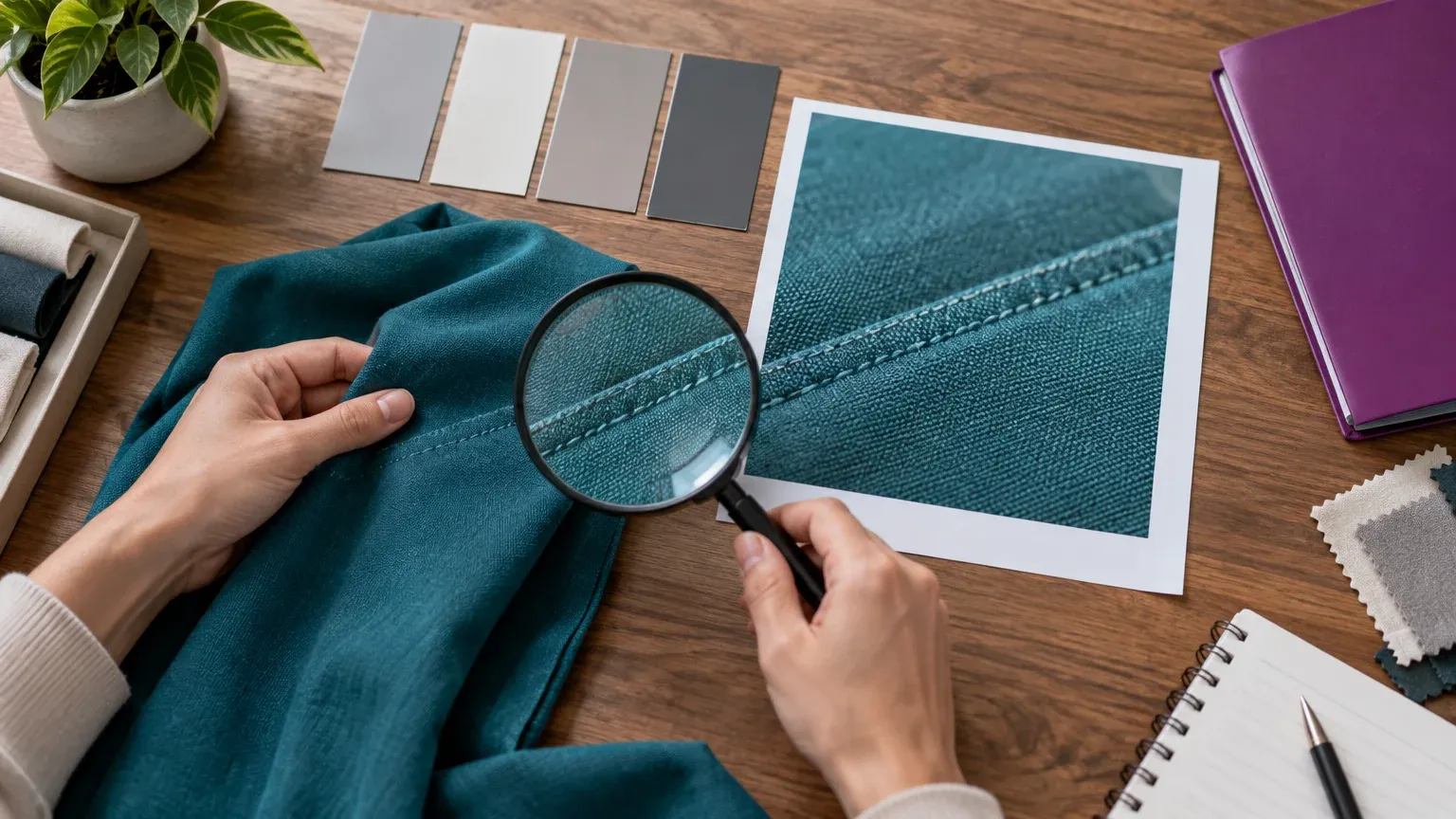
At delivery size, inspect color, logo spelling and placement, printed text, seams, weave, embellishments, transparency, reflections, silhouette, fit and drape.
| Shot requirement | AI candidate | Physical capture | Reject/reshoot trigger |
|---|---|---|---|
| Model or lifestyle variation | References support the garment | Actual interaction required | Changed silhouette or details |
| Logo, seam or texture close-up | Detail remains verifiable | Purchase-critical fine detail | Wrong text, weave or stitching |
| Rear or construction view | Genuine angle supplied | Missing reference angle | Invented construction |
| Transparency or reflective finish | Matches reference behavior | Actual material response needed | Changed opacity or finish |
| Fit, movement or performance | Creative illustration only | Observed physical demonstration | Unsupported product claim |
When a real fashion photoshoot remains preferable
A real fashion photoshoot is preferable when you need actual fit evidence, movement, construction, real participants or a specific location. We favor AI for most creative scenes, while retaining physical capture for exceptionally fine texture at very high resolution. Recreating a scene and documenting a product serve different purposes.
Can AI-generated fashion images demonstrate real fit, movement or product performance?
No. Generated fashion images can illustrate movement or wear, but cannot document an observed test. For U.S. advertising, the FTC’s online advertising guidance says demonstrations must show performance under normal use. Capture authentic evidence for such claims.
Should I use our Product Photography, Virtual Try-On or Model Swap?
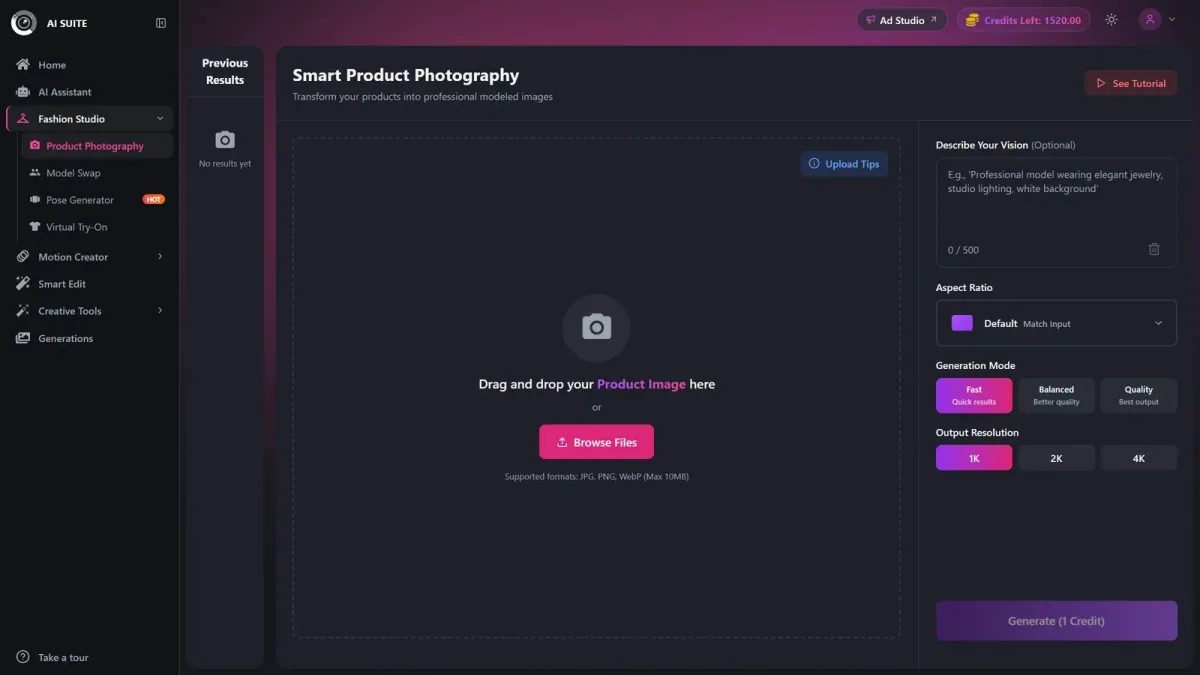
Use our Product Photography to create a model from wearable-product references and a prompt, Virtual Try-On to dress a selected model, and Model Swap to replace the person in an existing on-model photograph. Verify garment preservation against references after generation.
| Tool | Starting assets | Purpose |
|---|---|---|
| Product Photography | 1–4 wearable-product images and prompt | Create a model and scene from a prompt |
| Virtual Try-On | Garment reference and selected model | Dress the selected person |
| Model Swap | Existing on-model photo and prompt or face reference | Replace the person while retaining the outfit |
Virtual Try-On offers 100+ models and generates results in under two minutes; allow additional time for approval. Our Model Swap instructions explain how to prepare the starting image.
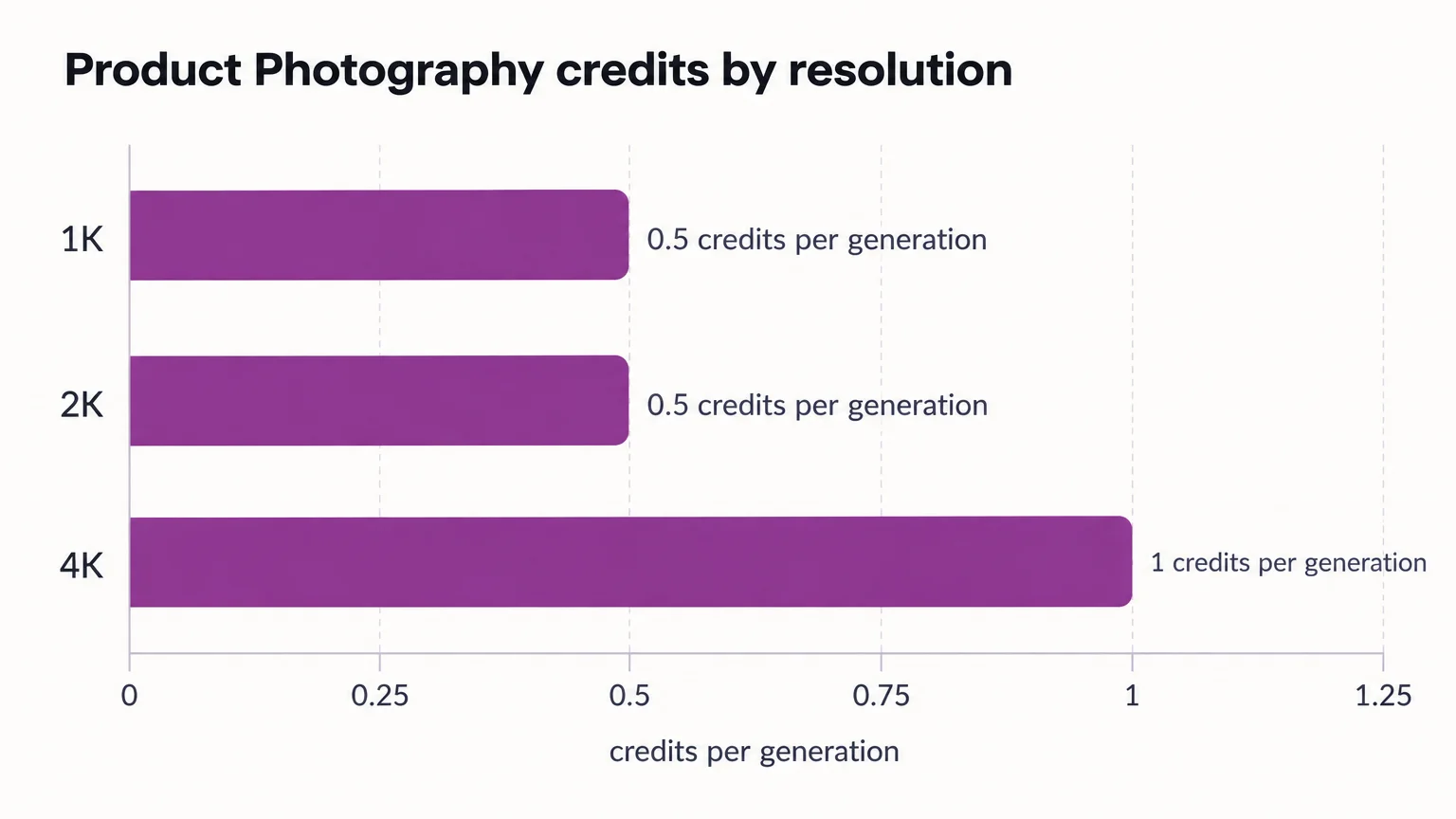
| Product Photography resolution | Credits per generation |
|---|---|
| 1K | 0.5 |
| 2K | 0.5 |
| 4K | 1.0 |
How many source photos and product views do I need for an AI fashion workflow?
Product Photography accepts 1–4 input images, but your reference library should cover every required garment view and purchase-critical detail. Capture unseen construction before generating a view that shows it.
AI offers model, pose, lighting and background variation without rebuilding a set. Physical direction gives you actual interaction and environmental integration.
Is a hybrid AI-and-photoshoot workflow better for an ecommerce catalogue?
Hybrid production is useful when your catalogue needs both trustworthy product evidence and repeatable creative variations. It adds coordination, but lets you assign each shot to the production method that suits it.
- Assign shots. Prepare garments and separate evidence shots from creative extensions.
- Capture essentials. Photograph source views, details and demonstrations. Baymard’s human-model image guidance recommends at least one basic, unstyled worn image.
- Generate extensions. Select the tool matching your starting assets and keep model, lighting and framing consistent.
- Approve against references. Check against the physical garment and reference photographs; record acceptance rate. Reshoot missing angles or persistent purchase-critical errors.
- Deliver channel assets. Create crops and exports from approved images, preserving required metadata.
Choose AI, traditional photography or hybrid by shot requirement
- Choose AI: reference-supported variations with favorable accepted-image costs. Budget for inspection.
- Choose traditional: authentic fit, movement, performance, fine detail or real-location requirements. Budget for logistics.
- Choose hybrid: evidence plus creative scale. Budget for coordination.
Before release, check reference-image rights, model consent, likeness permissions, commercial usage and client agreements. Channel rules differ:
- Google Merchant Center requires generative-AI images to carry IPTC DigitalSourceType TrainedAlgorithmicMedia metadata. Its image metadata instructions say to preserve embedded tags.
- Check each marketplace separately for its own image and metadata requirements.
- The U.S. Copyright Office’s AI copyrightability report excludes purely AI-generated material or material with insufficient human expressive control from U.S. copyright protection.
Start with a representative shot list, measure accepted outputs, and retain physical evidence where needed. For suitable AI-assigned shots, review our Product Photography workflow.


