


Table of Contents
As of November 11, 2026, Nano Banana Pro pricing on Google’s Standard API is $0.134 per 1K or 2K image and $0.24 per 4K image. Those are image-output charges, not complete request costs. In our Smart Edit editor, paid users spend one credit per 1K/2K output or two at 4K. Our plans start at $49/month for 150 credits and $99/month for 330. The budget that matters is how much you spend on outputs that become approved product images.
Nano Banana Pro pricing by resolution
Pro and Nano Banana 2 are different models
Nano Banana Pro is Gemini 3 Pro Image; Nano Banana 2 is a different model. Each variant has its own pricing.
Standard API image-output rates are listed below in US dollars before applicable taxes.
| Model | Resolution | USD per output |
|---|---|---|
| Pro | 1K | $0.134 |
| Pro | 2K | $0.134 |
| Pro | 4K | $0.24 |
API prices and hosted-platform credits are billed differently. In Smart Edit, Pro and Nano Banana 2 cost the same number of credits at each resolution.
Image output is only one part of the request
Add inputs, billed text/thinking output, and any optional tools to calculate the complete request cost.
- Text and image inputs: $2 per million tokens, listed in Google Cloud’s pricing table.
- Reference images: Google’s Pro model documentation specifies 560 tokens each. Each reference adds those tokens to the input bill.
- Text/thinking output: add any billed output charges to the image-output and input subtotal.
- Optional tools: add applicable grounding or search charges separately. Direct Google tool charges and provider search surcharges follow their respective rates.
For motion deliverables, use a separate image-to-video AI pricing budget rather than treating still-image rates as video rates.
Compare Gemini subscriptions, AI Studio, API billing, and hosted access
Gemini Apps subscriptions buy consumer access, production API calls are metered, and hosted platforms apply their own plans. Free access and credits apply only to the route that provides them.
| Route | Billing unit | Included usage or access | Resolution conditions | Suitable workload |
|---|---|---|---|---|
| Gemini Apps, free | No subscription payment | Free app access; Pro regeneration is a paid-subscriber feature | Available app settings | Exploring image tools |
| Google AI Pro | About $20/month in the US | Pro image regeneration, subject to app limits | Available app settings | Occasional interactive edits |
| AI Studio | Selected model’s billing | Development interface; eligible credits can offset usage | Selected model’s settings | Prompt development |
| Direct Gemini API | Metered inputs, outputs, and tools | Pay-per-use Pro requests | 1K, 2K, 4K pricing | Automated production |
| fal | $0.15/image; $0.30 at 4K | Generation or editing, billed per image | Separate 4K rate | Hosted API integration |
| Our Smart Edit photo editor | Subscription credits | Selected plan’s credit allowance | Paid Pro: one credit at 1K/2K, two at 4K | Browser-based editing workflows |
The US Google One listing prices Google AI Pro at $19.99/month. That buys a consumer bundle; API requests remain metered. A Developer Program benefit provides $10 monthly Cloud credits, which can cover eligible API and AI Studio usage.
Google’s image-generation help identifies Pro regeneration as a paid-subscriber feature. Its Apps limits documentation says limits refresh every five hours and subscribers can continue conversations with Flash-Lite after reaching their limit. Flash-Lite keeps conversations available; Pro image generation remains subject to its own limits. Budget using actual approved outputs rather than treating refresh windows as guaranteed monthly image inventory.
Production Pro API calls have no model free tier. AI Studio browser access and promotional credits have their own access and billing conditions.
fal’s Pro pricing guide lists $0.15 per generated or edited image, $0.30 at 4K, and $0.015 extra for web search. To compare routes, divide API charges or subscription cash paid by accepted images. For credit-based usage, multiply dollars per credit by credits consumed, then divide by accepted images.
Standard versus Batch: match billing to the deadline
Use Standard for interactive work; consider Batch for queued work when the exact model ID supports it and its turnaround fits your deadline. The Batch prices below apply to the historical preview model, not automatically to the current model.
| Component | Standard Pro | Historical preview Batch |
|---|---|---|
| 1K/2K image output | $0.134/image | $0.067/image |
| 4K image output | $0.24/image | $0.12/image |
The preview-era image-output rates were lower. Before choosing Batch, confirm support and rates for your exact model ID. The budgets below use Standard pricing.
Translate our Smart Edit credits into image costs
At full utilization, Creator’s cost per included credit is $49 ÷ 150; entry Studio’s is $99 ÷ 330, or 30¢. This spreads the monthly subscription payment across all included credits, so unused credits raise the cost of the images you actually produce.
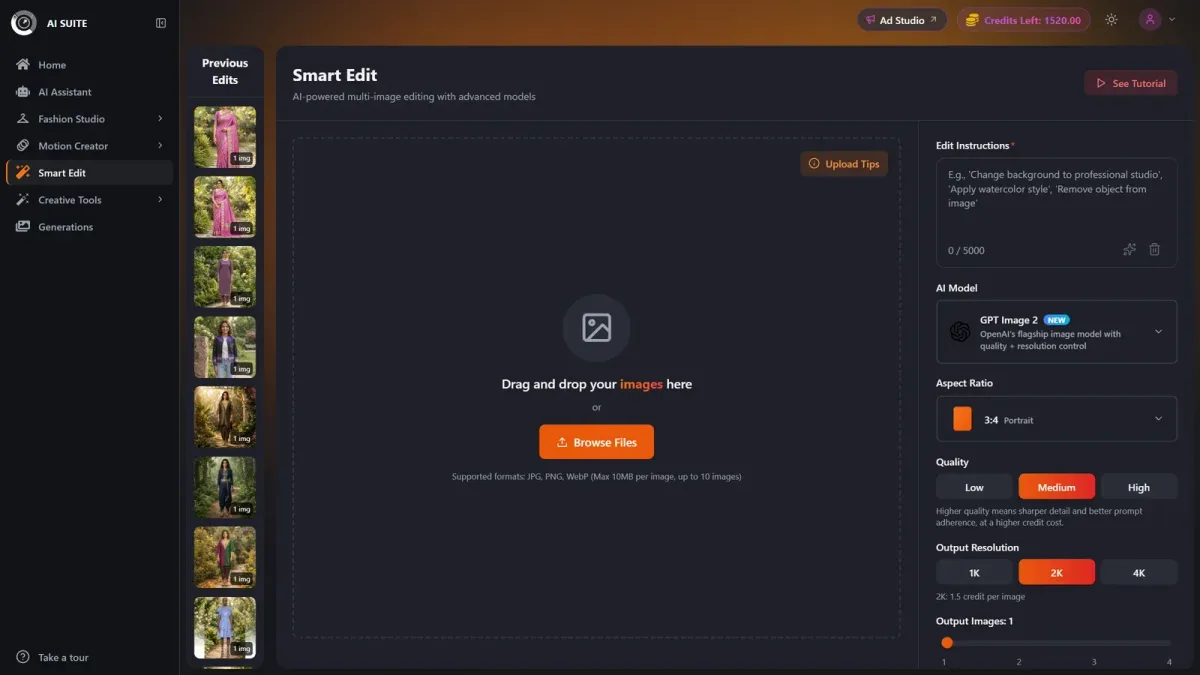
| Plan | Monthly cash payment | Included credits | 1K/2K allocation | 4K allocation |
|---|---|---|---|---|
| Creator | $49 | 150 | $49 ÷ 150 per output | $49 × 2 ÷ 150 per output |
| Entry Studio | $99 | 330 | 30¢/output | 60¢/output |
Requesting more outputs multiplies the displayed credit charge. At two credits per 4K output, the subscription allocation is $49 × 2 ÷ 150 on Creator and 60¢ on entry Studio.
Paid credits versus free-user outputs
Paid plans include watermark-free exports; free users receive watermarked outputs and pay about double the paid-user credit amounts. Creator supports assistant bulk jobs of up to 50 products and Studio up to 500. The monthly credit allowance determines how many outputs those jobs can generate.
Unused credits and the trial renewal
Assume you use entry Studio to produce only 100 accepted one-credit outputs without retries. Those outputs account for $30 of the plan’s credit allowance, but you still pay $99: 99¢ per accepted image, with 230 credits unused.
Purchased extra credits roll over while subscribed. The trial provides 20 credits for seven days for $1, then renews at the selected plan price, $49 for Creator or $99 for entry Studio, unless canceled before it ends. Prices exclude applicable taxes.
What do 100 approved images and a 500-product catalogue cost?
For 100 approved images, budget roughly $14–$27 at 1K/2K or $24–$48 at 4K for image output and inputs. A 500-product catalogue with three approved views per product and 75% acceptance comes to about $273 or $485, respectively. Billed text/thinking output and taxes are additional.
Define an accepted product image
Count an image as accepted only after checking garment color, print placement, logos, silhouette, construction details, and required framing against the source photos. A visually attractive output can still misrepresent the product.
Example: budget 100 final images
Assume each candidate uses two reference images, 100 prompt tokens, and 100 billed text/thinking output tokens, with no optional tools. The subtotals include image output and inputs; add billed text/thinking output separately.
- Reference inputs: 2 × 560 = 1,120 input tokens per candidate.
- Total inputs: 1,120 + 100 = 1,220 input tokens per candidate.
- Input charge: candidates × 1,220 × $2 ÷ 1,000,000.
- 1K/2K subtotal: candidates × $0.134 + candidates × 1,220 × $2 ÷ 1,000,000.
- 4K subtotal: candidates × $0.24 + candidates × 1,220 × $2 ÷ 1,000,000.
Divide required final images by your target acceptance rate and round the candidate count up. At 75% acceptance, for example, 100 approved images require 134 candidates. Your actual acceptance rate determines how many attempts you need.
| Target acceptance | Candidates | 1K/2K subtotal | 4K subtotal | Subtotal per approved, 1K/2K; 4K |
|---|---|---|---|---|
| 100% | 100 | $14 | $24 | 13.6¢; 24.2¢ |
| 75% | 134 | $18 | $32 | 18.3¢; 32.5¢ |
| 50% | 200 | $27 | $48 | 27.3¢; 48.5¢ |
At 75% acceptance, Smart Edit consumes 134 paid-user credits at 1K/2K or 268 at 4K. At entry Studio’s per-credit allocation, that is about $40 or $80. The subscription payment remains $99 if no other purchases are needed.
Example: scale to 500 products
Assume three final views per product and 75% acceptance: 500 × 3 = 1,500 approved images, requiring 2,000 candidates.
Using the same references and prompt length, input volume is 2,000 × 1,220 = 2,440,000 tokens. At $2 per million tokens, the input charge is about $5.
- 1K/2K: 2,000 × $0.134 = $268 for image output. With inputs, the subtotal is $273, plus billed text/thinking output.
- 4K: 2,000 × $0.24 = $480 for image output. With inputs, the subtotal is $485, plus billed text/thinking output.
The same workload requires 2,000 paid-user credits at 1K/2K or 4,000 at 4K, beyond entry Studio’s 330 included credits. Longer prompts, more references, reasoning, retries, grounding, higher resolution, unused subscriptions, and taxes all affect the budget.
Frequently asked questions
Can Nano Banana Pro product images be used commercially?
Commercial use depends on the current terms of your Google or hosted-provider access route. Review those terms and ensure you have rights to reference photos, logos, and other protected content. Permission to use an output is separate from copyright exclusivity, and you remain responsible for accurate product representation.
Does Nano Banana Pro have a free version?
The production Pro API has no model free tier. Free Gemini app access, AI Studio browser access, promotional credits, and hosted-platform trials each have their own eligibility and usage conditions.
Does a Google AI Pro subscription include Gemini API usage?
Google AI Pro includes a Developer Program benefit with $10 in monthly Google Cloud credits for eligible Gemini API and AI Studio usage, not unlimited API calls. API billing remains separate.
What happens when I reach the Gemini app limit?
Subscribers can continue conversations with Flash-Lite, and Google says limits refresh every five hours. Pro image generation remains subject to its own limits, so budget using actual approved outputs.
Which route suits occasional editing versus production?
Interactive app access suits occasional edits, while metered API access suits automated production with measurable request costs. A hosted studio can make sense when its editing workflow and other tools justify the subscription after accounting for rejected images and unused credits.
Choose the route for your next workload
Choose app access for occasional edits, API billing for automation, and a hosted studio when its workflow tools justify the subscription. Compare the subscription’s cash cost per expected approved image with complete pay-as-you-go costs, while accounting for the other tools you actually use.
Keep candidate rounds small, specify changes clearly, use targeted corrections, and approve composition before generating at final resolution. Before purchasing, confirm the exact model, billing mode, currency, resolution, displayed credits, renewal terms, and taxes.
The deciding number is total cash paid ÷ approved product images. Use a small trial workload to measure your own acceptance rate, then compare our plans against the catalogue you need to deliver.