


Table of Contents
For holiday product photos, start with gift-ready wrapping, soft textures and restrained lights, keeping the merchandise dominant, as the Society of Photographers advises. To reuse catalogue images, our Change Background replaces the setting, our Product Photography creates on-model imagery, and our Image to Video animates an approved still. The concepts below pair DIY setups with source-matched AI routes. Choose snow and Christmas symbols when they suit your audience.
Gift-ready holiday product photography ideas
Choose by the photograph you already have. Background means retaining its composition; On-model means generating a new model image; Motion means animating an approved still.
| Concept | Product | Existing image | Route | Effort |
|---|---|---|---|---|
| 1. Gift wrap | Cotton shirt | Folded overhead shot | Background | Low |
| 2. Party night | Satin dress | Full-length model or garment shot | Background or On-model | Moderate |
| 3. Cozy textures | Cardigan | Overhead flat lay | Background | Low |
| 4. Light bokeh | Leather bag | Sharp bag-height shot | Background | Moderate |
| 5. Boxed accessories | Earrings | Boxed three-quarter close-up | Background | Moderate |
| 6. Gift grid | Mixed accessories | Separate clean product shots | Background, then layout | Moderate |
| 7. Minimal neutral | Loafers | Three-quarter product shot | Background | Low |
| 8. Coordinated outfits | Cotton shirts | Approved group photograph | Background | Higher |
| 9. Snowy outdoors | Puffer coat | Full-length model shot | Background | Higher |
| 10. Midnight sparkle | Metallic bag | Sharp accessory shot | Background | Moderate |
| 11. Motion clip | Shoulder bag | Approved festive still | Motion | Higher |
| 12. Listing pair | Trainers | Clean white-background shot | Background for promotion | Low |
Low effort retains a simple arrangement; Moderate adds styling or layout work; Higher requires closer composition or frame-by-frame review.
| Concept | Warm-weather or nonreligious alternative | Best channel |
|---|---|---|
| 1 | Linen ribbon, local foliage | Email, listing gallery |
| 2 | Courtyard evening party | Email, social feed |
| 3 | Linen shirt, cotton throw | Collection tile, email |
| 4 | Veranda with distant lights | Campaign hero, feed |
| 5 | Plain twine, local leaves | Gift guide, email |
| 6 | Sandals and lightweight scarves | Gift guide, feed |
| 7 | Linen and dried grasses | Gallery, email |
| 8 | Lightweight coordinated outfits | Lifestyle email, collection |
| 9 | Linen outfit, shaded terrace | Seasonal campaign |
| 10 | Outdoor midnight celebration | Countdown email, feed |
| 11 | Daylight gifting scene | Vertical video, ads |
| 12 | Plain paper and ribbon | Listings, email, social |
1. Gift-wrap and unboxing
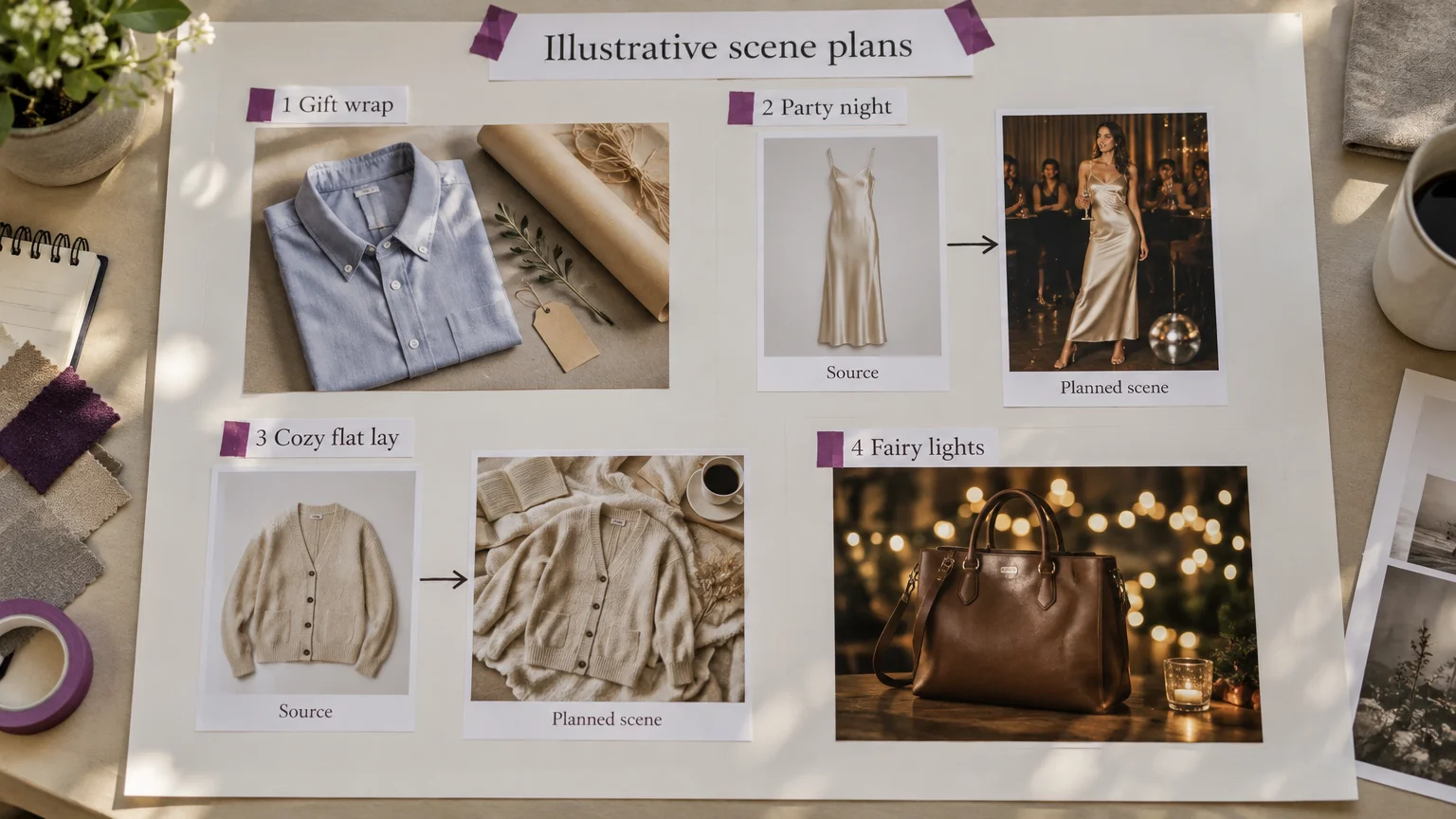
Style a folded cotton shirt emerging from reused delivery-box packaging. Use plain paper, ribbon and a handwritten tag, window light from the left, and an overhead camera. Keep space beside the box for email copy. For the Background route, start with a clean overhead shirt image; photograph hands separately if opening action matters. Do not imply gift packaging is included unless buyers receive it.
Scene prompt: Overhead folded-shirt scene, kraft paper and loose linen ribbon at the edges, left daylight, empty right side; preserve color, buttons, print and folds.
2. Party-night on-model styling
Pair a satin midi dress with an approved clutch and understated earrings. DIY props are a curtain and stool; use a neutral front-left key light with warm lights behind. Shoot full-length at waist height, arms relaxed and hem visible. Retain a suitable model photograph through Background, or use On-model from a clear garment shot. A courtyard suits warm-weather parties. Reserve countdown cues for concept 10.
Scene prompt: Full-length evening-party scene, relaxed standing pose, neutral front-left dress lighting, softly lit curtain, copy space above; preserve silhouette, seams, color and hem.
Compare the source framing with the planned scene before committing to an entire collection.
Soft textures and festive light
3. Cozy fabric flat lays
Place a rib-knit cardigan on a borrowed blanket or deep green fabric, with cinnamon outside its outline. Shoot overhead using side-window daylight. Canon’s flat-lay guidance recommends side or back lighting to reveal texture. Use Background with an overhead source showing both sleeves. Leave a clear corner for email copy. For summer, substitute a linen shirt, cotton throw and dried grasses.
Scene prompt: Overhead cardigan on softly folded neutral fabric, small cinnamon bundle beyond the garment, left daylight, clear upper-right corner; preserve knit, buttons and outline.
4. Fairy-light bokeh
Photograph a leather shoulder bag at bag height, with battery lights well behind it and neutral diffused light from front-left. Use a wide aperture and focus on the bag, following Nikon’s bokeh guide. Set manual white balance for accurate color, as Nikon’s white-balance guidance advises. Keep warm lights off the leather. Background needs a sharp, angle-compatible source; leave space opposite the strap.
Scene prompt: Neutrally lit leather bag at bag height, distant warm light bokeh, empty left side; preserve grain, stitching, hardware, logo and strap dimensions.
Small gifts and coordinated gift guides
5. Accessories inside gift boxes
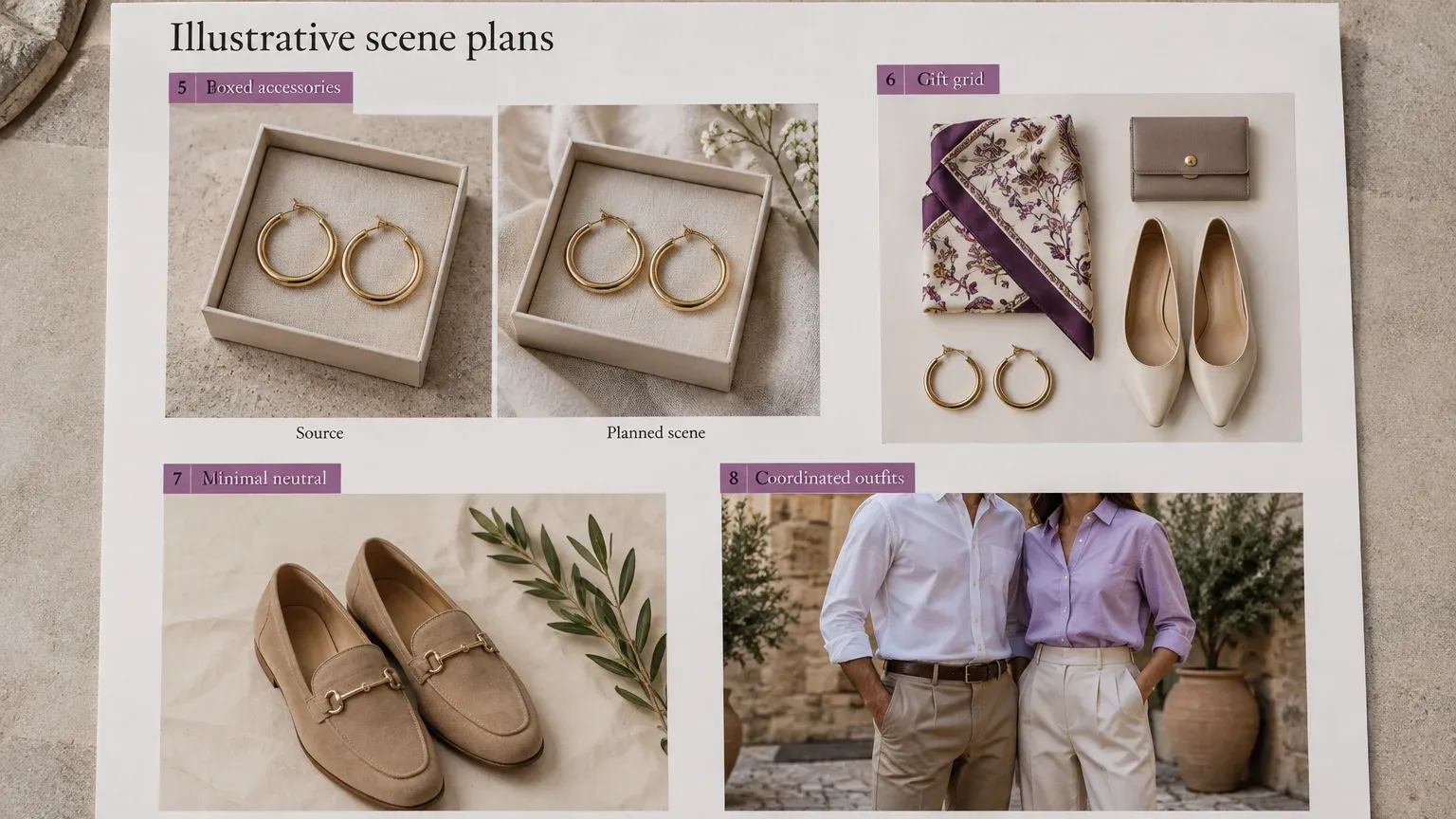
Present gold hoops in an open jewelry box with a plain fabric insert. Use diffused side light and a three-quarter close-up showing the clasp. Background works best from an already boxed photograph; shoot or composite the physical contact first if necessary. Keep the lid out of copy space. Plain twine and local leaves replace Christmas accents. Check hoop scale, gemstone count and metal finish.
Scene prompt: Retain these boxed earrings, add restrained ribbon outside the box and soft side daylight; preserve hoop diameter, clasp, metal color and surface finish.
6. Gift-guide grids
Build a coordinated grid from a scarf, wallet, trainers and earrings. DIY uses plain card, consistent upper-left window light and individual overhead or angle-matched shots. Apply Background to each clean source, then assemble approved tiles in a layout editor. Do not ask one generation to reconstruct the assortment. Give products comparable visual weight without implying equal physical size. Reserve a heading-and-price band.
Scene prompt: Single product tile on warm neutral paper, upper-left soft light, generous margins; preserve shape, color, branding and details, without text or extra products.
Review accessory scale and tile consistency before assembling the final gift guide.
Reusable prop checklist: Start at home; buy only what the approved scene needs.
| Prop | Household source | Use | Effort |
|---|---|---|---|
| Boxes, paper, tags | Deliveries and stationery | Gift framing | Low |
| Blankets, fabric | Pillowcases and offcuts | Soft backgrounds | Low |
| Battery lights | Existing decorations | Distant bokeh | Moderate |
| Plain card | Packaging scraps | Grid tiles, reflectors | Low |
| Twine, cinnamon, pinecones | Kitchen, craft supplies, collected material | Small edge accents | Low |
| Branches, dried foliage | Garden or permitted collection | Local seasonal framing | Low |
Quiet scenes and coordinated outfits
7. Minimalist neutral scenes
Set tan loafers on cream paper with one branch beyond the product outline. Use a board, side daylight and a low three-quarter angle revealing the upper and sole. Choose an existing photograph at that angle for Background; leave the upper third empty. Linen and local grasses work year-round. For a Christmas-specific version, add a red ribbon or pine sprig. Explore more fashion photography background ideas.
Scene prompt: Cream-paper loafer scene, small branch at the far edge, soft side daylight, natural contact shadow, open space above; preserve toe, sole, stitching and color.
8. Coordinated couple or family outfits
Coordinate cotton shirts against a plain wall or courtyard. DIY needs a bench, approved outfits and broad front-side daylight. Shoot at chest height with separation between people. Use Background on an existing group photograph to retain outfit relationships. With separate garment inputs, approve individual On-model images and assemble a campaign layout instead. Check swapped garments, merged limbs and scale; an accurate family scene is not an assumed one-click result.
Scene prompt: Retain this group, outfits and poses; add a sunlit courtyard with restrained celebration decor and space above; preserve proportions, prints and garment boundaries.
Outdoor atmosphere and midnight sparkle
9. Snowy outdoor on-model scenes
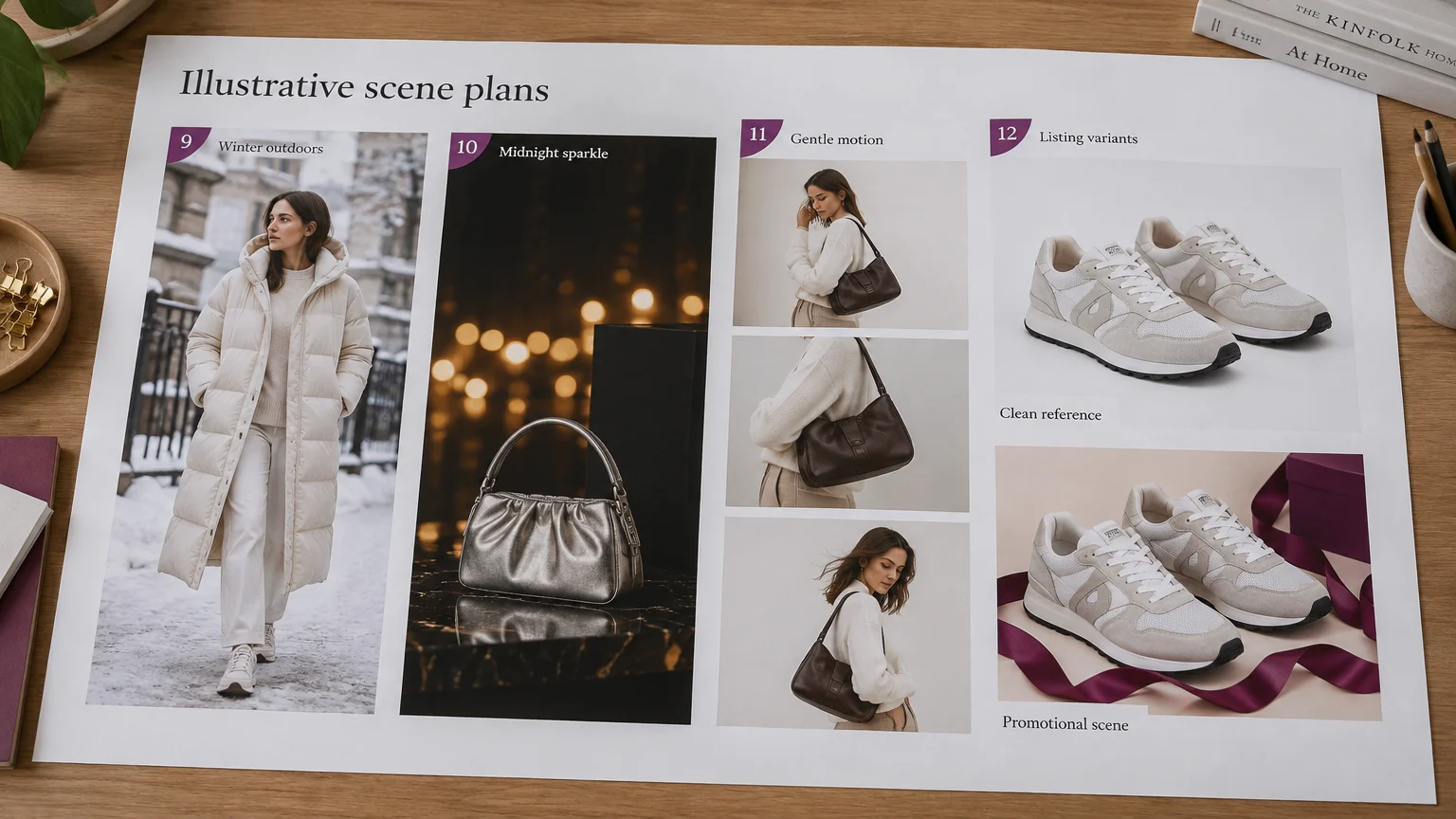
Use a puffer coat and boots only where winter styling suits the audience. DIY uses real outdoor surroundings, overcast light and waist-height full-length framing. For Background, choose a model source with compatible soft lighting; a garment-only source needs On-model first. Leave wall or sky space for copy. Keep snow off the coat and avoid invented scarves or gloves. For summer, switch the merchandise and scene to linen on a shaded terrace.
Scene prompt: Retain this puffer outfit on an overcast winter street, snow on ground only, visible boots; preserve quilting, zipper, sleeves and color.
10. New Year’s Eve sparkle
Frame a metallic mini bag against black card, a small gold-paper accent and distant battery lights. Use neutral side lighting and a bag-height camera. Background starts from a sharp accessory shot; add countdown copy later in the empty upper-left area. Unlike party-night dressing, this concept signals midnight celebration. A terrace setting works in warm climates. Keep sparkle behind the SKU, not painted onto it.
Scene prompt: Midnight celebration around this metallic bag, black background, distant gold sparkle, neutral side light, empty upper left; preserve finish, clasp, chain and dimensions.
Let the setting carry the seasonal atmosphere while product details stay clear.
Motion and listing-ready variants
11. A short festive motion clip
Animate an approved shoulder-bag still with a gentle push and distant twinkling lights. DIY uses a tripod, bag-height framing and neutral side light; add the push during editing. For Motion, start sharp and focus the prompt on movement, following Google Cloud’s video guidance. Protect vertical overlay space. Review beginning, middle and end for changing logos, straps or hardware. Inspect endpoints before attempting a loop.
Scene prompt: Slow gentle push toward the stationary bag; distant lights twinkle; keep strap, logo, seams and hardware stable, without rotation or opening.
12. Paired white-background and festive listing variants
Photograph trainers on a white sweep using broad neutral light and a three-quarter angle. Save that clean reference, then use Background for a ribbon-framed promotional variant with copy space above. Amazon’s product-photo guidance recommends white-background images alongside additional ambient imagery. Prepare its main-image candidate on pure white without non-included props, and check category-specific clothing rules. White backgrounds and AI generation do not automatically establish compliance.
Scene prompt: Promotional trainer scene, pale paper and restrained ribbon beyond the shoes, neutral diffused light, space above; preserve soles, stitching, logos and white color.
For Google Merchant Center, preserve embedded AI-image metadata as required by its image submission requirements.
Keep color, construction and scale accurate
Keep a clean, neutrally lit reference for every SKU. Compare each output against it before approving decoration.
- Check silhouette, drape, hem, print placement, logos, stitching, closures and pockets.
- Check jewelry scale and finish, bag hardware, shoe soles and approved outfit combinations.
- Keep festive warmth in the background, not on merchandise.
- Add a clean side-lit detail close-up of knit stitches, leather seams or an earring clasp.
- Reject misleading stills and distorted video frames.
For capture fundamentals, use our ecommerce product photography guide.
Build a reusable holiday catalogue workflow
- Plan backward from launch: allow sample approval, production, SKU review, corrections and exports for your audience’s season.
- Save a reusable brief: palette, model reference, outfits, light direction, camera angle, background, copy space and fidelity checks.
- Approve representative products: reuse approved model and outfit references rather than reinventing styling per SKU.
- Expand carefully: our AI Assistant Beta supports one product or up to 500 and shows the workflow plan and credit cost before approval. Review every SKU independently.
| Destination | Concepts | Crop and copy space |
|---|---|---|
| Listing gallery | 1, 5, 7, 12 | Protect complete product edges; retain dedicated main-image files |
| Gift guide | 5, 6 | Square tiles; reserved heading band |
| 1, 2, 3, 8, 10 | Wide crop; clear side for copy | |
| Social feed | 2, 4, 6, 9, 10 | Square or portrait; protect hems and straps |
| Stories and reels | Motion clip | Vertical; keep products and copy clear of overlays |
Preserve the reference, choose one compatible scene, approve the details, then export variants. If you need a new model composition first, start with our on-model product photography.


